start Peugeot 308 2016 Owners Manual
[x] Cancel search | Manufacturer: PEUGEOT, Model Year: 2016, Model line: 308, Model: Peugeot 308 2016Pages: 398, PDF Size: 9.38 MB
Page 343 of 398
341
308_en_Chap10c_SMegplus_ed02-2015
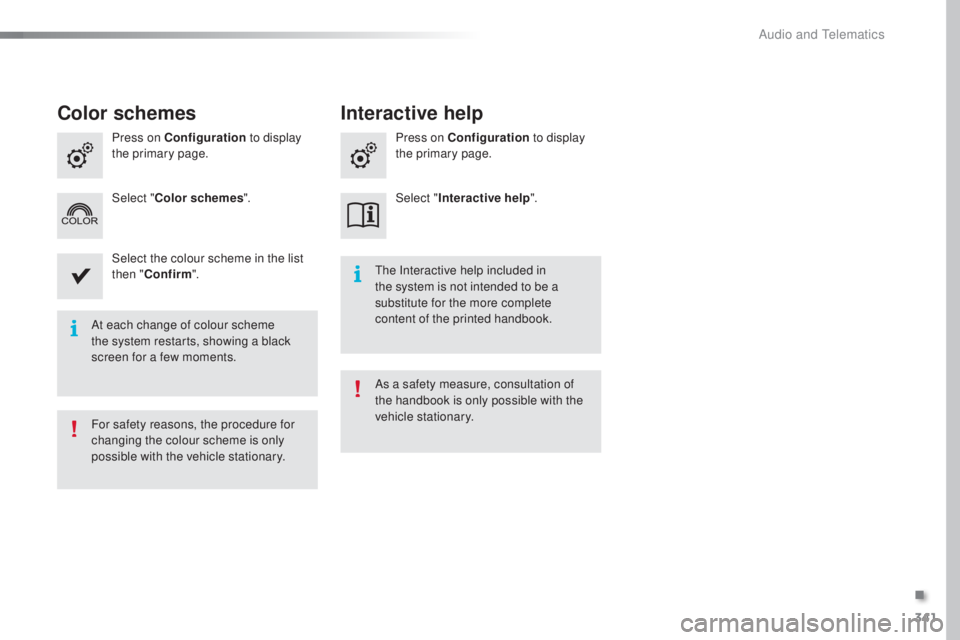
At each change of colour scheme
the system restarts, showing a black
screen for a few moments.
the I
nteractive help included in
the system is not intended to be a
substitute for the more complete
content of the printed handbook.
For safety reasons, the procedure for
changing the colour scheme is only
possible with the vehicle stationary. As a safety measure, consultation of
the handbook is only possible with the
vehicle stationary.
Press on Configuration
to display
the primary page. Press on Configuration
to display
the primary page.
Select " Color schemes ". Select "Interactive help ".
Select the colour scheme in the list
then " Confirm ".
Color schemes Interactive help
.
Audio and telematics
Page 349 of 398
347
308_en_Chap10c_SMegplus_ed02-2015
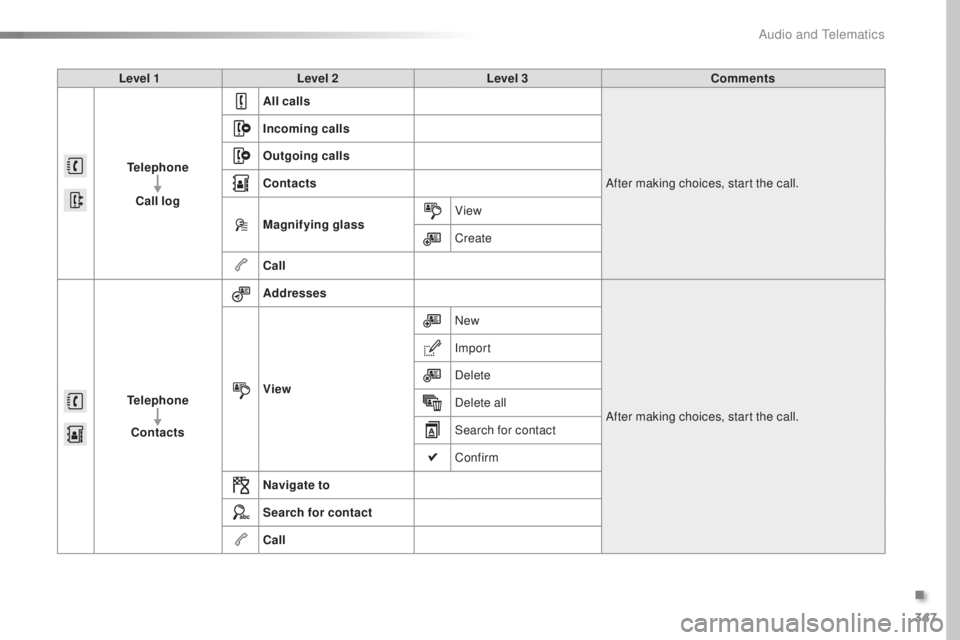
Level 1Level 2 Level 3 Comments
Telephone Call log All calls
After making choices, start the call.
Incoming calls
Outgoing calls
Contacts
Magnifying glass
View
Create
Call
Telephone Contacts Addresses
After making choices, start the call.
View New
Import
Delete
Delete all
Search for contact
Confirm
Navigate to
Search for contact
Call
.
Audio and telematics
Page 351 of 398
349
308_en_Chap10c_SMegplus_ed02-2015
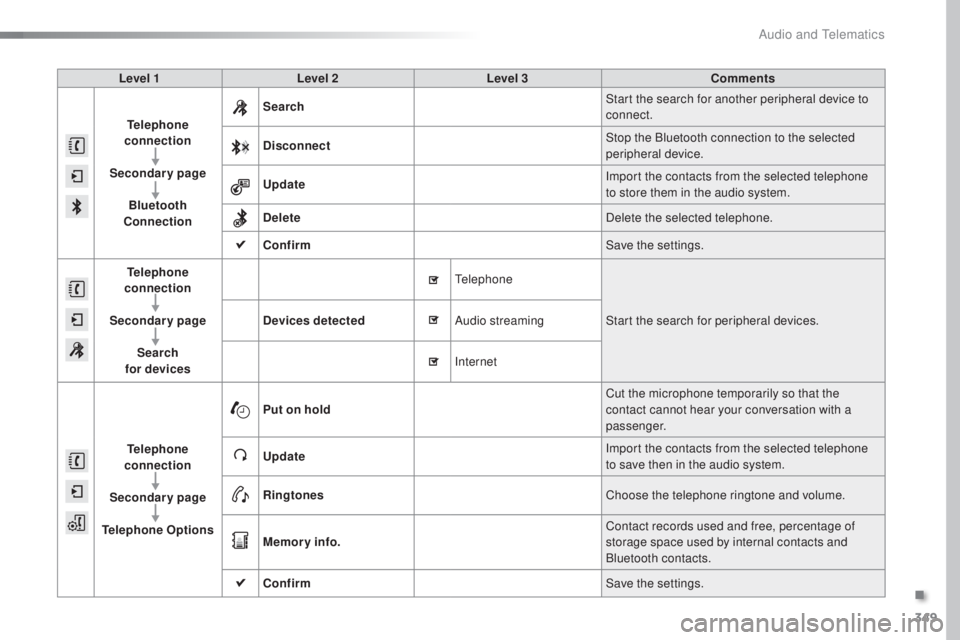
Level 1Level 2 Level 3 Comments
Telephone
connection
Secondary page Bluetooth
Connection Search
Start the search for another peripheral device to
connect.
Disconnect Stop the Bluetooth connection to the selected
peripheral device.
Update Import the contacts from the selected telephone
to store them in the audio system.
Delete Delete the selected telephone.
Confirm Save the settings.
Telephone
conn ection
Secondary page Search
for devices Devices detected
tele
phoneStart the search for peripheral devices.
Audio streaming
Internet
Telephone
connection
Secondary page
Telephone Options Put on hold
Cut the microphone temporarily so that the
contact cannot hear your conversation with a
passenger.
Update Import the contacts from the selected telephone
to save then in the audio system.
Ringtones Choose the telephone ringtone and volume.
Memory info. Contact records used and free, percentage of
storage space used by internal contacts and
Bluetooth contacts.
Confirm Save the settings.
.
Audio and telematics
Page 354 of 398
352
308_en_Chap10c_SMegplus_ed02-2015
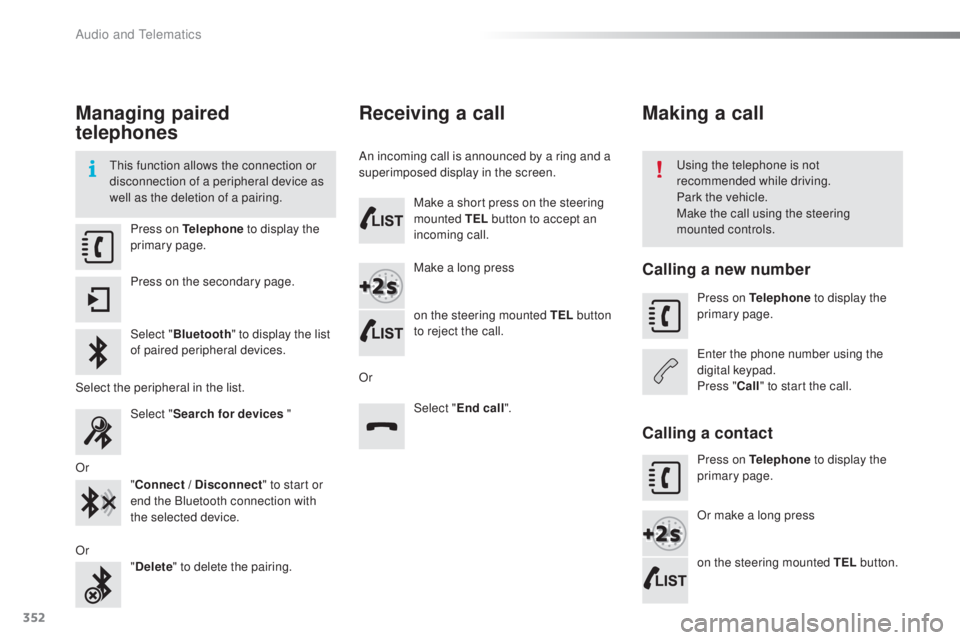
Managing paired
telephones
this function allows the connection or
d isconnection of a peripheral device as
well as the deletion of a pairing.usi ng the telephone is not
recommended while driving.
Park the vehicle.
Make the call using the steering
mounted controls.
Press on Telephone
to display the
primary page.
Press on the secondary page.
Select " Bluetooth " to display the list
of paired peripheral devices.
Select the peripheral in the list. Select "Search for devices "
Or "Connect / Disconnect " to start or
end the Bluetooth connection with
the selected device.
Or "Delete " to delete the pairing.
Receiving a call
An incoming call is announced by a ring and a
superimposed display in the screen.
Make a short press on the steering
mounted TEL button to accept an
incoming call.
Make a long press
on the steering mounted TEL button
to reject the call.
Or Select "End call".
Making a call
Calling a new number
Press on Telephone to display the
primary page.
ent
er the phone number using the
digital keypad.
Press " Call" to start the call.
Calling a contact
Press on Telephone to display the
primary page.
Or make a long press
on the steering mounted TEL button.
Audio and telematics
Page 357 of 398
355
308_en_Chap10c_SMegplus_ed02-2015
QUESTIONANSWER SOLUTION
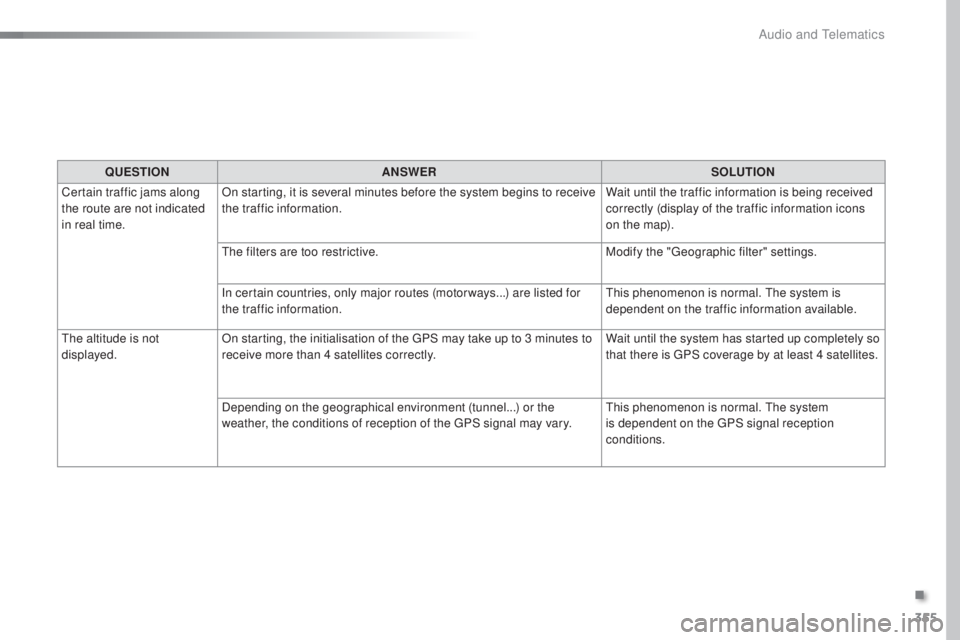
Certain traffic jams along
the route are not indicated
in real time. On starting, it is several minutes before the system begins to receive
the traffic information.
Wait until the traffic information is being received
correctly (display of the traffic information icons
on the map).
the f
ilters are too restrictive. Modify the "
geo
graphic filter" settings.
In certain countries, only major routes (motor ways...) are listed for
the traffic information.
thi
s phenomenon is normal.
the s
ystem is
dependent on the traffic information available.
the a
ltitude is not
displayed. On starting, the initialisation of the
gPS m
ay take up to 3 minutes to
receive more than 4 satellites correctly. Wait until the system has started up completely so
that there is
gPS c
overage by at least 4
s
atellites.
Depending on the geographical environment (tunnel...) or the
weather, the conditions of reception of the
gPS s
ignal may vary.
thi
s phenomenon is normal.
the s
ystem
is dependent on the
gPS s
ignal reception
conditions.
.
Audio and telematics
Page 359 of 398
357
308_en_Chap10c_SMegplus_ed02-2015
Media
QUESTIONANSWER SOLUTION
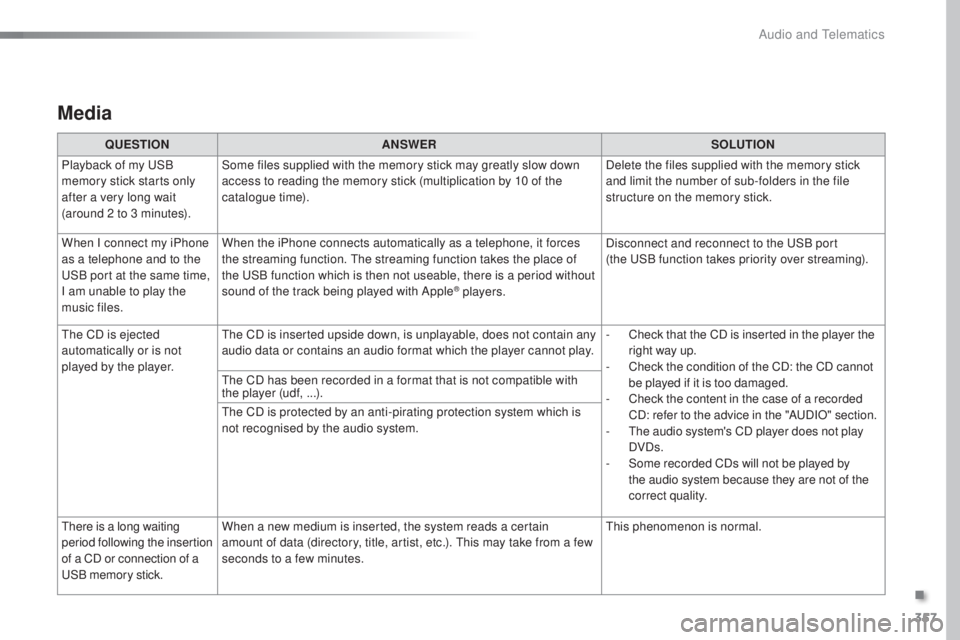
Playback of my
uSB
m
emory stick starts only
after a very long wait
(around 2 to 3 minutes). Some files supplied with the memory stick may greatly slow down
access to reading the memory stick (multiplication by 10 of the
catalogue time).
Delete the files supplied with the memory stick
and limit the number of sub-folders in the file
structure on the memory stick.
When I connect my iPhone
as a telephone and to the
uSB p
ort at the same time,
I am unable to play the
music files. When the iPhone connects automatically as a telephone, it forces
the streaming function.
the s
treaming function takes the place of
the
uSB f
unction which is then not useable, there is a period without
sound of the track being played with Apple
® players. Disconnect and reconnect to the
uSB p
ort
(the
uSB f
unction takes priority over streaming).
the C
D is ejected
automatically or is not
played by the player.
the C
D is inserted upside down, is unplayable, does not contain any
audio data or contains an audio format which the player cannot play. -
Ch
eck that the CD is inserted in the player the
right way up.
-
Ch
eck the condition of the CD: the CD cannot
be played if it is too damaged.
-
Ch
eck the content in the case of a recorded
CD: refer to the advice in the "A
uDI
O" section.
-
t
he a
udio system's CD player does not play
DVDs.
-
So
me recorded CDs will not be played by
the audio system because they are not of the
correct quality.
the C
D has been recorded in a format that is not compatible with
the player (udf, ...).
the C
D is protected by an anti-pirating protection system which is
not recognised by the audio system.
there
is a long waiting
period following the insertion
of a CD or connection of a
uSB
memory stick. When a new medium is inserted, the system reads a certain
amount of data (directory, title, artist, etc.).
thi
s may take from a few
seconds to a few minutes.
thi
s phenomenon is normal.
.
Audio and telematics
Page 360 of 398
358
308_en_Chap10c_SMegplus_ed02-2015
QUESTIONANSWER SOLUTION
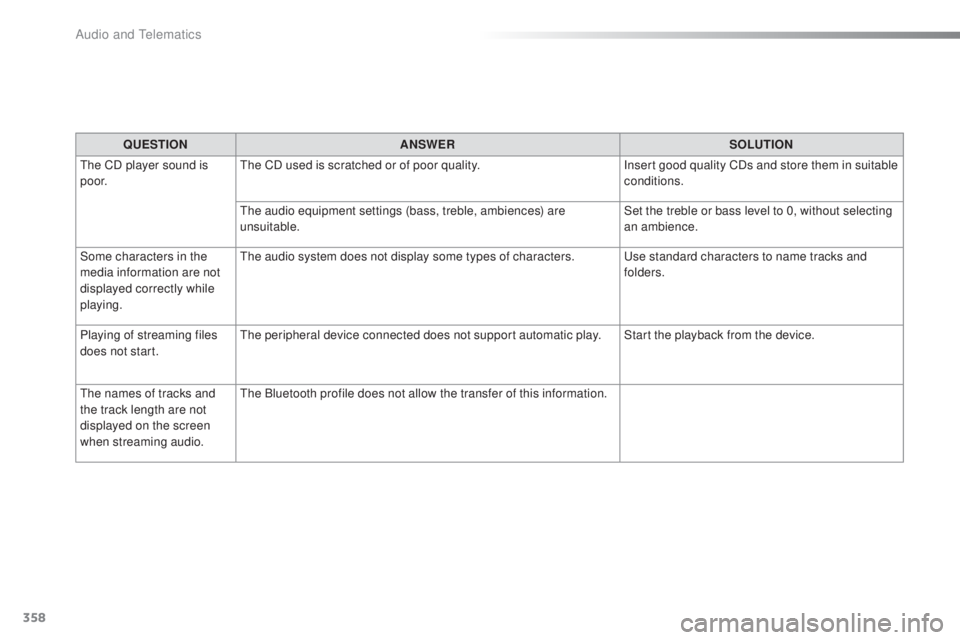
the C
D player sound is
p o o r.
the C
D used is scratched or of poor quality. Insert good quality CDs and store them in suitable
conditions.
the a
udio equipment settings (bass, treble, ambiences) are
unsuitable. Set the treble or bass level to 0, without selecting
an ambience.
Some characters in the
media information are not
displayed correctly while
playing.
the a
udio system does not display some types of characters.
us
e standard characters to name tracks and
folders.
Playing of streaming files
does not start.
the p
eripheral device connected does not support automatic play. Start the playback from the device.
the n
ames of tracks and
the track length are not
displayed on the screen
when streaming audio.
the B
luetooth profile does not allow the transfer of this information.
Audio and telematics
Page 362 of 398
360
308_en_Chap10c_SMegplus_ed02-2015
QUESTIONANSWER SOLUTION
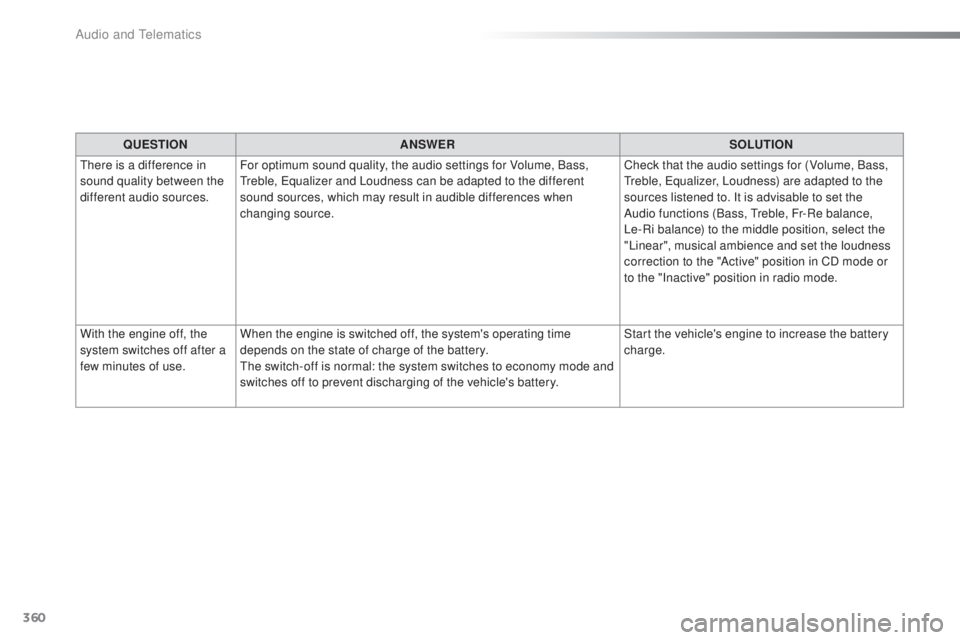
the
re is a difference in
sound quality between the
different audio sources. For optimum sound quality, the audio settings for Volume, Bass,
tre
ble,
equ
alizer and Loudness can be adapted to the different
sound sources, which may result in audible differences when
changing source. Check that the audio settings for (Volume, Bass,
tre
ble,
equ
alizer, Loudness) are adapted to the
sources listened to. It is advisable to set the
Audio functions (Bass,
tre
ble, Fr-Re balance,
Le-Ri balance) to the middle position, select the
"Linear", musical ambience and set the loudness
correction to the "Active" position in CD mode or
to the "Inactive" position in radio mode.
With the engine off, the
system switches off after a
few minutes of use. When the engine is switched off, the system's operating time
depends on the state of charge of the battery.
the s
witch-off is normal: the system switches to economy mode and
switches off to prevent discharging of the vehicle's battery. Start the vehicle's engine to increase the battery
charge.
Audio and telematics
Page 371 of 398
369
308_en_Chap10d_RD45_ed02-2015
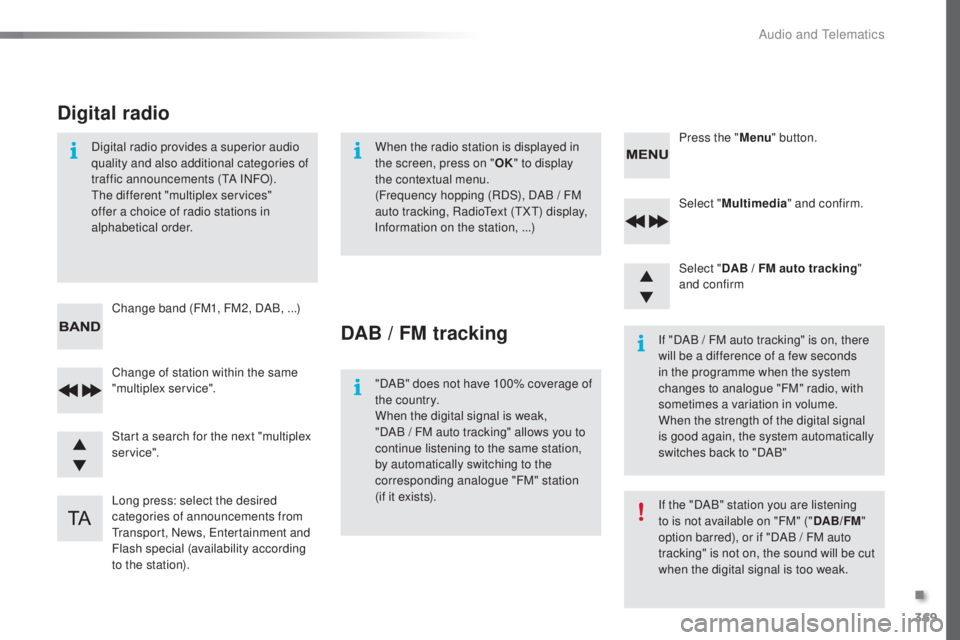
Select "Multimedia " and confirm.
Select " DAB / FM auto tracking "
and confirm
Long press: select the desired
categories of announcements from
tra
nsport, News,
ent
ertainment and
Flash special (availability according
to the station). Change of station within the same
"multiplex service". Press the "
Menu" button.
Start a search for the next "multiplex
service". Change band (FM1, FM2, DAB,
.
..)
Digital radio provides a superior audio
quality and also additional categories of
traffic announcements (
tA IN
FO).the d
ifferent "multiplex services"
offer a choice of radio stations in
alphabetical order.
Digital radio
When the radio station is displayed in
the screen, press on " OK" to display
the contextual menu.
(Frequency hopping (RDS), DAB
/ F
M
auto tracking, Radio
tex
t (
tXt) di
splay,
Information on the station, ...)
DAB / FM tracking
"DAB" does not have 100% coverage of
the country.
When the digital signal is weak,
"DAB
/ F
M auto tracking" allows you to
continue listening to the same station,
by automatically switching to the
corresponding analogue "FM" station
(if it exists). If "DAB / FM auto tracking" is on, there
will be a difference of a few seconds
in the programme when the system
changes to analogue "FM" radio, with
sometimes a variation in volume.
When the strength of the digital signal
is good again, the system automatically
switches back to "DAB"
If the "DAB" station you are listening
to is not available on "FM" ("
DAB/FM"
option barred), or if "DAB / FM auto
tracking" is not on, the sound will be cut
when the digital signal is too weak.
.
Audio and telematics
Page 375 of 398
373
308_en_Chap10d_RD45_ed02-2015
use only uSB memory sticks formatted FAt32
( File Allocation table ).
It is recommended that you use
genuine Apple
® uSB cables for correct
ope
ration.
*
In c
ertain cases, play of the audio files must
be initiated from the keypad.
** If the telephone supports the function.
Bluetooth® audio streaming
Streaming allows music files on the telephone
to be played via the audio system.
Connect the telephone: see the " Telephone"
section.
Select in the " Bluetooth: Telephone - Audio "
menu the telephone to be connected.
the a
udio system connects to a newly paired
telephone automatically.
Control of tracks to be played is via the buttons
on the audio system control panel and the
steering mounted controls**.
the c
ontextual
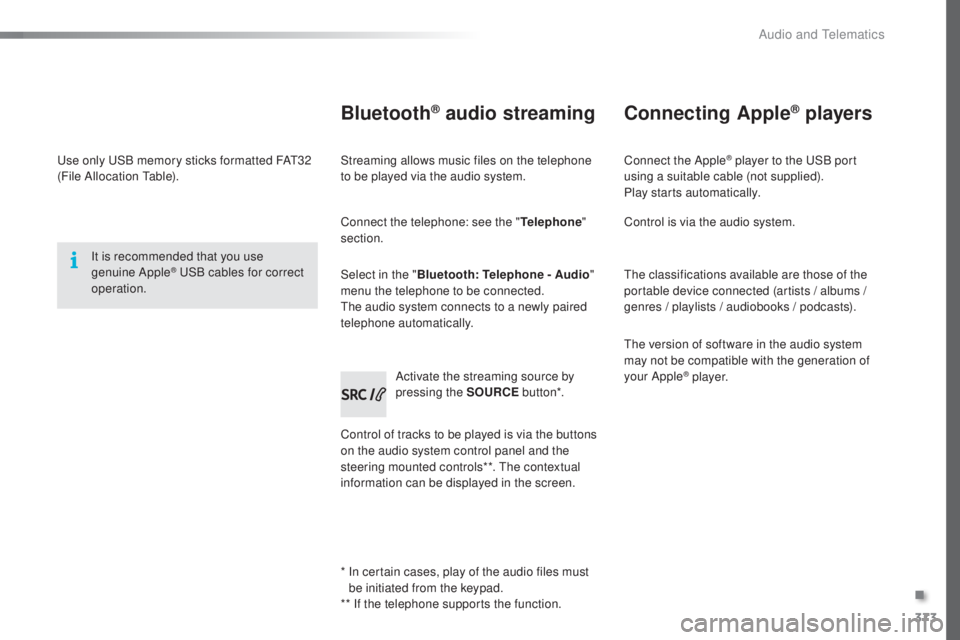
information can be displayed in the screen. Activate the streaming source by
pressing the SOURCE
but to n*.
Connecting Apple® players
Connect the Apple® player to the uSB port
using a suitable cable (not supplied).
Play starts automatically.
Control is via the audio system.
the c
lassifications available are those of the
portable device connected (artists / albums /
genres / playlists / audiobooks / podcasts).
the v
ersion of software in the audio system
may not be compatible with the generation of
your Apple
® p l aye r.
.
Audio and telematics