maintenance PEUGEOT 308 2024 User Guide
[x] Cancel search | Manufacturer: PEUGEOT, Model Year: 2024, Model line: 308, Model: PEUGEOT 308 2024Pages: 280, PDF Size: 8.13 MB
Page 186 of 280
184
Practical information
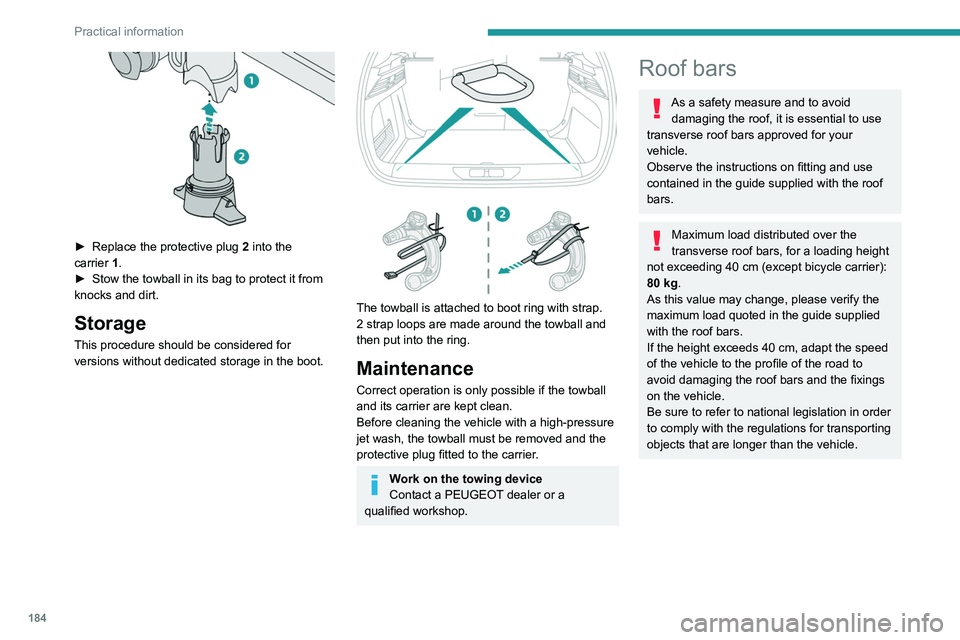
► Replace the protective plug 2 into the
carrier 1.
►
Stow the towball in its bag to protect it from
knocks and dirt.
Storage
This procedure should be considered for
versions without dedicated storage in the boot.
The towball is attached to boot ring with strap.
2 strap loops are made around the towball and
then put into the ring.
Maintenance
Correct operation is only possible if the towball
and its carrier are kept clean.
Before cleaning the vehicle with a high-pressure
jet wash, the towball must be removed and the
protective plug fitted to the carrier.
Work on the towing device
Contact a PEUGEOT dealer or a
qualified workshop.
Roof bars
As a safety measure and to avoid damaging the roof, it is essential to use
transverse roof bars approved for your
vehicle.
Observe the instructions on fitting and use
contained in the guide supplied with the roof
bars.
Maximum load distributed over the
transverse roof bars, for a loading height
not exceeding 40 cm (except bicycle carrier):
80
kg.
As this value may change, please verify the
maximum load quoted in the guide supplied
with the roof bars.
If the height exceeds 40
cm, adapt the speed
of the vehicle to the profile of the road to
avoid damaging the roof bars and the fixings
on the vehicle.
Be sure to refer to national legislation in order
to comply with the regulations for transporting
objects that are longer than the vehicle.
Page 191 of 280
189
Practical information
7Closing
► Lower the bonnet and release it near the end
of its travel.
►
Check the locking.
Because of the presence of electrical
equipment under the bonnet, it is strongly
recommended that exposure to water (rain,
washing, etc.) be limited.
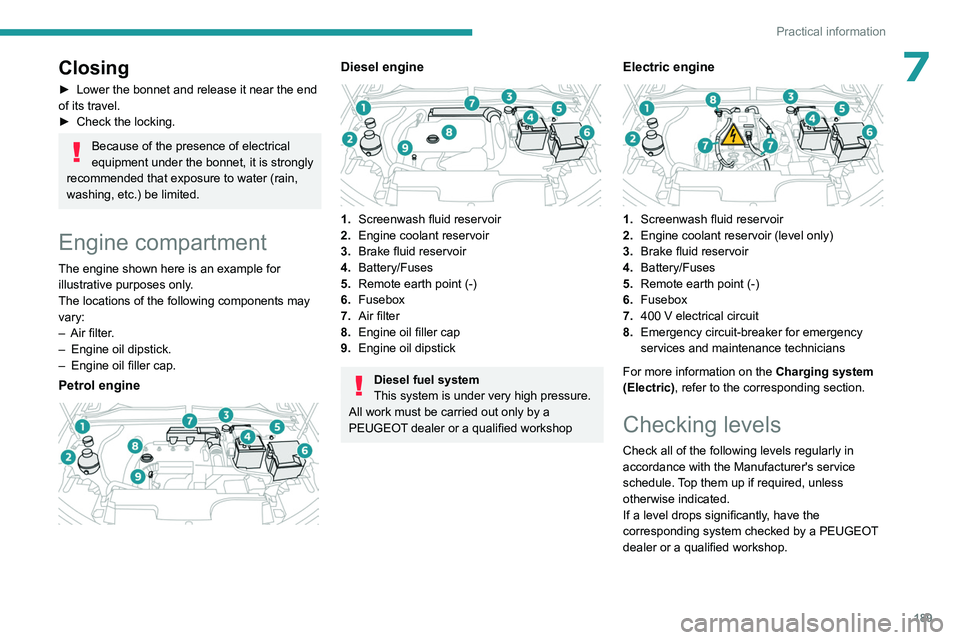
Engine compartment
The engine shown here is an example for
illustrative purposes only.
The locations of the following components may
vary:
–
Air filter
.
–
Engine oil dipstick.
–
Engine oil filler cap.
Petrol engine
Diesel engine
1. Screenwash fluid reservoir
2. Engine coolant reservoir
3. Brake fluid reservoir
4. Battery/Fuses
5. Remote earth point (-)
6. Fusebox
7. Air filter
8. Engine oil filler cap
9. Engine oil dipstick
Diesel fuel system
This system is under very high pressure.
All work must be carried out only by a
PEUGEOT dealer or a qualified workshop
Electric engine
1. Screenwash fluid reservoir
2. Engine coolant reservoir (level only)
3. Brake fluid reservoir
4. Battery/Fuses
5. Remote earth point (-)
6. Fusebox
7. 400
V electrical circuit
8. Emergency circuit-breaker for emergency
services and maintenance technicians
For more information on the Charging system
(Electric), refer to the corresponding section.
Checking levels
Check all of the following levels regularly in
accordance with the Manufacturer's service
schedule. Top them up if required, unless
otherwise indicated.
If a level drops significantly, have the
corresponding system checked by a PEUGEOT
dealer or a qualified workshop.
Page 194 of 280
192
Practical information
Otherwise, have them checked by a PEUGEOT
dealer or a qualified workshop.
Only use products recommended by
PEUGEOT or products of equivalent
quality and specification.
In order to optimise the operation of
components as important as those in the
braking system, PEUGEOT selects and offers
very specific products.
12 V battery
The battery does not require any maintenance.
Check regularly that the terminals are correctly
tightened (versions without quick-release
terminals) and that the connections are clean.
For more information on the precautions
to take before any work on the 12 V
battery, refer to the corresponding section.
Versions equipped with Stop & Start are
fitted with a 12 V lead-acid battery with
special technology and specifications.
Its replacement should be carried out only by
a PEUGEOT dealer or a qualified workshop.
Passenger compartment
filter
Depending on the environment and the
use of the vehicle (e.g. dusty atmosphere,
city driving), change it twice as often, if
necessary .
A clogged passenger compartment filter
can adversely affect air conditioning
system performance and generate
undesirable odours.
Air filter
Depending on the environment and the
use of the vehicle (e.g. dusty atmosphere,
city driving), change it twice as often, if
necessary .
Oil filter
Change the oil filter each time the engine
oil is changed.
Particle filter (Diesel)
The start of clogging of the particle filter is
indicated by the temporary lighting of this
warning lamp, accompanied by an alert
message.
As soon as traffic conditions allow, regenerate
the filter by driving at a speed of at least 37
mph
(60
km/h), with an engine speed above 2,500
rpm, for about 15 minutes (until the warning lamp
goes out).
If it is not possible to reach 37
mph (60 km/h),
leave the engine running at idle for about 15
minutes, then drive with an engine speed
above
2,500 rpm for 15 minutes.
Do not switch off the engine until the filter
is fully regenerated; repeated intervals
can degrade the engine oil prematurely.
Regenerating the filter while the vehicle is
stationary is not recommended.
Following prolonged operation of the
vehicle at very low speed or at idle, you
may, in exceptional circumstances, notice
water vapour coming from the exhaust while
accelerating. These emissions have no
impact on the vehicle’s behaviour and the
environment.
New vehicle
During the first few particle filter
regeneration operations, you may notice a
"burning" smell. This is perfectly normal.
Manual gearbox
The gearbox does not require any maintenance (no oil change).
Automatic gearbox
The gearbox does not require any maintenance (no oil change).
Brake pads
Brake wear depends on the style of
driving, particularly in the case of vehicles
used in town, over short distances. It may be
Page 198 of 280
196
Practical information
► While depressing the brake pedal, press the
control lever to release the parking brake.
►
Release the brake pedal, then switch off the
ignition.
Reverting to normal operation
► While depressing the brake pedal, restart the
engine.
With automatic gearbox or
drive selector and electric
parking brake
/
Release procedure
With the vehicle stationary and the engine
running:
►
Depress and hold the brake pedal.
►
Select and hold the mode
N
on the push
selector.
►
Press the
START/STOP button around 1 s to
switch off the engine (confirmed by the flashing
of the P and N indicator lights).
►
Release the brake pedal to switch on the
ignition and deactivate the electric parking brake.
A message is displayed on the instrument panel to confirm the unlocking
of the wheels for 15
minutes.
When the vehicle is free-wheeling, the
audio system cannot be updated (message
displayed on the instrument panel).
After 15 minutes or reverting to normal
operation
► While depressing the brake pedal, restart the
engine and select mode P .
Keyless Entry and Start
You must not depress the brake pedal
while switching the ignition on again, then
switching it off. If you do, the engine will start,
requiring you to restart the procedure.
Advice on care and maintenance
General recommendations
Observe the following recommendations to avoid
damaging the vehicle.
Exterior
Never use a high-pressure jet wash in
the engine compartment - risk of
damaging the electrical components!
Do not wash the vehicle in bright sunshine or
extremely cold conditions.
When washing the vehicle in an
automatic roller-brush car wash, be sure
to lock the doors and, depending on version,
move the electronic key away and deactivate
the "hands-free" function (Hands-Free
Tailgate Access).
When using a pressure washer, keep the jet
nozzle at a minimum distance of 30 cm from
the vehicle (particularly when cleaning areas
containing chipped paint, sensors or seals).
Promptly clean up any stains containing
chemicals liable to damage the vehicle's
paintwork (including tree resin, bird
droppings, insect secretions, pollen and tar).
Depending on the environment, clean the
vehicle frequently to remove salty deposits
(in coastal areas), soot (in industrial areas)
and mud/salts (in wet or cold areas). These
substances can be highly corrosive.
Contact a PEUGEOT dealer or a qualified
workshop for advice on removing stubborn
stains requiring special products (such as tar
or insect removers).
Preferably, have paint touch-ups performed
by a PEUGEOT dealer or a qualified
workshop.
Interior
When washing the vehicle, never use a
water hose or high-pressure jet to clean
the interior.
Liquids carried in cups or other open
containers can spill, presenting a risk of
damage to the instruments and controls and
the controls located on the centre console. Be
vigilant!
Page 199 of 280
197
Practical information
7To clean instrument panels, touch screens
or other displays, wipe gently with a soft,
dry cloth. Do not use products (e.g. alcohol,
disinfectant) or soapy water directly on these
surfaces - risk of damage!
Bodywork
High-gloss paint
Do not use abrasive products, solvents,
petrol or oil to clean the bodywork.
Never use an abrasive sponge to clean
stubborn stains - risk of scratching the
paintwork!
Do not apply polish in strong sunshine, or to
plastic or rubber parts.
Use a soft cloth and soapy water or a pH
neutral product.
Gently wipe the bodywork with a clean
microfibre cloth.
Apply polish with the vehicle clean and dry.
Comply with the instructions for use stated on
the product.
Decals
(Depending on version)
Do not use a high-pressure washer to
clean the vehicle - risk of damaging or
detaching the decals!
Use a high-flow hose (temperature
between 25°C and 40°C).
Place the jet of water perpendicular to the
surface to be cleaned.
Rinse the vehicle with demineralised water.
Textile
The dashboard, door panels and seats may
contain parts made of textile material.
Maintenance
Do not use aggressive cleaning products
(e.g. alcohol, solvent or ammonia).
Do not use steam-cleaning systems - risk of
affecting the adhesion of the fabrics!
Remove dust from the textile parts
regularly with a dry cloth, soft brush or
vacuum cleaner
.
Rub down the
textile parts once per year with
a clean, damp cloth. After leaving overnight to
dry, brush with a soft-bristled brush.
Stain removal
Do not rub the stain or it may spread or
you may cause the substance to
penetrate the surface.
Act quickly by reducing the stain from its edges inwards.
Remove as much substance or solids as
possible using a spoon or spatula, and
remove
as much liquid as possible using
absorbent paper.
Product/Procedure to use depending
on the type of stain:
–
Grease, oil and ink: clean with a pH-neutral
detergent.
–
V
omit: clean with sparkling mineral water.
–
Blood: spread flour over the stain and allow
to dry; remove with a slightly damp cloth.
–
Mud: allow to dry and then remove with a
slightly damp cloth.
–
Cake, chocolate, ice cream: clean with
lukewarm water
.
–
Sugary and/or alcoholic drinks: clean with
lukewarm water
, or lemon juice if the stain is
persistent.
–
Hair gel, coffee, tomato sauce, vinegar:
clean with lukewarm water and lemon juice.
For solid substances, then use a soft brush or
vacuum cleaner
.
For liquid substances, then use a damp
microfibre cloth and then dry with another
cloth.
Alcantara®
Alcantara® is an elegant and practical material
which is very resistant and easy to maintain.
Page 200 of 280
198
Practical information
Do not use printed cloths or
printed absorbent paper.
Do not use steam-cleaning systems.
Remove dust from the Alcantara® parts
regularly with a dry cloth, soft brush or
vacuum cleaner.
Clean the Alcantara
®, without rubbing too
vigorously, with a white cotton cloth which is
slightly damp.
To find out which products and procedures to
use on different types of stains, refer to the
"Textile - Stain removal" section.
For more information, go to the Alcantara
®
trademark website: www.alcantara.com.
Leather
Leather is a natural product. Appropriate regular
care is essential for its durability.
It must be protected and nourished using a
specific leather product, to keep it supple and
preserve its original appearance.
Do not use maintenance products which
are not suitable for cleaning leather
(e.g.
solvent, detergent, petrol, pure alcohol).
Do not use bleaching or colour-removal
products (e.g.
perchloroethylene).
When cleaning items partly made from
leather, take care not to damage the other
materials with the specific leather product.
Before cleaning greasy stains or liquids,
quickly mop up any surplus.
Before cleaning, wipe off any residues liable
to scuff the leather, using a cloth that has
been dampened with demineralised water
and thoroughly wrung out.
Clean the leather, without rubbing too
vigorously, using a soft cloth moistened with
soapy water or a pH-neutral product.
Dry with a soft, dry cloth.
Page 203 of 280
201
In the event of a breakdown
8The jack meets European standards,
as defined in the Machinery Directive
2006/42/CE, and also complies with UKCA
requirement, as defined by the Supply
of Machinery (Safety) Regulations 2008
No.1597.
The jack does not require any maintenance.
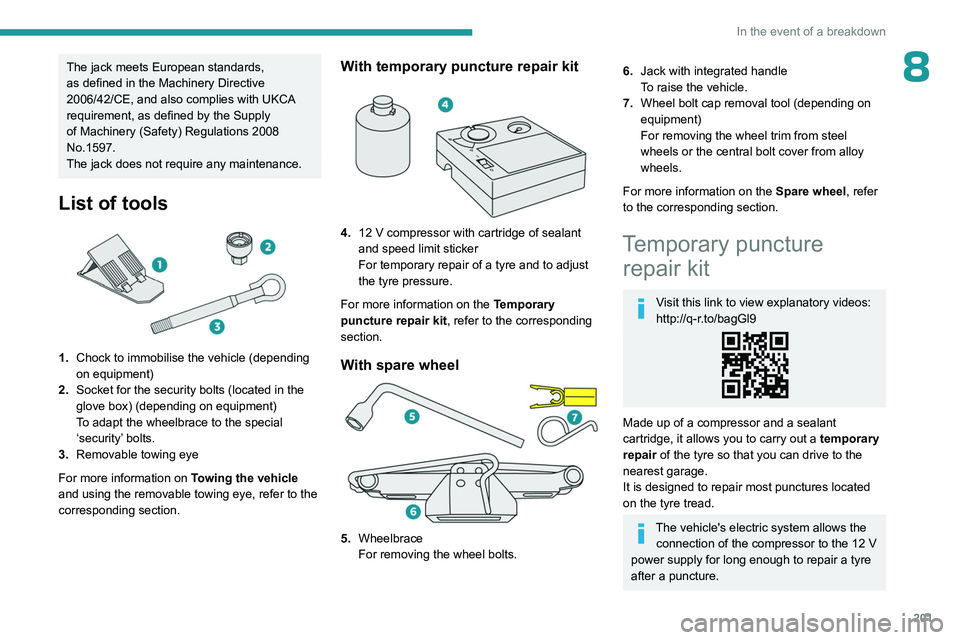
List of tools
1.Chock to immobilise the vehicle (depending
on equipment)
2. Socket for the security bolts (located in the
glove box) (depending on equipment)
To adapt the wheelbrace to the special
‘security’ bolts.
3. Removable towing eye
For more information on Towing the vehicle
and using the removable towing eye, refer to the
corresponding section.
With temporary puncture repair kit
4. 12 V compressor with cartridge of sealant
and speed limit sticker
For temporary repair of a tyre and to adjust
the tyre pressure.
For more information on the Temporary
puncture repair kit, refer to the corresponding
section.
With spare wheel
5. Wheelbrace
For removing the wheel bolts.
6.Jack with integrated handle
To raise the vehicle.
7. Wheel bolt cap removal tool (depending on
equipment)
For removing the wheel trim from steel
wheels or the central bolt cover from alloy
wheels.
For more information on the Spare wheel, refer
to the corresponding section.
Temporary puncture repair kit
Visit this link to view explanatory videos:
http://q-r.to/bagGl9
Made up of a compressor and a sealant
cartridge,
it allows you to carry out a temporary
repair of the tyre so that you can drive to the
nearest garage.
It is designed to repair most punctures located
on the tyre tread.
The vehicle's electric system allows the connection of the compressor to the 12 V
power supply for long enough to repair a tyre
after a puncture.
Page 247 of 280
245
Vehicle data recording and privacy
11Vehicle data recording
and privacy
Electronic control units are installed in your
vehicle. These control units process data
received from the vehicle's sensors, for example,
or data they generate themselves or exchange
with each other. Some of these control units are
required for the correct operation of your vehicle,
some others assist you while driving (driving or
manoeuvring aids), while others provide comfort
or infotainment functions.
The following contains general information about
how data is processed within the vehicle.
You will find additional information about the
specific data which is downloaded, stored
and transmitted to third parties and what it is
used for in your vehicle under the keyword
"Data protection". This information is directly
associated with the references for the functions
in question contained in the corresponding
vehicle handbook, or in the general terms and
conditions of sale.
This information is also available online.
Vehicle operating data
The control units process the data used for the
operation of the vehicle.
This data includes, for example:
–
Information about the state of the vehicle
(e.g.
speed, travel time, lateral acceleration,
wheel rotation rate, fastened seat belts display). –
Environmental conditions (e.g.
temperature,
rain sensor, distance sensor).
As a general rule, this data is temporary, is
not stored for longer than one operating cycle
and is only used within the vehicle itself. The
control units often record this data (including the
vehicle's key). This function allows either the
temporary or permanent storage of information
about the state of the vehicle, stresses on
components, servicing requirements, as well as
events and technical errors.
Depending on the vehicle's equipment level, the
data stored is as follows:
–
Operating state of system components
(e.g.
filling level, tyre pressures, battery charge
status).
–
Faults and malfunctions in important system
components (e.g.
lamps, brakes).
–
System reactions in specific driving situations
(e.g.
deployment of an airbag, triggering of
stability control and braking systems).
–
Information about events which have
damaged the vehicle.
–
For electric and rechargeable hybrid vehicles,
the traction battery charge level and the
estimated driving range.
In particular circumstances (e.g.
if the vehicle
has detected a malfunction), it may be necessary
to record data which would otherwise simply not
be stored.
When taking your vehicle in for servicing
(e.g.
repairs, maintenance), the stored operating
data may be read along with the vehicle's identification number and used if necessary.
The personnel working for the servicing network
(e.g.
garages, manufacturers) or third parties
(e.g. roadside assistance agents) may read
the vehicle's data. This also applies to work
carried out under warranty and quality assurance
measures.
This data is generally read via the OBD
(On-Board Diagnostics) port fitted by law to
the vehicle. It is used to report on the technical
state of the vehicle or its components and
facilitates the diagnosis of malfunctions, in
compliance with warranty obligations and for
quality improvement. This data, in particular the
information relating to stress on components,
technical events, operator errors and other
malfunctions, is sent to the Manufacturer, if
necessary, along with the vehicle's identification
number. The Manufacturer's liability may also be
engaged. The Manufacturer may also use the
operating data taken from the vehicle for product
recalls. This data may also be used to check the
customer's warranty and any claims made under
warranty.
Any malfunctions stored in the vehicle may be
reset by an after-sales service company during
servicing or repair work, or at your request.
Page 250 of 280
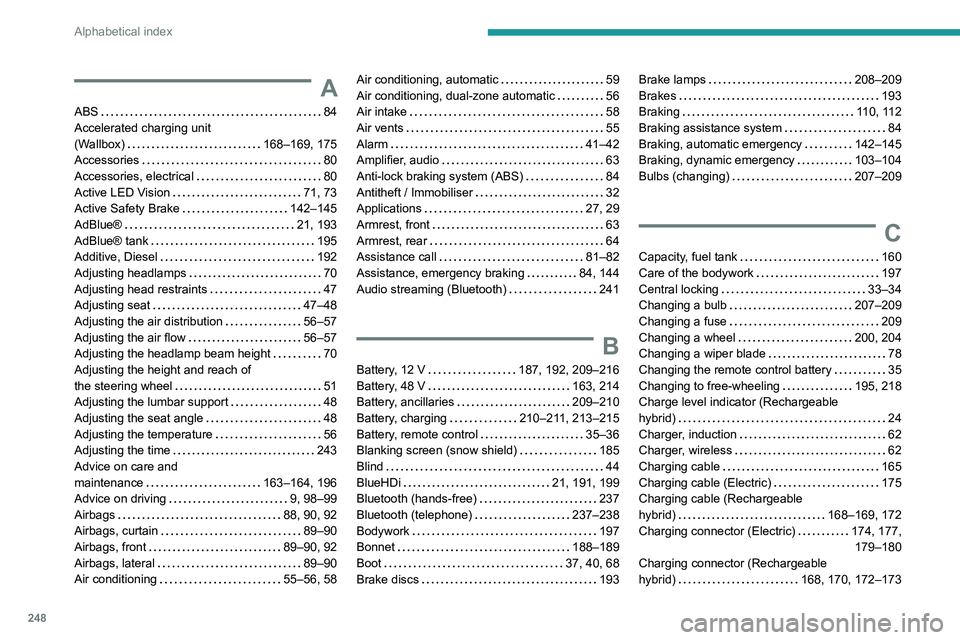
248
Alphabetical index
A
ABS 84
Accelerated charging unit
(Wallbox)
168–169, 175
Accessories
80
Accessories, electrical
80
Active LED Vision
71, 73
Active Safety Brake
142–145
AdBlue®
21, 193
AdBlue® tank
195
Additive, Diesel
192
Adjusting headlamps
70
Adjusting head restraints
47
Adjusting seat
47–48
Adjusting the air distribution
56–57
Adjusting the air flow
56–57
Adjusting the headlamp beam height
70
Adjusting the height and reach of
the steering wheel
51
Adjusting the lumbar support
48
Adjusting the seat angle
48
Adjusting the temperature
56
Adjusting the time
243
Advice on care and
maintenance
163–164, 196
Advice on driving
9, 98–99
Airbags
88, 90, 92
Airbags, curtain
89–90
Airbags, front
89–90, 92
Airbags, lateral
89–90
Air conditioning
55–56, 58
Air conditioning, automatic 59
Air conditioning, dual-zone automatic
56
Air intake
58
Air vents
55
Alarm
41–42
Amplifier, audio
63
Anti-lock braking system (ABS)
84
Antitheft / Immobiliser
32
Applications
27, 29
Armrest, front
63
Armrest, rear
64
Assistance call
81–82
Assistance, emergency braking
84, 144
Audio streaming (Bluetooth)
241
B
Battery, 12 V 187, 192, 209–216
Battery, 48 V
163, 214
Battery, ancillaries
209–210
Battery, charging
210–211, 213–215
Battery, remote control
35–36
Blanking screen (snow shield)
185
Blind
44
BlueHDi
21, 191, 199
Bluetooth (hands-free)
237
Bluetooth (telephone)
237–238
Bodywork
197
Bonnet
188–189
Boot
37, 40, 68
Brake discs
193
Brake lamps 208–209
Brakes
193
Braking
110, 112
Braking assistance system
84
Braking, automatic emergency
142–145
Braking, dynamic emergency
103–104
Bulbs (changing)
207–209
C
Capacity, fuel tank 160
Care of the bodywork
197
Central locking
33–34
Changing a bulb
207–209
Changing a fuse
209
Changing a wheel
200, 204
Changing a wiper blade
78
Changing the remote control battery
35
Changing to free-wheeling
195, 218
Charge level indicator (Rechargeable
hybrid)
24
Charger, induction
62
Charger, wireless
62
Charging cable
165
Charging cable (Electric)
175
Charging cable (Rechargeable
hybrid)
168–169, 172
Charging connector (Electric)
174, 177, 179–180
Charging connector (Rechargeable
hybrid)
168, 170, 172–173
Page 253 of 280
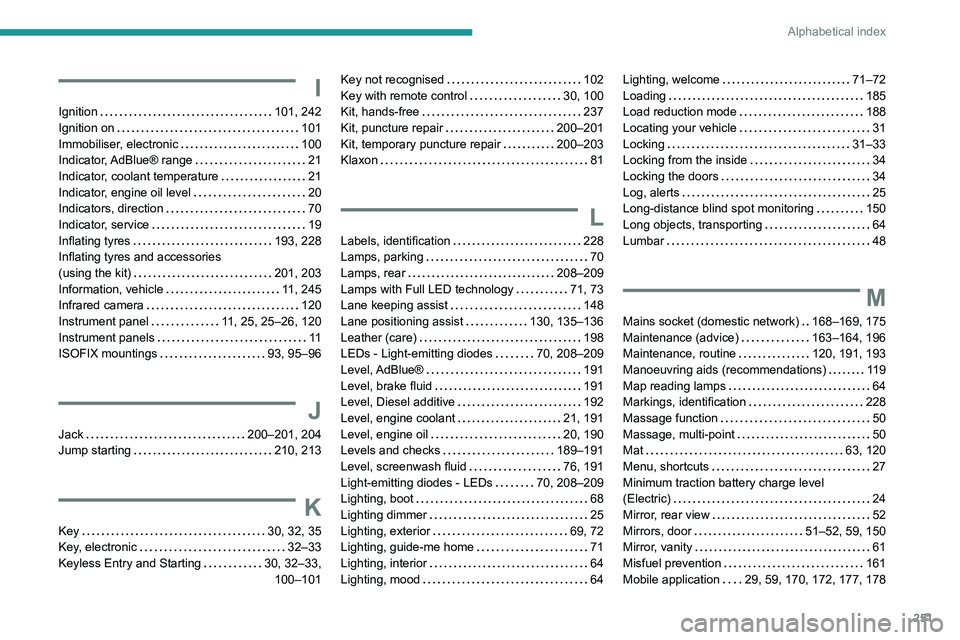
251
Alphabetical index
I
Ignition 101, 242
Ignition on
101
Immobiliser, electronic
100
Indicator, AdBlue® range
21
Indicator, coolant temperature
21
Indicator, engine oil level
20
Indicators, direction
70
Indicator, service
19
Inflating tyres
193, 228
Inflating tyres and accessories
(using the kit)
201, 203
Information, vehicle
11, 245
Infrared camera
120
Instrument panel
11, 25, 25–26, 120
Instrument panels
11
ISOFIX mountings
93, 95–96
J
Jack 200–201, 204
Jump starting
210, 213
K
Key 30, 32, 35
Key, electronic
32–33
Keyless Entry and Starting
30, 32–33, 100–101
Key not recognised 102
Key with remote control
30, 100
Kit, hands-free
237
Kit, puncture repair
200–201
Kit, temporary puncture repair
200–203
Klaxon
81
L
Labels, identification 228
Lamps, parking
70
Lamps, rear
208–209
Lamps with Full LED technology
71, 73
Lane keeping assist
148
Lane positioning assist
130, 135–136
Leather (care)
198
LEDs - Light-emitting diodes
70, 208–209
Level, AdBlue®
191
Level, brake fluid
191
Level, Diesel additive
192
Level, engine coolant
21, 191
Level, engine oil
20, 190
Levels and checks
189–191
Level, screenwash fluid
76, 191
Light-emitting diodes - LEDs
70, 208–209
Lighting, boot
68
Lighting dimmer
25
Lighting, exterior
69, 72
Lighting, guide-me home
71
Lighting, interior
64
Lighting, mood
64
Lighting, welcome 71–72
Loading
185
Load reduction mode
188
Locating your vehicle
31
Locking
31–33
Locking from the inside
34
Locking the doors
34
Log, alerts
25
Long-distance blind spot monitoring
150
Long objects, transporting
64
Lumbar
48
M
Mains socket (domestic network) 168–169, 175
Maintenance (advice)
163–164, 196
Maintenance, routine
120, 191, 193
Manoeuvring aids (recommendations)
119
Map reading lamps
64
Markings, identification
228
Massage function
50
Massage, multi-point
50
Mat
63, 120
Menu, shortcuts
27
Minimum traction battery charge level
(Electric)
24
Mirror, rear view
52
Mirrors, door
51–52, 59, 150
Mirror, vanity
61
Misfuel prevention
161
Mobile application
29, 59, 170, 172, 177, 178