Switch Peugeot 308 CC 2011 Owners Manual
[x] Cancel search | Manufacturer: PEUGEOT, Model Year: 2011, Model line: 308 CC, Model: Peugeot 308 CC 2011Pages: 292, PDF Size: 40.04 MB
Page 184 of 292
182
EMERGENCY OR ASSISTANCE CALL
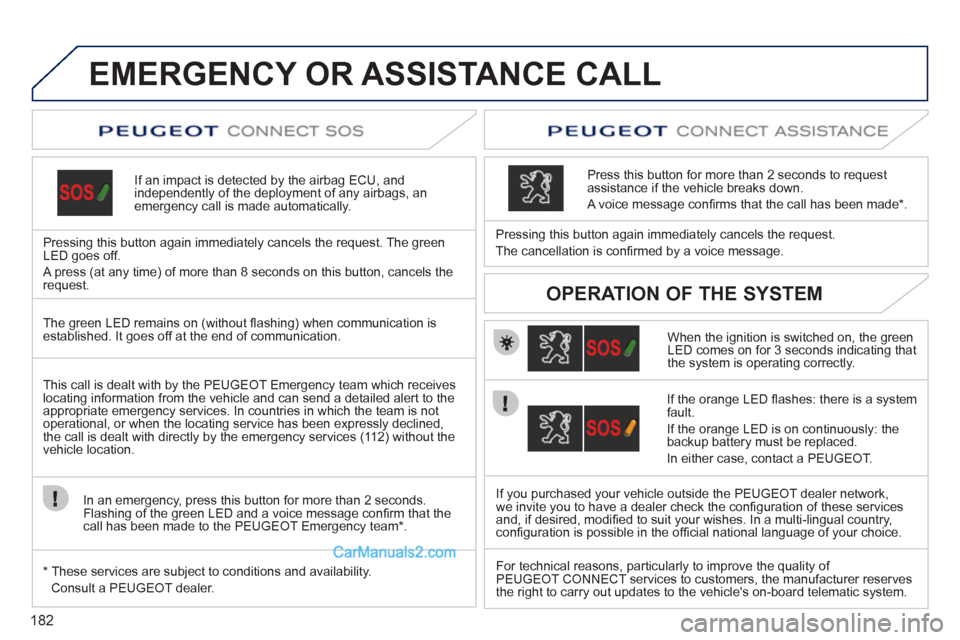
If an impact is detected by the airbag ECU, and
independently of the deployment of any airbags, an
emergency call is made automatically.
Pressing this button again immediately cancels the request. The green
LED goes off.
A press (at any time) of more than 8 seconds on this button, cancels the
request.
When the ignition is switched on, the green
LED comes on for 3 seconds indicating that
the system is operating correctly.
Pressing this button again immediately cancels the request.
The cancellation is confi rmed by a voice message.
Press this button for more than 2 seconds to request
assistance if the vehicle breaks down.
A voice message confi rms that the call has been made*.
OPERATION OF THE SYSTEM
The green LED remains on (without fl ashing) when communication is
established. It goes off at the end of communication.
This call is dealt with by the PEUGEOT Emergency team which receives
locating information from the vehicle and can send a detailed alert to the
appropriate emergency services. In countries in which the team is not
operational, or when the locating service has been expressly declined,
the call is dealt with directly by the emergency services (112) without the
vehicle location.
In an emergency, press this button for more than 2 seconds.
Flashing of the green LED and a voice message confi rm that the
call has been made to the PEUGEOT Emergency team * .
*
These services are subject to conditions and availability.
Consult a PEUGEOT dealer.
If the orange LED fl ashes: there is a system
fault.
If the orange LED is on continuously: the
backup battery must be replaced.
In either case, contact a PEUGEOT.
If you purchased your vehicle outside the PEUGEOT dealer network,
we invite you to have a dealer check the confi guration of these services
and, if desired, modifi ed to suit your wishes. In a multi-lingual country,
confi guration is possible in the offi cial national language of your choice.
For technical reasons, particularly to improve the quality of
PEUGEOT CONNECT services to customers, the manufacturer reserves
the right to carry out updates to the vehicle's on-board telematic system.
Page 187 of 292
185
2ABC3DEF5JKL4GHI6MNO8TUV7PQRS9WXYZ0*#
1
RADIO MEDIANAV ESC TRAFFIC
SETUPADDR
BOOK
The Peugeot Connect Media is protected in such a
way that it will only operate in your vehicle. If it is to be
installed in another vehicle, contact a PEUGEOT dealer
for confi guration of the system.
Certain functions described in this handbook will
become available during the course of the year.
PEUGEOT CONNECT MEDIA
For safety reasons, it is imperative that the driver
carries out operations which require prolonged attention
while the vehicle is stationary.
When the engine is switched off and to prevent
discharging of the battery, the Peugeot Connect Media
switches off following the activation of the Energy
Economy mode.
01 First steps
02 Voice commands and steering
mounted controls
03 General operation
04 Navigation - Guidance
05 Traffic information
06 Radio
07 Music media players
08 Using the telephone
09 Configuration
10 Screen menu map p.
p.
p.
p.
p.
p.
p.
p.
p.
p. 186
188
191
196
205
207
208
213
218
219
CONTENTS
Frequently asked questions p.
224
MULTIMEDIA AUDIO SYSTEM/BLUETOOTH TELEPHONE
GPS EUROPE
Page 189 of 292
187
01
2ABC3DEF
5JKL4GHI6MNO
8TUV7PQRS9WXYZ
0*#
1
13
14
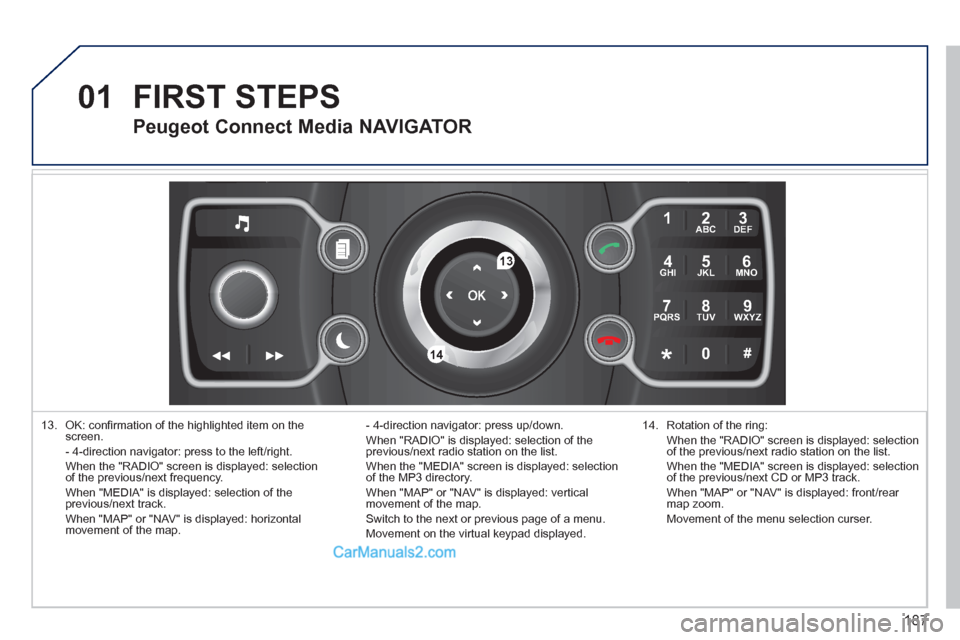
13. OK: confi rmation of the highlighted item on the
screen.
- 4-direction navigator: press to the left/right.
When the "RADIO" screen is displayed: selection
of the previous/next frequency.
When "MEDIA" is displayed: selection of the
previous/next track.
When "MAP" or "NAV" is displayed: horizontal
movement of the map. - 4-direction navigator: press up/down.
When "RADIO" is displayed: selection of the
previous/next radio station on the list.
When the "MEDIA" screen is displayed: selection
of the MP3 directory.
When "MAP" or "NAV" is displayed: vertical
movement of the map.
Switch to the next or previous page of a menu.
Movement on the virtual keypad displayed.
FIRST STEPS
14. Rotation of the ring:
When the "RADIO" screen is displayed: selection
of the previous/next radio station on the list.
When the "MEDIA" screen is displayed: selection
of the previous/next CD or MP3 track.
When "MAP" or "NAV" is displayed: front/rear
map zoom.
Movement of the menu selection curser.
Peugeot Connect Media NAVIGATOR
Page 212 of 292
210
07
1
3
42ABC3DEF5JKL4GHI6MNO8TUV7PQRS9WXYZ0*#
1RADIO MEDIANAV ESC TRAFFIC
SETUPADDR
BOOK
2ABC3DEF5JKL4GHI6MNO8TUV7PQRS9WXYZ0*#
1RADIO MEDIANAV ESC TRAFFIC
SETUPADDR
BOOK
2ABC3DEF5JKL4GHI6MNO8TUV7PQRS9WXYZ0*#
1RADIO MEDIANAV ESC TRAFFIC
SETUPADDR
BOOK
2ABC3DEF5JKL4GHI6MNO8TUV7PQRS9WXYZ0*#
1RADIO MEDIANAV ESC TRAFFIC
SETUPADDR
BOOK2
2ABC3DEF5JKL4GHI6MNO8TUV7PQRS9WXYZ0*#
1RADIO MEDIANAV ESC TRAFFIC
SETUPADDR
BOOK
5
7
8
6
9
RADIONAV ESC TRAFFICMEDIAMEDIA
2ABC3DEF5JKL4GHI6MNO8TUV7PQRS9WXYZ0*#
1RADIO MEDIANAV ESC TRAFFIC
SETUPADDR
BOOKRADIONAV ESC TRAFFICMEDIA
2ABC3DEF5JKL4GHI6MNO8TUV7PQRS9WXYZ0*#
1RADIO MEDIANAV ESC TRAFFIC
SETUPADDR
BOOK
2ABC3DEF5JKL4GHI6MNO8TUV7PQRS9WXYZ0*#
1RADIO MEDIANAV ESC TRAFFIC
SETUPADDR
BOOK
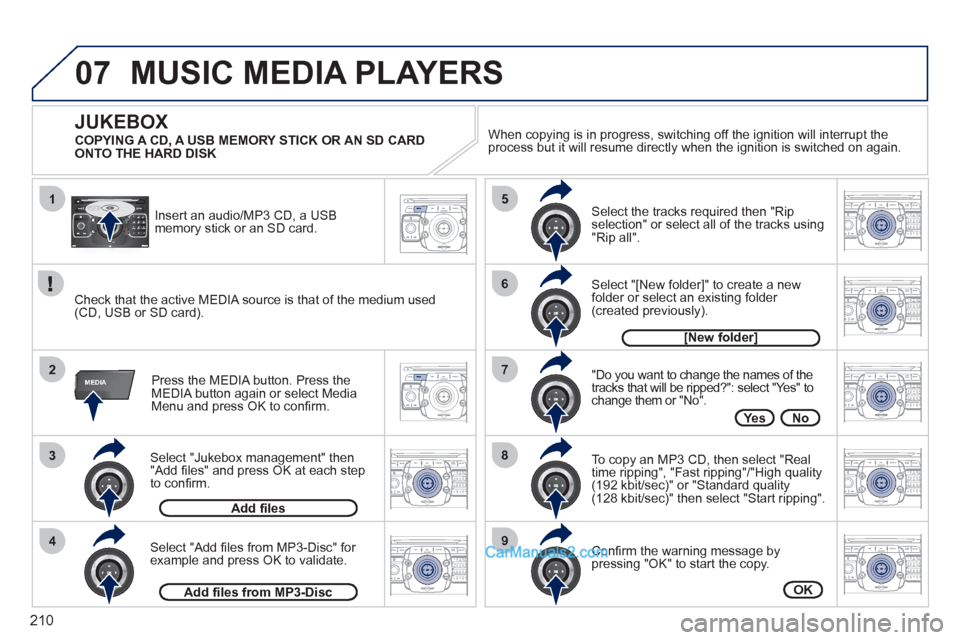
Select "Jukebox management" then
"Add fi les" and press OK at each step
to confi rm.
Press the MEDIA button. Press the
MEDIA button again or select Media
Menu and press OK to confi rm.
Insert an audio/MP3 CD, a USB
memory stick or an SD card.
JUKEBOX
Add fi les
Check that the active MEDIA source is that of the medium used
(CD, USB or SD card).
Select "Add fi les from MP3-Disc" for
example and press OK to validate.
Select the tracks required then "Rip
selection" or select all of the tracks using
"Rip all".
Select "[New folder]" to create a new
folder or select an existing folder
(created previously).
Add fi les from MP3-Disc
[New folder]
"Do you want to change the names of the
tracks that will be ripped?": select "Yes" to
change them or "No".
To copy an MP3 CD, then select "Real
time ripping", "Fast ripping"/"High quality
(192 kbit/sec)" or "Standard quality
(128 kbit/sec)" then select "Start ripping".
Confi rm the warning message by
pressing "OK" to start the copy.
OK
Yes No
When copying is in progress, switching off the ignition will interrupt the
process but it will resume directly when the ignition is switched on again.
MUSIC MEDIA PLAYERS
COPYING A CD, A USB MEMORY STICK OR AN SD CARD
ONTO THE HARD DISK
Page 218 of 292
216
08
14
5
2ABC3DEF5JKL4GHI6MNO8TUV7PQRS9WXYZ0*#
1NAV ESC TRAFFICADDR
BOOK2ABC3DEF5JKL4GHI6MNO8TUV7PQRS9WXYZ0*#
1SETUP2ABC3DEF5JKL4GHI6MNO8TUV7PQRS9WXYZ0*#
1
3
2ABC3DEF5JKL4GHI6MNO8TUV7PQRS9WXYZ0*#
1RADIO MEDIANAV ESC TRAFFIC
SETUPADDR
BOOK
2
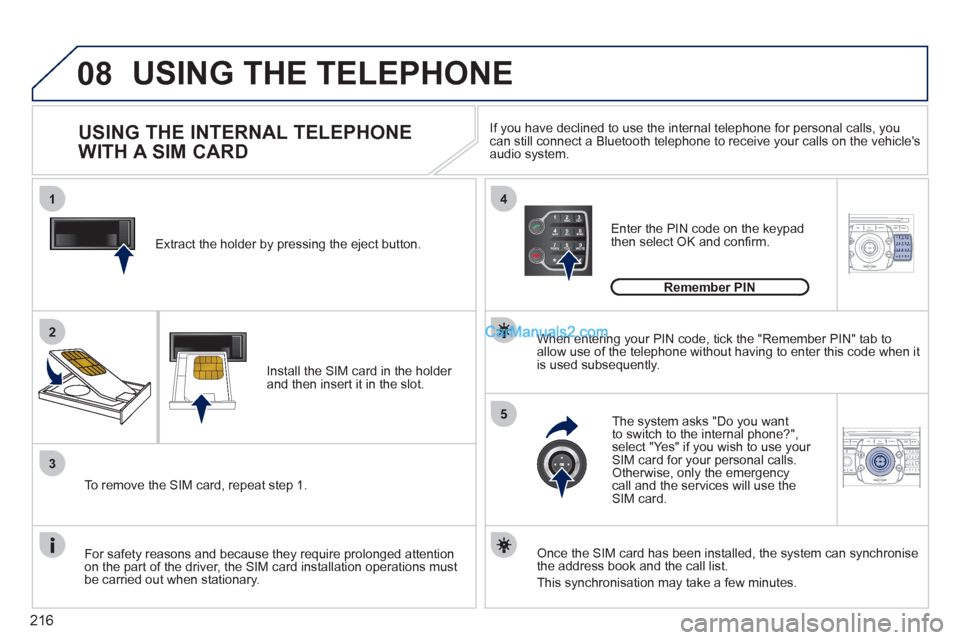
Extract the holder by pressing the eject button.
Install the SIM card in the holder
and then insert it in the slot.
To remove the SIM card, repeat step 1.
For safety reasons and because they require prolonged attention
on the part of the driver, the SIM card installation operations must
be carried out when stationary.
Enter the PIN code on the keypad
then select OK and confi rm.
The system asks "Do you want
to switch to the internal phone?",
select "Yes" if you wish to use your
SIM card for your personal calls.
Otherwise, only the emergency
call and the services will use the
SIM card.
Remember PIN
When entering your PIN code, tick the "Remember PIN" tab to
allow use of the telephone without having to enter this code when it
is used subsequently.
USING THE INTERNAL TELEPHONE
WITH A SIM CARD
USING THE TELEPHONE
Once the SIM card has been installed, the system can synchronise
the address book and the call list.
This synchronisation may take a few minutes.
If you have declined to use the internal telephone for personal calls, you
can still connect a Bluetooth telephone to receive your calls on the vehicle's
audio system.
Page 227 of 292
225
QUESTION
ANSWER
SOLUTION
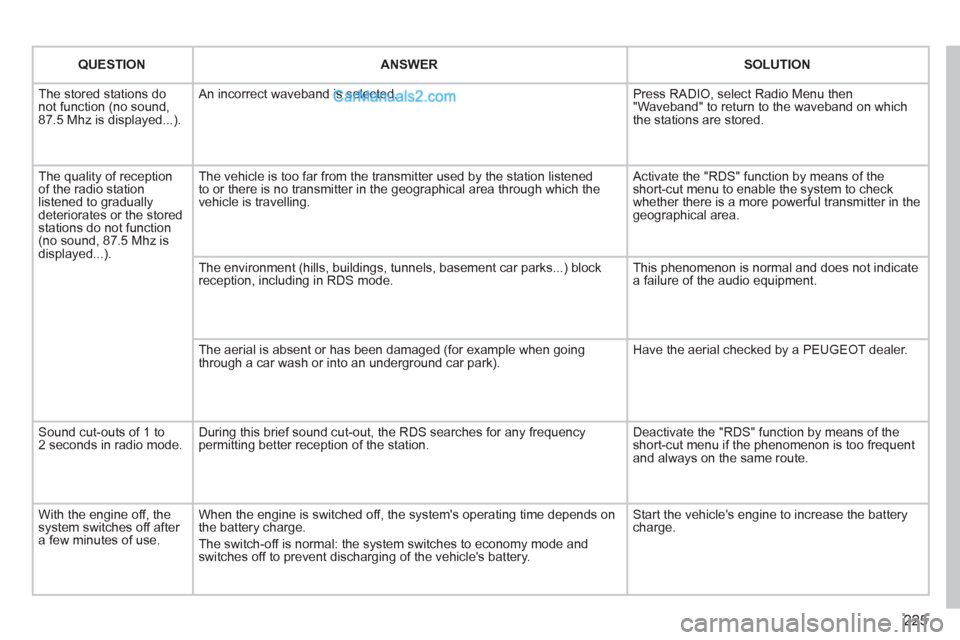
The stored stations do
not function (no sound,
87.5 Mhz is displayed...). An incorrect waveband is selected. Press RADIO, select Radio Menu then
"Waveband" to return to the waveband on which
the stations are stored.
The quality of reception
of the radio station
listened to gradually
deteriorates or the stored
stations do not function
(no sound, 87.5 Mhz is
displayed...). The vehicle is too far from the transmitter used by the station listened
to or there is no transmitter in the geographical area through which the
vehicle is travelling. Activate the "RDS" function by means of the
short-cut menu to enable the system to check
whether there is a more powerful transmitter in the
geographical area.
The environment (hills, buildings, tunnels, basement car parks...) block
reception, including in RDS mode. This phenomenon is normal and does not indicate
a failure of the audio equipment.
The aerial is absent or has been damaged (for example when going
through a car wash or into an underground car park). Have the aerial checked by a PEUGEOT dealer.
Sound cut-outs of 1 to
2 seconds in radio mode. During this brief sound cut-out, the RDS searches for any frequency
permitting better reception of the station. Deactivate the "RDS" function by means of the
short-cut menu if the phenomenon is too frequent
and always on the same route.
With the engine off, the
system switches off after
a few minutes of use. When the engine is switched off, the system's operating time depends on
the battery charge.
The switch-off is normal: the system switches to economy mode and
switches off to prevent discharging of the vehicle's battery. Start the vehicle's engine to increase the battery
charge.
Page 229 of 292
227
QUESTION
ANSWER
SOLUTION
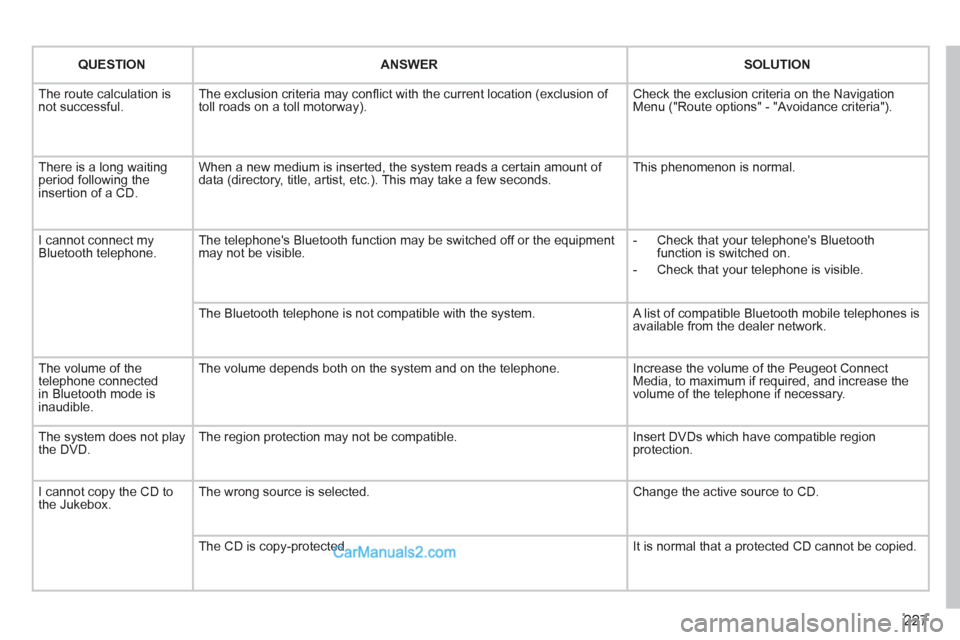
The route calculation is
not successful. The exclusion criteria may confl ict with the current location (exclusion of
toll roads on a toll motorway). Check the exclusion criteria on the Navigation
Menu ("Route options" - "Avoidance criteria").
There is a long waiting
period following the
insertion of a CD. When a new medium is inserted, the system reads a certain amount of
data (directory, title, artist, etc.). This may take a few seconds. This phenomenon is normal.
I cannot connect my
Bluetooth telephone. The telephone's Bluetooth function may be switched off or the equipment
may not be visible.
- Check that your telephone's Bluetooth
function is switched on.
- Check that your telephone is visible.
The Bluetooth telephone is not compatible with the system. A list of compatible Bluetooth mobile telephones is
available from the dealer network.
The volume of the
telephone connected
in Bluetooth mode is
inaudible. The volume depends both on the system and on the telephone. Increase the volume of the Peugeot Connect
Media, to maximum if required, and increase the
volume of the telephone if necessary.
The system does not play
the DVD. The region protection may not be compatible. Insert DVDs which have compatible region
protection.
I cannot copy the CD to
the Jukebox. The wrong source is selected. Change the active source to CD.
The CD is copy-protected. It is normal that a protected CD cannot be copied.
Page 231 of 292
229
The Peugeot Connect Navigation is protected in such
a way that it will only operate in your vehicle. If it is to be
installed in another vehicle, contact a PEUGEOT dealer
for confi guration of the system.
Certain functions described in this handbook will
become available during the course of the year.
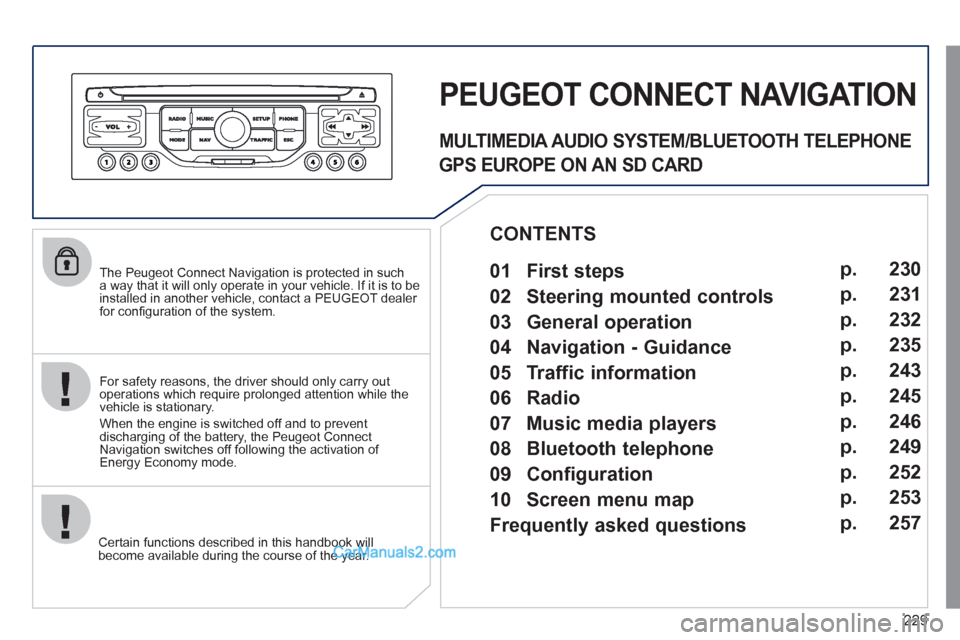
PEUGEOT CONNECT NAVIGATION
For safety reasons, the driver should only carry out
operations which require prolonged attention while the
vehicle is stationary.
When the engine is switched off and to prevent
discharging of the battery, the Peugeot Connect
Navigation switches off following the activation of
Energy Economy mode.
MULTIMEDIA AUDIO SYSTEM/BLUETOOTH TELEPHONE
GPS EUROPE ON AN SD CARD
01 First steps
CONTENTS
02 Steering mounted controls
03 General operation
04 Navigation - Guidance
05 Traffic information
06 Radio
07 Music media players
08 Bluetooth telephone
09 Configuration
10 Screen menu map p.
p.
p.
p.
p.
p.
p.
p.
p.
p.
Frequently asked questions p. 230
231
232
235
243
245
246
249
252
253
257
Page 251 of 292
249
08
1
2
3
5 4
*
The services available depend on the network, the SIM card and the
compatibility of the Bluetooth telephone used. Check the telephone
manual and with your network provider for details of the services
available to you.
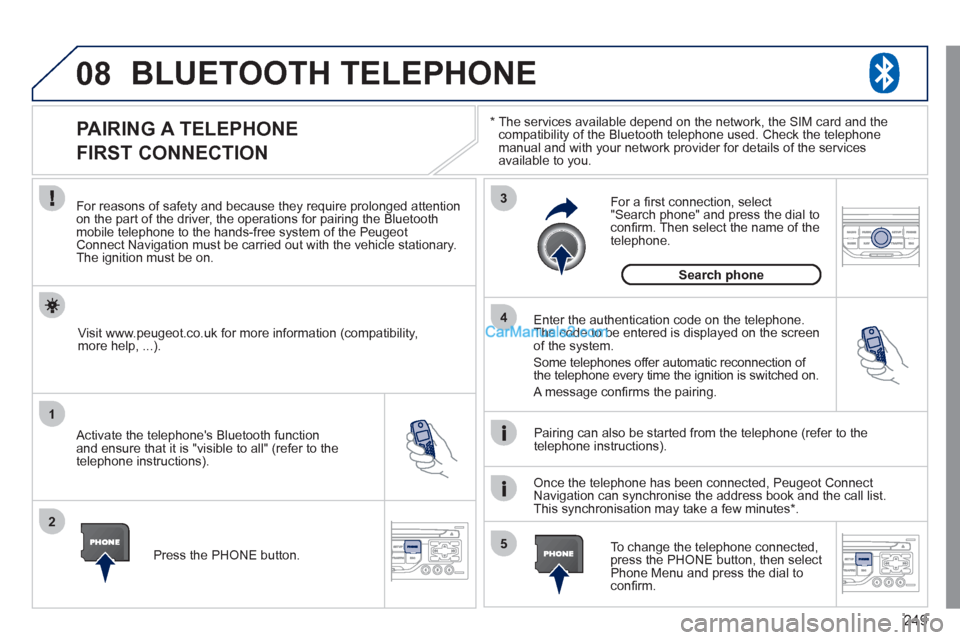
BLUETOOTH TELEPHONE
PAIRING A TELEPHONE
FIRST CONNECTION
For reasons of safety and because they require prolonged attention
on the part of the driver, the operations for pairing the Bluetooth
mobile telephone to the hands-free system of the Peugeot
Connect Navigation must be carried out with the vehicle stationary.
The ignition must be on.
Activate the telephone's Bluetooth function
and ensure that it is "visible to all" (refer to the
telephone instructions).
Enter the authentication code on the telephone.
The code to be entered is displayed on the screen
of the system.
Some telephones offer automatic reconnection of
the telephone every time the ignition is switched on.
A message confi rms the pairing.
To change the telephone connected,
press the PHONE button, then select
Phone Menu and press the dial to
confi rm.
Once the telephone has been connected, Peugeot Connect
Navigation can synchronise the address book and the call list.
This synchronisation may take a few minutes * .
Pairing can also be started from the telephone (refer to the
telephone instructions).
Visit www.peugeot.co.uk for more information (compatibility,
more help, ...).
Press the PHONE button.
For a fi rst connection, select
"Search phone" and press the dial to
confi rm. Then select the name of the
telephone.
Search phone
Page 260 of 292
258
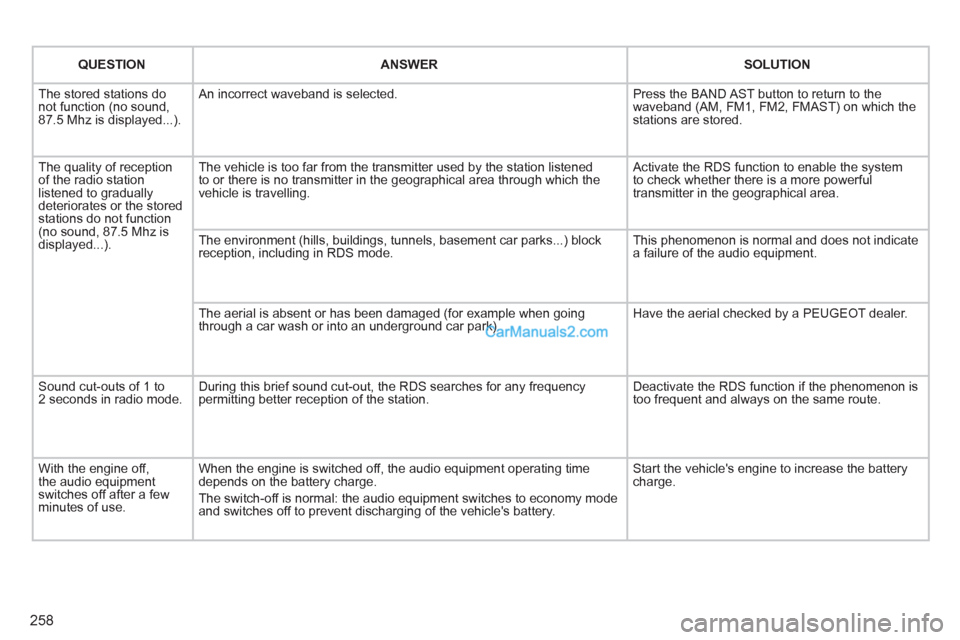
QUESTION
ANSWER
SOLUTION
The stored stations do
not function (no sound,
87.5 Mhz is displayed...). An incorrect waveband is selected. Press the BAND AST button to return to the
waveband (AM, FM1, FM2, FMAST) on which the
stations are stored.
The quality of reception
of the radio station
listened to gradually
deteriorates or the stored
stations do not function
(no sound, 87.5 Mhz is
displayed...). The vehicle is too far from the transmitter used by the station listened
to or there is no transmitter in the geographical area through which the
vehicle is travelling. Activate the RDS function to enable the system
to check whether there is a more powerful
transmitter in the geographical area.
The environment (hills, buildings, tunnels, basement car parks...) block
reception, including in RDS mode. This phenomenon is normal and does not indicate
a failure of the audio equipment.
The aerial is absent or has been damaged (for example when going
through a car wash or into an underground car park). Have the aerial checked by a PEUGEOT dealer.
Sound cut-outs of 1 to
2 seconds in radio mode. During this brief sound cut-out, the RDS searches for any frequency
permitting better reception of the station. Deactivate the RDS function if the phenomenon is
too frequent and always on the same route.
With the engine off,
the audio equipment
switches off after a few
minutes of use. When the engine is switched off, the audio equipment operating time
depends on the battery charge.
The switch-off is normal: the audio equipment switches to economy mode
and switches off to prevent discharging of the vehicle's battery. Start the vehicle's engine to increase the battery
charge.