Switch Peugeot 308 CC 2011 Manual PDF
[x] Cancel search | Manufacturer: PEUGEOT, Model Year: 2011, Model line: 308 CC, Model: Peugeot 308 CC 2011Pages: 292, PDF Size: 40.04 MB
Page 136 of 292
8
!
134
DRIVING
When the cruise control is switched
on, be careful if you maintain the
pressure on one of the programmed
speed changing buttons: this may
result in a very rapid change in the
speed of your vehicle.
Do not use the cruise control on
slippery roads or in heavy traffi c.
On a steep descent, the cruise
control will not be able to prevent
the vehicle from exceeding the pro-
grammed speed.
To avoid any risk of jamming of the
pedals:
- ensure that the mat is posi-
tioned correctly,
- never fi t one mat on top of an-
other.
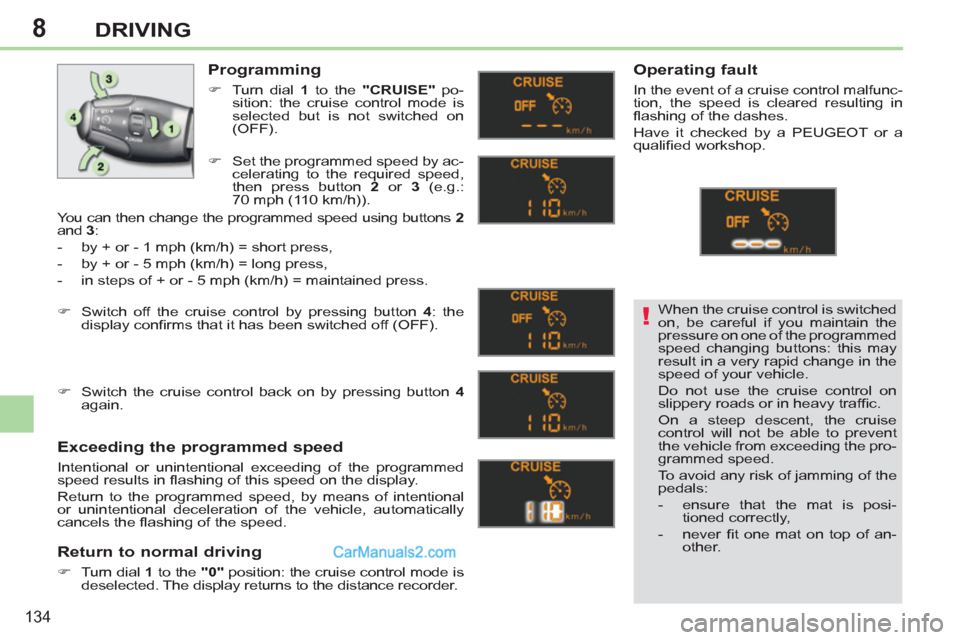
Programming
)
Turn dial 1
to the "CRUISE"
po-
sition: the cruise control mode is
selected but is not switched on
(OFF).
Exceeding the programmed speed
Intentional or unintentional exceeding of the programmed
speed results in fl ashing of this speed on the display.
Return to the programmed speed, by means of intentional
or unintentional deceleration of the vehicle, automatically
cancels the fl ashing of the speed.
Return to normal driving
)
Turn dial 1
to the "0"
position: the cruise control mode is
deselected. The display returns to the distance recorder.
Operating fault
In the event of a cruise control malfunc-
tion, the speed is cleared resulting in
fl ashing of the dashes.
Have it checked by a PEUGEOT or a
qualifi ed workshop.
)
Set the programmed speed by ac-
celerating to the required speed,
then press button 2
or 3
(e.g.:
70 mph (110 km/h)).
)
Switch off the cruise control by pressing button 4
: the
display confi rms that it has been switched off (OFF).
)
Switch the cruise control back on by pressing button 4
again.
You can then change the programmed speed using buttons 2
and 3
:
- by + or - 1 mph (km/h) = short press,
- by + or - 5 mph (km/h) = long press,
- in steps of + or - 5 mph (km/h) = maintained press.
Page 137 of 292
8
!
135
DRIVING
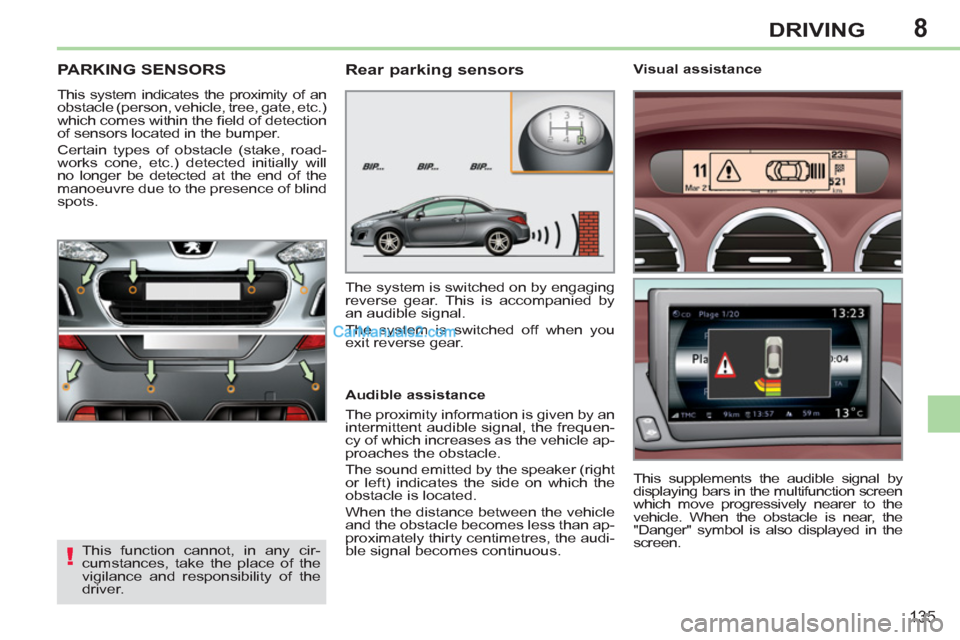
PARKING SENSORS
This system indicates the proximity of an
obstacle (person, vehicle, tree, gate, etc.)
which comes within the fi eld of detection
of sensors located in the bumper.
Certain types of obstacle (stake, road-
works cone, etc.) detected initially will
no longer be detected at the end of the
manoeuvre due to the presence of blind
spots.
This function cannot, in any cir-
cumstances, take the place of the
vigilance and responsibility of the
driver.
Rear parking sensors
Audible assistance
The proximity information is given by an
intermittent audible signal, the frequen-
cy of which increases as the vehicle ap-
proaches the obstacle.
The sound emitted by the speaker (right
or left) indicates the side on which the
obstacle is located.
When the distance between the vehicle
and the obstacle becomes less than ap-
proximately thirty centimetres, the audi-
ble signal becomes continuous.
The system is switched on by engaging
reverse gear. This is accompanied by
an audible signal.
The system is switched off when you
exit reverse gear.
This supplements the audible signal by
displaying bars in the multifunction screen
which move progressively nearer to the
vehicle. When the obstacle is near, the
"Danger" symbol is also displayed in the
screen.
Visual assistance
Page 138 of 292
8
ii
136
DRIVING
Front parking sensors
In addition to the rear parking sensors,
the front parking sensors are triggered
when an obstacle is detected in front
and the speed of the vehicle is still below
6 mph (10 km/h).
The sound emitted by the speaker (front
or rear) indicates whether the obstacle is
in front or behind.
The front parking sensors are interrupted
if the vehicle stops for more than three
seconds in forward gear, if no further ob-
stacles are detected or when the speed
of the vehicle exceeds 6 mph (10 km/h).
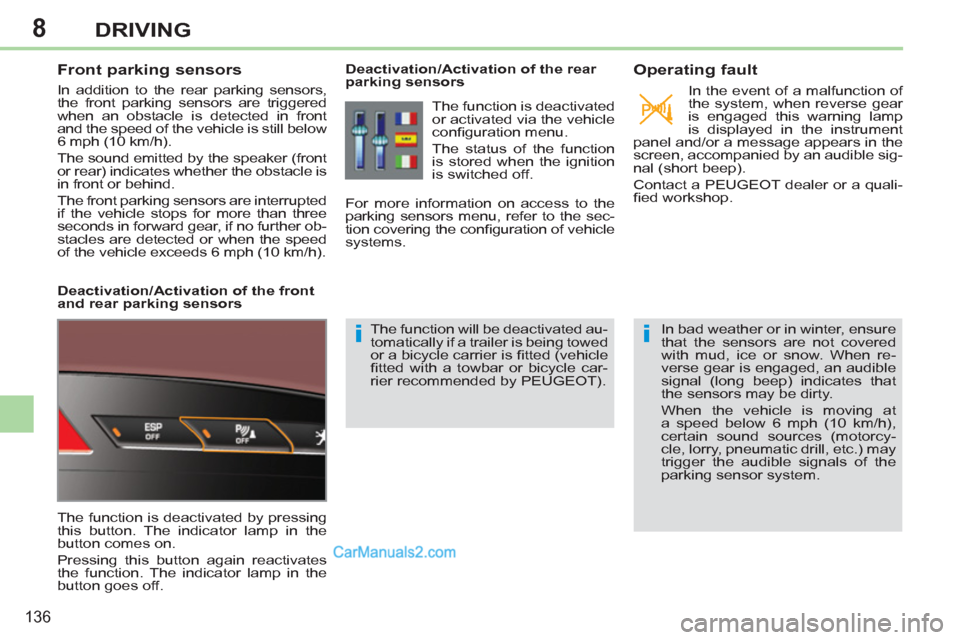
Deactivation/Activation of the front
and rear parking sensors
The function is deactivated by pressing
this button. The indicator lamp in the
button comes on.
Pressing this button again reactivates
the function. The indicator lamp in the
button goes off.
Deactivation/Activation of the rear
parking sensors
The function will be deactivated au-
tomatically if a trailer is being towed
or a bicycle carrier is fi tted (vehicle
fi tted with a towbar or bicycle car-
rier recommended by PEUGEOT).
Operating fault
In the event of a malfunction of
the system, when reverse gear
is engaged this warning lamp
is displayed in the instrument
panel and/or a message appears in the
screen, accompanied by an audible sig-
nal (short beep).
Contact a PEUGEOT dealer or a quali-
fi ed workshop.
In bad weather or in winter, ensure
that the sensors are not covered
with mud, ice or snow. When re-
verse gear is engaged, an audible
signal (long beep) indicates that
the sensors may be dirty.
When the vehicle is moving at
a speed below 6 mph (10 km/h),
certain sound sources (motorcy-
cle, lorry, pneumatic drill, etc.) may
trigger the audible signals of the
parking sensor system.
The function is deactivated
or activated via the vehicle
confi guration menu.
The status of the function
is stored when the ignition
is switched off.
For more information on access to the
parking sensors menu, refer to the sec-
tion covering the confi guration of vehicle
systems.
Page 140 of 292
9
i
!
!
138
CHECKS
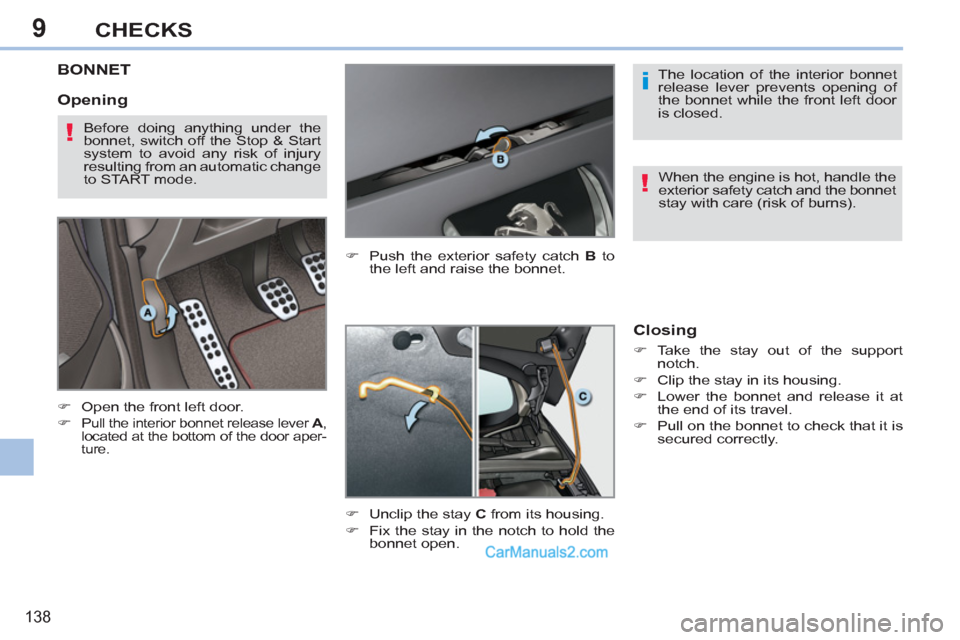
BONNET
)
Open the front left door.
)
Pull the interior bonnet release lever A
,
located at the bottom of the door aper-
ture.
)
Push the exterior safety catch B
to
the left and raise the bonnet.
Closing
)
Take the stay out of the support
notch.
)
Clip the stay in its housing.
)
Lower the bonnet and release it at
the end of its travel.
)
Pull on the bonnet to check that it is
secured correctly.
Opening
The location of the interior bonnet
release lever prevents opening of
the bonnet while the front left door
is closed.
When the engine is hot, handle the
exterior safety catch and the bonnet
stay with care (risk of burns).
Before doing anything under the
bonnet, switch off the Stop & Start
system to avoid any risk of injury
resulting from an automatic change
to START mode.
)
Unclip the stay C
from its housing.
)
Fix the stay in the notch to hold the
bonnet open.
Page 144 of 292
9
!
i
142
CHECKS
CHECKING LEVELS
Check all of these levels regularly and
top them up if necessary, unless other-
wise indicated.
If a level drops signifi cantly, have the
corresponding system checked by a
PEUGEOT dealer or a qualifi ed work-
shop.
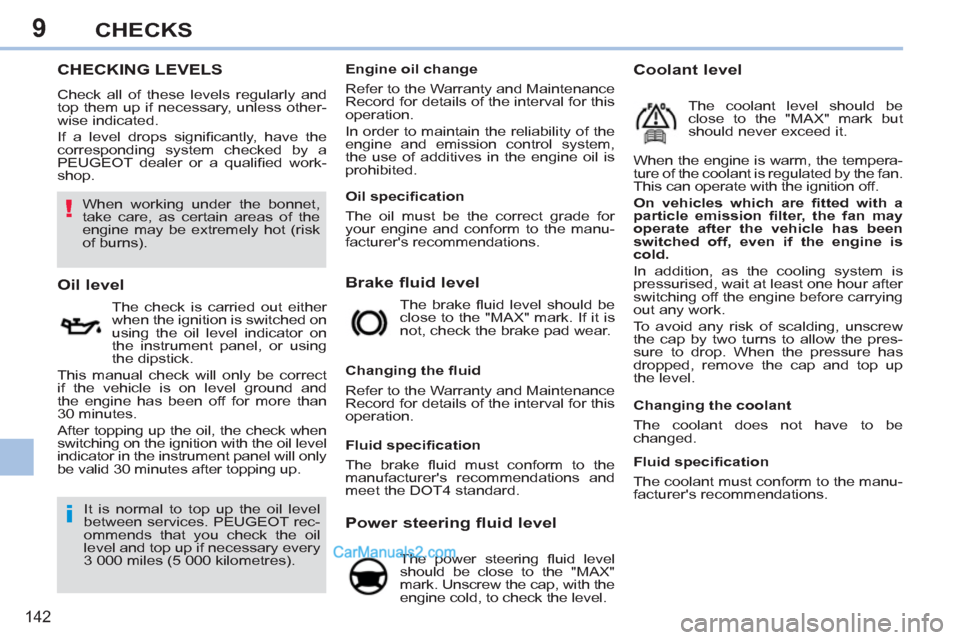
Brake fluid level
Oil level
The check is carried out either
when the ignition is switched on
using the oil level indicator on
the instrument panel, or using
the dipstick.
This manual check will only be correct
if the vehicle is on level ground and
the engine has been off for more than
30 minutes.
After topping up the oil, the check when
switching on the ignition with the oil level
indicator in the instrument panel will only
be valid 30 minutes after topping up. The brake fl uid level should be
close to the "MAX" mark. If it is
not, check the brake pad wear.
Power steering fluid level
The power steering fl uid level
should be close to the "MAX"
mark. Unscrew the cap, with the
engine cold, to check the level.
It is normal to top up the oil level
between services. PEUGEOT rec-
ommends that you check the oil
level and top up if necessary every
3 000 miles (5 000 kilometres).
Changing the fl uid
Refer to the Warranty and Maintenance
Record for details of the interval for this
operation. When the engine is warm, the tempera-
ture of the coolant is regulated by the fan.
This can operate with the ignition off.
On vehicles which are fi tted with a
particle emission fi lter, the fan may
operate after the vehicle has been
switched off, even if the engine is
cold.
In addition, as the cooling system is
pressurised, wait at least one hour after
switching off the engine before carrying
out any work.
To avoid any risk of scalding, unscrew
the cap by two turns to allow the pres-
sure to drop. When the pressure has
dropped, remove the cap and top up
the level.
Coolant level
The coolant level should be
close to the "MAX" mark but
should never exceed it.
Changing the coolant
The coolant does not have to be
changed.
When working under the bonnet,
take care, as certain areas of the
engine may be extremely hot (risk
of burns).
Fluid specifi cation
The coolant must conform to the manu-
facturer's recommendations.
Fluid specifi cation
The brake fl uid must conform to the
manufacturer's recommendations and
meet the DOT4 standard.
Oil specifi cation
The oil must be the correct grade for
your engine and conform to the manu-
facturer's recommendations.
Engine oil change
Refer to the Warranty and Maintenance
Record for details of the interval for this
operation.
In order to maintain the reliability of the
engine and emission control system,
the use of additives in the engine oil is
prohibited.
Page 148 of 292
10
i
146
PRACTICAL INFORMATION
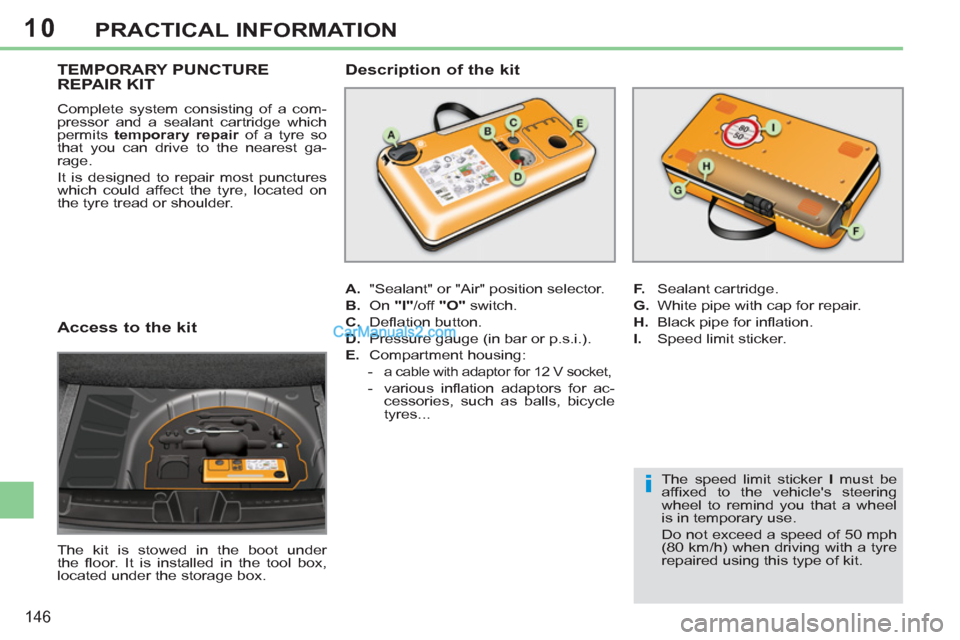
Access to the kit
The kit is stowed in the boot under
the fl oor. It is installed in the tool box,
located under the storage box.
TEMPORARY PUNCTURE
REPAIR KIT
Complete system consisting of a com-
pressor and a sealant cartridge which
permits temporary repair
of a tyre so
that you can drive to the nearest ga-
rage.
It is designed to repair most punctures
which could affect the tyre, located on
the tyre tread or shoulder.
A.
"Sealant" or "Air" position selector.
B.
On "I"
/off "O"
switch.
C.
Defl ation button.
D.
Pressure gauge (in bar or p.s.i.).
E.
Compartment housing:
-
a cable with adaptor for 12 V socket,
- various infl ation adaptors for ac-
cessories, such as balls, bicycle
tyres...
Description of the kit
F.
Sealant cartridge.
G.
White pipe with cap for repair.
H.
Black pipe for infl ation.
I.
Speed limit sticker.
The speed limit sticker I
must be
affi xed to the vehicle's steering
wheel to remind you that a wheel
is in temporary use.
Do not exceed a speed of 50 mph
(80 km/h) when driving with a tyre
repaired using this type of kit.
Page 149 of 292
10
i!
147
PRACTICAL INFORMATION
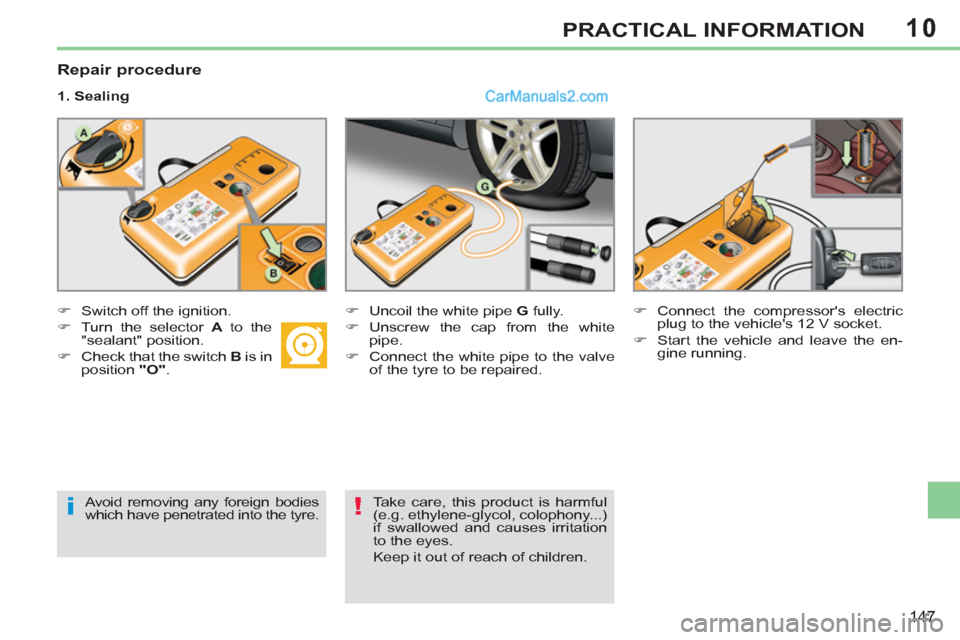
Repair procedure
1. Sealing
)
Switch off the ignition.
)
Turn the selector A
to the
"sealant" position.
)
Check that the switch B
is in
position "O"
.
)
Uncoil the white pipe G
fully.
)
Unscrew the cap from the white
pipe.
)
Connect the white pipe to the valve
of the tyre to be repaired.
)
Connect the compressor's electric
plug to the vehicle's 12 V socket.
)
Start the vehicle and leave the en-
gine running.
Avoid removing any foreign bodies
which have penetrated into the tyre.
Take care, this product is harmful
(e.g. ethylene-glycol, colophony...)
if swallowed and causes irritation
to the eyes.
Keep it out of reach of children.
Page 150 of 292
10
ii
148
PRACTICAL INFORMATION
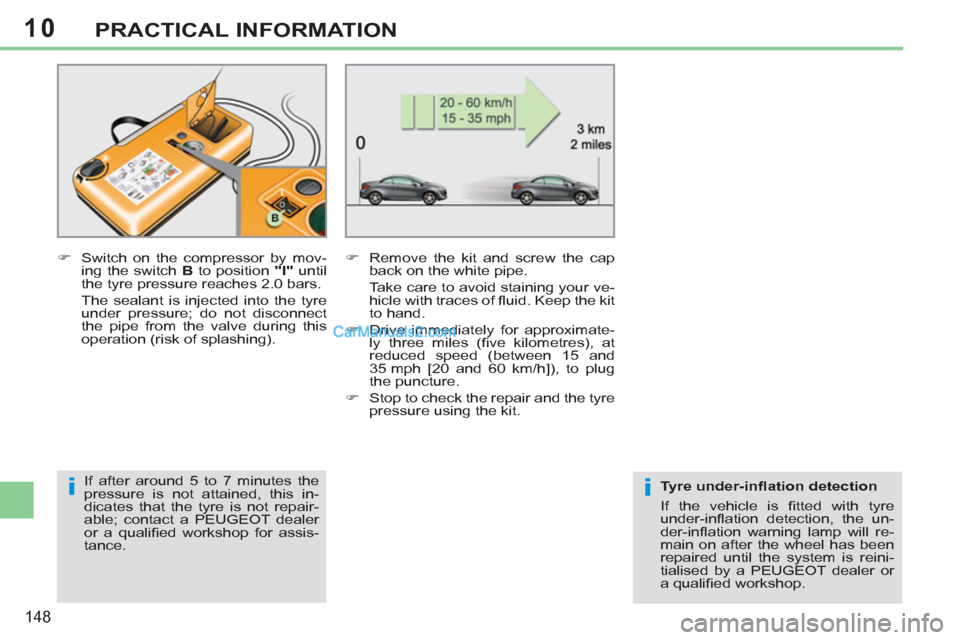
)
Switch on the compressor by mov-
ing the switch B
to position "I"
until
the tyre pressure reaches 2.0 bars.
The sealant is injected into the tyre
under pressure; do not disconnect
the pipe from the valve during this
operation (risk of splashing).
)
Remove the kit and screw the cap
back on the white pipe.
Take care to avoid staining your ve-
hicle with traces of fl uid. Keep the kit
to hand.
)
Drive immediately for approximate-
ly three miles (fi ve kilometres), at
reduced speed (between 15 and
35 mph [20 and 60 km/h]), to plug
the puncture.
)
Stop to check the repair and the tyre
pressure using the kit.
If after around 5 to 7 minutes the
pressure is not attained, this in-
dicates that the tyre is not repair-
able; contact a PEUGEOT dealer
or a qualifi ed workshop for assis-
tance.
Tyre under-infl ation detection
If the vehicle is fi tted with tyre
under-infl ation detection, the un-
der-infl ation warning lamp will re-
main on after the wheel has been
repaired until the system is reini-
tialised by a PEUGEOT dealer or
a qualifi ed workshop.
Page 151 of 292
10
!
149
PRACTICAL INFORMATION
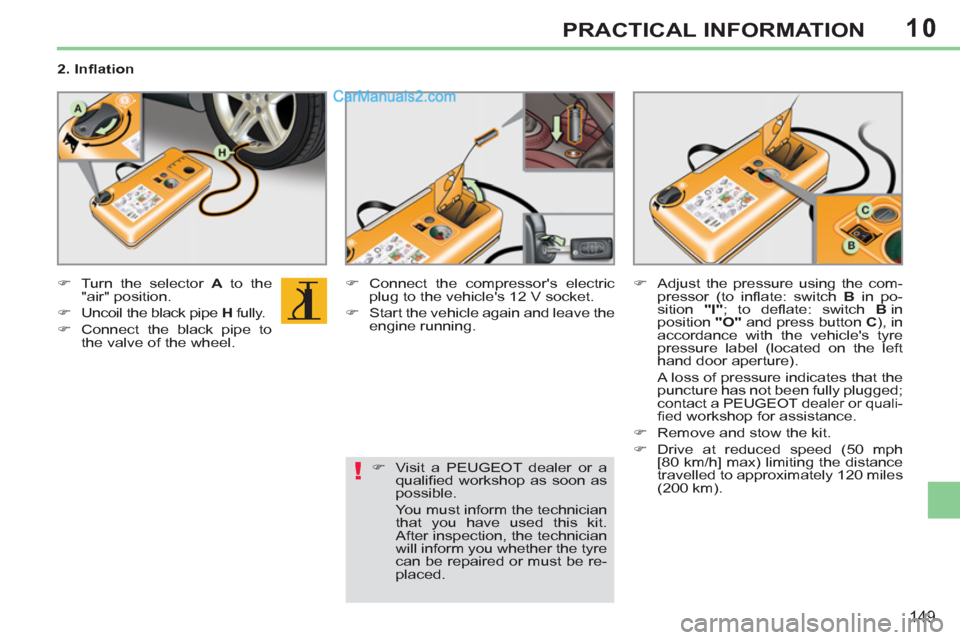
2. Infl ation
)
Turn the selector A
to the
"air" position.
)
Uncoil the black pipe H
fully.
)
Connect the black pipe to
the valve of the wheel.
)
Connect the compressor's electric
plug to the vehicle's 12 V socket.
)
Start the vehicle again and leave the
engine running.
)
Adjust the pressure using the com-
pressor (to infl ate: switch B
in po-
sition "I"
; to defl ate: switch B
in
position "O"
and press button C
), in
accordance with the vehicle's tyre
pressure label (located on the left
hand door aperture).
A loss of pressure indicates that the
puncture has not been fully plugged;
contact a PEUGEOT dealer or quali-
fi ed workshop for assistance.
)
Remove and stow the kit.
)
Drive at reduced speed (50 mph
[80 km/h] max) limiting the distance
travelled to approximately 120 miles
(200 km).
)
Visit a PEUGEOT dealer or a
qualifi ed workshop as soon as
possible.
You must inform the technician
that you have used this kit.
After inspection, the technician
will inform you whether the tyre
can be repaired or must be re-
placed.
Page 152 of 292
10
!
150
PRACTICAL INFORMATION
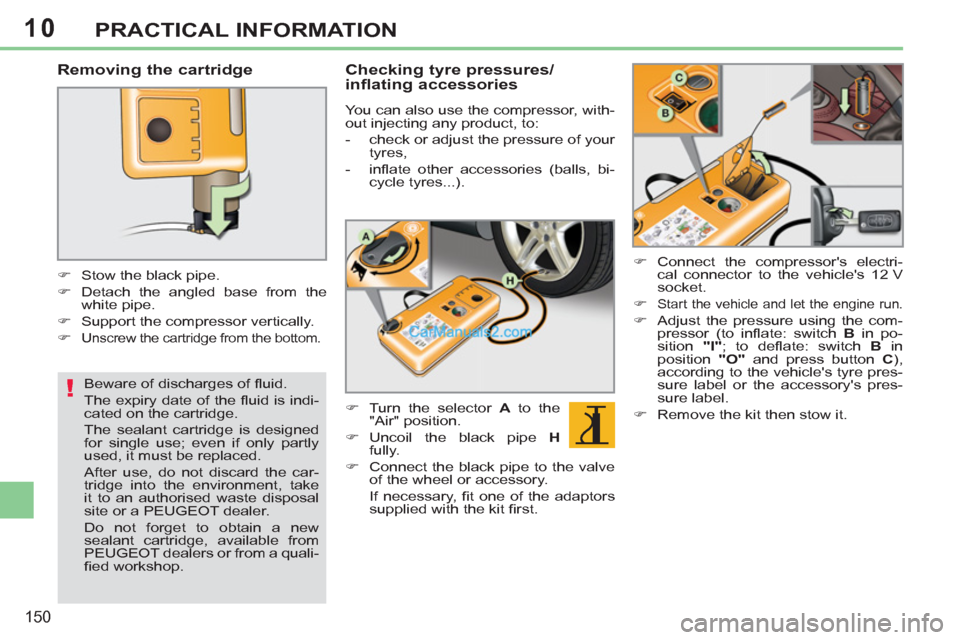
Removing the cartridge
)
Stow the black pipe.
)
Detach the angled base from the
white pipe.
)
Support the compressor vertically.
)
Unscrew the cartridge from the bottom.
Beware of discharges of fl uid.
The expiry date of the fl uid is indi-
cated on the cartridge.
The sealant cartridge is designed
for single use; even if only partly
used, it must be replaced.
After use, do not discard the car-
tridge into the environment, take
it to an authorised waste disposal
site or a PEUGEOT dealer.
Do not forget to obtain a new
sealant cartridge, available from
PEUGEOT dealers or from a quali-
fi ed workshop.
Checking tyre pressures/
inflating accessories
You can also use the compressor, with-
out injecting any product, to:
- check or adjust the pressure of your
tyres,
- infl ate other accessories (balls, bi-
cycle tyres...).
)
Turn the selector A
to the
"Air" position.
)
Uncoil the black pipe H
fully.
)
Connect the black pipe to the valve
of the wheel or accessory.
If necessary, fi t one of the adaptors
supplied with the kit fi rst.
)
Connect the compressor's electri-
cal connector to the vehicle's 12 V
socket.
)
Start the vehicle and let the engine run.
)
Adjust the pressure using the com-
pressor (to infl ate: switch B
in po-
sition "I"
; to defl ate: switch B
in
position "O"
and press button C
),
according to the vehicle's tyre pres-
sure label or the accessory's pres-
sure label.
)
Remove the kit then stow it.