key PEUGEOT 5008 2014 Service Manual
[x] Cancel search | Manufacturer: PEUGEOT, Model Year: 2014, Model line: 5008, Model: PEUGEOT 5008 2014Pages: 404, PDF Size: 23.34 MB
Page 313 of 404
3 11
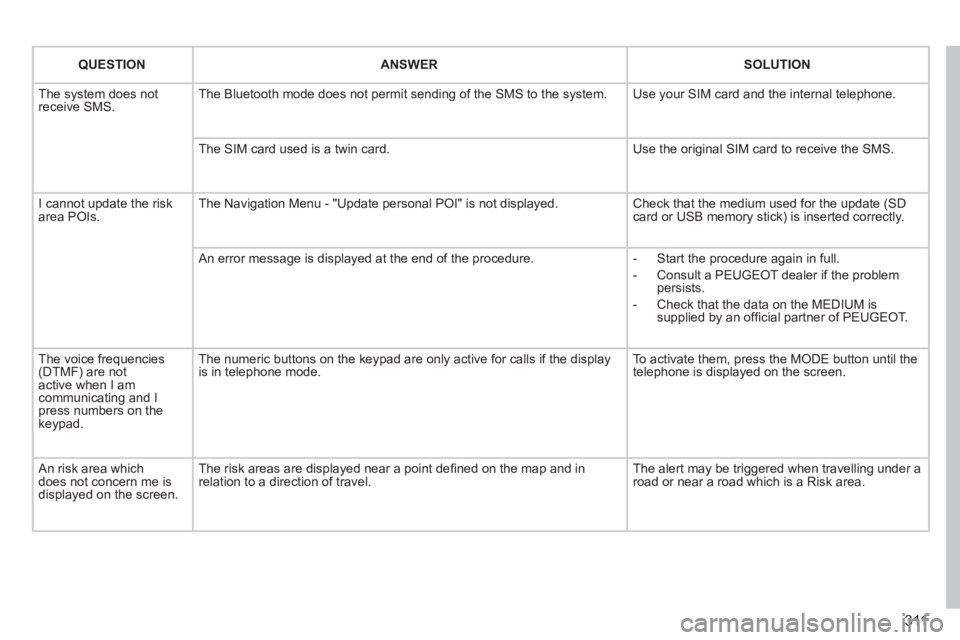
QUESTIONANSWERSOLUTION
The system does not receive SMS. The Bluetooth mode does not permit sending of the SMS to the system. Use your SIM card and the internal telephone.
The SIM card used is a twin card. Use the original SIM card to receive the SMS.
I cannot update the risk area POIs. The Navigation Menu - "Update personal POI" is not displayed. Check that the medium used for the update (SD card or USB memory stick) is inserted correctly.
An error message is displayed at the end of the procedure. - Start the procedure again in full.
- Consult a PEUGEOT dealer if the problem persists.
- Check that the data on the MEDIUM is supplied by an offi cial partner of PEUGEOT.
The voice frequencies (DTMF) are not active when I am communicating and I press numbers on the keypad.
The numeric buttons on the keypad are only active for calls if the displ\
ay is in telephone mode. To activate them, press the MODE button until the telephone is displayed on the screen.
An risk area which does not concern me is displayed on the screen.
The risk areas are displayed near a point defi ned on the map and in relation to a direction of travel. The alert may be triggered when travelling under a road or near a road which is a Risk area.
Page 342 of 404
340
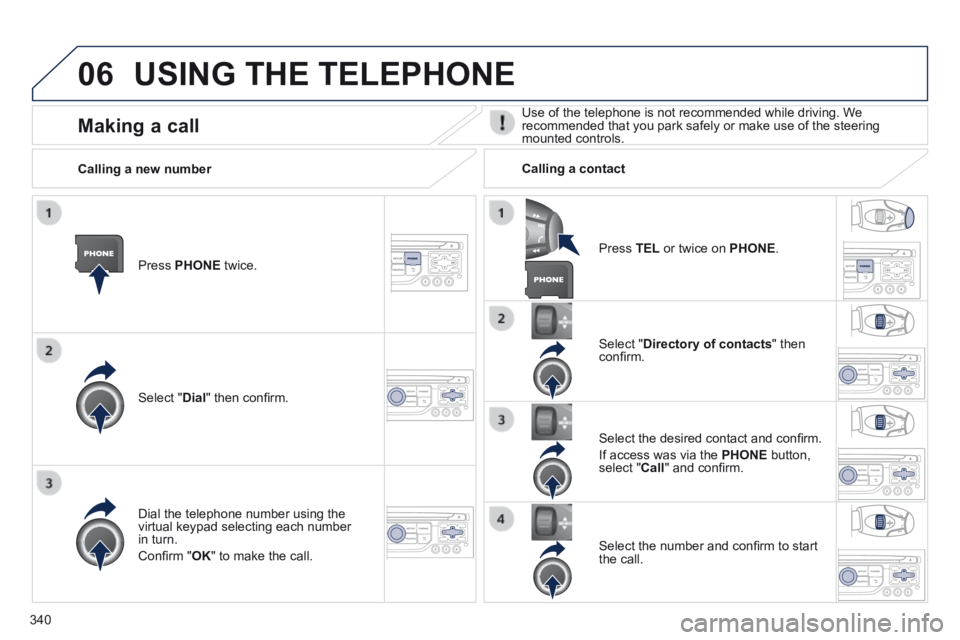
06 USING THE TELEPHONE
Press PHONE twice.
Select " Dial " then confi rm.
Select " Directory of contacts " then confi rm.
Dial the telephone number using the virtual keypad selecting each number in turn.
Confi rm " OK " to make the call.
Press TEL or twice on PHONE .
Calling a new number Calling a contact
Select the desired contact and confi rm.
If access was via the PHONE button, select " Call " and confi rm.
Select the number and confi rm to start the call.
Making a call Use of the telephone is not recommended while driving. We recommended that you park safely or make use of the steering mounted controls.
Page 345 of 404
343
06
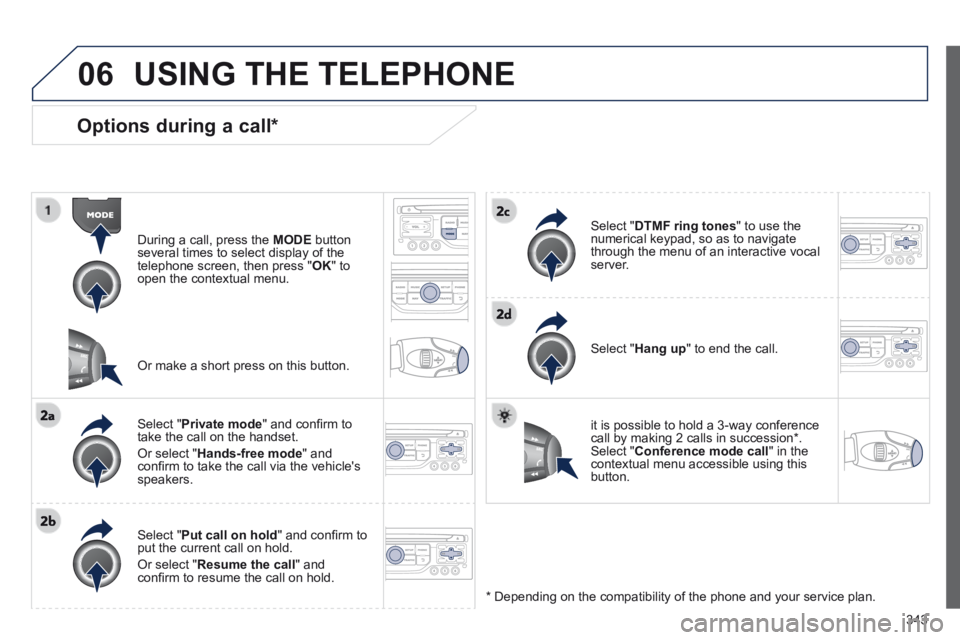
Options during a call *
During a call, press the MODE button several times to select display of the telephone screen, then press " OK " to open the contextual menu.
Select " Private mode " and confi rm to take the call on the handset.
Or select " Hands-free mode " and confi rm to take the call via the vehicle's speakers.
Select " Put call on hold " and confi rm to put the current call on hold.
Or select " Resume the call " and confi rm to resume the call on hold.
Select " DTMF ring tones " to use the numerical keypad, so as to navigate through the menu of an interactive vocal server.
Select " Hang up " to end the call.
* Depending on the compatibility of the phone and your service plan.
it is possible to hold a 3-way conference call by making 2 calls in succession*. Select " Conference mode call " in the contextual menu accessible using this button.
Or make a short press on this button.
USING THE TELEPHONE
Page 349 of 404
347
07
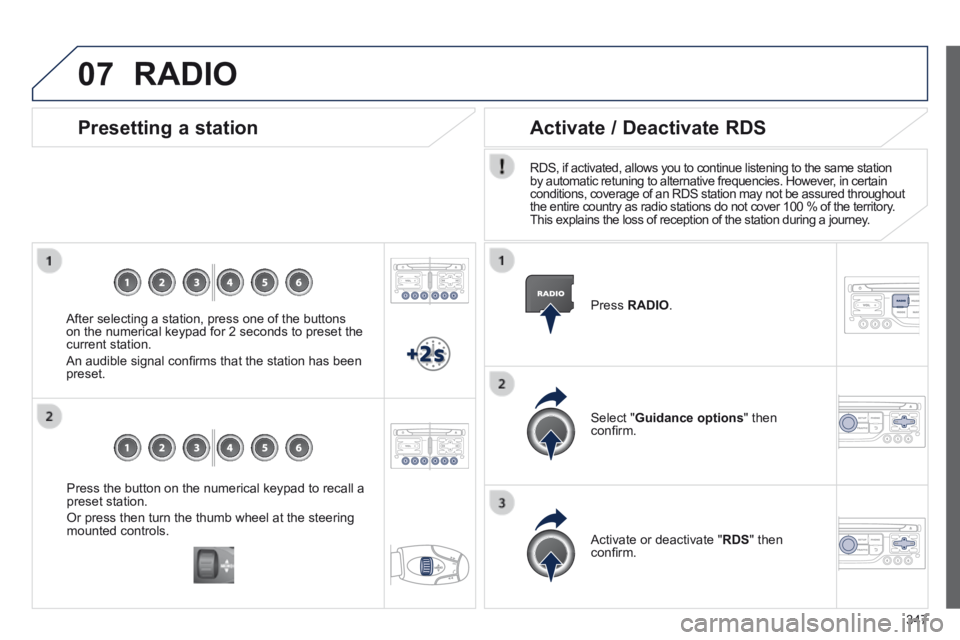
Press the button on the numerical keypad to recall a preset station.
Or press then turn the thumb wheel at the steering mounted controls.
Presetting a station
After selecting a station, press one of the buttons on the numerical keypad for 2 seconds to preset the current station.
An audible signal confi rms that the station has been preset.
Press RADIO .
Activate / Deactivate RDS
RDS, if activated, allows you to continue listening to the same station by automatic retuning to alternative frequencies. However, in certain conditions, coverage of an RDS station may not be assured throughout the entire country as radio stations do not cover 100 % of the territory. This explains the loss of reception of the station during a journey.
Select " Guidance options " then confi rm.
Activate or deactivate " RDS " then confi rm.
RADIO
Page 351 of 404
349
08
CD, MP3 CD / USB player
The audio equipment will only play audio fi les with ".wma, .aac, .fl ac, .ogg and .mp3" fi le extensions and with a bit rate of between 32 Kbps and 320 Kbps.
It also supports VBR (Variable Bit Rate) mode.
No other type of fi le (.mp4, .m3u...) can be played.
WMA fi les must be of the standard wma 9 type.
The sampling rates supported are greater than 32 KHz.
It is advisable to restrict fi le names to 20 characters, without using of special characters (e.g.: " " ? ; ù) to avoid any playing and displ\
aying problems.
In order to be able to play a recorded CDR or CDRW, when recording it is preferable to select the ISO 9660 level 1, 2 or Joliet standard.
If the disc is recorded in another format (udf, ...), it may not be pl\
ayed correctly.
It is recommended that the same recording standard is always used for an individual disc, with as low a speed as possible (4x maximum) for optimum sound quality.
In the particular case of a multi-session CD, the Joliet standard is recommended.
Information and advice
The system supports USB mass storage or iPod devices via the USB port (suitable cable not supplied).
If a partitioned USB memory key is connected to the system, only the fi rst partition is recognised.
Control of the peripheral device is with the audio system controls.
The number of tracks is limited to 2000 maximum, 999 tracks per folder.
If the current consumption at the USB port exceeds 500 mA, the system goes into protection mode and deactivates the port.
Other peripherals, not recognised on connection, must be connected to the auxiliary socket using a Jack cable (not supplied).
In order to be read, a USB memory stick must be formatted FAT 16 or 32.
The system does not support the operation of an Apple ® player and a ® player and a ®
USB memory stick connected at the same time.
It is recommended that offi cial Apple ® USB cables are used to ensure ® USB cables are used to ensure ®
correct operation.
MUSIC MEDIA PLAYERS
Page 379 of 404
377
06 BLUETOOTH
For safety reasons and because they require prolonged attention on the part of the driver, the operations for pairing of the Bluetooth mobile telephone with the Bluetooth hands-free system of your audio equipment must be carried out with the vehicle stationary and the ignition on.
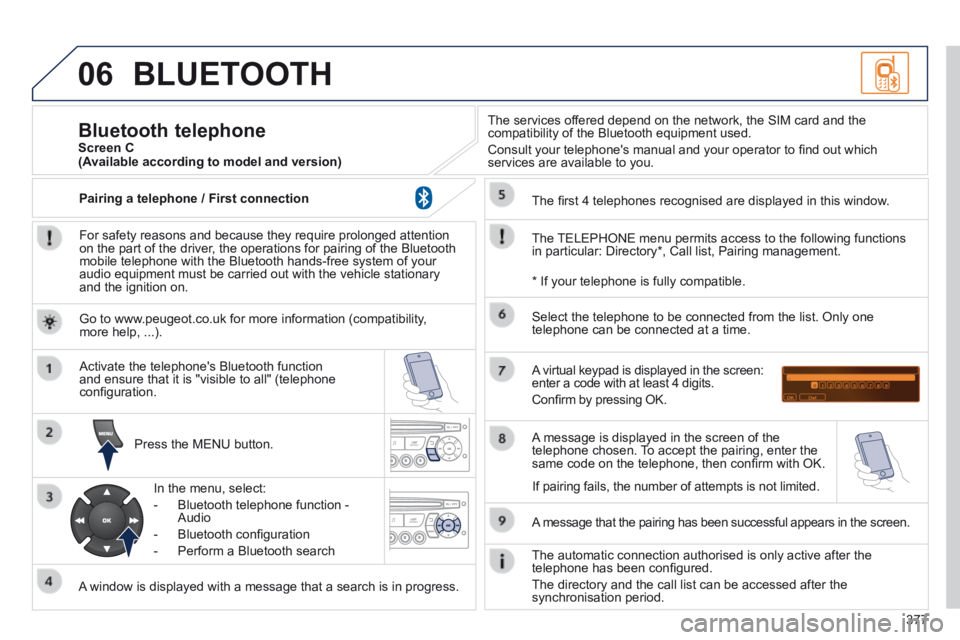
Press the MENU button.
A window is displayed with a message that a search is in progress.
Activate the telephone's Bluetooth function and ensure that it is "visible to all" (telephone confi guration.
In the menu, select:
- Bluetooth telephone function - Audio
- Bluetooth confi guration
- Perform a Bluetooth search
The services offered depend on the network, the SIM card and the compatibility of the Bluetooth equipment used.
Consult your telephone's manual and your operator to fi nd out which services are available to you.
Bluetooth telephone Screen C
The TELEPHONE menu permits access to the following functions in particular: Directory * , Call list, Pairing management.
The fi rst 4 telephones recognised are displayed in this window.
A virtual keypad is displayed in the screen: enter a code with at least 4 digits.
Confi rm by pressing OK.
A message that the pairing has been successful appears in the screen.
Select the telephone to be connected from the list. Only one telephone can be connected at a time.
A message is displayed in the screen of the telephone chosen. To accept the pairing, enter the same code on the telephone, then confi rm with OK.
The automatic connection authorised is only active after the telephone has been confi gured.
The directory and the call list can be accessed after the synchronisation period.
(Available according to model and version)
* If your telephone is fully compatible.
If pairing fails, the number of attempts is not limited.
Go to www.peugeot.co.uk for more information (compatibility, more help, ...).
Pairing a telephone / First connection
Page 380 of 404
378
06
Receiving a call
An incoming call is announced by a ring and a superimposed display in the vehicle's screen.
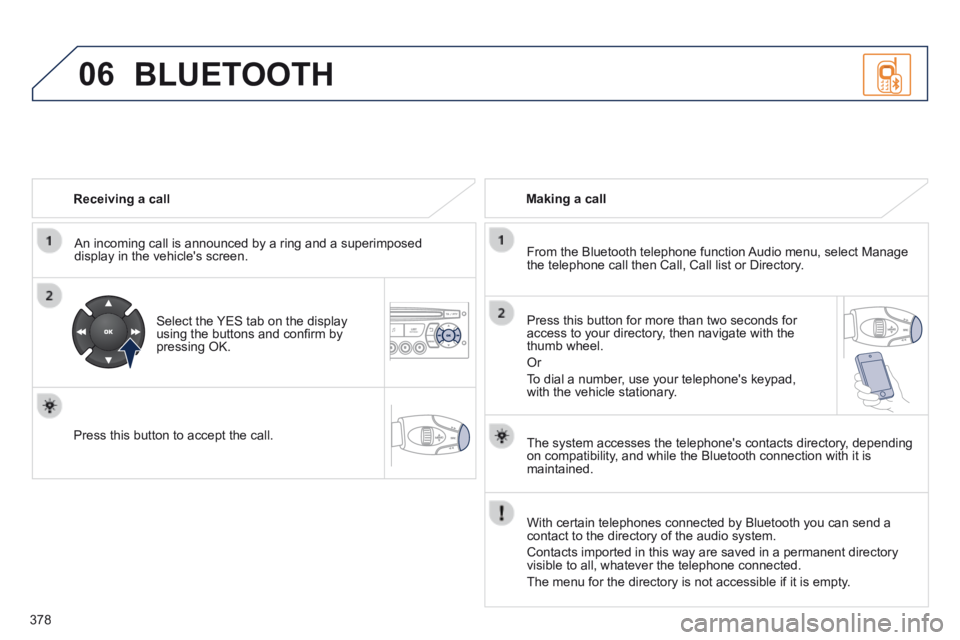
Select the YES tab on the display using the buttons and confi rm by pressing OK.
Press this button to accept the call.
Making a call
From the Bluetooth telephone function Audio menu, select Manage the telephone call then Call, Call list or Directory.
Press this button for more than two seconds for access to your directory, then navigate with the thumb wheel.
Or
To dial a number, use your telephone's keypad, with the vehicle stationary.
BLUETOOTH
The system accesses the telephone's contacts directory, depending on compatibility, and while the Bluetooth connection with it is maintained.
With certain telephones connected by Bluetooth you can send a contact to the directory of the audio system.
Contacts imported in this way are saved in a permanent directory visible to all, whatever the telephone connected.
The menu for the directory is not accessible if it is empty.
Page 381 of 404

379
06
Initiate the pairing between the telephone and the vehicle. This pairing can be initiated from the vehicle's telephone function menu or via the telephone's keypad. Refer to the steps in "Pairing a telephone" on the previous pages. During the pairing phase, the vehicle must be stationary with the key in the ignition.
Select the telephone to be connected from the telephone function menu.
The audio system connects to a newly paired telephone automatically.
Bluetooth audio streaming *
Wireless transmission of music fi les on the telephone, played via the audio equipment. The telephone must be able to manage the appropriate Bluetooth profi les (Profi les A2DP / AVRCP).
* Depending on the compatibility of the telephone.
** In certain cases, playing of the Audio fi les must be initiated from the keypad.
*** If the telephone supports the function.
Activate the streaming source by pressing the SOURCE button ** . The tracks to be played can be controlled as usual via the buttons on the audio system control panel and the steering mounted controls *** . The contextual information can be displayed on the screen.
During a call, press this button for more than 2 seconds.
Confi rm with OK to end the call.
Ending a call
BLUETOOTH
Page 392 of 404
Alphabetical index
390
Jack ......................................................223, 225JACK socket ..........................119, 353, 374, 376Jukebox (c opy) ..............................................294Jukebox (playing) ..........................................295
Labels, identification .....................................264Lamps, warning and indicator ...........Lamps, warning and indicator ...........Lamps, warning and indicator30, 33, 34LED daytime running lamps .........104, 231, 232LEDs - light-emitting diodes .................231, 232Level, brake fluid ...........................................209Level, headlamp wash ...........................111, 2 1 0Level, power steering fluid ............................209Levels and checks ................................20 6 -210Light-emitting diodes - LEDs ................231, 232
Keeping children safe ..........................132, 13 3,137, 145, 146, 150, 162Key with remote control ................81, 82, 84, 86Main beam ....................................100, 231-233Maintenance ...................................................25Map reading lamps .......................................114Markings, identification .................................264Mat ................................................................120Menu, main ...................................................370Mini fuel level ..................................................96Mirror, rear view ..............................................79Mirrors, door....................................................78Misfuel prevention ...........................................99Modularity, seats .............................................77Motorway function (direction indicators) ......152Mountings for ISOFIX seats .........................14 4MP3 CD .........................................................373Multimedia, rear ....................................Multimedia, rear ....................................Multimedia, rear119, 122Music media players ............................292, 348
K
J
L
M
Navigation .....................................280, 319, 320Net .................................................................127Number plate lamps .............................235, 236
N
Oil filter ..........................................................Oil filter ..........................................................Oil filter2 11Oil level....................................................42, 208Opening the bonnet ......................................204Opening the boot ......................................81, 94Opening the doors ....................................81, 91Opening the panoramic sunroof blind ..........124Opening the retractable screen ......................53Operation indicator lamps ........................30-33
Paint colour code ..........................................264Panoramic glass sunroof ..............................Panoramic glass sunroof ..............................Panoramic glass sunroof124Parking brake ................................................212Parking brake, electric ....................35, 166, 169Parking sensors, audible and visual .............198Parking sensors, front ...................................198Parking sensors, rear....................................198Parking space sensor ..................................201Particle emission filter ..................Particle emission filter ..................Particle emission filter204, 210, 211Passenger compartment filter ......................Passenger compartment filter ......................Passenger compartment filter2 11PEUGEOT call button ...................................267PEUGEOT Connect Assistance ..........266, 267
O
P
ISOFIX child seats .................................14 4 -146ISOFIX mountings.........................................14 4Lighting ..........................................................11 6Lighting bulbs (replacement) ........231, 234-236Lighting control stalk .....................................10 0Lighting dimmer ..............................................Lighting dimmer ..............................................Lighting dimmer43Lighting, guide-me home ......................104, 10 6Lighting, interior ....................................Lighting, interior ....................................Lighting, interior114 , 115Loading .............................................25, 77, 252Load reduction mode ....................................247Load space cover ...................................Load space cover ...................................Load space cover125 -127Locating your vehicle ......................................83Locking from the inside ...................................92Long objects, transporting ........................70, 77Luggage retaining net ...................................129
Page 395 of 404
.
Visual search393
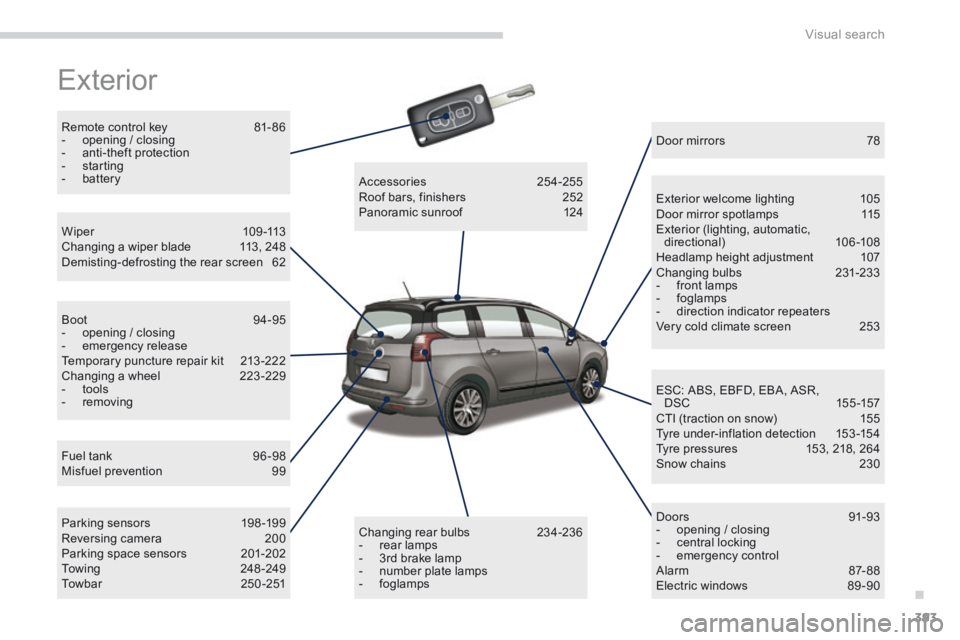
Exterior
Remote control key 81- 86 - opening / closing - anti-theft protection - starting - battery
Fuel tank 96 -98 Misfuel prevention 99
W i p e r 1 0 9 - 1 1 3 Changing a wiper blade 113, 248 Demisting-defrosting the rear screen 62
B o o t 9 4 - 9 5 - opening / closing - emergency release Temporary puncture repair kit 213 -222 Changing a wheel 223 -229 - tools - removing
Parking sensors 198 -199 Reversing camera 200 Parking space sensors 201-202 Towing 248 -249 T o w b a r 2 5 0 - 2 5 1
Accessories 254-255 Roof bars, finishers 252 Panoramic sunroof 124
Door mirrors 78
Exterior welcome lighting 105 Door mirror spotlamps 115 Exterior (lighting, automatic, directional) 106-108 Headlamp height adjustment 107 Changing bulbs 231-233 - front lamps - foglamps - direction indicator repeaters Very cold climate screen 253
D o o r s 9 1 - 9 3 - opening / closing - central locking - emergency control Alarm 87- 88 Electric windows 89 -90
ESC: ABS, EBFD, EBA, ASR, DSC 155 -157 CTI (traction on snow) 155 Tyre under-inflation detection 153 -154 Tyre pressures 153, 218, 264 Snow chains 230
Changing rear bulbs 234-236 - rear lamps - 3rd brake lamp - number plate lamps - foglamps