phone PEUGEOT 5008 2014 Workshop Manual
[x] Cancel search | Manufacturer: PEUGEOT, Model Year: 2014, Model line: 5008, Model: PEUGEOT 5008 2014Pages: 404, PDF Size: 23.34 MB
Page 379 of 404
377
06 BLUETOOTH
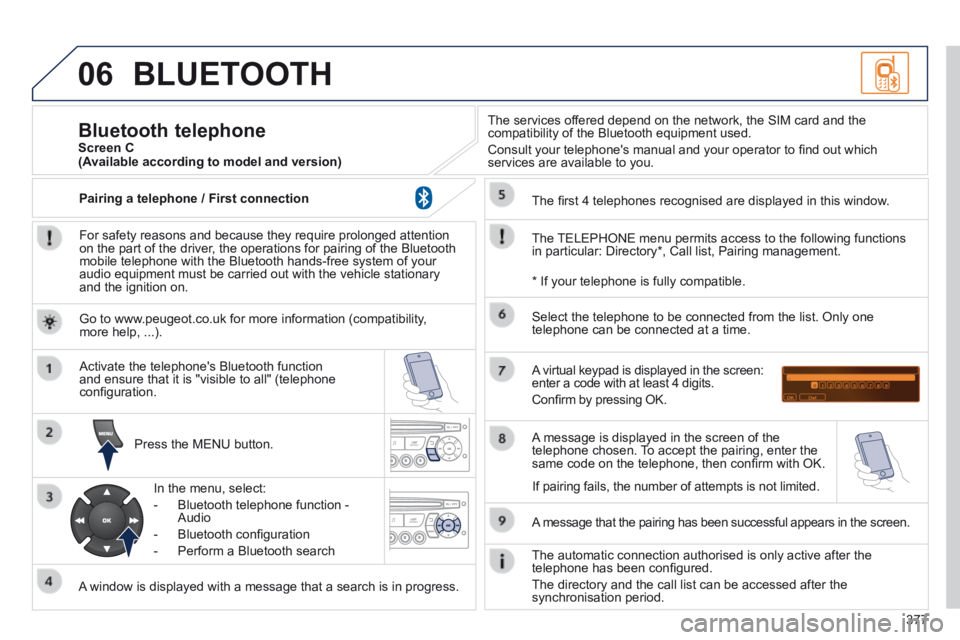
For safety reasons and because they require prolonged attention on the part of the driver, the operations for pairing of the Bluetooth mobile telephone with the Bluetooth hands-free system of your audio equipment must be carried out with the vehicle stationary and the ignition on.
Press the MENU button.
A window is displayed with a message that a search is in progress.
Activate the telephone's Bluetooth function and ensure that it is "visible to all" (telephone confi guration.
In the menu, select:
- Bluetooth telephone function - Audio
- Bluetooth confi guration
- Perform a Bluetooth search
The services offered depend on the network, the SIM card and the compatibility of the Bluetooth equipment used.
Consult your telephone's manual and your operator to fi nd out which services are available to you.
Bluetooth telephone Screen C
The TELEPHONE menu permits access to the following functions in particular: Directory * , Call list, Pairing management.
The fi rst 4 telephones recognised are displayed in this window.
A virtual keypad is displayed in the screen: enter a code with at least 4 digits.
Confi rm by pressing OK.
A message that the pairing has been successful appears in the screen.
Select the telephone to be connected from the list. Only one telephone can be connected at a time.
A message is displayed in the screen of the telephone chosen. To accept the pairing, enter the same code on the telephone, then confi rm with OK.
The automatic connection authorised is only active after the telephone has been confi gured.
The directory and the call list can be accessed after the synchronisation period.
(Available according to model and version)
* If your telephone is fully compatible.
If pairing fails, the number of attempts is not limited.
Go to www.peugeot.co.uk for more information (compatibility, more help, ...).
Pairing a telephone / First connection
Page 380 of 404
378
06
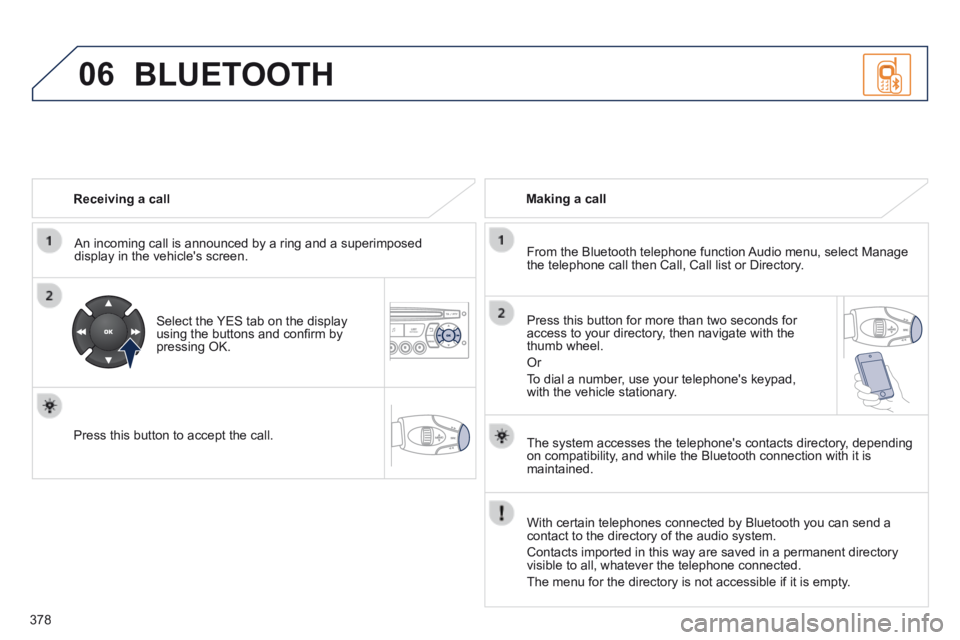
Receiving a call
An incoming call is announced by a ring and a superimposed display in the vehicle's screen.
Select the YES tab on the display using the buttons and confi rm by pressing OK.
Press this button to accept the call.
Making a call
From the Bluetooth telephone function Audio menu, select Manage the telephone call then Call, Call list or Directory.
Press this button for more than two seconds for access to your directory, then navigate with the thumb wheel.
Or
To dial a number, use your telephone's keypad, with the vehicle stationary.
BLUETOOTH
The system accesses the telephone's contacts directory, depending on compatibility, and while the Bluetooth connection with it is maintained.
With certain telephones connected by Bluetooth you can send a contact to the directory of the audio system.
Contacts imported in this way are saved in a permanent directory visible to all, whatever the telephone connected.
The menu for the directory is not accessible if it is empty.
Page 381 of 404

379
06
Initiate the pairing between the telephone and the vehicle. This pairing can be initiated from the vehicle's telephone function menu or via the telephone's keypad. Refer to the steps in "Pairing a telephone" on the previous pages. During the pairing phase, the vehicle must be stationary with the key in the ignition.
Select the telephone to be connected from the telephone function menu.
The audio system connects to a newly paired telephone automatically.
Bluetooth audio streaming *
Wireless transmission of music fi les on the telephone, played via the audio equipment. The telephone must be able to manage the appropriate Bluetooth profi les (Profi les A2DP / AVRCP).
* Depending on the compatibility of the telephone.
** In certain cases, playing of the Audio fi les must be initiated from the keypad.
*** If the telephone supports the function.
Activate the streaming source by pressing the SOURCE button ** . The tracks to be played can be controlled as usual via the buttons on the audio system control panel and the steering mounted controls *** . The contextual information can be displayed on the screen.
During a call, press this button for more than 2 seconds.
Confi rm with OK to end the call.
Ending a call
BLUETOOTH
Page 386 of 404

384
07 SCREEN MENU MAP(S)
Bluetooth telephone
Connect/Disconnect an equipment
Consult the paired equipment
Bluetooth confi guration
Telephone function
Audio Streaming function
Delete a paired equipment
Perform a Bluetooth search
Calls list
Call
Directory
Terminate the current call
Manage the telephone call
Activate secret mode
1
2
3
3
3
4
4
4
2
3
4
2
3
3
Video-brightness adjustment
Display confi guration
Defi ne vehicle settings *
Personalisation-Configuration
normal video
inverse video
brightness (- +) adjustment
Setting the date and time
setting day/month/year
hour/minute adjustment
choice of 12 h / 24 h mode
Choice of units
l/100 km - mpg - km/l
°Celsius / °Fahrenheit
Choice of language
1
2
4
3
2
4
4
3
4
4
2
3
4
4
4
* The settings vary according to vehicle.
Page 388 of 404

386
FREQUENTLY ASKED QUESTIONS
QUESTIONANSWERSOLUTION
I am unable to access my voicemail. Few telephones or service providers allow the use of this function.
The CD player sound is poor. The CD used is scratched or of poor quality. Insert good quality CDs and store them in suitable conditions.
The audio equipment settings (bass, treble, ambiences) are unsuitable.\
Set the treble or bass level to 0, without selecting an ambience.
The stored stations do not function (no sound, 87.5 Mhz is displayed...).
An incorrect waveband is selected. Press the BAND AST button to return to the waveband (AM, FM1, FM2, FMAST) on which the stations are stored.
The traffi c announcement (TA) is displayed. I do not receive any traffi c information.
The radio station is not part of the regional traffi c information network. Tune to a radio station which broadcasts traffi c information.
The quality of reception of the radio station listened to gradually deteriorates or the stored stations do not function (no sound, 87.5 Mhz is displayed...).
The vehicle is too far from the transmitter used by the station listened\
to or there is no transmitter in the geographical area through which the\
vehicle is travelling.
Activate the RDS function to enable the system to check whether there is a more powerful transmitter in the geographical area.
The environment (hills, buildings, tunnels, basement car parks...) blo\
ck reception, including in RDS mode. This phenomenon is normal and does not indicate a failure of the audio equipment.
The aerial is absent or has been damaged (for example when going through a car wash or into an underground car park). Have the aerial checked by a PEUGEOT dealer.
Page 390 of 404
Alphabetical index
388
Accessories ..................................................254Accessory socket, 12V ..................117, 120, 130Accessory socket, 12 volt .....................125, 126Access to the 3rd row .....................................74Adjusting headlamps ....................................107Adjusting head restraints ..........................68, 71Adjusting seat belt height .............................15 8Adjusting the steering wheel ..........................80Airbags ............................................................38Airbags, curtain .....................................16 4, 165Airbags, front.........................................162, 165Airbags, lateral ......................................16 4, 165Air conditioning ...............................................25Air conditioning, automatic .............................59Air conditioning, digital ...................................63Air conditioning, manual ...........................59, 60Air filter ..........................................................Air filter ..........................................................Air filter2 11Air flow ............................................................25Air vents ..........................................................58Alarm ...............................................................87Anti-pinch ................................................89, 124Anti-theft .........................................................84Armrest, rear .................................................Armrest, rear .................................................Armrest, rear126Assistance call .....................................265, 266Audible warning ............................................152Audio streaming (Bluetooth) .................352, 379Audio systems .................................................53Audio/video sockets ......................................296Automatic illumination of headlamps ......................................101, 10 6Automatic operation of hazard warning lamps ............................152Automatic rain sensitive windscreen wipers .................................................109, 112Auxiliary socket .....................296, 353, 374, 376
Backup starting .............................................245Battery ............................................211, 244-246Battery, charging ...........................................246Battery, remote control .............................85, 86Blind for panoramic sunroof ..........................Blind for panoramic sunroof ..........................Blind for panoramic sunroof124Blinds.............................................................131Bluetooth (hands-free) ..........297-299, 336, 377Bluetooth (telephone) ....................297-299, 336Bonnet ...........................................................204Bonnet stay ...................................................204Boot .................................................................94Boot lamp ..............................................116, 131Brake discs ....................................................212Brake lamps ..................................................234Brake pads ....................................................212Brakes ...........................................................212
A
D
Checks ..................................206, 207, 211, 212Child lock .......................................................151Children .........................................140, 145, 146Child seats ...........................132, 133, 137, 150Child seats, conventional ......................139, 140Closing the boot ........................................82, 94Closing the doors ......................................82, 91Cold climate screen ......................................253Colour screen, retractable ........................51, 53Concertina boards ..........................75, 125, 126Connectors, audio ..................118, 119, 374, 376Control for panoramic sunroof blind .............124Coolant level ...........................................39, 210Coolant temperature indicator ........................Coolant temperature indicator ........................Coolant temperature indicator39Courtesy lamps .............................................114Courtesy mirror .............................................Courtesy mirror .............................................Courtesy mirror118Cruise control ................................................181Cup holder ......................................Cup holder ......................................Cup holder117, 125, 126
Date (setting) ......................................44, 46, 48Deactivating ESP ..........................................157Deactivating the passenger airbag ...............162Deadlocking ....................................................82Defrosting ............................................60, 62, 78Demisting ........................................................60Dials and gauges ............................................27Diesel additive level ......................................210Dimensions ...................................................263Dipped beam .................................100, 231-233Dipstick ....................................................42, 208Directional lighting ........................................108
Capacity, fuel tank ..........................................96CD MP3 .........................................................373Central locking ..........................................82, 92Centre console ..............................................11 9Changing a bulb ............................231, 234-236Changing a fuse ............................................237Changing a wheel ................................223, 225Changing a wiper blade ........................113, 248Changing the date ..............................44, 46, 48Changing the remote control battery ..............85Changing the time ..............................44, 46, 48Checking levels .....................................208 -210Checking the engine oil level ..........................42Checking tyre pressures (using the kit) ........213
B
C
Page 394 of 404
Alphabetical index
392
Table of weights ............................257, 259, 262Tables, aircraft ..............................................121Tables of engines .................................256, 258Tables of fuses ..............................................237Ta n k , f u e l .........................................................99Technical data ...............................256 -259, 262Telephone .....................267, 297-299, 336, 340Telephone, hands-free ..........................297-299Temperature control for heated seats ............................................69Temperature, coolant ......................................39Temporary tyre repair kit...............................213Third brake lamp ..................................235, 236TMC (Traffic info) .................................289, 333To o l s ..............................................213, 223, 225To r c h .....................................116, 125, 126, 131Total distance recorder ...................................Total distance recorder ...................................Total distance recorder43To w b a r ...........................................................To w b a r ...........................................................To w b a r250Towed loads ..................................257, 259, 262Towing another vehicle .........................248, 249Traction control (ASR) ............................................................36Traffic information ( TA) .....................................290, 334, 347, 372Traffic information ( TM C) .................................289, 290, 333, 334Tr a i l e r ............................................................Tr a i l e r ............................................................Tr a i l e r250Trip computer .....................................Trip computer .....................................Trip computer54, 55, 57Trip distance recorder .....................................Trip distance recorder .....................................Trip distance recorder43Tyre pressures ..............................................264Ty r e s ................................................................25Tyre under-inflation detection ...............153, 226
Vehicle configuration .............28, 44, 46, 48, 51Vehicle identification .....................................264Ventilation .................................................58-60Voice commands ..........................................272
Warning lamps ....................................31, 34, 35Washing (advice)...........................................200Wash-wipe, rear ............................................Wash-wipe, rear ............................................Wash-wipe, rear11 0Weights .........................................257, 259, 262Welcome lighting...................................105, 115Window controls .............................................89Wiper control stalk ........................109, 110, 112Wiper, rear.....................................................11 0Wipers ...................................................109, 112
Xenon headlamps .........................................231
V
W
X
UT
Under floor storage .......................................13 0Under-inflation (detection) ............................153Unlocking ........................................................81Unlocking from the inside ...............................92Update risk areas ..................................287, 324Updating POIs ...............................................287USB (PEUGEOT Connect) ...................119, 374