radio controls PEUGEOT 5008 2017 User Guide
[x] Cancel search | Manufacturer: PEUGEOT, Model Year: 2017, Model line: 5008, Model: PEUGEOT 5008 2017Pages: 404, PDF Size: 15.31 MB
Page 354 of 404
10
Media
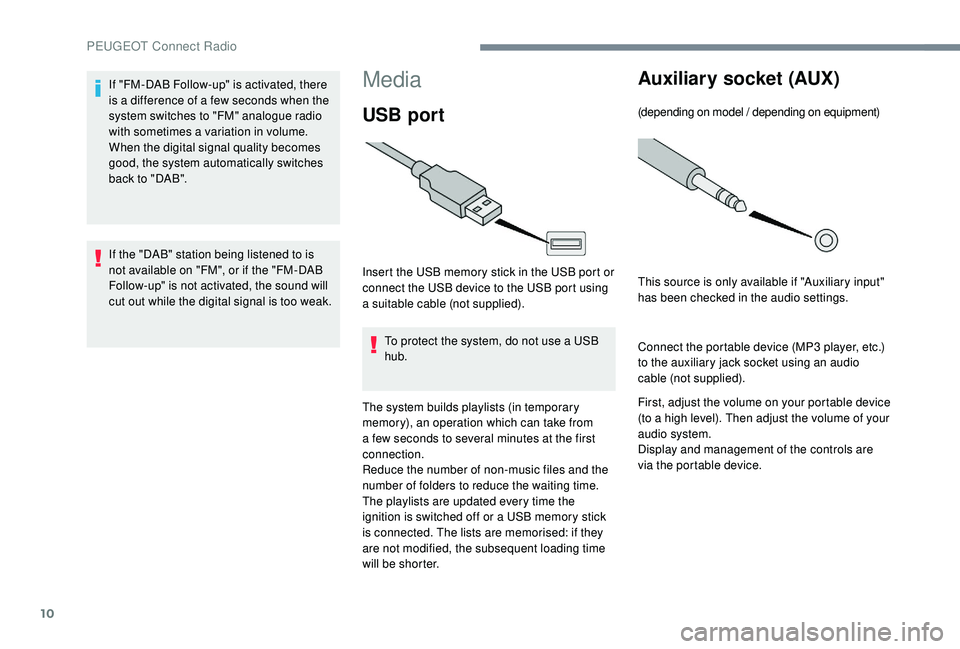
USB port
Insert the USB memory stick in the USB port or
connect the USB device to the USB port using
a suitable cable (not supplied).To protect the system, do not use a USB
hub.
The system builds playlists (in temporary
memory), an operation which can take from
a few seconds to several minutes at the first
connection.
Reduce the number of non-music files and the
number of folders to reduce the waiting time.
The playlists are updated every time the
ignition is switched off or a USB memory stick
is connected. The lists are memorised: if they
are not modified, the subsequent loading time
will be shorter.
Auxiliary socket (AUX)
(depending on model / depending on equipment)
This source is only available if "Auxiliary input"
has been checked in the audio settings.
Connect the portable device (MP3
player, etc.)
to the auxiliary jack socket using an audio
cable (not supplied).
First, adjust the volume on your portable device
(to a high level). Then adjust the volume of your
audio system.
Display and management of the controls are
via the portable device.
If "FM-DAB Follow-up" is activated, there
is a difference of a few seconds when the
system switches to "FM" analogue radio
with sometimes a variation in volume.
When the digital signal quality becomes
good, the system automatically switches
back to "DAB".
If the "DAB" station being listened to is
not available on "FM", or if the "FM-DAB
Follow-up" is not activated, the sound will
cut out while the digital signal is too weak.
PEUGEOT Connect Radio
Page 355 of 404
11
Selecting the source
Press "Radio Media" to display the
primary page.
Press the " SOURCES " button.
Choose the source.
Bluetooth® audio streaming
Streaming allows you to listen to music from
your smartphone.
The Bluetooth profile must be activated, first
adjust the volume on your portable device (to a
high level).
Then adjust the volume of your system.
If play does not start automatically, it may be
necessary to start the audio playback from the
smartphone.
Control is from the portable device or by using
the system's touch buttons.
Once connected in Streaming mode, the
smartphone is considered to be a media
source.
Connecting Apple® players
Connect the Apple® player to the USB port
using a suitable cable (not supplied).
Play starts automatically.
Control is via the audio system.
The classifications available are those
of the portable device connected
(artists / albums / genres / playlists /
audiobooks / podcasts), you can also use
a classification structured in the form of a
library.
The default classification used is by artist.
To modify the classification used, return
to the first level of the menu then select
the desired classification (playlists for
example) and confirm to go down through
the menu to the desired track.
The version of software in the audio system
may not be compatible with the generation of
your Apple
® p l aye r.
Information and advice
The system supports USB Mass Storage
devices, BlackBerry® devices or Apple®
players via USB ports. The adapter cable
is not supplied.
Device management is done by the audio
system controls.
Other peripherals, not recognised on
connection, must be connected to the
auxiliary socket using a Jack cable (not
supplied) or via Bluetooth streaming,
depending on compatibility.
To protect the system, do not use a USB
hub.
The audio equipment will only play audio files
with ".wav", ".wma", ".aac", ".ogg" and ".mp3"
file extensions and with a bit rate of between
32
Kbps and 320
Kbps.
It also supports VBR (Variable Bit Rate) mode.
No other file types (.mp4, etc.) can be read.
".wma" files must be of the standard wma
9
type.
Sampling frequencies supported are 11, 22,
44
and 48
kHz.
.
PEUGEOT Connect Radio
Page 361 of 404
17
Press "Bluetooth connection " to
display the list of paired devices.
Press on the name of the telephone
chosen in the list to disconnect it.
Press again to connect it.
Deleting a telephone
Press the basket at the top right
of the screen to display a basket
alongside the telephone chosen.
Press the basket alongside the
telephone chosen to delete it.
Receiving a call
An incoming call is announced by a ring and a
superimposed display in the screen.
Make a short press on the steering
mounted PHONE button to accept
an incoming call. And
Make a long press
on the steering mounted PHONE
button to reject the call.
Or Press "End call".
Making a call
Using the telephone is not recommended
while driving.
Park the vehicle.
Make the call using the steering mounted
controls.
Calling a new number
Press "Telephone" to display the
primary page. Enter the phone number using the
digital keypad.
Press "
Call" to start the call.
Calling a contact
Press "Telephone" to display the
primary page.
Or make a long press
on the steering mounted PHONE
button.
Press " Contacts ".
Select the desired contact from the list offered.
Press "Call".
.
PEUGEOT Connect Radio
Page 373 of 404
1
Bluetooth® audio system
Contents
First steps
2
S
teering mounted controls
3
M
enus
4
R
adio
4
D
AB radio (Digital Audio Broadcasting)
6
M
edia
8
T
elephone
1
1
Frequently asked questions
1
6 The different functions and settings
described vary according to the version
and configuration of your vehicle.
As a safety measure and because it
requires sustained attention by the
driver, the pairing of a Bluetooth mobile
telephone with the Bluetooth hands-free
system of your audio system must be
done with the vehicle stationary
and the
ignition on.
Your audio system is coded in such a way
that it will only operate in your vehicle.
All work on the system must be
carried out exclusively by a dealer or a
qualified workshop, to avoid any risk of
electrocution, fire or mechanical faults.
To avoid discharging the battery, the audio
system may switch off after a few minutes
if the engine is not running.
.
Bluetooth® audio system
Page 375 of 404
3
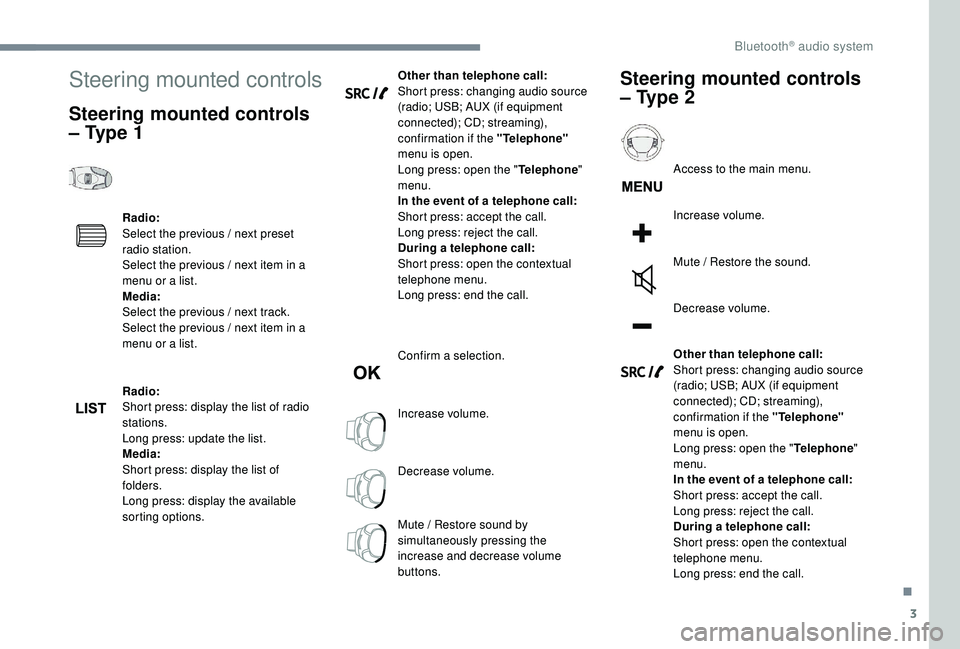
Steering mounted controls
Steering mounted controls
– Type 1
Radio:
Select the previous / next preset
radio station.
Select the previous / next item in a
menu or a list.
Media:
Select the previous / next track.
Select the previous / next item in a
menu or a list.
Radio:
Short press: display the list of radio
stations.
Long press: update the list.
Media:
Short press: display the list of
folders.
Long press: display the available
sorting options.Other than telephone call:
Short press: changing audio source
(radio; USB; AUX (if equipment
connected); CD; streaming),
confirmation if the "Telephone"
menu is open.
Long press: open the " Telephone"
menu.
In the event of a telephone call:
Short press: accept the call.
Long press: reject the call.
During a telephone call:
Short press: open the contextual
telephone menu.
Long press: end the call.
Confirm a selection.
Increase volume.
Decrease volume.
Mute / Restore sound by
simultaneously pressing the
increase and decrease volume
buttons.
Steering mounted controls
– Type 2
Access to the main menu.
Increase volume.
Mute / Restore the sound.
Decrease volume.
Other than telephone call:
Short press: changing audio source
(radio; USB; AUX (if equipment
connected); CD; streaming),
confirmation if the "Telephone"
menu is open.
Long press: open the " Telephone"
menu.
In the event of a telephone call:
Short press: accept the call.
Long press: reject the call.
During a telephone call:
Short press: open the contextual
telephone menu.
Long press: end the call.
.
Bluetooth® audio system
Page 398 of 404
300
S
Safety, children ..............15 3 -15 4, 157-15 8, 162,
16 4, 166 -168, 170
Saturation of the particle filter (Diesel)
.........261
Scented air freshener
............................114 -115
Screen menu map
........................................... 13
Screen, monochrome
...............................38-39
Screens, very cold conditions
.....................25
3
Screenwash, front
......................................... 13 5
Screenwash, rear
.......................................... 13 5
SCR (Selective Catalytic Reduction) system
...................................... 262
Seat belts
....................................... 14 9 -152, 163
Seat belts, rear
....................................... 14 9 -15 0
Seats, additional
....................................... 8
8 -91
Seats, electric
................................................. 81
RRadio .......................................... 23 -24, 2 7, 7, 11
Radio, digital (Digital Audio Broadcasting - DAB)
.................................25
, 9
Range, AdBlue
................................................ 32
RDS
................
....................................... 24-25, 7
Rear air blower
...............................
...............102
Rear screen, demisting – defrosting .....104 -105
Recharging the battery
..........................287-288
Reduction of electrical load
..........................252
Regeneration of the particle filter
.................261
Pads, brake
...........................................
261-262
Paint
..............................................................
296
Paint colour code ..........................................
296
Parcel shelf, rear
...........................................
11 9
Park Assist
...............................
.............
2 3 7, 239
Parking brake
........................................
261-262
Parking brake, electric
..................... 2
6,
181-18 4
Parking sensors, front
...........................
230-231
Parking sensors, rear .................................... 230
Personalisation
............................................
9 -10
PEUGEOT Connect Nav ...................................
1
PEUGEOT Connect Radio
...............................
1
P
lates, identification
...................................... 296
Player, Apple
® ........................................... 2 7, 11
Player, MP3 CD ............................... ................26
Player, USB
....................................... 112 , 26, 10
Port, USB
.......................................... 112 , 26, 10
Pre-heater, Diesel
........................................... 22
Pressures, tyres
.................................... 272, 296
Pre-tensioning seat belts
.............................. 152
Priming the fuel system
........................ 266-267
Profiles
...................................................... 34, 18
Protecting children
......... 15 3 -15 4, 157-15 8, 162,
16 4, 166 -168, 170
Puncture
........................................ 269-270, 272
PReinitialisation of the under-
inflation detection system ...........................19 6
Reinitialising the remote control
..................... 58
R
eminder, key in ignition
...............................17
8
Remote control
.........................4 9 - 51, 53, 55-56
Removing a wheel
................................ 275 -278
Removing the mat
......................................... 11 6
Replacing bulbs
..................... 2
78-279, 281-283
Replacing fuses
.................................... 284-285
Replacing the air filter
................................... 2
61
Replacing the oil filter
................................... 2
61
Replacing the passenger compartment filter ......261
Reservoir, screenwash
......................... 259-260
Resetting the service indicator
....................... 30
Resetting the trip recorder
........................ 35 -37
Rev counter
................................................... 8-9
Reversing lamps
..............................
......281-282
Roof bars
....................................................... 255
Running out of fuel (Diesel)
.................. 266-267 Seats, front
...............................
.................
76, 81
Seats, heated
............................................
81- 82
Seats, rear
.................................................
85 -91
Selector, gear
.........................................
185 -189
Serial number, vehicle
..................................
296
Service indicator
.......................................
28, 34
Servicing
......................................................... 28
S
ettings, equipment
............................
38 - 42, 45
Settings, system
........................................
35, 19
Sidelamps
.............................. 12
6 -127,
279, 281
Side repeater ................................................
281
Snow chains .......................................... 195, 254
Snow screen
................................................. 253
Socket, 12 V
.................................................. 271
Socket, 12 V accessory
.........111, 11 9 , 123, 271
Socket, 230 V
...............................
.................11 8
Socket, auxiliary
........................................ 2
6, 10
Socket, JACK
............................................ 26, 10
Speakers
....................................................... 112
Speed limiter
.......................... 19
7-198, 200-203
Speed limit recognition
......................... 19
8 -19 9
Speedometer
................................................ 8-9
Stability control (ESC).................... 142, 14 4 -14 6
Starting a Diesel engine
............................... 2
47
Starting the engine
....................................... 17
7
Starting the vehicle
....26, 175 , 17 7-179, 185 -189
Starting using another battery
.......18 0 -181, 286
Station, radio
...............................
..........23-25, 7
Stay, bonnet
.................................................. 256
Steering mounted controls, audio
................ 3,
3
Steering wheel, adjustment
............................ 83
S
topping the vehicle
....26, 175 , 17 7-179, 185 -189
Stop & Start
.................22, 3 7, 95, 103, 192-195,
245, 256, 260, 289
Storage
............................................ 11 0 -111, 114
Storage boxes
............................................... 120
Storage compartments
.................................11 0
Storing driving positions
................................. 81
S
unroof, panoramic
........................................ 70
S
un visor
...............................
........................111
Alphabetical index