display PEUGEOT 5008 2017 Owner's Guide
[x] Cancel search | Manufacturer: PEUGEOT, Model Year: 2017, Model line: 5008, Model: PEUGEOT 5008 2017Pages: 404, PDF Size: 15.31 MB
Page 43 of 404
41
Upper bar
Certain information is always displayed in the
upper bar of the touch screen:
-
T
ime and exterior temperature (a blue
warning lamp appears when there is a risk
of i c e).
-
R
epeat of the air conditioning information,
and direct access to the corresponding
menu.
-
S
ummary of information from the Radio
Media , Telephone menus and navigation
instructions*.
-
Notifications.
-
A
ccess to the Settings for the touch screen
and the digital instrument panel (date/time,
languages, units,etc.).
*
D
epending on equipment
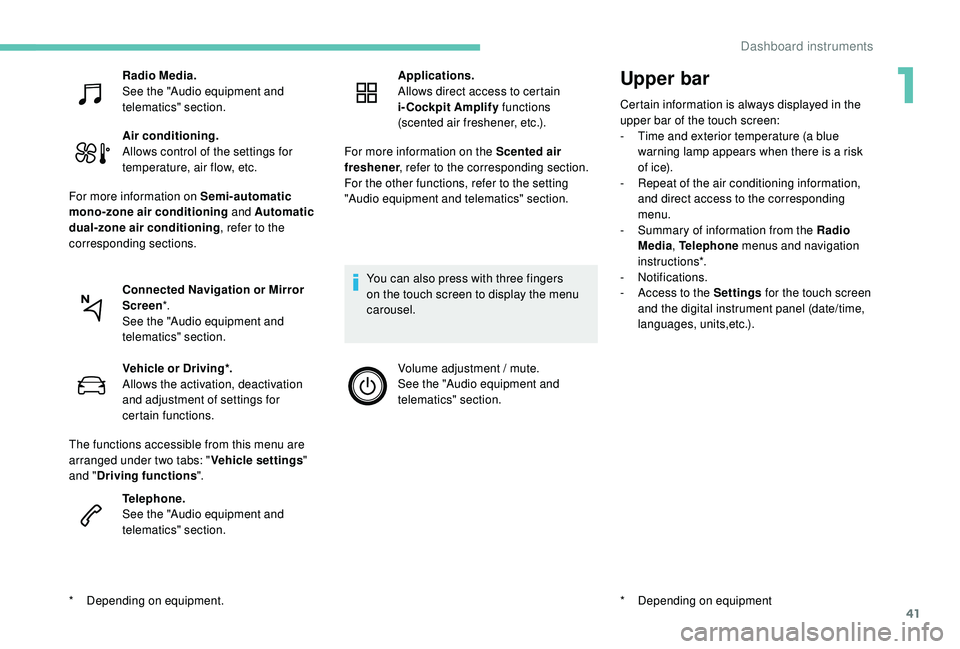
Radio Media.
See the "Audio equipment and
telematics" section.
Air conditioning.
Allows control of the settings for
temperature, air flow, etc.
For more information on Semi-automatic
mono-zone air conditioning and Automatic
dual-zone air conditioning , refer to the
corresponding sections.
Connected Navigation or Mirror
Screen *.
See the "Audio equipment and
telematics" section.
*
D
epending on equipment. Vehicle or Driving*.
Allows the activation, deactivation
and adjustment of settings for
certain functions.
The functions accessible from this menu are
arranged under two tabs: " Vehicle settings"
and " Driving functions ".
Telephone.
See the "Audio equipment and
telematics" section. Applications.
Allows direct access to certain
i-Cockpit Amplify
functions
(scented air freshener, etc.).
For more information on the Scented air
freshener , refer to the corresponding section.
For the other functions, refer to the setting
"Audio equipment and telematics" section.
You can also press with three fingers
on the touch screen to display the menu
carousel. Volume adjustment / mute.
See the "Audio equipment and
telematics" section.
1
Dashboard instruments
Page 44 of 404
42
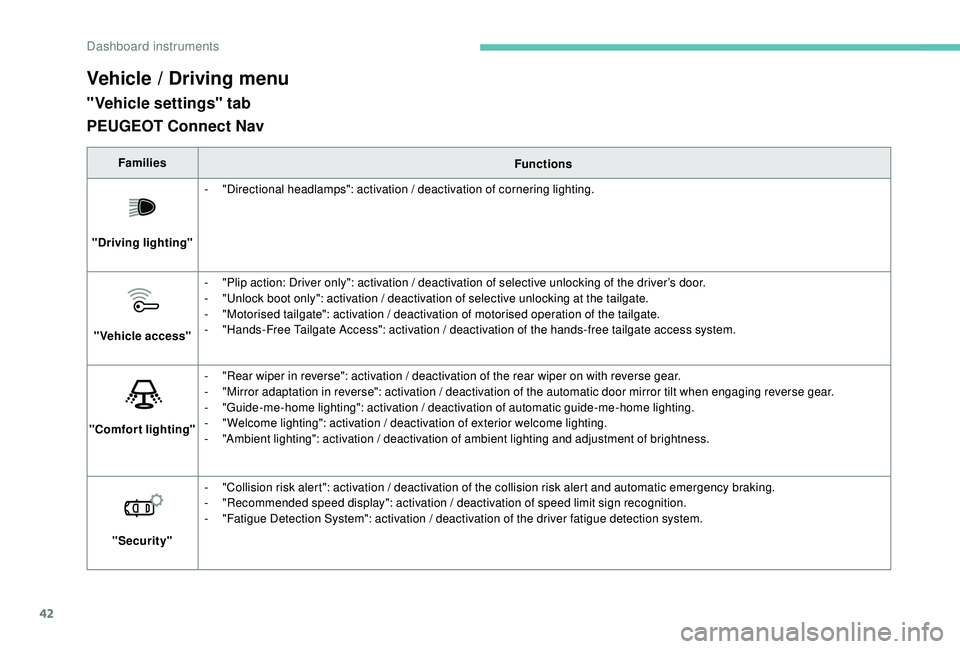
Vehicle / Driving menu
"Vehicle settings" tab
FamiliesFunctions
"Driving lighting" -
"
Directional headlamps": activation / deactivation of cornering lighting.
"Vehicle access" -
"
Plip action: Driver only": activation / deactivation of selective unlocking of the driver’s door.
-
"
Unlock boot only": activation / deactivation of selective unlocking at the tailgate.
-
"
Motorised tailgate": activation / deactivation of motorised operation of the tailgate.
-
"
Hands-Free Tailgate Access": activation / deactivation of the hands-free tailgate access system.
"Comfort lighting" -
"
Rear wiper in reverse": activation / deactivation of the rear wiper on with reverse gear.
-
"
Mirror adaptation in reverse": activation / deactivation of the automatic door mirror tilt when engaging reverse gear.
-
"
Guide-me-home lighting": activation / deactivation of automatic guide-me-home lighting.
-
"
Welcome lighting": activation / deactivation of exterior welcome lighting.
-
"
Ambient lighting": activation / deactivation of ambient lighting and adjustment of brightness.
"Security" -
"
Collision risk alert": activation / deactivation of the collision risk alert and automatic emergency braking.
-
"
Recommended speed display": activation / deactivation of speed limit sign recognition.
-
"
Fatigue Detection System": activation / deactivation of the driver fatigue detection system.
PEUGEOT Connect Nav
Dashboard instruments
Page 45 of 404
43
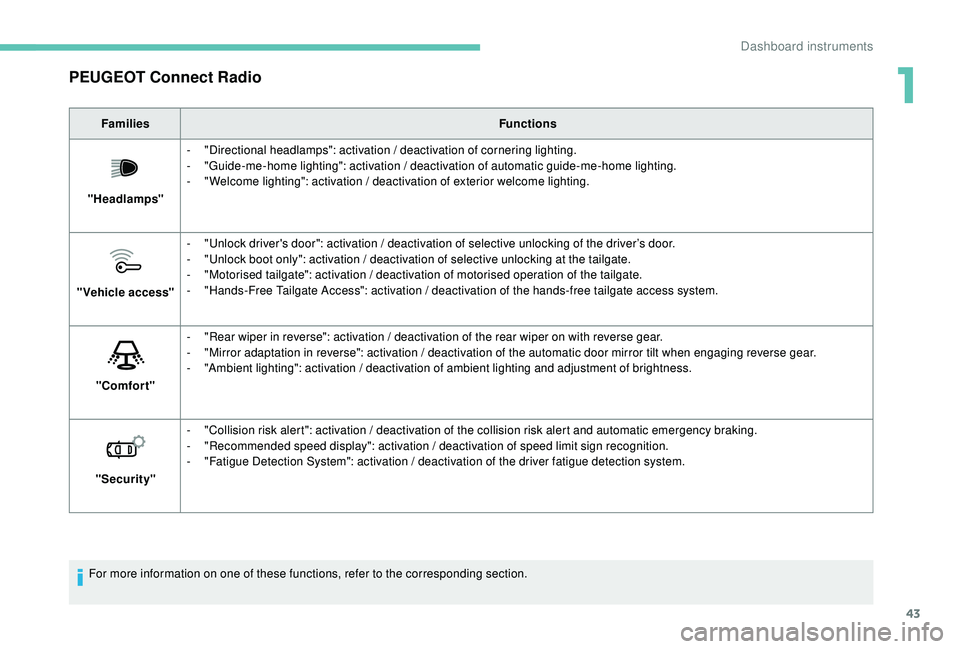
PEUGEOT Connect Radio
FamiliesFunctions
"Headlamps" -
"
Directional headlamps": activation / deactivation of cornering lighting.
-
"
Guide-me-home lighting": activation / deactivation of automatic guide-me-home lighting.
-
"
Welcome lighting": activation / deactivation of exterior welcome lighting.
"Vehicle access" -
"
Unlock driver's door": activation / deactivation of selective unlocking of the driver’s door.
-
"
Unlock boot only": activation / deactivation of selective unlocking at the tailgate.
-
"
Motorised tailgate": activation / deactivation of motorised operation of the tailgate.
-
"
Hands-Free Tailgate Access": activation / deactivation of the hands-free tailgate access system.
"Comfort" -
"
Rear wiper in reverse": activation / deactivation of the rear wiper on with reverse gear.
-
"
Mirror adaptation in reverse": activation / deactivation of the automatic door mirror tilt when engaging reverse gear.
-
"
Ambient lighting": activation / deactivation of ambient lighting and adjustment of brightness.
"Security" -
"
Collision risk alert": activation / deactivation of the collision risk alert and automatic emergency braking.
-
"
Recommended speed display": activation / deactivation of speed limit sign recognition.
-
"
Fatigue Detection System": activation / deactivation of the driver fatigue detection system.
For more information on one of these functions, refer to the corresponding section.
1
Dashboard instruments
Page 48 of 404
46
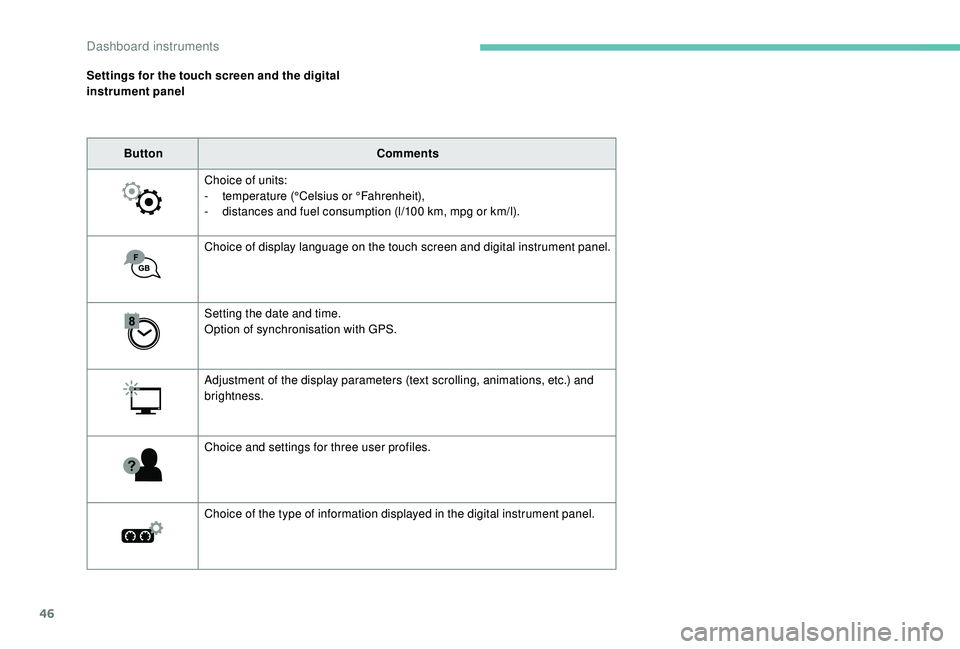
Settings for the touch screen and the digital
instrument panelButton Comments
Choice of units:
-
t
emperature (°Celsius or °Fahrenheit),
-
d
istances and fuel consumption (l/100 km, mpg or km/l).
Choice of display language on the touch screen and digital instrument panel.
Setting the date and time.
Option of synchronisation with GPS.
Adjustment of the display parameters (text scrolling, animations, etc.) and
brightness.
Choice and settings for three user profiles.
Choice of the type of information displayed in the digital instrument panel.
Dashboard instruments
Page 50 of 404
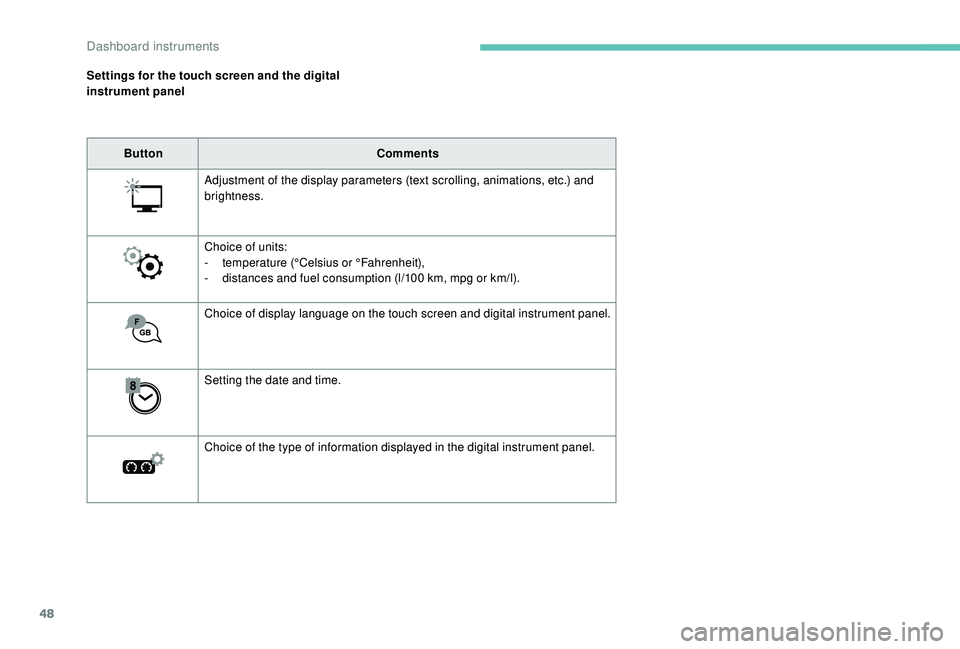
48
Settings for the touch screen and the digital
instrument panelButton Comments
Adjustment of the display parameters (text scrolling, animations, etc.) and
brightness.
Choice of units:
-
t
emperature (°Celsius or °Fahrenheit),
-
d
istances and fuel consumption (l/100 km, mpg or km/l).
Choice of display language on the touch screen and digital instrument panel.
Setting the date and time.
Choice of the type of information displayed in the digital instrument panel.
Dashboard instruments
Page 60 of 404
58
Reinitialising the remote
control
Following replacement of the battery or in
the event of a remote control fault, it may be
necessary to reinitialise the remote control.
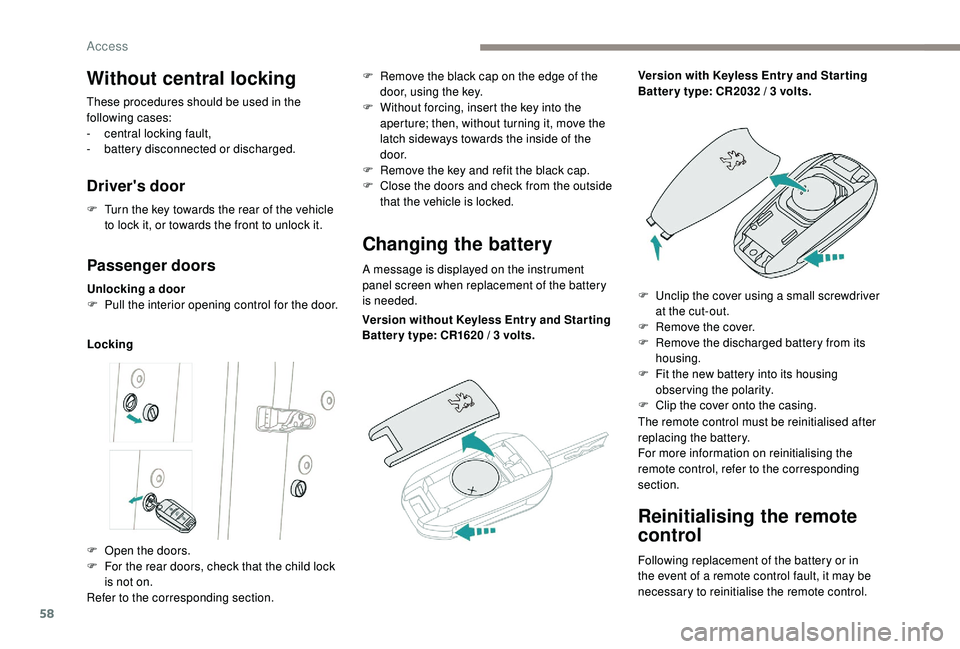
Without central locking
These procedures should be used in the
following cases:
-
c
entral locking fault,
-
b
attery disconnected or discharged.
Driver's door
F Turn the key towards the rear of the vehicle to lock it, or towards the front to unlock it.
Passenger doors
Unlocking a door
F P ull the interior opening control for the door.
Locking
Changing the battery
A message is displayed on the instrument
panel screen when replacement of the battery
is needed.
F
O
pen the doors.
F
F
or the rear doors, check that the child lock
is not on.
Refer to the corresponding section. F
R
emove the black cap on the edge of the
door, using the key.
F
W
ithout forcing, insert the key into the
aperture; then, without turning it, move the
latch sideways towards the inside of the
d o o r.
F
R
emove the key and refit the black cap.
F
C
lose the doors and check from the outside
that the vehicle is locked.
Version without
K
eyless Entr y and Star ting
Batter y type: CR1620
/ 3 volts.Version with
K
eyless Entr y and Star ting
Batter y type: CR2032 / 3 volts.
F
U
nclip the cover using a small screwdriver
at the cut-out.
F
R
emove the cover.
F
R
emove the discharged battery from its
housing.
F
F
it the new battery into its housing
observing the polarity.
F
C
lip the cover onto the casing.
The remote control must be reinitialised after
replacing the battery.
For more information on reinitialising the
remote control, refer to the corresponding
section.
Access
Page 62 of 404
60
Anti-intrusion security
Operation
If one of the doors or the boot is open, the
automatic central locking does not take place.This is signalled by the sound of
the locks rebounding, accompanied
by illumination of this symbol in the
instrument panel, an audible signal
and the display of an alert message.
Carrying long or voluminous objects
If you want to drive with the boot open, you
should press the central locking button
to lock the doors. Other wise, every time
the speed of the vehicle exceeds 6
mph
(10
km/h), the locks will rebound and the
alerts mentioned above will appear.
Pressing the central locking button
unlocks the vehicle.
Above 6
mph (10 km/h), this unlocking is
te m p o r a r y.
This system allows automatic simultaneous
locking of the doors and boot as soon as the
speed of the vehicle exceeds 6
mph (10 km/h).
Unlocking
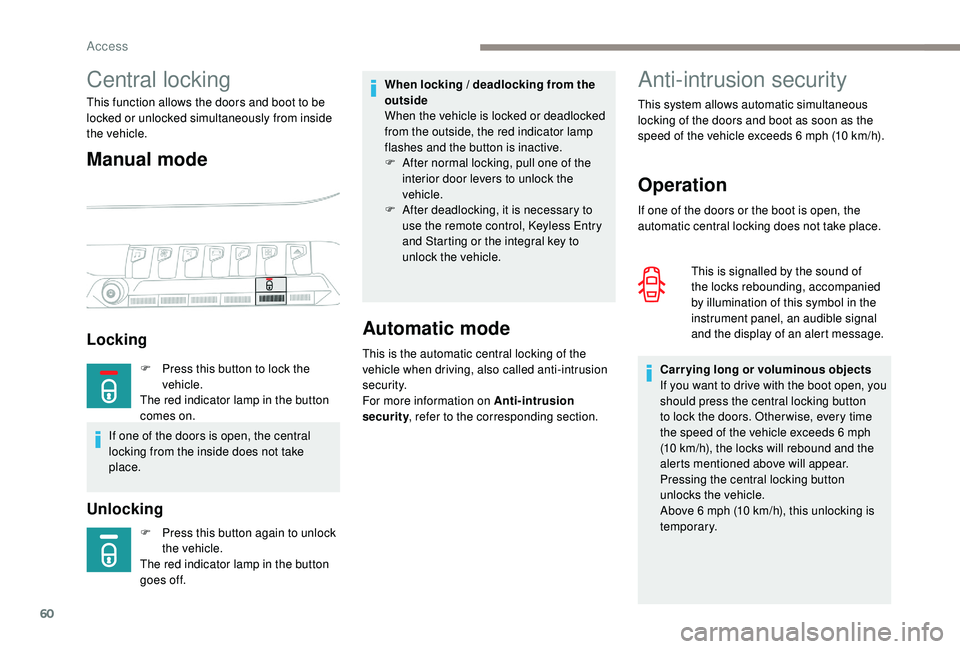
Central locking
This function allows the doors and boot to be
locked or unlocked simultaneously from inside
the vehicle.
Manual mode
Locking
F Press this button again to unlock
the vehicle.
The red indicator lamp in the button
goes off.
Automatic mode
This is the automatic central locking of the
vehicle when driving, also called anti-intrusion
s e c u r i t y.
For more information on Anti-intrusion
security , refer to the corresponding section.
When locking / deadlocking from the
outside
When the vehicle is locked or deadlocked
from the outside, the red indicator lamp
flashes and the button is inactive.
F
A
fter normal locking, pull one of the
interior door levers to unlock the
vehicle.
F
A
fter deadlocking, it is necessary to
use the remote control,
K
eyless Entry
and Starting or the integral key to
unlock the vehicle.
F
P
ress this button to lock the
vehicle.
The red indicator lamp in the button
comes on.
If one of the doors is open, the central
locking from the inside does not take
place.
Access
Page 63 of 404
61
Activation / Deactivation
You can activate or deactivate this function
permanently.F
W
ith the ignition on, press this
button until an audible signal is
triggered and a corresponding
message of confirmation is
displayed.
The state of the system stays in memory when
switching off the ignition.
Driving with the doors locked may render
access for the emergency services
difficult in an emergency.
Alarm
(Depending on version)
System which protects and provides a deterrent
against theft and break-ins. It provides the
following types of monitoring:
- perimeter monitoring
The system checks for opening of the vehicle.
The alarm is triggered if anyone tries to open a
door, the boot, the bonnet, etc.
- volumetric monitoring
The system checks for any variation in the
volume in the passenger compartment.
The alarm is triggered if anyone breaks a
window, enters the passenger compartment or
moves inside the vehicle.
- anti-tilt monitoring
The system checks for any change in the
attitude of the vehicle.
The alarm is triggered if the vehicle is lifted,
moved or knocked.
Self-protection function
The system checks for the putting out of
ser vice of its components.
The alarm is triggered if the battery, the central
control or the siren wiring are put out of ser vice
or damaged. For all work on the alarm system, contact
a PEUGEOT dealer or a qualified
workshop.
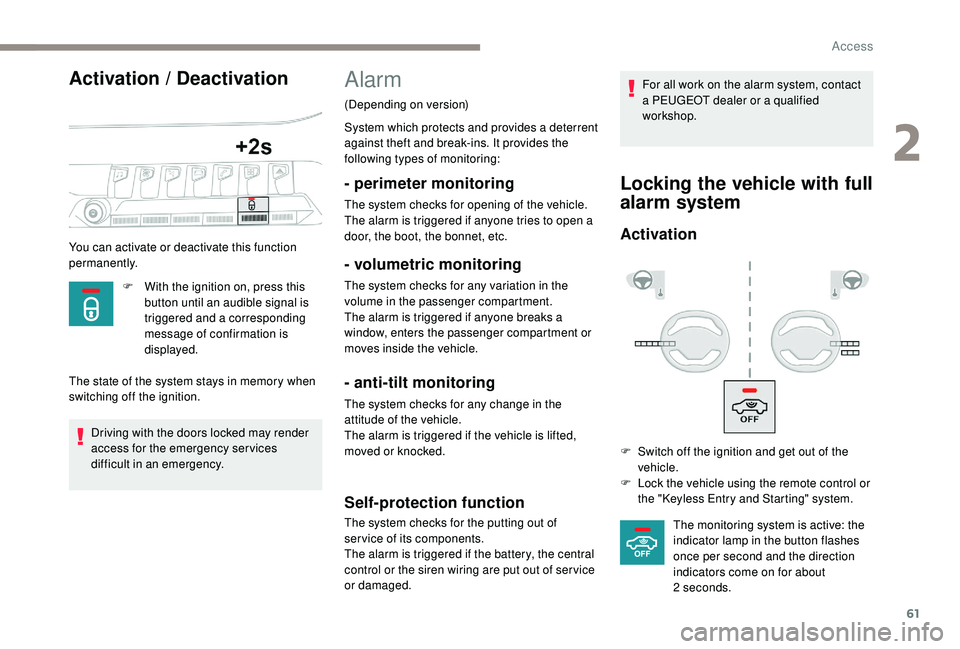
Locking the vehicle with full
alarm system
Activation
F Switch off the ignition and get out of the
vehicle.
F
L
ock the vehicle using the remote control or
the "
K
eyless Entry and Starting" system.The monitoring system is active: the
indicator lamp in the button flashes
once per second and the direction
indicators come on for about
2
seconds.
2
Access
Page 66 of 404
64
Closing
When a door is not closed correctly:-
w
ith the engine running or the
vehicle moving (speed below
6
mph (10 km/h)), this warning
lamp comes on, accompanied by
an alert message displayed for a
few seconds.
-
w
ith the vehicle moving (speed
above 6
mph (10 km/h)), in
addition to the warning lamp and
alert message, an audible signal
sounds for a few seconds.
Boot
Opening the tailgate
With the exterior tailgate control
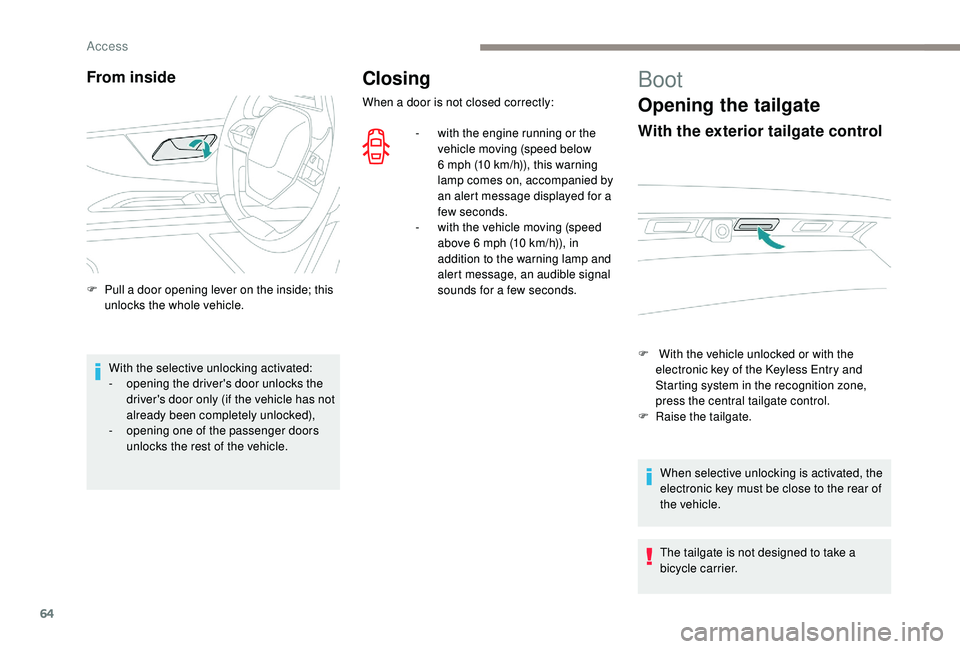
F With the vehicle unlocked or with the electronic key of the K eyless Entry and
Starting system in the recognition zone,
press the central tailgate control.
F
Ra
ise the tailgate.
When selective unlocking is activated, the
electronic key must be close to the rear of
the vehicle.
The tailgate is not designed to take a
bicycle carrier.
From inside
F Pull a door opening lever on the inside; this unlocks the whole vehicle.
With the selective unlocking activated:
-
o
pening the driver's door unlocks the
driver's door only (if the vehicle has not
already been completely unlocked),
-
o
pening one of the passenger doors
unlocks the rest of the vehicle.
Access
Page 84 of 404
82
Prolonged use is not recommended for
those with sensitive skin.
There is a risk of burns for people whose
perception of heat is impaired (illness,
taking medication, etc.).
There is a risk of overheating the system if
material with insulating properties is used,
such as cushions or seat covers.
Do not use the system:
-
i
f wearing damp clothing,
-
i
f child seats are fitted.
To avoid breaking the heating element in
the seat:
-
d
o not place heavy objects on the seat,
-
d
o not kneel or stand on the seat,
-
d
o not place sharp objects on the seat,
-
d
o not spill liquids onto the seat.
To avoid the risk of short-circuit:
-
d
o not use liquid products for cleaning
the seat,
-
n
ever use the heating function when
the seat is damp.Multipoint massage
System with a choice of type of massage and
adjustment of its intensity.
This system operates with the engine running,
as well as in STOP mode of Stop & Start.
Activation / Settings
The massage settings are adjusted in the touch
screen.
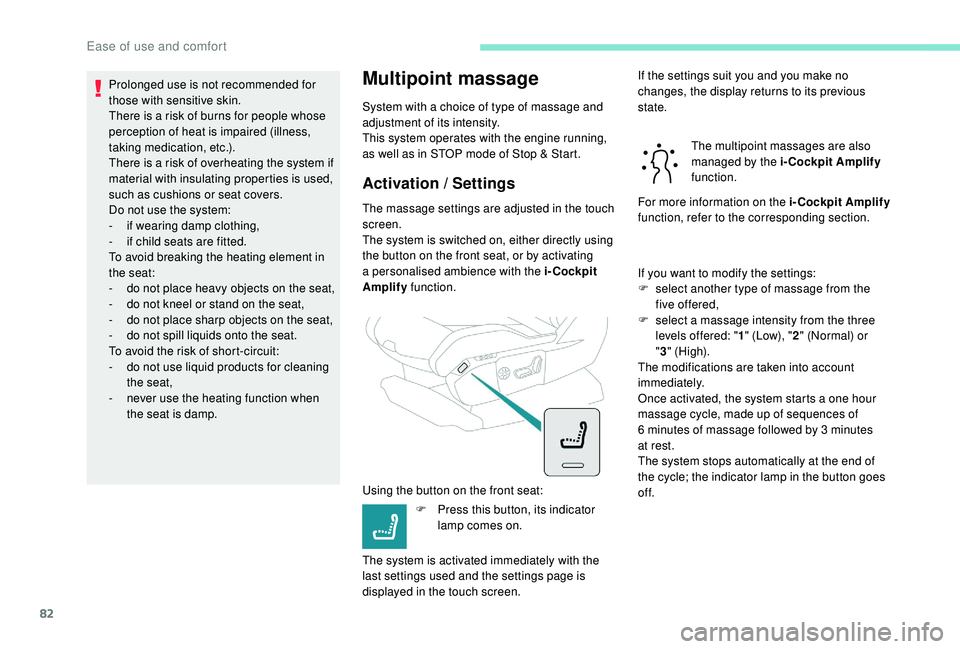
The system is switched on, either directly using
the button on the front seat, or by activating
a personalised ambience with the i-Cockpit
Amplify function.
Using the button on the front seat: F
P
ress this button, its indicator
lamp comes on.
The system is activated immediately with the
last settings used and the settings page is
displayed in the touch screen. If the settings suit you and you make no
changes, the display returns to its previous
state.
The multipoint massages are also
managed by the i-Cockpit Amplify
function.
For more information on the i-Cockpit Amplify
function, refer to the corresponding section.
If you want to modify the settings:
F
s
elect another type of massage from the
five offered,
F
s
elect a massage intensity from the three
levels offered: " 1" (Low), " 2" (Normal) or
" 3 " (High).
The modifications are taken into account
immediately.
Once activated, the system starts a one hour
massage cycle, made up of sequences of
6
minutes of massage followed by 3 minutes
at rest.
The system stops automatically at the end of
the cycle; the indicator lamp in the button goes
of f.
Ease of use and comfort