display Peugeot 508 2016 Owner's Guide
[x] Cancel search | Manufacturer: PEUGEOT, Model Year: 2016, Model line: 508, Model: Peugeot 508 2016Pages: 371, PDF Size: 12.12 MB
Page 43 of 371
41
508 _en_Chap01_instrument-bord_ed01-2016
tr i p c o m p u t e r
the information is accessible in the "Driving" menu.
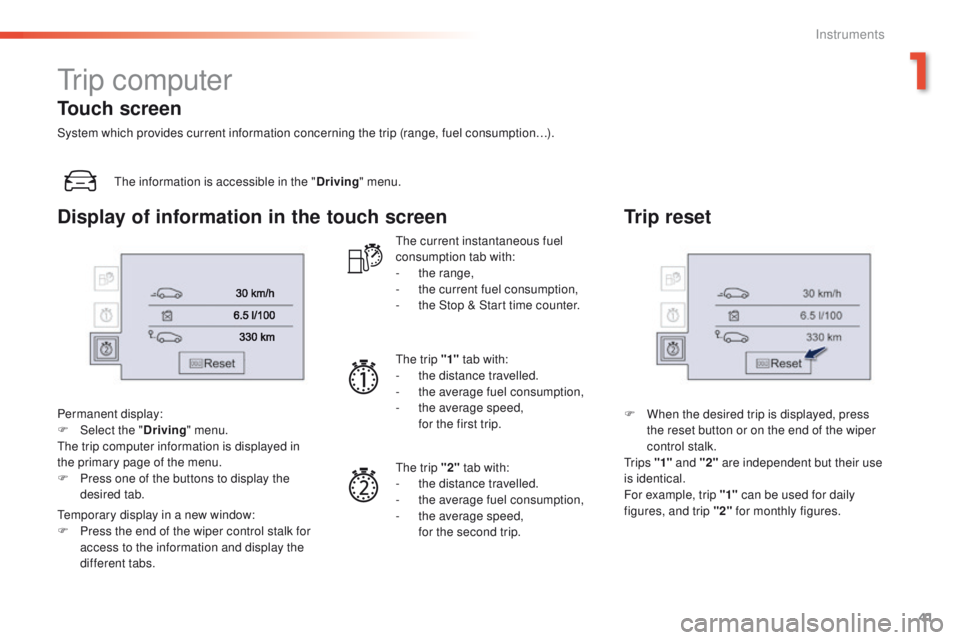
Permanent display:
F
Sel
ect the " Driving" menu.
th
e trip computer information is displayed in
the primary page of the menu.
F
P
ress one of the buttons to display the
desired tab.
te
mporary display in a new window:
F
P
ress the end of the wiper control stalk for
access to the information and display the
different tabs.
th
e current instantaneous fuel
consumption tab with:
-
t
he range,
-
t
he current fuel consumption,
-
t
he Stop & Start time counter.
th
e trip "1" tab with:
-
t
he distance travelled.
-
t
he average fuel consumption,
-
t
he average speed,
f
or the first trip.
th
e trip "2" tab with:
-
t
he distance travelled.
-
t
he average fuel consumption,
-
t
he average speed,
f
or the second trip.
Trip reset
F When the desired trip is displayed, press the reset button or on the end of the wiper
control stalk.
t
r i p s "1" and "2" are independent but their use
is identical.
For example, trip "1" can be used for daily
figures, and trip "2" for monthly figures.
Touch screen
System which provides current information concerning the trip (range, fuel consumption…).
Display of information in the touch screen
1
Instruments
Page 44 of 371
42
508 _en_Chap01_instrument-bord_ed01-2016
If dashes are displayed continuously
while driving in place of the digits,
contact a P
e
uge
Ot
dealer or a
qualified workshop.
th
is function is only displayed from
20 mph (30 km/h).
th
is value may vary following a change
in the style of driving or the relief,
resulting in a significant change in the
current fuel consumption.
Trip computer, a few definitions…
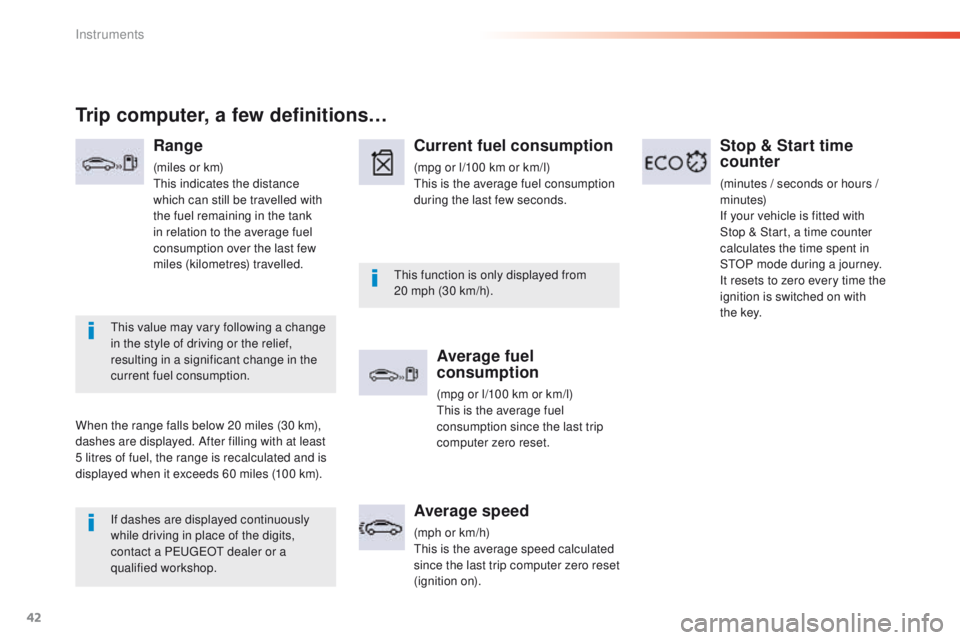
Range
(miles or km)th is indicates the distance
which can still be travelled with
the fuel remaining in the tank
in relation to the average fuel
consumption over the last few
miles (kilometres) travelled.
When the range falls below 20 miles (30 km),
dashes are displayed. After filling with at least
5 litres of fuel, the range is recalculated and is
displayed when it exceeds 60 miles (100 km).
Current fuel consumption
(mpg or l/100 km or km/l)th is is the average fuel consumption
during the last few seconds.
Average fuel
consumption
(mpg or l/100 km or km/l)th is is the average fuel
consumption since the last trip
computer zero reset.
Average speed
(mph or km/h)th is is the average speed calculated
since the last trip computer zero
reset
(ignition on).
Stop & Start time
counter
(minutes / seconds or hours /
minutes)
If your vehicle is fitted with
Stop
& Start, a time counter
calculates the time spent in
S
tO
P mode during a journey.
It resets to zero every time the
ignition is switched on with
t h e
key.
Instruments
Page 45 of 371
43
508 _en_Chap01_instrument-bord_ed01-2016
touch screen
It gives access to:
- m enus for adjusting settings for vehicle
functions and systems,
-
a
udio and display configuration menus,
-
a
udio system and telephone controls and
the display of associated information.
And, depending on equipment, it allows:
-
t
he display of alert messages and the
visual parking sensors information,
-
a
ccess to the controls for the navigation
system and Internet services, and the
display of associated information.
For reasons of safety, the driver
should only carr y out operations
that require close attention, with the
vehicle stationary.
Some functions are not accessible
when driving.General operation
Recommendations
It is necessary to press firmly, particularly for
"flick" gestures (scrolling through lists, moving
the map...).
A light wipe is not enough.
th
e screen does not recognise pressing with
more than one finger.
th
is technology allows use at all temperatures
and when wearing gloves.
Do not use pointed objects on the touch
screen.
Do not touch the touch screen with wet hands.
us
es a soft clean cloth to clean the touch
screen.
State of indicator lamps
Some buttons contain an indicator lamp that
gives the state of the corresponding function.
gr
een indicator: you have switched on the
corresponding function.
Orange indicator: you have switched off the
corresponding function.
1
Instruments
Page 46 of 371
44
508 _en_Chap01_instrument-bord_ed01-2016
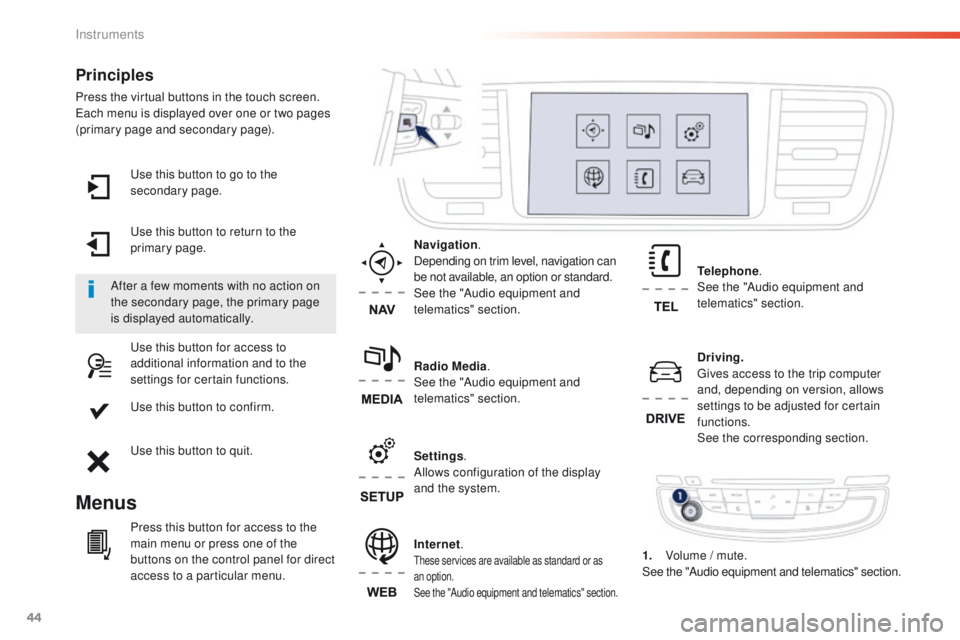
use this button to go to the
secondary page.
us
e this button to return to the
primary page.
us
e this button for access to
additional information and to the
settings for certain functions.
us
e this button to confirm.
us
e this button to quit.
Principles
Press the virtual buttons in the touch screen.each menu is displayed over one or two pages
(primary page and secondary page).
Menus
Driving . gi
ves access to the trip computer
and, depending on version, allows
settings to be adjusted for certain
functions.
See the corresponding section.
Internet.
these services are available as standard or as
an option.
See the "Audio equipment and telematics" section.
Telephone .
See the "Audio equipment and
telematics" section.
Radio Media .
See the "Audio equipment and
telematics" section. Navigation .
Depending on trim level, navigation can
be not available, an option or standard.
See the "Audio equipment and
telematics" section.
Settings .
Allows configuration of the display
and the system.
After a few moments with no action on
the secondary page, the primary page
is displayed automatically.
Press this button for access to the
main menu or press one of the
buttons on the control panel for direct
access to a particular menu. 1.
V
olume / mute.
See the "Audio equipment and telematics" section.
Instruments
Page 47 of 371
45
508 _en_Chap01_instrument-bord_ed01-2016
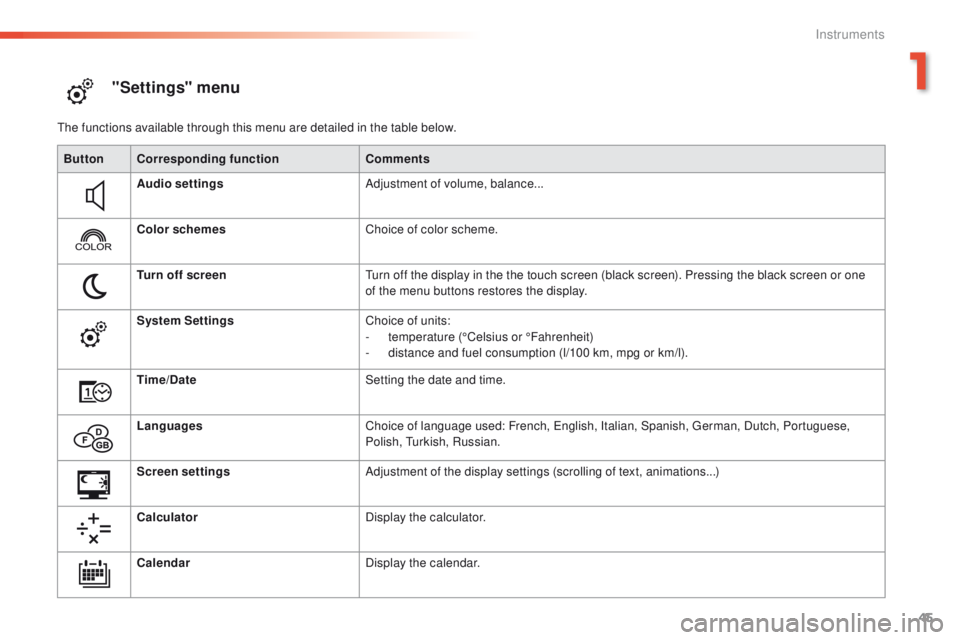
"Settings" menu
the functions available through this menu are detailed in the table below.Button Corresponding function Comments
Audio settings Adjustment of volume, balance...
Color schemes Choice of color scheme.
Turn off screen
tu
rn off the display in the the touch screen (black screen). Pressing the black screen or one
of the menu buttons restores the display.
System Settings Choice of units:
-
t
emperature (°Celsius or °Fahrenheit)
-
d
istance and fuel consumption (l/100 km, mpg or km/l).
Time/Date Setting the date and time.
Languages Choice of language used: French,
e
n
glish, Italian, Spanish, g
e
rman, Dutch, Portuguese,
Polish,
t
u
rkish, Russian.
Screen settings Adjustment of the display settings (scrolling of text, animations...)
Calculator Display the calculator.
Calendar Display the calendar.
1
Instruments
Page 49 of 371
47
508 _en_Chap01_instrument-bord_ed01-2016
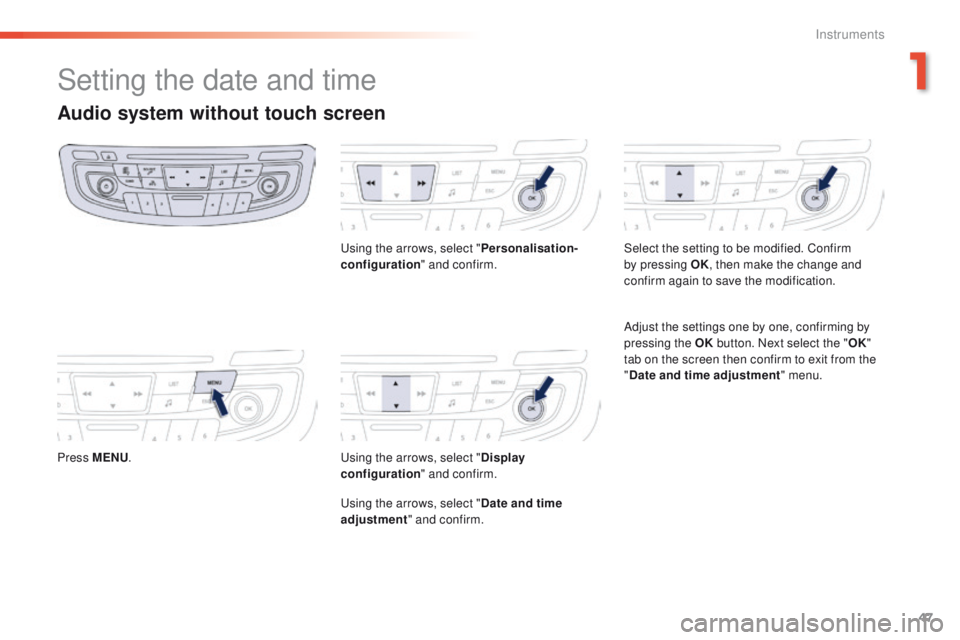
Setting the date and time
Audio system without touch screen
Press MENU.
us
ing the arrows, select "
Personalisation-
configuration " and confirm.us ing the arrows, select "Display
configuration " and confirm.
us
ing the arrows, select "Date and time
adjustment " and confirm. Select the setting to be modified. Confirm
by pressing OK
, then make the change and
confirm again to save the modification.
Adjust the settings one by one, confirming by
pressing the OK button. Next select the " OK"
tab on the screen then confirm to exit from the
" Date and time adjustment " menu.
1
Instruments
Page 65 of 371
63
508_en_Chap02_ouvertures_ed01-2016
Do not throw the remote control
batteries away, they contain metals
which are harmful to the environment.
ta
ke them to an approved collection
point.
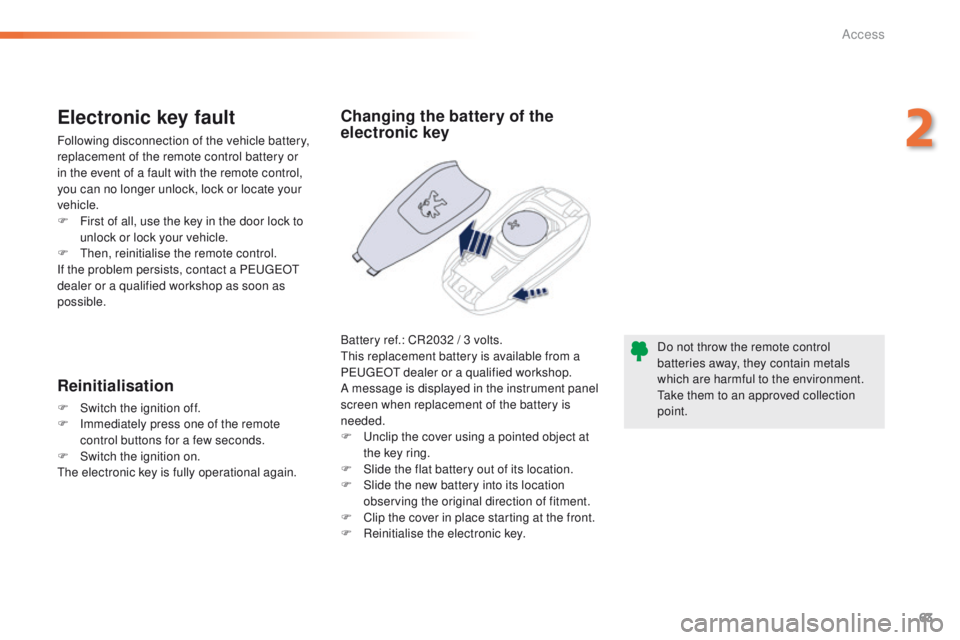
Changing the battery of the
electronic key
Battery ref.: CR2032 / 3 volts.th is replacement battery is available from a
P
e
uge
Ot
dealer or a qualified workshop.
A message is displayed in the instrument panel
screen when replacement of the battery is
needed.
F
u
n
clip the cover using a pointed object at
the key ring.
F
S
lide the flat battery out of its location.
F
S
lide the new battery into its location
observing the original direction of fitment.
F
C
lip the cover in place starting at the front.
F
R
einitialise the electronic key.
Electronic key fault
Following disconnection of the vehicle battery,
replacement of the remote control battery or
in the event of a fault with the remote control,
you can no longer unlock, lock or locate your
vehicle.
F
F
irst of all, use the key in the door lock to
unlock or lock your vehicle.
F
t
hen
, reinitialise the remote control.
If the problem persists, contact a P
e
uge
Ot
dealer or a qualified workshop as soon as
possible.
Reinitialisation
F Switch the ignition off.
F I mmediately press one of the remote
control buttons for a few seconds.
F
S
witch the ignition on.
th
e electronic key is fully operational again.
2
Access
Page 70 of 371
68
508_en_Chap02_ouvertures_ed01-2016
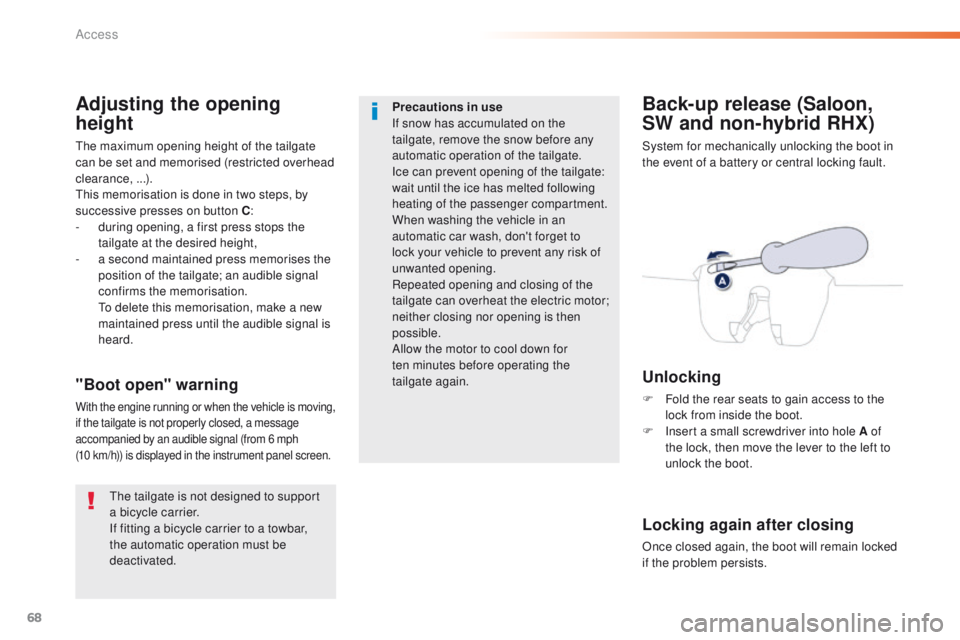
Back-up release (Saloon,
SW and non-hybrid RHX)
System for mechanically unlocking the boot in
the event of a battery or central locking fault.
Unlocking
F Fold the rear seats to gain access to the lock from inside the boot.
F
I
nsert a small screwdriver into hole A of
the lock, then move the lever to the left to
unlock the boot."Boot open" warning
With the engine running or when the vehicle is moving,
if the tailgate is not properly closed, a message
accompanied by an audible signal (from 6 mph
(10
km/h)) is displayed in the instrument panel screen.
Locking again after closing
Once closed again, the boot will remain locked
if the problem persists.
Adjusting the opening
height
the maximum opening height of the tailgate
can be set and memorised (restricted overhead
clearance, ...).
th
is memorisation is done in two steps, by
successive presses on button C :
-
d
uring opening, a first press stops the
tailgate at the desired height,
-
a s
econd maintained press memorises the
position of the tailgate; an audible signal
confirms the memorisation.
t
o d
elete this memorisation, make a new
maintained press until the audible signal is
heard.
th
e tailgate is not designed to support
a bicycle carrier.
If fitting a bicycle carrier to a towbar,
the automatic operation must be
deactivated. Precautions in use
If snow has accumulated on the
tailgate, remove the snow before any
automatic operation of the tailgate.
Ice can prevent opening of the tailgate:
wait until the ice has melted following
heating of the passenger compartment.
When washing the vehicle in an
automatic car wash, don't forget to
lock your vehicle to prevent any risk of
unwanted opening.
Repeated opening and closing of the
tailgate can overheat the electric motor;
neither closing nor opening is then
possible.
Allow the motor to cool down for
ten
minutes before operating the
tailgate again.
Access
Page 79 of 371
77
508_en_Chap03_ergonomie-et-confort_ed01-2016
Storing driving positions
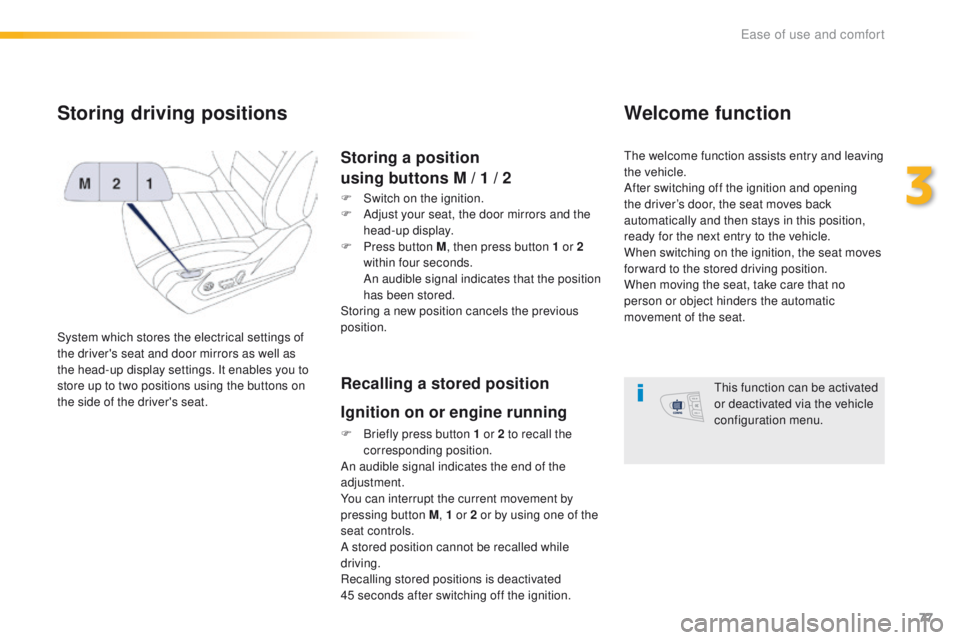
System which stores the electrical settings of
the driver's seat and door mirrors as well as
the head-up display settings. It enables you to
store up to two positions using the buttons on
the side of the driver's seat.
Storing a position
using buttons M / 1 / 2
F Switch on the ignition.
F
A djust your seat, the door mirrors and the
head-up display.
F
P
ress button M , then press button 1 or 2
within four seconds.
A
n audible signal indicates that the position
has been stored.
Storing a new position cancels the previous
position.
Recalling a stored position
Ignition on or engine running
F Briefly press button 1 or 2 to recall the corresponding position.
An audible signal indicates the end of the
adjustment.
You can interrupt the current movement by
pressing button M , 1 or 2 or by using one of the
seat controls.
A stored position cannot be recalled while
driving.
Recalling stored positions is deactivated
45
seconds after switching off the ignition.
Welcome function
the welcome function assists entry and leaving
the vehicle.
After switching off the ignition and opening
the driver’s door, the seat moves back
automatically and then stays in this position,
ready for the next entry to the vehicle.
When switching on the ignition, the seat moves
for ward to the stored driving position.
When moving the seat, take care that no
person or object hinders the automatic
movement of the seat.
th
is function can be activated
or deactivated via the vehicle
configuration menu.
3
ease of use and comfort
Page 90 of 371
88
508_en_Chap03_ergonomie-et-confort_ed01-2016
Dual-zone digital air conditioning
the air conditioning can only operate with the engine running.
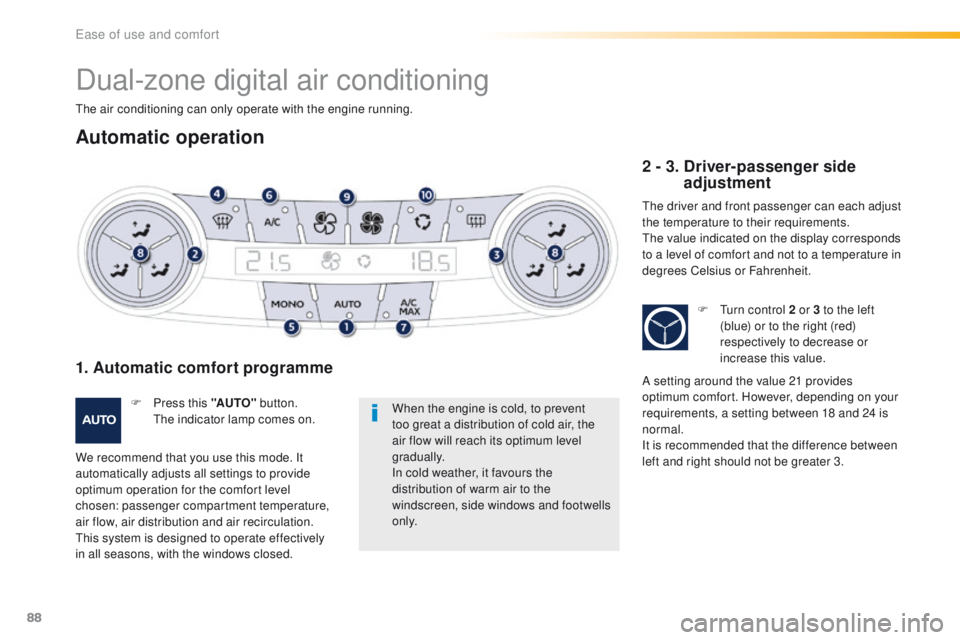
Automatic operation
When the engine is cold, to prevent
too great a distribution of cold air, the
air flow will reach its optimum level
gradually.
In cold weather, it favours the
distribution of warm air to the
windscreen, side windows and footwells
o n l y.
F
P
ress this "AUTO"
button. th
e
indicator lamp comes on.
1. Automatic comfort programme
We recommend that you use this mode. It
automatically adjusts all settings to provide
optimum operation for the comfort level
chosen: passenger compartment temperature,
air flow, air distribution and air recirculation.
th
is system is designed to operate effectively
in all seasons, with the windows closed.
2 - 3. Driver-passenger side adjustment
the driver and front passenger can each adjust
the temperature to their requirements.
th
e value indicated on the display corresponds
to a level of comfort and not to a temperature in
degrees Celsius or Fahrenheit.
F
t
u
rn control 2 or 3 to the left
(blue) or to the right (red)
respectively to decrease or
increase this value.
A setting around the value 21 provides
optimum comfort. However, depending on your
requirements, a setting between 18 and 24 is
normal.
It is recommended that the difference between
left and right should not be greater 3.
ease of use and comfort