display Peugeot 508 2016 Workshop Manual
[x] Cancel search | Manufacturer: PEUGEOT, Model Year: 2016, Model line: 508, Model: Peugeot 508 2016Pages: 371, PDF Size: 12.12 MB
Page 186 of 371
184
508_en_Chap06_conduite_ed01-2016
Head-up display
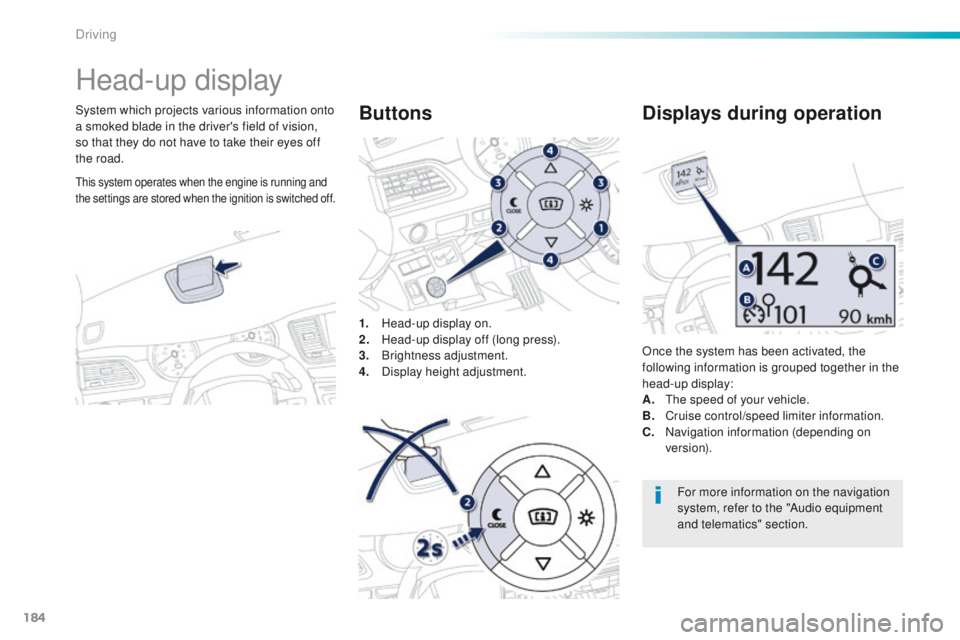
System which projects various information onto
a smoked blade in the driver's field of vision,
so that they do not have to take their eyes off
the road.1.
H
ead-up display on.
2.
H
ead-up display off (long press).
3.
Br
ightness adjustment.
4.
D
isplay height adjustment.Buttons
Once the system has been activated, the
following information is grouped together in the
head-up display:
A.
t
h
e speed of your vehicle.
B.
C
ruise control/speed limiter information.
C.
N
avigation information (depending on
ve r s i o n).
Displays during operation
For more information on the navigation
system, refer to the "Audio equipment
and telematics" section.
this system operates when the engine is running and
the settings are stored when the ignition is switched off.
Driving
Page 187 of 371
185
508_en_Chap06_conduite_ed01-2016
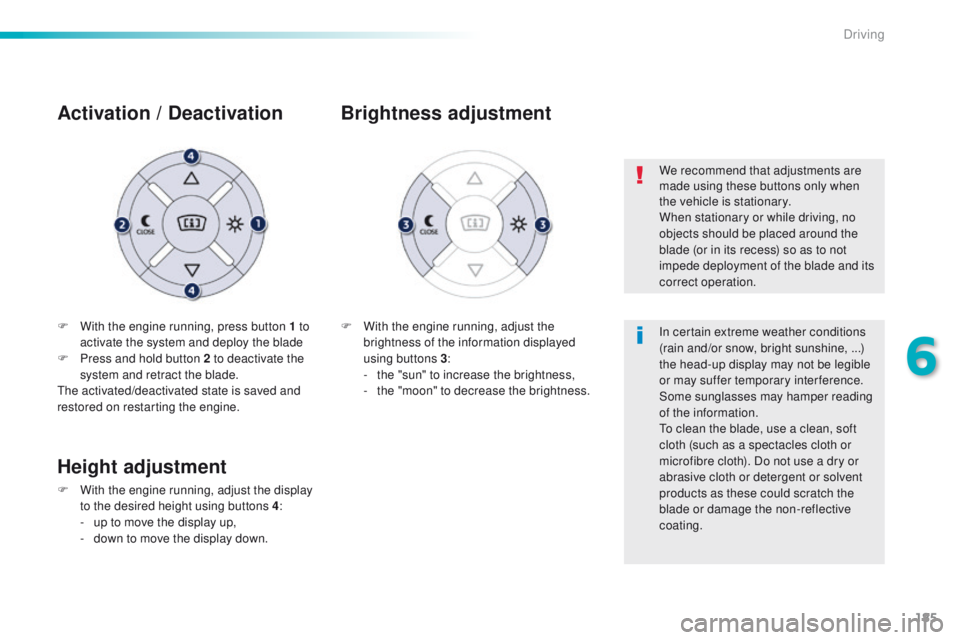
F With the engine running, press button 1 to activate the system and deploy the blade
F
P
ress and hold button 2 to deactivate the
system and retract the blade.
th
e activated/deactivated state is saved and
restored on restarting the engine.
Activation / D eactivation
F With the engine running, adjust the
brightness of the information displayed
using buttons 3 :
-
t
he "sun" to increase the brightness,
-
t
he "moon" to decrease the brightness.
Brightness adjustment
We recommend that adjustments are
made using these buttons only when
the vehicle is stationary.
When stationary or while driving, no
objects should be placed around the
blade (or in its recess) so as to not
impede deployment of the blade and its
correct operation.
In certain extreme weather conditions
(rain and/or snow, bright sunshine, ...)
the head-up display may not be legible
or may suffer temporary interference.
Some sunglasses may hamper reading
of the information.
to c
lean the blade, use a clean, soft
cloth (such as a spectacles cloth or
microfibre cloth). Do not use a dry or
abrasive cloth or detergent or solvent
products as these could scratch the
blade or damage the non-reflective
coating.
Height adjustment
F With the engine running, adjust the display to the desired height using buttons 4 :
-
u
p to move the display up,
-
d
own to move the display down.
6
Driving
Page 189 of 371
187
508_en_Chap06_conduite_ed01-2016
the loss of pressure detected does not
always lead to visible deformation of
the tyre.
Do not rely on just a visual check.
th
e alert is maintained until the tyre or
tyres concerned is reinflated, repaired
or replaced.
th
e spare wheel (space-saver type or a
steel rim) does not have a sensor.
Under-inflation alert
the alert is given by the fixed illumination
of this warning lamp, accompanied by
an audible signal, and depending on
equipment, the display of a message.
In the event of a problem on one of the tyres,
the symbol or the message appears, according
to equipment, to identify it.
F
R
educe speed, avoid sudden steering
movements or harsh brake applications.
F
S
top as soon as it is safe to do so.
F
I
f you have a compressor (the one in the
temporary puncture repair kit for example),
check the four tyre pressures when cold.
I
f it is not possible to check the tyre
pressures at the time, drive carefully at
reduced speed.
or
F
I
n the event of a puncture, use the
temporary puncture repair kit or the spare
wheel (according to equipment).
Operating fault
the flashing and then fixed
illumination of the under-inflation
warning lamp accompanied by the
illumination of the service warning
lamp indicates a fault with the system.
th
is alert is also displayed when one or more
wheels is not fitted with a sensor (for example,
a space-saver or steel spare wheel).
go t
o a P
e
uge
Ot
dealer or a qualified
workshop
to have the system checked
or, following the repair of a puncture, to
have the original wheel, equipped with a
sensor, refitted.
Any tyre repair or replacement on a
wheel fitted with this system must be
carried out by a P
e
uge
Ot
dealer or a
qualified workshop.
If after changing a tyre, a wheel is not
detected by your vehicle (fitting snow
tyres for example), you must have the
system reinitialised by a P
e
uge
Ot
dealer or a qualified workshop.
In this case, monitoring of the tyre pressures is
not assured.
6
Driving
Page 190 of 371
188
508_en_Chap06_conduite_ed01-2016
Speed limiter
System which prevents the vehicle from
exceeding the speed programmed by the
driver.
When the programmed speed limit is reached,
pressing the accelerator pedal no longer
has any effect unless it is pressed firmly,
which allows you to temporarily exceed the
programmed speed.
to r
eturn to the programmed speed, simply
slow down to a speed below the programmed
speed by releasing the accelerator.
th
e speed limiter is switched on manually:
it requires a programmed speed of at least
20
mph (30 km/h).
th
e speed limiter is switched off by manual
operation of the control.
th
e programmed speed remains in the memory
when the ignition is switched off.
th
e speed limiter cannot, in any
circumstances, replace the need to
observe speed limits, nor can it replace
the need for vigilance and responsibility
on the part of the driver.
th
is information also appears in the
head-up display.
For more information, refer to the
"Head-up display" section.
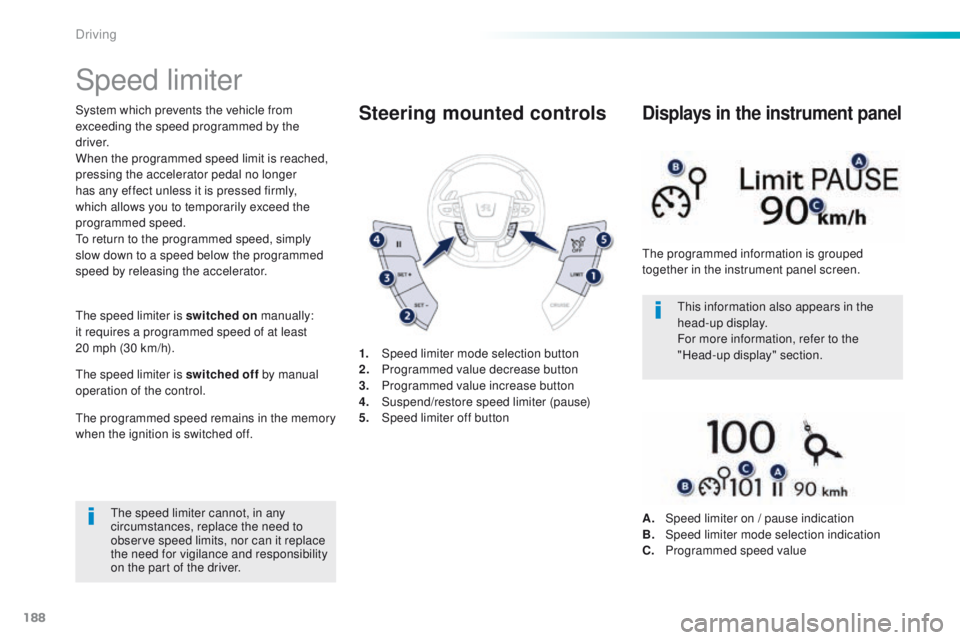
1.
Spe
ed limiter mode selection button
2.
P
rogrammed value decrease button
3.
P
rogrammed value increase button
4.
S
uspend/restore speed limiter (pause)
5.
Spe
ed limiter off buttonSteering mounted controls
the programmed information is grouped
together in the instrument panel screen.
Displays in the instrument panel
A. Speed limiter on / pause indication
B. Spe ed limiter mode selection indication
C.
P
rogrammed speed value
Driving
Page 191 of 371
189
508_en_Chap06_conduite_ed01-2016
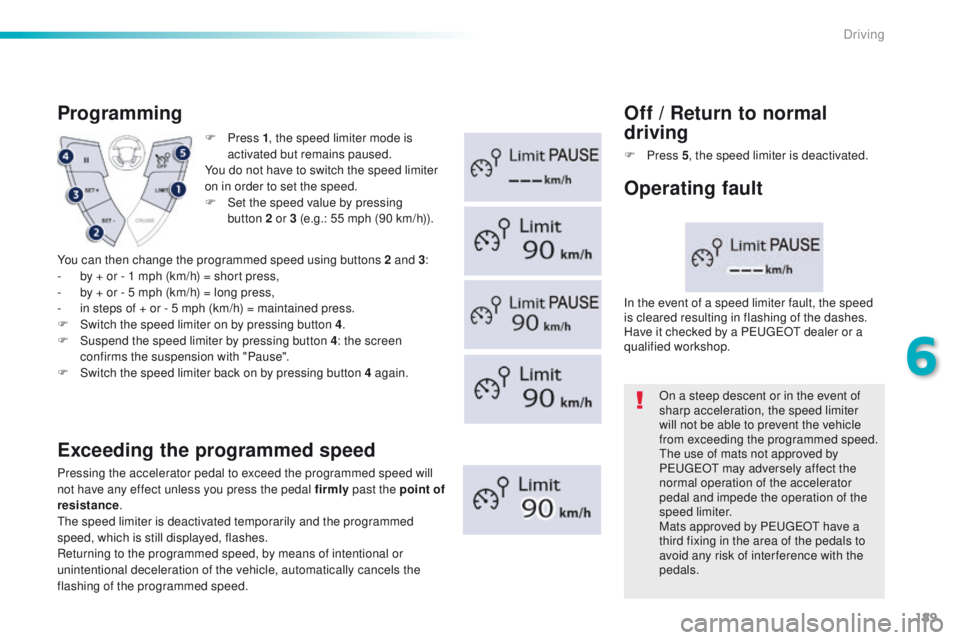
F Press 1, t he speed limiter mode is
activated but remains paused.
You do not have to switch the speed limiter
on in order to set the speed.
F
S
et the speed value by pressing
button
2 or 3 (e.g.: 55 mph (90 km/h)).
Programming
Exceeding the programmed speed
Pressing the accelerator pedal to exceed the programmed speed will
not have any effect unless you press the pedal firmly past the point of
resistance .
th
e speed limiter is deactivated temporarily and the programmed
speed, which is still displayed, flashes.
Returning to the programmed speed, by means of intentional or
unintentional deceleration of the vehicle, automatically cancels the
flashing of the programmed speed.
Off / Return to normal
d riving
F Press 5, t he speed limiter is deactivated.
On a steep descent or in the event of
sharp acceleration, the speed limiter
will not be able to prevent the vehicle
from exceeding the programmed speed.
th
e use of mats not approved by
P
e
uge
Ot
may adversely affect the
normal operation of the accelerator
pedal and impede the operation of the
speed limiter.
Mats approved by P
e
uge
Ot
have a
third fixing in the area of the pedals to
avoid any risk of inter ference with the
pedals.
In the event of a speed limiter fault, the speed
is cleared resulting in flashing of the dashes.
Have it checked by a P
e
uge
Ot
dealer or a
qualified workshop.
Operating fault
You can then change the programmed speed using buttons 2 and 3 :
- b y + or - 1 mph (km/h) = short press,
-
b
y + or - 5 mph (km/h) = long press,
-
i
n steps of + or - 5 mph (km/h) = maintained press.
F
S
witch the speed limiter on by pressing button 4 .
F
S
uspend the speed limiter by pressing button 4 : the screen
confirms the suspension with "Pause".
F
S
witch the speed limiter back on by pressing button 4 again.
6
Driving
Page 192 of 371
190
508_en_Chap06_conduite_ed01-2016
Cruise control
System which automatically maintains the
speed of the vehicle at the value programmed
by the driver, without any action on the
accelerator pedal.
th
e cruise control is switched on manually: it
requires a minimum vehicle speed of 25 mph
(40 km/h) and the engagement of:
-
4
th gear or higher with a manual gearbox,
-
2nd gear or higher with an automatic
gearbox,
-
position D with an automatic gearbox.
th
e cruise control is switched off manually
or by pressing the brake or clutch pedal or
on triggering of the
e SC system for safety
reasons.
It is possible to exceed the programmed speed
temporarily by pressing the accelerator pedal.
to r
eturn to the programmed speed, simply
release the accelerator pedal.
Switching off the ignition cancels any
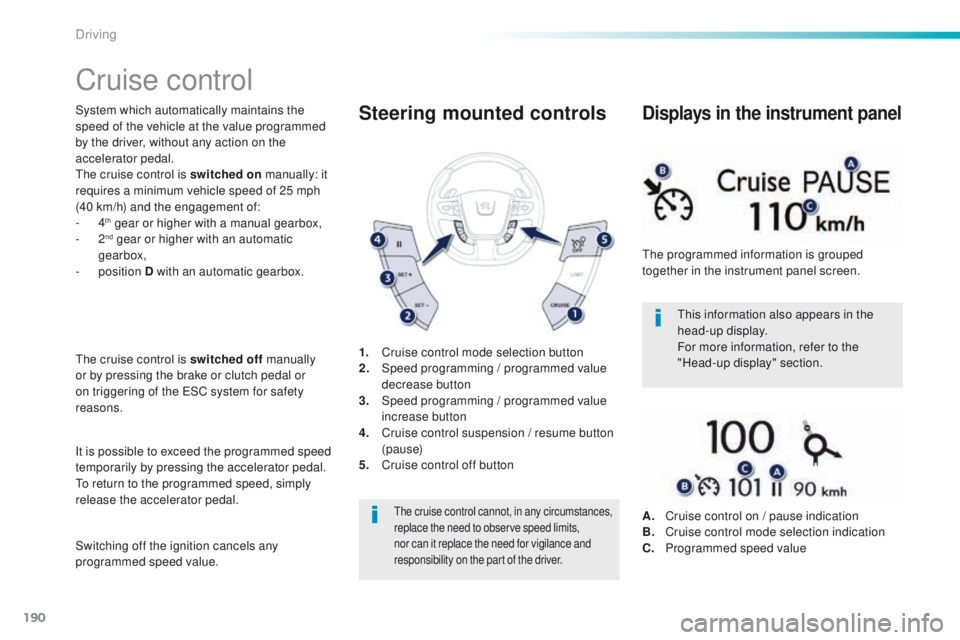
programmed speed value. 1.
C
ruise control mode selection button
2.
S
peed programming
/ programmed value
decrease button
3.
S
peed programming
/ programmed value
increase button
4.
C
ruise control suspension / resume button
(pause)
5.
C
ruise control off button
Steering mounted controls
the cruise control cannot, in any circumstances,
replace the need to observe speed limits,
nor can it replace the need for vigilance and
responsibility on the part of the driver.
this information also appears in the
head-up display.
For more information, refer to the
"Head-up display" section.
th
e programmed information is grouped
together in the instrument panel screen.
Displays in the instrument panel
A. Cruise control on / pause indication
B. C ruise control mode selection indication
C.
P
rogrammed speed value
Driving
Page 193 of 371
191
508_en_Chap06_conduite_ed01-2016
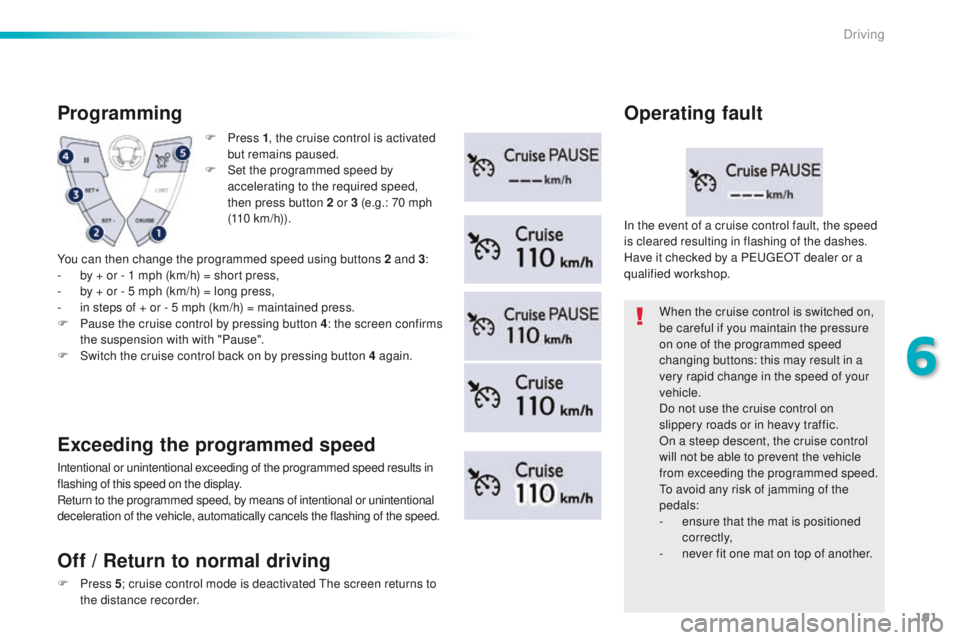
F Press 1, t he cruise control is activated
but remains paused.
F
S
et the programmed speed by
accelerating to the required speed,
then press button 2 or 3 (e.g.: 70 mph
(110
km/h)).
Programming
You can then change the programmed speed using buttons 2 and 3 :
- b y + or - 1 mph (km/h) = short press,
-
b
y + or - 5 mph (km/h) = long press,
-
i
n steps of + or - 5 mph (km/h) = maintained press.
F
P
ause the cruise control by pressing button 4 : the screen confirms
the suspension with with "Pause".
F
S
witch the cruise control back on by pressing button 4 again.
Exceeding the programmed speed
Intentional or unintentional exceeding of the programmed speed results in
flashing of this speed on the display.
Return to the programmed speed, by means of intentional or unintentional
deceleration of the vehicle, automatically cancels the flashing of the speed. When the cruise control is switched on,
be careful if you maintain the pressure
on one of the programmed speed
changing buttons: this may result in a
very rapid change in the speed of your
vehicle.
Do not use the cruise control on
slippery roads or in heavy traffic.
On a steep descent, the cruise control
will not be able to prevent the vehicle
from exceeding the programmed speed.
to a
void any risk of jamming of the
pedals:
-
e
nsure that the mat is positioned
c o r r e c t l y,
-
n
ever fit one mat on top of another.
In the event of a cruise control fault, the speed
is cleared resulting in flashing of the dashes.
Have it checked by a P
e
uge
Ot
dealer or a
qualified workshop.
Operating fault
Off
/ Return to normal driving
F Press 5; c ruise control mode is deactivated th e screen returns to
the distance recorder.
6
Driving
Page 194 of 371
192
508_en_Chap06_conduite_ed01-2016
Memorising speeds
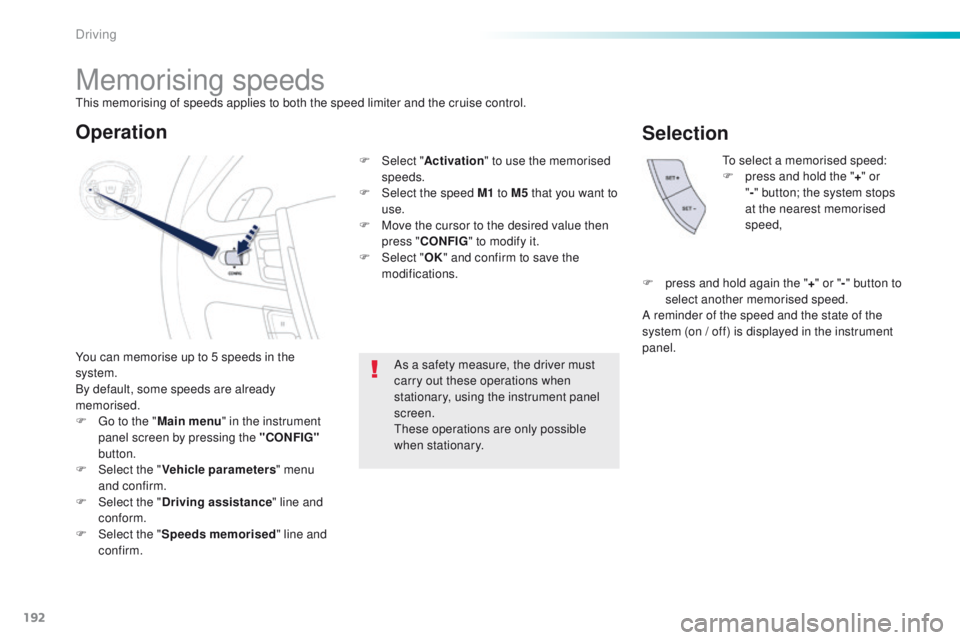
You can memorise up to 5 speeds in the
system.
By default, some speeds are already
memorised.
F g
o t
o the "Main menu " in the instrument
panel screen by pressing the "CONFIG"
button.
F
Sel
ect the " Vehicle parameters " menu
and confirm.
F
Sel
ect the " Driving assistance " line and
conform.
F
Sel
ect the " Speeds memorised " line and
confirm.
to
select a memorised speed:
F
p
ress and hold the "
+" or
" - " button; the system stops
at the nearest memorised
speed,
As a safety measure, the driver must
carry out these operations when
stationary, using the instrument panel
screen.
th
ese operations are only possible
when stationary.
Operation
F Select " Activation" to use the memorised
speeds.
F
Sel
ect the speed M1 to M5 that you want to
use.
F
M
ove the cursor to the desired value then
press " CONFIG " to modify it.
F
Sel
ect "OK" and confirm to save the
modifications.
Selection
F press and hold again the "+ " or " -" button to
select another memorised speed.
A reminder of the speed and the state of the
system (on
/ off) is displayed in the instrument
panel.
th
is memorising of speeds applies to both the speed limiter and the cruise control.
Driving
Page 195 of 371
193
508_en_Chap06_conduite_ed01-2016
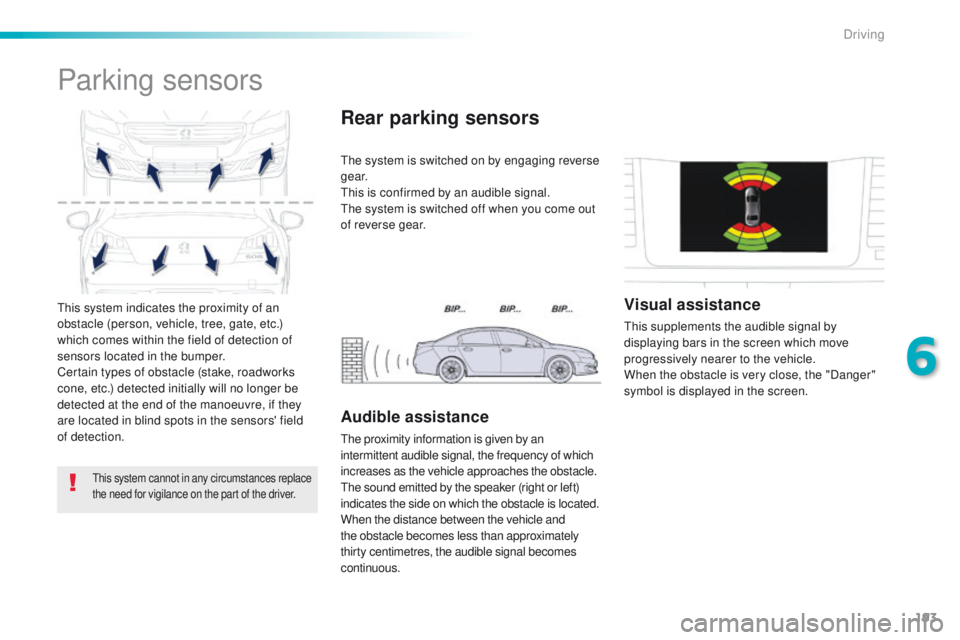
this system indicates the proximity of an
obstacle (person, vehicle, tree, gate, etc.)
which comes within the field of detection of
sensors located in the bumper.
Certain types of obstacle (stake, roadworks
cone, etc.) detected initially will no longer be
detected at the end of the manoeuvre, if they
are located in blind spots in the sensors' field
of detection.
Parking sensors
this system cannot in any circumstances replace
the need for vigilance on the part of the driver.
the system is switched on by engaging reverse
g e a r.
th
is is confirmed by an audible signal.
th
e system is switched off when you come out
of reverse gear.
Rear parking sensors
Audible assistance
the proximity information is given by an
intermittent audible signal, the frequency of which
increases as the vehicle approaches the obstacle.
th
e sound emitted by the speaker (right or left)
indicates the side on which the obstacle is located.
When the distance between the vehicle and
the obstacle becomes less than approximately
thirty centimetres, the audible signal becomes
continuous.
Visual assistance
this supplements the audible signal by
displaying bars in the screen which move
progressively nearer to the vehicle.
When the obstacle is very close, the "Danger"
symbol is displayed in the screen.
6
Driving
Page 197 of 371
195
508_en_Chap06_conduite_ed01-2016
In bad weather or in winter, ensure
that the sensors are not covered with
mud, ice or snow. When reverse gear is
engaged, an audible signal (long beep)
indicates that the sensors may be dirty.
Certain sound sources (motorcycle,
lorry, pneumatic drill, etc.) may trigger
the audible signals of the parking
sensor system.In the event of a malfunction of
the system, when reverse gear
is engaged this warning lamp is
Operating fault
displayed in the instrument panel and/or a
message appears in the screen, accompanied
by an audible signal (short beep).
Contact a P
e
uge
Ot
dealer or a qualified
workshop.
6
Driving