ECO mode Peugeot 508 2016 Owner's Guide
[x] Cancel search | Manufacturer: PEUGEOT, Model Year: 2016, Model line: 508, Model: Peugeot 508 2016Pages: 371, PDF Size: 12.12 MB
Page 296 of 371
294
508_en_Chap10c_SMegplus_ed01-2016
Bluetooth® audio streaming
Streaming allows audio files on your telephone
to be played through the vehicle's spx`eakers.
Connect the telephone: see the "Telephone"
section, then " Bluetooth".
Choose the " Audio" or "All" profile.
If play does not start automatically, it may be
necessary to start the audio playback from the
telephone.
Control is from the peripheral device or by
using the audio system buttons.
Once connected in streaming mode,
the telephone is considered to be a
media source.
It is recommended that you activate
"Repeat " on the Bluetooth peripheral.
Connecting Apple® players
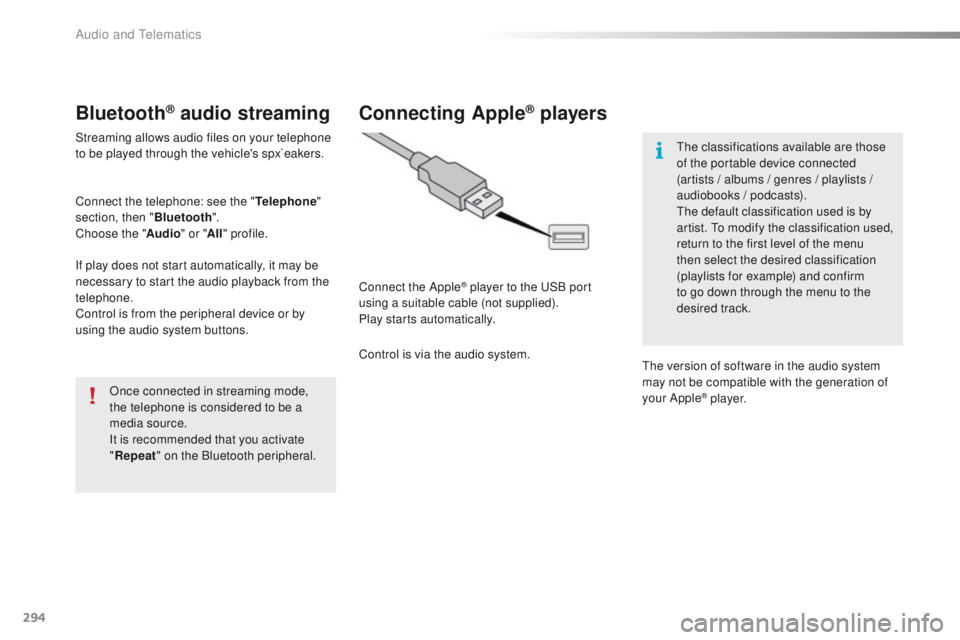
Connect the Apple® player to the uS B port
using a suitable cable (not supplied).
Play starts automatically.
Control is via the audio system.
th
e classifications available are those
of the portable device connected
(artists / albums / genres / playlists /
audiobooks / podcasts).
th
e default classification used is by
artist. t
o m
odify the classification used,
return to the first level of the menu
then select the desired classification
(playlists for example) and confirm
to go down through the menu to the
desired track.
th
e version of software in the audio system
may not be compatible with the generation of
your Apple
® p l aye r.
Audio and telematics
Page 327 of 371
325
508_en_Chap10c_SMegplus_ed01-2016
the services available depend on
the network, the SIM card and the
compatibility of the Bluetooth telephone
used. Check the telephone manual and
with your network provider for details of
the services available to you.
th
e ability of the system to connect
with only one profile depends on the
telephone.
t
h
e three profiles may all
connect by default.
Visit www.peugeot.co.uk for more information
(compatibility, additional help, ...).
the
recognised telephone
appears in the list.
Depending on your telephone, you may be
asked to accept automatic connection every
time the ignition is switched on. On return to the vehicle, if the last telephone
connected is present again, it is reconnected
automatically and within around 30 seconds
after switching on the ignition the pairing is
done without any action on your part, with
(Bluetooth activated).
to m
odify the automatic connection mode,
select the telephone in the list then select the
desired profile. Depending on the type of telephone,
the system will ask you to accept or not
the transfer of your contacts.
If not, select " Update".
Connecting a Bluetooth®
peripheral device
Automatic reconnection
On switching on the ignition, the telephone
connected when the ignition was last switched
off is automatically reconnected, if this
connection mode had been activated during the
pairing procedure.
th
e connection is confirmed by the display of a
message and the name of the telephone.
Manual connection
Press on Telephone to display the
primary page.
Press on the secondary page.
Select " Bluetooth " to display the list
of paired peripherals.
Select the peripheral to connect. Press on " Search for devices ".
th
e connection is confirmed by the display of a
message and the name of the telephone.
.
Audio and telematics
Page 336 of 371
334
508_en_Chap10c_SMegplus_ed01-2016
QUESTIONANSWER SOLUTION
th
ere is a difference in
sound quality between the
different audio sources. For optimum sound quality, the audio settings for Loudness,
Ambience,
t
r
eble, Bass, Volume can be adapted to the different
sound sources, which may result in audible differences when
changing source. Check that the audio settings (Loudness,
Ambience,
t
r
eble, Bass, Volume) are adapted to
the sources listened to. Adjust Balance,
t
r
eble
and Bass to the middle position, select the
"None" musical ambience and set the loudness
correction to the "Active" position in CD mode or
to the "Inactive" position in radio mode.
With the engine off, the
system switches off after a
few minutes of use. When the engine is switched off, the system's operating time
depends on the state of charge of the battery.
th
e switch-off is normal: the system switches to economy mode and
switches off to prevent discharging of the vehicle's battery. Start the vehicle's engine to increase the battery
charge.
Audio and telematics
Page 348 of 371
346
508_en_Chap10d_RD5_ed01-2016
then adjust the volume of the audio
system. Press the SOURCE or SRC button
several times in succession and
select " AUX".
Auxiliary socket (AUX)
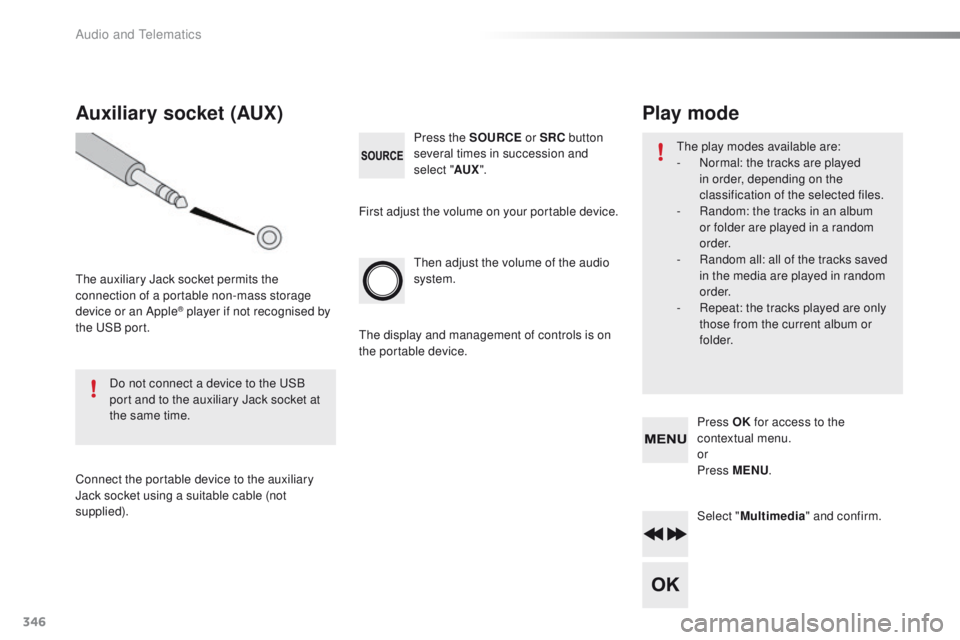
the auxiliary Jack socket permits the
connection of a portable non-mass storage
device or an Apple
® player if not recognised by
the
uS
B port.
Do not connect a device to the
u
S
B
port and to the auxiliary Jack socket at
the same time.
Connect the portable device to the auxiliary
Jack socket using a suitable cable (not
supplied). First adjust the volume on your portable device.
th
e display and management of controls is on
the portable device.
Select "Multimedia " and confirm.
Press OK
for access to the
contextual menu.
or
Press MENU .
Play mode
the play modes available are:
-
N ormal: the tracks are played
in order, depending on the
classification of the selected files.
-
R
andom: the tracks in an album
or folder are played in a random
o r d e r.
-
R
andom all: all of the tracks saved
in the media are played in random
o r d e r.
-
R
epeat: the tracks played are only
those from the current album or
f o l d e r.
Audio and telematics
Page 352 of 371
350
508_en_Chap10d_RD5_ed01-2016
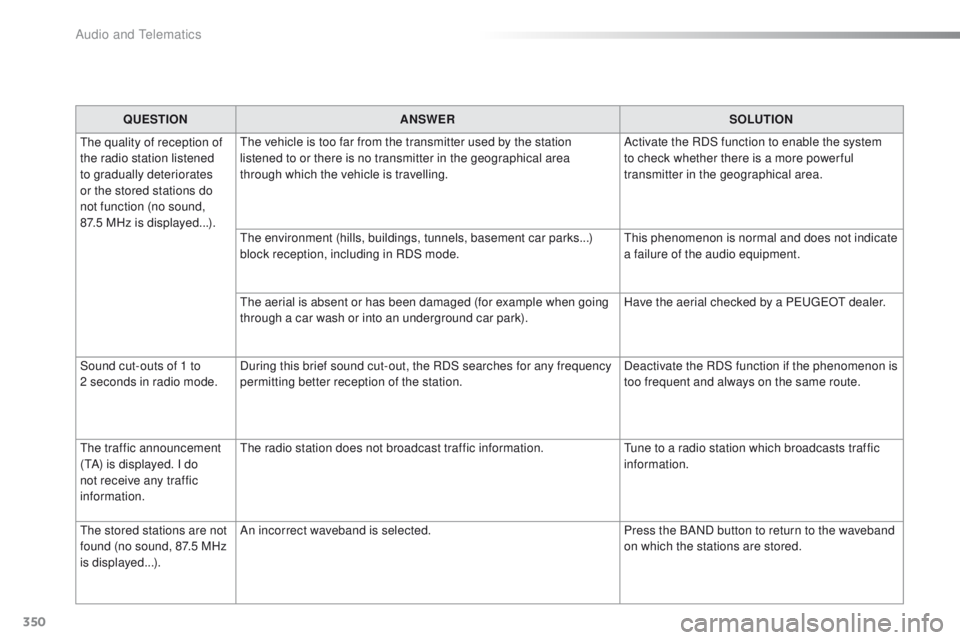
QUESTIONANSWER SOLUTION
th
e quality of reception of
the radio station listened
to gradually deteriorates
or the stored stations do
not function (no sound,
87.5
MHz is displayed...).
th
e vehicle is too far from the transmitter used by the station
listened to or there is no transmitter in the geographical area
through which the vehicle is travelling. Activate the RDS function to enable the system
to check whether there is a more power ful
transmitter in the geographical area.
th
e environment (hills, buildings, tunnels, basement car parks...)
block reception, including in RDS mode.
th
is phenomenon is normal and does not indicate
a failure of the audio equipment.
th
e aerial is absent or has been damaged (for example when going
through a car wash or into an underground car park). Have the aerial checked by a P
e
uge
Ot
dealer.
Sound cut-outs of 1 to
2
seconds in radio mode. During this brief sound cut-out, the RDS searches for any frequency
permitting better reception of the station. Deactivate the RDS function if the phenomenon is
too frequent and always on the same route.
the
traffic announcement
(
tA
) is displayed. I do
not receive any traffic
information.
th
e radio station does not broadcast traffic information.
tu
ne to a radio station which broadcasts traffic
information.
th
e stored stations are not
found (no sound, 87.5 MHz
is displayed...). An incorrect waveband is selected.
Press the BAND button to return to the waveband
on which the stations are stored.
Audio and telematics
Page 354 of 371
352
508_en_Chap10d_RD5_ed01-2016
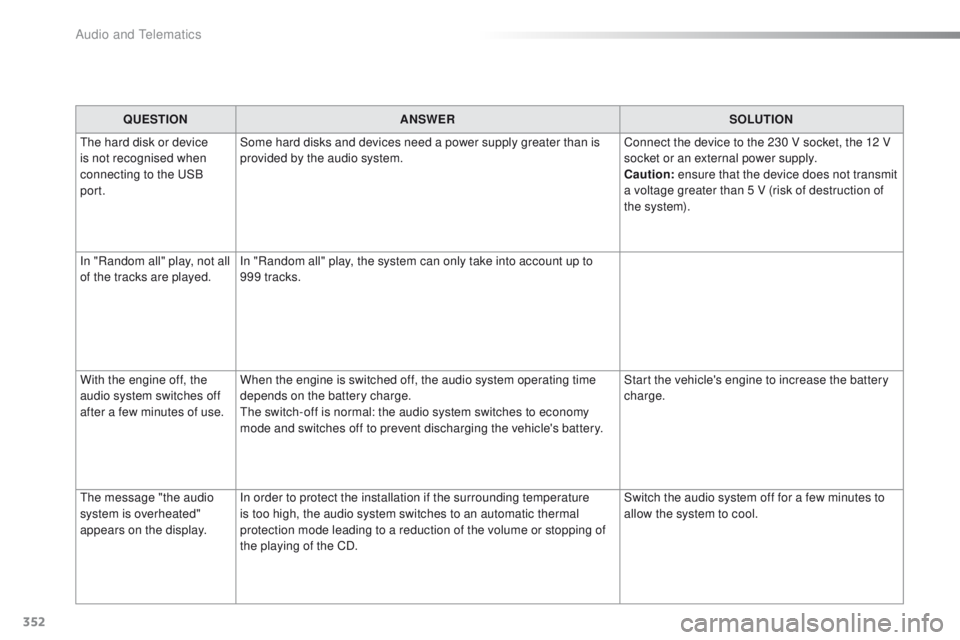
QUESTIONANSWER SOLUTION
th
e hard disk or device
is not recognised when
connecting to the
u
S
B
port. Some hard disks and devices need a power supply greater than is
provided by the audio system.
Connect the device to the 230 V socket, the 12 V
socket or an external power supply.
Caution:
ensure that the device does not transmit
a voltage greater than 5 V (risk of destruction of
the system).
In "Random all" play, not all
of the tracks are played. In "Random all" play, the system can only take into account up to
999 tracks.
With the engine off, the
audio system switches off
after a few minutes of use. When the engine is switched off, the audio system operating time
depends on the battery charge.
th
e switch-off is normal: the audio system switches to economy
mode and switches off to prevent discharging the vehicle's battery. Start the vehicle's engine to increase the battery
charge.
th
e message "the audio
system is overheated"
appears on the display. In order to protect the installation if the surrounding temperature
is too high, the audio system switches to an automatic thermal
protection mode leading to a reduction of the volume or stopping of
the playing of the CD. Switch the audio system off for a few minutes to
allow the system to cool.
Audio and telematics
Page 356 of 371
354
508_en_Chap11_index-alpha_ed01-2016
gauge, fuel.............................................. 13, 20 0ge
arbox,
automatic
........ 1
1, 16, 176, 180, 183, 222, 253
ge
arbox, manual
......11, 16, 174, 180, 183, 222
gea
r lever, automatic gearbox
..................... 17
6
ge
ar lever, manual gearbox
.........................174
ge
ar shift indicator
....................................... 175
gl
ove box ...................................................... 101
gr
ound clearance
......................................... 272
gu
ide-me-home
.................................... 121, 124Identification, vehicle
....................................
2
73
Immobiliser, electronic
................
52, 61, 69, 167
Indicator, coolant temperature
........................ 3
0
Indicator, engine oil level ................................
31
Indicator lamps ................................................
14
Indicators, direction ......................................120
Inflating tyres
..........................................11, 2 7 3
Inflating tyres and accessories (using the kit)
..............................
................234
Input, auxiliary
.............................. 1
08, 292, 346
Instrument panel
...............................
..............13
Instruments and controls
..................................7
I
ntelligent t
ra
ction Control
............................13
4
ISOFIX
...................................................152-15 6
Hazard warning lamps
..........................
132, 2 27
Headlamp adjustment
...................................
126
Headlamps, automatic illumination
......
118 , 12 1
Headlamps, dipped beam
.............
117, 242, 244
Headlamps, halogen
.............................
242, 244
Headlamps, main beam
................ 1
17, 242, 244
Headlamp wash
............................................
128
Head restraints, front ................................
75, 78
Head restraints, rear .....................................
109
Head-up display
............................
18 4, 188, 19 0
Heating
.........................................
83, 86, 88, 91
Heating, programmable (Webasto)
................ 97
H
ill start assist
...............................................
18
3
Horn ............................................................... 132
Filling the fuel tank
............................... 20
0, 202
Filter, air
...............
......................................... 221
Filter, oil
......................................................... 221
Filter, particle
........................................ 220, 221
G
I
E
H
F
Driving positions (storing) ...............................77
Dynamic stability control (DSC) ........ 1
8, 22, 133Filter, passenger compartment
.....................221
Fitting a wheel ............................... ................240
Fitting roof bars
.............................................212
Fittings, boot
......................................... 11
2 , 113
Fittings, front
...................................................99
Fittings, rear
...............................
...................111
Flap, fuel filler
...............................
.................200
Flashing indicators
................................120, 125
Foglamps, front
.............................119, 123, 242
Foglamps, rear
..............................119, 245, 246
Folding the rear seats
...................................109
Folding/unfolding the door mirrors
.................80
Frequency (radio)
..........................................288
Fuel ................................................................ 202
Fuel consumption
............................................ 11
F
usebox, dashboard
.....................................250
Fusebox, engine compartment
.....................252
Fuses
.............................................................249
e
BA
............................................................... 13 3
ec
o-driving (advice)
........................................ 11
el
ectronic brake force distribution
(
eB
FD)
........................................................ 13 3
em
ergency call
..................................... 1
3 2 , 2 74
em
ergency switching off
............................... 16
6
em
ergency warning lamps
................... 13
2, 2 27
em
issions control system, SCR .............25, 223
en
ergy economy mode
.................................261
en
gine compartment
.............................215 -217
en
gine,
Diesel
............16, 202, 216, 217, 228, 266, 268
en
gine, petrol
....................... 202, 215, 264, 265
en
vironment
......................... 1
1, 54, 63, 96, 179,
186, 220, 226, 253
Alphabetical index
Page 357 of 371
355
508_en_Chap11_index-alpha_ed01-2016
Keyless entry and
Starting electronic key ..................... 5
5, 56, 69
Key not recognised
..........................54, 62, 166
Key with remote control
............................49, 69
Kit, hands-free
...................................... 324, 325
Kit, temporary puncture repair
......................229
Labels, identification
..................................... 2
73
Lamps, parking
............................................. 12
5
L
eD
s - light-emitting diodes
.........242, 245, 246
Level, AdBlue
® additive ................................. 223
Level, brake fluid ........................................... 2
19
Level, Diesel additive
............................ 220, 221
Level, engine coolant
.............................. 30, 220
Level, engine oil
...............................
.......31, 218
Level, headlamp wash
.......................... 129, 2 20
Level, power steering fluid
............................ 2
19
Levels and checks
................................ 215 -220
Jack
........
.......................................................
235
JBL (audio system)
.......................................
2
76
Jump starting
..............................
..................
254Level, screenwash fluid ........................
129, 2 20
Lighting, cornering
........................................
123
Lighting dimmer
..............................
................
32
Lighting, guide-me home
......................
121, 124
Lighting, interior
....................................
102, 103
Lighting, mood
..............................................
103
Lighting, welcome
.........................................
125
Loading
...................................................
11, 212
Load reduction mode
....................................
261
Locating your vehicle
................................ 5
2, 61
Locking
...............................................
50, 58, 64
Locking, manual (back-up)
............................. 62
L
ong objects, transporting
............................
111
L
ow fuel level ..........................................
23, 201
Luggage retaining strap
................................
112
K
L
J
Maintenance, routine ...................................... 11
Map reading lamps ....................................... 102
Markings, identification
............................................... 2
73
Massage function
........................................... 79
Mat
................................................................ 10 0
Memorising a speed
..................................... 192
Menu, touch screen
.....277, 281, 282, 284, 286,
296, 298, 302, 310, 320, 322
Menu, audio system
.............................340, 348
Mirror, rear view
.............................................. 82
Mirrors, door ...................................... 80, 81, 19 6
Mirror, vanity
..............................
...................101
Misfuel prevention
...............................
..........201
Mountings, Isofix
........................................... 152
MP3 CD
................................................ 343, 344
M
Navigation ..................................................... 296
Net, high load retaining .................................115
Number plate lamps
...................................... 24
8
Oil consumption
............................................ 218
OIl, engine
..................................................... 218
Opening the boot
..............................
..50, 57, 65
Opening the doors
...............................
.....49, 55
Opening the roof blind
..........................104, 10 6
Pads, brake
................................................... 222
Paint colour code
.......................................... 273
Panoramic glass sunroof
..............................10 6
Parking brake
........................................ 167, 222
Parking brake, electric
............................21, 16 8
Parking sensors, front
...................................19 4
Parking sensors, rear .................................... 193
P
e
uge
Ot
Connect Apps .............................319
Peuge
O
t Connect Assistance
...................2 74
Peuge
O
t Connect Packs
...........................2 74
Peuge
O
t Connect SOS
............................. 2
74
Plates, identification ...................................... 273
O
P
N
.
Alphabetical index