Bluetooth name Peugeot 508 RXH 2012 Owner's Manual
[x] Cancel search | Manufacturer: PEUGEOT, Model Year: 2012, Model line: 508 RXH, Model: Peugeot 508 RXH 2012Pages: 302, PDF Size: 9.33 MB
Page 259 of 302
257
1
2
5
6
3
4
06
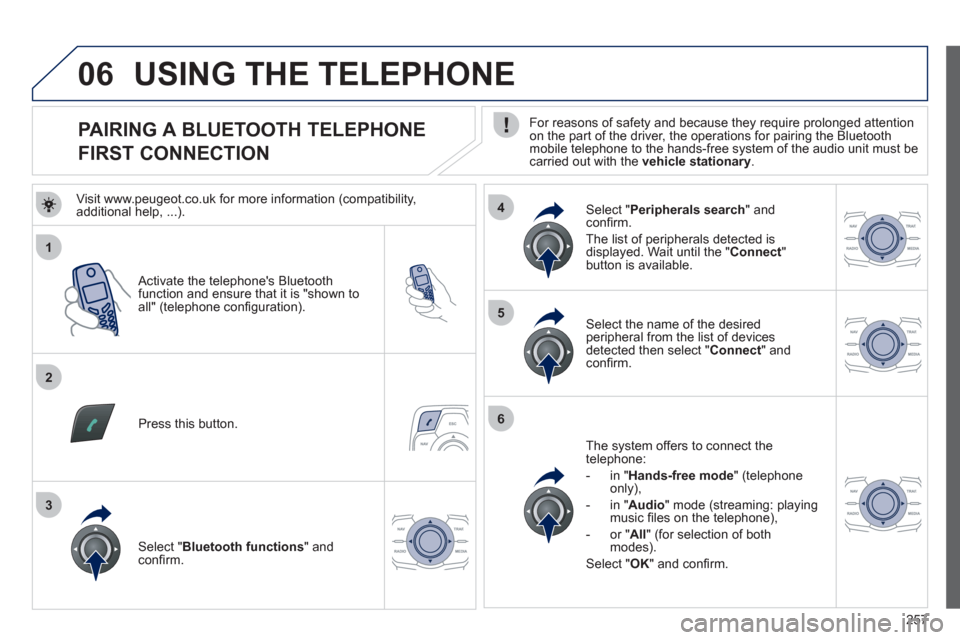
PAIRING A BLUETOOTH TELEPHONE
FIRST CONNECTION
For reasons of safety and because they require prolonged attention on the part of the driver, the operations for pairing the Bluetooth
mobile telephone to the hands-free system of the audio unit must becarried out with the vehicle stationary.
Activate the telephone's Bluetooth
function and ensure that it is "shown to all" (telephone confi guration).
Pr
ess this button.
Select the name of the desired
peripheral from the list of devicesdetected then select "Connect" andconfi rm.
The s
ystem offers to connect the
telephone:
- in " Hands-free mod
e
" (telephone
only),
- in "
Audio
" mode (streaming: playing music fi les on the telephone),
-
or "All" (for selection of bothmodes).
Select "OK" and confi rm.
Select " Bluetooth functions " and confi rm.
Select "Peripherals search" andconfi rm.
The list of
peripherals detected is
displayed. Wait until the " Connect"button is available.
USING THE TELEPHONE
Visit www.peugeot.co.uk for more information (compatibility,
additional help, ...).
Page 281 of 302
279
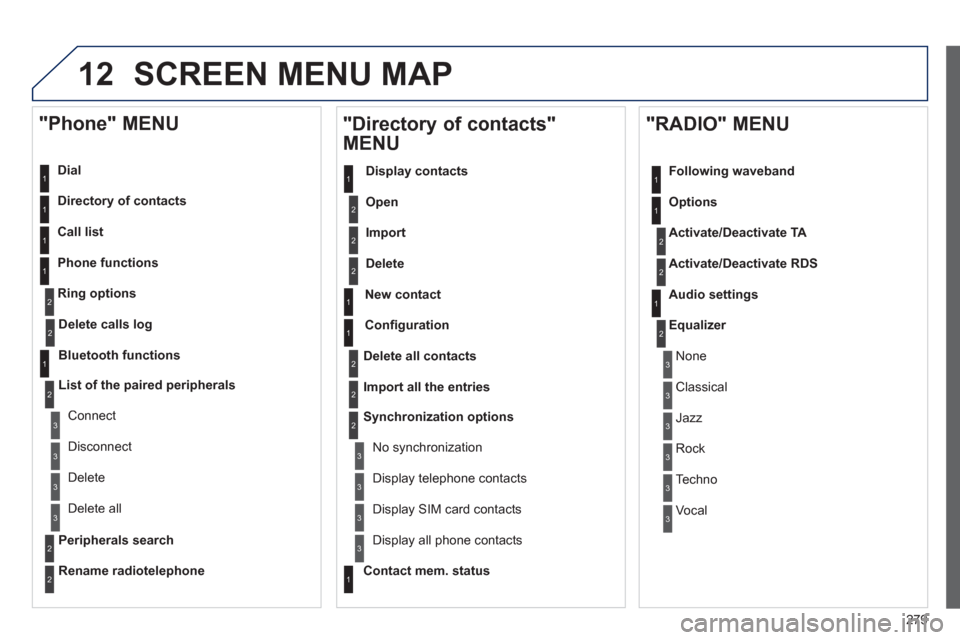
12 SCREEN MENU MAP
Dial
Director
y of contacts
Call list
Phone functions
Rin
g options
"Phone" MENU
1
1
2
1
1
2
3
3
2
1
3
3
2
2
1
2
2
2
1
1
2
2
2
1
3
3
3
3
1
2
2
1
1
3
3
3
3
3
3
2
Confi guration
Delete all contacts
Import all the entries
S
ynchronization options
No s
ynchronization
"Directory of contacts"
MENU
Display contacts
Open
Import
Delete
New contact
Equalizer
"RADIO" MENU
Following waveband
Options
Activate/Deactivate TA
Activate/Deactivate RD
S
Audio settings
Displa
y telephone contacts
Displa
y SIM card contacts
Contact mem. status
Displa
y all phone contacts
Delete calls log
Bluetooth functions
List of the paired peripherals
Connect
Di
sconnect
D
elete
Peripherals searchD
elete all
Rename radiotelephon
e
None
Classical
Jazz
Rock
Techno
Vocal
Page 286 of 302
284
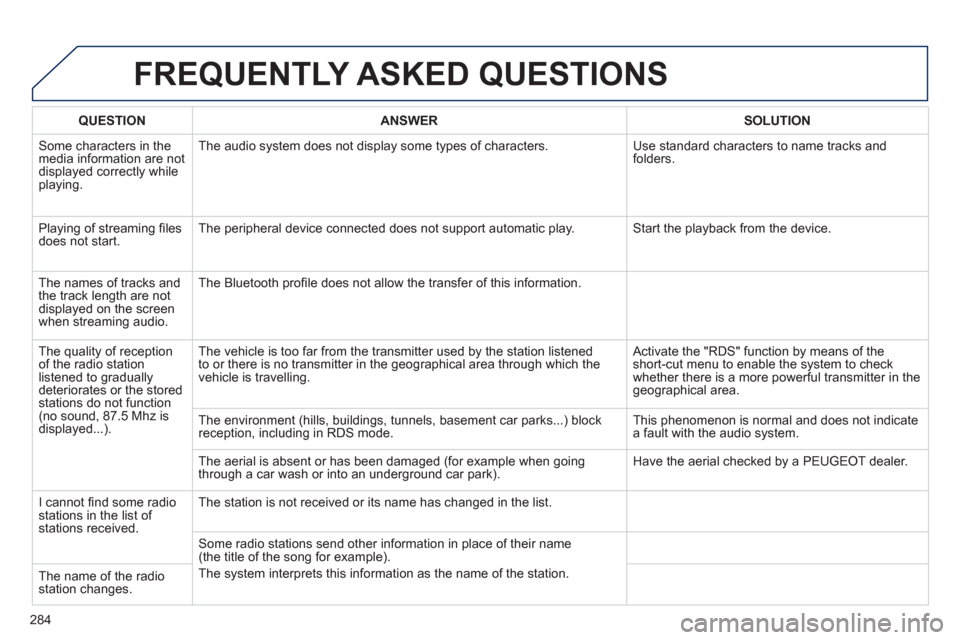
FREQUENTLY ASKED QUESTIONS
QUESTIONANSWERSOLUTION
Some characters in themedia information are not
displayed correctly while playing. The audio s
ystem does not display some types of characters. Use standard characters to name tracks and
folders.
Pla
ying of streaming fi lesdoes not start. The peripheral device connected does not support automatic play. Start the playback from the device.
Th
e names of tracks and
the track length are notdisplayed on the screen
when streaming audio. The Bluetooth profi le does not allow the transfer of this information.
The qualit
y of receptionof the radio station
listened to graduallydeteriorates or the stored stations do not function(no sound, 87.5 Mhz is
displayed...). The vehicle is too
far from the transmitter used by the station listened
to or there is no transmitter in the geographical area through which the
vehicle is travelling.
Activate the "RDS" function by means of theshort-cut menu to enable the system to check
whether there is a more powerful transmitter in thegeographical area.
The environment
(hills, buildings, tunnels, basement car parks...) block reception, including in RDS mode. This phenomenon is normal and does not indicate
a fault with the audio system.
The aerial is absent or has been dama
ged (for example when goingthrough a car wash or into an underground car park). Have the aerial checked by a PEUGEOT dealer.
I
cannot fi nd some radiostations in the list of stations received.
The station is not received or its name has changed in the list.
Some radio stations send other information in place of their name(the title of the song for example).
The s
ystem interprets this information as the name of the station.
The name of the radio station changes.