navigation system Peugeot 508 RXH 2013 User Guide
[x] Cancel search | Manufacturer: PEUGEOT, Model Year: 2013, Model line: 508 RXH, Model: Peugeot 508 RXH 2013Pages: 308, PDF Size: 8.95 MB
Page 253 of 308
251
04NAVIGATION - GUIDANCE
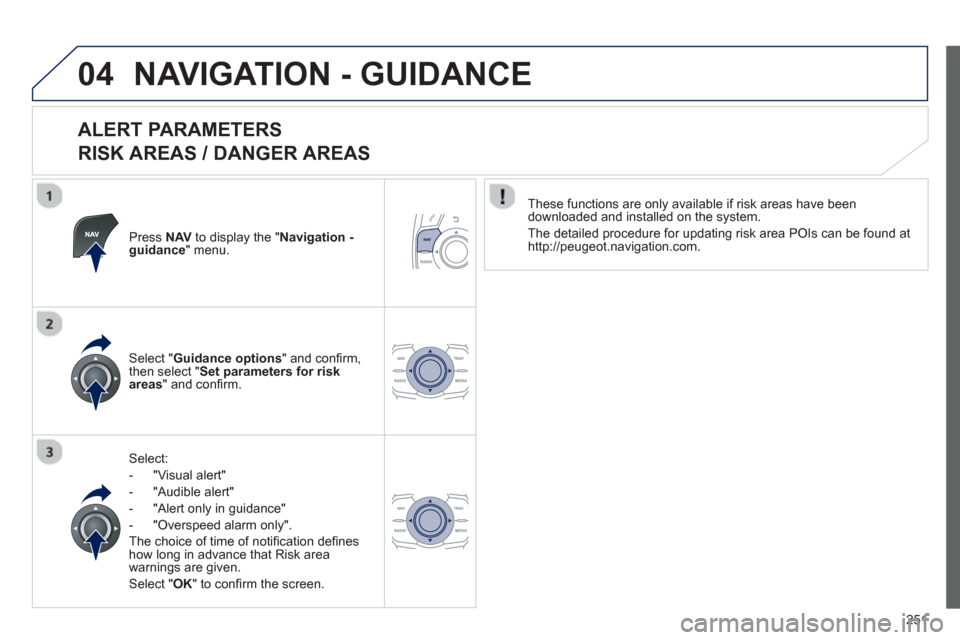
ALERT PARAMETERS
RISK AREAS / DANGER AREAS
Press NAVto display the "Navigation - guidance" menu.
Select:
-
"Visual alert"
-
"Audible alert"
- "Alert only in guidance"
- "
Overspeed alarm only".
Th
e choice of time of notifi cation defi nes how long in advance that Risk area
warnings are given.
Select " OK
" to confi rm the screen.
Select " Guidance options
" and confi rm,
then select "Set parameters for riskareas
" and confi rm.
These
functions are only available if risk areas have been
downloaded and installed on the system.
The detailed procedure for updatin
g risk area POIs can be found athttp://peugeot.navigation.com.
Page 255 of 308
253
04NAVIGATION - GUIDANCE
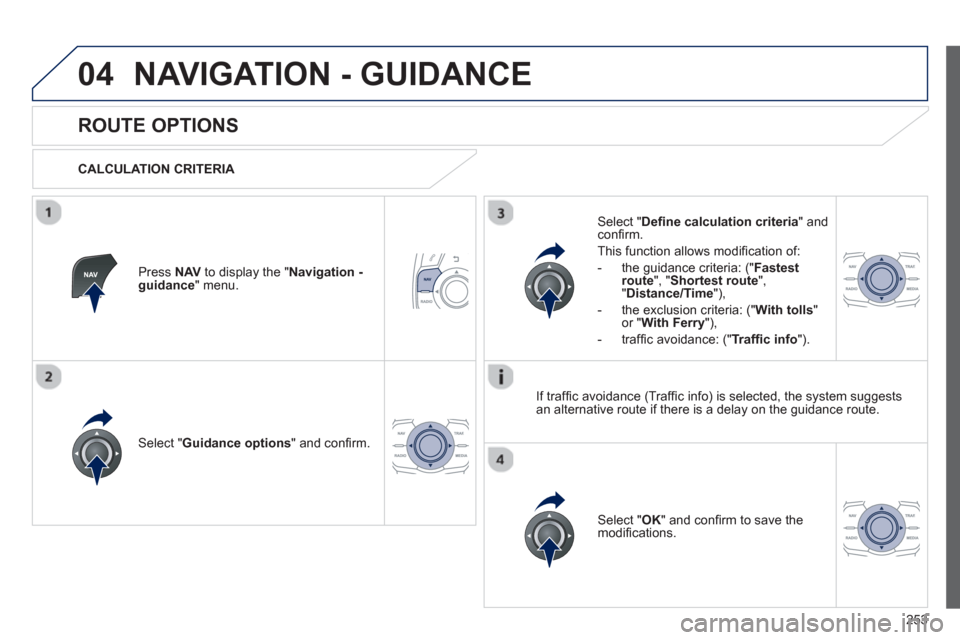
ROUTE OPTIONS
CALCULATION CRITERIA
Select " Guidance options
" and confi rm.
Select " OK
" and confi rm to save themodifi cations.
Select " Defi ne calculation criteria" andconfi rm.
Thi
s function allows modifi cation of:
- the
guidance criteria: (" Fastest
route", " Shortest route", "Distance/Time "),
- the exclusion criteria:
(" With tolls"or "With Ferry
"),
- traffi c avoidance:
(" Traffi c info
").
Press NAVto display the " Navigation - guidance" menu.
I
f traffi c avoidance (Traffi c info) is selected, the system suggests
an alternative route if there is a delay on the guidance route.
Page 256 of 308
254
04NAVIGATION - GUIDANCE
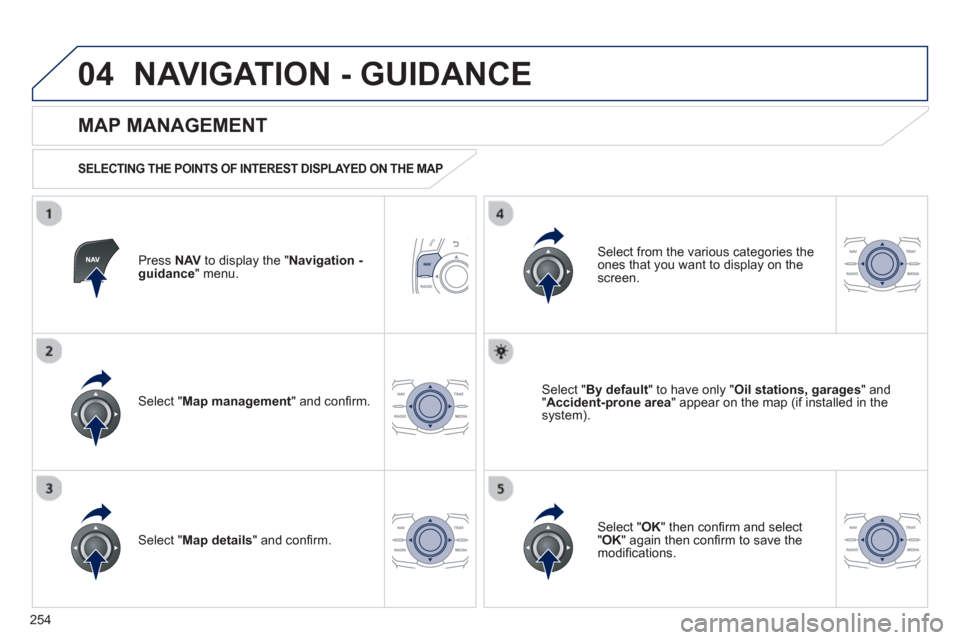
Press NAVto display the " Navigation - guidance" menu.
MAP MANAGEMENT
SELECTING THE POINTS OF INTEREST DISPLAYED ON THE MAP
Select " Map management
" and confi rm.
Select from the various categories the
ones that you want to display on thescreen.
Select " Map details
" and confi rm.
Select " By default" to have only "Oil stations, garages" and"Accident-prone area
" appear on the map (if installed in the
system).
Select " OK
" then confi rm and select "OK" again then confi rm to save the
modifi cations.
Page 259 of 308
257
04NAVIGATION - GUIDANCE
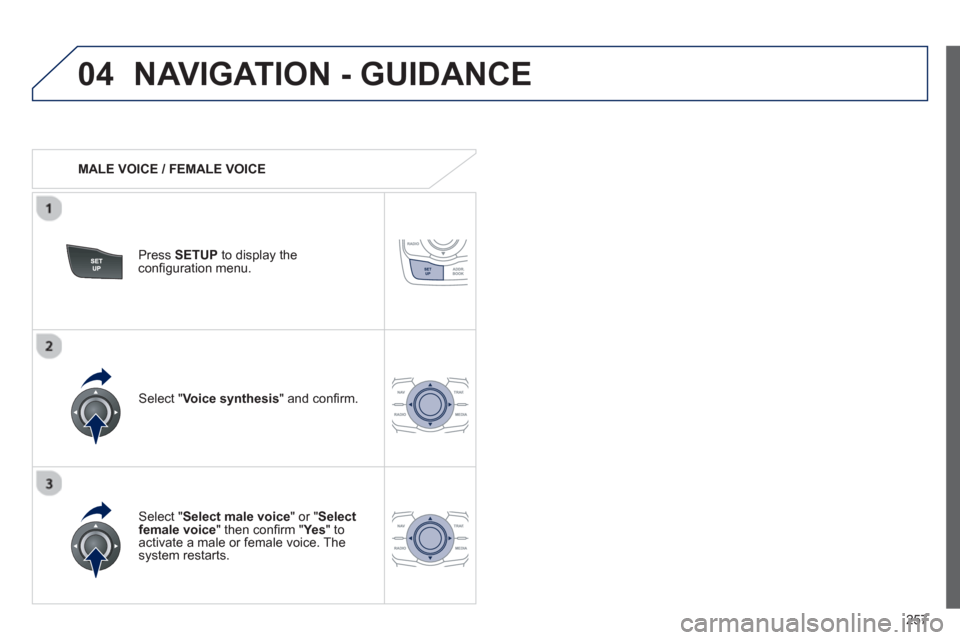
MALE VOICE / FEMALE VOICE
Press SETUP
to display theconfi guration menu.
Select "Select male voice
" or "Selectfemale voice" then confi rm " Ye s
" to activate a male or female voice. Thesystem restarts.
Select "Voice synthesis
" and confi rm.
Page 261 of 308
259
05TRAFFIC INFORMATION
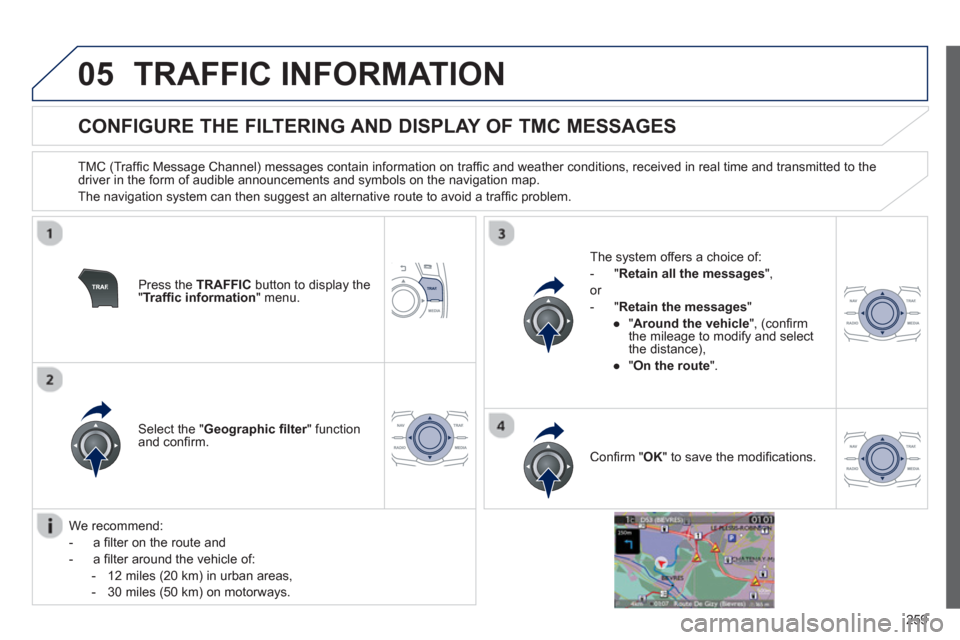
CONFIGURE THE FILTERING AND DISPLAY OF TMC MESSAGES
TMC (Traffi c Message Channel) messages contain information on traffi c and weather conditions, received in real time and transmitted to the
driver in the form of audible announcements and symbols on the navigation map.
The navi
gation system can then suggest an alternative route to avoid a traffi c problem.
Pr
ess the TRAFFICbutton to display the "Traffi c information
" menu.
Select the "Geographic fi lter" function rand confi rm. The s
ystem offers a choice of:
- " Retain all the messa
ges",
or
-"Retain the messa
ges"
●
"Around the vehicle ", (confi rm
the mileage to modify and select
the distance),
●
" On the rout
e".
Confi rm " OK
" to save the modifi cations.
We recommend:
-
a fi lter on the route and
-
a fi lter around the vehicle of:
- 12 miles
(20 km) in urban areas,
- 30 miles
(50 km) on motorways.
Page 288 of 308
286
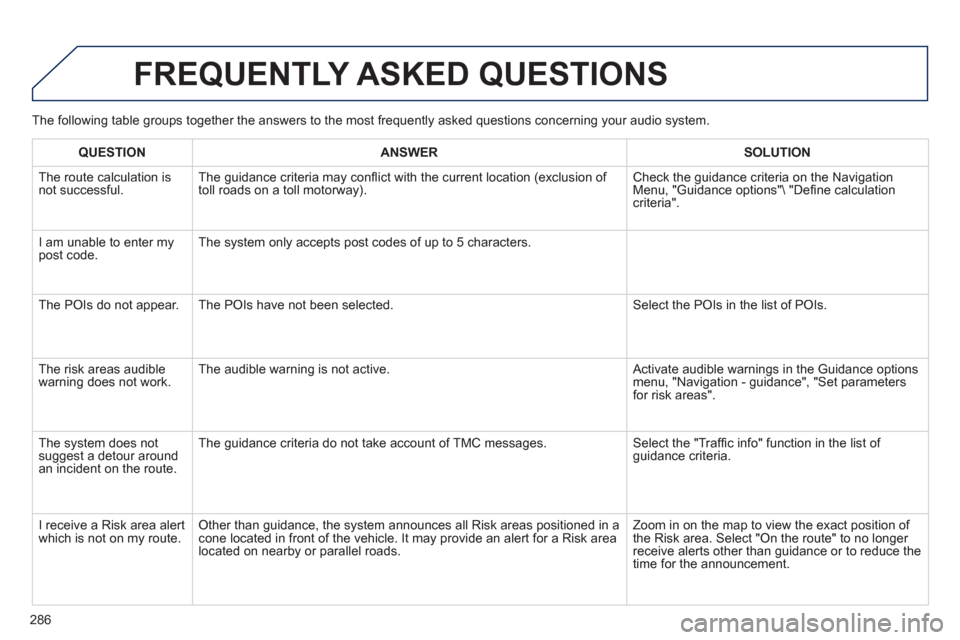
FREQUENTLY ASKED QUESTIONS
The following table groups together the answers to the most frequently asked questions concerning your audio system.
QUESTIONANSWERSOLUTION
The route calculation is not successful. The guidance criteria may confl ict with the current location (exclusion of
toll roads on a toll motorway). Check the guidance criteria on the Navigation Menu, "Guidance options" "Defi ne calculation criteria".
I am unable to enter m
ypost code. The system only accepts post codes of up to 5 characters.
The P
OIs do not appear. The POIs have not been selected. Select the POIs in the list of POIs.
Th
e risk areas audiblewarning does not work. The audible warning is not active. Activate audible warnings in the Guidance options menu, "Navigation - guidance", "Set parameters for risk areas".
The system does notsuggest a detour around an incident on the route. The
guidance criteria do not take account of TMC messages. Select the "Traffi c info" function in the list of guidance criteria.
I r
eceive a Risk area alert
which is not on my route. Other than guidance, the system announces all Risk areas positioned in a cone located in front of the vehicle. It may provide an alert for a Risk area located on nearby or parallel roads. Zoom in on the ma
p to view the exact position of
the Risk area. Select "On the route" to no longer receive alerts other than guidance or to reduce the
time for the announcement.
Page 296 of 308
294
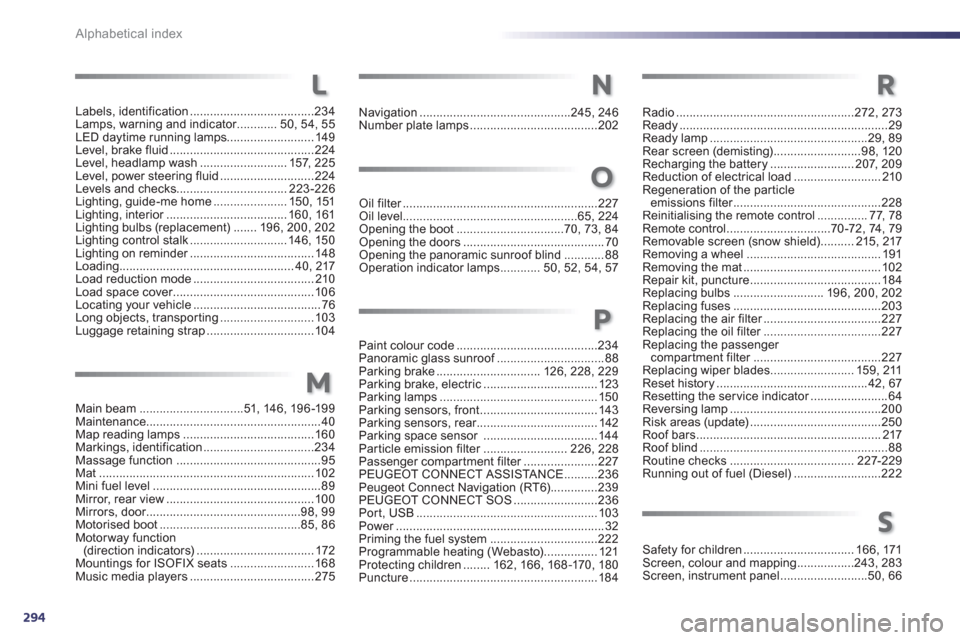
Alphabetical index
Labels, identification.....................................234Lamps, warning and indicator............r50,54, 55LED daytime running lamps..........................149Level, brake fluid ...........................................224Level, headlamp wash.......................... 157,225Level, power steering fluid............................224Levels and checks.................................223-226Lighting, guide-me home......................150,151Lighting, interior....................................r160,161Lighting bulbs (replacement).......196,200,202Lighting control stalk.............................146,150Lighting on reminder.....................................r148Loading.................................................... 40, 217Load reduction mode.................................... 210Load space cover..........................................r106Locating your vehicle......................................76Long objects, transpor ting............................103Luggage retaining strap................................104
L
Main beam...............................51, 146,196-199Maintenance....................................................40Map reading lamps.......................................160Markings, identification.................................234Massage function...........................................95Mat................................................................102Mini fuel level..................................................89Mirror, rear view ............................................ 100Mirrors, door..............................................r98,99Motorised boot..........................................85,86Motorway function(direction indicators)...................................172Mountings for ISOFIX seats.........................168Music media players .....................................275
Navigation.............................................245, 246Number plate lamps......................................202
Oil filter..........................................................r227Oil level....................................................65,224Opening the boot................................70,73,84Opening the doors..........................................70Opening the panoramic sunroof blind ............88Operation indicator lamps............50, 52, 54,57
Radio.....................................................272, 273Ready..............................................................29Ready lamp...............................................29,89Rear screen (demisting) ..........................98, 120Recharging the battery.........................207, 209Reduction of electrical load..........................210Regeneration of the particleemissions filter............................................r228Reinitialising the remote control...............77,78Remote control...............................70-72, 74,79Removable screen (snow shield)..........215, 217Removing a wheel........................................191Removing the mat.........................................102Repair kit, puncture .......................................184Replacing bulbs ...........................196,200, 202Replacing fuses ............................................203Replacing the air filter...................................r227Replacing the oil filter...................................r227Replacing the passenger compartment filter......................................r227Replacing wiper blades.........................159, 211Reset history .............................................42,67Resetting the service indicator.......................r64Reversing lamp.............................................200Risk areas (update).......................................250Roof bars.......................................................217Roof blind........................................................88Routine checks.....................................227-229Running out of fuel (Diesel)..........................222
Safety for children ................................. 166, 171Screen, colour and mapping.................243, 283Screen, instrument panel..........................50,66
M
N
O
R
S
Paint colour code..........................................234Panoramic glass sunroof................................f88Parking brake...............................126,228, 229Parking brake, electric..................................123Parking lamps...............................................150Parking sensors, front...................................143Parking sensors, rear....................................r142Parking space sensor ..................................144Particle emission filter.........................r226, 228Passenger compartment filter......................r227PEUGEOT CONNECT ASSISTA NCE..........236Peugeot Connect Navigation (RT6)..............239PEUGEOT CONNECT SOS.........................236Port, USB......................................................103Power..............................................................r32Priming the fuel system ................................222Programmable heating (Webasto)................121Protecting children........ 162,166, 168-170, 180Puncture........................................................184
P
Page 297 of 308
.
295
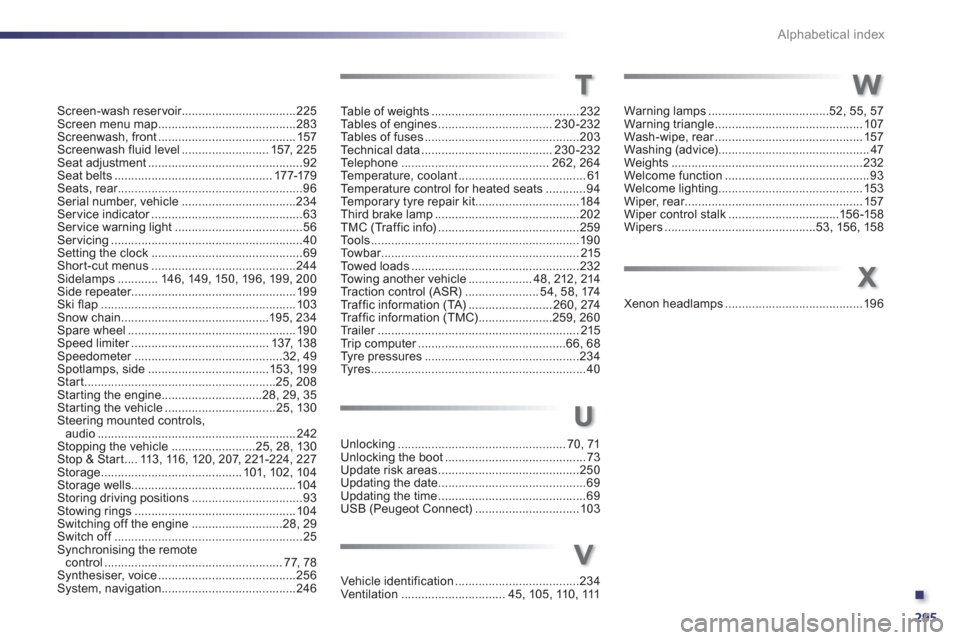
Alphabetical index
Screen-wash reser voir..................................225Screen menu map.........................................283Screenwash, front ......................................... 157Screenwash fluid level..........................157,225Seat adjustment..............................................92Seat belts...............................................177-179Seats, rear.......................................................r96Serial number, vehicle ..................................234Ser vice indicator.............................................r63Service warning light ......................................56Servicing .........................................................40Setting the clock .............................................69Short-cut menus...........................................244Sidelamps............146, 149,150, 196,199,200Side repeater.................................................199Ski flap..........................................................103Snow chain ............................................195, 234Spare wheel ..................................................190Speed limiter.........................................r137, 138Speedometer............................................r32, 49Spotlamps, side ....................................153, 199Start.........................................................25, 208Starting the engine..............................28, 29,35Starting the vehicle.................................25,130Steering mounted controls,audio...........................................................242Stopping the vehicle.........................25,28,130Stop & Start....113,116,120, 207, 221-224,227Storage..........................................101,102,104Storage wells................................................. 104Storing driving positions.................................93Stowing rings................................................104Switching off the engine...........................28, 29Switch off........................................................f25Synchronising the remotecontrol .....................................................77,78Synthesiser, voice.........................................256System, navigation ........................................246
Table of weights ............................................232Ta b l e s of engines..................................230-232Tables of fuses..............................................203Te c hnical data.......................................230-232Te l e p h o ne............................................262, 264Te m p e r a t u r e , c o o l a nt......................................61Temperature control for heated seats............94Te m p o r a ry tyre repair kit...............................184Third brake lamp ...........................................202TMC (Tr affic info)..........................................259To o l s..............................................................190To w b a r...........................................................r215Towed loads..................................................232To w i ng another vehicle...................48, 212, 214Tr a c t i o n c o n t r o l (ASR) ......................54, 58, 174Traffic information (TA) .........................260, 274Traffic information (TMC)......................259,260Tr a i l e r............................................................r215Tr i p c o m p u t e r............................................r66, 68Tyre pressures..............................................234Tyres................................................................40
Unlocking..................................................70,71Unlocking the boot..........................................73Update risk areas..........................................250Updating the date............................................69Updating the time ............................................69USB (Peugeot Connect)...............................103
U
T
Warning lamps ....................................52, 55,57Warning triangle ............................................107Wash-wipe, rear............................................r157Washing (advice).............................................47Weights.........................................................232Welcome function...........................................93Welcome lighting...........................................153Wiper, rear.....................................................r157Wiper control stalk .................................156-158Wipers .............................................53, 156, 158
W
Vehicle identification.....................................234Ventilation...............................45, 105, 110,111
X
Xenon headlamps.........................................196
V