audio Peugeot 508 RXH 2013 Owner's Manual
[x] Cancel search | Manufacturer: PEUGEOT, Model Year: 2013, Model line: 508 RXH, Model: Peugeot 508 RXH 2013Pages: 308, PDF Size: 8.95 MB
Page 5 of 308
.
.
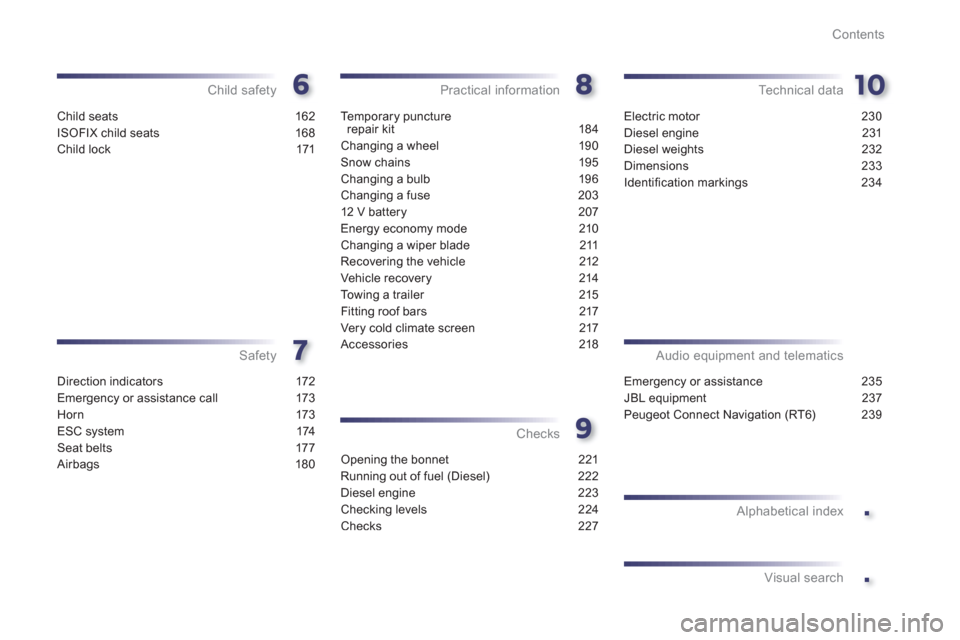
Contents
Child seats 162
ISOFIX child seats 168
Child lock 171
Child safety
Direction indicators 172
Emergency or assistance call 173
Horn 173
ESC system 174
Seat belts 177
Airbags 180
Safety
Te m p o r a ry puncture
repair kit 184
Changing a wheel 190
Snow chains 195
Changing a bulb 196
Changing a fuse 203
12 V battery 207
Energy economy mode 210
Changing a wiper blade 211
Recovering the vehicle 212
Vehicle recovery 214
Towing a trailer 215
Fitting roof bars 217
Very cold climate screen 217
Accessories 218
Practical information
Opening the bonnet 221
Running out of fuel (Diesel) 222
Diesel engine 223
Checking levels 224
Checks 227
Checks
Electric motor 230
Diesel engine 231
Diesel weights 232
Dimensions 233
Identifi cation markings 234
Technical data
Emergency or assistance 235
JBL equipment 237
Peugeot Connect Navigation (RT6) 239
Audio equipment and telematics
Alphabetical index
Visual search
Page 11 of 308
.
9
Familiarisation
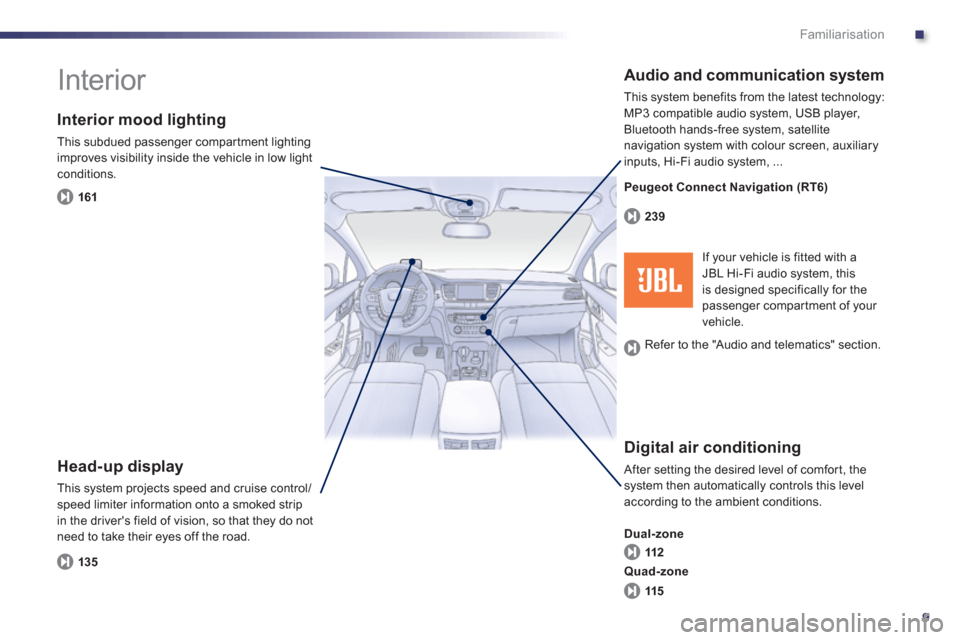
Interior
Interior mood lighting
This subdued passenger compar tment lighting
improves visibility inside the vehicle in low light conditions.
Head-up display
This system projects speed and cruise control/speed limiter information onto a smoked strip
in the driver's field of vision, so that they do not need to take their eyes off the road.
Digital air conditioning
After setting the desired level of comfor t, the system then automatically controls this level
according to the ambient conditions.
Dual-zone
Audio and communication system
This system benefits from the latest technology: MP3 compatible audio system, USB player,
Bluetooth hands-free system, satellite
navigation system with colour screen, auxiliary
inputs, Hi-Fi audio s
ystem, ...
16
1
135112 239
115 Quad-zone
If your vehicle is fitted with aJBL Hi-Fi audio system, this
is designed specifically for thepassenger compar tment of your
vehicle. Peu
geot Connect Navigation (RT6)
R
efer to the "Audio and telematics" section.
Page 14 of 308
12
Familiarisation
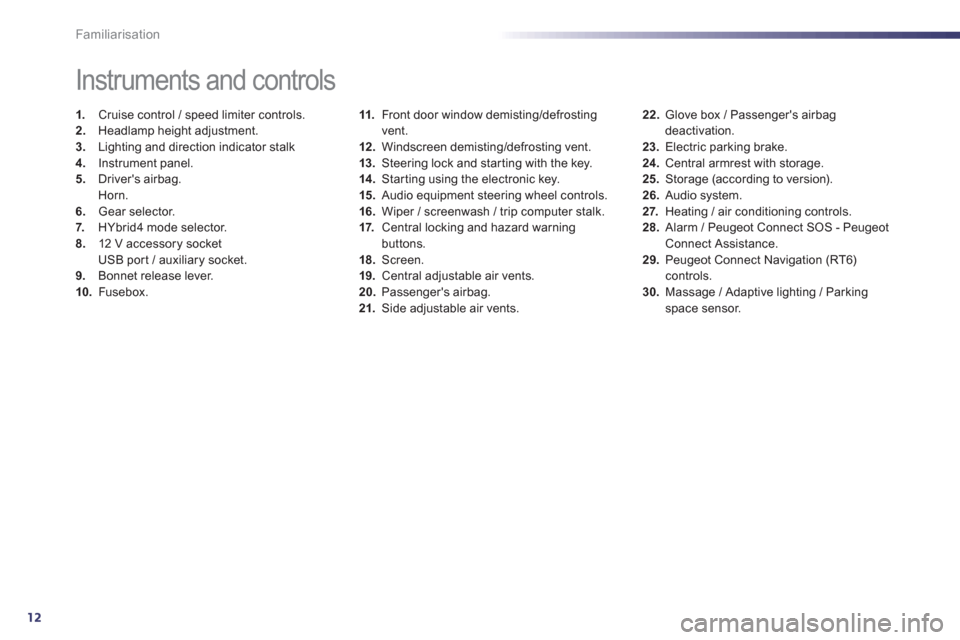
11.Front door window demisting/defrostingvent.
12.Windscreen demisting/defrosting vent.
13
. Steering lock and star ting with the key. 14 .
Starting using the electronic key.
15. Audio equipment steering wheel controls.
16.Wiper / screenwash / trip computer stalk.
17. Central locking and hazard warningbuttons.
18. Screen.
19.Central adjustable air vents.
20.Passenger's airbag. 21. Side adjustable air vents.
Instruments and controls
1.
Cruise control / speed limiter controls. 2.
Headlamp height adjustment. 3.
Lighting and direction indicator stalk
4.
Instrument panel. 5.
Driver's airbag.Horn.
6.Gear selector.
7. HYbrid4 mode selector. 8.12 V accessory socket
USB por t / auxiliary socket. 9. Bonnet release lever.10.Fusebox.
22.
Glove box / Passenger's airbag deactivation. 23.
Electric parking brake.
24.
Central armrest with storage. 25.Storage (according to version).26.Audio system. 27.
Heating / air conditioning controls.28.
Alarm / Peugeot Connect SOS - PeugeotConnect Assistance. 29.
Peugeot Connect Navigation (RT6)controls. 30.
Massage / Adaptive lighting / Parkingspace sensor.
Page 105 of 308
3
103
Comfort
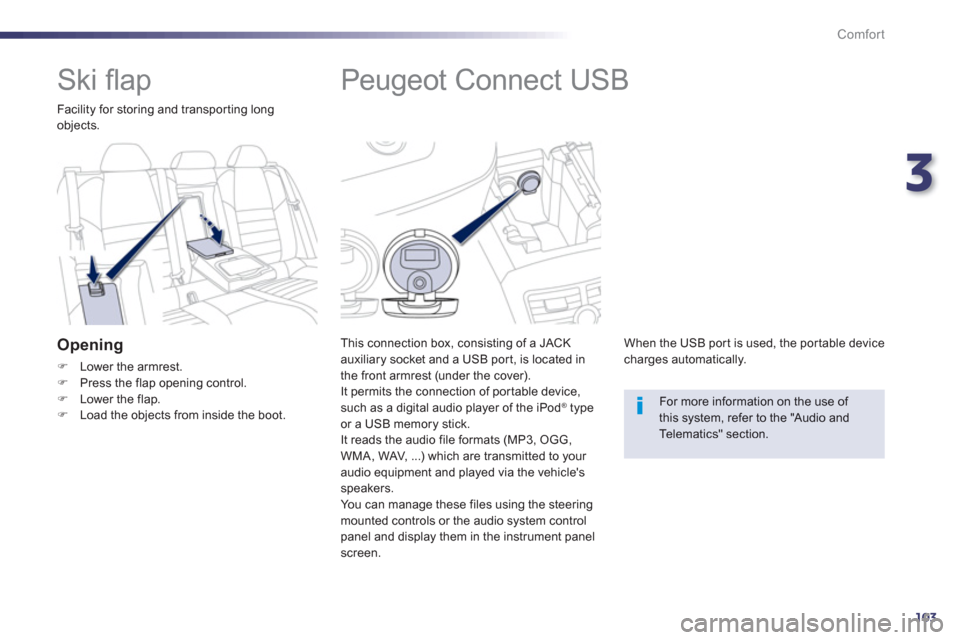
Peugeot Connect USB
This connection box, consisting of a JACKauxiliary socket and a USB port, is located in
the front armrest (under the cover).
It permits the connection of por table device,
such as a di
gital audio player of the iPod® type®
or a USB memory stick.
It reads the audio file formats (MP3, OGG,WMA, WAV, ...) which are transmitted to your audio equipment and played via the vehicle's
speakers.
You can mana
ge these files using the steeringmounted controls or the audio system control
panel and display them in the instrument panel screen.
When the USB por t is used, the por table device
charges automatically.
For more information on the use of this system, refer to the "Audio andTelematics" section.
Ski fl ap
Facility for storing and transporting longobjects.
Opening
)Lower the armrest. )Press the flap opening control.)Lower the flap. )Load the objects from inside the boot.
Page 137 of 308
4
135
Driving
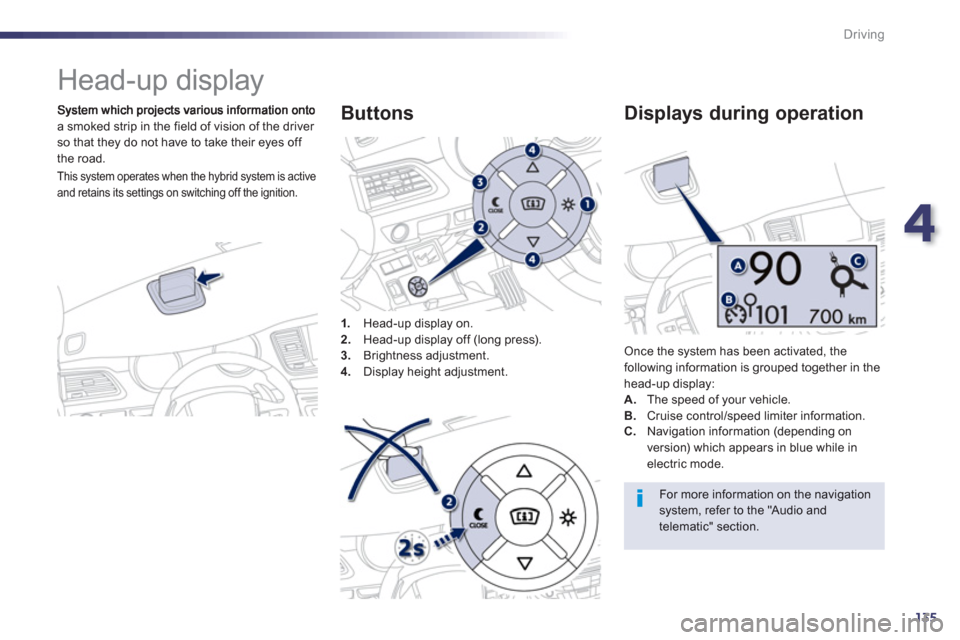
Head-up display
a smoked strip in the field of vision of the driver so that they do not have to take their eyes off
th
e road.
1
.Head-up display on.
2. Head-up display off (long press).3.
Brightness adjustment. 4.
Display height adjustment.
Buttons
Once the system has been activated, thefollowing information is grouped together in the
head-up display:A.The speed of your vehicle. B. Cruise control/speed limiter information.
Displays during operation
C.
Navigation information (depending on
version) which appears in blue while in electric mode.
For more information on the navigation system, refer to the "Audio andtelematic" section.
This system operates when the hybrid system is active
and retains its settings on switching off the ignition.
Page 175 of 308
7
173
Safety
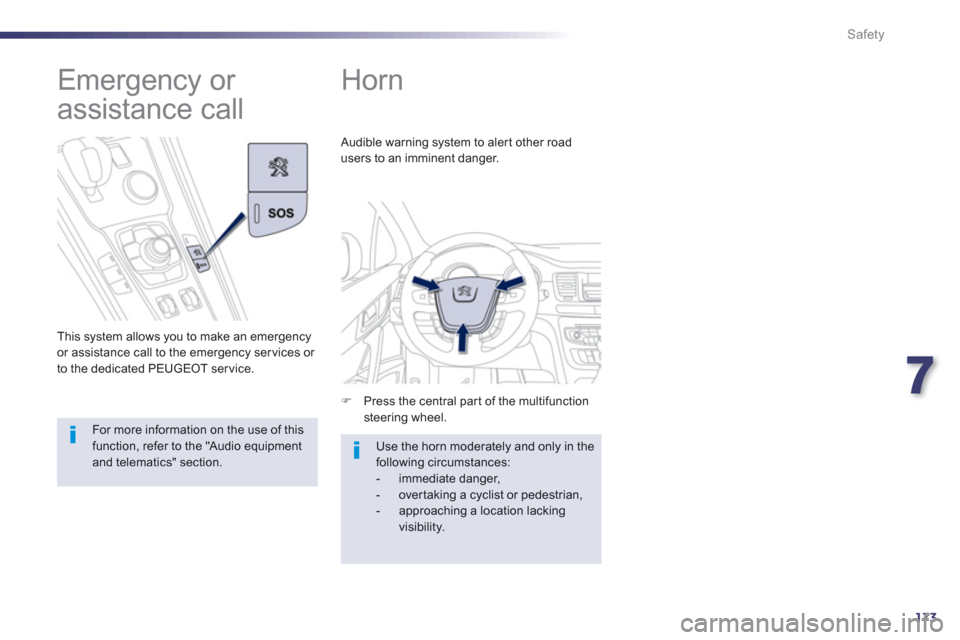
Horn
)
Press the central part of the multifunctionsteering wheel.
Audible warning system to alert other road
users to an imminent dan
ger.
Use the horn moderately and only in thefollowing circumstances:
- immediate danger,
- over taking a cyclist or pedestrian,
- approaching a location lackingvisibility.
Emergency or
assistance call
This system allows you to make an emergency
or assistance call to the emergency services or
to the dedicated PEUGEOT ser vice.
For more information on the use of this function, refer to the "Audio equipment and telematics" section.
Page 206 of 308
204
Practical information
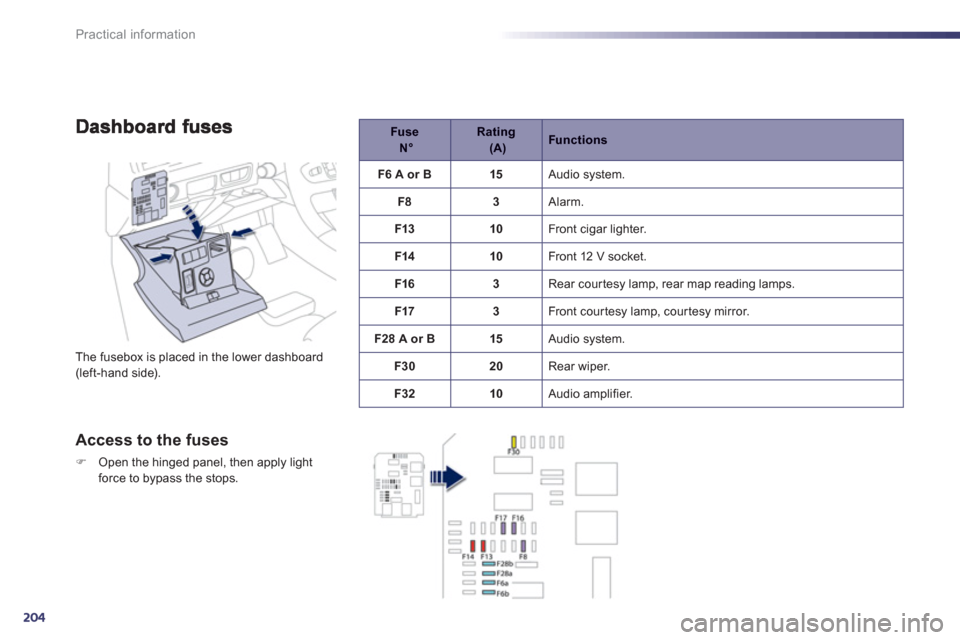
The fusebox is placed in the lower dashboard (left-hand side).
Access to the fuses
)Open the hinged panel, then apply light
force to bypass the stops.
Fuse N°
Rating (A)
Functions
F6 A or B
15 Audio system.
F
83 Alarm.
F13
10 Front cigar lighter.
F1410 Front 12 V socket.
F1
63 Rear courtesy lamp, rear map reading lamps.
F17
3 Front cour tesy lamp, cour tesy mirror.
F2
8 A or B15 Audio system.
F3
020 Rear wiper.
F32
10 Audio amplifier.
Page 207 of 308
8
205
Practical information
Fuse N°Rating (A)Functions
F3 15
Driver's electric window panel, 12 V socket for rear seats.
F
415
12 V socket in boot.
F530 One-touch rear window.
F
630 One-touch front window.
F1
120 Trailer unit.
F12 2
0 Audio amplifier.
F1
520 Panoramic sunroof blind.
F1
65 Driver's electric window switch panel.
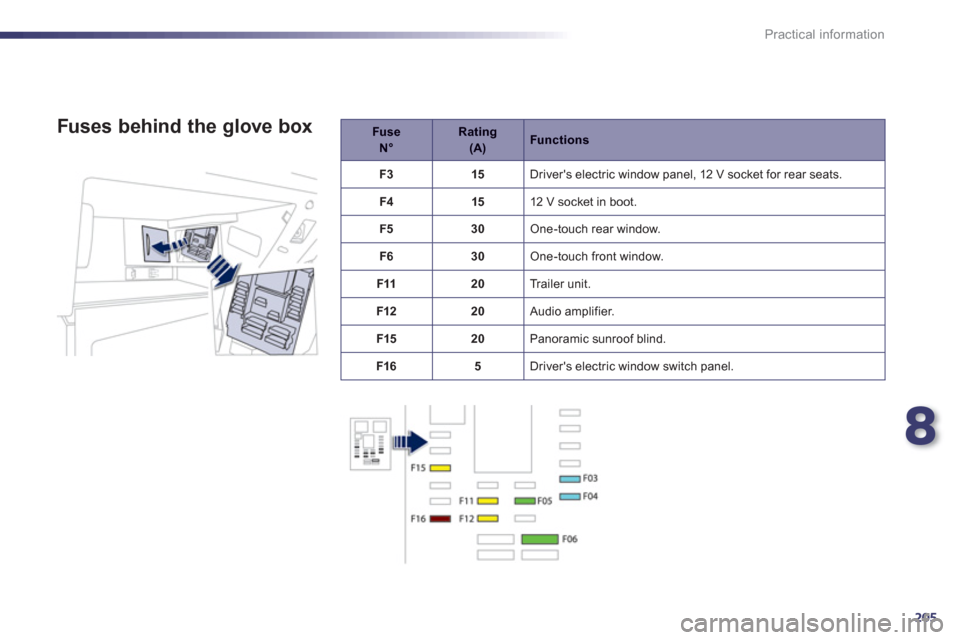
Fuses behind the glove box
Page 212 of 308
210
Practical information
Load reduction mode
System which manages the use of cer tain
functions according to the level of chargeremaining in the battery.
When the vehicle is being driven, the loadreduction function temporarily deactivates certain functions, such as the air conditioning,
the heated rear screen...
The deactivated functions are reactivated automatically as soon as conditions permit.
S
ystem which manages the duration of use of certain functions to conser ve a sufficient level of charge in the battery.
After the engine has stopped, you can still use functions such as the audio and telematics
system, windscreen wipers, dipped beam headlamps, cour tesy lamps, etc. for a maximumcombined duration of about forty minutes.
Energy economy mode
Switching to economy mode
A message then appears in the instrument
panel screen indicating that the vehicle has
switched to economy mode and the activefunctions are put on standby.
If a telephone call is being made at this time, it
will be maintained for around 10 minutes with
the Bluetooth hands-free system of your audio
system.
Exiting economy mode
These functions are reactivated automaticallynext time the vehicle is driven.)In order to restore the use of these functions immediately, star t the engine and let it run:
- for less than ten minutes, to use
the equipment for approximately
five minutes,
- for more than ten minutes, to use the
equipment for up to approximatel
y thirtyminutes.
Let the engine run for the duration specified toensure that the battery charge is sufficient.
Do not repeatedly and continuously restar t theengine in order to charge the battery.
A flat battery prevents the engine from star ting (refer to the "Battery" section).
In this energy economy mode and whenstarting up the hybrid system, it maytake a few seconds before the Readylamp comes on.
Page 221 of 308
8
219
Practical information
The fitting of electrical equipmentor accessories which are notrecommended by PEUGEOT may result in a failure of your vehicle's electronic system and excessive electricalconsumption.Please note this precaution. You are advised to contact a PEUGEOT representative to be shown the rangeof recommended equipment andaccessories.
Installation of radio communication transmitters
Before installing any after-market radio communication transmitter, you can contact a PEUGEOT dealer for the specification of transmitters which canbe fitted (frequency, maximum power, aerial position, specific installationrequirements), in line with the Vehicle
Electromagnetic Compatibility Directive(2004/10 4/EC).
Depending on the legislation in force in the country, it may be compulsoryto have a high visibility safety vest, warning triangle and spare bulbs and fuses available in the vehicle. You can also obtain products
for cleaning and
maintenance (exterior and interior) and topping up fluids (screenwash, ...), as well as refills(cartridge for temporary tyre repair kit...) fromPEUGEOT dealers.
"Multimedia":
audio systems, portable navigation system,
Ta k a r a / S o ny por table video screen, Bluetoothsystem, speakers, DVD player, Wi-Fi, drivingaids, video suppor t, microwave unit...