engine Peugeot 807 2013 Service Manual
[x] Cancel search | Manufacturer: PEUGEOT, Model Year: 2013, Model line: 807, Model: Peugeot 807 2013Pages: 234, PDF Size: 9.8 MB
Page 130 of 234
128
Changing a fuse
Fuse box
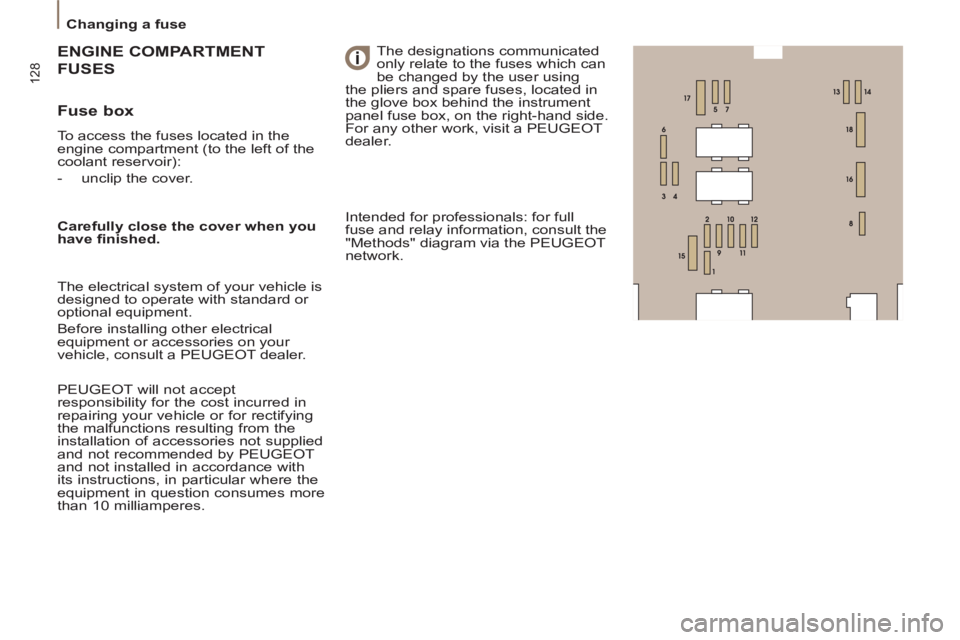
To access the fuses located in the
engine compartment (to the left of the
coolant reservoir):
- unclip the cover.
GINE COMPARTMENT
ENGIN
USES FUS
The designations communicated
only relate to the fuses which can
be changed by the user using
the pliers and spare fuses, located in
the glove box behind the instrument
panel fuse box, on the right-hand side.
For any other work, visit a PEUGEOT
dealer.
Carefully close the cover when you
have fi nished.
The electrical system of your vehicle is
designed to operate with standard or
optional equipment.
Before installing other electrical
equipment or accessories on your
vehicle, consult a PEUGEOT dealer.
PEUGEOT will not accept
responsibility for the cost incurred in
repairing your vehicle or for rectifying
the malfunctions resulting from the
installation of accessories not supplied
and not recommended by PEUGEOT
and not installed in accordance with
its instructions, in particular where the
equipment in question consumes more
than 10 milliamperes. Intended for professionals: for full
fuse and relay information, consult the
"Methods" diagram via the PEUGEOT
network.
Page 131 of 234
129
QUICK HELP
7
Changing a fuse
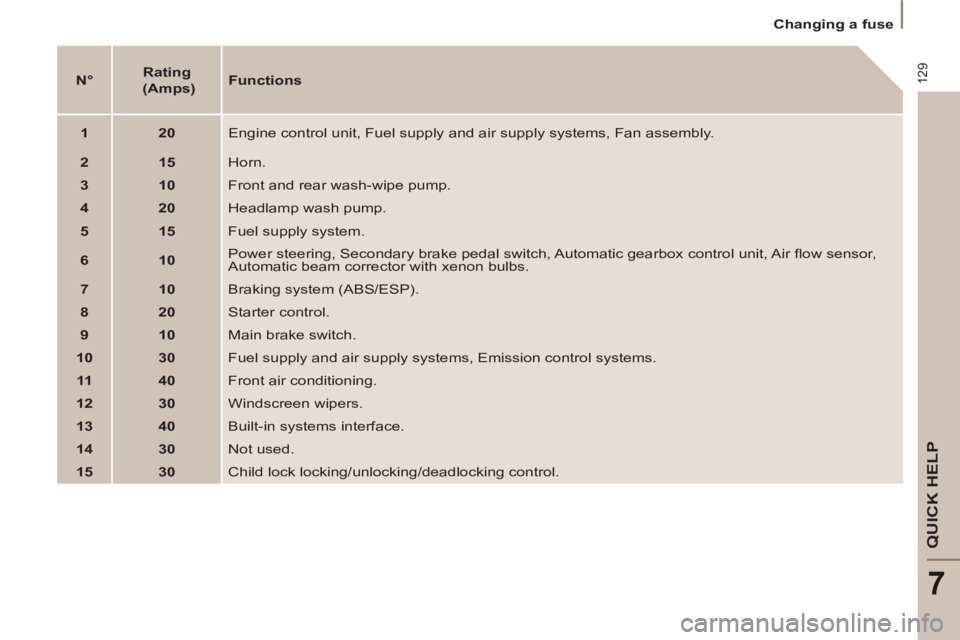
N°
Rating
(Amps)
Functions
1
20
Engine control unit, Fuel supply and air supply systems, Fan assembly.
2
15
Horn.
3
10
Front and rear wash-wipe pump.
4
20
Headlamp wash pump.
5
15
Fuel supply system.
6
10
Power steering, Secondary brake pedal switch, Automatic gearbox control unit, Air fl ow sensor,
Automatic beam corrector with xenon bulbs.
7
10
Braking system (ABS/ESP).
8
20
Starter control.
9
10
Main brake switch.
10
30
Fuel supply and air supply systems, Emission control systems.
11
40
Front air conditioning.
12
30
Windscreen wipers.
13
40
Built-in systems interface.
14
30
Not used.
15
30
Child lock locking/unlocking/deadlocking control.
Page 133 of 234
131
QUICK HELP
7
Having your vehicle towed
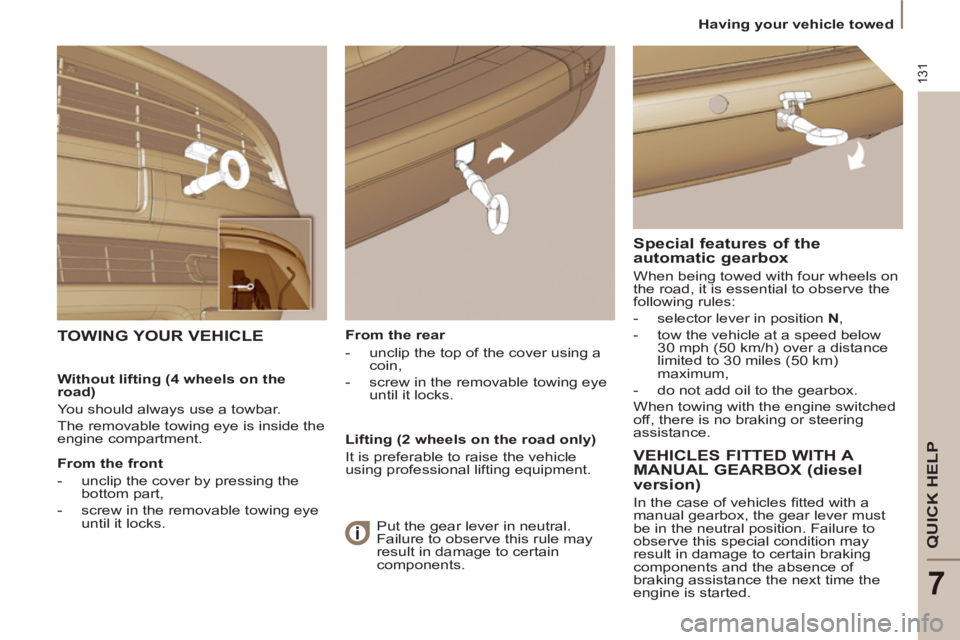
From the rear
- unclip the top of the cover using a
coin,
- screw in the removable towing eye
until it locks.
TOWING YOUR VEHICLE
Special features of the
automatic gearbox
When being towed with four wheels on
the road, it is essential to observe the
following rules:
- selector lever in position N
,
- tow the vehicle at a speed below
30 mph (50 km/h) over a distance
limited to 30 miles (50 km)
maximum,
- do not add oil to the gearbox.
When towing with the engine switched
off, there is no braking or steering
assistance.
Without lifting (4 wheels on the
road)
You should always use a towbar.
The removable towing eye is inside the
engine compartment.
From the front
- unclip the cover by pressing the
bottom part,
- screw in the removable towing eye
until it locks.
Lifting (2 wheels on the road only)
It is preferable to raise the vehicle
using professional lifting equipment.
VEHICLES FITTED WITH A
MANUAL GEARBOX (diesel
version)
In the case of vehicles fi tted with a
manual gearbox, the gear lever must
be in the neutral position. Failure to
observe this special condition may
result in damage to certain braking
components and the absence of
braking assistance the next time the
engine is started. Put the gear lever in neutral.
Failure to observe this rule may
result in damage to certain
components.
Page 134 of 234
Diesel technical data
132
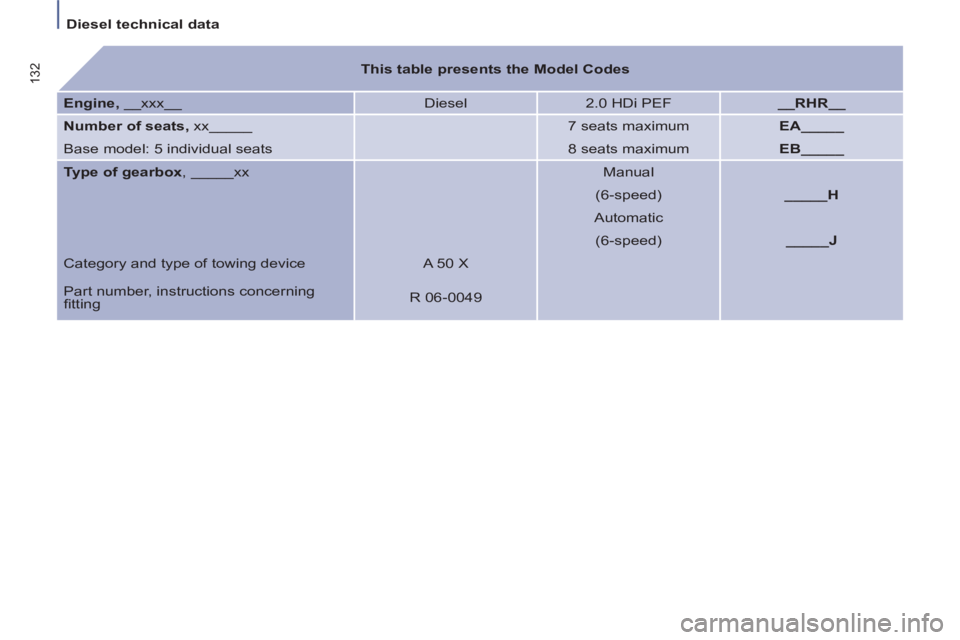
This table presents the Model Codes
Engine,
__xxx__ Diesel
2.0 HDi PEF
__RHR__
Number of seats,
xx_____
7 seats maximum
EA_____
Base model: 5 individual seats
8 seats maximum
EB_____
Type of gearbox
, _____xx
Manual
(6-speed)
_____H
Automatic
(6-speed)
_____J
Category and type of towing device A 50 X
Part number, instructions concerning
fi tting R 06-0049
Page 135 of 234
133
Diesel technical data
TECHNICAL DATA
8
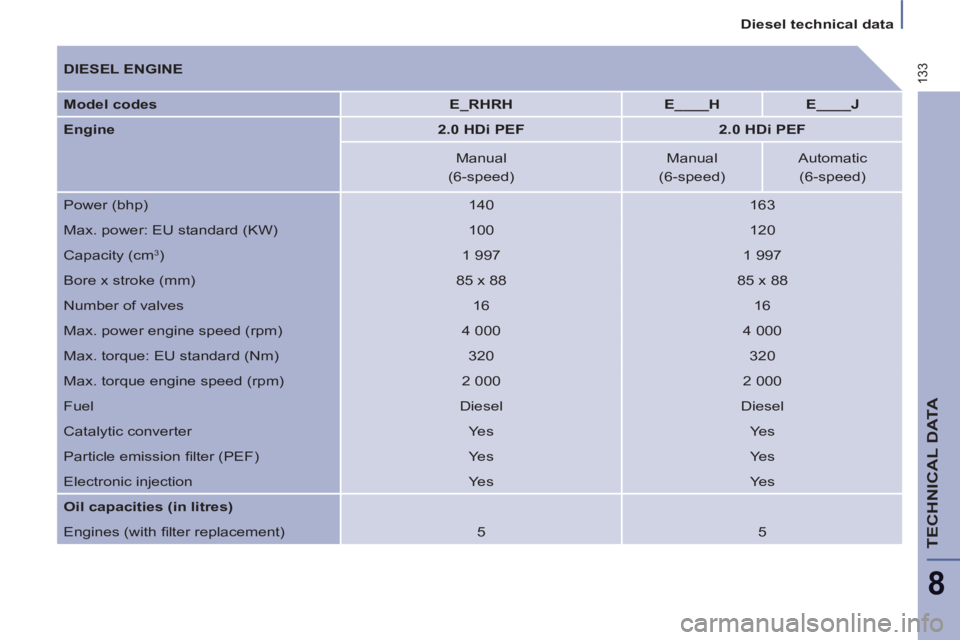
DIESEL ENGINE
Model codes
E_RHRH
E____H
E____J
Engine
2.0 HDi PEF
2.0 HDi PEF
Manual
Manual
Automatic
(6-speed)
(6-speed)
(6-speed)
Power (bhp)
140
163
Max. power: EU standard (KW)
100
120
Capacity (cm
3
)
1 997
1 997
Bore x stroke (mm)
85 x 88
85 x 88
Number of valves
16
16
Max. power engine speed (rpm)
4 000
4 000
Max. torque: EU standard (Nm)
320
320
Max. torque engine speed (rpm)
2 000
2 000
Fuel
Diesel
Diesel
Catalytic converter
Yes
Yes
Particle emission fi lter (PEF)
Yes
Yes
Electronic injection
Yes
Yes
Oil capacities (in litres)
Engines (with fi lter replacement)
5
5
Page 136 of 234
Diesel technical data
134
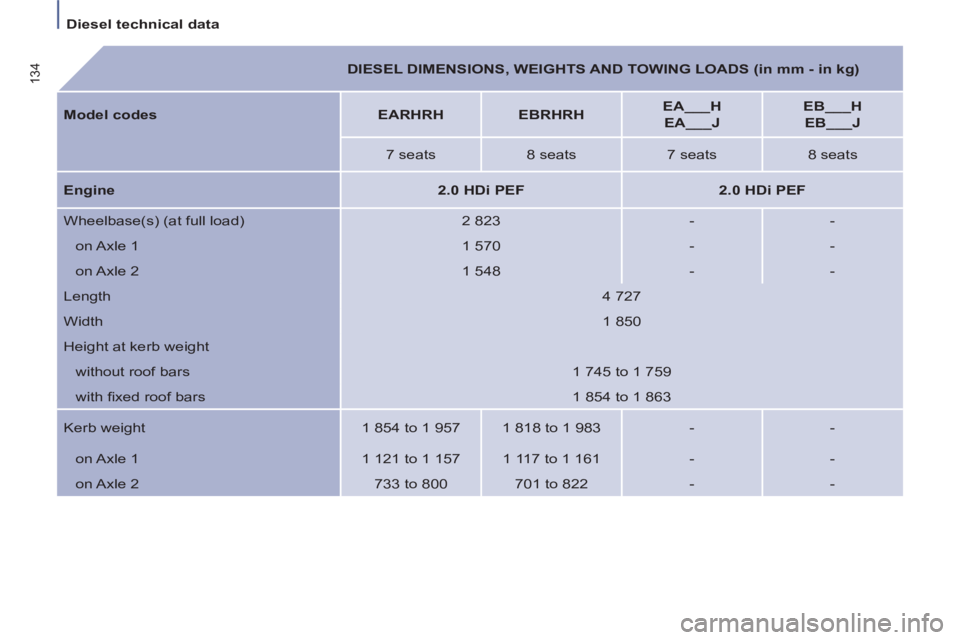
DIESEL DIMENSIONS, WEIGHTS AND TOWING LOADS (in mm - in kg)
Model codes
EARHRH
EBRHRH
EA___H
EA___J
EB___H
EB___J
7 seats
8 seats
7 seats
8 seats
Engine
2.0 HDi PEF
2.0 HDi PEF
Wheelbase(s) (at full load)
2 823
-
-
on Axle 1
1 570
-
-
on Axle 2
1 548
-
-
Length
4 727
Width
1 850
Height at kerb weight
without roof bars
1 745 to 1 759
with fi xed roof bars
1 854 to 1 863
Kerb weight
1 854 to 1 957
1 818 to 1 983
-
-
on Axle 1
1 121 to 1 157
1 117 to 1 161
-
-
on Axle 2
733 to 800
701 to 822
-
-
Page 137 of 234
135
Diesel technical data
TECHNICAL DATA
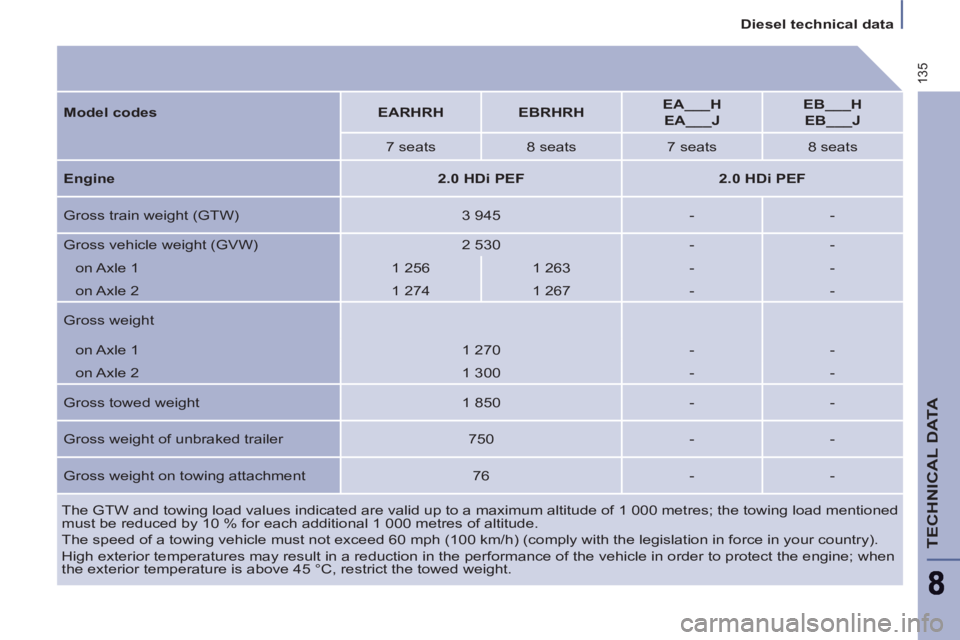
The GTW and towing load values indicated are valid up to a maximum altitude of 1 000 metres; the towing load mentioned
must be reduced by 10 % for each additional 1 000 metres of altitude.
The speed of a towing vehicle must not exceed 60 mph (100 km/h) (comply with the legislation in force in your country).
High exterior temperatures may result in a reduction in the performance of the vehicle in order to protect the engine; when
the exterior temperature is above 45 °C, restrict the towed weight.
Model codes
EARHRH
EBRHRH
EA___H
EA___J
EB___H
EB___J
7 seats
8 seats
7 seats
8 seats
Engine
2.0 HDi PEF
2.0 HDi PEF
Gross train weight (GTW)
3 945
-
-
Gross vehicle weight (GVW)
2 530
-
-
on Axle 1
1 256
1 263
-
-
on Axle 2
1 274
1 267
-
-
Gross weight
on Axle 1
1 270
-
-
on Axle 2
1 300
-
-
Gross towed weight
1 850
-
-
Gross weight of unbraked trailer
750
-
-
Gross weight on towing attachment
76
-
-
Page 138 of 234
136
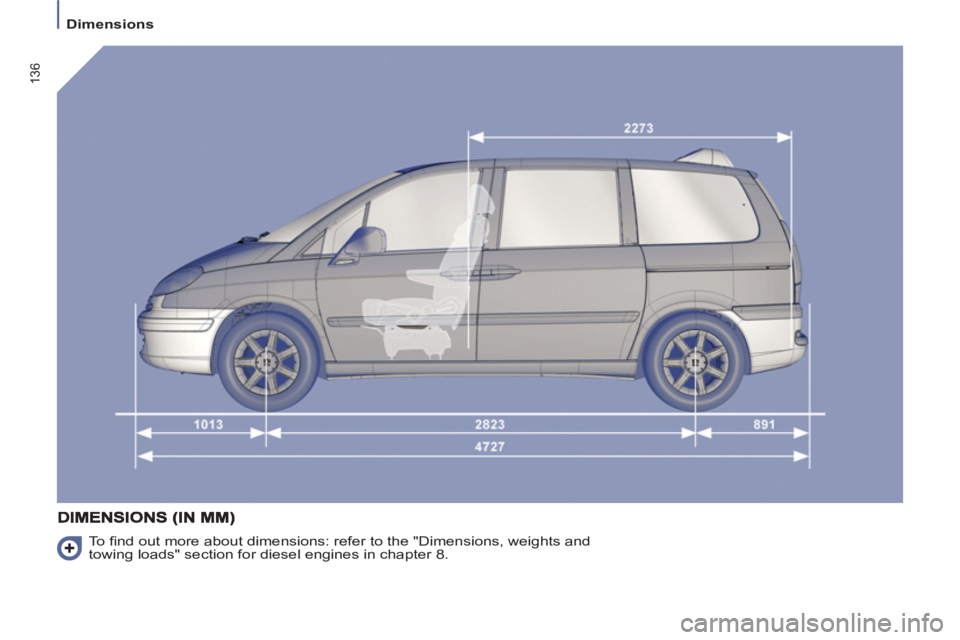
Dimensions
To fi nd out more about dimensions: refer to the "Dimensions, weights and
towing loads" section for diesel engines in chapter 8.
Page 142 of 234
9.2
01 FIRST STEPS
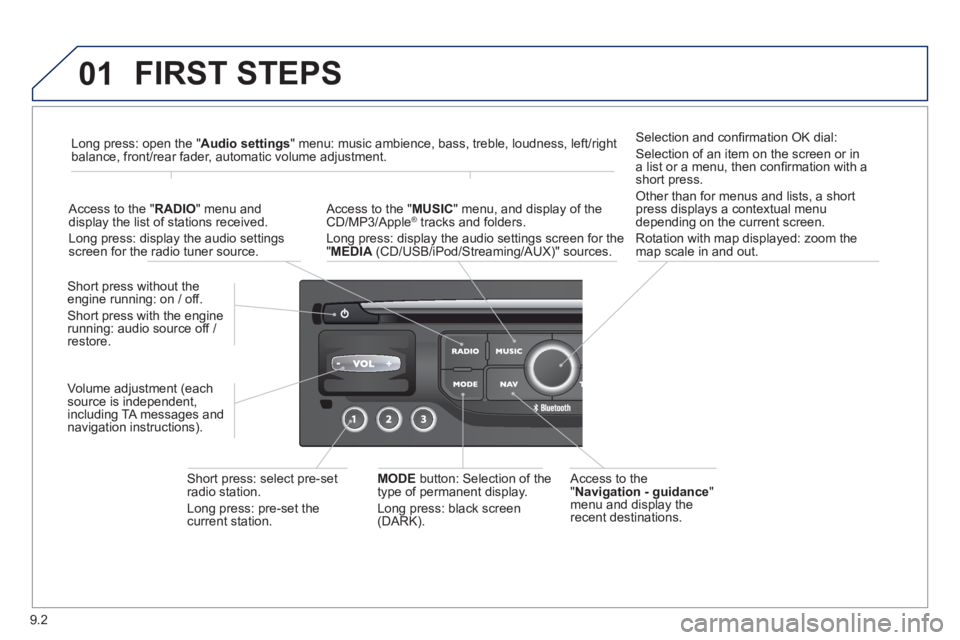
Access to the" Navigation - guidance"menu and display the
recent destinations. Short
press without the engine running: on / off.
Short press with the engine
running: audio source off /
restore.
Short press: select pre-setradio station.
Lon
g press: pre-set the current station.MODE button:
Selection of the
type of permanent display.
Lon
g press: black screen(DARK).
A
ccess to the " MUSIC" menu, and display of the CD/MP3/Apple®
tracks and folders. ®
Long press: display the audio settings screen for the"MEDIA
(CD/USB/iPod/Streaming/AUX)" sources.
Long press: open the "Audio settings" menu: music ambience, bass, treble, loudness, left/right
balance, front/rear fader, automatic volume adjustment.
A
ccess to the " RADIO
" menu anddisplay the list of stations received.
Lon
g press: display the audio settingsscreen for the radio tuner source.
Selection and confi rmation OK dial:
Selection of an item on the screen or in a list or a menu, then confi rmation with a short press.
Other than for menus and lists, a short
press displays a contextual menu
depending on the current screen.
Rotation with map displa
yed: zoom the
map scale in and out.
Volume ad
justment (each
source is independent,
includin
g TA messages and
navigation instructions).
Page 199 of 234
9.59
FREQUENTLY ASKED QUESTIONS
QUESTIONANSWERSOLUTION
With the engine off, the system switches off after a few minutes of use.When the en
gine is switched off, the system's operating time depends on
the battery charge.
The switch-off is normal: the s
ystem switches to economy mode and
switches off to prevent discharging of the vehicle's battery. Start the vehicle's en
gine to increase the batterycharge.
Pla
yback of my USB memory stick starts only
after a very long wait (around 2 to 3 minutes).
Some fi les supplied with the memory stick may greatly slow down access
to reading the memory stick (multiplication by 10 of the catalogue time). Delete the fi les supplied with the memory stickand limit the number of sub-folders in the fi le structure on the memory stick.
When I connect m
yiPhone as telephone and
to the USB port at thesame time, I am unable
to play the music fi les. When the iPhone connects automaticall
y as a telephone, it forces the
streaming function. The streaming function takes the place of the USB
function which is then not useable, there is a period without sound of the
track being played with Apple® players.®
Disconnect and reconnect to the USB port (the USB function takes priority over streaming).