display Peugeot Bipper 2014 User Guide
[x] Cancel search | Manufacturer: PEUGEOT, Model Year: 2014, Model line: Bipper, Model: Peugeot Bipper 2014Pages: 192, PDF Size: 11.02 MB
Page 72 of 192
70
Menu
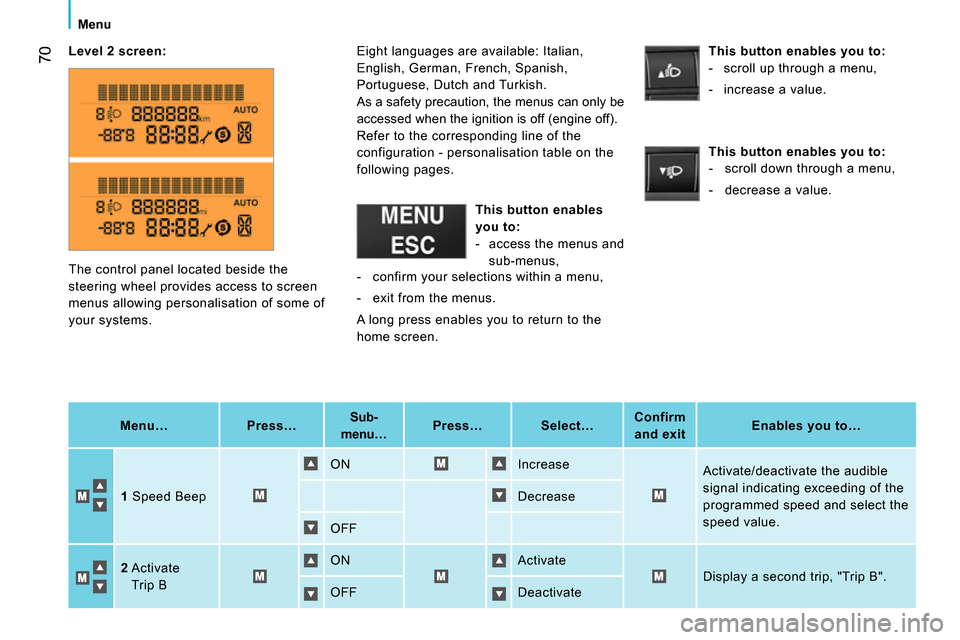
Level 2
screen
:
Menu…
Press…
Sub-
menu…
Press…
Select…
Confirm
and exit
Enables you to…
1
Speed Beep ON Increase
Activate/deactivate the audible
signal indicating exceeding of the
programmed speed and select the
speed value. Decrease
OFF
2
Activate
Trip B ON Activate
Display a second trip, "Trip B".
OFF Deactivate The control panel located beside the
steering wheel provides access to screen
menus allowing personalisation of some of
your systems. Eight languages are available: Italian,
English, German, French, Spanish,
Portuguese, Dutch and Turkish.
As a safety precaution, the menus can only be
accessed when the ignition is off (engine off).
Refer to the corresponding line of the
configuration - personalisation table on the
following pages.
This button enables
you to:
- access the menus and
sub-menus,
This button enables you to:
- scroll up through a menu,
- increase a value.
This button enables you to:
- scroll down through a menu,
- decrease a value.
- confirm your selections within a menu,
- exit from the menus.
A long press enables you to return to the
home screen.
Page 73 of 192

71
3
TECHNOLOGY on BOARD
Menu
Menu…
Press…
Sub-menu…
Press…
Select…
Confirm
and exit
Enables you to…
3
Set the time Hours Increase
Set the clock.
Decrease
Format 24 hour
Select the clock display mode.
12 hour
4
Set the date Year/Month/Day Increase
Set the date.
Decrease
5
See radio ON
Display the name of the station.
Display the CD track number.
OFF
6
Autoclose While moving ON
Activate/deactivate the
automatic locking of the doors
above 12 mph (20 km/h) OFF
7 Measurement
unit Distances Km
Select the distance display unit.
Mi(les)
Temperature °C
Select the temperature display
unit.
°F
Consumption km/l
Select the fuel consumption
display unit.
l/100 km
8
Language List of languages
available Select the display language.
9
Volume of
announcements
Increase Increase/decrease the volume
of the signals and warnings
(the volume changes immediately
when the button is pressed). Decrease
Page 74 of 192
72
Menu
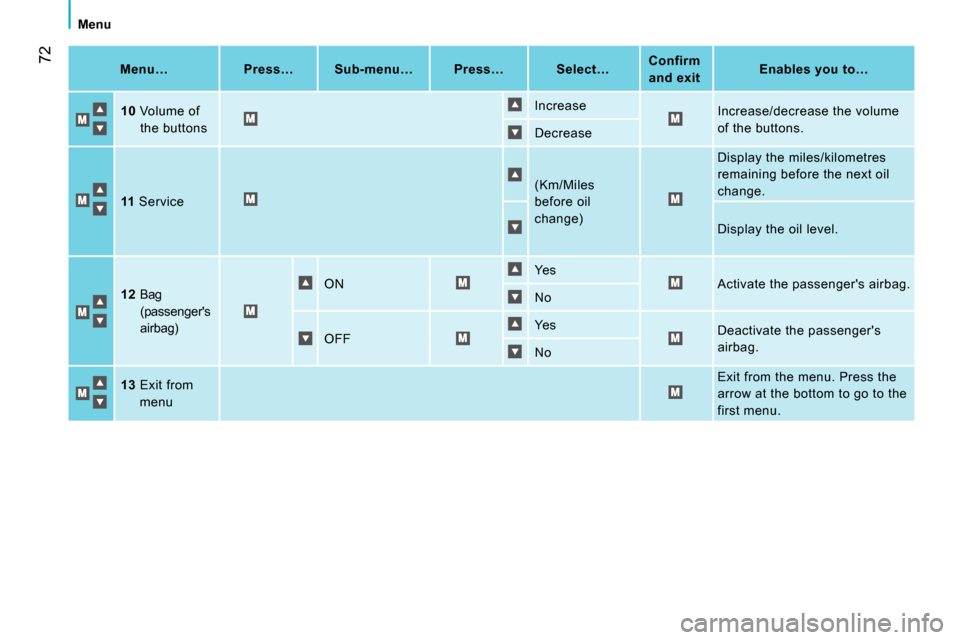
Menu…
Press…
Sub-menu…
Press…
Select…
Confirm
and exit
Enables you to…
10
Volume of
the buttons Increase
Increase/decrease the volume
of the buttons.
Decrease
11
Service (Km/Miles
before oil
change) Display the miles/kilometres
remaining before the next oil
change.
Display the oil level.
12
Bag
(passenger's
airbag) ON Ye s
Activate the passenger's airbag.
No
OFF Ye s
Deactivate the passenger's
airbag.
No
13
Exit from
menu Exit from the menu. Press the
arrow at the bottom to go to the
first menu.
Page 76 of 192
74
Audio equipment
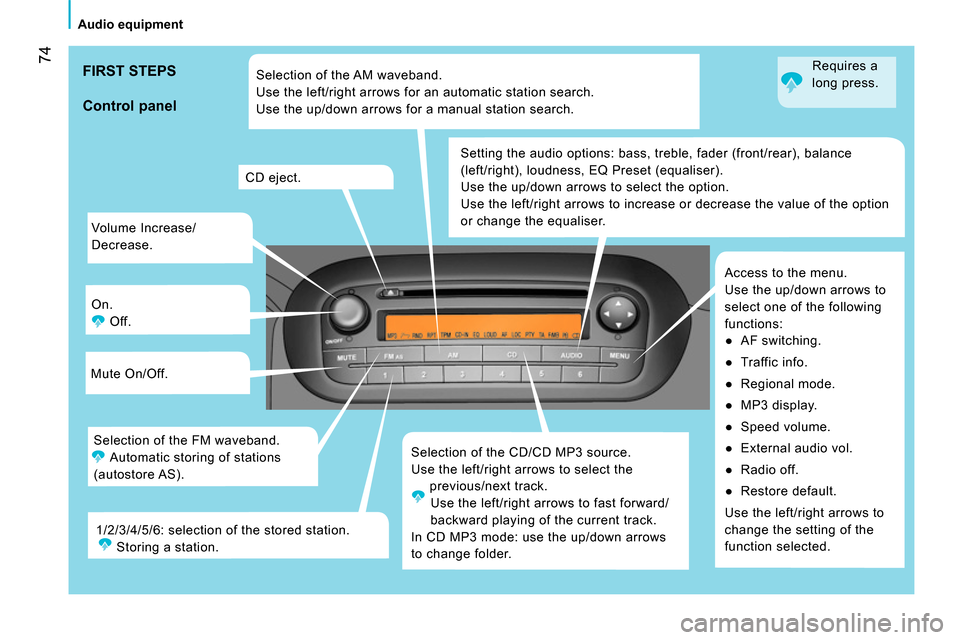
Volume Increase/
Decrease.
On.
Off.
Mute On/Off.
Selection of the CD/CD MP3 source.
Use the left/right arrows to select the
previous/next track.
Use the left/right arrows to fast forward/
backward playing of the current track.
In CD MP3 mode: use the up/down arrows
to change folder. Setting the audio options: bass, treble, fader (front/rear), balance
(left/right), loudness, EQ Preset (equaliser).
Use the up/down arrows to select the option.
Use the left/right arrows to increase or decrease the value of the option
or change the equaliser.
Access to the menu.
Use the up/down arrows to
select one of the following
functions:
●
AF switching.
●
Traffic info.
●
Regional mode.
●
MP3 display.
●
Speed volume.
●
External audio vol.
●
Radio off.
●
Restore default.
Use the left/right arrows to
change the setting of the
function selected. CD eject.
Selection of the FM waveband.
Automatic storing of stations
(autostore AS). Selection of the AM waveband.
Use the left/right arrows for an automatic station search.
Use the up/down arrows for a manual station search.
1/2/3/4/5/6: selection of the stored station.
Storing a station.
Control panel
FIRST STEPS
Requires a
long press.
Page 78 of 192
76
Audio equipment
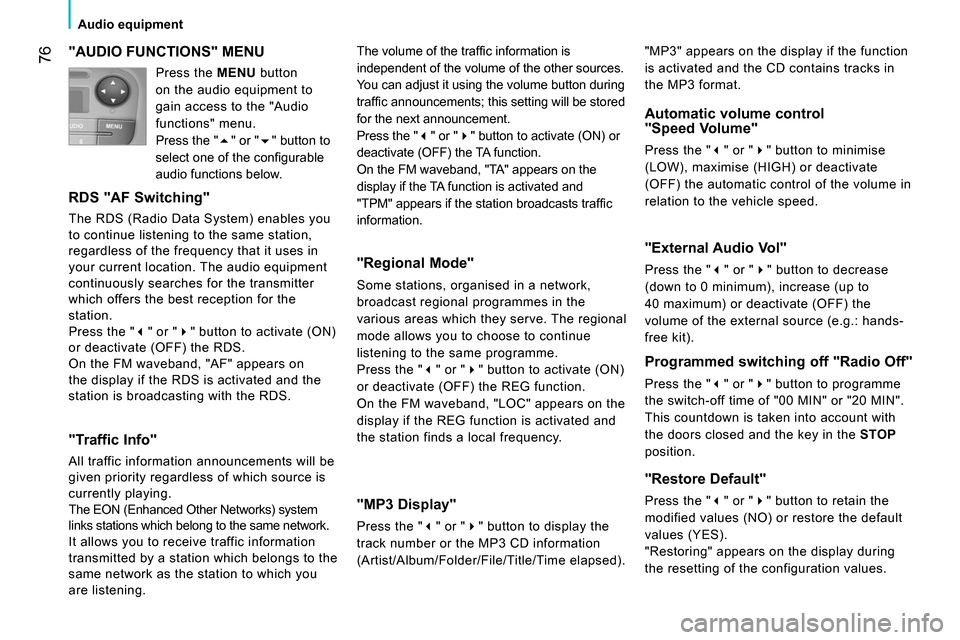
"AUDIO FUNCTIONS" MENU
RDS "AF Switching"
The RDS (Radio Data System) enables you
to continue listening to the same station,
regardless of the frequency that it uses in
your current location. The audio equipment
continuously searches for the transmitter
which offers the best reception for the
station.
Press the "" or "" button to activate (ON)
or deactivate (OFF) the RDS.
On the FM waveband, "AF" appears on
the display if the RDS is activated and the
station is broadcasting with the RDS.
"Traffic Info"
All traffic information announcements will be
given priority regardless of which source is
currently playing.
The EON (Enhanced Other Networks) system
links stations which belong to the same network.
It allows you to receive traffic information
transmitted by a station which belongs to the
same network as the station to which you
are listening.
"Regional Mode"
Some stations, organised in a network,
broadcast regional programmes in the
various areas which they serve. The regional
mode allows you to choose to continue
listening to the same programme.
Press the "" or "" button to activate (ON)
or deactivate (OFF) the REG function.
On the FM waveband, "LOC" appears on the
display if the REG function is activated and
the station finds a local frequency.
"MP3 Display"
Press the "" or "" button to display the
track number or the MP3 CD information
(Artist/Album/Folder/File/Title/Time elapsed).
Automatic volume control
"Speed Volume"
Press the "" or "" button to minimise
(LOW), maximise (HIGH) or deactivate
(OFF) the automatic control of the volume in
relation to the vehicle speed. The volume of the traffi c information is
independent of the volume of the other sources.
You can adjust it using the volume button during
traffi c announcements; this setting will be stored
for the next announcement.
Press the "" or "" button to activate (ON) or
deactivate (OFF) the TA function.
On the FM waveband, "TA" appears on the
display if the TA function is activated and
"TPM" appears if the station broadcasts traffi c
information.
"External Audio Vol"
Press the "" or "" button to decrease
(down to 0 minimum), increase (up to
40 maximum) or deactivate (OFF) the
volume of the external source (e.g.: hands-
free kit).
Programmed switching off "Radio Off"
Press the "" or "" button to programme
the switch-off time of "00 MIN" or "20 MIN".
This countdown is taken into account with
the doors closed and the key in the STOP
position.
"Restore Default"
Press the "" or "" button to retain the
modified values (NO) or restore the default
values (YES).
"Restoring" appears on the display during
the resetting of the configuration values. "MP3" appears on the display if the function
is activated and the CD contains tracks in
the MP3 format. Press the MENU button
on the audio equipment to
gain access to the "Audio
functions" menu.
Press the "" or "" button to
select one of the confi gurable
audio functions below.
Page 79 of 192
2 1
77
3
TECHNOLOGY on BOARD
Audio equipment
CD
PLAYING A CD OR AN MP3 COMPILATION
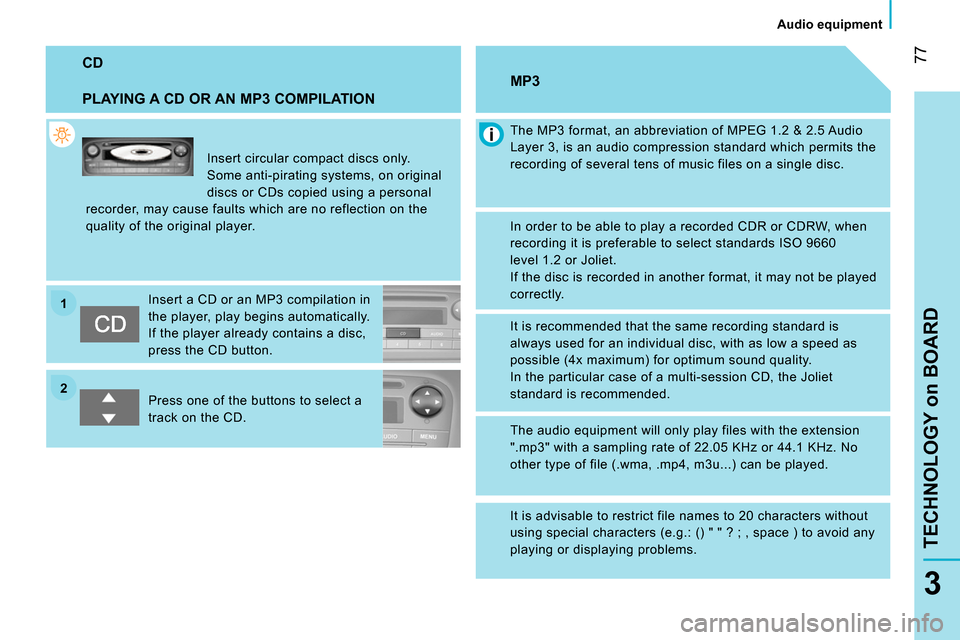
Insert circular compact discs only.
Some anti-pirating systems, on original
discs or CDs copied using a personal
recorder, may cause faults which are no reflection on the
quality of the original player.
Insert a CD or an MP3 compilation in
the player, play begins automatically.
If the player already contains a disc,
press the CD button.
Press one of the buttons to select a
track on the CD.
The MP3 format, an abbreviation of MPEG 1.2 & 2.5 Audio
Layer 3, is an audio compression standard which permits the
recording of several tens of music files on a single disc.
MP3
In order to be able to play a recorded CDR or CDRW, when
recording it is preferable to select standards ISO 9660
level 1.2 or Joliet.
If the disc is recorded in another format, it may not be played
correctly.
It is recommended that the same recording standard is
always used for an individual disc, with as low a speed as
possible (4x maximum) for optimum sound quality.
In the particular case of a multi-session CD, the Joliet
standard is recommended.
The audio equipment will only play files with the extension
".mp3" with a sampling rate of 22.05 KHz or 44.1 KHz. No
other type of file (.wma, .mp4, m3u...) can be played.
It is advisable to restrict file names to 20 characters without
using special characters (e.g.: () " " ? ; , space ) to avoid any
playing or displaying problems.
Page 80 of 192
78
Bluetooth hands-free system
INTRODUCTION
This system allows you to:
- send and receive calls via the Bluetooth® connection with your mobile telephone,
- display the names of your contacts and numbers from the directory of your mobile phone in the instrument panel screen,
- use voice commands to make a call and manage your contacts while keeping both hands on the steering wheel,
- hear your text messages via the voice synthesiser built into the system,
- listen to MP3, WMA, AAC, M4A, MP4 and WAV audio files from a USB storage device,
- display information on the track being played in the radio screen (title, artist, etc…),
- control vocally a portable music player (iPod
® type),
- recharge your portable music player (iPod
® type) via the USB port.
BLUETOOTH HANDS-FREE SYSTEM
KEY
Indicates that a long press is required to start the action described.
Voice mode
Speak the designated voice command clearly and distinctly. Requires a press on the steering mounted "voice" control before speaking the desired voice command.
Page 81 of 192
79
TECHNOLOGY on BOARD
Bluetooth hands-free system
3
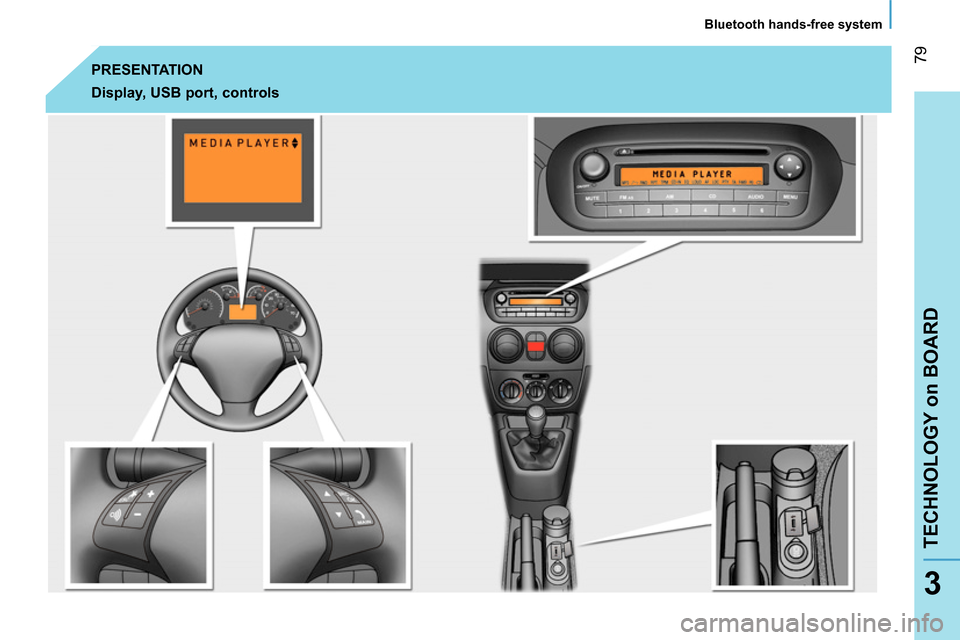
PRESENTATION
Display, USB port, controls
Page 82 of 192
80
Bluetooth hands-free system
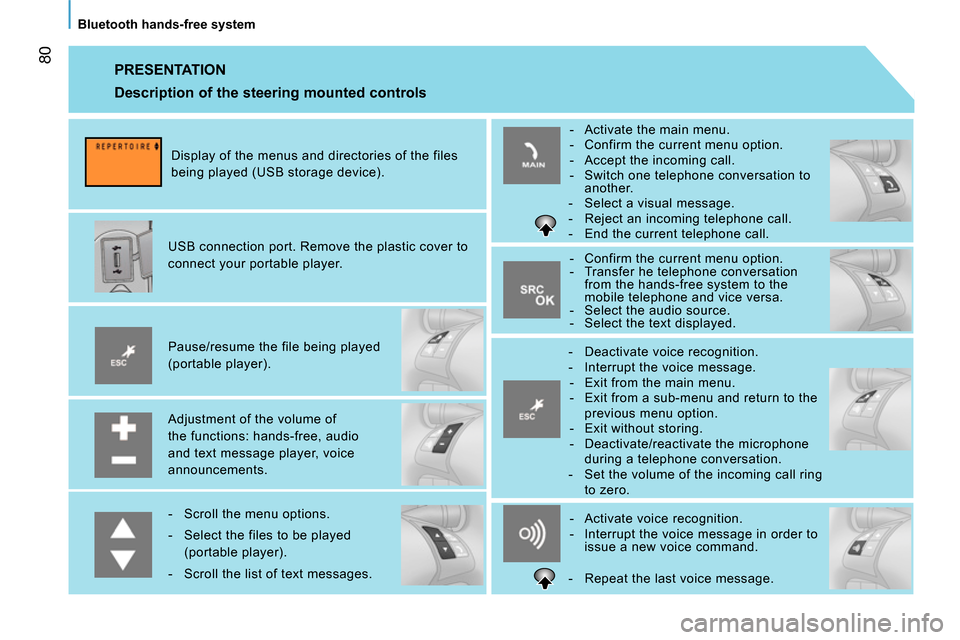
PRESENTATION
Adjustment of the volume of
the functions: hands-free, audio
and text message player, voice
announcements.
Pause/resume the file being played
(portable player).
USB connection port. Remove the plastic cover to
connect your portable player.
Display of the menus and directories of the files
being played (USB storage device).
- Scroll the menu options.
- Select the files to be played
(portable player).
- Scroll the list of text messages.
- Activate voice recognition.
- Interrupt the voice message in order to
issue a new voice command.
- Deactivate voice recognition.
- Interrupt the voice message.
- Exit from the main menu.
- Exit from a sub-menu and return to the
previous menu option.
- Exit without storing.
- Deactivate/reactivate the microphone
during a telephone conversation.
- Set the volume of the incoming call ring
to zero.
- Confirm the current menu option.
- Transfer he telephone conversation
from the hands-free system to the
mobile telephone and vice versa.
- Select the audio source.
- Select the text displayed.
- Activate the main menu.
- Confirm the current menu option.
- Accept the incoming call.
- Switch one telephone conversation to
another.
- Select a visual message.
- Reject an incoming telephone call.
- End the current telephone call.
Description of the steering mounted controls
- Repeat the last voice message.
Page 84 of 192
82
Bluetooth hands-free system
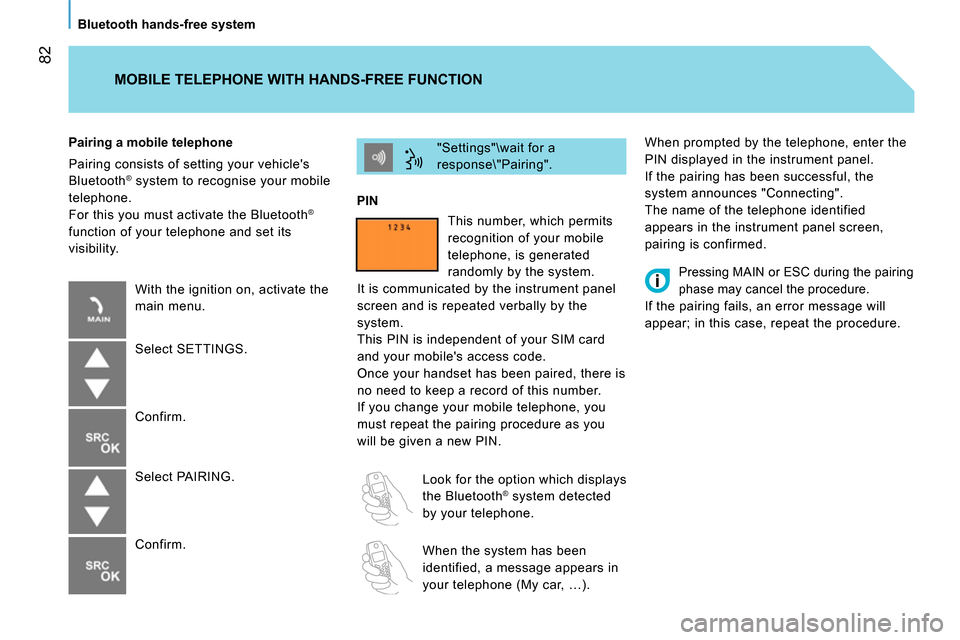
When prompted by the telephone, enter the
PIN displayed in the instrument panel.
If the pairing has been successful, the
system announces "Connecting".
The name of the telephone identified
appears in the instrument panel screen,
pairing is confirmed. "Settings"\wait for a
response\"Pairing".
PIN
Pairing a mobile telephone
Pairing consists of setting your vehicle's
Bluetooth
® system to recognise your mobile
telephone.
For this you must activate the Bluetooth
®
function of your telephone and set its
visibility.
MOBILE TELEPHONE WITH HANDS-FREE FUNCTION
With the ignition on, activate the
main menu.
Select SETTINGS.
Confirm.
Select PAIRING.
Confirm. This number, which permits
recognition of your mobile
telephone, is generated
randomly by the system.
It is communicated by the instrument panel
screen and is repeated verbally by the
system.
This PIN is independent of your SIM card
and your mobile's access code.
Once your handset has been paired, there is
no need to keep a record of this number.
If you change your mobile telephone, you
must repeat the pairing procedure as you
will be given a new PIN.
Look for the option which displays
the Bluetooth
® system detected
by your telephone.
When the system has been
identified, a message appears in
your telephone (My car, …).
Pressing MAIN or ESC during the pairing
phase may cancel the procedure.
If the pairing fails, an error message will
appear; in this case, repeat the procedure.