phone Peugeot Boxer 2013 User Guide
[x] Cancel search | Manufacturer: PEUGEOT, Model Year: 2013, Model line: Boxer, Model: Peugeot Boxer 2013Pages: 184, PDF Size: 4.53 MB
Page 107 of 184
105
Bluetooth hands-free system
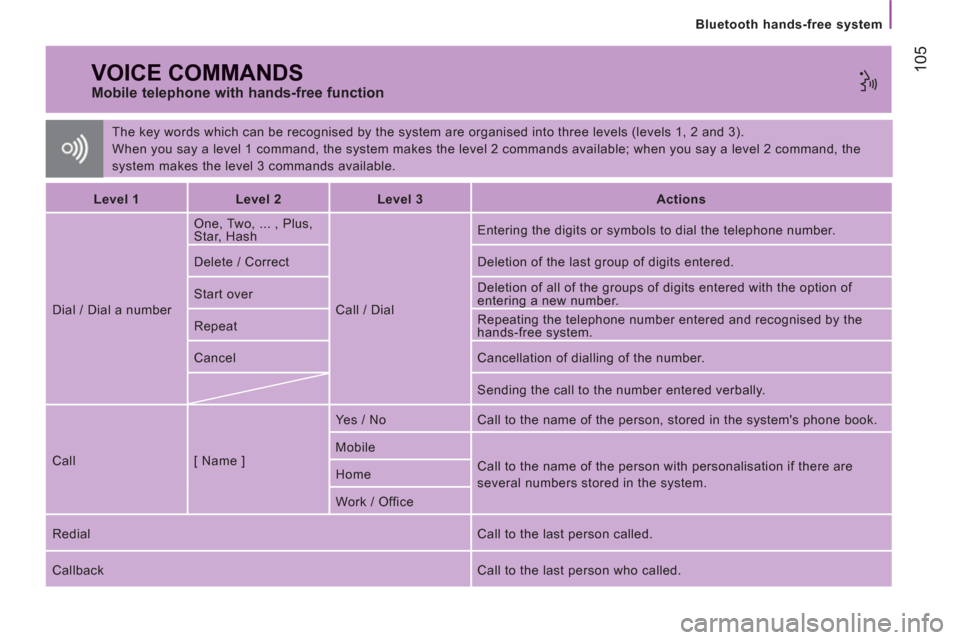
The key words which can be recognised by the system are organised into three levels (levels 1, 2 and 3).
When you say a level 1 command, the system makes the level 2 commands available; when you say a level 2 command, the
system makes the level 3 commands available.
VOICE COMMANDS
Mobile telephone with hands-free function
Level 1
Level 2
Level 3
Actions
Dial / Dial a number One, Two, ... , Plus,
Star, Hash
Call / Dial Entering the digits or symbols to dial the telephone number.
Delete / Correct Deletion of the last group of digits entered.
Start over Deletion of all of the groups of digits entered with the option of
entering a new number.
Repeat Repeating the telephone number entered and recognised by the
hands-free system.
Cancel Cancellation of dialling of the number.
Sending the call to the number entered verbally.
Call [ Name ] Yes / No Call to the name of the person, stored in the system's phone book.
Mobile
Call to the name of the person with personalisation if there are
several numbers stored in the system. Home
Work / Office
Redial Call to the last person called.
Callback Call to the last person who called.
Page 108 of 184
106
Bluetooth hands-free system
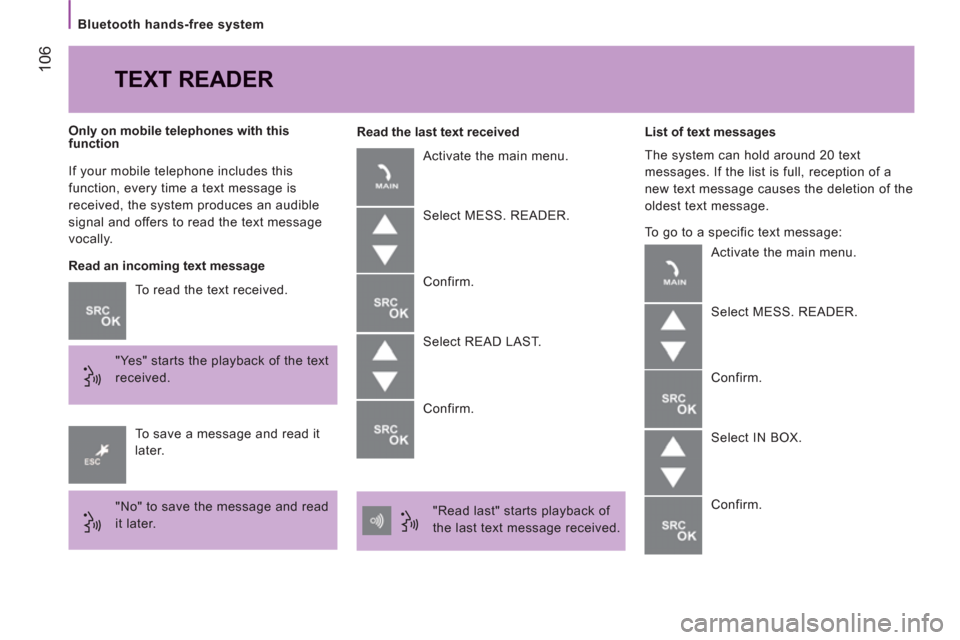
If your mobile telephone includes this
function, every time a text message is
received, the system produces an audible
signal and offers to read the text message
vocally.
To read the text received.
"Yes" starts the playback of the text
received.
Only on mobile telephones with this
function
To save a message and read it
later.
"No" to save the message and read
it later.
TEXT READER
Read an incoming text message
Read the last text received
Activate the main menu.
Select MESS. READER.
Confirm.
Select READ LAST.
Confirm.
"Read last" starts playback of
the last text message received.
List of text messages
The system can hold around 20 text
messages. If the list is full, reception of a
new text message causes the deletion of the
oldest text message.
To go to a specific text message:
Activate the main menu.
Select MESS. READER.
Confirm.
Select IN BOX.
Confirm.
Page 110 of 184
108
Bluetooth hands-free system
VOICE COMMANDS
Message reader
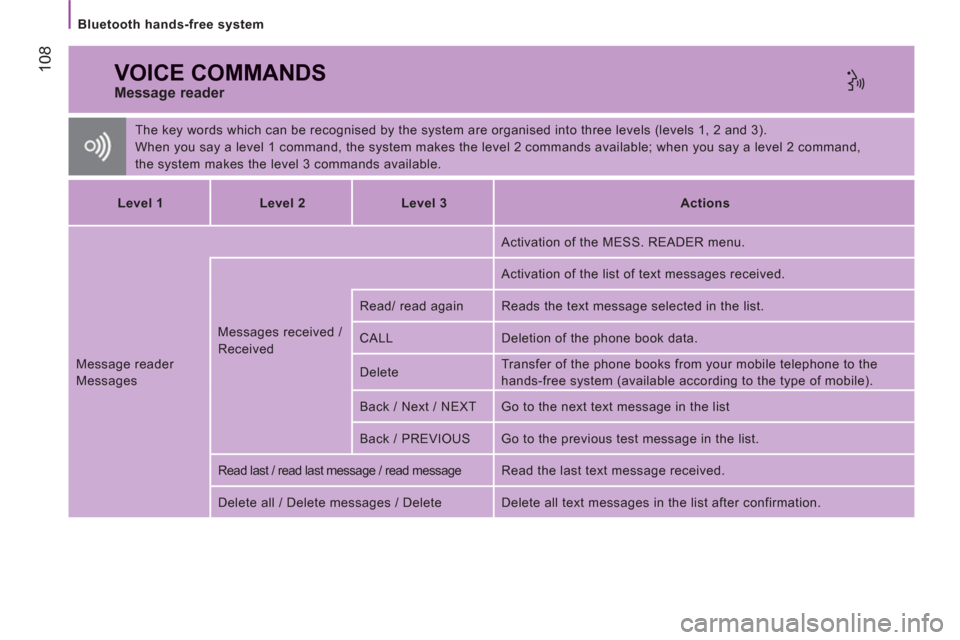
The key words which can be recognised by the system are organised into three levels (levels 1, 2 and 3).
When you say a level 1 command, the system makes the level 2 commands available; when you say a level 2 command,
the system makes the level 3 commands available.
Level 1
Level 2
Level 3
Actions
Message reader
Messages Messages received /
Received Activation of the MESS. READER menu.
Activation of the list of text messages received.
Read/ read again Reads the text message selected in the list.
CALL Deletion of the phone book data.
Delete Transfer of the phone books from your mobile telephone to the
hands-free system (available according to the type of mobile).
Back / Next / NEXT Go to the next text message in the list
Back / PREVIOUS Go to the previous test message in the list.
Read last / read last message / read message Read the last text message received.
Delete all / Delete messages / Delete Delete all text messages in the list after confirmation.