Over speed Peugeot Boxer 2020 User Guide
[x] Cancel search | Manufacturer: PEUGEOT, Model Year: 2020, Model line: Boxer, Model: Peugeot Boxer 2020Pages: 196, PDF Size: 5.1 MB
Page 66 of 196
64
Driving
Driving recommendations
► Observe the driving regulations and remain vigilant whatever the traffic conditions.► Monitor your environment and keep your hands on the wheel to be able to react to
anything that may happen any time.
► Drive smoothly, anticipate the need for braking and maintain a longer safety distance,
especially in bad weather.
► Stop the vehicle to carry out operations that require close attention (such as adjustments).► During long trips, take a break every two hours.
Important!
Never leave the engine running in a
closed space without sufficient
ventilation. Internal combustion engines emit
toxic exhaust gases such as carbon
monoxide. Danger of poisoning and death!
In severe wintry conditions (temperature
below -23°C), let the engine run for 4
minutes before moving off, to ensure the
correct operation and durability of the
mechanical components of your vehicle
(engine and gearbox).
Never drive with the parking brake
applied . Risk of overheating and
damage to the braking system!
Do not park the vehicle or leave the
engine running on a flammable
surface (dry grass, dead leaves, etc.). The
exhaust system of your vehicle is very hot,
even several minutes after the engine stops.
Risk of fire!
Never leave a vehicle unattended with
the engine running. If you have to leave
your vehicle with the engine running, apply
the parking brake and put the gearbox into
neutral or position N or P (depending on the
type of gearbox).
Never leave children inside the vehicle
unsupervised.
To assure the durability of your vehicle and your safety, remember that certain precautions,
described hereafter, should be taken when
driving your vehicle :
Manoeuvre cautiously, at low speed
The dimensions of your vehicle differ from those
of a light vehicle, in width, in height, as well as in
length, and some obstacles will be more difficult
to notice.
Manoeuvre slowly.
Before turning, check that there are no obstacles
at mid-height along the sides.
Before reversing, check that there are no
obstacles, particularly at high level behind the
vehicle. Be aware of the external dimensions, if ladders
are fitted.
Load the vehicle correctly
With a load carried, the vehicle must remain
within the maximum authorised weight, the
Gross Vehicle Weight.
To avoid upsetting the balance of the vehicle,
the load should be centred and the heaviest part
placed on the floor in front of the rear wheels.
It is inadvisable to place heavy loads on a roof
rack.
Loading also implies adherence to the maximum
load of the roof bar anchor points. Adhere to
the maximum permissible weight, according to
PEUGEOT dealer specifications.
Loads must be securely lashed down.
A load that is not properly secured inside the
vehicle may affect vehicle handling and create a
risk of accident.
If your vehicle is fitted with a drop-side back, the
height and width of the load must remain within
the overall dimensions of the vehicle.
Drive the vehicle in a prudent and efficient
way
Take corners gently.
Anticipate the need to brake as the stopping
distance is increased, particularly on wet or icy
roads.
Be aware of the effect of side winds on the
vehicle.
Effective eco-driving saves fuel; accelerate progressively, anticipate the need to slow down
and adapt your speed to suit the situation.
Indicate changes of direction well in advance so
that you are seen by other road users.
Take care
The tyres must be inflated to at least the
pressures indicated on the label, even over-
inflated by 0.2 to 0.3 bar for long journeys.
On flooded roads
We strongly advise against driving on flooded
roads, as this could cause serious damage to
the engine or gearbox, as well as to the electrical
systems of your vehicle.
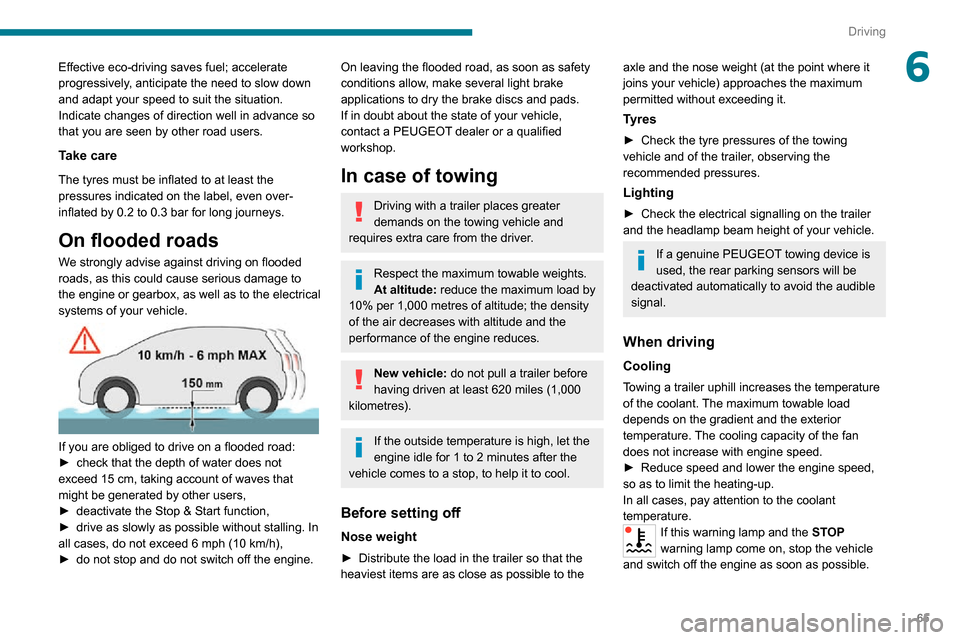
If you are obliged to drive on a flooded road:►
check that the depth of water does not exceed 15 cm, taking account of waves that might be generated by other users,► deactivate the Stop & Start function,► drive as slowly as possible without stalling. In
all cases, do not exceed 6 mph (10 km/h),► do not stop and do not switch off the engine.
Page 67 of 196
65
Driving
6Effective eco-driving saves fuel; accelerate
progressively, anticipate the need to slow down
and adapt your speed to suit the situation.
Indicate changes of direction well in advance so
that you are seen by other road users.
Take care
The tyres must be inflated to at least the
pressures indicated on the label, even over-
inflated by 0.2 to 0.3 bar for long journeys.
On flooded roads
We strongly advise against driving on flooded
roads, as this could cause serious damage to
the engine or gearbox, as well as to the electrical
systems of your vehicle.
If you are obliged to drive on a flooded road:► check that the depth of water does not exceed 15 cm, taking account of waves that might be generated by other users,► deactivate the Stop & Start function,► drive as slowly as possible without stalling. In
all cases, do not exceed 6 mph (10 km/h),► do not stop and do not switch off the engine.
On leaving the flooded road, as soon as safety
conditions allow, make several light brake
applications to dry the brake discs and pads.
If in doubt about the state of your vehicle,
contact a PEUGEOT dealer or a qualified
workshop.
In case of towing
Driving with a trailer places greater
demands on the towing vehicle and
requires extra care from the driver.
Respect the maximum towable weights.
At altitude: reduce the maximum load by
10% per 1,000 metres of altitude; the density
of the air decreases with altitude and the
performance of the engine reduces.
New vehicle: do not pull a trailer before
having driven at least 620 miles (1,000
kilometres).
If the outside temperature is high, let the
engine idle for 1 to 2 minutes after the
vehicle comes to a stop, to help it to cool.
Before setting off
Nose weight
► Distribute the load in the trailer so that the heaviest items are as close as possible to the
axle and the nose weight (at the point where it
joins your vehicle) approaches the maximum
permitted without exceeding it.
Tyres
► Check the tyre pressures of the towing vehicle and of the trailer, observing the
recommended pressures.
Lighting
► Check the electrical signalling on the trailer and the headlamp beam height of your vehicle.
If a genuine PEUGEOT towing device is
used, the rear parking sensors will be
deactivated automatically to avoid the audible
signal.
When driving
Cooling
Towing a trailer uphill increases the temperature
of the coolant. The maximum towable load
depends on the gradient and the exterior
temperature. The cooling capacity of the fan
does not increase with engine speed.
► Reduce speed and lower the engine speed, so as to limit the heating-up.
In all cases, pay attention to the coolant
temperature.
If this warning lamp and the STOP
warning lamp come on, stop the vehicle
and switch off the engine as soon as possible.
Page 76 of 196
74
Driving
the whole manoeuvre, in particular using the
mirrors.
Radar
The operation of the radar as well as the
associated functions may be impaired through
the accumulation of dirt (mud, frost, etc.), in
certain difficult weather conditions (very heavy
rain, snow) or if the bumper is damaged.
If the front bumper is to be repainted, contact
a PEUGEOT dealer or a qualified workshop;
certain types of paint could interfere with the
operation of the radar.
Driving aids camera
This camera and its associated functions
may be impaired or not work if the windscreen
area in front of the camera is dirty, misty,
frosty, covered with snow, damaged or
masked by a sticker.
In humid and cold weather, demist the
windscreen regularly.
Poor visibility (inadequate street lighting,
heavy rain, thick fog, snowfall), dazzle
(headlamps of an oncoming vehicle, low sun,
reflections on a damp road, leaving a tunnel,
alternating shade and light) can also impair
detection performance.
In the event of a windscreen replacement,
contact a PEUGEOT dealer or a qualified
workshop to recalibrate the camera;
otherwise, the operation of the associated
driving aids may be disrupted.
Other cameras
The images from the camera(s)
displayed on the touch screen or on the
instrument panel may be distorted by the
relief.
In the presence of areas in shade, or in
conditions of bright sunlight or inadequate
lighting, the image may be darkened and with
lower contrast.
Obstacles may appear further away than they
actually are.
Sensors
The operation of the sensors as well as
the associated functions may be disturbed
by sound interference such as that emitted
by noisy vehicles and machinery (e.g. lorries,
pneumatic drills), by the accumulation of
snow or dead leaves on the road or in the
event of damaged bumpers and mirrors.
When reverse gear is engaged, an audible
signal (long beep) indicates that the sensors
may be dirty.
A front or rear impact to the vehicle can
upset the sensors’ settings, which is not
always detected by the system: distance
measurements may be distorted.
The sensors do not systematically detect
obstacles that are too low (pavements, studs)
or too thin (trees, posts, wire fences).
Certain obstacles located in the sensors’ blind
spots may not be detected or may no longer
be detected during the manoeuvre.
Certain materials (fabrics) absorb sound
waves: pedestrians may not be detected.
Maintenance
Clean the bumpers and door mirrors and
the field of vision of the cameras regularly.
When washing your vehicle at high pressure,
direct the spray from at least 30 cm away from the radar, sensors and cameras.
Mats
The use of mats not approved by
PEUGEOT may interfere with the operation of
the speed limiter or cruise control.
To avoid any risk of jamming the pedals:
► ensure that the mat is secured correctly ,► never fit one mat on top of another.
Units of speed
Ensure that the units of speed displayed
on the instrument panel (mph or km/h) are
those for the country you are driving in.
If this is not the case, when the vehicle is
stationary, set the display to the required
units of speed so that it complies with what is
authorised locally.
In case of doubt, contact a PEUGEOT dealer or a qualified workshop.
Speed Limit recognition
and recommendation
Refer to the General recommendations on the
use of driving and manoeuvring aids .
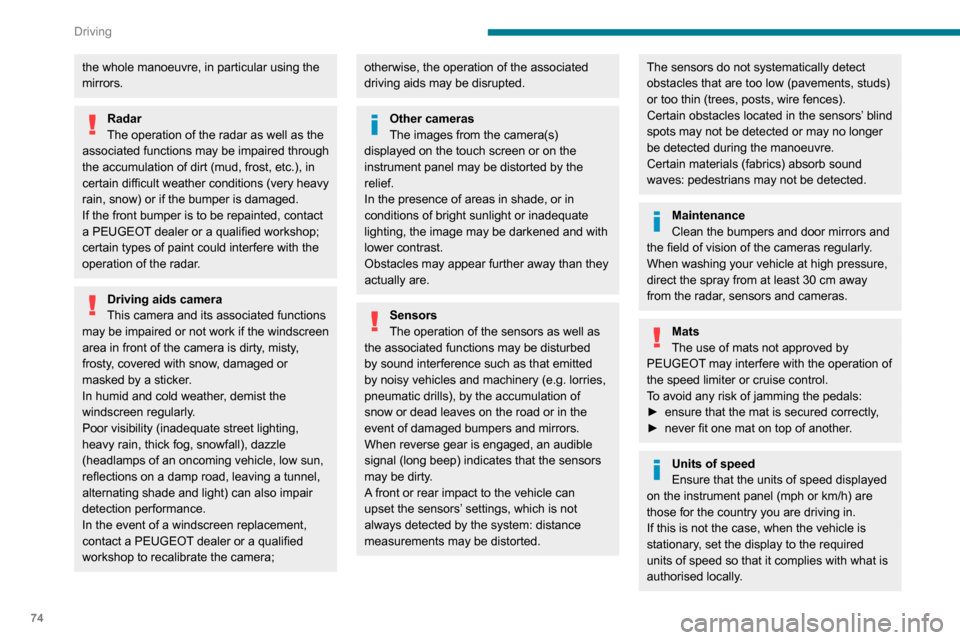
Using the camera located at the top of the
windscreen, this system detects the following
types of signs and displays the corresponding
information on the instrument panel:
– the maximum authorised speed,– no overtaking,– the end of the previous limitations / restrictions.
Page 77 of 196
75
Driving
6In case of doubt, contact a PEUGEOT dealer
or a qualified workshop.
Speed Limit recognition
and recommendation
Refer to the General recommendations on the
use of driving and manoeuvring aids.
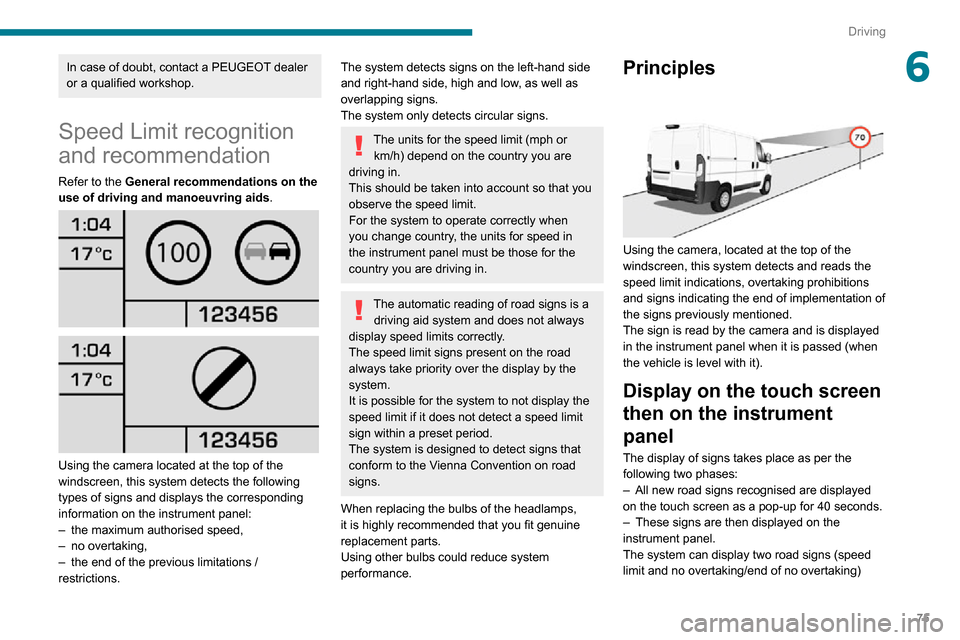
Using the camera located at the top of the
windscreen, this system detects the following
types of signs and displays the corresponding
information on the instrument panel:
– the maximum authorised speed,– no overtaking,– the end of the previous limitations / restrictions.
The system detects signs on the left-hand side
and right-hand side, high and low, as well as
overlapping signs.
The system only detects circular signs.
The units for the speed limit (mph or
km/h) depend on the country you are
driving in.
This should be taken into account so that you
observe the speed limit.
For the system to operate correctly when
you change country, the units for speed in
the instrument panel must be those for the
country you are driving in.
The automatic reading of road signs is a driving aid system and does not always
display speed limits correctly.
The speed limit signs present on the road
always take priority over the display by the
system.
It is possible for the system to not display the
speed limit if it does not detect a speed limit
sign within a preset period.
The system is designed to detect signs that
conform to the Vienna Convention on road
signs.
When replacing the bulbs of the headlamps,
it is highly recommended that you fit genuine
replacement parts.
Using other bulbs could reduce system
performance.
Principles
Using the camera, located at the top of the
windscreen, this system detects and reads the
speed limit indications, overtaking prohibitions
and signs indicating the end of implementation of
the signs previously mentioned.
The sign is read by the camera and is displayed
in the instrument panel when it is passed (when
the vehicle is level with it).
Display on the touch screen
then on the instrument
panel
The display of signs takes place as per the
following two phases:
– All new road signs recognised are displayed on the touch screen as a pop-up for 40 seconds.– These signs are then displayed on the instrument panel.
The system can display two road signs (speed
limit and no overtaking/end of no overtaking)
Page 78 of 196
76
Driving
simultaneously in the two dedicated areas of the
instrument panel.
If an additional road sign is detected, such
as a reduced speed limit for wet road sign, it
is displayed in an empty window below the
corresponding sign.
Additional signs are filtered as follows:
– Signs for snow or ice only appear if the outside temperature is below 3°C.– Signs for snow, rain or fog are only displayed if the wipers are activated while the outside
temperature is below 3°C.
– Signs concerning heavy goods vehicles are not displayed if they concern a vehicle weighing
less than 4 tonnes.
– Signs concerning farm equipment are not displayed.
Signs such as no overtaking go out after about
40 seconds on the instrument panel.
Activation/Deactivation
This function can be set using the MODE
button: in the “Traffic Sign” menu, select
“ON” or “OFF”.
For more information on Vehicle
configuration (MODE) , refer to the
corresponding section.
Operating limits
The system does not take account of reduced
speed limits, especially those imposed in the
following cases:
– Poor weather (rain, snow).– Atmospheric pollution.– Towing.– Driving with a space-saver type spare wheel or snow chains fitted.– Driving with a non-standard suspension kit.– Tyre repaired using the temporary puncture repair kit.– Young drivers.The system may not display the speed limit if it
does not detect a speed limit sign within a preset
period and in the following situations:
– Road signs that are obstructed, non-standard, damaged or bent.– Obsolete or incorrect maps.– Road incline causing the sign to be out of the camera field of vision (on a slope, for example). – Change in the vehicle load that causes the camera to tilt significantly (system operation may
temporarily be suspended to enable camera
self-calibration).
Speed limiter
Refer to the General recommendations on the
use of driving and manoeuvring aids .
System which prevents the vehicle
from exceeding the speed
programmed by the driver. The speed is selected when the vehicle is
stationary with the engine running or while
driving with at least 2
nd gear engaged.
The minimum speed to be programmed is 19
mph (30 km/h).
The vehicle responds to the driver's foot
pressure on the accelerator until resistance is felt
in the pedal, which signifies that the vehicle has
reached the programmed speed.
However, depressing the pedal beyond this point
of resistance to the floor allows you to exceed
the programmed speed. To resume use of the
speed limiter, gradually release the pressure
on the accelerator pedal and return below the
programmed speed.
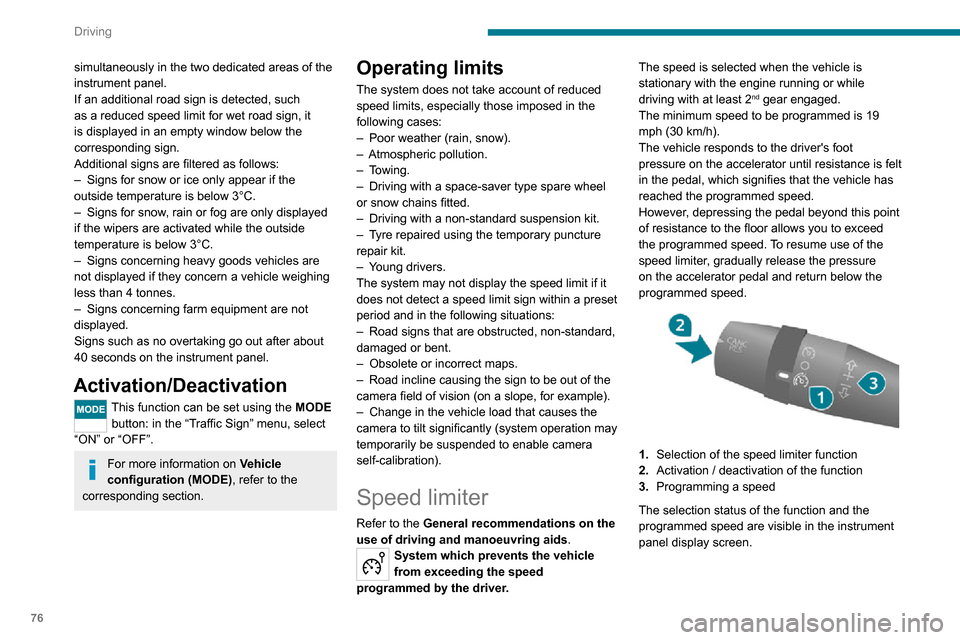
1. Selection of the speed limiter function
2. Activation / deactivation of the function
3. Programming a speed
The selection status of the function and the
programmed speed are visible in the instrument
panel display screen.
Selecting the function
► Turn ring 1 all the way down. The speed
limiter is selected, but is not yet active.
The display indicates OFF and the last
programmed speed.
Programming a speed
A speed can be programmed without activating
the speed limiter but with the engine running.
To memorise a speed higher than the previous
one:
► Move the control upwards (+).A short press increases the setting by 1 mph
(km/h).
Pressing and holding increases the setting in
steps of 5 mph (km/h).
To memorise a speed lower than the previous
one:
► Move the control downwards (-).A short press decreases the setting by 1 mph
(km/h).
Pressing and holding decreases the setting in
steps of 5 mph (km/h).
Activation/Deactivation
► Press button 2 to activate the speed limiter.
Page 80 of 196
78
Driving
The maximum speed is set according to the regulations in force in the country of
sale.
This maximum speed cannot be changed by
the driver.
If you wish to modify this maximum speed,
contact a PEUGEOT dealer.
Cruise control - particular
recommendations
For the safety of everyone, only use the
cruise control where the driving
conditions allow running at a constant speed
and keeping an adequate safety distance.
Remain vigilant when the cruise control
is activated. If you hold one of the speed
setting modification buttons down, a very
rapid change in the speed of your vehicle may
occur.
When descending a steep hill , the cruise
control system cannot prevent the vehicle
from exceeding the set speed. Brake if
necessary to control the speed of your
vehicle.
On steep climbs or when towing, the set
speed may not be reached or maintained.
Exceeding the programmed speed
setting
The speed setting can be exceeded
temporarily by pressing the accelerator
pedal (the programmed speed flashes).
To return to the speed setting, release
the accelerator pedal (when this speed is
reached again, the display of the speed stops
flashing).
Operating limits
Never use the system in the following
situations:
– In an urban area with the risk of pedestrians crossing the road.– In heavy traffic.– On winding or steep roads.– On slippery or flooded roads.– In poor weather conditions.– Driving on a speed circuit.– Driving on a rolling road.– When using snow chains, non-slip covers or studded tyres.
Cruise control
Refer to the General recommendations on the
use of driving and manoeuvring aids and to
Cruise control - particular recommendations.
System which automatically maintains the
speed of the vehicle at the cruise setting programmed by the driver, without using the
accelerator pedal.
To be programmed or activated, the speed of the
vehicle must be above 19 mph (30 km/h), with at
least 2
nd gear engaged.
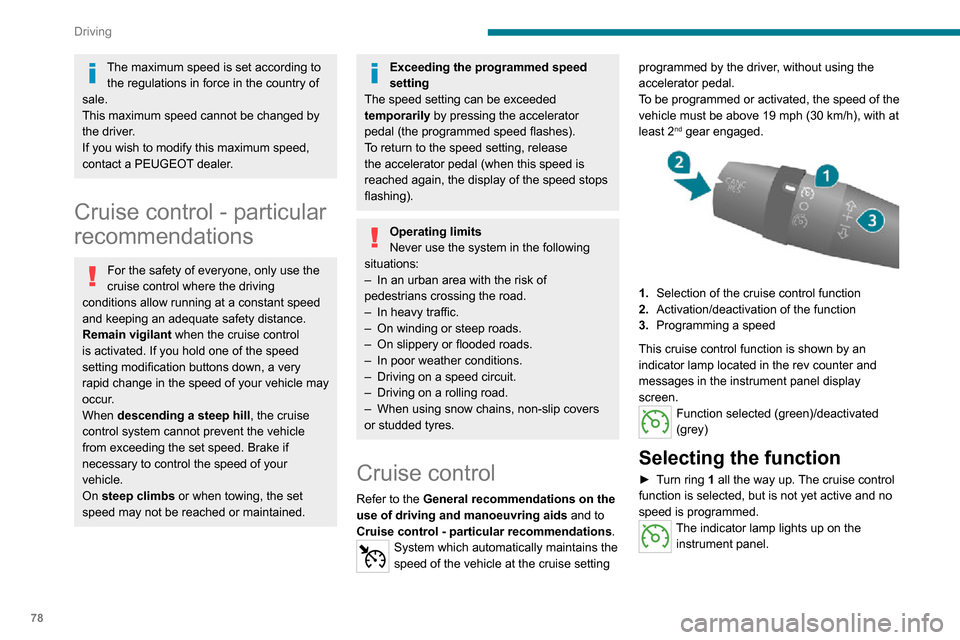
1.
Selection of the cruise control function
2. Activation/deactivation of the function
3. Programming a speed
This cruise control function is shown by an
indicator lamp located in the rev counter and
messages in the instrument panel display
screen.
Function selected (green)/deactivated
(grey)
Selecting the function
► Turn ring 1 all the way up. The cruise control
function is selected, but is not yet active and no
speed is programmed.
The indicator lamp lights up on the instrument panel.
First activation/
Programming a speed
► Bring the vehicle up to the desired speed by pressing the accelerator.► Move the control upwards (+) or downwards (-) to memorise it. A message appears in the
instrument panel display to confirm activation.
The memorised speed is visible in the instrument
panel display.
The vehicle will maintain this speed setting.
Deactivation (off)
► Press button 2.
or
► Depress the brake or clutch pedal. A message appears in the instrument panel
display to confirm deactivation.
Reactivation
► Following deactivation of the cruise control, press button 2. A message appears in the
instrument panel display to confirm reactivation.
Your vehicle will return to the last programmed
speed.
You can also repeat the "first activation"
procedure.
Changing the programmed
speed
There are two methods for memorising a speed
higher than the previous one:
Page 86 of 196
84
Driving
– Auto: for an automatic detection of the trailer
length (3 m, 6 m or 9 m).
In Auto mode, an icon appears in the instrument
panel indicating the length detected by the
system.
It may be necessary to make a 90° turn
to allow the system to detect the length
of the trailer.
When a trailer is detected, vehicle detection
when reversing is deactivated.
Operating conditions
– All vehicles are moving in the same direction and in adjacent lanes.– The speed of your vehicle is 6 mph (10 km/h) minimum. – When you overtake a vehicle, the speed difference is less than 16 mph (25 km/h).– When another vehicle overtakes you, the speed difference is less than 31 mph (50 km/h).
Active Safety Brake with Distance Alert and
Intelligent emergency
braking assistance
Refer to the General recommendations on the
use of driving and manoeuvring aids .
This system:– warns the driver that their vehicle is at risk of collision with the vehicle in front.– reduces the vehicle's speed to avoid a collision or limit its severity.
This system is comprised of three functions:
– Distance Alert.
– Intelligent emergency braking assistance.– Active Safety Brake (automatic emergency braking).
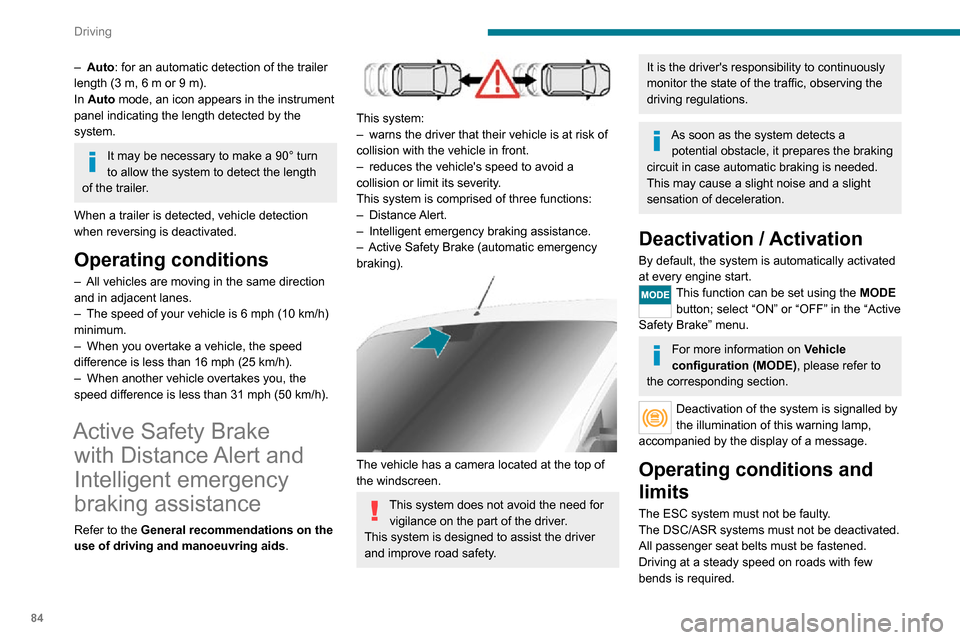
The vehicle has a camera located at the top of
the windscreen.
This system does not avoid the need for
vigilance on the part of the driver.
This system is designed to assist the driver
and improve road safety.
It is the driver's responsibility to continuously
monitor the state of the traffic, observing the
driving regulations.
As soon as the system detects a potential obstacle, it prepares the braking
circuit in case automatic braking is needed.
This may cause a slight noise and a slight
sensation of deceleration.
Deactivation / Activation
By default, the system is automatically activated
at every engine start.
This function can be set using the MODE
button; select “ON” or “OFF” in the “Active
Safety Brake” menu.
For more information on Vehicle
configuration (MODE) , please refer to
the corresponding section.
Deactivation of the system is signalled by
the illumination of this warning lamp,
accompanied by the display of a message.
Operating conditions and
limits
The ESC system must not be faulty.
The DSC/ASR systems must not be deactivated.
All passenger seat belts must be fastened.
Driving at a steady speed on roads with few
bends is required.
In the following cases, deactivating the system via the vehicle's configuration menu is advised:– towing a trailer,– carrying long objects on roof bars or roof rack,– with snow chains fitted,– before using an automatic car wash, with the engine running,– before placing the vehicle on a rolling road in a workshop,– towed vehicle, engine running,– following an impact to the windscreen close to the detection camera.
It is automatically deactivated after
detection of a fault with the brake pedal
switch or with at least two brake lamps.
After an impact, the function automatically stops operating. Contact a
PEUGEOT dealer or a qualified workshop to
have the system checked.
It is possible that warnings are not given,
are given too late or seem unjustified.
The driver must always stay in control of their
vehicle and be prepared to react at any time
to avoid an accident.
Cases of non-detection by the system:
– Pedestrians, cyclists, animals, objects on the road.– Vehicles crossing your lane.– Vehicles driving in the opposite direction.
Page 101 of 196
99
Practical information
7A clogged passenger compartment filter can adversely affect air conditioning
system performance and generate
undesirable odours.
Oil filter
Change the oil filter each time the engine
oil is changed.
Particle filter (Diesel)
In addition to the catalytic converter, this filter
actively contributes to the preservation of
air quality by trapping the unburnt pollutant
particles. Black exhaust fumes are therefore not
emitted.
Operation
This filter, inserted into the exhaust system,
accumulates the carbonaceous particles. The
engine management computer automatically
and periodically manages the removal of
carbonaceous particles (regeneration).
The regeneration procedure is triggered
according to the amount of accumulated
particles and the conditions of use of the vehicle.
During this phase, you may notice certain
phenomena - accelerated idling, triggering of
the cooling fan, increased smoke and increased
temperature at the exhaust - which have no
impact on the operation of the vehicle and the
environment.
Following prolonged operation of the
vehicle at very low speed or at idle, you
may, in exceptional circumstances, notice the
emission of water vapour at the exhaust while
accelerating. This has no impact on the
vehicle’s behaviour and the environment.
Due to the high exhaust temperatures
caused by the normal operation of the
particle filter, it is recommended not to park
the vehicle on flammable materials (grass, dry
leaves, pine needles, etc.) to avoid any risk of
fire.
Saturation/Regeneration
If there is a risk of clogging, this warning
lamp comes on, accompanied by a
message on the instrument panel display.
This warning is due to the start of saturation of
the particle filter (exceptionally long urban driving
conditions: reduced speed, traffic jams, etc.).
In order to regenerate the filter, it is
recommended to drive as soon as possible -
when traffic conditions and regulations permit
- at a speed of at least 37 mph (60 km/h), with
an engine speed above 2,000 rpm for about
15 minutes (until the warning lamp and/or the
message disappear).
If possible, avoid switching off the engine
before the end of filter regeneration; repeated
interruptions can lead to early deterioration of the
engine oil. It is not recommended to terminate
the filter regeneration with the vehicle stationary.
Malfunction
If this alert persists, do not ignore this warning;
this indicates that a malfunction has occurred in
the exhaust system/particle filter assembly.
Have the assembly checked by a PEUGEOT
dealer or a qualified workshop.
Manual gearbox
The gearbox does not require any maintenance (no oil change).
Brake pads
Brake wear depends on the style of
driving, particularly in the case of vehicles
used in town, over short distances. It may be
necessary to have the condition of the brakes
checked, even between vehicle services.
Unless there is a leak in the circuit, a drop in the
brake fluid level indicates that the brake pads
are worn.
If this warning lamp comes on, have the
brake pads checked by a PEUGEOT
dealer or a qualified workshop.
After washing the vehicle, moisture, or in wintry conditions, ice can form on the
brake discs and pads: braking efficiency may
be reduced. Gently dab the brakes to dry and
defrost them.
Page 102 of 196
100
Practical information
reading and have an adverse effect on road holding.
Fitting different tyres on the front and rear axles
can cause the ESC to mistime.
AdBlue® (BlueHDi
engines)
To respect the environment and ensure
compliance with the Euro 6 standard, without
adversely affecting the performance or fuel
consumption of its Diesel engines, PEUGEOT
has taken the decision to equip its vehicles
with a system that associates SCR (Selective
Catalytic Reduction) with a Diesel Particle Filter
(DPF) for the treatment of exhaust gases.
SCR system
Using a liquid called AdBlue® that contains
urea, a catalytic converter turns up to 85% of
the nitrogen oxides (NOx) into nitrogen and
Brake disc wear
For information on checking brake disc
wear, contact a PEUGEOT dealer or a
qualified workshop.
Manual parking brake
If you notice excessive brake lever travel
or decreased effectiveness, the parking
brake must be adjusted, even between two
services.
This system must be checked by a PEUGEOT
dealer or a qualified workshop.
Diesel fuel filter
The Diesel fuel filter is located under the bonnet,
close to the brake fluid reservoir.
If this warning lamp comes on, the filter
must be purged to remove water.
You can also purge the fuel filter regularly, every
time the engine oil is changed.
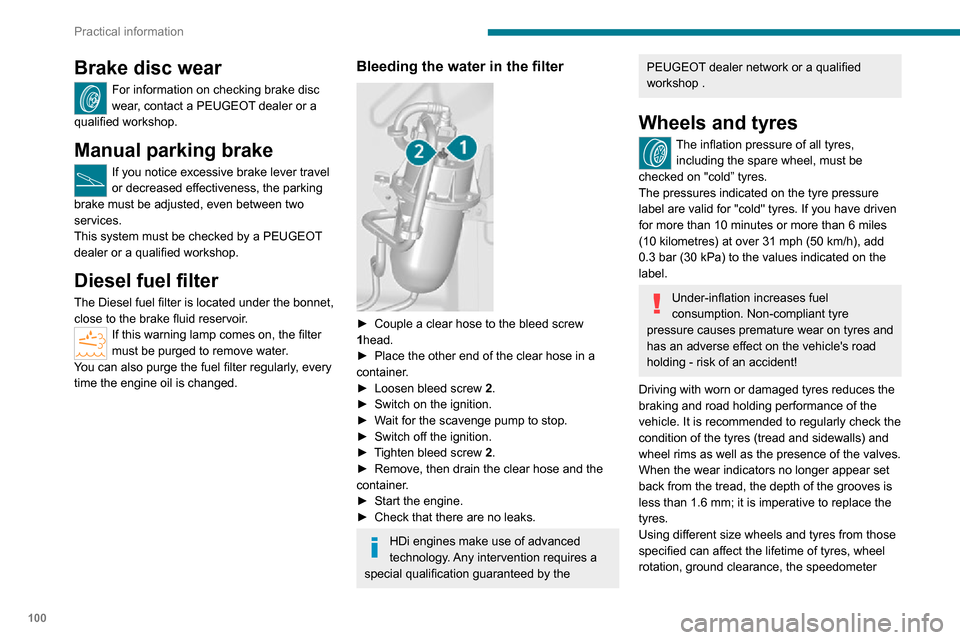
Bleeding the water in the filter
► Couple a clear hose to the bleed screw 1head.► Place the other end of the clear hose in a container.► Loosen bleed screw 2.► Switch on the ignition.► Wait for the scavenge pump to stop.► Switch off the ignition.► Tighten bleed screw 2.► Remove, then drain the clear hose and the container.► Start the engine.► Check that there are no leaks.
HDi engines make use of advanced
technology. Any intervention requires a
special qualification guaranteed by the
PEUGEOT dealer network or a qualified workshop .
Wheels and tyres
The inflation pressure of all tyres,
including the spare wheel, must be
checked on "cold” tyres.
The pressures indicated on the tyre pressure
label are valid for "cold" tyres. If you have driven
for more than 10 minutes or more than 6 miles
(10 kilometres) at over 31 mph (50 km/h), add 0.3 bar (30 kPa) to the values indicated on the
label.
Under-inflation increases fuel
consumption. Non-compliant tyre
pressure causes premature wear on tyres and
has an adverse effect on the vehicle's road
holding - risk of an accident!
Driving with worn or damaged tyres reduces the
braking and road holding performance of the
vehicle. It is recommended to regularly check the
condition of the tyres (tread and sidewalls) and
wheel rims as well as the presence of the valves.
When the wear indicators no longer appear set
back from the tread, the depth of the grooves is
less than 1.6 mm; it is imperative to replace the
tyres.
Using different size wheels and tyres from those
specified can affect the lifetime of tyres, wheel
rotation, ground clearance, the speedometer
Page 156 of 196
154
Audio system
Voice commands
Information - Using the
system
Instead of touching the screen, you can
use your voice to control the system.
To ensure that voice commands are always recognised by the system, please
observe the following recommendations:
– speak in a normal tone of voice,– before speaking, always wait for the "beep" (acoustic signal),– the system is able to recognise the voice commands provided, regardless of gender,
tone and inflection of the voice of the speaker,
– if possible, minimise the noise inside the passenger compartment,– before issuing a voice command, ask any other passengers to refrain from speaking.
Since the system recognises commands
regardless of who is speaking, when several
people are speaking simultaneously, it
is possible for the system to recognise
commands that are different or additional to
what has been requested,
– for optimal operation, you are advised to close the windows and any sunroof present
(on versions/markets where fitted) to avoid
any external source of disturbance.
Telephone
Pairing a Bluetooth®
telephone
For safety reasons and because it
requires sustained attention by the driver,
the pairing of a Bluetooth
® mobile phone with
the hands-free kit of your audio system must
be done with the vehicle stationary.
Activate the Bluetooth
® function on the telephone
and ensure that it is "visible to all" (telephone
configuration).
Press the "Phone" button.
If no mobile phone has yet been paired
with the system, a special page is displayed in
the screen.
Select "Connect the telephone" to start the pairing procedure and then search for
the name of the system on the mobile phone.
Using the telephone keypad, enter the PIN
displayed on the screen of the system or confirm
the PIN displayed on the mobile phone.
During pairing, a screen page is displayed
showing the progress of the operation.If the pairing procedure fails, it is
recommended that you deactivate and
then reactivate the Bluetooth® function on your
telephone.
* If your telephone i s fully compatible with the system.
Once the pairing procedure is complete, a
screen page with "Connection
successful” appears:
Confirm to display the menus.
In particular, the telephone menu provides
access to the following functions: " List. of
calls”, “Contacts”*, “Num. keypad.".
Receiving a call
An incoming call is announced by a ring and a
display overlaid on the screen.
Press this button to accept the call.
Or press this steering-mounted button to accept the call.
Ending a call
To refuse the call, press this steering- mounted button.
Making a call
Select “List of calls ” to access the latest
dialled numbers.
Select "Contacts” to display your
contacts, then navigate with the dial.
To dial a number, use "Num. keypad" in the system.
Settings
System settings
Press the “MENU” button.
Select “System settings” then press to
view the list of settings and to activate or
deactivate the options:
– "Reinitialise default value "– "20 min. delay to switch off "– “Volume limit at start-up"– "Automatic"
Audio
Press the “MENU” button.
Select “Audio” then press to view the list
of settings and to activate or deactivate
the options:
– "Treble"– “Medium”– “Bass ”
– "Balance"– “Volume adapted according to the speed ”– "Loudness"
The audio settings are different and
independent for each audio source.