wheel PEUGEOT EXPERT 2018 Workshop Manual
[x] Cancel search | Manufacturer: PEUGEOT, Model Year: 2018, Model line: EXPERT, Model: PEUGEOT EXPERT 2018Pages: 416, PDF Size: 14.12 MB
Page 295 of 416
293
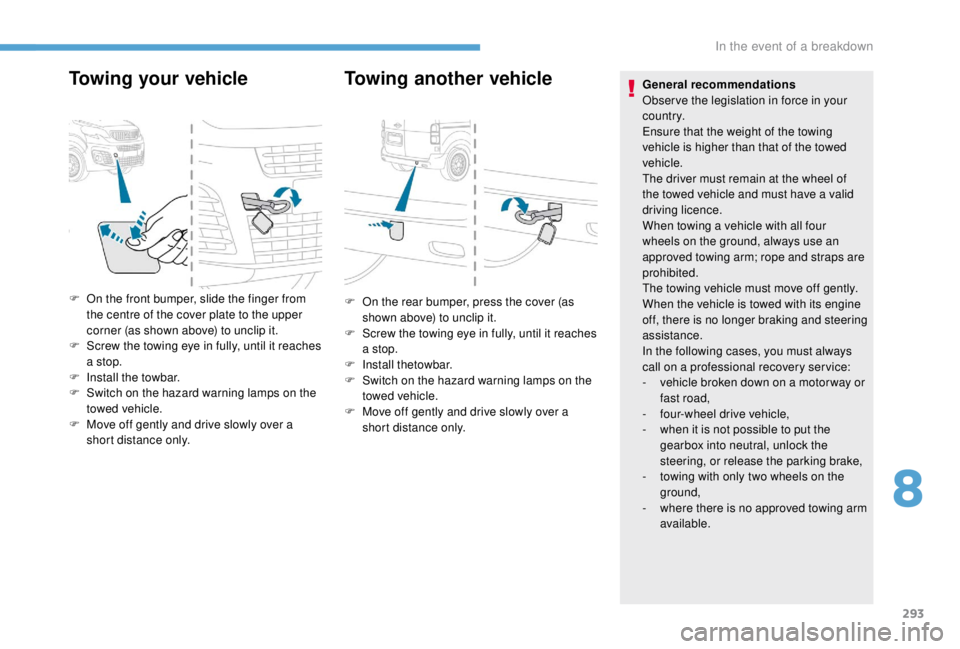
Towing your vehicleTowing another vehicle
F On the front bumper, slide the finger from
the centre of the cover plate to the upper
corner (as shown above) to unclip it.
F
S
crew the towing eye in fully, until it reaches
a stop.
F
I
nstall the towbar.
F
S
witch on the hazard warning lamps on the
towed vehicle.
F
M
ove off gently and drive slowly over a
short distance only. General recommendations
Obser ve the legislation in force in your
c o u nt r y.
Ensure that the weight of the towing
vehicle is higher than that of the towed
vehicle.
The driver must remain at the wheel of
the towed vehicle and must have a valid
driving licence.
When towing a vehicle with all four
wheels on the ground, always use an
approved towing arm; rope and straps are
prohibited.
The towing vehicle must move off gently.
When the vehicle is towed with its engine
off, there is no longer braking and steering
assistance.
In the following cases, you must always
call on a professional recovery ser vice:
-
v
ehicle broken down on a motor way or
fast road,
-
f
our-wheel drive vehicle,
-
w
hen it is not possible to put the
gearbox into neutral, unlock the
steering, or release the parking brake,
-
t
owing with only two wheels on the
ground,
-
w
here there is no approved towing arm
available.
F
O n the rear bumper, press the cover (as
shown above) to unclip it.
F
S
crew the towing eye in fully, until it reaches
a stop.
F
I
nstall thetowbar.
F
S
witch on the hazard warning lamps on the
towed vehicle.
F
M
ove off gently and drive slowly over a
short distance only.
8
In the event of a breakdown
Page 307 of 416
305
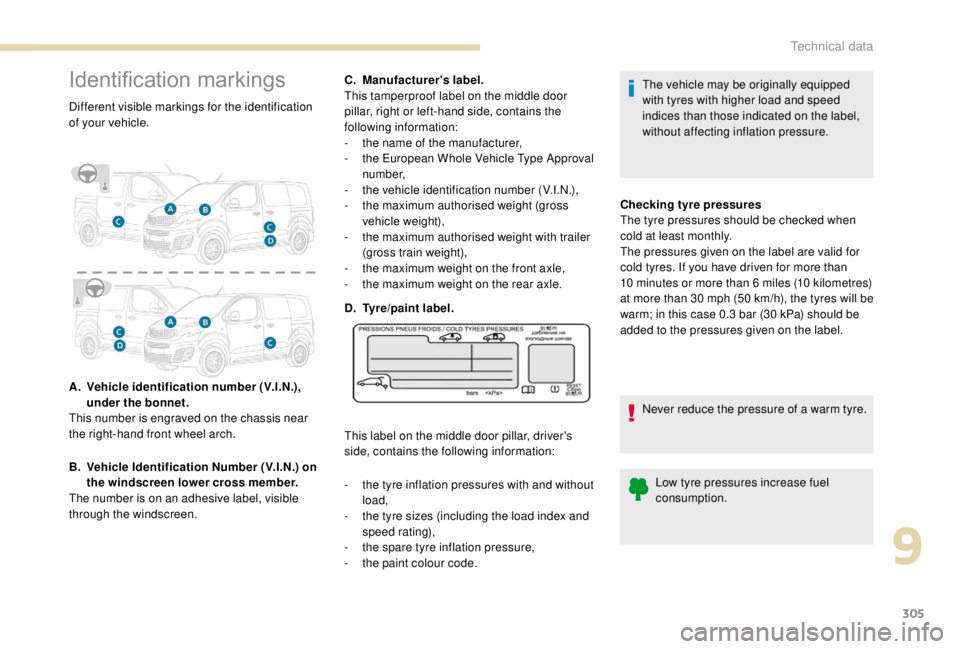
Identification markings
Different visible markings for the identification
of your vehicle.
A.
V
ehicle identification number (V.I.N.),
under the bonnet.
This number is engraved on the chassis near
the right-hand front wheel arch.
B.
V
ehicle Identification Number (V.I.N.) on
the windscreen lower cross member.
The number is on an adhesive label, visible
through the windscreen. C.
M
anufacturer's label.
This tamperproof label on the middle door
pillar, right or left-hand side, contains the
following information:
-
t
he name of the manufacturer,
-
t
he European Whole Vehicle Type Approval
number,
-
t
he vehicle identification number (V.I.N.),
-
t
he maximum authorised weight (gross
vehicle weight),
-
t
he maximum authorised weight with trailer
(gross train weight),
-
t
he maximum weight on the front axle,
-
t
he maximum weight on the rear axle.
D.
T
yre/paint label.
This label on the middle door pillar, driver's
side, contains the following information:
-
t
he tyre inflation pressures with and without
load,
-
t
he tyre sizes (including the load index and
speed rating),
-
t
he spare tyre inflation pressure,
-
t
he paint colour code. The vehicle may be originally equipped
with tyres with higher load and speed
indices than those indicated on the label,
without affecting inflation pressure.
Checking tyre pressures
The tyre pressures should be checked when
cold at least monthly.
The pressures given on the label are valid for
cold tyres. If you have driven for more than
10
minutes or more than 6 miles (10 kilometres)
at more than 30
mph (50 km/h), the tyres will be
warm; in this case 0.3
bar (30 kPa) should be
added to the pressures given on the label.
Never reduce the pressure of a warm tyre.Low tyre pressures increase fuel
consumption.
9
Technical data
Page 311 of 416
3
In the "Settings" menu you can create
a profile for just one person or a group
of people with common points, with the
possibility of entering a multitude of
settings (radio presets, audio settings,
navigation history, contact favourites,
etc.); these settings are taken into account
automatically.
In very hot conditions, the volume may
be limited to protect the system. It may go
into standby (screen and sound off) for at
least 5
minutes.
The return to normal takes place when
the temperature in the passenger
compartment has dropped.Steering mounted controls
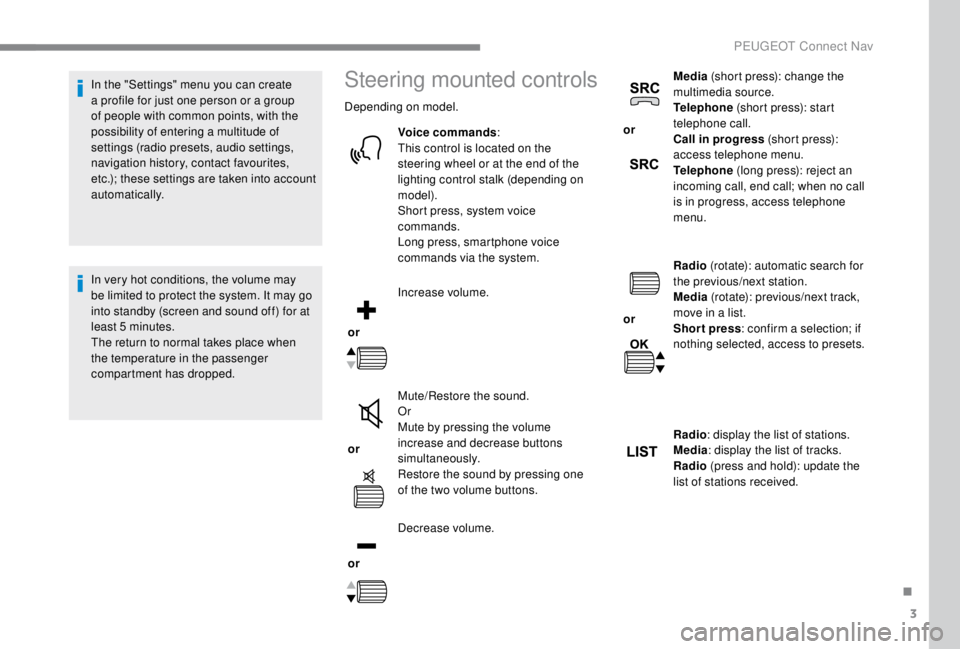
Depending on model.
Voice commands :
This control is located on the
steering wheel or at the end of the
lighting control stalk (depending on
model).
Short press, system voice
commands.
Long press, smartphone voice
commands via the system.
or Increase volume.
or Mute/Restore the sound.
Or
Mute by pressing the volume
increase and decrease buttons
simultaneously.
Restore the sound by pressing one
of the two volume buttons.
or Decrease volume. or
Media
(short press): change the
multimedia source.
Telephone (short press): start
telephone call.
Call in progress (short press):
access telephone menu.
Telephone (long press): reject an
incoming call, end call; when no call
is in progress, access telephone
menu.
or Radio
(rotate): automatic search for
the previous/next station.
Media (rotate): previous/next track,
move in a list.
Short press : confirm a selection; if
nothing selected, access to presets.
Radio : display the list of stations.
Media : display the list of tracks.
Radio (press and hold): update the
list of stations received.
.
PEUGEOT Connect Nav
Page 314 of 416
6
First steps
Example of a "voice command" for
navigation:
"Navigate to address ", " 11
Regent
Street, London ".
Example of a "voice command" for
the radio and media:
" Play ar tist ", " Madonna ".
Example of a "voice command" for
the telephone:
" Call David Miller ".
The voice commands, with a choice of
12
languages (English, French, Italian,
Spanish, German, Dutch, Portuguese,
Polish, Turkish, Russian, Arabic,
Brazilian), are made using the language
previously chosen and set in the system.
For some voice commands, there are
alternative synonyms.
Example: Guide to/Navigate to/
Go to/...
The voice commands in Arabic for:
"Navigate to address" and "Display POI in
the city", are not available.
Information – Using the
system
Press the Push To Talk voice
control button and tell me
what you'd like after the tone.
Remember you can interrupt
me at any time by pressing this
button. If you press it again
while I'm waiting for you to
speak, it'll end the conversation.
If you need to start over, say
"cancel". If you want to undo
something, say "undo". And to
get information and tips at any
time, just say "help". If you ask
to me do something and there's
some information missing
that I need, I'll give you some
examples or take you through
it step by step. There's more
information available in "novice"
mode. You can set the dialogue
mode to "expert" when you feel
comfortable.
Global voice commands
These commands can be made from any
screen page after pressing the " Voice
command" or "Telephone" button located
on the steering wheel, as long as there is
no telephone call in progress.
PEUGEOT Connect Nav
Page 315 of 416
7
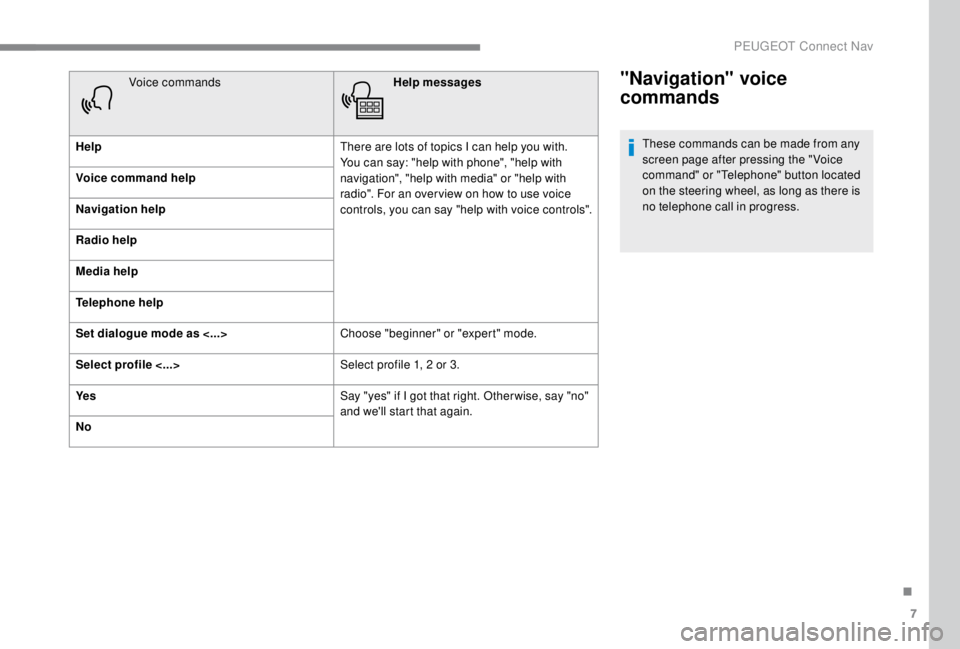
"Navigation" voice
commands
These commands can be made from any
screen page after pressing the " Voice
command" or "Telephone" button located
on the steering wheel, as long as there is
no telephone call in progress.
Voice commands
Help messages
Help There are lots of topics I can help you with.
You can say: "help with phone", "help with
navigation", "help with media" or "help with
radio". For an over view on how to use voice
controls, you can say "help with voice controls".
Voice command help
Navigation help
Radio help
Media help
Telephone help
Set dialogue mode as <...>
Choose "beginner" or "expert" mode.
Select profile <...> Select profile 1, 2
or 3.
Ye s Say "yes" if I got that right. Other wise, say "no"
and we'll start that again.
No
.
PEUGEOT Connect Nav
Page 316 of 416
8
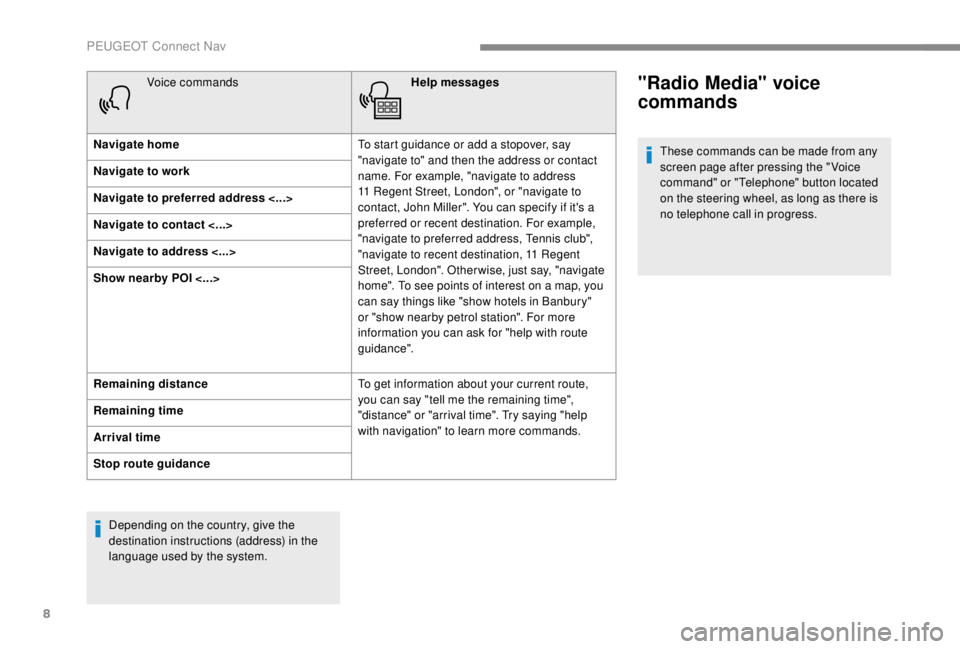
Voice commandsHelp messages
Navigate home To start guidance or add a stopover, say
"navigate to" and then the address or contact
name. For example, "navigate to address
11
Regent Street, London", or "navigate to
contact, John Miller". You can specify if it's a
preferred or recent destination. For example,
"navigate to preferred address, Tennis club",
"navigate to recent destination, 11
Regent
Street, London". Other wise, just say, "navigate
home". To see points of interest on a map, you
can say things like "show hotels in Banbury"
or "show nearby petrol station". For more
information you can ask for "help with route
guidance".
Navigate to work
Navigate to preferred address <...>
Navigate to contact <...>
Navigate to address <...>
Show nearby POI <...>
Remaining distance
To get information about your current route,
you can say "tell me the remaining time",
"distance" or "arrival time". Try saying "help
with navigation" to learn more commands.
Remaining time
Arrival time
Stop route guidance
Depending on the country, give the
destination instructions (address) in the
language used by the system."Radio Media" voice
commands
These commands can be made from any
screen page after pressing the " Voice
command" or "Telephone" button located
on the steering wheel, as long as there is
no telephone call in progress.
PEUGEOT Connect Nav
Page 317 of 416
9
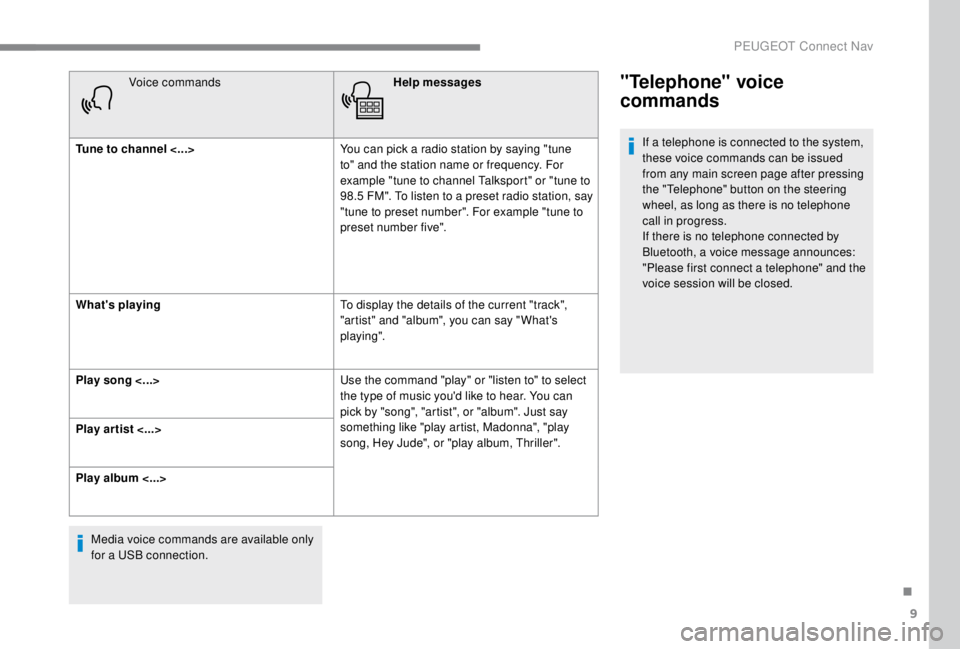
Voice commandsHelp messages
Tune to channel <...> You can pick a radio station by saying "tune
to" and the station name or frequency. For
example "tune to channel Talksport" or "tune to
98.5
FM". To listen to a preset radio station, say
"tune to preset number". For example "tune to
preset number five".
What's playing To display the details of the current "track",
"artist" and "album", you can say " What's
playing".
Play song <...> Use the command "play" or "listen to" to select
the type of music you'd like to hear. You can
pick by "song", "artist", or "album". Just say
something like "play artist, Madonna", "play
song, Hey Jude", or "play album, Thriller".
Play ar tist <...>
Play album <...>
Media voice commands are available only
for a USB connection."Telephone" voice
commands
If a telephone is connected to the system,
these voice commands can be issued
from any main screen page after pressing
the "Telephone" button on the steering
wheel, as long as there is no telephone
call in progress.
If there is no telephone connected by
Bluetooth, a voice message announces:
"Please first connect a telephone" and the
voice session will be closed.
.
PEUGEOT Connect Nav
Page 318 of 416
10
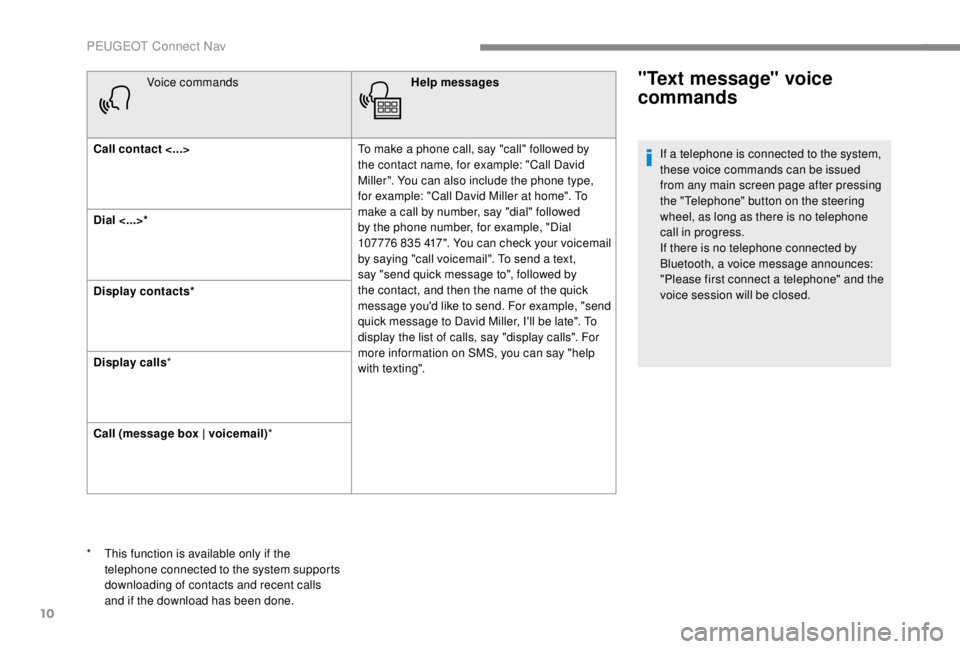
Voice commandsHelp messages
Call contact <...> To make a phone call, say "call" followed by
the contact name, for example: "Call David
Miller". You can also include the phone type,
for example: "Call David Miller at home". To
make a call by number, say "dial" followed
by the phone number, for example, "Dial
107776
835 417". You can check your voicemail
by saying "call voicemail". To send a text,
say "send quick message to", followed by
the contact, and then the name of the quick
message you'd like to send. For example, "send
quick message to David Miller, I'll be late". To
display the list of calls, say "display calls". For
more information on SMS, you can say "help
with texting".
Dial <...>*
Display contacts*
Display calls
*
Call (message box | voicemail) *"Text message" voice
commands
* This function is available only if the
telephone connected to the system supports
downloading of contacts and recent calls
and if the download has been done. If a telephone is connected to the system,
these voice commands can be issued
from any main screen page after pressing
the "Telephone" button on the steering
wheel, as long as there is no telephone
call in progress.
If there is no telephone connected by
Bluetooth, a voice message announces:
"Please first connect a telephone" and the
voice session will be closed.
PEUGEOT Connect Nav
Page 357 of 416
3
In very hot conditions, the volume may
be limited to protect the system. It may go
into standby (screen and sound off) for at
least 5
minutes.
The return to normal takes place when
the temperature in the passenger
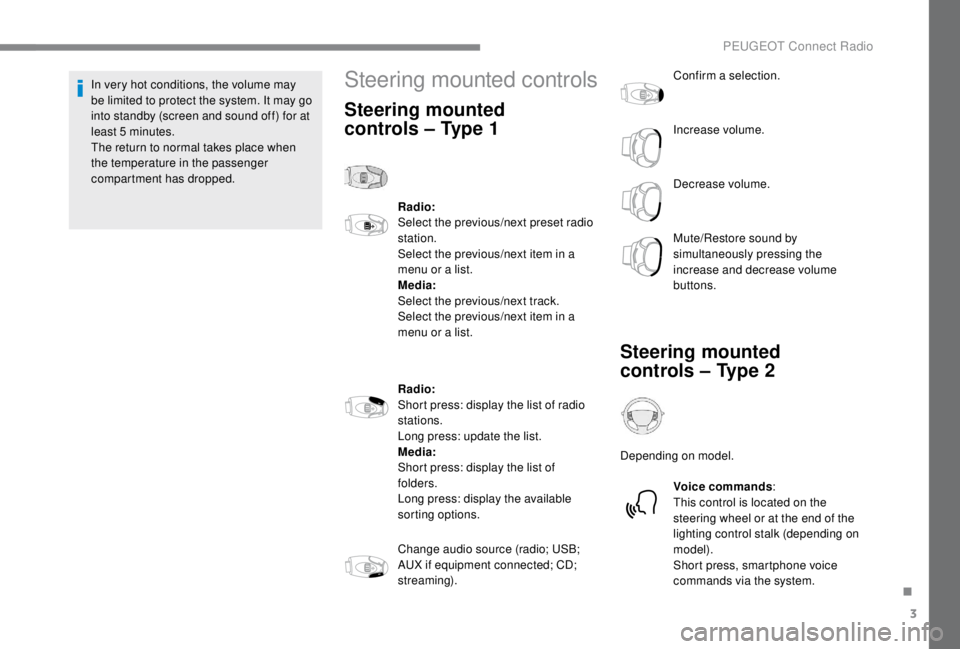
compartment has dropped.Steering mounted controls
Steering mounted
controls – Type 1
Radio:
Select the previous/next preset radio
station.
Select the previous/next item in a
menu or a list.
Media:
Select the previous/next track.
Select the previous/next item in a
menu or a list.
Radio:
Short press: display the list of radio
stations.
Long press: update the list.
Media:
Short press: display the list of
folders.
Long press: display the available
sorting options.
Change audio source (radio; USB;
AUX if equipment connected; CD;
streaming). Confirm a selection.
Increase volume.
Decrease volume.
Mute/Restore sound by
simultaneously pressing the
increase and decrease volume
buttons.
Steering mounted
controls – Type 2
Depending on model.
Voice commands :
This control is located on the
steering wheel or at the end of the
lighting control stalk (depending on
model).
Short press, smartphone voice
commands via the system.
.
PEUGEOT Connect Radio
Page 386 of 416
4
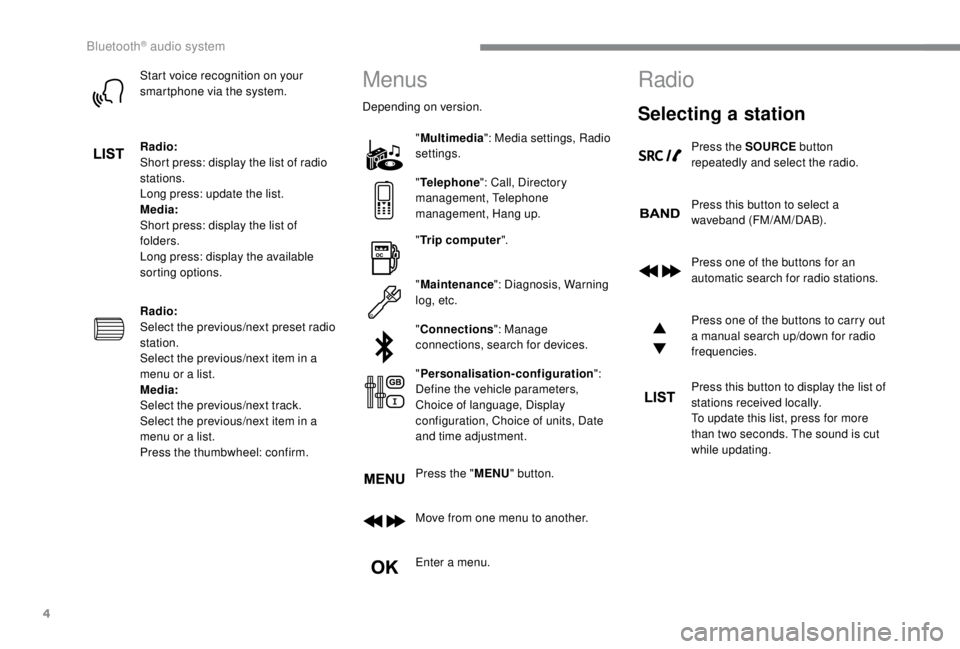
Start voice recognition on your
smartphone via the system.
Radio:
Short press: display the list of radio
stations.
Long press: update the list.
Media:
Short press: display the list of
folders.
Long press: display the available
sorting options.
Radio:
Select the previous/next preset radio
station.
Select the previous/next item in a
menu or a list.
Media:
Select the previous/next track.
Select the previous/next item in a
menu or a list.
Press the thumbwheel: confirm.Menus
Depending on version."Multimedia ": Media settings, Radio
settings.
" Telephone ": Call, Directory
management, Telephone
management, Hang up.
" Trip computer ".
" Maintenance ": Diagnosis, Warning
log, etc.
" Connections ": Manage
connections, search for devices.
" Personalisation-configuration ":
Define the vehicle parameters,
Choice of language, Display
configuration, Choice of units, Date
and time adjustment.
Press the " MENU" button.
Move from one menu to another.
Enter a menu.
Radio
Selecting a station
Press the SOURCE button
repeatedly and select the radio.
Press this button to select a
waveband (FM/AM/DAB).
Press one of the buttons for an
automatic search for radio stations.
Press one of the buttons to carry out
a manual search up/down for radio
frequencies.
Press this button to display the list of
stations received locally.
To update this list, press for more
than two seconds. The sound is cut
while updating.
Bluetooth® audio system