display PONTIAC BONNEVILLE 2003 Owner's Guide
[x] Cancel search | Manufacturer: PONTIAC, Model Year: 2003, Model line: BONNEVILLE, Model: PONTIAC BONNEVILLE 2003Pages: 418, PDF Size: 20.24 MB
Page 182 of 418

Memory Seats
If your vehicle has this feature, the memory seat and
mirror positions will be recalled for the identified
driver when the remote keyless entry transmitter is used
to enter the vehicle.
You can program this feature to be active by choosing
ON when the SEAT RECALL choice appears, or
inactive by choosing
OFF when the SEAT RECALL
choice appears on the DIC. Make your choices
by pressing the RESET button and store them to
memory by pressing the SELECT button.
You can also program this feature
to recall your
memory seat position or the exit seat position.
Memory Position: Choose ON when the SEAT
RECALL choice appears and then choose
MEMORY when the RECALL POSITION choice
appears.
Ex!! PesW?!?: Chwse ON when the SEAT
RECALL choice appears and then choose
EXIT
when the RECALL POSITION choice appears.
The seat will move when you enter the vehicle after
unlocking it with a remote keyless entry transmitter.
This will allow for easy entry.
For more information on this feature, see
Memory Seat
and Mirrors on page 2-48.
Outside Curb View Assist Mirror
If your vehicle has this feature, the outside curb view
assist mirror, which tips the passenger mirror while the
vehicle is in REVERSE
(R), can be made active or
inactive through the DIC. When TILT MIRROR
-OFF/ON
appears on the display, use the RESET button to
toggle the arrow between
OFF and ON. When you have
made your choice, press the SELECT button to record
your selection. For more information on this feature, see
Outside Curb View Assist Mirror on page 2-39.
Driver ID
This feature displays the DRIVER ID, as identified by
the
DIC. If this feature is ON, the DRIVER ID will
be displayed every time the ignition
is turned on. If the
DRIVER ID
is OFF, the DRIVER ID can be displayed
by pressing either a button on the remote keyless entry
transmitter or a memory seat button.
3-67
Page 184 of 418
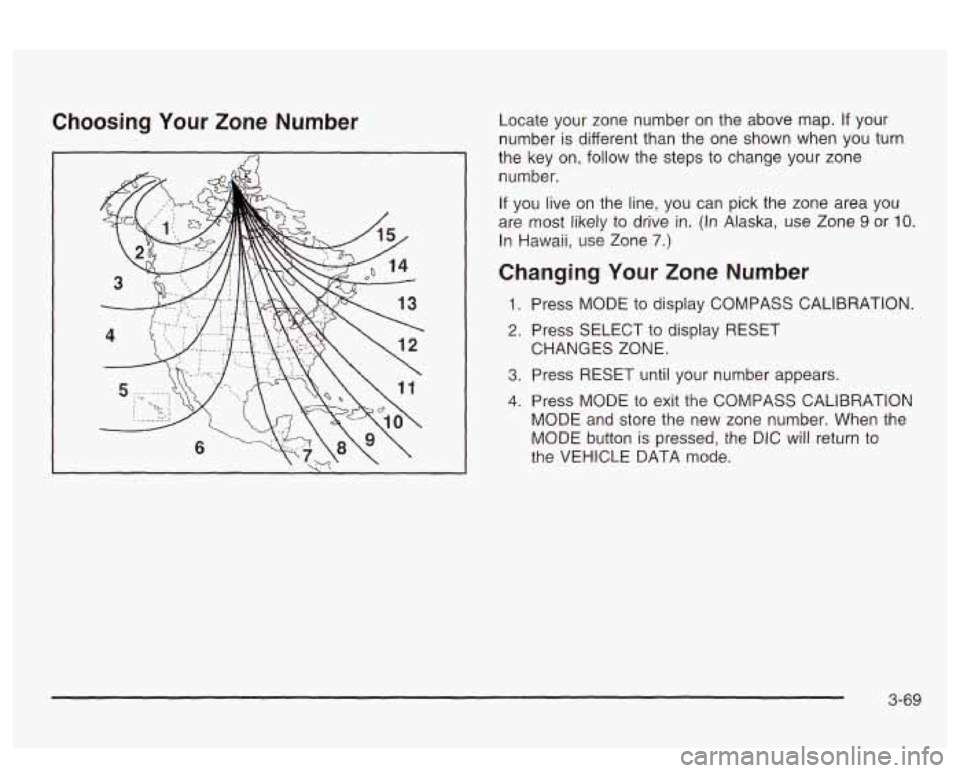
Choosing Your Zone Number Locate your zone number on the above map. If your
number
is different than the one shown when you turn
the key on,
follow the steps to change your zone
number.
If you live on the line, you can pick the zone area you
are most likely to drive
in. (In Alaska, use Zone 9 or IO.
In Hawaii, use Zone 7.)
Changing Your Zone Number
1. Press MODE to display COMPASS CALIBRATION.
2. Press SELECT to display RESET
3. Press RESET until your number appears.
4. Press MODE to exit the COMPASS CALIBRATION
MODE and store the new zone number. When the
MODE button is pressed, the DIC will return to
the VEHICLE DATA mode. CHANGES ZONE.
3-69
Page 185 of 418
Calibrating the Compass
All electronic compasses need to know the magnetic
profile of your vehicle. This is called calibration and
is done automatically by your compass. However, if you
would like
to manually calibrate the compass, the
following instructions will show you how.
Sometimes, strong magnetic fields can affect the
compass.
If the compass display does not show a
direction, and CALIBRATE COMPASS is displayed on
the DIC, try calibrating the compass as follows:
1. Drive the vehicle to an open, flat area.
2. Press MODE to display COMPASS CALIBRATION.
3. Press SELECT to display PRESS RESET TO
RECALIBRATE and then press the RESET
button.
4. The display will change to SLOWLY DRIVE IN
SMALL CIRCLES. Drive the vehicle in small
circles. Don’t drive faster than
10 mph (1 6 km/h).
5. Continue to drive in circles until the CALIBRATION
COMPLETE message is displayed on the DIC and
a direction is shown for the compass.
Compass Accuracy
Your compass may show different headings around
bridges, power lines, large metal objects and steep hills.
This is normal and
is true of compasses in general.
If you put large metal objects like golf clubs in the trunk
they could affect accuracy.
If the affect is minimal,
the compass will adapt to these objects over time.
If you use an antenna with a magnetic base, it is best to
mount it away from the center of the trunk near the
rear window.
The rear defog system can affect accuracy, and the
compass corrects for the rear defog. However,
if the rear
defog is turned on while making sharp turns, the
accuracy may be off. When you turn the rear defog off
again, the accuracy returns
to normal.
Be aware that metal objects are sometimes buried in
the ground. They can affect accuracy and you may not
know they are there. As an example, many concrete
roads have metal reinforcements inside.
Also,
if you drive with the trunk open, this could affect
accuracy and could decalibrate the compass.
Your compass should be calibrated. You will know this
when a direction
is shown and the CALIBRATE
COMPASS message is no longer displayed.
3-70
Page 186 of 418
Audio System(s)
Notice: Before you add any sound equipment to
your vehicle
- like a tape player, CB radio, mobile
telephone or two-way radio
- be sure you can
add what you want. If you can, it’s very important to
do
it properly. Added sound equipment may
interfere with the operation of your vehicle’s engine,
Delphi Electronics radio or other systems, and
even damage them. Your vehicle’s systems may interfere with the operation of sound equipment that
has been added improperly.
So, before adding sound equipment, check with
your dealer and be sure to check federal rules
covering mobile radio and telephone units.
Your audio system has been designed
to operate easily
and
to give years of listening pleasure. You will get
the most enjoyment out of it
if you acquaint yourself with
it first. Find out what your audio system can do and
how to operate all of its controls to be sure you’re getting
LI It: II IUS1 vu1 VI 11 IC UUVUl IUUU ”1 ‘y“ I””. .. .
into it.
I‘- - --* -. .+ -g +h -A-r-nmmA nnninonrinn +hat
,ant 3 -..-- ..-..-
Your vehicle has a feature called Retained Accessory
Power (RAP). With RAP, you can play your audio
system even after the ignition is turned
off. See
“Retained Accessory Power (RAP)” under lgnition
Positions on page 2-25.
Setting the Time
Press and hold HR or MIN for two seconds. Then press
and hold
HR until the correct hour appears on the
display. AM will also appear. Press and hold MIN until
the correct minute appears on the display. The time may
be
set with the ignition on or off.
To synchronize the time with an FM station broadcasting
Radio Data System
(RDS) Information, press and
hold HR and MIN at the same time until UPDATED and
the clock symbol appear on the display.
If the time is
not available from the station, NO UPDATE will appear
on the display instead.
3-71
Page 187 of 418
Radio with CD
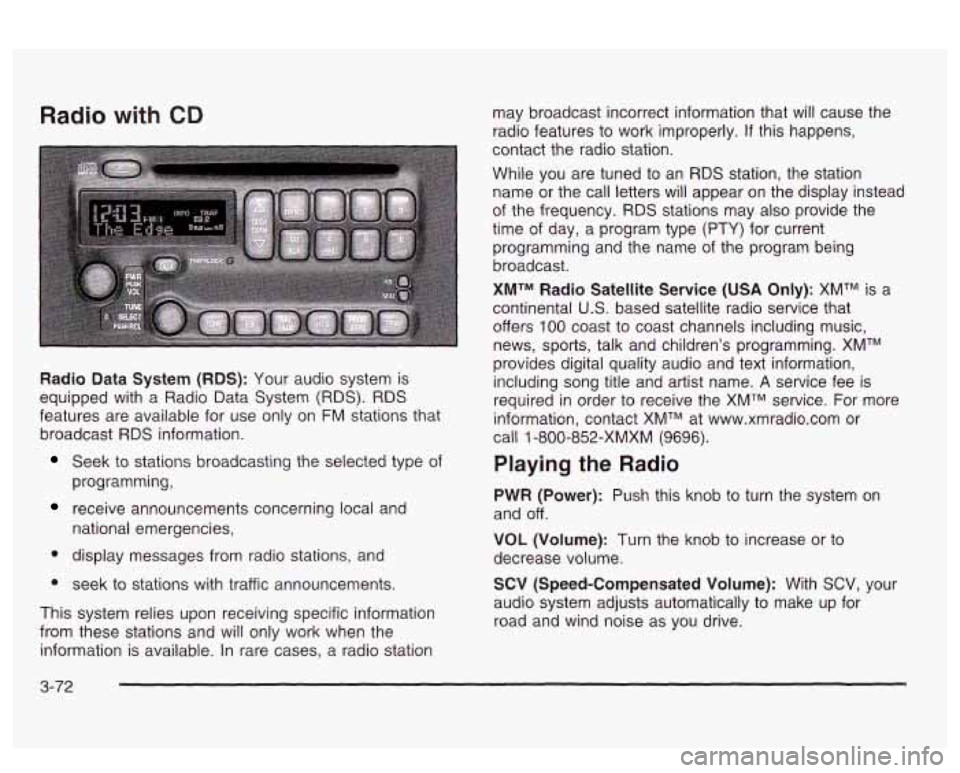
Radio Data System (RDS): Your audio system is
equipped with a Radio Data System
(RDS). RDS
features are available for use only on FM stations that
broadcast
RDS information.
Seek to stations broadcasting the selected type of
programming,
receive announcements concerning local and
national emergencies,
display messages from radio stations, and
seek to stations with traffic announcements.
This system relies upon receiving specific information
from these stations and will only work when the
information is available. In rare cases, a radio station may
broadcast incorrect information that will cause the
radio features to work improperly.
If this happens,
contact the radio station.
While you are tuned to an
RDS station, the station
name or the call letters will appear
on the display instead
of the frequency.
RDS stations may also provide the
time of day, a program type
(PTY) for current
programming and the name of the program being
broadcast.
XMTM Radio Satellite Service (USA Only): XMTM is a
continental
U.S. based satellite radio service that
offers
100 coast to coast channels including music,
news, sports, talk and children's programming. XMTM
provides digital quality audio and text information,
including song title and artist name.
A service fee is
required in order to receive the XMTM service. For more
information, contact XMTM at www.xmradio.com or
call
1 -800-852-XMXM (9696).
Playing the Radio
PWR (Power): Push this knob to turn the system on
and off.
VOL (Volume): Turn the knob to increase or to
decrease volume.
SCV (Speed-Compensated Volume): With SCV, your
audio system adjusts automatically to make up for
road and wind noise as you drive.
3-72
Page 188 of 418
Set the volume at the desired level. Press this button to
select MIN, MED or MAX. Each higher choice allows
for more volume compensation at faster vehicle speeds.
Then, as you drive, SCV automatically increases the
volume, as necessary, to overcome noise at any speed.
The volume level should always sound the same to
you as you drive.
If you don’t want to use SCV,
select
OFF.
RCL (Recall): Push this knob to switch the display
between the radio station frequency and the time.
Pushing this knob with the ignition off will display the
time.
For
XMTM (USA only, if your radio is equipped with
XMTM Satellite Radio Service), pressing this button while
in XMTM mode to retrieve various pieces of information
related to the current song or channel. By pressing
and releasing the RCL knob, you may retrieve
four different categories of information: Artist, Song
Title, Category or PTY, Channel Number/ Cnannei hame.
To change the default on the display, push the knob
until you see the display you want, then hold the knob
until the display flashes. The selected display will
now be the default.
Finding a Station
BAND: Press this button to switch between AM, FM,
FM2, or XMI, XM2 (USA only,
if your radio is equipped
with XMTM Satellite Radio Service). The display will
show your selection.
TUNE: Turn this knob to choose radio stations.
A SEEK v : Press the up or the down arrow to go to
the next or to the previous station and stay there.
The radio will seek only to stations that are in the
selected band and only to those with a strong signal.
SCAN v : Press and hold one of the SCAN arrows
for two seconds until SCAN appears on the display
and you hear a beep. The radio will go to a station, play
for a few seconds, then go on to the next station.
Press one of the SCAN arrows again to stop scanning.
To scan preset stations, press and hold one of the
SCAN arrows for more man Tour seconas uniii FSGAi<
and the preset number appear on the display. You
will hear a double beep. The radio will go to the first
preset station stored on your pushbuttons, play for a few
seconds, then go on to the next preset station. Press
one of the SCAN arrows again to stop scanning presets.
The radio will scan only to stations that are
in the
selected band and only to those with a strong signal.
3-73
Page 189 of 418
Setting Preset Stations
The six numbered pushbuttons let you return to your
favorite stations. You can set up to
30 stations (six AM,
six FM1 and six FM2, six XM1 and six XM2
(USA
only, if your radio is equipped with the XMTM Satellite
Radio Service), by pedorming the following steps:
1. Turn the radio on.
2. Press BAND to select AM, FMI or FM2,
3. Tune in the desired station.
4. Press EQ to select the equalization.
5. Press and hold one of the six numbered
or
XMl, XM2.
pushbuttons until you hear a beep. Whenever you
press that numbered pushbutton, the station
you set
will return and the equalization that you
selected will also be automatically selected for that
pushbutton.
6. Repeat the steps for each pushbutton.
Setting the Tone (Bassnreble)
TONE: Press and release this button until BASS, MID
or TREB appears on the display. The SELECT LED
indicator
will light to show that the tone control can be
adjusted. Turn the SELECT knob to increase or
to
decrease. If a station is weak or noisy, you may want to
decrease the treble. To
adjust all of the tone controls
to the middle position,
press and hold TONE until FLAT appears on the
display.
EQ (Equalizer): Press this button to select customized
bass, mid and treble equalization settings.
You can set up to six customized equalization settings
by performing the following steps:
1.
2.
3.
4.
5.
6. Turn
the radio on.
Use the TONE button and the SELECT knob to
create the desired equalization.
Press and hold the
EQ button for two seconds.
SELECT EQ
# will appear on the display and the
EQ symbol will flash.
Press EQ or turn the
SELECT knob to select the
desired EQ number.
Press and hold the EQ button or push the SELECT
knob
to store the equalization setting and the
number. You will hear
a beep and EQ SAVED will
appear on the display.
Repeat the steps for the other
EQ settings and
numbers.
EQ
5 has been programmed at the factory for use with
talk radio, but it can be preset
to a different tone.
3-74
Page 190 of 418
Adjusting the Speakers (Balance/Fade)
BAL (Balance): Press and release this button until
BAL appears on the display. The SELECT LED indicator
will light to show that the speakers can be adjusted.
Turn the SELECT knob to move the sound toward the
left or the right speakers.
FADE: Press and release this button until FADE
appears on the display. The SELECT LED indicator will
light to show that the speakers can be adjusted.
Turn the SELECT knob to move the sound toward the
front or the speakers.
Pressing and holding the BAL FADE button for two
seconds
will return all speaker settings t~ the middle
position.
Finding a PTY Station (RDS, and XMTM)
To select and find a desired PTY perform the following:
1. Press PROG TYPE. The PTY symbol will be
2. Select a category by turning the SELECT knob.
eis;!2yed 2r! the screen.
3. Once the desired category is displayed, press either
SEEK arrow to select the category and take you to
the category’s first station.
4. If you want to go to another station within that
category and the category is displayed, press
either SEEK arrow once.
If the category is not
displayed, press either SEEK arrow twice to display
the category and then to go to another station.
5. Press PROG TYPE to exit program type mode.
SCAN: You can also scan through the channels within
a category by performing the following:
1. Press PROG TYPE. The PTY symbol will be
2. Select a category by turning the SELECT knob.
3. Once the desired category is displayed, press and
hold either SCAN arrow, and the radio will begin
scanning within your chosen category.
particular station.
displayed
on the screen.
4. Press either SCAN
arrow again to stop at a
3-75
Page 191 of 418
BAND (Alternate Frequency): Alternate frequency
allows the radio to switch to a stronger station with the
same programming. Press and hold
BAND for two
seconds to turn alternate frequency on. AF ON
will appear on the display. The radio may switch to
stronger stations. Press and hold BAND again for two
seconds to turn alternate frequency off. AF OFF
will appear on the display. The radio will not switch to
other stations.
This function does not apply for
XMTM.
Setting Preset PTYs (RDS Only)
The six numbered pushbuttons let you return to your
favorite program types (PTYs). These pushbuttons have
factory PTY presets.
You can set up to 12 PTYs
(six FMI and six
FM2) by performing the following steps:
1. Press BAND to select FM1 or FM2.
2. Press PROG TYPE, if it is not already on.
3. Turn the SELECT knob to select a PTY
4. Press and hold one of the six numbered
pushbuttons until you hear a beep. Whenever you
press that numbered pushbutton, the PTY you
set will return.
RDS Messages
ALERT!: Alert warns of national or local emergencies.
When an alert announcement comes on the current
radio station, ALERT! will appear on the display. You will
hear the announcement, even
if the volume is muted
or a compact disc is playing.
If the compact disc player
is playing, play will stop during the announcement.
You will not be able to turn off alert announcements.
ALERT! will not be affected by tests of the emergency
broadcast system. This feature is not supported by
all RDS stations.
INFO (Information): If the current station has a
message, INFO will appear on the display. Press this
button to see the message. The message may display
the artist and song title, call in phone numbers, etc.
If the whole message is not displayed, parts of it
will appear every three seconds. To scroll through the
message at your own speed, press the INFO button
repeatedly. A new group of words will appear on
the display with each press. Once the complete
message has been displayed, INFO will disappear from
the display until another new message is received.
The old message can be displayed by pressing
the INFO button until a new message is received or a
different station is tuned to.
5. Repeat the steps for each pushbutton.
3-76
Page 192 of 418
TRAF (Traffic): TRAF will appear on the display if the
tuned station broadcasts traffic announcements.
To
receive the traffic announcement from the tuned station,
press this button. Brackets will be displayed around
TRAF and when a traffic announcement comes on the
tuned radio station you will hear
it.
If the current tuned station does not broadcast traffic
announcements, press this button and the radio
will seek to a station that does. When the radio finds a
station that broadcasts traffic announcements, it will
stop. Brackets will be displayed around TRAF and when
a traffic announcement comes on the tuned radio
station you will hear it.
If no station is found, NO TRAF
will appear on the display.
Traffic Interrupt Feature: Your radio can interrupt the
play of a
CD, or XMTM station. Press the TRAF
button. The radio
will seek to a station that broadcasts
traffic announcements. When the radio finds a station
that broadcasts traffic announcements, it will stop.
Brackets around TRAF will appear on the display. When
a traffic announcement comes on the station that was
found, you will hear it. When the traffic announcement
is
over, the radio will resume play of the CD, or XMTM
station.
If no station is found, NO TRAF will appear on
the display.
3-77