display PONTIAC G8 2009 User Guide
[x] Cancel search | Manufacturer: PONTIAC, Model Year: 2009, Model line: G8, Model: PONTIAC G8 2009Pages: 356, PDF Size: 1.83 MB
Page 102 of 356
Adjusting the Setting During an
OverSpeed Warning
While the OverSpeed warning is
displayed move the thumbwheel up
Qor downRto adjust the
value when in Manual mode or to
select a different preset when
in Preset mode. Press and hold
8
for more than 3 seconds to set
the value to the nearest 5 MPH or
km/h above the current vehicle’s
speed. If Preset mode was selected,
this will change it to Manual mode.
Underspeed Chime
If an OverSpeed warning appeared
and the vehicle’s speed drops
below the set value, you will hear a
chime. The underspeed chime
can be turned on or off through the
vehicle customization. SeeDIC
Vehicle Customization on page 4-31
for more information.
DIC Warnings and
Messages
Messages are displayed on the DIC
to notify the driver that the status
of the vehicle has changed and that
some action may be needed by
the driver to correct the condition.
Multiple messages may appear
one after another.
Some messages may not require
immediate action, but you can press
3or8to acknowledge that
you received the messages and
to clear them from the display.
Some messages cannot be cleared
from the DIC display because
they are more urgent. These
messages require action before they
can be cleared. You should take
any messages that appear on
the display seriously and remember
that clearing the messages will
only make the messages disappear,
not correct the problem.The following are the possible
messages that can be displayed
and some information about them.
!ABS Fault
This message is displayed if there is
a problem with the ABS system.
The ABS light may also turn on
in the instrument panel cluster.
SeeAntilock Brake System (ABS)
Warning Light on page 4-16.
When this message is on, the brake
system will still operate with the
antilock operation disabled.
See your dealer/retailer.
uActive Select On
This message is displayed when
the automatic transmission
active select mode is enabled.
See “Active Select Mode” under
Automatic Transmission Operation
on page 8-6.
4-26 Instruments and Controls
Page 103 of 356
9Airbag Fault
This message is displayed if there is
a problem with the airbag system
or safety belt pretensioner system.
SeeAirbag System on page 1-20
and “Safety Belt Pretensioners”
underLap-Shoulder Belt on
page 1-14. The Airbag Readiness
light may also come on in the
instrument panel cluster. SeeAirbag
Readiness Light on page 4-13.
See your dealer/retailer.
{Alarm Activated
This message is displayed when
the content theft-deterrent system
was activated by an attempted
break-in. The messages may
also include the location on the
vehicle where the break-in
was attempted. SeeContent
Theft-Deterrent on page 2-13
for more information.
"Alternator
This message is displayed if there is
a problem with the battery charging
system. The charging system light
may also come on in the instrument
panel cluster. SeeCharging System
Light on page 4-15. Driving while this
message is on could drain the
battery. Turn off all unnecessary
accessories. Have the electrical
system checked as soon as possible.
See your dealer/retailer.
Battery Saver Mode On
This message is displayed when the
battery voltage level is low.
$Brake
This message is displayed if there is
a problem with the brake system.
The Brake System Warning light may
also come on in the instrument panel
cluster. SeeBrake System Warning
Light on page 4-15. When this
message is on, stop the vehicle onthe side of the road. Do not continue
driving until you know that braking is
possible or that the cause of the
problem has been corrected, see
your dealer/retailer. This message
also indicates low brake uid. Check
the brake uid level. SeeBrakes on
page 9-25.
*Check Engine
If this message and the Malfunction
Indicator Lamp come on and
stay on when driving, the system
may require servicing. Although the
vehicle may still be drivable and
not require towing, take the vehicle
to your dealer/retailer as soon
as possible. If this message comes
on when the Malfunction Indicator
Lamp is ashing, reduce the
vehicle’s speed and load until the
lamp stops ashing, then take
the vehicle to your dealer/retailer as
soon as possible. SeeMalfunction
Indicator Lamp on page 4-18
for more information.
Instruments and Controls 4-27
Page 104 of 356
:Check Oil
This message is displayed if the oil
pressure or oil level is low. Stop
when safe, turn off the engine and
check the engine oil level. See
Engine Oil on page 9-8. Do not run
the engine when this warning is
illuminated. If the oil level is normal,
have the system checked at your
dealer/retailer.
You can press
3or8to
acknowledge that you received the
message, but
:Check Oil will
continue to appear in the bottom of
the DIC display until the vehicle
has been serviced.
X Contact Dealer
This message is displayed when
there is a fault in the instrument
panel, see your dealer/retailer.
You can press
3or8to
acknowledge that you received the
message, butXService willcontinue to appear in the bottom of
the DIC display until the vehicle
has been serviced.
ICruise On, Cruise Off,
Cruise Active, and Cruise
Inactive
These messages display the
status of the cruise control system.
SeeCruise Control on page 4-5
for more information.
Engine Immobilized Refer to
Owners Manual
This message is displayed when the
engine has been shutdown due to
the theft-deterrent system. See
Immobilizer Operation on page 2-12
for more information.
You can press
3or8to
acknowledge that you received the
message, but
AEng Immo will
continue to appear in the bottom of
the DIC display until the vehicle
has been serviced.
BEngine Temp
(Temperature) Hot
This message is displayed when the
engine coolant temperature is
excessively hot. Stop the vehicle as
soon as it is safe to do so. See
Engine Overheating on page 9-20.
You can press
3or8to
acknowledge that you received the
message, but
BTemp Hot will
continue to appear in the bottom of
the DIC display until the vehicle
has been serviced.
.Low Fuel
This message is displayed when the
fuel level is low.
You can press
3or8to
acknowledge that you received the
message, but
.Low Fuel will
continue to appear in the bottom of
the DIC display until the fuel
tank has been lled above the low
fuel level.
4-28 Instruments and Controls
Page 105 of 356
yOverSpeed
This message is displayed when the
vehicle’s speed is greater than
the set OverSpeed value. See
“OverSpeed” underDIC Operation
and Displays on page 4-22.
You can press
8or move the
thumbwheel up
Qor downRto
acknowledge that you received
the message, but OverSpeed will
continue to appear in the bottom of
the DIC display as long as the
vehicle’s speed exceeds the
preset value.
$Park Brake
This message is displayed if the
parking brake is applied when you
are driving. Release the parking
brake. SeeParking Brake on
page 8-11.
Replace Battery in Remote Key
This message is displayed when the
battery in the remote keyless entry
transmitter needs to be replaced.
See your dealer/retailer to replace
the battery.
You can press
3or8to
acknowledge that you received the
message, but
QKey Batt will
continue to appear in the bottom
of the DIC display until the battery
has been replaced.
wRest Reminder
This feature reminds the driver
that they may have been driving
for too long without a break.
When the ignition is turned on, a
timer starts counting. After two hours
of continuous driving, the rest
reminder ashes to alert the driver.The Rest Reminder message is
displayed until
3or8are
pressed. The rest reminder
reappears after 20 minutes
accompanied by a chime, unless
the ignition has been turned off.
For information on how to turn the
rest reminder on and off, seeDIC
Vehicle Customization on page 4-31.
{Safety Mode Active and
Power Reduced
These messages display alternately
when there is a problem with the
engine control system, see your
dealer/retailer.
You can press
3or8to
acknowledge that you received the
message, but
{Safety will
continue to appear in the bottom of
the DIC display until the vehicle
has been serviced.
Instruments and Controls 4-29
Page 106 of 356
Service Charging System
This message is displayed when
there is a fault in the battery charging
system, see your dealer/retailer.
You can press
3or8to
acknowledge that you received the
message, but
"Low Batt will
continue to appear in the bottom of
the DIC display until the vehicle
has been serviced.
:Service Engine Oil
This message is displayed when the
engine oil needs to be changed.
When you change the engine oil,
be sure to reset the Oil Life System.
SeeEngine Oil Life System on
page 9-10for information on how to
reset the message. SeeEngine
Oil on page 9-8andScheduled
Maintenance on page 11-4for
more information.
vService Vehicle Soon
This message is displayed when
there is a problem with the vehicle,
see your dealer/retailer.
You can press
3or8to
acknowledge that you received the
message, but
*Service will
continue to appear in the bottom of
the DIC display until the vehicle
has been serviced.
DSport Shift
This message is displayed when the
automatic transmission is operating
in sport shift mode.
SeeAutomatic Transmission
Operation on page 8-6.
LStability Ctrl (Control)
Assistance
This message is displayed when the
Electronic Stability Program (ESP®)
is actively helping the vehicle
with road grip and stability.
ESP CTRL appears at the bottom of
the display and remains illuminated
as long as the ESP is actively
helping with road grip and stability.
SeeElectronic Stability Program
on page 8-19.
FStability Ctrl (Control) Off
This message is displayed when the
ESP has been turned off.
SeeElectronic Stability Program
on page 8-19. If this message is
displayed and you have not turned
off the ESP, it means there is a
problem with the ESP, see your
dealer/retailer.
4-30 Instruments and Controls
Page 107 of 356
You can press3or8to
acknowledge that you received
the message, but ESP OFF will
continue to appear in the bottom of
the DIC display until the vehicle
has been serviced.
7Check XX Tire Pressure
This message is displayed when the
ination pressure is low or very
low in the indicated tire.
You can press
3or8to
acknowledge that you received the
message, but
7LF Tire,7RF Tire,
7LR Tire, or7RR Tire will continue
to appear in the bottom of the DIC
display until the tire pressure is at a
normal level. SeeTire Pressure
Monitor System on page 9-52
for more information.
7Tire Pressure System Fault
This message is displayed when
there is a problem with the Tire
Pressure Monitor System.
You can press
3or8to
acknowledge that you received the
message, but
7Tire Fault will
continue to appear in the bottom
of the DIC display until the tire
pressure is at a normal level.
SeeTire Pressure Monitor System
on page 9-52for more information.
xVery Low Fuel
This message is displayed when the
fuel level is very low.
You can press
3or8to
acknowledge that you received the
message, but
.V.Low Fuel will
continue to appear in the bottom of
the DIC display until enough fuel
tank has been lled above the
low fuel level.
DIC Vehicle
Customization
Your vehicle has features that you
can customize through the DIC.
Using the Customization Menu
Press3until you see Customize
Options and then press
8.
The customization options will only
be available when the vehicle
speed is less than 6 mph (10 km/h).
If the vehicle is moving faster
than that the display will show
Not Available.
Move the thumbwheel up
Qor
down
Rto scroll through the
available options. Press
8to select
an item. To exit the current menu,
or go back, use the thumbwheel
to select
qat the top of the screen
and then press
8.
Instruments and Controls 4-31
Page 110 of 356
Underspeed Chime
If you select Underspeed Chime you
will be able to enable or disable
the underspeed chime feature.
SeeDIC Operation and Displays
on page 4-22for more information.
Distance to go
If you select Distance to go you will
be able to choose if you want
the distance to go display to be
shown on the DIC. SeeDIC
Operation and Displays on
page 4-22for more information.
Distance to go Default
If you select Distance to go Default
you will be able to change the
distance to go default setting.
The default setting is 500 km.
Set the value you want it to be.
Digital speedometer
If you select Digital speedometer you
will be able to choose if you want the
digital speedometer to be shown on
the DIC display.Pressure Units
If you select Pressure Units you
can choose how the tire pressures
will be displayed. If you select
PSI then all tire pressures will be
displayed in PSI. If you select
kPa then all tire pressures will
be displayed in kPa. If you select
Automatic and the Unit selection
is English then all tire pressures will
be displayed in PSI. If you select
Automatic and the Unit selection is
Metric then all tire pressures will
be displayed in kPa.
Rest reminder
If you select Rest reminder you will
be able to enable or disable the
rest reminder feature. SeeDIC
Warnings and Messages on
page 4-26for more information.Language
This item will allow you to set the
language for the displayed to
English or French.
Remote Key programming
Choose Program if the vehicle’s
remote keys require programming.
Follow the instructions on the
DIC display to complete key
programming. All the vehicle’s keys
must be programmed at the same
time. If an existing key is not
reprogrammed during the procedure
it will no longer work.
Choose Instructions if information is
required to complete programming
procedure.
Choose Exit to return to the
customization menu.
SeeRemote Keyless Entry (RKE)
System Operation on page 2-4
for more information.
4-34 Instruments and Controls
Page 117 of 356
The vehicle has a light sensor
located on top of the instrument
panel. Do not cover the sensor or
the headlamps will come on
when they are not needed.
The system may also turn on the
headlamps when driving through a
parking garage or tunnel.
Fog Lamps
For vehicles with this feature, it
provides better visibility in foggy or
misty conditions.
The fog lamp switch is located on
the exterior lamps control on
the instrument panel to the left of
the steering column.
-(Fog Lamps):To turn on
the fog lamps, turn the exterior
lamps control to parking lamps
or headlamps and pull the fog
lamps control. Push the control
to turn the fog lamps off.The fog lamp indicator in the
instrument panel comes on when
the fog lamps are in use.
The fog lamps control can be
pulled out while the exterior lamps
control is in the AUTO position.
If left in this position, the fog lamps
come on automatically whenever
the parking lamps or low-beam
headlamps turn on.
When the high-beam headlamps are
turned on, the fog lamps turn off
automatically. When the high-beam
headlamps are turned off, the
fog lamps come on again.
Some localities have laws that
require the headlamps to be
on along with the fog lamps.
Instrument Panel
Brightness
The instrument panel lighting
buttons are located above the
exterior lamps control.
6:Press to brighten the
instrument panel lights.
f:Press to dim the instrument
panel lights.
Press both instrument panel
brightness buttons at the same time
to turn the night panel mode on
or off.
Night panel mode lights up the
speed, information displays
and warning reminders while the
rest of the instrument panel
lights are off.
Lighting 5-3
Page 120 of 356
Notice:Before adding any sound
equipment to your vehicle, such
as an audio system, CD player,
CB radio, mobile telephone, or
two-way radio, make sure that it
can be added by checking with
your dealer/retailer. Also, check
federal rules covering mobile
radio and telephone units. If
sound equipment can be added, it
is very important to do it properly.
Added sound equipment may
interfere with the operation of your
vehicle’s engine, radio, or other
systems, and even damage them.
Your vehicle’s systems may
interfere with the operation of
sound equipment that has been
added.
The vehicle has Retained Accessory
Power (RAP), and the audio system
can be played after the ignition is
turned off. SeeRetained Accessory
Power (RAP) on page 8-3for more
information.Setting the Clock
Radio with Single CD Player
The time and date can be adjusted
when the radio is either on or
off, press
Gto display the date.
To adjust the time and date:
1. Press and hold
Guntil the
display shows the Set Clock
screen and the hour display
ashes.
2. Turn the volume knob to adjust
the hour.
3. Press the volume knob and the
minute display will ash to
adjust the minutes.
4. Turn the volume knob to adjust
the minutes.
5. Repeat these steps to adjust the
month, date, and year.
6. Press
Gto save the settings.
If no adjustments are made for
eight seconds, the radio will
automatically save the settings.
Radio with Six-Disc CD Player
The time and date can be adjusted
when the radio is either on or
off, press
Gto display the date.
To adjust the time and date:
1. Press and hold
Gfor more than
two seconds to display the
Options menu.
2. Turn the MENU knob to highlight:
Hour, Minute, Date, Month,
and Year.
3. Highlight Hour and Press the
MENU knob.
4. Turn the MENU knob to adjust
the hours.
5. Press the MENU knob to return
to the Options menu.
6. Repeat steps 2 through 5 to
adjust the minutes, date, month,
and year.
7. Press
Gto save the settings.
If no adjustments are made for
eight seconds, the radio will
automatically save the settings.
6-2 Infotainment
Page 122 of 356
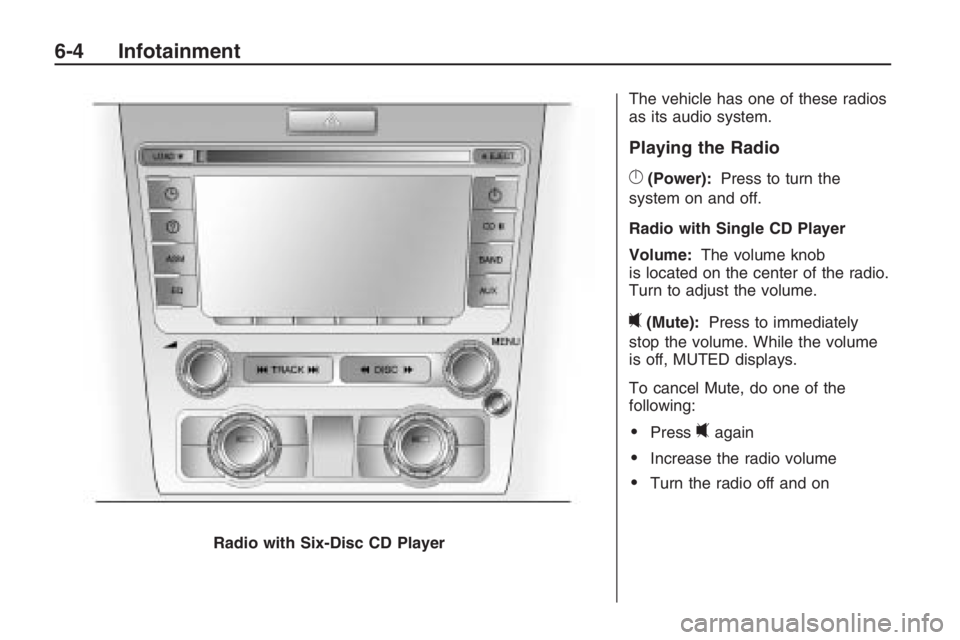
The vehicle has one of these radios
as its audio system.
Playing the Radio
}(Power):Press to turn the
system on and off.
Radio with Single CD Player
Volume: The volume knob
is located on the center of the radio.
Turn to adjust the volume.
0(Mute): Press to immediately
stop the volume. While the volume
is off, MUTED displays.
To cancel Mute, do one of the
following:
Press0again
Increase the radio volume
Turn the radio off and on
Radio with Six-Disc CD Player
6-4 Infotainment