lock PONTIAC GRAND AM 2003 Service Manual
[x] Cancel search | Manufacturer: PONTIAC, Model Year: 2003, Model line: GRAND AM, Model: PONTIAC GRAND AM 2003Pages: 354, PDF Size: 16.3 MB
Page 126 of 354
A/C (Air Conditioning): Press this button to turn the
air-conditioning system on or off. When
NC is pressed,
an indicator light above the button will come on
to let
you know that air conditioning is activated. The fan knob
must be set
to a speed for the air conditioning to
operate.
On hot days, open the windows
to let hot inside air
escape; then close them. This helps
to reduce the time
it takes for your vehicle to cool down. It also helps
the system
to operate more efficiently.
For quick cool down on hot days:
1. Select the vent mode.
2. Select the highest fan speed.
3. Select NC.
4. Select the coolest temperature.
Using these settings together for long periods of time
may cause the air inside of your vehicle
to become
your vehicle has cooled, turn the recirculation mode off
tc
dry. Tc prevent
this frcl?? hsppenin& s!?er the 2i!- i!7
The air-conditioning system removes moisture from
the air,
so you may sometimes notice a small amount of
water dripping underneath your vehicle while idling or
after turning
Gf! the engine. This is nCx??ml.
Defogging and Defrosting
There are two modes to choose from to clear fog or
frost from your windshield. Use the defog mode to clear
the windows of fog or moisture and warm the
passengers. Use the defrost mode
to remove fog or
frost from the windshield more quickly.
Turn the right knob clockwise or counterclockwise
to
select defog or defrost mode.
+3 (Defog): This mode directs half of the air to the
windshield with most of the remaining air directed
to the
floor outlets and some air directed at the side windows.
When you select this mode, the system turns
off
recirculation automatically and runs the air-conditioning
compressor unless the outside temperature is at or
below freezing. The recirculation mode cannot be
selected while in the defog mode.
To help clear the side windows quickly while using air
conditioning, do the following:
1. Select the bi-level mode.
2. Select the highest fan speed.
3. Select NC.
4. Select the temperature.
3-1 9
Page 128 of 354
Outlet Adjustment
Use the louvers on the air outlets to change the
direction of the airflow.
Operation Tips
Clear away any ice, snow or leaves from the air
inlets at the base of the windshield that may
block the flow of air into your vehicle.
Use of non-GM approved hood deflectors may
adversely affect the performance of the system.
0 Keep the path under the front seats clear of objects
to help circulate the air inside of your vehicle more
effectively.
0 When an objectionable odor outside the vehicle is
encountered, use the MAX mode, with the
temperature knob at
a comfortable setting to
prevent the odor from entering the vehicle through
the ventilation system. This can be helpful when
driving through a long tunnel with poor ventilation.
However, extended usage of this mode in cold
or cool weather can cause window fogging.
3-2 1
Page 135 of 354
Anti-Lock Brake System
Warning Light
If your vehicle has the
anti-lock brake system, the
light will come on when
your engine is started and
may stay on for several
seconds. That’s normal.
If the light stays on, turn the ignition to OFF. Or, if the
light comes on when you’re driving, stop as soon
as possible and turn the ignition
off. Then start the
engine again to reset the system. If the light still stays
on, or comes on again while you’re driving, your vehicle
needs service. If the regular brake system warning
light isn’t on, you still have brakes, but you don’t have
anti-lock brakes. If the regular brake system warning
light is also on, you don’t have anti-lock brakes
and there’s a problem with your regular brakes. See
Brake System Warning Light on page 3-26 earlier in this
section.
The anti-lock brake system warning light will come on
briefly when you turn the ignition key
to ON. This is
normal.
If the light doesn’t come on then, have it fixed
so it will be ready to warn you if there is a problem.
Enhanced Traction System
Warning Light
TRAC
OFF
If your vehicle has the
Enhanced Traction System
(ETS), this warning light
should come on briefly as
you start the engine.
If the warning light doesn’t come on then, have it fixed
so it will be ready to warn you if there’s a problem.
If the warning light stays on, or comes on when you’re
driving, there may be a problem with your Enhanced
Traction System and your vehicle may need service.
When this warning light is on, the system will not
limit wheel spin. Adjust your driving accordingly.
3-28
Page 143 of 354

Security Light
SECURITY
This light will come on
when you turn the key
to
ON and will stay on
until the vehicle starts.
Service Vehicle Soon Light
SERVICE
VEHICLE
SOON
This light will come on
briefly when you turn the
ignition
to ON.
If you’re driving and the security light comes on and
remains on, your Passlock@ system is not working
properly. Your vehicle is not protected by Passlock@
and you should see your dealer.
Low Washer Fluid Warning
Light
It will stay on, or come on and a chime will sound if it
detects a problem on the vehicle, such
as a Daytime
Running
Lamps (DRL) or an automatic headlamp
system malfunction.
If this happens, see your dealer as
soon as possible.
This light will come on
briefly when you turn on
the ignition.
It will also stay
on, or come on and a
chime will sound,
if
the windshield washer fluid
reservoir is less than
one-third full.
3-36
Page 148 of 354
To adjust both tone controls and both speaker controls
to the middle position, first end out of audio mode
by pressing another button, causing the radio to perform
that function, or by waiting five seconds for the display
to return to time of day. Then press and hold the AUDIO
button for more than two seconds until you hear a
beep.
CEN will appear on the display.
Adjusting the Speakers (Balance/Fade)
AUDIO: To adjust the balance between the right
and the left speakers, press and release the AUDIO
button until
BAL appears on the display. Then press and
hold the up or the down arrow to move the sound
toward the right or the left speakers.
To adjust the fade between the front and rear speakers,
press and release the AUDIO button until FAD
appears on the display. Then press and hold the up or
the down arrow
to move the sound toward the front
or the rear speakers.
To adjust balance or fade to the middle position, select
than two seconds until you hear a beep.
L and a zero
or
F and a zero will appear on the display.
n A I rn n TI- -- -._-I I- -1-1 n I ~n~n I-.. DHL UI rnu. I II~II peas CAI IU I iuiu HWUIU IUI 111u1e
To adjust both tone controls and both speaker controls
to the middle position, first end out of audio mode
by pressing another button, causing the radio
to perform
that function, or by waiting five seconds for the display
to return to time of day. Then press and hold AUDIO for
more than two seconds until you hear a beep.
CEN
will appear on the display.
Radio Messages
CAL (Calibration): Your audio system has been
calibrated for your vehicle from the factory.
If CAL
appears on the display it means that your radio has not
been configured properly for your vehicle and must
be returned
to the dealership for service.
LOC (Locked): This message is displayed when the
THEFTLOCK@ system has locked up. You must return
to the dealership for service.
Playing a Compact Disc
Insert a disc partway into the slot, label side up. The
display will show CD. If you want
to insert a compact
disc with the ignition
off, first press RCL or the eject
button.
mInw,-.v 1.,;11 311 ;+ Thn A;nn ehnallA knmim .-~lo~t;mm Thn tJlCdy&l VVlll pull I1 II 1. I IIG U13b JIlVUlU UGYII I pluyll 13. I (IC.
If an error appears on the display, see ‘Compact Disc
Messages” later in this section.
3-4 1
Page 158 of 354
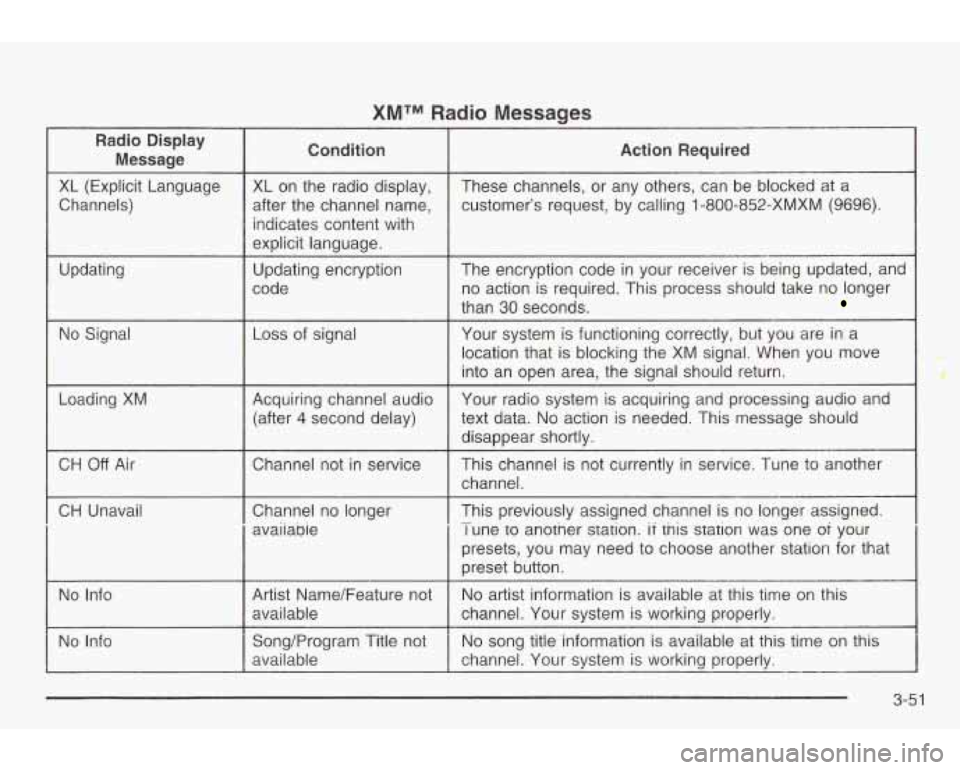
XMTM Radio Messages
Radio Display
Message condition Action Required
XL (Explicit Language
Channels)
Updating
No Signal
Loading
XM
XL on the radio display,
after the channel name, indicates content with
explicit language.
Updating encryption
code
Loss of signal
Acquiring channel audio (after
4 second delay) These channels,
or any others, can be blocked at a
customer’s request, by calling 1 -800-852-XMXM
(9696).
The encryption code in your receiver is being updated, and
no action is required. This process should take no longer
than 30 seconds.
Your system is functioning correctly, but you are in a
location that is blocking the XM signal. When you move
into an open area, the signal should return.
Your radio system
is acquiring and processing audio and
text data.
No action is needed. This message should
disappear shortly.
CH Off Air I Channel not in service
CH Unavail
I Channel no longer
I avaiiabie This channel
is not currently
in service. Tune to another
channel.
This previously assigned channel is no longer assigned.
I une to another station. if tnis station was one oi your
presets, you may need
to choose another station for that
preset button.
-
No Info Artist Name/Feature not
channel. Your system is working properly. available
No
artist information is available at this time on this
No Info No
song title information
is available at this time on this
Song/Program Title not
available channel. Your system is working properly.
--
3-51
Page 159 of 354
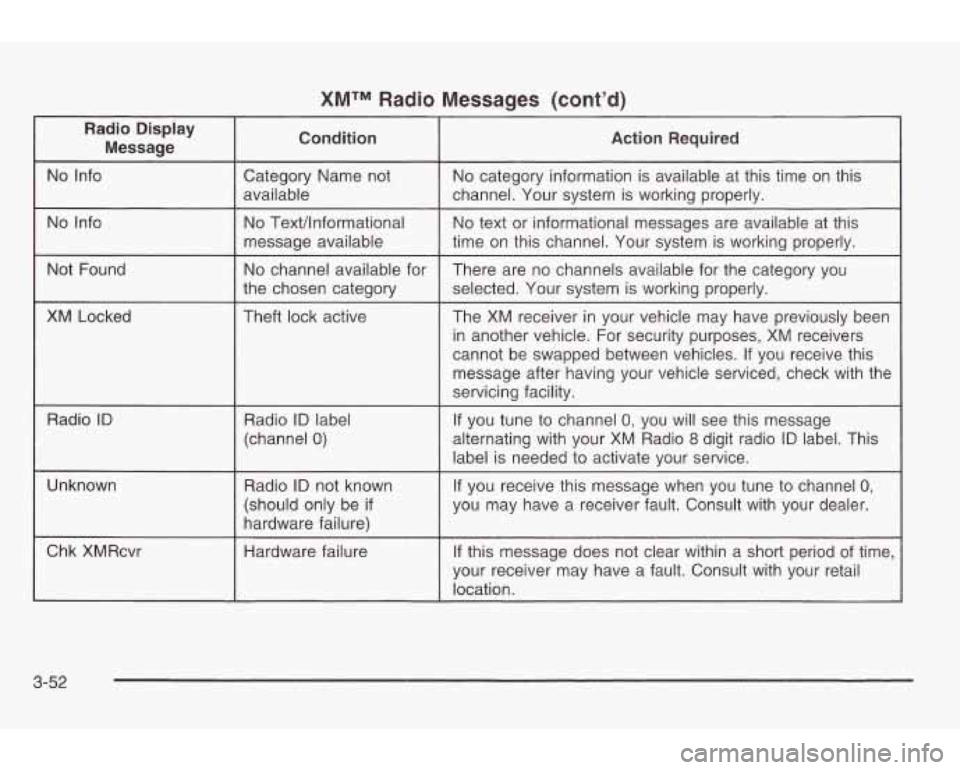
XMTM Radio Messages (cont’d)
Radio Display
Message Condition
Action Required
No Info
time on this channel. Your system is working properly.
message
available
No text or informational messages are available at this No Text/lnformational No Info channel.
Your system is working properly.
available
No category information is available at this time on this
Category Name not
Not Found
XM Locked
Radio
ID
No channel available for
the chosen category
Theft lock active
~ ~~~ ~~ ~
Radio ID label
(channel
0)
There are no channels available for the category you
selected. Your system is working properly.
The XM receiver in your vehicle may have previously been
in another vehicle. For security purposes, XM receivers
cannot be swapped between vehicles. If you receive this
message after having your vehicle serviced, check with the
servicing facility.
If you tune to channel 0, you will see this message
alternating with your XM Radio
8 digit radio ID label. This
label is needed to activate your service.
Unknown Radio
ID not known
(should only be
if
hardware failure)
Chk XMRcvr
Hardware failure
I
If you receive this message when you tune to channel 0,
you may have a receiver fault. Consult with your dealer.
If this message does not clear within a short period of time,
your receiver may have a fault. Consult with your retail
location.
3-52
Page 169 of 354
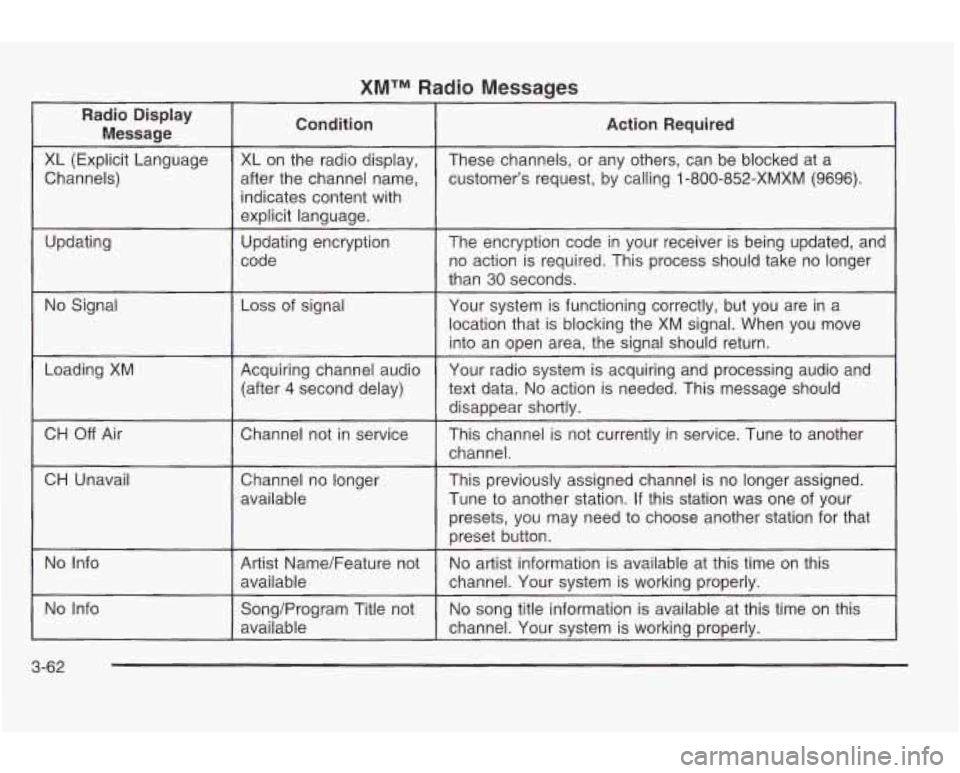
XMTM Radio Messages
Radio Display Message Condition
Action
Required
XL (Explicit Language
customer’s request, by calling
1-800-852-XMXM (9696).
after
the channel name,
Channels) These channels,
or any others, can be blocked at a
XL on the radio display,
indicates content with
explicit language.
code no action is required. This process should take no longer
Updating
The encryption code
in your receiver
is being updated, and
Updating encryption
than
30 seconds.
No Signal Loss
of signal
Your system is functioning correctly, but you are in a
location that is blocking the XM signal. When you move
into an open area, the signal should return.
Loading XM
CH
Off Air
CH Unavail Acquiring channel audio
text data.
No action is needed. This message should
(after 4 second delay) Your
radio system is acquiring and processing audio and
disappear shortlv.
..
Chatme1 not in service
This channel is not currently in service. Tune to another
channel.
Channel no longer
available This previously assigned channel
is no longer assigned.
Tune
to another station. If this station was one of your
presets, you may need
to choose another station for that
preset button.
No Info
No song title information is available at this time on this
Song/Program Title not
No Info
No artist information is available at this time on this
Artist Name/Feature not
available
channel. Your system is working properly.
available channel.
Your system is working properly.
3-62
Page 172 of 354

SEEK v : Your tape must have at least three
seconds of silence between each selection for seek to
work. Press the up or the down arrow to search for
the next
or the previous selection on the tape. You can
skip as many as nine selections up or down on the
tape. Choose how many selections you want to skip,
then press the SEEK arrow that many times. The
number of selections to be skipped will appear on the
display.
A SCAN v : Press and hold one of the arrows for
more than two seconds until SCAN appears on
the display and you hear a beep. The tape will go to the
next selection, play for a few seconds, then go on to
the next selection. The tape will scan in forward
only. Press this button again to stop scanning.
BAND: Press this button to listen to the radio when a
tape
is playing. The inactive tape or CD will remain
safely inside the radio for future listening.
CD TAPE: Press this button to switch between playing
a cassette tape and a compact disc,
if both are
loaded, when listening to the radio. The display will
show tape and CD symbols.
A (Eject): Press this button, located next to the
cassette tape
slot, to eject a tape. Eject may be
activated with either the ignition or radio
off. Cassettes
may be loaded with the radio and ignition
off if this
button is pressed first.
Cassette Tape Messages
If an error occurs while trying to play a cassette tape, it
could be for one of the following reasons:
TIGHT TAPE: This message is displayed when the
tape is tight and the player can’t turn the tape hubs.
Remove the tape. Hold the tape with the open end down
and try to turn the right hub counterclockwise with a
pencil. Turn the tape over and repeat. If the hubs do not
turn easily, your tape may be damaged and should
not be used in the player. Try a new tape to make sure
your player is working properly.
BROKEN TAPE: This message is displayed when the
tape is broken. Try a new tape.
WRAPPED TAPE: This message is displayed when the
tape is wrapped around the tape head. Attempt to get
the cassette out. Try a new tape.
3-65
Page 175 of 354
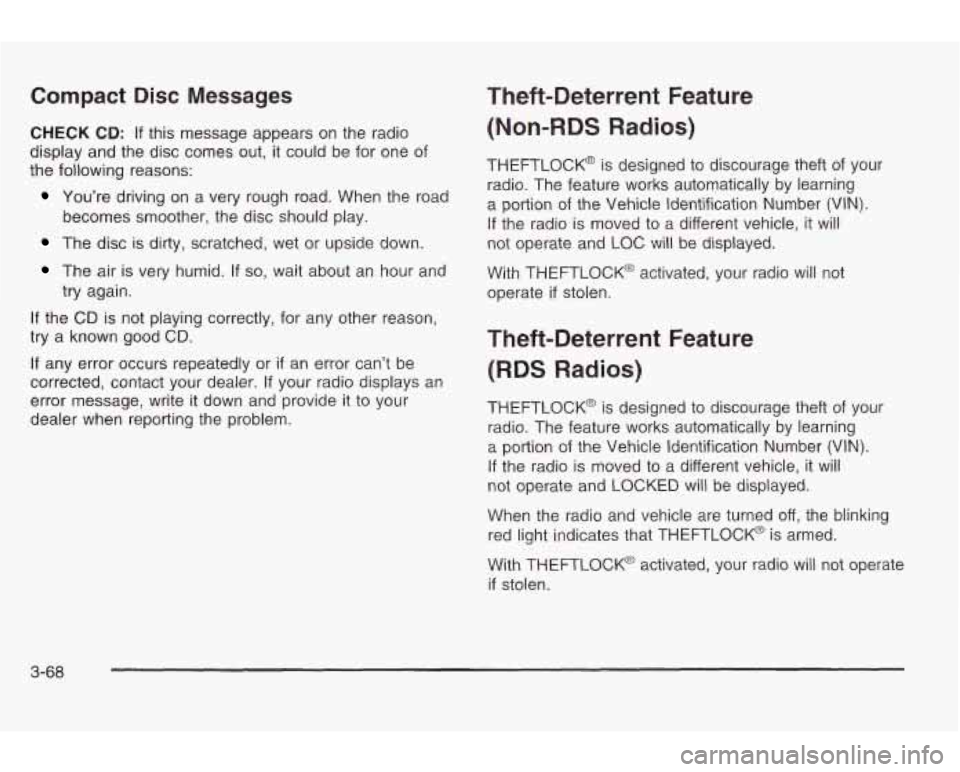
Compact Disc Messages
CHECK CD: If this message appears on the radio
display and the disc comes out, it could be for one of
the following reasons:
You’re driving on a very rough road. When the road
The disc is dirty, scratched, wet or upside down.
becomes smoother,
the disc should play.
The air is very humid. If so, wait about an hour and
try again.
If the CD is not playing correctly, for any other reason,
try a known good
CD.
If any error occurs repeatedly or if an error can’t be
corrected, contact your dealer. If your radio displays an
error message, write it down and provide
it to your
dealer when reporting the problem.
Theft-Deterrent Feature
(Non-RDS Radios)
THEFTLOCK@ is designed to discourage theft of your
radio. The feature works automatically by learning
a portion of the Vehicle Identification Number (VIN).
If the radio is moved to a different vehicle, it will
not operate and LOC will be displayed.
with THEFTLOCK@ activated, your radio will not
operate
if stolen.
Theft-Deterrent Feature
(RDS Radios)
THEFTLOCK@ is designed to discourage theft of your
radio. The feature works automatically by learning
a portion of the Vehicle Identification Number (VIN).
If the radio is moved to a different vehicle, it will
not operate and LOCKED will be displayed.
When the radio and vehicle are turned
off, the blinking
red light indicates that THEFTLOCK@ is armed.
With THEFTLOCK@ activated, your radio
will not operate
if stolen.
3-68