lock PONTIAC GRAND PRIX 2006 Workshop Manual
[x] Cancel search | Manufacturer: PONTIAC, Model Year: 2006, Model line: GRAND PRIX, Model: PONTIAC GRAND PRIX 2006Pages: 472, PDF Size: 2.82 MB
Page 148 of 472
2. Press the PASS. button to turn the passenger
climate control system on and off. When the
passenger system is off, the driver’s temperature
setting is also used for the passenger and the
passenger display is off.
In cold weather, the system will start at reduced fan
speeds to avoid blowing cold air into your vehicle
until warmer air is available. The system will
start out blowing air at the oor but may change
modes automatically as the vehicle warms up
to maintain the chosen temperature setting. The
length of time needed for the air to warm up
will depend on the outside temperature and the
length of time that has elapsed since your vehicle
was last driven.
3. Wait for the system to regulate. This may take from
10 to 30 minutes. Then adjust the temperature, if
necessary.
Do not cover the solar sensor located in the center of
the instrument panel, near the windshield. For more
information on the solar sensor, see “Sensors” later in
this section.Manual Operation
xw
(Temperature):To manually adjust the
temperature inside the vehicle, press the up arrow on
the temperature control to raise the temperature
and press the down arrow to lower the temperature.
The display will show your selection.
When one temperature is displayed, the driver
temperature is set. When both temperatures are
displayed, the temperature for both the driver and
passenger are set. Pressing PASS. will turn the
passenger temperature setting on and off. If only the
driver temperature is set, the driver temperature is used
for the passenger and the passenger display is off.
9(Fan):Turn the fan knob clockwise to increase the
fan speed and counterclockwise to decrease the fan
speed. Turning the fan knob cancels the automatic fan
operation and places the system in manual. Turn the
knob to AUTO to return to automatic fan operation. If the
airow seems low when the fan is at the highest setting,
the passenger compartment air lter, if equipped, may
need to be replaced. SeePassenger Compartment Air
Filter on page 3-33for additional information.
3-30
Page 151 of 472
=(Rear Window Defogger):Press this button to
turn the rear window defogger on and off. Be sure
to clear as much snow from the rear window as possible.
The rear window defogger will turn off approximately
20 minutes after the button is pressed. If turned on
again, the defogger will only run for approximately
20 minutes before turning off. The defogger can also be
turned off by pressing the button again or by turning
off the engine.
Do not drive the vehicle until all the windows are clear.
Notice:Do not use anything sharp on the inside
of the rear window. If you do, you could cut or
damage the warming grid, and the repairs would not
be covered by your warranty. Do not attach a
temporary vehicle license, tape, a decal or anything
similar to the defogger grid.
Outlet Adjustment
Rotate and turn the air outlets, located in the middle
and at each outboard side of the instrument panel,
to adjust the direction of the airow.
Operation Tips
Clear away any ice, snow, or leaves from the air
inlets at the base of the windshield that may
block the ow of air into the vehicle.
Use of non-GM approved hood deectors may
adversely affect the performance of the system.
Keep the path under the front seats clear of
objects to help circulate the air inside of the
vehicle more effectively.
If the airow seems low when the fan is at the
highest setting, the passenger compartment air
lter may need to be replaced. See “Passenger
Compartment Air Filter” following, for more
information.
Passenger Compartment Air Filter
The passenger compartment air lter is located near the
passenger’s side windshield wiper arm, underneath
the inlet grille.
The lter traps most of the pollen from entering the
climate control system. Similar to the engine’s air lter,
it may need to be changed periodically to insure
system performance. SeeScheduled Maintenance on
page 6-4for more information.
3-33
Page 162 of 472
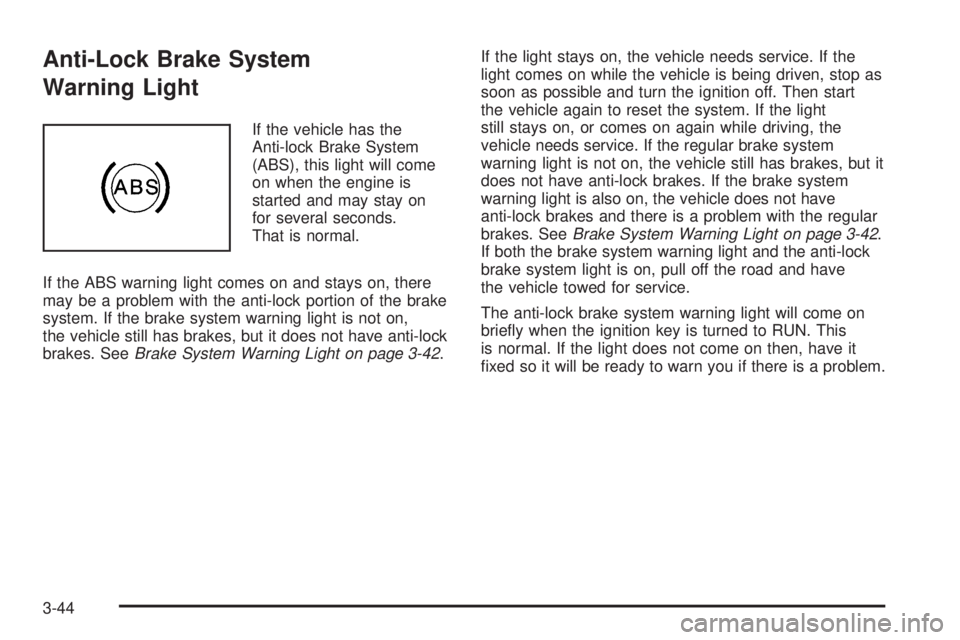
Anti-Lock Brake System
Warning Light
If the vehicle has the
Anti-lock Brake System
(ABS), this light will come
on when the engine is
started and may stay on
for several seconds.
That is normal.
If the ABS warning light comes on and stays on, there
may be a problem with the anti-lock portion of the brake
system. If the brake system warning light is not on,
the vehicle still has brakes, but it does not have anti-lock
brakes. SeeBrake System Warning Light on page 3-42.If the light stays on, the vehicle needs service. If the
light comes on while the vehicle is being driven, stop as
soon as possible and turn the ignition off. Then start
the vehicle again to reset the system. If the light
still stays on, or comes on again while driving, the
vehicle needs service. If the regular brake system
warning light is not on, the vehicle still has brakes, but it
does not have anti-lock brakes. If the brake system
warning light is also on, the vehicle does not have
anti-lock brakes and there is a problem with the regular
brakes. SeeBrake System Warning Light on page 3-42.
If both the brake system warning light and the anti-lock
brake system light is on, pull off the road and have
the vehicle towed for service.
The anti-lock brake system warning light will come on
briey when the ignition key is turned to RUN. This
is normal. If the light does not come on then, have it
xed so it will be ready to warn you if there is a problem.
3-44
Page 173 of 472
ENGINE OIL MONITOR SYSTEM:This menu allows
the engine oil monitor system to be reset. To reset
the engine oil monitor system, seeEngine Oil Life
System on page 5-19.
Tire Ination Monitor System:If the vehicle has ABS,
this menu sets the tire ination monitor system. See “Tire
Ination Monitor System” underInation - Tire Pressure
on page 5-67for more information.
To set or reset the tire ination monitor system, use the
following procedure:
1. Press the set/reset button to reset the tire ination
monitor system. The message, TIRE INFLATION
HAS BEEN SET, will appear on the screen if
the Check Tire Pressure message, indicating an
irregularity in the pressure of one of the tires,
had previously appeared on the DIC. If the Check
Tire Pressure message did not appear and the
set/reset button is pressed, the system will reset,
but no acknowledgment message will appear on the
screen.
2. Press the options button again to advance to the
next screen.
Select the set/reset button to return to the
main (date) screen.PERSONAL PROGRAMMING MODE:This menu
allows you to customize several features on your
vehicle. These adjustments can only be made while the
vehicle is in PARK (P). Press the set/reset button to
display the rst screen.
Personal Programming Mode Screens
Press the options button to access these modes:
EXTERIOR LIGHTING DELAY:This screen allows this
feature to be turned off or allows the selection of the
number of seconds the headlamps, sidelamps, taillamps,
fog lamps, and back-up lamps are turned on after the
key is removed from the ignition, or the vehicle is
unlocked using the remote keyless entry transmitter.
If OFF is selected, the exterior lamps will not turn on.
If a time delay is chosen, the lamps will turn on for
the selected time. The time delay will be cancelled and
the exterior lamps will turn on automatically when
the key is removed from the ignition, or the vehicle is
unlocked using the remote keyless entry transmitter.
To program this mode, use the following procedure:
1. Press and release the set/reset button to scroll to
the selection to be programmed. Choose from
OFF, 15, 30, 60, or 90 seconds.
2. Press the options button again to advance to the
next screen.
3-55
Page 174 of 472
INTERIOR LIGHTS WHEN DOOR CLOSED:This
screen allows this feature to be turned OFF or ON.
If OFF is selected, the interior lamps will turn off
immediately when the ignition is turned off and the last
door is closed.
If ON is selected, the interior lamps will stay on for
about 25 seconds after the vehicle’s ignition is turned off
and the last door is closed.
To program this mode, use the following procedure:
1. Press and release the set/reset button to scroll to
either OFF or ON.
2. Press the options button again to advance to the
next screen.
INTERIOR LIGHTS WHEN KEY REMOVED:This
screen allows this feature to be turned OFF or ON. This
feature enables the interior lamps in the vehicle to
turn on for about 25 seconds after the key is removed
from the ignition.
If OFF is selected, removing the key from the ignition
will not cause the interior lamps to turn on.
If ON is selected, removing the key from the ignition will
cause the interior lamps to be turned on for about
25 seconds.To program this mode, use the following procedure:
1. Press and release the set/reset button to scroll to
either OFF or ON.
2. Press the options button again to advance to the
next screen.
AUTO DOOR LOCK:This screen allows this feature to
be turned OFF or ON.
If OFF is selected, all automatic door locking is disabled.
The doors will always need to be locked manually
before driving, to increase occupant safety.
If ON is selected, the vehicle’s doors automatically lock
when the doors are closed and the vehicle is shifted
into DRIVE (D).
To program this mode, use the following procedure:
1. Press and release the set/reset button to scroll to
either OFF or ON.
2. Press the options button again to advance to the
next screen.
AUTO DOOR UNLOCK:This screen can be used if
ON was selected for the AUTO DOOR LOCK feature.
This screen allows this feature to be turned off, used for
the driver’s door only, or for all the doors.
If OFF is selected, none of the doors will unlock when
the vehicle’s transaxle is shifted into PARK (P).
3-56
Page 175 of 472
If DRIVER is selected, only the driver’s door will unlock
when the vehicle’s transaxle is shifted into PARK (P).
If ALL is selected, all the doors will unlock when
the vehicle’s transaxle is shifted into PARK (P).
To program this mode, use the following procedure:
1. Press and release the set/reset button to scroll to
either OFF, DRIVER, or ALL.
2. Press the options button again to advance to the
next screen.
AUTO DOOR UNLOCK ON:If DRIVER or ALL was
selected on the AUTO DOOR UNLOCK screen,
this screen allows selection of when the vehicle’s doors
will unlock. The choices are when the key is removed
from the ignition or when the vehicle is shifted into
PARK (P).
If KEY-OUT is selected, the auto door unlock will
function when the key is taken out of the ignition.
If PARK is selected, the auto door unlock will function
when the transaxle is shifted into PARK (P).
To program this mode, use the following procedure:
1. Press and release the set/reset button to scroll to
either KEY-OUT or PARK.
2. Press the options button again to advance to the
next screen.DELAYED LOCKING:This screen allows this feature
to be turned OFF or ON. The key must be out of
the ignition for this feature to work.
If OFF is selected, there will be no delayed locking of
the vehicle’s doors.
If ON is selected, the locking of the vehicle’s doors will
be delayed by ve seconds after a power door lock
switch is pressed when a door is open, or the LOCK
button on the remote keyless entry transmitter is
pressed while a door is open.
To program this mode, use the following procedure:
1. Press and release the set/reset button to scroll to
either OFF or ON.
2. Press the options button again to advance to the
next screen.
REMOTE LOCKS FEEDBACK:This screen allows
selection for this option to be turned OFF, or gives the
choice of two methods of verication; LIGHTS or
LIGHTS and HORN; that indicate the vehicle’s doors
are locked when the LOCK button on the remote keyless
entry transmitter is pressed.
If OFF is selected, this feature will not be programmed.
If LIGHTS is selected, the exterior lamps will ash
when the LOCK button on the remote keyless entry
transmitter is pressed.
3-57
Page 176 of 472
If LIGHTS and HORN are selected, the exterior lamps
will ash when the LOCK button on the remote
keyless entry transmitter is pressed and the horn will
sound when the LOCK button on the remote keyless
entry transmitter is pressed again within ve seconds of
the previous command.
To program this mode, use the following procedure:
1. Press the set/reset button to scroll to OFF, LIGHTS,
or LIGHTS and HORN.
2. Press the options button again to advance to the
next screen.
If the vehicle does not have a content theft-deterrent
system, the next screens with PROGRAMMING
FINISHED and DISPLAY OFF will appear.
If the vehicle does have a content theft-deterrent
system, the next screen will appear.
THEFT DETERRENT:The vehicle may have a content
theft-deterrent system. Once it is turned on, the
system will activate if someone tries to enter the vehicle
without using the remote keyless entry transmitter or
the correct key. This screen allows this feature to
be turned OFF or ON.
If OFF is selected, the theft-deterrent system will not
function.If ON is selected, the theft-deterrent system will be
activated.
To program this mode, use the following procedure:
1. Press the set/reset button to scroll to OFF or ON.
2. Press the options button again to advance to
the next screen.
KEY CYLINDER DISARM:If the vehicle has a content
theft-deterrent system, this screen allows this feature
to be turned OFF or ON.
If OFF is selected, the content theft-deterrent system
will not disarm when the vehicle is unlocked using
the door lock, or when someone tampers with the
door lock.
If ON is selected, the content theft-deterrent system
will disarm when the vehicle is unlocked using the door
key. This makes the vehicle more resistant to key
lock tampering.
To program this mode, use the following procedure:
1. Press the set/reset button to scroll to OFF or ON.
2. Press the options button again to advance to
the next screen.
3-58
Page 177 of 472
LOCK SWITCH ARM:If the vehicle has the content
theft-deterrent system and ON was selected on
the THEFT DETERRENT screen, this screen allows this
feature to be turned OFF or ON. If ON is selected,
the content theft-deterrent system starts the arming
process when a door lock switch is pressed while a
door is open.
If OFF is selected, the theft-deterrent system will not
activate this feature.
If ON is selected, the content theft-deterrent system will
arm when the doors are locked with the door lock
switch. The key must be removed from the ignition when
the doors are locked or the content theft-deterrent
system will not arm.
To program this mode, use the following procedure:
1. Press the set/reset button to scroll to OFF or ON.
2. Press the options button again to advance to
the next screen.REMOTE START:If your vehicle has the remote start
feature, this screen allows this feature to be turned
OFF or ON. The remote start feature allows you to start
the engine from outside of the vehicle using your
remote keyless entry transmitter. See “Remote Vehicle
Start” underRemote Keyless Entry System Operation
on page 2-4for more information.
If OFF is selected, the remote start feature will
be disabled.
If ON is selected, the remote start feature will
be enabled.
To program this mode, use the following procedure:
1. Press the set/reset button to scroll to OFF or ON.
2. Press the options button again to advance to
the next screen.
PROGRAMMING FINISHED will appear on the next
screen. This conrms that the personal options
programming is complete.
DISPLAY OFF will appear on the next screen. The
screen will count down and then go blank. Press the
options button to advance to a new screen.
3-59
Page 184 of 472
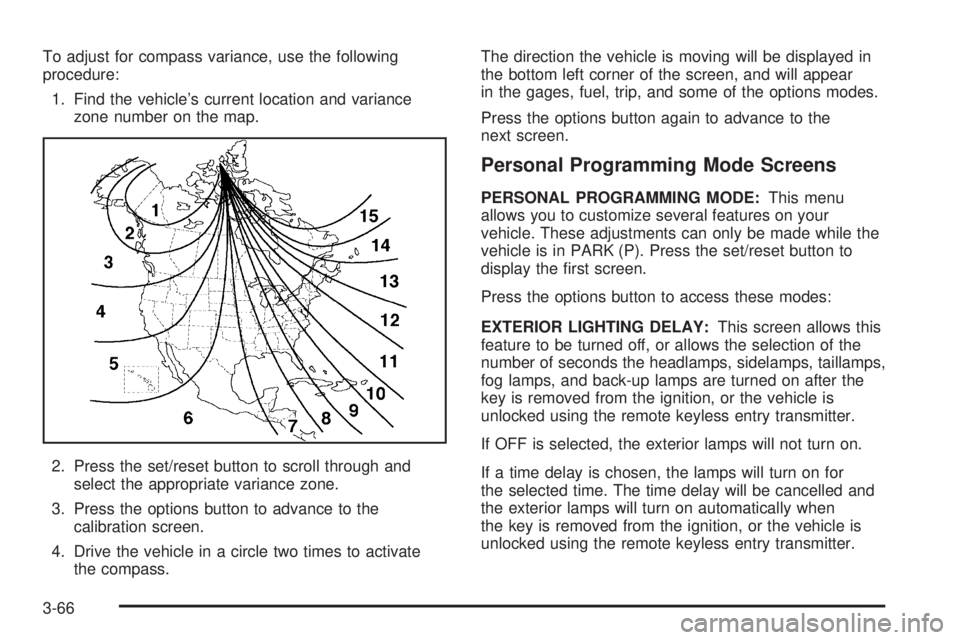
To adjust for compass variance, use the following
procedure:
1. Find the vehicle’s current location and variance
zone number on the map.
2. Press the set/reset button to scroll through and
select the appropriate variance zone.
3. Press the options button to advance to the
calibration screen.
4. Drive the vehicle in a circle two times to activate
the compass.The direction the vehicle is moving will be displayed in
the bottom left corner of the screen, and will appear
in the gages, fuel, trip, and some of the options modes.
Press the options button again to advance to the
next screen.
Personal Programming Mode Screens
PERSONAL PROGRAMMING MODE:This menu
allows you to customize several features on your
vehicle. These adjustments can only be made while the
vehicle is in PARK (P). Press the set/reset button to
display the rst screen.
Press the options button to access these modes:
EXTERIOR LIGHTING DELAY:This screen allows this
feature to be turned off, or allows the selection of the
number of seconds the headlamps, sidelamps, taillamps,
fog lamps, and back-up lamps are turned on after the
key is removed from the ignition, or the vehicle is
unlocked using the remote keyless entry transmitter.
If OFF is selected, the exterior lamps will not turn on.
If a time delay is chosen, the lamps will turn on for
the selected time. The time delay will be cancelled and
the exterior lamps will turn on automatically when
the key is removed from the ignition, or the vehicle is
unlocked using the remote keyless entry transmitter.
3-66
Page 185 of 472
To program this mode, use the following procedure:
1. Press and release the set/reset button to scroll to
the selection you want to program. Choose from
OFF, 15, 30, 60, or 90 seconds.
2. Press the options button again to advance to the
next screen.
INTERIOR LIGHTS WHEN DOOR CLOSED:This
screen allows this feature to be turned OFF or ON.
If OFF is selected, the interior lamps will turn off
immediately when the ignition is turned off and the last
open door is closed.
If ON is selected, the interior lamps will stay on for
about 25 seconds after the vehicle’s ignition is off and
the last open door is closed.
To program this mode, use the following procedure:
1. Press and release the set/reset button to scroll to
either OFF or ON.
2. Press the options button again to advance to the
next screen.
INTERIOR LIGHTS WHEN KEY REMOVED:This
screen allows this feature to be turned OFF or ON. This
feature enables the interior lamps in the vehicle to
turn on for about 25 seconds after the key is removed
from the ignition.If OFF is selected, removing the key from the ignition
will not cause the interior lamps to turn on.
If ON is selected, removing the key from the ignition will
cause the interior lamps to be turned on for about
25 seconds.
To program this mode, use the following procedure:
1. Press and release the set/reset button to scroll to
either OFF or ON.
2. Press the options button again to advance to the
next screen.
AUTO DOOR LOCK:This screen allows this feature to
be turned OFF or ON.
If OFF is selected, all automatic door locking is disabled.
The doors will always need to be locked manually
before driving, to increase occupant safety.
If ON is selected, the vehicle’s doors automatically lock
when the doors are closed and the vehicle is shifted
into DRIVE (D).
To program this mode, use the following procedure:
1. Press and release the set/reset button to scroll to
either OFF or ON.
2. Press the options button again to advance to the
next screen.
3-67