lock PORSCHE 911 GT3 2010 5.G User Guide
[x] Cancel search | Manufacturer: PORSCHE, Model Year: 2010, Model line: 911 GT3, Model: PORSCHE 911 GT3 2010 5.GPages: 251, PDF Size: 14.33 MB
Page 22 of 251
Operation, Safety
21
DoorsIf the door windows are closed, they will be
automatically opened by a few millimeters when
the doors are opened and, when the doors are
closed, they will be closed again. This makes it
easier to open and close the doors and protects
the seals.
fTherefore, you should pull the door handle
slowly so that the door window can be lowered
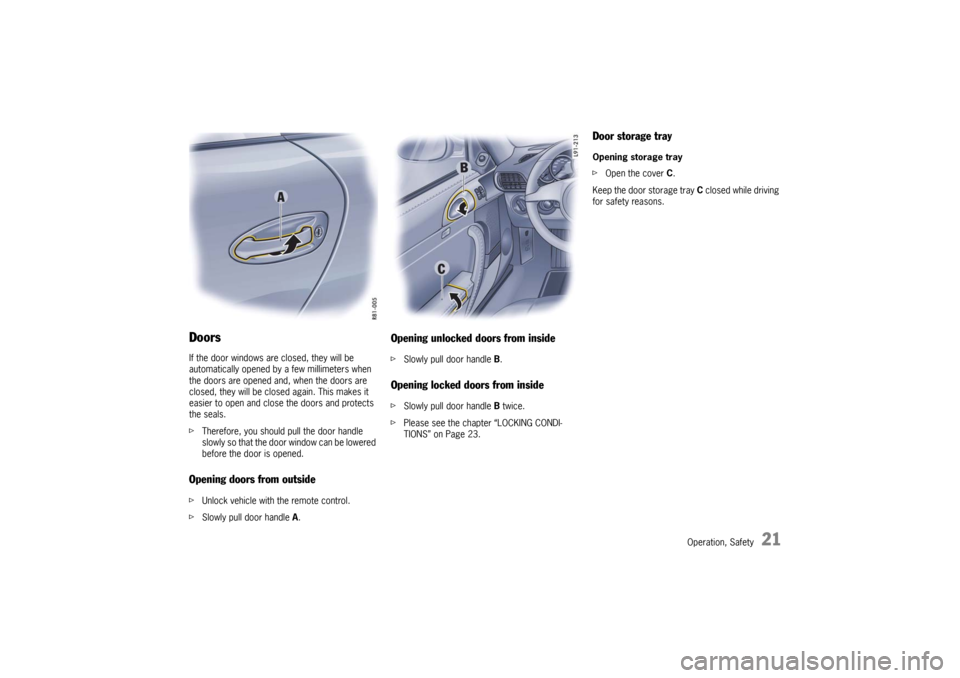
before the door is opened.Opening doors from outside fUnlock vehicle with the remote control.
fSlowly pull door handle A.
Opening unlocked doors from inside fSlowly pull door handle B. Opening locked doors from inside fSlowly pull door handle B twice.
fPlease see the chapter “LOCKING CONDI-
TIONS” on Page 23.
Door storage trayOpening storage tray
fOpen the cover C.
Keep the door storage tray C closed while driving
for safety reasons.
10_GT3_21.book Seite 21 Donnerstag, 4. Juni 2009 12:48 12
Page 23 of 251

22
Operation, Safety
Central Locking This device complies with:
Part 15 of the FCC Rules
RSS-210 of Industry Canada.
Operation is subject to the following two condi-
tions:
1. This device may not cause harmful interfe-
rence, and
2. this device must accept any interference
received, including interference that may
cause undesired operation.
Note
The manufacturer is not responsible for any radio
or TV interference caused by unauthorized modifi-
cations to this equipment.
Such modification could void the user’s authority
to operate the equipment.
Warning!
Any changes or modifications not expressly
approved by Porsche could void the user’s autho-
rity to operate this equipment.
fPlease see the chapter “LOAD SWITCH-OFF
AFTER 2 HOURS OR 7 DAYS” on Page 208.Both car doors and the filler flap can be centrally
unlocked or locked with the remote control.
The vehicle cannot be locked if the driver’s door is
not completely closed.
A short signal from the alarm horn will draw
your attention to the fact that the following
components are not completely closed when you
try to lock the vehicle:
– Passenger’s door
– Luggage compartment lid
– Engine compartment lid
– Glove compartment
Unlocking the vehicle by using the key in the door
lock and opening the door may activate the alarm
system within 10 seconds.
Note
fOn vehicles with the Sport Chrono Package
Plus, the PCM can be used to activate
automatic door locking.
Please see the chapter “Individual Memory” in
the separate PCM Owner’s Manual.
Automatic relocking If the car is unlocked by remote control and none
of the car doors is opened within approx.
60 seconds, automatic relocking takes place.
This relocking time can be adapted to your indivi-
dual requirements (10 - 100 seconds) by an autho-
rized Porsche dealer.
10_GT3_21.book Seite 22 Donnerstag, 4. Juni 2009 12:48 12
Page 24 of 251

Operation, Safety
23
Locking conditionsfLock car once.
The doors cannot be opened from the outside.
Alarm system and passenger compartment
monitoring are switched on.
If a person or animal remains in the vehicle:
fQuickly lock car twice.
The doors cannot be opened from the outside.
The passenger compartment monitoring is
switched off.
Unlocking the door with the inner door
handle
Any person remaining in the locked car can open
the door with the inner door handle:
1. Pull inner door handle once to unlock door
lock.
2. Pull inner door handle again to open door.
Note
fInform any person remaining in the car that the
alarm system will be triggered if the door is
opened.
Malfunction of the remote controlThe remote control may not function correctly due
to local radio wave interference. The vehicle will
then not lock properly.
This can be identified by the missing locking
sound and the missing check-back signal of the
emergency flasher.
If this should occur:
fLock the vehicle with the key in the door.Emergency operation – openingfUnlock the driver’s door with the key at the
door lock.
Open door within 20 seconds and insert the
ignition key into the ignition lock within
10 seconds to prevent the alarm system from
being triggered.
Note on operation
If the door is not opened within approx.
20 seconds, automatic relocking takes place.
The alarm system will be triggered by the next
unlocking of the door:
fInsert the ignition key into the ignition lock to
switch off the alarm system.
Emergency operation – closing fLock the driver’s door with the key at the door
lock.
If there is a defect in the central locking
system, all functioning elements of the central
locking system will be locked.
The alarm system is switched on.
The passenger compartment monitoring
system is switched off.
The fault should be remedied immediately at an
authorized Porsche dealer.
10_GT3_21.book Seite 23 Donnerstag, 4. Juni 2009 12:48 12
Page 25 of 251
24
Operation, Safety
Indication by emergency flasher and
alarm hornIf the remote control is used for unlocking or
locking, a response is provided by the emergency
flasher:
– Unlocking – single flash.
– Locking – double flash.
– Locking twice – continuous illumination for
approx. 2 seconds. Fault indication A double horn signal during locking indicates a
defect in the central locking or alarm system.
Have the defect remedied at an authorized
Porsche dealer. Overload protectionIf the central locking system is operated more
than ten times within a minute, further operation is
blocked for 30 seconds.
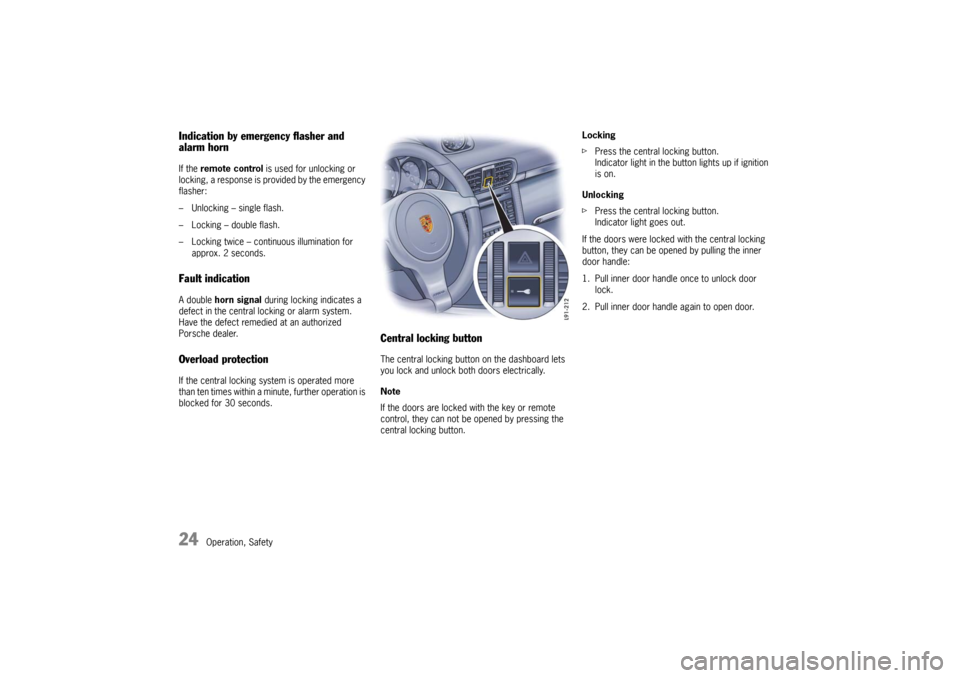
Central locking buttonThe central locking button on the dashboard lets
you lock and unlock both doors electrically.
Note
If the doors are locked with the key or remote
control, they can not be opened by pressing the
central locking button.Locking
fPress the central locking button.
Indicator light in the button lights up if ignition
is on.
Unlocking
fPress the central locking button.
Indicator light goes out.
If the doors were locked with the central locking
button, they can be opened by pulling the inner
door handle:
1. Pull inner door handle once to unlock door
lock.
2. Pull inner door handle again to open door.
10_GT3_21.book Seite 24 Donnerstag, 4. Juni 2009 12:48 12
Page 26 of 251

Operation, Safety
25
Automatic door locking Your authorized Porsche dealer can program
diverse types of automatic door locking in the
control unit of the central locking system:
Ty p e 1
Doors lock automatically when the ignition is
switched on.
Ty p e 2
Doors lock automatically when a speed of
3 - 6 mph (5 - 10 km/h) is exceeded. Ty p e 3
Doors lock automatically when the ignition is
switched on. If doors are opened with the engine
running, they lock again automatically when a
speed of 3 - 6 mph (5 - 10 km/h) is exceeded.
Ty p e 4
The doors do not lock automatically.
Note
Automatically locked doors can be unlocked with
the central locking button or opened by pulling on
the inside door handle twice.
fOn vehicles with the Sport Chrono Package
Plus, the PCM can be used to activate
automatic door locking.
Please see the chapter “Individual Memory” in
the separate PCM Owner’s Manual.
Warning!
In an emergency situation where you need to
exit the car through an automatically locked
door, remember the following procedure to
open the door.
fUnlock the doors by pressing the central
locking button or
fpull the inside door handle twice to open the door.
10_GT3_21.book Seite 25 Donnerstag, 4. Juni 2009 12:48 12
Page 27 of 251
26
Operation, Safety
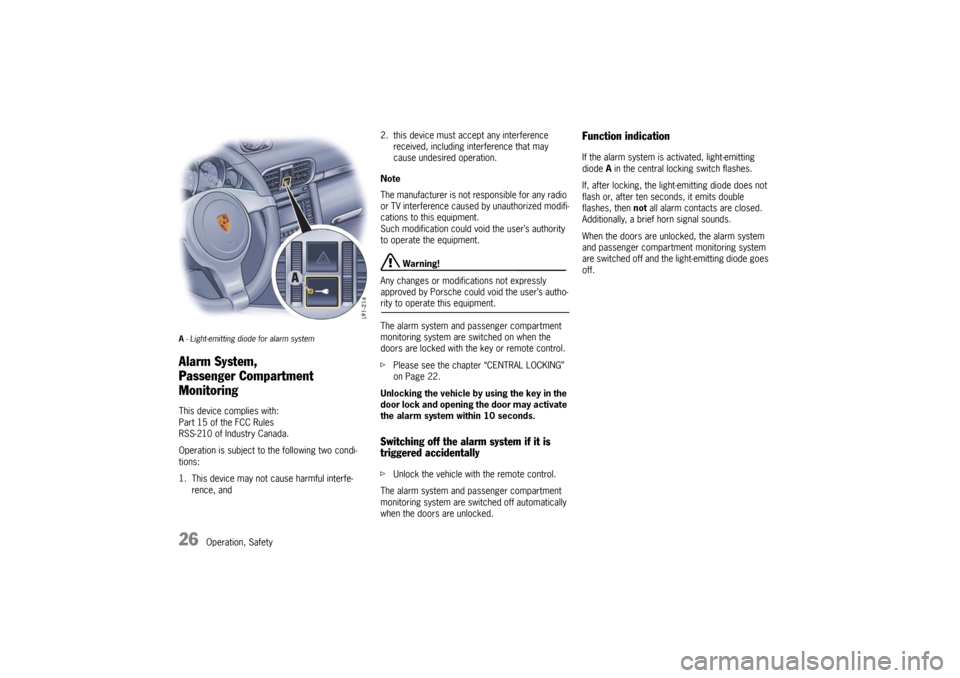
A- Light-emitting diode for alarm systemAlarm System,
Passenger Compartment
MonitoringThis device complies with:
Part 15 of the FCC Rules
RSS-210 of Industry Canada.
Operation is subject to the following two condi-
tions:
1. This device may not cause harmful interfe-
rence, and2. this device must accept any interference
received, including interference that may
cause undesired operation.
Note
The manufacturer is not responsible for any radio
or TV interference caused by unauthorized modifi-
cations to this equipment.
Such modification could void the user’s authority
to operate the equipment.
Warning!
Any changes or modifications not expressly
approved by Porsche could void the user’s autho-
rity to operate this equipment.
The alarm system and passenger compartment
monitoring system are switched on when the
doors are locked with the key or remote control.
fPlease see the chapter “CENTRAL LOCKING”
on Page 22.
Unlocking the vehicle by using the key in the
door lock and opening the door may activate
the alarm system within 10 seconds. Switching off the alarm system if it is
triggered accidentallyfUnlock the vehicle with the remote control.
The alarm system and passenger compartment
monitoring system are switched off automatically
when the doors are unlocked.
Function indication If the alarm system is activated, light-emitting
diode A in the central locking switch flashes.
If, after locking, the light-emitting diode does not
flash or, after ten seconds, it emits double
flashes, then not all alarm contacts are closed.
Additionally, a brief horn signal sounds.
When the doors are unlocked, the alarm system
and passenger compartment monitoring system
are switched off and the light-emitting diode goes
off.
10_GT3_21.book Seite 26 Donnerstag, 4. Juni 2009 12:48 12
Page 28 of 251

Operation, Safety
27
When the alarm is armed, the following
areas are monitored –Doors
– Luggage compartment lid
– Engine compartment lid
– Glove compartment
– Passenger compartment
If one of these alarm contacts is interrupted, the
alarm horn sounds for approximately 3 minutes.
Additionally, the emergency flasher flashes and
the passenger compartment light lightes for
approximately five minutes.
When the alarm is triggered, the light-emitting
diode changes over to double flashes.
In order not to limit the action range of the
passenger compartment monitoring system:
fDo not fold the front seat backrests forward.
Deactivating the passenger compartment
monitoring system for one locking
processIf a person or animal remains in the car while it is
locked, the passenger compartment monitoring
system must be switched off.
fQuickly lock car twice.
The doors are locked but can be opened from
the inside:
1. Pull inner door handle once to unlock door
lock.
2. Pull inner door handle again to open door.
Note
fInform any person remaining in the car that the
alarm system will be triggered if the door is
opened.
Fault indication A double horn signal during locking indicates a
defect in the central locking or alarm system.
fHave the defect remedied at an authorized
Porsche dealer.
10_GT3_21.book Seite 27 Donnerstag, 4. Juni 2009 12:48 12
Page 30 of 251

Operation, Safety
29
Opening/closing windowsThe two rocker switches A and B in the driver’s
door and the switch in the passenger’s door have
a two-stage function:
Opening
fPress the rocker switch down to the first stage
until the window has reached the desired
position.
Closing
fPress the rocker switch upwards to the first
stage until the window has reached the desired
position.
One-touch operation
fPress the rocker switch upwards or
downwards to the second stage.
Window moves to its final position.
Press again to stop the window in the desired
position.
One-touch operation for closing the passenger’s
window is available once the window is approxima-
tely half-way closed.
Anti-crushing protectionIf a side window is blocked during closing, it will
stop and open again by about an inch.
Warning!
Risk of serious personal injuries.
If the rocker switch is pressed again within
10
seconds of the window being blocked, the
window will close with its full closing force.
Anti-crushing protection is disabled.
fOnce the anti-crushing protection acts to stop
the window and opens it slightly, do not press
the rocker switch again within 10 seconds
without checking to make sure that nothing is
blocking the path of the window.The window will close with full closing force.
One-touch operation is disabled for 10 seconds
after blockage of a side window.
Automatic window lowering fPlease see the chapter “DOORS” on Page 21.Storing end position of the windowsIf the battery is disconnected and reconnected,
the windows will not be raised automatically when
the door is closed.
1. Close the windows with the rocker switch
once.
2. Press the rocker switch upwards again to store
the end position of the windows in the control
unit.
10_GT3_21.book Seite 29 Donnerstag, 4. Juni 2009 12:48 12
Page 31 of 251
30
Operation, Safety
Door mirrorsBefore driving the vehicle, adjust the outside and
inside mirrors.
It is important for safe driving that you have clear,
unobstructed vision to the rear.
Warning!
Risk of an accident, resulting in serious
personal injury or death.
fDo not put anything on or near the windows or
the mirrors that may interfere with the driver’s vision.
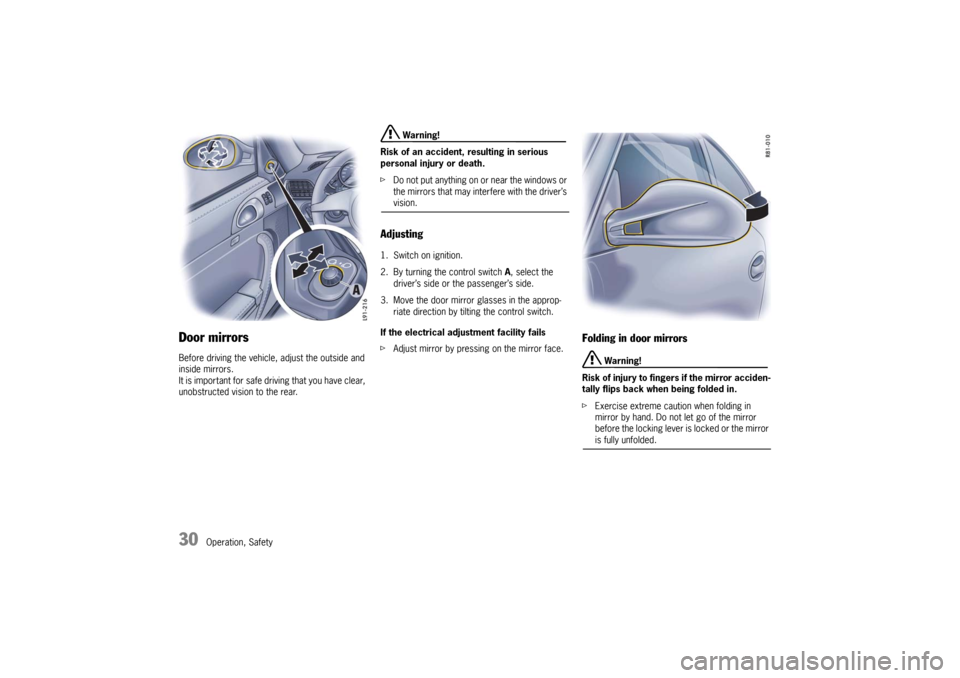
Adjusting 1. Switch on ignition.
2. By turning the control switch A, select the
driver’s side or the passenger’s side.
3. Move the door mirror glasses in the approp-
riate direction by tilting the control switch.
If the electrical adjustment facility fails
fAdjust mirror by pressing on the mirror face.
Folding in door mirrors
Warning!
Risk of injury to fingers if the mirror acciden-
tally flips back when being folded in.
fExercise extreme caution when folding in
mirror by hand. Do not let go of the mirror
before the locking lever is locked or the mirror is fully unfolded.
10_GT3_21.book Seite 30 Donnerstag, 4. Juni 2009 12:48 12
Page 32 of 251
Operation, Safety
31
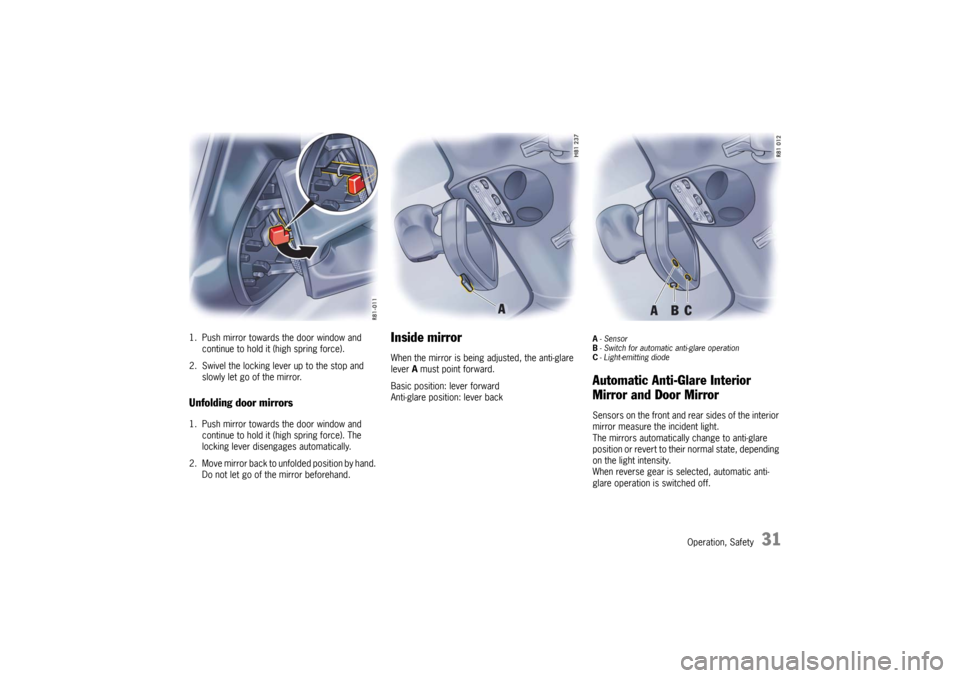
1. Push mirror towards the door window and
continue to hold it (high spring force).
2. Swivel the locking lever up to the stop and
slowly let go of the mirror.Unfolding door mirrors1. Push mirror towards the door window and
continue to hold it (high spring force). The
locking lever disengages automatically.
2. Move mirror back to unfolded position by hand.
Do not let go of the mirror beforehand.
Inside mirrorWhen the mirror is being adjusted, the anti-glare
lever A must point forward.
Basic position: lever forward
Anti-glare position: lever back
A-Sensor
B- Switch for automatic anti-glare operation
C- Light-emitting diode Automatic Anti-Glare Interior
Mirror and Door Mirror Sensors on the front and rear sides of the interior
mirror measure the incident light.
The mirrors automatically change to anti-glare
position or revert to their normal state, depending
on the light intensity.
When reverse gear is selected, automatic anti-
glare operation is switched off.
10_GT3_21.book Seite 31 Donnerstag, 4. Juni 2009 12:48 12