lock PORSCHE 911 GT3 2010 5.G Service Manual
[x] Cancel search | Manufacturer: PORSCHE, Model Year: 2010, Model line: 911 GT3, Model: PORSCHE 911 GT3 2010 5.GPages: 251, PDF Size: 14.33 MB
Page 87 of 251
86
Operation, Safety
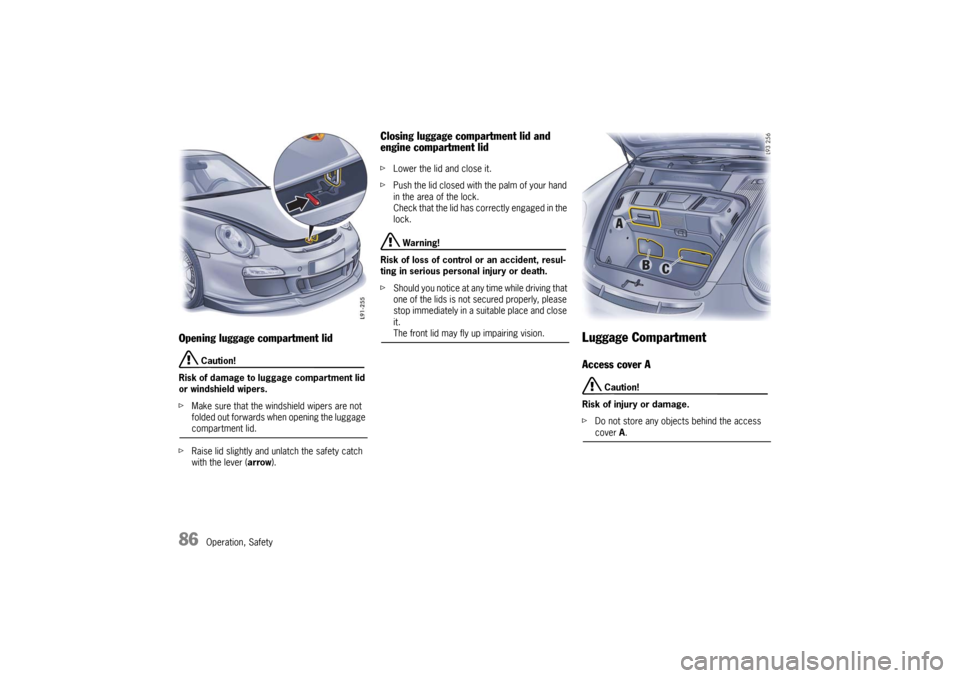
Opening luggage compartment lid
Caution!
Risk of damage to luggage compartment lid
or windshield wipers.
fMake sure that the windshield wipers are not
folded out forwards when opening the luggage compartment lid.
fRaise lid slightly and unlatch the safety catch
with the lever (arrow).
Closing luggage compartment lid and
engine compartment lid fLower the lid and close it.
fPush the lid closed with the palm of your hand
in the area of the lock.
Check that the lid has correctly engaged in the
lock.
Warning!
Risk of loss of control or an accident, resul-
ting in serious personal injury or death.
fShould you notice at any time while driving that
one of the lids is not secured properly, please
stop immediately in a suitable place and close
it. The front lid may fly up impairing vision.
Luggage CompartmentAccess cover A
Caution!
Risk of injury or damage.
fDo not store any objects behind the access cover A.
10_GT3_21.book Seite 86 Donnerstag, 4. Juni 2009 12:48 12
Page 88 of 251
Operation, Safety
87
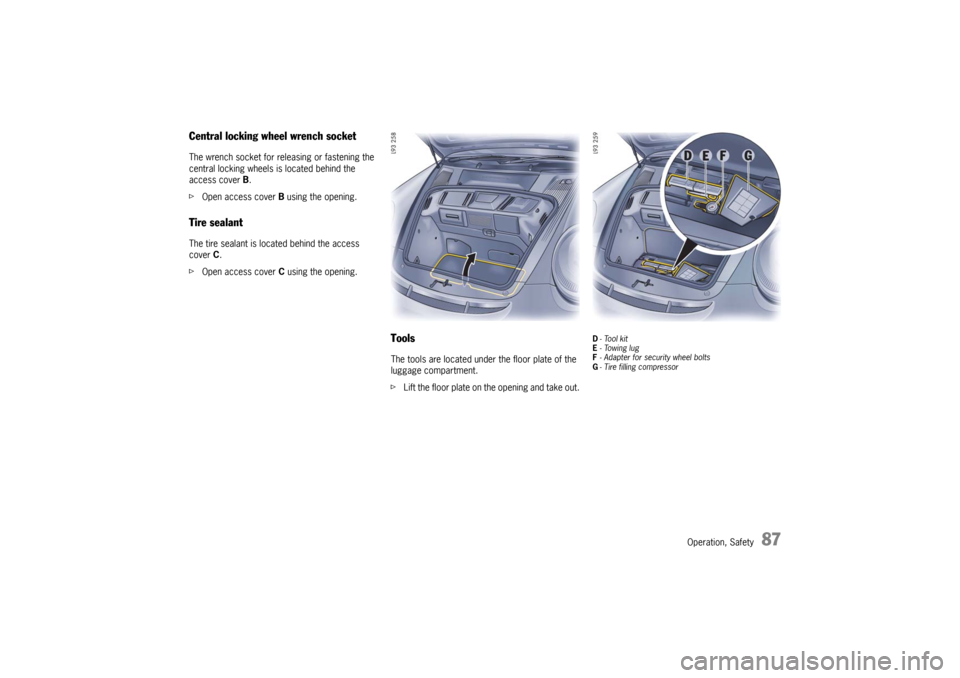
Central locking wheel wrench socketThe wrench socket for releasing or fastening the
central locking wheels is located behind the
access cover B.
fOpen access cover B using the opening.Tire sealantThe tire sealant is located behind the access
cover C.
fOpen access cover C using the opening.
ToolsThe tools are located under the floor plate of the
luggage compartment.
fLift the floor plate on the opening and take out.
D-Tool kit
E- Towing lug
F- Adapter for security wheel bolts
G- Tire filling compressor
10_GT3_21.book Seite 87 Donnerstag, 4. Juni 2009 12:48 12
Page 89 of 251
88
Operation, Safety
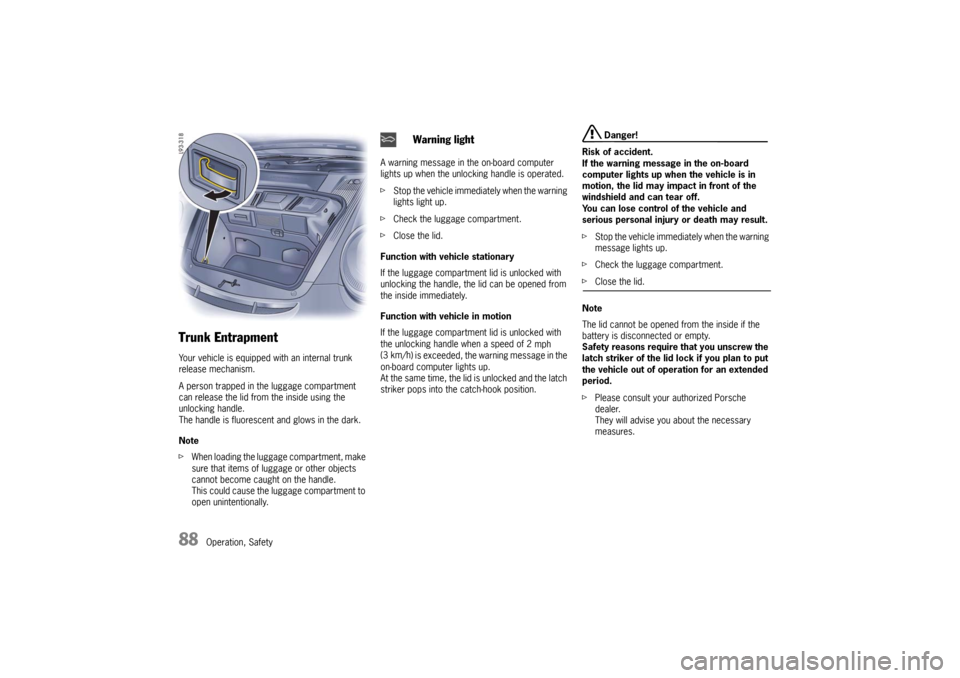
Trunk EntrapmentYour vehicle is equipped with an internal trunk
release mechanism.
A person trapped in the luggage compartment
can release the lid from the inside using the
unlocking handle.
The handle is fluorescent and glows in the dark.
Note
fWhen loading the luggage compartment, make
sure that items of luggage or other objects
cannot become caught on the handle.
This could cause the luggage compartment to
open unintentionally.A warning message in the on-board computer
lights up when the unlocking handle is operated.
fStop the vehicle immediately when the warning
lights light up.
fCheck the luggage compartment.
fClose the lid.
Function with vehicle stationary
If the luggage compartment lid is unlocked with
unlocking the handle, the lid can be opened from
the inside immediately.
Function with vehicle in motion
If the luggage compartment lid is unlocked with
the unlocking handle when a speed of 2
mph
(3 km/h
) is exceeded, the warning message in the
on-board computer lights up.
At the same time, the lid is unlocked and the latch
striker pops into the catch-hook position.
Danger!
Risk of accident.
If the warning message in the on-board
computer lights up when the vehicle is in
motion, the lid may impact in front of the
windshield and can tear off.
You can lose control of the vehicle and
serious personal injury or death may result.
fStop the vehicle immediately when the warning
message lights up.
fCheck the luggage compartment.
fClose the lid.
Note
The lid cannot be opened from the inside if the
battery is disconnected or empty.
Safety reasons require that you unscrew the
latch striker of the lid lock if you plan to put
the vehicle out of operation for an extended
period.
fPlease consult your authorized Porsche
dealer.
They will advise you about the necessary
measures.
Warning light
10_GT3_21.book Seite 88 Donnerstag, 4. Juni 2009 12:48 12
Page 91 of 251

90
Operation, Safety Fading and drifting
FM range is limited to about 25 miles (40 km),
except for some high power stations.
If a vehicle is moving away from the desired
station’s transmitter, the signal will tend to fade
and/or drift. This condition is more prevalent with
FM than AM, and is often accompanied by distor-
tion.
Fading and drifting can be minimized to a certain
degree by careful attention to fine tuning or selec-
tion of a stronger signal.
Static and fluttering
When the line-of-sight link between a transmitter
and vehicle is blocked by large buildings or
mountains, the radio sound may be accompanied
with static or fluttering because of the characteri-
stic of FM.
In a similar effect, a fluttering noise is sometimes
heard when driving along a tree-lined road.
This static and fluttering can be reduced by adjus-
ting the tone control for greater bass response
until the disturbance has passed.
Multipath
Because of the reflecting characteristics of FM,
direct and reflected signals may reach the antenna
at the same time (multipath) and cancel each other
out.
As a vehicle moves through these electronic dead
spots, the listener may hear a momentary flutter
or loss of reception. Station swapping
When two FM stations are close to each other, and
an electronic dead spot, such as static or multi-
path area, interrupts the original signal,
sometimes the stronger second signal will be
selected automatically until the original one
returns.
This swapping can also occur as you drive away
from the selected station and approach another
station of a stronger signal.
Compact disc player
Caution!
To avoid damage to compact disc player and
discs.
fUse only compact discs labeled as shown,
having no dirt, damage or warpage.
fNever attempt to disassemble or oil any part
of the player unit.
Do not insert any object other than a disc into
the slot.
Remember there are no user-serviceable parts
inside the compact disc player.
fDo not allow the disc to sustain any finger-
prints, scrapes or stickers on the surfaces.
This may cause poor sound quality.
Hold the disc only on the edge or center hole. fWhen not in use, take the disc out of the player,
put the disc back into its case and store it
away from dust, heat, damp and direct
sunlight.
Leaving the disc on the dashboard in the sun
can damage the disc.
fIf the disc gets dirty, clean the disc by wiping
the surfaces from the center to the outside in
a radial direction with a soft cloth.
Do not use a conventional record cleaner or
anti-static record preservative.
Disc cleaners are available in audio stores.
10_GT3_21.book Seite 90 Donnerstag, 4. Juni 2009 12:48 12
Page 104 of 251
Instruments, On-Board Computer, Warnings
103 Instruments, On-Board Computer, Warnings
Instrument Panel USA Models...................... 104
Instrument Panel Canada Models ................. 106
Engine Oil Temperature .............................. 108
Automatic Speed Control Indicator light ....... 108
Instrument Illumination................................ 108
Trip Odometer ........................................... 109
Speedometer ............................................. 110
Changing over between Miles / Kilometers ... 110
Tachometer ............................................... 111
Turn Signal Indicator Light .......................... 111
High Beam Indicator Light ........................... 111
Upshift indicator ......................................... 111
Cooling System.......................................... 112
Fuel........................................................... 113
Clock ........................................................ 114
Outside Temperature.................................. 114
Engine Oil Pressure .................................... 115
Check Engine (Emission Control) ................. 116
On-Board Computer (BC)............................. 117
Warnings on the instrument panel and the
on-board computer ..................................... 148
10_GT3_21.book Seite 103 Donnerstag, 4. Juni 2009 12:48 12
Page 105 of 251

104
Instruments, On-Board Computer
Instrument Panel USA Models Also refer to the corresponding chapters in
the Owner’s Manual.
1.Engine oil temperature gauge
2.Speedometer with analogue display
3.Tire pressure warning light
4.Turn signal indicator light, left
5.Tachometer
6.High beam indicator light
7.Turn signal indicator light, right
8.Upshift indicator
9.Cooling system
Temperature gauge, warning light
10.Fuel
Level gauge, warning light
11.Engine oil pressure gauge
12.Adjustment button for instrument illumination
and trip counter
13.Odometer and daily trip mileage display
14.Automatic speed control indicator light15.Light sensor for instrument illumination
16.Airbag warning light
17.Check Engine warning light
(Emission control warning light)
18.Central warning light
19.On-board computer display
20.Porsche Stability Management
PSM Multifunctional light
21.Brake warning light
22.Safety belt warning light
23.ABS warning light
24.Clock and outside temperature display
25.Adjustment button for clockWhen the ignition is switched on, the warning
lights light up for a lamp check.
Note
Warnings that have been given are stored in the
appropriate control unit memory and can be read
out at an authorized Porsche dealer.
This information can help to warn you about situa-
tions which may be hazardous to you or your car. 10_GT3_21.book Seite 104 Donnerstag, 4. Juni 2009 12:48 12
Page 107 of 251

106
Instruments, On-Board Computer
Instrument Panel Canada Models Also refer to the corresponding chapters in
the Owner’s Manual.
1.Engine oil temperature gauge
2.Speedometer with analogue display
3.Tire pressure warning light
4.Turn signal indicator light, left
5.Tachometer
6.High beam indicator light
7.Turn signal indicator light, right
8.Upshift indicator
9.Cooling system
Temperature gauge, warning light
10.Fuel
Level gauge, warning light
11.Engine oil pressure gauge
12.Adjustment button for instrument illumination
and trip counter
13.Odometer and daily trip mileage display
14.Automatic speed control indicator light15.Light sensor for instrument illumination
16.Airbag warning light
17.Check Engine warning light
(Emission control warning light)
18.Central warning light
19.On-board computer display
20.Porsche Stability Management
PSM Multifunctional light
21.Brake warning light
22.Safety belt warning light
23.ABS warning light
24.Clock and outside temperature display
25.Adjustment button for clockWhen the ignition is switched on, the warning
lights light up for a lamp check.
Note
Warnings that have been given are stored in the
appropriate control unit memory and can be read
out at an authorized Porsche dealer.
This information can help to warn you about situa-
tions which may be hazardous to you or your car. 10_GT3_21.book Seite 106 Donnerstag, 4. Juni 2009 12:48 12
Page 115 of 251
114
Instruments, On-Board Computer
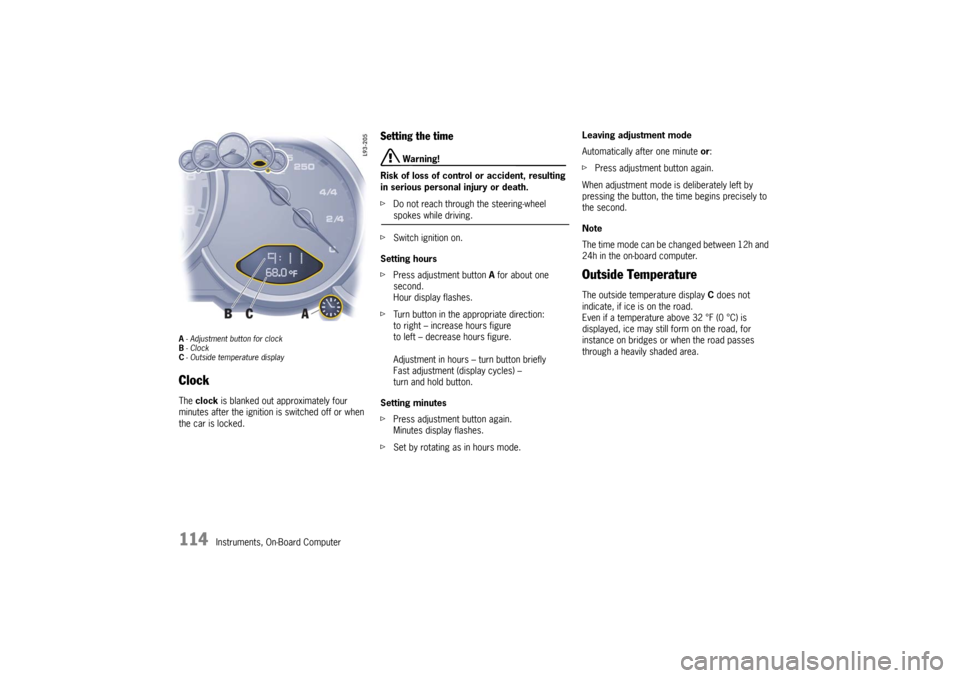
A- Adjustment button for clock
B-Clock
C- Outside temperature displayClock The clock is blanked out approximately four
minutes after the ignition is switched off or when
the car is locked.
Setting the time
Warning!
Risk of loss of control or accident, resulting
in serious personal injury or death.
fDo not reach through the steering-wheel spokes while driving.
fSwitch ignition on.
Setting hours
fPress adjustment button A for about one
second.
Hour display flashes.
fTurn button in the appropriate direction:
to right – increase hours figure
to left – decrease hours figure.
Adjustment in hours – turn button briefly
Fast adjustment (display cycles) –
turn and hold button.
Setting minutes
fPress adjustment button again.
Minutes display flashes.
fSet by rotating as in hours mode. Leaving adjustment mode
Automatically after one minute or:
fPress adjustment button again.
When adjustment mode is deliberately left by
pressing the button, the time begins precisely to
the second.
Note
The time mode can be changed between 12h and
24h in the on-board computer.
Outside Temperature The outside temperature display C does not
indicate, if ice is on the road.
Even if a temperature above 32 °F (0 °C) is
displayed, ice may still form on the road, for
instance on bridges or when the road passes
through a heavily shaded area.
10_GT3_21.book Seite 114 Donnerstag, 4. Juni 2009 12:48 12
Page 149 of 251

148
Warnings
Warnings on the instrument panel and the on-board computerIf a warning message appears, always refer to the corresponding chapters in the Owner’s Manual.
Warning messages are issued only if all measurement preconditions are met. Therefore, check all fluid levels regularly –
in particular, always check the engine oil level before refuelling.Acknowledging warning messagesWarning messages can be deleted from the on-board computer display.
fPush the on-board computer operating lever forward.
You can recall erased warning messages in the “INFO” menu.
Instrument
panelOn-board
computerText display on on-board
computerMeaning/measure
Seat belt Driver and passenger must fasten their seat belts.
Handbrake Handbrake is still on.
Ignition key
not removed
Replace battery
in ignition keyReplace the remote-control battery.
Ignition lock faulty,
visit workshopHave the fault remedied at an authorized Porsche dealer.
Ignition lock faulty,
visit workshop nowHave the fault remedied at an authorized Porsche dealer.
Relieve steering Relieve the steering lock by moving the steering wheel to the left or right.
Steering locked The steering wheel lock remains engaged.
Have the fault remedied at an authorized Porsche dealer.
10_GT3_21.book Seite 148 Donnerstag, 4. Juni 2009 12:48 12
Page 158 of 251

Maintenance, Car Care
157
Exercise Extreme Caution when
Working on your Vehicle
Danger!
Ignoring the following instructions may
cause serious personal injury or death.
fThe engine compartment of any motor vehicle
is a potentially hazardous area. If you are not
fully familiar with proper repair procedures, do
not attempt the adjustments described on the
following pages.
This caution also applies to the entire vehicle.
fO n l y w o r k o n y o u r v e h i c l e o u t d o o r s o r i n a w e l l
ventilated area.
fEnsure that there are no open flames in the
area of your vehicle at any time when fuel
fumes might be present. Be especially
cautious of such devices such as hot water
heaters which ignite a flame intermittently.
fBefore working on any part in the engine
compartment, turn the engine off and let it cool
down sufficiently. Hot engine compartment
components can burn skin on contact.
fBe alert and cautious around engine at all
times while the engine is running.
If work has to be performed with the engine
running, always set the parking brake, and
make sure the shift lever is in neutral position.fIn particular, be very careful to ensure that
items of clothing (ties, shirt, sleeves etc.),
jewelry, long hair, hand or fingers cannot get
caught in the engine-compartment blower, fan,
belts or other moving parts.
The radiator and radiator fans are in the front
of the car.
The engine-compartment blower is mounted
on the engine-compartment lid.
The engine-compartment blower can start or
continue running as a function of temperature,
even with the engine switched off.
Carry out work in these areas only with the
engine off, the ignition switched off, and
exercise extreme caution.
fYour Porsche is equipped with an electronic
ignition system. When the ignition is on, high
voltage is present in all wires connected with
the ignition system; therefore, exercise
extreme caution when working on any part of
the engine while the ignition is on or the engine
is running.
fAlways support your car with safety stands if it
is necessary to work under the car.
fWhen working under the car without safety
stands but with the wheels on the ground,
make sure the car is on level ground, the
wheels are blocked, and that the engine
cannot be started.
Remove the ignition key. fDo not smoke or allow an open flame around
the battery or fuel.
Keep a fire extinguisher close at hand.
fIncomplete or improper servicing may cause
problems in the operation o f t h e c a r. I f i n d o u b t
about any servicing, have it done by your
authorized Porsche dealer.
Improper maintenance during the warranty
period may affect your Porsche warranty
coverage.
fSupplies of fluids, e.g. engine oil, brake fluid or
coolant, are hazardous to your health.
Keep these fluids out of children’s reach and
dispose of them in accordance with the appro-
priate regulations.
fSome countries require additional tools and
special spare parts to be carried in your
vehicle.
Please make enquiries before driving abroad.
Power measurementsPower measurements on dynamometers are not
approved by Porsche.
10_GT3_21.book Seite 157 Donnerstag, 4. Juni 2009 12:48 12