CAN Ram 1500 2015 Owner's Manual
[x] Cancel search | Manufacturer: RAM, Model Year: 2015, Model line: 1500, Model: Ram 1500 2015Pages: 871, PDF Size: 24.83 MB
Page 218 of 871
NOTE:
•For vehicle’s equipped with Keyless Enter-N-Go™, place
the ignition in the RUN position with the Engine ON.
•Erasing all channels should only be performed when
programming HomeLink® for the first time. Do not
erase channels when programming additional buttons.
•If you have any problems, or require assistance, please
call toll-free 1-800-355-3515 or, on the Internet at
HomeLink.com for information or assistance.
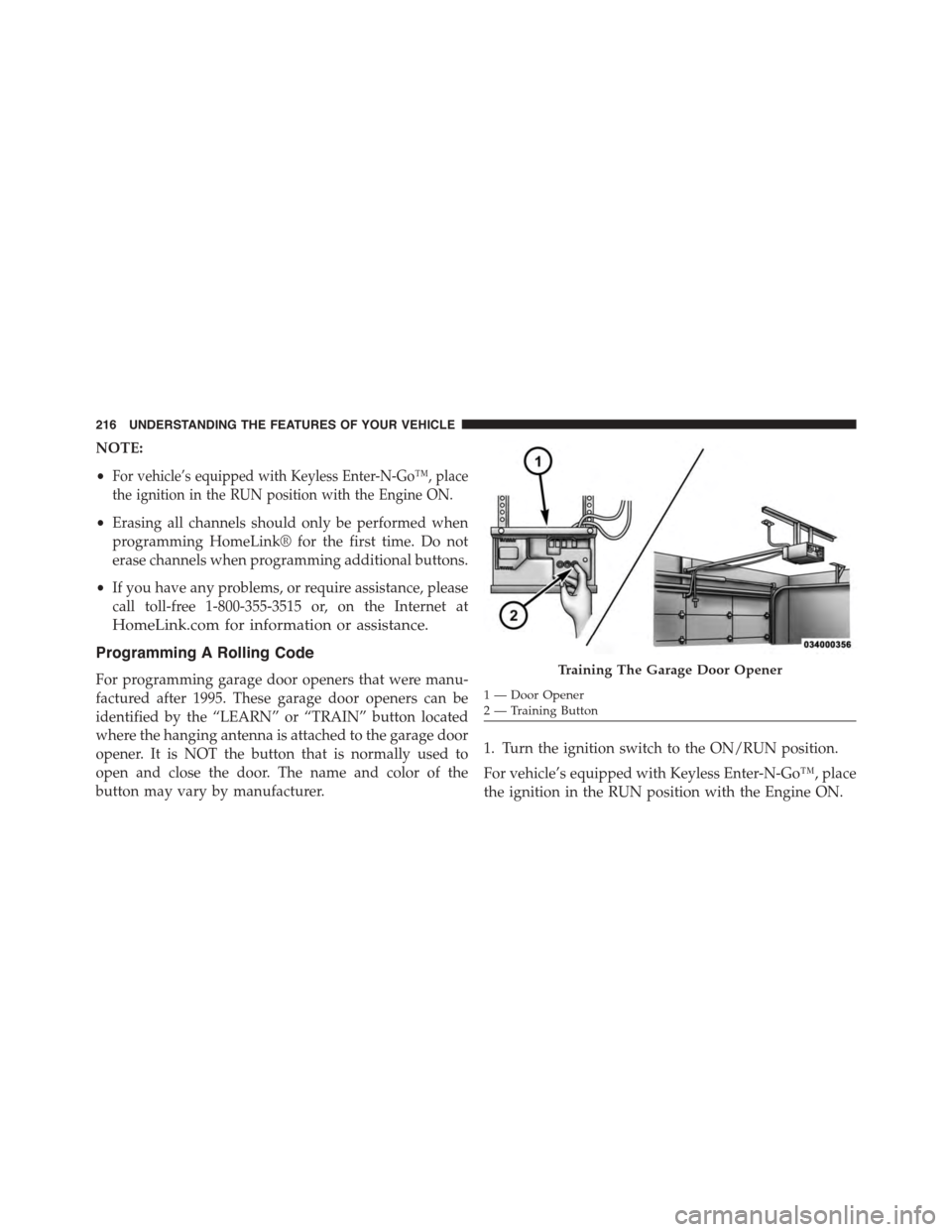
Programming A Rolling Code
For programming garage door openers that were manu-
factured after 1995. These garage door openers can be
identified by the “LEARN” or “TRAIN” button located
where the hanging antenna is attached to the garage door
opener. It is NOT the button that is normally used to
open and close the door. The name and color of the
button may vary by manufacturer.
1. Turn the ignition switch to the ON/RUN position.
For vehicle’s equipped with Keyless Enter-N-Go™, place
the ignition in the RUN position with the Engine ON.
Training The Garage Door Opener
1—DoorOpener2 — Training Button
216 UNDERSTANDING THE FEATURES OF YOUR VEHICLE
Page 219 of 871
2. Place the hand - held transmitter 1 to 3 inches (3 to 8
cm) away from the HomeLink® button you wish to
program.
3. Push and hold the Homelink® button you want to
program while you push and hold the hand - held
transmitter button.
4. Continue to hold both buttons until the EVIC/DID
display changes from “CHANNEL # TRAINING” to
“CHANNEL # TRAINED,” then release both buttons.
NOTE:
•It may take up to 30 seconds or longer in some cases
for the channel to train.
•If the EVIC/DID displays “DID NOT TRAIN” repeat
from Step 2.
5. At the garage door opener motor (in the garage),
locate the “LEARN” or “TRAINING” button. This can
usually be found where the hanging antenna wire is
attached to the garage door opener/device motor.
Firmly push and release the “LEARN” or “TRAIN-
ING” button. On some garage door openers/devices
there may be a light that blinks when the garage door
opener/device is in the LEARN/TRAIN mode.
NOTE:You have 30 seconds in which to initiate the next
step after the LEARN button has been pushed.
6. Return to the vehicle and push the programmed
HomeLink® button twice (holding the button for two
seconds each time). The EVIC/DID will display
“CHANNEL # TRANSMIT.” If the garage door
opener/device activates, programming is complete.
NOTE:If the garage door opener/device does not acti-
vate, push the button a third time (for two seconds) to
complete the training.
To program the remaining two HomeLink® buttons,
repeat each step for each remaining button. DO NOT
erase the channels.
3
UNDERSTANDING THE FEATURES OF YOUR VEHICLE 217
Page 222 of 871
Canadian/Gate Operator Programming
For programming transmitters in Canada/United States
that require the transmitter signals to “time-out” after
several seconds of transmission.
Canadian radio frequency laws require transmitter sig-
nals to time-out (or quit) after several seconds of trans-
mission – which may not be long enough for HomeLink®
to pick up the signal during programming. Similar to this
Canadian law, some U.S. gate operators are designed to
time-out in the same manner.
It may be helpful to unplug the device during the cycling
process to prevent possible overheating of the garage
door or gate motor.
1. Turn the ignition switch to the ON/RUN position.
For vehicle’s equipped with Keyless Enter-N-Go™, place
the ignition in the RUN position with the Engine ON.
2. Place the hand - held transmitter 1 to 3 inches (3 to 8
cm) away from the HomeLink® button you wish to
program.
3. Push and hold the Homelink® button while you push
and release (“cycle”), your hand - held transmitter
every two seconds.
4. Continue to hold both buttons until the EVIC/DID
display changes from “CHANNEL # TRAINING” to
“CHANNEL # TRAINED,” then release both buttons.
NOTE:
•It may take up to 30 seconds or longer in some cases
for the channel to train.
•If the EVIC/DID displays “DID NOT TRAIN” repeat
from Step 2.
220 UNDERSTANDING THE FEATURES OF YOUR VEHICLE
Page 223 of 871
5. Push and hold the programmed HomeLink® button.
The EVIC/DID will display “CHANNEL # TRANS-
MIT.” If the device is plugged in and activates, pro-
gramming is complete.
If you unplugged the garage door opener/device for
programming, plug it back in at this time.
Reprogramming A Single HomeLink® Button
(Canadian/Gate Operator)
To reprogram a channel that has been previously trained,
follow these steps:
1. Turn the ignition switch to the ON/RUN position.
For vehicle’s equipped with Keyless Enter-N-Go™, place
the ignition in the RUN position with the Engine ON.
2. Push and hold the desired HomeLink® button until
the EVIC/DID displays “CHANNEL # TRAINING”
Do not release the button.
3.Without releasing the buttonproceed with
“Canadian/Gate Operator Programming” Step 2 and
follow all remaining steps.
Using HomeLink®
To operate, push and release the programmed
HomeLink® button. Activation will now occur for the
programmed device (i.e., garage door opener, gate opera-
tor, security system, entry door lock, home/office light-
ing, etc.,). The hand-held transmitter of the device may
also be used at any time.
Security
It is advised to erase all channels before you sell or turn
in your vehicle.
To erase the channels press and hold the two outside
HomeLink® buttons (I and III) for up 20 seconds. The
Electronic Vehicle Information Center (EVIC) or Driver
3
UNDERSTANDING THE FEATURES OF YOUR VEHICLE 221
Page 224 of 871
Interactive Display (DID) will display “CLEARING
CHANNELS.” Release the buttons when the EVIC/DID
displays “CHANNELS CLEARED.”
The HomeLink® Universal Transceiver is disabled when
the Vehicle Security Alarm is active.
Troubleshooting Tips
If you are having trouble programming HomeLink®,
here are some of the most common solutions:
•Replace the battery in the original hand-held transmitter.
•Push the LEARN button on the Garage Door Opener
to complete the training for a Rolling Code.
•Did you unplug the device for programming and
remember to plug it back in?
If you have any problems, or require assistance, please
call toll-free 1-800-355-3515 or, on the Internet at
HomeLink.com for information or assistance.
WARNING!
Vehicle exhaust contains carbon monoxide, a danger-
ous gas. Do not run your vehicle in the garage while
programming the transceiver. Exhaust gas can cause
serious injury or death.
WARNING!
Your motorized door or gate will open and close
while you are programming the universal trans-
ceiver. Do not program the transceiver if people, pets
or other objects are in the path of the door or gate.
Only use this transceiver with a garage door opener
that has a “stop and reverse” feature as required by
Federal safety standards. This includes most garage
door opener models manufactured after 1982. Do not
(Continued)
222 UNDERSTANDING THE FEATURES OF YOUR VEHICLE
Page 225 of 871
WARNING!(Continued)
use a garage door opener without these safety fea-
tures. Call toll-free 1-800-355-3515 or, on the Internet
atHomeLink.com for safety information or assis-
tance.
General Information
This device complies with FCC rules Part 15 and Industry
Canada RSS-210. Operation is subject to the following
two conditions:
1. This device may not cause harmful interference.
2. This device must accept any interference that may be
received including interference that may cause unde-
sired operation.
NOTE:
•The transmitter has been tested and it complies with
FCC and IC rules. Changes or modifications not ex-
pressly approved by the party responsible for compli-
ance could void the user ’s authority to operate the
device.
•The term IC before the certification/registration num-
ber only signifies that Industry Canada technical speci-
fications were met.
3
UNDERSTANDING THE FEATURES OF YOUR VEHICLE 223
Page 226 of 871

POWER SUNROOF — IF EQUIPPED
The power sunroof switch is located on the overhead
console between the courtesy/reading lights.
WARNING!
•Never leave children unattended in a vehicle, or
with access to an unlocked vehicle. Never leave the
Key Fob in or near the vehicle, or in a location
accessible to children. Do not leave the ignition of
a vehicle equipped with Keyless Enter-N-Go™ in
the ACC or ON/RUN mode. Occupants, particu-
larly unattended children, can become entrapped
by the power sunroof while operating the power
sunroof switch. Such entrapment may result in
serious injury or death.
•In a collision, there is a greater risk of being thrown
from a vehicle with an open sunroof. You could
also be seriously injured or killed. Always fasten
your seat belt properly and make sure all passen-
gers are also properly secured.
(Continued)
Power Sunroof Switch
224 UNDERSTANDING THE FEATURES OF YOUR VEHICLE
Page 228 of 871

Pinch Protect Feature
This feature will detect an obstruction in the opening of
the sunroof during Express Close operation. If an ob-
struction in the path of the sunroof is detected, the
sunroof will automatically retract. Remove the obstruc-
tion if this occurs. Next, press the switch forward and
release to Express Close.
NOTE:If three consecutive sunroof close attempts result
in Pinch Protect reversals, the fourth close attempt will be
a Manual Close movement with Pinch Protect disabled.
Press and hold close switch to fully close sunroof.
Venting Sunroof — Express
Press and release the Vent button within one half second
and the sunroof will open to the vent position. This is
called “Express Vent” and it will occur regardless of
sunroof position. During Express Vent operation, any
movement of the switch will stop the sunroof.
Sunshade Operation
The sunshade can be opened manually. However, the
sunshade will open automatically as the sunroof opens.
NOTE:The sunshade cannot be closed if the sunroof is
open.
Wind Buffeting
Wind buffeting can be described as the perception of
pressure on the ears or a helicopter-type sound in the
ears. Your vehicle may exhibit wind buffeting with the
windows down, or the sunroof (if equipped) in certain
open or partially open positions. This is a normal occur-
rence and can be minimized. If the buffeting occurs with
the rear windows open, open the front and rear windows
together to minimize the buffeting. If the buffeting occurs
with the sunroof open, adjust the sunroof opening to
minimize the buffeting or open any window.
226 UNDERSTANDING THE FEATURES OF YOUR VEHICLE
Page 229 of 871
Sunroof Maintenance
Use only a nonabrasive cleaner and a soft cloth to clean
the glass panel.
Ignition Off Operation
The power sunroof switch will remain active for up to
approximately ten minutes after the ignition switch is
turned to the LOCK position. Opening either front door
will cancel this feature.
NOTE:Ignition Off time is programmable through the
Uconnect® System. Refer to “Uconnect® Settings/
Customer Programmable Features” in “Understanding
Your Instrument Panel” for further information.
ELECTRICAL POWER OUTLETS
The auxiliary 12 Volt (13 Amp) power outlets can provide
power for in-cab accessories designed for use with the
standard “cigar lighter” plug. The 12 Volt power outlets
have a cap attached to the outlet indicating “12V DC,”
together with either a key symbol or a battery symbol.
A key symbol indicates that the key must be in the
ON/RUN or ACC positions for the outlet to provide
power. The battery symbol indicates that the outlet is
connected to the battery, and can provide power at all
times.
NOTE:To ensure proper operation, a MOPAR® knob
and element must be used.
3
UNDERSTANDING THE FEATURES OF YOUR VEHICLE 227
Page 230 of 871
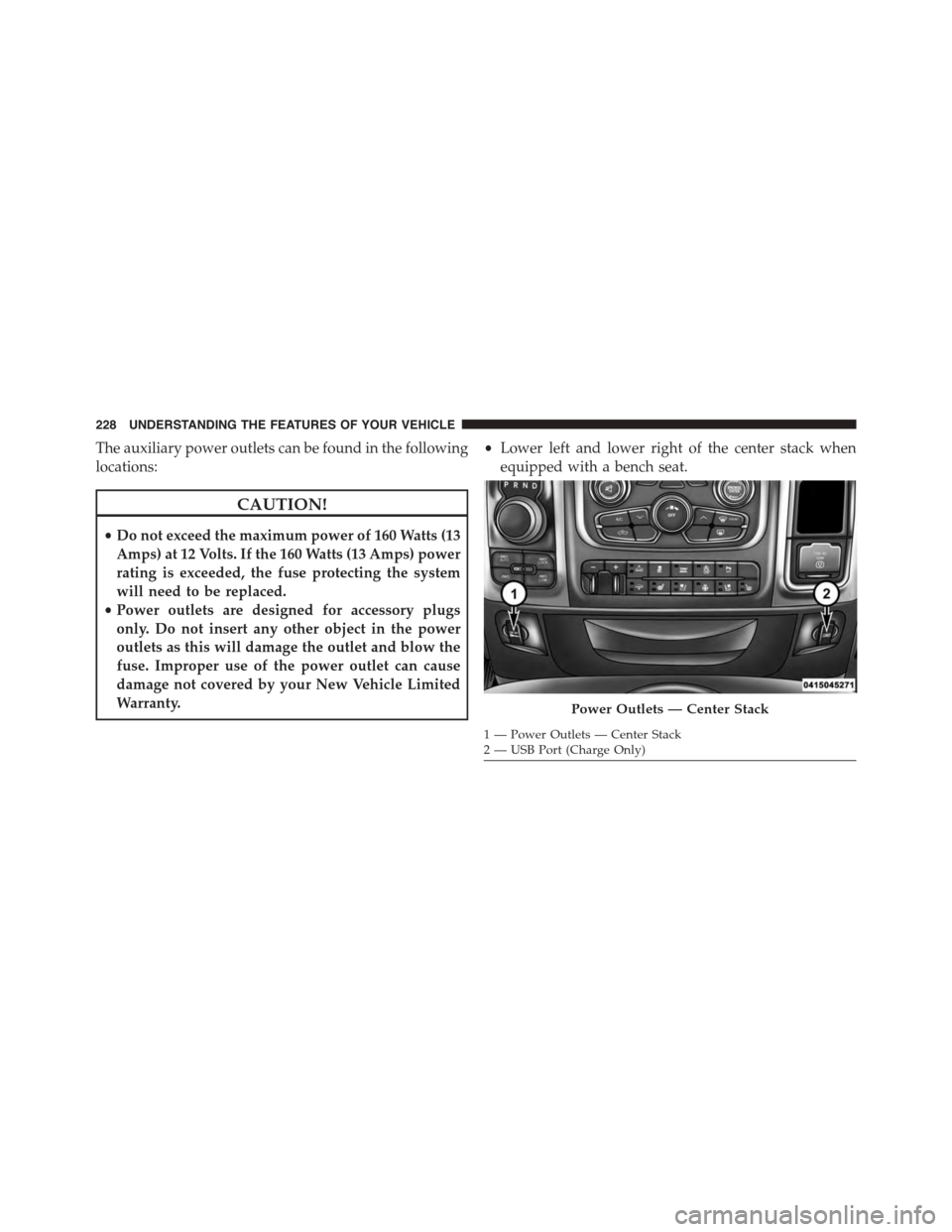
The auxiliary power outlets can be found in the following
locations:
CAUTION!
•Do not exceed the maximum power of 160 Watts (13
Amps) at 12 Volts. If the 160 Watts (13 Amps) power
rating is exceeded, the fuse protecting the system
will need to be replaced.
•Power outlets are designed for accessory plugs
only. Do not insert any other object in the power
outlets as this will damage the outlet and blow the
fuse. Improper use of the power outlet can cause
damage not covered by your New Vehicle Limited
Warranty.
•Lower left and lower right of the center stack when
equipped with a bench seat.
Power Outlets — Center Stack
1 — Power Outlets — Center Stack2—USBPort(ChargeOnly)
228 UNDERSTANDING THE FEATURES OF YOUR VEHICLE