CAN Ram 1500 2015 Manual PDF
[x] Cancel search | Manufacturer: RAM, Model Year: 2015, Model line: 1500, Model: Ram 1500 2015Pages: 871, PDF Size: 24.83 MB
Page 152 of 871

Vehicles Equipped With Remote Start
On models that are equipped with remote start, the
ventilated seats can be programed to come on during a
remote start.
If your vehicle is equipped with a touchscreen, this
feature can be programmed through the Uconnect®
system. Refer to “Uconnect® Settings” in “Understand-
ing Your Instrument Panel” for further information.
If your vehicle is not equipped with a touchscreen, this
feature can be programmed through the Electronic Ve-
hicle Information Center (EVIC) or Driver Information
Display (DID). Refer to “Electronic Vehicle Information
Center (EVIC)” or “Driver Information Display (DID)” in
“Understanding Your Instrument Panel” for further in-
formation.
Manual Seat Adjuster — If Equipped
Both front seats are adjustable forward or rearward. The
manual seat adjustment handle is located under the seat
cushion at the front edge of each seat.
While sitting in the seat, pull up on the handle and slide
the seat forward or backward. Release the bar once you
Manual Seat Adjuster
150 UNDERSTANDING THE FEATURES OF YOUR VEHICLE
Page 155 of 871

Folding Rear Seat (Table Mode) — If Equipped
Both the left and right rear seatbacks can be folded down
and used as a table.
To fold down either rear seatback:
1. Lift the handle, located next to the head restraint.
2. Fold the seatback forward.
3. Lift the seatback, to return the seat to the upright
position. Be sure the seatback is locked in place.
Table Mode Handle
Table Mode
3
UNDERSTANDING THE FEATURES OF YOUR VEHICLE 153
Page 156 of 871
Folding Rear Seat — If Equipped
Both the outboard rear seats will drop and move forward
when the seatback is folded flat.
WARNING!
•It is dangerous to ride in a cargo area, inside or
outside of a vehicle. In a collision, people riding in
these areas are more likely to be seriously injured
or killed.
•Do not allow people to ride in any area of your
vehicle that is not equipped with seats and seat
belts.
•Be sure everyone in your vehicle is in a seat and
using a seat belt properly.
(Continued)
WARNING!(Continued)
•Cargo must be securely tied down before driving
your vehicle. Improperly secured cargo can fly
around in a sudden stop or collision and strike
someone in the vehicle, causing serious injury or
death.
To fold either rear seat flat:
1. Lift the handle, located on the outboard side of either
of the rear seats.
154 UNDERSTANDING THE FEATURES OF YOUR VEHICLE
Page 158 of 871
WARNING!
An improperly latched seat could cause serious in-
jury or death. Make sure that the seatback is securely
locked into position. If the seatback in not securely
locked into position the seat will not provide the
proper stability for child seats and/or passengers.
Head Restraints
Head restraints are designed to reduce the risk of injury
by restricting head movement in the event of a rear
impact. Head restraints should be adjusted so that the top
of the head restraint is located above the top of your ear.
WARNING!
The head restraints for all occupants must be prop-
erly installed and adjusted prior to operating the
(Continued)
WARNING!(Continued)
vehicle or occupying a seat. Head restraints should
never be adjusted while the vehicle is in motion.
Driving a vehicle with the head restraints improperly
adjusted or removed could cause serious injury or
death in the event of a collision.
Front Head Restraints
To raise the head restraint, pull upward on the head
restraint. To lower the head restraint, press the adjust-
ment button, located on the base of the head restraint,
and push downward on the head restraint.
To remove the head restraint, raise it as far as it can go
then press the release buttons at the base of each post
while pulling the head restraint up. To reinstall the head
restraint, put the head restraint posts into the holes while
pressing the release buttons. Then adjust it to the appro-
priate height.
156 UNDERSTANDING THE FEATURES OF YOUR VEHICLE
Page 161 of 871
presets. Your Remote Keyless Entry (RKE) transmitter
can also be programmed to recall the same positions
when the UNLOCK button is pressed.
NOTE:Your vehicle is equipped with two RKE trans-
mitters, one RKE transmitter can be linked to memory
position 1 and the other transmitter can be linked to
memory position 2.
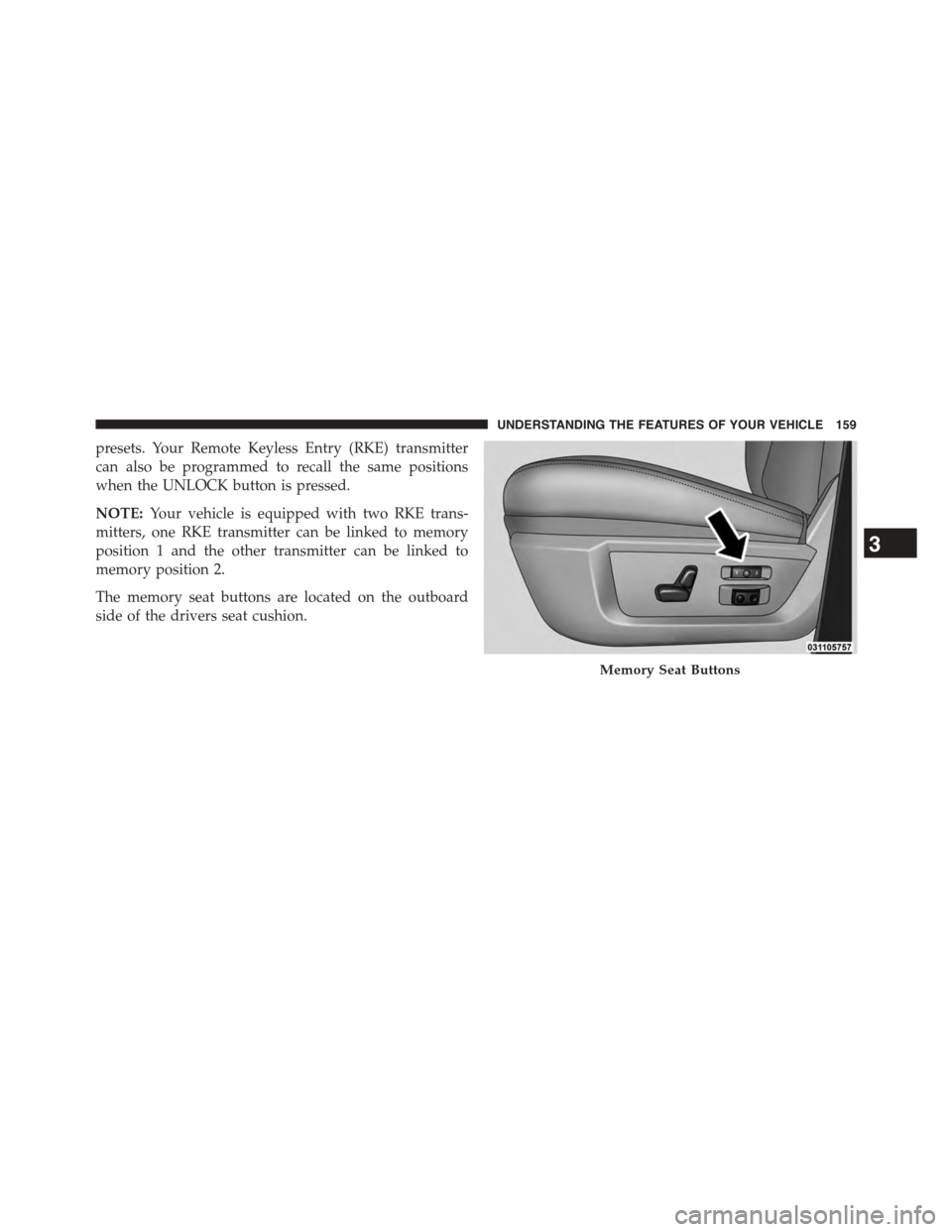
The memory seat buttons are located on the outboard
side of the drivers seat cushion.
Memory Seat Buttons
3
UNDERSTANDING THE FEATURES OF YOUR VEHICLE 159
Page 162 of 871
Programming The Memory Feature
NOTE:To create a new memory profile, perform the
following:
1. Cycle the vehicles ignition to the ON/RUN position
(do not start the engine).
2. Adjust all memory profile settings to desired prefer-
ences (seat, side mirrors, adjustable pedals and radio
station presets).
3. Press and release the S (Set) button on the memory
switch.
4. Within five seconds, press and release either of the
memory buttons (1) or (2). The Electronic Vehicle
Information Center (EVIC) or Driver Information Dis-
play (DID) will display which memory position has
been set.
NOTE:
•Memory profiles can be set without the vehicle in
PARK, but the vehicle must be in PARK to recall a
memory profile.
•To set a memory profile to your RKE transmitter, refer
to “Linking And Unlinking The Remote Keyless Entry
Transmitter To Memory” in this section.
Linking And Unlinking The Remote Keyless Entry
Transmitter To Memory
Your RKE transmitters can be programmed to recall one
of two pre-programmed memory profiles by pressing the
UNLOCK button on the RKE transmitter.
NOTE:Before programming your RKE transmitters to
memory the feature has to be selected.
•If your vehicle is equipped with a touchscreen, you
must select the “Memory To FOB” feature through the
160 UNDERSTANDING THE FEATURES OF YOUR VEHICLE
Page 163 of 871
Uconnect® system. Refer to “Uconnect® Settings ” in
“Understanding Your Instrument Panel” for further
information.
•If your vehicle is not equipped with a touchscreen, you
must select the “Key Fob Linked To Memory” feature
through the Electronic Vehicle Information Center
(EVIC) or Driver Information Display (DID). Refer to
“Electronic Vehicle Information Center (EVIC)” or
“Driver Information Display (DID)” in “Understand-
ing Your Instrument Panel” for further information.
To program your RKE transmitters, perform the follow-
ing:
1. Cycle the vehicles ignition to the Off position.
2. Select desired memory profile (1) or (2).
NOTE:If a memory profile has not already been set, refer
to#Programming The Memory Feature#for instructions
on how to set a memory profile.
3. Once the profile has been recalled, press and release
the SET (S) button on the memory switch, then press
and release button (1) or (2) accordingly. “Memory
Profile Set” (1 or 2) will display in the instrument
cluster on vehicles equipped with the EVIC/DID.
4. Press and release the LOCK button on the RKE
transmitter within 10 seconds.
NOTE:Your RKE transmitters can be unlinked to your
memory settings by pressing the SET (S) button, and
within 10 seconds, followed by pressing the UNLOCK
button on the RKE transmitter.
3
UNDERSTANDING THE FEATURES OF YOUR VEHICLE 161
Page 164 of 871
Memory Position Recall
NOTE:For vehicles equipped with an automatic trans-
mission, the vehicle must be in PARK to recall memory
positions. If a recall is attempted when the vehicle is not
in PARK, a message will be displayed in the Electronic
Vehicle Information Center (EVIC) or Driver Information
Display (DID).
For vehicles equipped with a manual transmission, the
vehicle speed must be at 0 mph (0 km/h) to recall
memory positions. If a recall is attempted with the
vehicle speed above 0 mph (0 km/h), a message will
display in the EVIC/DID.
Driver One Memory Position Recall
•To recall the memory settings for driver one using the
memory switch, press MEMORY button number 1 on
the memory switch.
•To recall the memory settings for driver one using the
RKE transmitter, press the UNLOCK button on the
RKE transmitter linked to memory position 1.
Driver Two Memory Position Recall
•To recall the memory setting for driver two using the
memory switch, press MEMORY button number 2 on
the memory switch.
•To recall the memory settings for driver two using the
RKE transmitter, press the UNLOCK button on the
RKE transmitter linked to memory position 2.
A recall can be cancelled by pressing any of the
MEMORY buttons during a recall (S, 1, or 2). When a
recall is cancelled, the driver’s seat, and the power pedals
(if equipped) stop moving. A delay of one second will
occur before another recall can be selected.
162 UNDERSTANDING THE FEATURES OF YOUR VEHICLE
Page 169 of 871

Automatic Headlights — If Equipped
This system automatically turns the headlights on or off
according to ambient light levels. To turn the system on,
rotate the headlight switch to the AUTO position.
When the system is on, the Headlight Delay feature is
also on. This means the headlights will stay on for up to
90 seconds after you turn the ignition switch to the OFF
position. To turn the automatic headlights off, turn the
headlight switch out of the AUTO position.
NOTE:The engine must be running before the head-
lights will turn on in the Automatic Mode.
Headlights On With Wipers (Available With
Automatic Headlights Only)
When this feature is active, the headlights will turn on
approximately 10 seconds after the wipers are turned on
if the headlight switch is placed in the AUTO position. In
addition, the headlights will turn off when the wipers are
turned off, if they were turned on by this feature.
NOTE:If your vehicle is equipped with a touchscreen,
this feature can be programmed through the Uconnect®
system. Refer to “Uconnect® Settings” in “Understand-
ing Your Instrument Panel” for further information.Automatic Headlight Position
3
UNDERSTANDING THE FEATURES OF YOUR VEHICLE 167
Page 170 of 871
If your vehicle is not equipped with a touchscreen, this
feature can be programmed through the Electronic Ve-
hicle Information Center (EVIC) or Driver Information
Display (DID). Refer to “Electronic Vehicle Information
Center (EVIC)” or “Driver Information Display (DID)” in
“Understanding Your Instrument Panel” for further in-
formation.
Daytime Running Lights (DRL) — If Equipped
The headlights on your vehicle will illuminate when the
engine is started and the transmission is in any gear
except PARK. This provides a constant#Lights ON#
condition until the ignition is turned OFF. The lights
illuminate at less than 50% of normal intensity. If the
parking brake is applied, the Daytime Running Lights
(DRL) will turn OFF. Also, if a turn signal is activated, the
DRL lamp on the same side of the vehicle may turn off for
the duration of the turn signal activation. Once the turn
signal is no longer active, the DRL lamp will illuminate.
Headlight Delay
To aid in your exit, your vehicle is equipped with a
headlight delay that will leave the headlights on for
approximately up to 90 seconds. This delay is initiated
when the ignition is turned OFF while the headlight
switch is on, and then the headlight switch is cycled off.
Headlight delay can be cancelled by either turning the
headlight switch on then off, or by turning the ignition
ON.
NOTE:If your vehicle is equipped with a touchscreen,
this feature can be programmed through the Uconnect®
system. Refer to “Uconnect® Settings” in “Understand-
ing Your Instrument Panel” for further information.
If your vehicle is not equipped with a touchscreen, this
feature can be programmed through the Electronic Ve-
hicle Information Center (EVIC) or Driver Information
Display (DID). Refer to “Electronic Vehicle Information
168 UNDERSTANDING THE FEATURES OF YOUR VEHICLE