steering RAM 1500 2021 User Guide
[x] Cancel search | Manufacturer: RAM, Model Year: 2021, Model line: 1500, Model: RAM 1500 2021Pages: 496, PDF Size: 20.89 MB
Page 55 of 496

GETTING TO KNOW YOUR VEHICLE53
To turn on the headlights, rotate the headlight
switch clockwise. When the headlight switch is
on, the parking lights, taillights, license plate
light and instrument panel lights are also turned
on. To turn off the headlights, rotate the
headlight switch back to the O (off) position.
NOTE:
Your vehicle is equipped with plastic head -
light and fog light (if equipped) lenses that
are lighter and less susceptible to stone
breakage than glass lights. Plastic is not as
scratch resistant as glass and therefore
different lens cleaning procedures must be
followed.
To minimize the possibility of scratching the
lenses and reducing light output, avoid
wiping with a dry cloth. To remove road dirt,
wash with a mild soap solution followed by
rinsing.
MULTIFUNCTION LEVER
The multifunction lever is located on the left
side of the steering column.
Multifunction Lever
DAYTIME RUNNING LIGHTS (DRLS)
The Daytime Running Lights (DRLs) come on
whenever the engine is running, and the low
beams are not on. The lights will remain on until
the ignition is placed in the OFF or ACC position,
or the parking brake is engaged.
NOTE:
For vehicles sold in Canada, the Daytime
Running Lights will automatically deactivate
when the front fog lights are turned on.
If a turn signal is activated, the DRL lamp on
the same side of the vehicle will turn off for
the duration of the turn signal activation.
Once the turn signal is no longer active, the
DRL lamp will illuminate.
If allowed by law in the country in which the
vehicle was purchased, the Daytime Running
Lights can be turned on and off using the
Uconnect system Ú page 237.
HIGH/LOW BEAM SWITCH
Push the multifunction lever toward the
instrument panel to switch the headlights to
high beams. Pulling the multifunction lever
back will turn the low beams on.
AUTOMATIC HIGH BEAM HEADLAMP
C
ONTROL — IF EQUIPPED
The Automatic High Beam Headlamp Control
system provides increased forward lighting at
night by automating high beam control through
the use of a camera mounted on the inside
rearview mirror or a windshield mounted
camera. These cameras detect vehicle specific
light and automatically switch from high beams
to low beams until the approaching vehicle is
out of view.
CAUTION!
Do not use abrasive cleaning components,
solvents, steel wool or other abrasive
materials to clean the lenses.
2
21_DT_OM_EN_USC_t.book Page 53
Page 57 of 496
GETTING TO KNOW YOUR VEHICLE55
HEADLIGHT DELAY
To assist when exiting the vehicle, the headlight
delay feature will leave the headlights on for up
to 90 seconds. This delay is initiated when the
ignition is placed in the OFF position while the
headlight switch is on, and then the headlight
switch is cycled off. Headlight delay can be
cancelled by either turning the headlight switch
on then off, or by placing the ignition in the ON
position.
NOTE:
This feature can be programmed through the
Uconnect system Úpage 237.
The headlight delay feature is automatically
activated if the headlight switch is left in the
AUTO position when the ignition is placed in
the OFF position.
LIGHTS-ON REMINDER
If the headlights, parking lights, or cargo lights
are left on after the ignition is placed in the OFF
position, the vehicle will chime when the
driver’s door is opened.
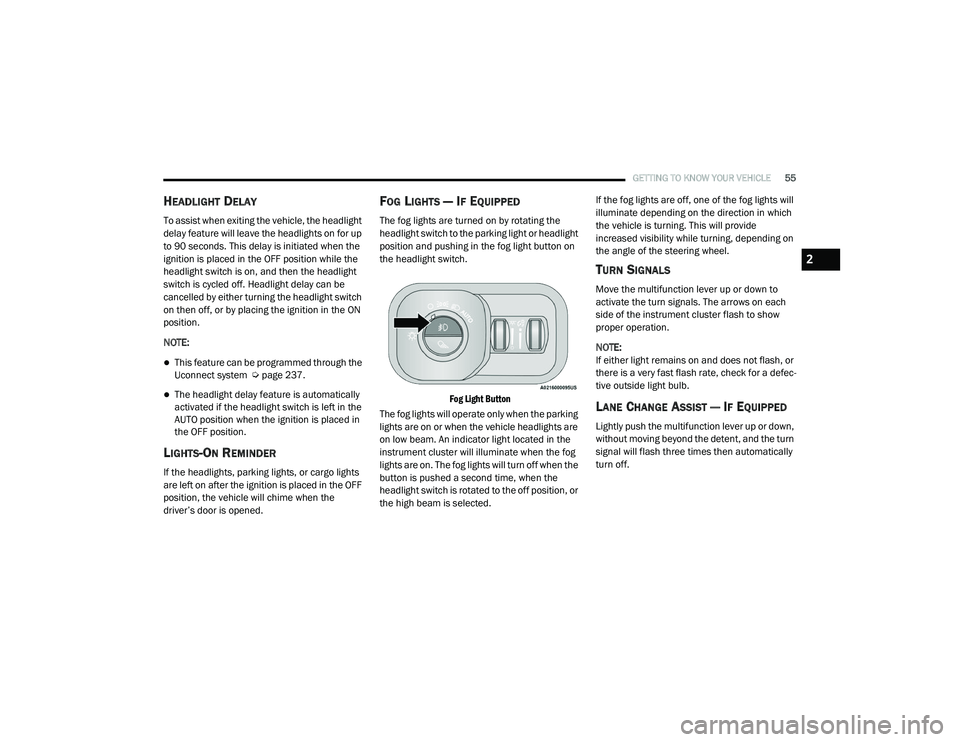
FOG LIGHTS — IF EQUIPPED
The fog lights are turned on by rotating the
headlight switch to the parking light or headlight
position and pushing in the fog light button on
the headlight switch.
Fog Light Button
The fog lights will operate only when the parking
lights are on or when the vehicle headlights are
on low beam. An indicator light located in the
instrument cluster will illuminate when the fog
lights are on. The fog lights will turn off when the
button is pushed a second time, when the
headlight switch is rotated to the off position, or
the high beam is selected. If the fog lights are off, one of the fog lights will
illuminate depending on the direction in which
the vehicle is turning. This will provide
increased visibility while turning, depending on
the angle of the steering wheel.
TURN SIGNALS
Move the multifunction lever up or down to
activate the turn signals. The arrows on each
side of the instrument cluster flash to show
proper operation.
NOTE:
If either light remains on and does not flash, or
there is a very fast flash rate, check for a defec
-
tive outside light bulb.
LANE CHANGE ASSIST — IF EQUIPPED
Lightly push the multifunction lever up or down,
without moving beyond the detent, and the turn
signal will flash three times then automatically
turn off.
2
21_DT_OM_EN_USC_t.book Page 55
Page 60 of 496

58GETTING TO KNOW YOUR VEHICLE
With the parking lights or headlights on, rotating
the right dimmer control upward will increase
the brightness of the instrument panel lights.
Rotating the left dimmer control will adjust the
interior and ambient light levels when the
headlights are on.
NOTE:
The dimming of the touchscreen is program -
mable through the Uconnect system
Ú page 237.
ILLUMINATED ENTRY
The courtesy lights will turn on when you use the
key fob to unlock the doors or open any door.
This feature also turns on the approach lamps
located beneath the outside mirrors (if
equipped).
The lights will fade to off after approximately
30 seconds, or they will immediately fade to off
once the ignition switch is placed in the ON/
RUN position from the OFF position.
The front courtesy overhead console and door
courtesy lights will not turn off if the Dome ON
button on the overhead console is pushed. The
overhead and door courtesy lights will turn off
after 10 minutes to protect the battery. The illuminated entry system will not operate if
the Dome Defeat button on the overhead
console is pushed.
NOTE:
If your vehicle is equipped with Illuminated
Approach lights under the outside mirrors, they
will also be turned off by pushing the Dome
Defeat button.
WINDSHIELD WIPERS AND WASHERS
The windshield wiper/washer controls are
located on the multifunction lever on the left
side of the steering column. The front wipers are
operated by rotating a switch, located on the
end of the lever.
Windshield Wiper/Washer Lever
WINDSHIELD WIPER OPERATION
Intermittent Wipers
The intermittent feature of this system was
designed for use when weather conditions
make a single wiping cycle, with a variable
pause between cycles, desirable. For maximum
delay between cycles, rotate the control knob
upward to the first detent.
The delay interval decreases as you rotate the
knob until it enters the low continual speed
position. The delay can be regulated from a
maximum of about 18 seconds between cycles,
to a cycle every one second. The delay intervals
will double in duration when the vehicle speed
is 10 mph (16 km/h) or less.Windshield Washers
To use the windshield washer, push the washer
knob, located on the end of the multifunction
lever, inward and hold. Washer fluid will be
sprayed and the wiper will operate for two to
three cycles after the washer knob is released.
If the washer knob pushed while in the delay
range, the wiper will operate for several
seconds after the washer knob is released. It
will then resume the intermittent interval
previously selected. If the washer knob is
21_DT_OM_EN_USC_t.book Page 58
Page 68 of 496

66GETTING TO KNOW YOUR VEHICLE
NOTE:
It is not necessary to move the temperature
settings for cold or hot vehicles. The system
automatically adjusts the temperature,
mode, and blower speed to provide comfort
as quickly as possible.
The temperature can be displayed in US or
Metric units by selecting the US/Metric
customer-programmable feature within
Uconnect Settings Úpage 237.
To provide you with maximum comfort in the
Automatic mode during cold start-ups, the
blower fan will remain on low until the engine
warms up. The blower will increase in speed
and transition into Auto mode.
Manual Operation Override
This system offers a full complement of manual
override features. The AUTO symbol in the front
ATC display will be turned off when the system
is being used in the manual mode.
CLIMATE VOICE RECOGNITION
Adjust vehicle temperatures hands-free and
keep everyone comfortable while you keep
moving ahead. Push the VR button on the steering wheel. After
the beep, say one of the following commands:
“
Set driver temperature to 70 degrees ”
“Set passenger temperature to 70 degrees ”
Did you know: Voice Command for Climate may
only be used to adjust the interior temperature
of your vehicle. Voice Command will not work to
adjust the heated seats or steering wheel if
equipped.
OPERATING TIPS
NOTE:
Refer to the chart at the end of this section for
suggested control settings for various weather
conditions.
Summer Operation
The engine cooling system must be protected
with a high-quality antifreeze coolant to provide
proper corrosion protection and to protect
against engine overheating. OAT coolant
(conforming to MS.90032) is recommended.
Winter Operation
To ensure the best possible heater and
defroster performance, make sure the engine
cooling system is functioning properly and the proper amount, type, and concentration of
coolant is used. Use of the Air Recirculation
mode during Winter months is not
recommended, because it may cause window
fogging.
Vacation/Storage
For information on maintaining the Climate
Control system when the vehicle is being stored
for an extended period of time, see
Ú
page 461.
Window Fogging
Vehicle windows tend to fog on the inside in
mild, rainy, and/or humid weather. To clear the
windows, select Defrost or Mix mode and
increase the front blower speed. Do not use the
Recirculation mode without A/C for long
periods, as fogging may occur.
Outside Air Intake
Make sure the air intake, located directly in
front of the windshield, is free of obstructions,
such as leaves. Leaves collected in the air
intake may reduce airflow, and if they enter the
air distribution box, they could plug the water
drains. In Winter months, make sure the air
intake is clear of ice, slush, and snow.
21_DT_OM_EN_USC_t.book Page 66
Page 86 of 496
84GETTING TO KNOW YOUR VEHICLE
Venting Sunroof — Express
Push and release the Vent button within one
half second and the sunroof will open to the
vent position. This is called “Express Vent” and
it will occur regardless of sunroof position.
During Express Vent operation, any movement
of the switch will stop the sunroof.
NOTE:
If the sunshade was not already open, it will
automatically open prior to the roof opening to
the vent position.
Ignition Off Operation
The power sunroof switch will remain active for
up to approximately 10 minutes after the
ignition switch is placed in the OFF position.
Opening either front door will cancel this
feature.
NOTE:
Ignition Off time is programmable through the
Uconnect system Úpage 237.
Sunroof Maintenance
Use only a non-abrasive cleaner and a soft cloth
to clean the glass panel. Periodically check for
and clear out any debris that may have
collected in the tracks.
HOOD
TO OPEN THE HOOD
To open the hood, two latches must be
released.
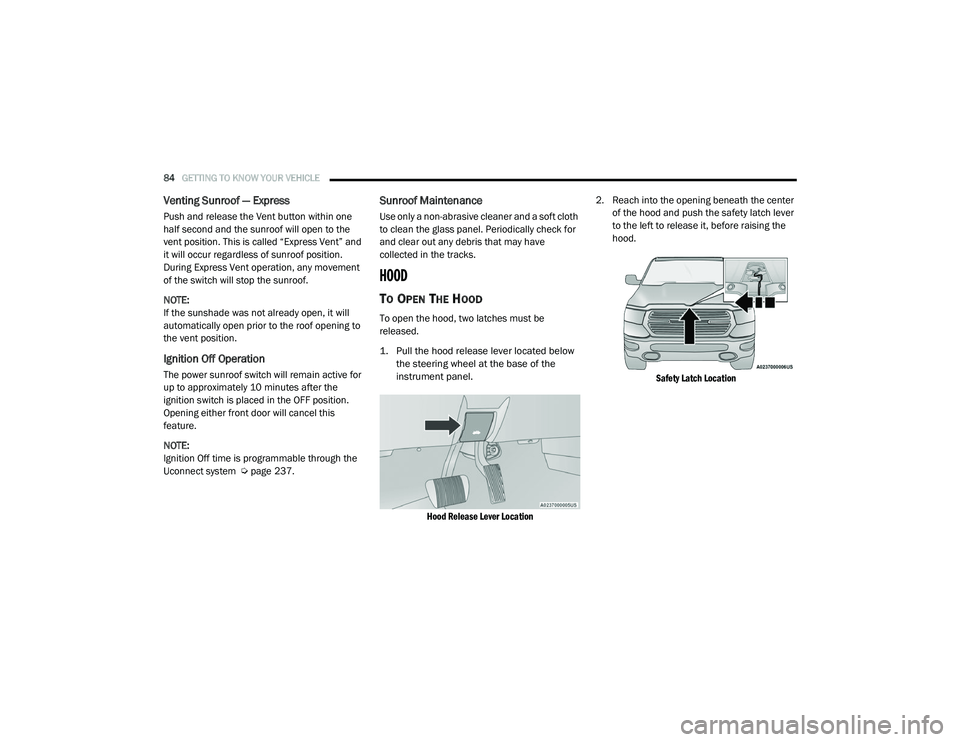
1. Pull the hood release lever located below
the steering wheel at the base of the
instrument panel.
Hood Release Lever Location
2. Reach into the opening beneath the center
of the hood and push the safety latch lever
to the left to release it, before raising the
hood.
Safety Latch Location
21_DT_OM_EN_USC_t.book Page 84
Page 96 of 496
94GETTING TO KNOW YOUR VEHICLE
(Continued)
The interior of the RamBox will automatically
illuminate when the lid is opened. The timing
can be adjusted within Uconnect Settings
Úpage 237.
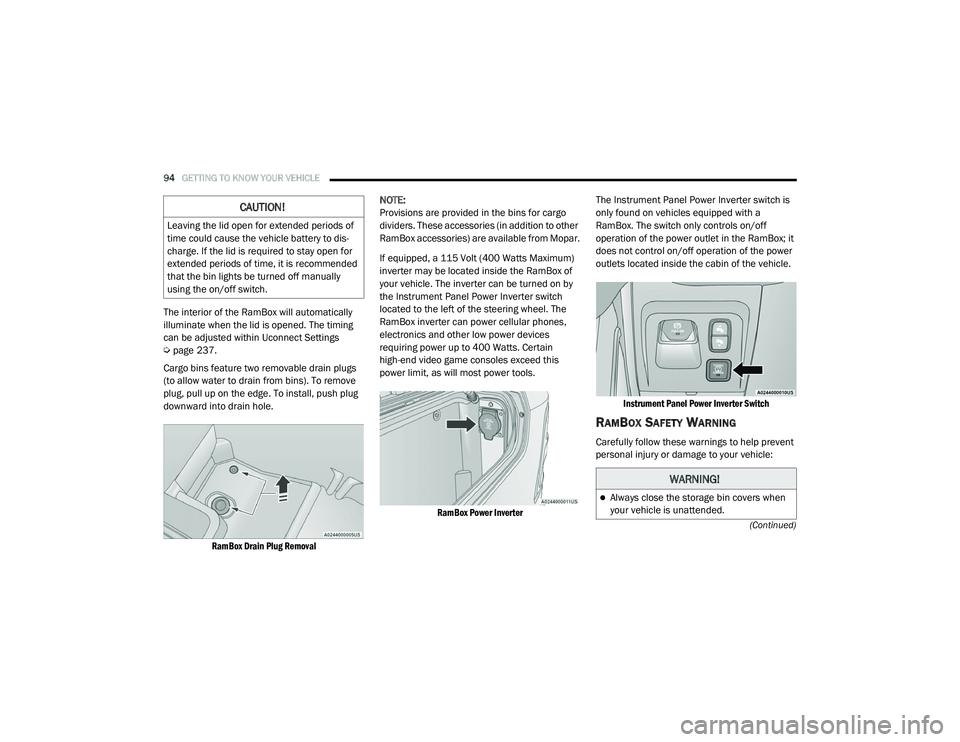
Cargo bins feature two removable drain plugs
(to allow water to drain from bins). To remove
plug, pull up on the edge. To install, push plug
downward into drain hole.
RamBox Drain Plug Removal
NOTE:
Provisions are provided in the bins for cargo
dividers. These accessories (in addition to other
RamBox accessories) are available from Mopar.
If equipped, a 115 Volt (400 Watts Maximum)
inverter may be located inside the RamBox of
your vehicle. The inverter can be turned on by
the Instrument Panel Power Inverter switch
located to the left of the steering wheel. The
RamBox inverter can power cellular phones,
electronics and other low power devices
requiring power up to 400 Watts. Certain
high-end video game consoles exceed this
power limit, as will most power tools.
RamBox Power Inverter
The Instrument Panel Power Inverter switch is
only found on vehicles equipped with a
RamBox. The switch only controls on/off
operation of the power outlet in the RamBox; it
does not control on/off operation of the power
outlets located inside the cabin of the vehicle.
Instrument Panel Power Inverter Switch
RAMBOX SAFETY WARNING
Carefully follow these warnings to help prevent
personal injury or damage to your vehicle:
CAUTION!
Leaving the lid open for extended periods of
time could cause the vehicle battery to dis -
charge. If the lid is required to stay open for
extended periods of time, it is recommended
that the bin lights be turned off manually
using the on/off switch.
WARNING!
Always close the storage bin covers when
your vehicle is unattended.
21_DT_OM_EN_USC_t.book Page 94
Page 116 of 496

114GETTING TO KNOW YOUR INSTRUMENT PANEL
INSTRUMENT CLUSTER DISPLAY
Your vehicle will be equipped with an
instrument cluster display, which offers useful
information to the driver. With the ignition in the
OFF mode, opening/closing of a door will
activate the display for viewing, and display the
total miles, or kilometers, in the odometer. Your
instrument cluster display is designed to display
important information about your vehicle’s
systems and features. Using a driver interactive
display located on the instrument panel, your
instrument cluster display can show you how
systems are working and give you warnings
when they are not. The steering wheel mounted
controls allow you to scroll through the main
menus and submenus. You can access the
specific information you want and make
selections and adjustments.
INSTRUMENT CLUSTER DISPLAY
C
ONTROLS
The instrument cluster display features a driver
interactive display that is located in the
instrument cluster.
Instrument Cluster Display/Controls Location
The instrument cluster display menu items may
consist of the following:
Speedometer
Vehicle Info
Off-Road — If Equipped
Driver Assist (show/hide) — If Equipped
Fuel Economy (show/hide)
Stop/Start — If Equipped
Trip Info (show/hide)
Trailer Tow (show/hide) — If Equipped
Audio (show/hide)
Messages
Screen Set Up
The system allows the driver to select
information by pushing the following instrument
cluster display control buttons located on the
left side of the steering wheel.
Instrument Cluster Display Control Buttons
1 – Instrument Cluster Display Controls
2 – Instrument Cluster Display Screen
21_DT_OM_EN_USC_t.book Page 114
Page 118 of 496

116GETTING TO KNOW YOUR INSTRUMENT PANEL
DISPLAY MENU ITEMS
Push and release the up or down arrow
button until the desired selectable menu icon is
highlighted in the instrument cluster display.
Speedometer
Push and release the up or down arrow
button until the speedometer menu item is
highlighted in the instrument cluster display.
Push and release the OK button to cycle the
display between mph and km/h.
Vehicle Info
Push and release the up or down arrow
button until the Vehicle Info menu icon is
displayed in the instrument cluster display.
Push and release the left or right arrow
button to scroll through the information
submenus and push and release the OK button
to select or reset the resettable submenus.
Tire Pressure Monitor System
Air Suspension — If Equipped
Coolant Temperature — If Equipped
Trans Temperature (Automatic only)
Oil Temperature
Oil Pressure — If Equipped
Oil Life
Battery Voltage — If Equipped
Gauge Summary — If Equipped
Coolant Temp
Trans Temp
Oil Temp
Oil Pressure
Engine Hours
Off-Road
Push and release the up or down arrow
button until the Off-Road menu icon is displayed
in the instrument cluster display. Push and
release the left or right arrow button to
scroll through the information submenus.
Drivetrain
Front Wheel Angle: displays the graphical
and numerical value of calculated
average front wheel angle from the
steering wheel orientation.
Transfer Case Lock Status: displays
“Lock” graphic only during 4WD High,
4WD High Part Time, 4WD Low status.
Axle Lock And Sway Bar Status (If
Equipped): displays front and rear or rear
only axle locker graphic, and sway bar
connection graphic with text message
(connected or disconnected).
Pitch And Roll
Displays the pitch and roll of the vehicle
in the graphic with the angle number on
the screen.
NOTE:
When vehicle speed becomes too high to
display the pitch and roll, “- -” will display in
place of the numbers, and the graphic will be
greyed out. A message indicating the necessary
speed for the feature to become available will
also display.
Driver Assist — If Equipped
The Driver Assist menu displays the status of
the ACC and LaneSense systems.
Push and release the up or down arrow
button until the Driver Assist menu is displayed
in the instrument cluster display.
21_DT_OM_EN_USC_t.book Page 116
Page 119 of 496

GETTING TO KNOW YOUR INSTRUMENT PANEL117
Adaptive Cruise Control (ACC) Feature
The instrument cluster display displays the
current Adaptive Cruise Control (ACC) system
settings. The information displayed depends on
ACC system status.
Push the Adaptive Cruise Control (ACC) on/off
button (located on the steering wheel) until one
of the following displays in the instrument
cluster display:
Adaptive Cruise Control Off
When ACC is deactivated, the display will read
“Adaptive Cruise Control Off.”
Adaptive Cruise Control Ready
When ACC is activated but the vehicle speed
setting has not been selected, the display will
read “Adaptive Cruise Control Ready.”
Push the SET + or the SET- button (located on
the steering wheel) and the following will display
in the instrument cluster display:
ACC SET
When ACC is set, the set speed will display in
the instrument cluster Úpage 179.The ACC screen may display once again if any
ACC activity occurs, which may include any of
the following:
Distance Setting Change
System Cancel
Driver Override
System Off
ACC Proximity Warning
ACC Unavailable Warning
LaneSense — If Equipped
The instrument cluster display displays the
current LaneSense system settings. The
information displayed depends on LaneSense
system status and the conditions that need to
be met Ú page 137.
Fuel Economy
Push and release the up or down arrow
button until the Fuel Economy menu item is
highlighted in the instrument cluster display.
Push and hold the OK button to reset Average
Fuel Economy.
Current Fuel Economy
Average Fuel Economy
Range To Empty
Trip Info
Push and release the up or down arrow
button until the Trip menu item is highlighted in
the instrument cluster display. Push and
release the right or left arrow button to
enter the submenus of Trip A and Trip B. The
Trip A or Trip B information will display the
following:
Distance
Average Fuel Economy
Elapsed Time
Push and hold OK button to reset all
information.
Stop/Start — If Equipped
Push and release the up or down arrow
button until the Stop/Start icon/title is
highlighted in the instrument cluster display.
The screen will display the Stop/Start status.
3
21_DT_OM_EN_USC_t.book Page 117
Page 131 of 496
GETTING TO KNOW YOUR INSTRUMENT PANEL129
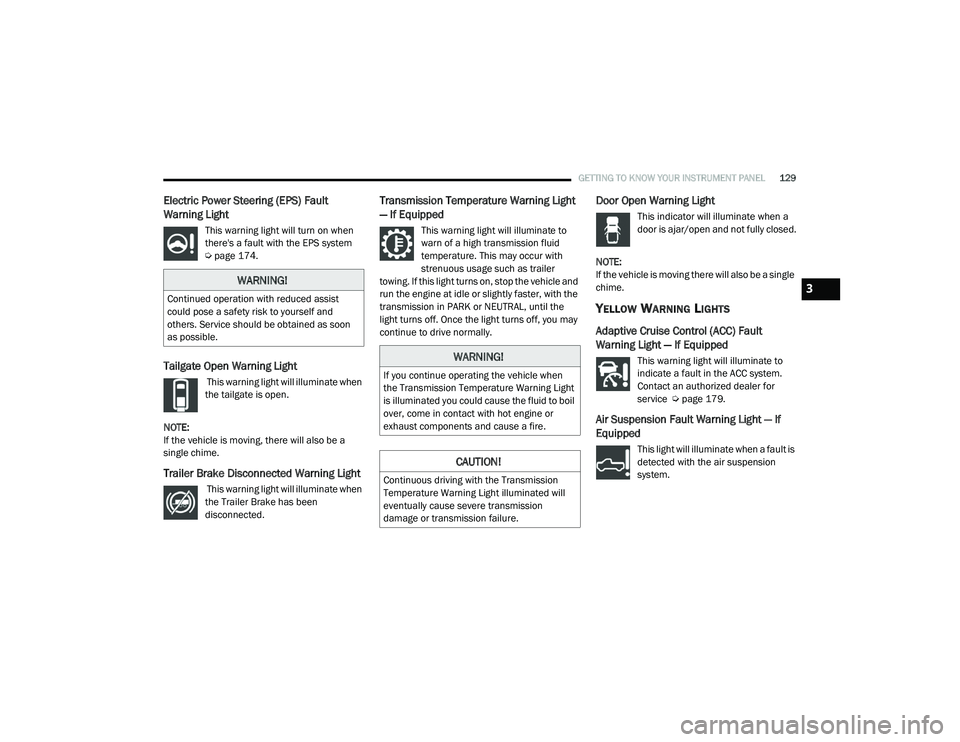
Electric Power Steering (EPS) Fault
Warning Light
This warning light will turn on when
there's a fault with the EPS system
Úpage 174.
Tailgate Open Warning Light
This warning light will illuminate when
the tailgate is open.
NOTE:
If the vehicle is moving, there will also be a
single chime.
Trailer Brake Disconnected Warning Light
This warning light will illuminate when
the Trailer Brake has been
disconnected.
Transmission Temperature Warning Light
— If Equipped
This warning light will illuminate to
warn of a high transmission fluid
temperature. This may occur with
strenuous usage such as trailer
towing. If this light turns on, stop the vehicle and
run the engine at idle or slightly faster, with the
transmission in PARK or NEUTRAL, until the
light turns off. Once the light turns off, you may
continue to drive normally.
Door Open Warning Light
This indicator will illuminate when a
door is ajar/open and not fully closed.
NOTE:
If the vehicle is moving there will also be a single
chime.
YELLOW WARNING LIGHTS
Adaptive Cruise Control (ACC) Fault
Warning Light — If Equipped
This warning light will illuminate to
indicate a fault in the ACC system.
Contact an authorized dealer for
service Ú page 179.
Air Suspension Fault Warning Light — If
Equipped
This light will illuminate when a fault is
detected with the air suspension
system.
WARNING!
Continued operation with reduced assist
could pose a safety risk to yourself and
others. Service should be obtained as soon
as possible.
WARNING!
If you continue operating the vehicle when
the Transmission Temperature Warning Light
is illuminated you could cause the fluid to boil
over, come in contact with hot engine or
exhaust components and cause a fire.
CAUTION!
Continuous driving with the Transmission
Temperature Warning Light illuminated will
eventually cause severe transmission
damage or transmission failure.
3
21_DT_OM_EN_USC_t.book Page 129