ECO mode RAM 1500 2021 Manual PDF
[x] Cancel search | Manufacturer: RAM, Model Year: 2021, Model line: 1500, Model: RAM 1500 2021Pages: 496, PDF Size: 20.89 MB
Page 276 of 496

274MULTIMEDIA
NOTE:
If there are no phones currently connected
with the system, a pop-up will appear asking
if you would like to pair a mobile phone.
This pop-up only appears when the user
enters Phone Mode and no other device(s)
have previously been paired. If the system
has a phone previously paired, even if no
phone is currently connected with the
system, this pop-up will not appear.
3. Select “Yes” to begin the pairing process.
4. Search for available devices on your Bluetooth®-enabled mobile phone.
Press the Settings button on your mobile
phone.
Select “Bluetooth®” and ensure it is
enabled. Once enabled, the mobile
phone will begin to search for Bluetooth®
connections.
NOTE:
During the pairing procedure, you may receive a
pop-up on your touchscreen asking you to make
sure the PIN on the touchscreen matches the
PIN from the pop-up on your mobile phone. 5. If “No” is selected, and you still would like to
pair a mobile phone, press the Pairing or
Settings button from the Uconnect Phone
main screen.
Press the Paired Phones button.
Search for available devices on your
Bluetooth®-enabled mobile phone (see
below). When prompted on the phone,
select “Uconnect” and accept the
connection request.
6. Uconnect Phone will display an in-progress screen while the system is connecting.
7. When your mobile phone finds the Uconnect system, select “Uconnect.”
8. When prompted on the mobile phone, accept the connection request from
Uconnect.
9. When the pairing process has successfully completed, the system will prompt you to
choose whether or not this is your favorite
phone. Selecting “Yes” will make this phone
the highest priority. This phone will take
precedence over other paired phones within
range and will connect to the Uconnect
system automatically when entering the vehicle. Only one mobile phone and/or one
Bluetooth® audio device can be connected
to the Uconnect system at a time. If “No” is
selected, simply select “Uconnect” from the
mobile phone/audio device Bluetooth®
screen, and the Uconnect system will
reconnect to the Bluetooth® device.
NOTE:
For phones which are not made a favorite, the
phone priority is determined by the order in
which it was paired. The most recent phone
paired will have the higher priority.
NOTE:
During the pairing procedure, you may receive a
pop-up on your mobile phone for the Uconnect
system to access your “messages” and
“contacts”. Selecting “Ok” or “Allow” will sync
your contacts with the Uconnect system.
You can also use the following VR command to
bring up the Paired Phone screen from any
screen on the radio:
“Show Paired Phones”
NOTE:
Software updates on your phone or the
Uconnect system may interfere with the Blue -
21_DT_OM_EN_USC_t.book Page 274
Page 283 of 496

MULTIMEDIA281
NOTE:
Only use the numbering listed in the provided
table. Otherwise, the system will not transpose
the message. Did You Know:
Your mobile phone must have the
full implementation of the Message Access Profile
(MAP) to take advantage of this feature. For
details about MAP, visit UconnectPhone.com.
Apple® iPhone® iOS 6 or later supports reading
incoming text messages only. For further
information on how to enable this feature on
your Apple® iPhone®, refer to your iPhone’s®
“User Manual”.
Did You Know: Voice Text Reply is not
compatible with iPhone®, but if your vehicle is
equipped with Siri® Eyes Free, you can use your
voice to send a text message.
Siri® Eyes Free — If Equipped
When used with your Apple® iPhone®
connected to your vehicle via Bluetooth®, Siri
lets you use your voice to send text messages,
select media, place phone calls and much
more. Siri uses your natural language to
understand what you mean and responds back
to confirm your requests. The system is
designed to keep your eyes on the road and
your hands on the wheel by letting Siri help you
perform useful tasks. To enable Siri, push and hold, then release the
Uconnect Voice Recognition (VR) button on the
steering wheel. After you hear a double beep,
you can ask Siri to play podcasts and music, get
directions, read text messages, and many other
useful requests.
Bluetooth® Communication Link
Mobile phones may lose connection to the
Uconnect Phone. When this happens, the
connection can generally be re-established by
restarting the mobile phone. Your mobile phone
is recommended to remain in Bluetooth® ON
mode.
Power-Up
After switching the ignition key from OFF to
either the ON/RUN or ACC position, or after a
language change, you must wait at least
15 seconds prior to using the system
Ú
page 482.
PRE-DEFINED VOICE TEXT REPLY
RESPONSES
Yes. Stuck in
traffic. See you later.
No. Start without
me. I’ll be late.
Okay. Where are
you? I will be 5
25, 30, 45,
60> minutes late.
Call me.
Are you there
yet?
I’ll call you later. I need
directions. See you in 5
minutes.
I’m on my
way. Can’t talk
right now.
I’m lost. Thanks.
5
21_DT_OM_EN_USC_t.book Page 281
Page 303 of 496
MULTIMEDIA301
To get started with Uconnect Market on the
touchscreen:
1. Press the Market button in the Uconnect
App drawer.
2. Press “Get Started”.
3. Press “Text Me A Link” and enter your phone number to receive a text message
with instructions on how to set up Uconnect
Market.
NOTE:
If the text message does not come through,
press the Resend Text button. It might take a
minute to receive the text message.
4. Once you receive the text message, press the link provided. You will be directed to a
Sign-in screen. Enter your email and
password. You will now be able to use
Uconnect Market.
5. If you do not have an account, press “Register Now” to create one.
6. Accept the Uconnect market Terms of Service.
7. Enter your credit card information, and press “Next”. 8. Enter your phone number, and press “Next”.
9. The system will verifying the phone number.
Once verified, Uconnect Market will be
available to use. Press the OK button.
From the online portal, https://
market.mopar.com/home, you can link loyalty
accounts and start receiving benefits from them
while still using Uconnect Market and view your
purchase history.
MANAGE MY SIRIUSXM GUARDIAN™
A
CCOUNT
To manage your SiriusXM Guardian™ account,
press the ASSIST button in your vehicle, or call
SiriusXM Guardian™ Customer Care.
NOTE:
It is recommended, when selling your vehicle, or
turning in your lease, to call SiriusXM
Guardian™ Care to remove your personal data.
CONNECTED SERVICES FAQS
For additional information about SiriusXM
Guardian™, active subscribers can push the
ASSIST button and then select SiriusXM
Guardian™ Call on your in-vehicle touchscreen
to contact SiriusXM Guardian™. Your call will be directed to a SiriusXM Guardian™ agent or held
in a queue until an agent is available. If you do
not have an active subscription, push the
ASSIST button and click the Activate button on
the touchscreen to activate services.
CONNECTED SERVICES SOS FAQS
1.
What happens if I accidentally push the SOS
Call button on the mirror?
You have
10 seconds after pushing the SOS Call
button to cancel the call. To cancel the call,
either push the SOS Call button again, or
press the Cancel button on the in-vehicle
touchscreen.
2. What type of information is sent when I use
the SOS Call button from my vehicle?
Certain vehicle information, such as make
and model, is transmitted along with the
last known GPS location.
3. When could I use the SOS Call button? You
can use the SOS Call button to make a call
if you or someone else needs emergency
assistance.
5
21_DT_OM_EN_USC_t.book Page 301
Page 313 of 496

SAFETY311
Anti-Lock Brake System (ABS) Warning
Light
The yellow ABS Warning Light will turn on when
the ignition is placed in the ON/RUN mode and
may stay on for as long as four seconds.
If the ABS Warning Light remains on or comes
on while driving, it indicates that the anti-lock
portion of the brake system is not functioning
and that service is required. However, the
conventional brake system will continue to
operate normally if the ABS Warning Light is on.
If the ABS Warning Light is on, the brake system
should be serviced as soon as possible to
restore the benefits of anti-lock brakes. If the
ABS Warning Light does not come on when the
ignition is placed in the ON/RUN mode, have
the light repaired as soon as possible.
ELECTRONIC BRAKE CONTROL (EBC)
S
YSTEM
Your vehicle is equipped with an advanced
Electronic Brake Control (EBC) system. This
system includes Anti-Lock Brake System (ABS),
Brake Assist System (BAS), Electronic Brake
Force Distribution (EBD), Electronic Roll
Mitigation (ERM), Electronic Stability Control
(ESC), Hill Start Assist (HSA), and Traction Control System (TCS). These systems work
together to enhance both vehicle stability and
control in various driving conditions.
Your vehicle may also be equipped with Trailer
Sway Control (TSC) and Hill Descent Control
(HDC).
Brake Assist System (BAS)
The BAS is designed to optimize the vehicle’s
braking capability during emergency braking
maneuvers. The system detects an emergency
braking situation by sensing the rate and
amount of brake application, and then applies
optimum pressure to the brakes. This can help
reduce braking distances. The BAS
complements the Anti-Lock Brake System
(ABS). Applying the brakes very quickly results
in the best BAS assistance. To receive the
benefit of the system, you must apply
continuous braking pressure during the
stopping sequence (do not “pump” the brakes).
Do not reduce brake pedal pressure unless
braking is no longer desired. Once the brake
pedal is released, the BAS is deactivated.
Brake System Warning Light
The red Brake System Warning Light will turn on
when the ignition is placed in the ON/RUN
mode and may stay on for as long as four
seconds.
If the Brake System Warning Light remains on or
comes on while driving, it indicates that the
brake system is not functioning properly and
that immediate service is required. If the Brake
System Warning Light does not come on when
the ignition is placed in the ON/RUN mode,
have the light repaired as soon as possible.
WARNING!
The Brake Assist System (BAS) cannot
prevent the natural laws of physics from
acting on the vehicle, nor can it increase the
traction afforded by prevailing road
conditions. BAS cannot prevent collisions,
including those resulting from excessive
speed in turns, driving on very slippery
surfaces, or hydroplaning. The capabilities of
a BAS-equipped vehicle must never be
exploited in a reckless or dangerous manner,
which could jeopardize the user's safety or
the safety of others.
6
21_DT_OM_EN_USC_t.book Page 311
Page 315 of 496
SAFETY313
(Continued)
ESC Operating Modes
Depending upon model and mode of operation,
the ESC system may have multiple operating
modes. ESC On
This is the normal operating mode for the ESC.
Whenever the vehicle is started, the ESC system
will be in this mode. This mode should be used
for most driving conditions. Alternate ESC
modes should only be used for specific reasons
as noted in the following paragraphs.
Partial Off
This mode may be useful if the vehicle becomes
stuck. This mode may modify TCS and ESC
thresholds for activation, which allows for more
wheel spin than normally allowed.
To enter the “Partial Off” mode, momentarily
push the ESC OFF switch and the ESC OFF
Indicator Light will illuminate. To turn the ESC
on again, momentarily push the ESC OFF switch
and the ESC OFF Indicator Light will turn off.
NOTE:
For vehicles with multiple partial ESC modes,
the push and release of the button will toggle
the ESC modes. Multiple attempts may be
required to return to “ESC On”.
WARNING!
Electronic Stability Control (ESC) cannot
prevent the natural laws of physics from
acting on the vehicle, nor can it increase
the traction afforded by prevailing road
conditions. ESC cannot prevent accidents,
including those resulting from excessive
speed in turns, driving on very slippery
surfaces, or hydroplaning. ESC also cannot
prevent accidents resulting from loss of
vehicle control due to inappropriate driver
input for the conditions. Only a safe, atten
-
tive, and skillful driver can prevent acci -
dents. The capabilities of an ESC equipped
vehicle must never be exploited in a reck -
less or dangerous manner which could
jeopardize the user’s safety or the safety of
others.Vehicle modifications, or failure to properly
maintain your vehicle, may change the
handling characteristics of your vehicle,
and may negatively affect the performance
of the ESC system. Changes to the steering
system, suspension, braking system, tire
type and size or wheel size may adversely
affect ESC performance. Improperly
inflated and unevenly worn tires may also
degrade ESC performance. Any vehicle
modification or poor vehicle maintenance
that reduces the effectiveness of the ESC
system can increase the risk of loss of
vehicle control, vehicle rollover, personal
injury and death.
WARNING! (Continued)
6
21_DT_OM_EN_USC_t.book Page 313
Page 316 of 496
314SAFETY
(Continued)
Full Off — If Equipped
This mode is intended for off-highway or
off-road use only and should not be used on any
public roadways. In this mode, TCS and ESC
features are turned off. To enter the “Full Off”
mode, push and hold the ESC OFF switch for five
seconds while the vehicle is stopped with the
engine running. After five seconds, a chime will
sound, the ESC OFF Indicator Light will
illuminate, and the “ESC OFF” message will
display in the instrument cluster. To turn ESC on
again, momentarily push the ESC OFF switch.NOTE:
System may switch from ESC “Full Off” to
“Partial Off” mode when vehicle exceeds a
predetermined speed. When the vehicle speed
slows below the predetermined speed the
system will return to ESC “Full Off”.
ESC modes may also be affected by drive
modes (if equipped).
ESC Activation/Malfunction Indicator Light
And ESC OFF Indicator Light
The ESC Activation/Malfunction
Indicator Light in the instrument
cluster will come on when the ignition
is placed in the ON/RUN mode. It
should go out with the engine running. If the
ESC Activation/Malfunction Indicator Light
comes on continuously with the engine running,
a malfunction has been detected in the ESC
system. If this light remains on after several
ignition cycles, and the vehicle has been driven
several miles (kilometers) at speeds greater
than 30 mph (48 km/h), see an authorized
dealer as soon as possible to have the problem
diagnosed and corrected.
WARNING!
When in “Partial Off” mode, the TCS func -
tionality of ESC, (except for the limited slip
feature described in the TCS section), has
been disabled and the “ESC OFF Indicator
Light” will be illuminated. When in “Partial
Off” mode, the engine power reduction
feature of TCS is disabled, and the
enhanced vehicle stability offered by the
ESC system is reduced.
Trailer Sway Control (TSC) is disabled when
the ESC system is in the “Partial Off” mode.
WARNING!
In the ESC “Full Off” mode, the engine
torque reduction and stability features are
disabled. Therefore, enhanced vehicle
stability offered by the ESC system is
unavailable. In an emergency evasive
maneuver, the ESC system will not engage
to assist in maintaining stability. ESC “Full
Off” mode is intended for off-highway or
off-road use only.
The Electronic Stability Control (ESC)
cannot prevent the natural laws of physics
from acting on the vehicle, nor can it
increase the traction afforded by prevailing
road conditions. ESC cannot prevent all
accidents, including those resulting from
excessive speed in turns, driving on very
slippery surfaces, or hydroplaning. ESC also
cannot prevent collisions.
WARNING! (Continued)
21_DT_OM_EN_USC_t.book Page 314
Page 317 of 496

SAFETY315
The ESC Activation/Malfunction Indicator Light
starts to flash as soon as the tires lose traction
and the ESC system becomes active. The ESC
Activation/Malfunction Indicator Light also
flashes when TCS is active. If the ESC
Activation/Malfunction Indicator Light begins to
flash during acceleration, ease up on the
accelerator and apply as little throttle as
possible. Be sure to adapt your speed and
driving to the prevailing road conditions.
The ESC OFF Indicator Light indicates
that the Electronic Stability Control
(ESC) is in a reduced mode.
NOTE:
The ESC Activation/Malfunction Indicator
Light and the ESC OFF Indicator Light come
on momentarily each time the ignition is
placed in the ON/RUN mode.
Each time the ignition is placed in the ON/
RUN mode, the ESC system will be on even if
it was turned off previously.
The ESC system will make buzzing or clicking
sounds when it is active. This is normal; the
sounds will stop when ESC becomes inactive
following the maneuver that caused the ESC
activation.
Hill Descent Control (HDC) — If Equipped
HDC is intended for low speed off-road driving
while in 4WD Low. HDC maintains vehicle speed
while descending hills during various driving
situations. HDC controls vehicle speed by
actively controlling the brakes.
HDC Has Three States:
1. Off (feature is not enabled and will not activate).
2. Enabled (feature is enabled and ready but activation conditions are not met, or driver
is actively overriding with brake or throttle
application).
3. Active (feature is enabled and actively controlling vehicle speed).
Enabling HDC
HDC is enabled by pushing the HDC switch, but
the following conditions must also be met to
enable HDC:
Driveline is in 4WD Low.
Vehicle speed is below 5 mph (8 km/h).
The parking brake is released.
The driver door is closed. Activating HDC
Once HDC is enabled it will activate
automatically if driven down a grade of
sufficient magnitude. The set speed for HDC is
selectable by the driver, and can be adjusted by
using the gear shift +/-. The following
summarizes the HDC set speeds:
HDC Target Set Speeds
P = No set speed. HDC may be enabled but
will not activate.
R = 0.6 mph (1 km/h)
N = 1.2 mph (2 km/h)
D = 0.6 mph (1 km/h)
1st = 0.6 mph (1 km/h)
2nd = 1.2 mph (2 km/h)
3rd = 1.8 mph (3 km/h)
4th = 2.5 mph (4 km/h)
5th = 3.1 mph (5 km/h)
6th = 3.7 mph (6 km/h)
7th = 4.3 mph (7 km/h)
8th = 5.0 mph (8 km/h)
9th = 5.6 mph (9 km/h) – If Equipped
6
21_DT_OM_EN_USC_t.book Page 315
Page 320 of 496
318SAFETY
Ready Alert Braking (RAB)
RAB may reduce the time required to reach full
braking during emergency braking situations. It
anticipates when an emergency braking
situation may occur by monitoring how fast the
throttle is released by the driver. The Electronic
Brake Control System will prepare the brake
system for a panic stop.
Traction Control System (TCS)
TCS monitors the amount of wheel spin of each
of the driven wheels. If wheel spin is detected,
the TCS may apply brake pressure to the
spinning wheel(s) and/or reduce engine power
to provide enhanced acceleration and stability.
A feature of the TCS, Brake Limited Differential
(BLD), functions similarly to a limited slip
differential and controls the wheel spin across a
driven axle. If one wheel on a driven axle is
spinning faster than the other, the system will
apply the brake of the spinning wheel. This will
allow more engine torque to be applied to the
wheel that is not spinning. BLD may remain
enabled even if TCS and Electronic Stability
Control (ESC) are in reduced modes.
Trailer Sway Control (TSC)
TSC uses sensors in the vehicle to recognize an
excessively swaying trailer and will take the
appropriate actions to attempt to stop the sway.
NOTE:
TSC cannot stop all trailers from swaying.
Always use caution when towing a trailer and
follow the trailer tongue weight recommenda -
tions Ú page 214.
When TSC is functioning, the ESC Activation/
Malfunction Indicator Light will flash, the engine
power may be reduced and you may feel the
brakes being applied to individual wheels to
attempt to stop the trailer from swaying. TSC is
disabled when the ESC system is in the “Partial
Off” or “Full Off” modes.AUXILIARY DRIVING SYSTEMS
BLIND SPOT MONITORING (BSM) — IF
E
QUIPPED
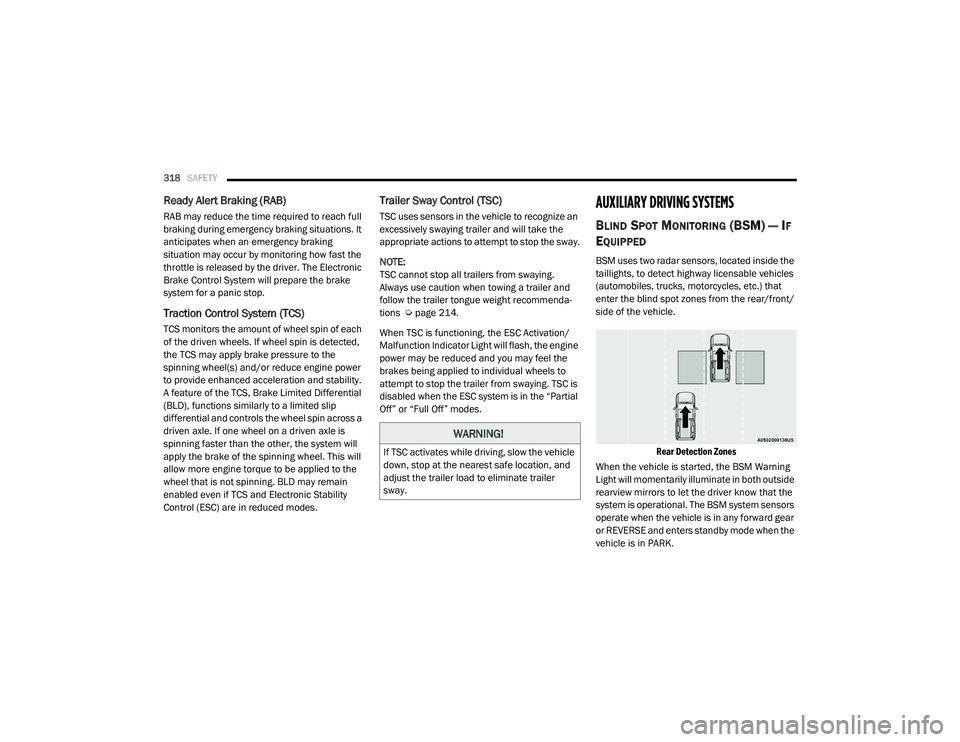
BSM uses two radar sensors, located inside the
taillights, to detect highway licensable vehicles
(automobiles, trucks, motorcycles, etc.) that
enter the blind spot zones from the rear/front/
side of the vehicle.
Rear Detection Zones
When the vehicle is started, the BSM Warning
Light will momentarily illuminate in both outside
rearview mirrors to let the driver know that the
system is operational. The BSM system sensors
operate when the vehicle is in any forward gear
or REVERSE and enters standby mode when the
vehicle is in PARK.
WARNING!
If TSC activates while driving, slow the vehicle
down, stop at the nearest safe location, and
adjust the trailer load to eliminate trailer
sway.
21_DT_OM_EN_USC_t.book Page 318
Page 325 of 496

SAFETY323
a trailer will be detected using the blind spot
radar within 90 seconds of forward move -
ment of the vehicle. The vehicle must be
moving above 6 mph (10 km/h) to activate the feature. Once the trailer has been
detected, the system will default to the
maximum blind spot zone until the length has
been verified. You will see “Auto” in the
instrument panel cluster .
Maximum Mode — When “Max Mode” is
selected, the system will default to the
maximum blind spot zone regardless of what
size trailer is attached .
NOTE:
Selected setting is stored when the ignition is
placed in the OFF position. To change this
setting, it must be selected through the
Uconnect settings Ú page 237.
Trailer Length Detection
Once the trailer presence has been established,
the trailer length will be established (by making
a 90 degree turn) and then the trailer length
category (example 10-20 ft (3 m to 6 m)) will be
displayed. This can take up to 30 seconds after
completing the turn. NOTE:
During the same ignition cycle, if the vehicle is
at a standstill for a minimum of 90 seconds, a
new “trailer detection request” is enabled by
the system once the vehicle resumes motion.
Maximum length supported by the Trailer Merge
Assist feature is 39.5 ft (12 m). Trailer length is
considered the forward most portion of the
trailer hitch to the rearward most portion of the
body, fascia/bumper, or ramp of the trailer.
Maximum width supported by the Trailer Merge
Assist feature is 8.5 ft (2.59 m). Trailer width is
measured at the widest portion of the trailer
and may include wheels, tires, finders, or rails.
NOTE:
Fifth wheel or gooseneck trailers are not
supported by Trailer Merge Assist.
NOTE:
The ability to detect a trailer may be degraded in
crowded or busy environments. Busy parking
lots, narrow areas surrounded with trees, or any
other crowded area may prevent the radar
sensors from being able to adequately detect
the trailer. The system will try to detect a trailer
at every ignition cycle or 90 seconds of stand
-
still.
Trailer Length Detection
Trailer length will be identified and placed into
one of the following categories:
Trailer length up to 10 ft (3 m) — Blind spot
zone will be adjusted to 10 ft (3 m) .
Trailer length between 10 ft to 20 ft (3 m to
6 m) — Blind spot zone will be adjusted to
20 ft (6 m) .
Trailer length between 20 ft to 30 ft (6 m to
9 m) — Blind spot zone will be adjusted to
30 ft (9 m) .
1 — Trailer Length
2 — Trailer Width
3 — Trailer Hitch
6
21_DT_OM_EN_USC_t.book Page 323
Page 333 of 496
SAFETY331
warning limit, upon the next ignition switch
cycle, the Tire Pressure Monitoring System
(TPMS) Warning Light and a “LOW TIRE”
message will remain on and a chime will
sound. In addition, the graphic in the instru -
ment cluster will still display a pressure value
in a different color and an “Inflate to XX”
message.
After driving the vehicle for up to 20 minutes
above 15 mph (24 km/h), the Tire Pressure
Monitoring System (TPMS) Warning Light will
flash on and off for 75 seconds and then
remain on solid. In addition, the instrument
cluster will display a "SERVICE TPMS
SYSTEM" message for a minimum of five
seconds and then display dashes (--) in place
of the pressure value.
For each subsequent ignition switch cycle, a
chime will sound, the Tire Pressure Moni -
toring System (TPMS) Warning Light will flash
on and off for 75 seconds and then remain
on solid, and the instrument cluster will
display a "SERVICE TPMS SYSTEM" message
for a minimum of five seconds and then
display dashes (--) in place of the pressure
value.
Once you repair or replace the original road
tire and reinstall it on the vehicle in place of
the non-matching full size spare or compact
spare, the TPMS will update automatically. In
addition, the Tire Pressure Monitoring
System (TPMS) Warning Light will turn off and
the graphic in the instrument cluster will
display a new pressure value instead of
dashes (--), as long as no tire pressure is
below the low-pressure warning limit in any of
the four active road tires. The vehicle may
need to be driven for up to 20 minutes above
15 mph (24 km/h) in order for the TPMS to
receive this information.
Tire Fill Alert
This feature notifies the user when the placard
tire pressure is attained while inflating or
deflating the tire.
You may choose to disable or enable the Tire Fill
Alert feature through use of the Uconnect
Settings in the radio.
NOTE:
Only one tire can be filled at a time when
using the Tire Fill Alert system.
The Tire Fill Alert feature cannot be entered if
an existing TPMS fault is set to “active” or if
the system is in deactivation mode (if
equipped).
The system will be activated when a positive
increase in tire pressure is detected by the
TPMS while inflating the tire. The ignition must
be in the RUN mode, with the transmission in
PARK.
NOTE:
It is not required to have the engine running to
enter Tire Fill Alert mode.
The hazard lamps will come on to confirm the
vehicle is in Tire Fill Alert mode.
When Tire Fill Alert mode is entered, the tire
pressure display screen will be displayed in the
instrument cluster.
If the hazard lamps do not come on while
inflating the tire, the TPMS sensor may be out of
range preventing the TPMS sensor signal from
being received. In this case, the vehicle may
need to be moved either forward or backward
slightly to exit the null spot.
6
21_DT_OM_EN_USC_t.book Page 331