radio RAM 1500 2023 Workshop Manual
[x] Cancel search | Manufacturer: RAM, Model Year: 2023, Model line: 1500, Model: RAM 1500 2023Pages: 416, PDF Size: 20.59 MB
Page 246 of 416
244MULTIMEDIA
Assist — If Equipped
Description
Vehicles equipped with the SiriusXM Guardian™
connected services feature may contain an ASSIST button
in the vehicle. Once your SiriusXM Guardian™ connected
services have been activated, the ASSIST button can
connect you directly to the Customer Care call center
(if equipped). You will be directed to one of the following
four services:
Roadside Assistance — If you get a flat tire or need a
tow, you’ll be connected to someone who can help
anytime.
Connected Services — Contact the SiriusXM
Guardian™ Customer Care call center to activate your
services, renew after your trial has expired, for
in-vehicle support for your SiriusXM Guardian™
connected services, or help answering any general
questions surrounding your connected services.
Uconnect Care — In-vehicle support for all
non-connected Uconnect system features, such as
radio and Bluetooth® connections.
Vehicle Care — Total support for your vehicle.
SiriusXM Guardian™ In-Vehicle Assistance Features —
If Equipped
With SiriusXM Guardian™, your vehicle has onboard
assistance features located on the rearview mirror or
overhead console designed to enhance your driving
experience if you should ever need assistance or support. How It Works
Simply push the ASSIST button in the vehicle and you will
be presented with your ASSIST options on the
touchscreen. Make your selection by pressing the
touchscreen.
Requirements
This feature is available only on vehicles sold in the US
and Canada.
Vehicle must be properly equipped with the SiriusXM
Guardian™ connected services.
Vehicle must have an operable LTE (voice/data) or 4G
(data) network connection.
Vehicle must be registered with SiriusXM Guardian™
and have an active subscription that includes the appli -
cable feature.
Vehicle must be powered in the ON/RUN or ACC
(Accessory) position with a properly functioning elec -
trical system.
Disclaimers
If Roadside Assistance Call is provided to your vehicle, you
agree to be responsible for any additional roadside
assistance service costs that you may incur. In order to
provide SiriusXM Guardian™ connected services to you,
we may record and monitor your conversations with
Roadside Assistance Call, Vehicle Care, Uconnect Care, or
SiriusXM Guardian™ Customer Care, whether such
conversations are initiated through the SiriusXM
Guardian™ connected services in your vehicle, or via a
landline or mobile device, and may share information
obtained through such recording and monitoring in
accordance with regulatory requirements. You acknowledge, agree and consent to any recording,
monitoring or sharing of information obtained through any
such call recordings.
Send & Go — If Equipped
Description
The Send & Go feature allows you to search for a
destination on your mobile device, and then send the
route to your vehicle’s Navigation system.
How It Works
1. There are multiple ways to find a destination. After
selecting the Location tab at the bottom of the App,
browse through one of the categories provided, or
type the name or keyword in the search box. You can
also select categories such as “Favorites” or
“Contact List”.
2. Select your destination from the list that appears. Location information will then be displayed on the
map.
From this screen, you will be able to:
View the location on a map.
See the distance from your current location.
Send the destination to the vehicle (Send & Go).
3. Send the destination to the Uconnect Navigation in your vehicle. You can also call the destination by
pressing the Call button.
4. Confirm your destination in the vehicle through a notification or in the Navigation system.
23_DT_OM_EN_USC_t.book Page 244
Page 247 of 416
MULTIMEDIA245
Requirements
Vehicle must have an operable LTE (voice/data) or 4G
(data) network connection compatible with your device.
Vehicle must have an active subscription that includes
the applicable feature.
Vehicle Finder
Description
The Vehicle Finder feature allows you to find the location
of your vehicle.
You can also sound the horn and flash the lights to make
finding your vehicle even easier.
How It Works
Select the Vehicle Finder function within the Vehicle
Branded App and select the Location tab at the bottom of
the App. Then, press the Vehicle icon to find your vehicle.
Requirements
Vehicle must be properly equipped with the Uconnect
system.
Vehicle must have an operable LTE (voice/data) or 4G
(data) network connection compatible with your device.
Vehicle must have an active subscription that includes
the applicable feature.
Vehicle ignition must have been turned on within
14 days.
4G Wi-Fi Hotspot — If Equipped
Description
4G Wi-Fi Hotspot is an in-vehicle service that connects
your device to an LTE (voice/data) or 4G (data) network
that is ready to go wherever you are. After you've made
your purchase, turn on your device’s Wi-Fi and connect
your devices.
Enables all your passengers to be simultaneously
connected to the web.
Connect several devices at one time.
Any Wi-Fi-enabled device — such as a laptop or any
other portable-enabled media — can connect over your
private in-vehicle network.
A high-speed, secured connection lets anyone on your
private network access the Web — great for working
and relaxing. Create A 4G Wi-Fi Hotspot For Use In Your Vehicle
How It Works
The 4G Wi-Fi Hotspot feature provides the
vehicle passengers with an internet access
hotspot in the vehicle, using the radio as an
access point. The hotspot will allow
Wi-Fi-enabled in-vehicle devices (such as a laptop or any
other portable-enabled media device) to wirelessly
connect to the internet. Uconnect offers a complimentary
3-month trial period that includes 1GB of total data. The
trial can be activated any time within the first year of new
vehicle ownership.
Use one of these three ways to purchase a subscription to
the 4G Wi-Fi Hotspot:
1. From your vehicle’s touchscreen, select the 4G Wi-Fi Hotspot App, and press the How To Purchase button
and follow the instructions.
2. Log onto your Owner’s Site and click the link to the AT&T portal to get set up.
3. For existing Connected Car customers: Push the
ASSIST button to be routed to an AT&T Customer Care
agent who will assist you.
WARNING!
The driver should NEVER use the 4G Wi-Fi Hotspot
while driving the vehicle as doing so may result in an
accident involving serious injury or death.
5
23_DT_OM_EN_USC_t.book Page 245
Page 254 of 416
252MULTIMEDIA
13.How do I find out how much longer I have on my
subscription? Contact SiriusXM Guardian™ Customer
Care.
You also can visit your Owner’s Site and choose a sub -
scription to view its expiration date. When your sub -
scription is about to expire, you will receive an email
or letter of notification.
14. Can I get a refund if I have not used the entire
subscription? Prorated refunds are provided from the
date of cancellation for annual plans or longer.
Please see the Uconnect and SiriusXM Guardian™
Terms & Conditions for refunds related to billing
plans of other lengths and other circumstances.
15. Can I cancel a subscription before it expires? Yes. If
you have an annual subscription, your subscription
will be canceled the day you cancel. If you have a
monthly subscription, your subscription will be
canceled on the last day of the month in which you
choose to cancel.
16. What should I do if I want to sell my vehicle? Before
your vehicle is sold to a new owner, you’ll want to
remove your account information. This process
removes all personal information, returns the
Uconnect system to its original factory settings,
removes all SiriusXM Guardian™ connected services
and account information. To remove your account
information from the Uconnect system, contact
SiriusXM Guardian™ Customer Care. 17.
What if I forgot to remove my account information
before I returned my lease vehicle or sold it? Contact
SiriusXM Guardian™ Customer Care.
18. What will happen if an operable LTE (voice/data), 4G
(data), or 5G (data) network connection compatible
with my device is temporarily unavailable? The SOS
Call and ASSIST buttons will NOT function if you are
not connected to an operable LTE (voice/data) or 4G
(data), 5G (data) network. Services that required your
smartphone only direct calls to Roadside Assistance
Call may be functioning if you have an operable
network.
DATA COLLECTION & PRIVACY
The Uconnect system collects and transmits data which
may include information about your vehicle, your vehicle’s
health and performance, your vehicle’s location, your
utilization of the features in your vehicle, and other data.
The collection, use and sharing of this information is
required to provide the SiriusXM Guardian™ connected
services and is further described by the Uconnect Privacy
Policy, which can be found at www.driveuconnect.com/
connectedservices/privacy.html (US Residents) or
www.driveuconnect.ca (Canadian Residents). This
information may be collected by SiriusXM® Connected
Vehicle Services Inc. and shared with FCA US LLC for the
purposes stated in the Uconnect Privacy Policy. Vehicle
health and diagnostic information including location data
may be used by Uconnect to provide a Vehicle Health
Report to you. Even if you cancel your SiriusXM Guardian™ subscription,
this vehicle diagnostic health information, including
location data, may still be transmitted from your vehicle
and you may still have a Vehicle Health Report sent to you.
Use of any of the connected services including SiriusXM
Guardian™ is deemed to be your consent to the collection,
use and disclosure of this information in accordance with
the Uconnect Privacy Policy. If you do not want this
information to be collected, used, or shared, you must
cancel your Uconnect services in their entirety by
contacting us as referenced in the Uconnect Privacy
Policy.RADIO OPERATION AND MOBILE PHONES
Under certain conditions, the mobile phone being on in
your vehicle can cause erratic or noisy performance from
your radio. This condition may be lessened or eliminated
by repositioning the mobile phone within the vehicle. This
condition is not harmful to the radio. If your radio
performance does not satisfactorily improve from
repositioning the mobile phone, it is recommended that
the volume be turned down or off during mobile phone
operation when not using the Uconnect system.
23_DT_OM_EN_USC_t.book Page 252
Page 255 of 416

MULTIMEDIA253
REGULATORY AND SAFETY
I
NFORMATION
US/CANADA
Exposure to Radio Frequency Radiation
The radiated output power of the internal wireless radio is
far below the FCC and IC radio frequency exposure limits.
Nevertheless, the wireless radio will be used in such a
manner that the radio is 8 inches (20 cm) or further from
the human body.
The internal wireless radio operates within guidelines
found in radio frequency safety standards and
recommendations, which reflect the consensus of the
scientific community.
The radio manufacturer believes the internal wireless
radio is safe for use by consumers. The level of energy
emitted is far less than the electromagnetic energy
emitted by wireless devices such as mobile phones.
However, the use of wireless radios may be restricted in
some situations or environments, such as aboard
airplanes. If you are unsure of restrictions, you are
encouraged to ask for authorization before turning on the
wireless radio
Úpage 402.
PERFORMANCE PAGES — IF EQUIPPED
Performance Pages is an application that provides a
display for performance indicators that will help you gain
familiarity with the capabilities of your vehicle in real time. To access the Performance Pages, press the Vehicle
button on the touchscreen. Then, press the Performance
tab. Press the desired button on the touchscreen to
access that specific Performance Page.
The Performance Pages include the following:
Timers
Gauges
G-Force
Pitch & Roll
Dyno/Engine
Vehicle Dynamics
Snapshot
The Snapshot feature allows you to take a screenshot of
any page. The information can be saved onto a USB
device. To take a snapshot, make sure a USB device is plugged
into the vehicle. Next, press the Snapshot icon located in
the lower left corner of the touchscreen.
The file will be saved to the USB drive. At the time a
snapshot is taken, the bottom bar of the touchscreen will
be replaced with the historical data from the vehicle
present at the time the snapshot icon was pressed. The
following information will display:
Date
Vehicle Identification Number (VIN)
Longitude And Latitude Coordinates
Outside Temperature
Odometer
The following describes each feature and its operation:
TIMERS
When the Timers page is selected, you will be able to view
the Drag and Accel & Braking timers.
Recent
A real-time summary of performance timers for the
most recent valid run, or the status of a test in prog -
ress.
Last
The last recorded run of performance timers.
Best
The best recorded run of performance timers, except
for braking data.
WARNING!
Measurement of vehicle statistics with the
Performance Pages is intended for off-highway or
off-road use only and should not be done on any public
roadways. It is recommended that these features be
used in a controlled environment and within the limits
of the law. The capabilities of the vehicle as measured
by the Performance Pages must never be exploited in a
reckless or dangerous manner, which can jeopardize
the user’s safety or the safety of others. Only a safe,
attentive, and skillful driver can prevent accidents.
5
23_DT_OM_EN_USC_t.book Page 253
Page 264 of 416
262
(Continued)
SAFETY
SAFETY FEATURES
ANTI-LOCK BRAKE SYSTEM (ABS)
The ABS provides increased vehicle stability and brake
performance under most braking conditions. The system
automatically prevents wheel lock and enhances vehicle
control during braking.
The ABS performs a self-check cycle to ensure that the
ABS is working properly each time the vehicle is started
and driven. During this self-check, you may hear a slight
clicking sound as well as some related motor noises.
The ABS is activated during braking when the system
detects one or more wheels are beginning to lock. Road
conditions such as ice, snow, gravel, bumps, railroad
tracks, loose debris, or panic stops may increase the
likelihood of ABS activation(s).
You also may experience the following normal
characteristics when the ABS activates:
ABS motor noise or clicking sounds (you may continue
to hear for a short time after the stop)
Brake pedal pulsations
A slight drop of the brake pedal at the end of the stop The ABS is designed to function with the Original
Equipment Manufacturer (OEM) tires. Modification may
result in degraded ABS performance.
Anti-Lock Brake System (ABS) Warning
Light
The yellow ABS Warning Light will turn on when the ignition
is placed in the ON/RUN mode and may stay on for as long
as four seconds.
If the ABS Warning Light remains on or comes on while
driving, it indicates that the anti-lock portion of the brake
system is not functioning and that service is required.
However, the conventional brake system will continue to
operate normally if the ABS Warning Light is on.
If the ABS Warning Light is on, the brake system should be
serviced as soon as possible to restore the benefits of
Anti-Lock Brakes. If the ABS Warning Light does not come
on when the ignition is placed in the ON/RUN mode, have
the light repaired as soon as possible.
WARNING!
The ABS contains sophisticated electronic equip -
ment that may be susceptible to interference caused
by improperly installed or high output radio transmit -
ting equipment. This interference can cause possible
loss of anti-lock braking capability. Installation of
such equipment should be performed by qualified
professionals.
Pumping of the Anti-Lock Brakes will diminish their
effectiveness and may lead to a collision. Pumping
makes the stopping distance longer. Just press firmly
on your brake pedal when you need to slow down or
stop.
The ABS cannot prevent the natural laws of physics
from acting on the vehicle, nor can it increase
braking or steering efficiency beyond that afforded
by the condition of the vehicle brakes and tires or the
traction afforded.
The ABS cannot prevent collisions, including those
resulting from excessive speed in turns, following
another vehicle too closely, or hydroplaning.
The capabilities of an ABS equipped vehicle must
never be exploited in a reckless or dangerous
manner that could jeopardize the user’s safety or the
safety of others.
WARNING!
23_DT_OM_EN_USC_t.book Page 262
Page 272 of 416
270SAFETY
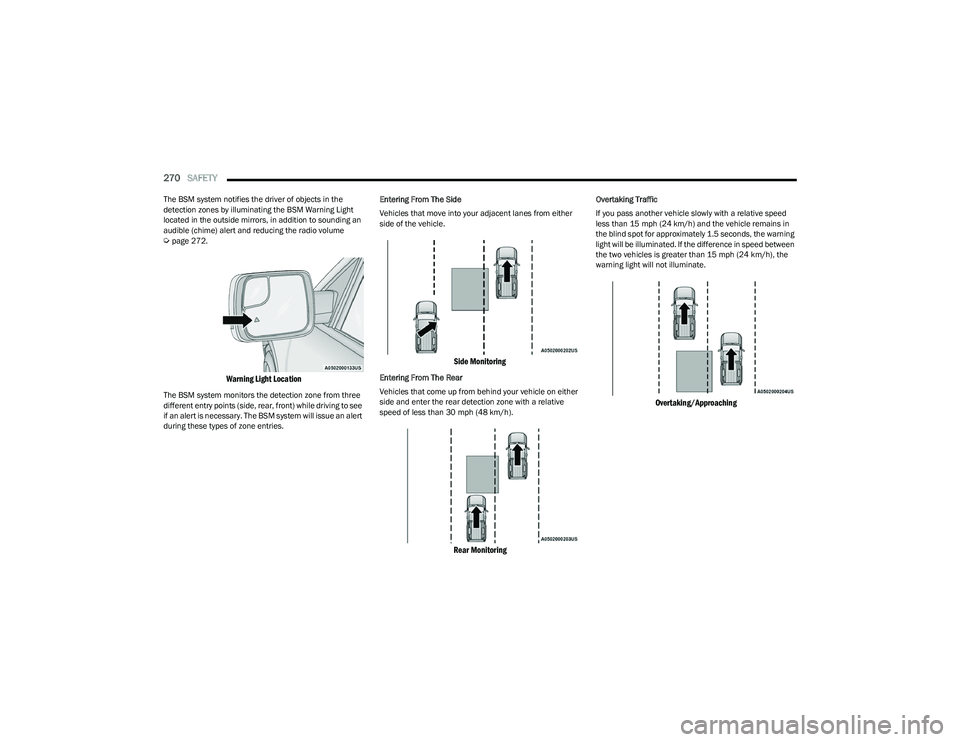
The BSM system notifies the driver of objects in the
detection zones by illuminating the BSM Warning Light
located in the outside mirrors, in addition to sounding an
audible (chime) alert and reducing the radio volume
Úpage 272.
Warning Light Location
The BSM system monitors the detection zone from three
different entry points (side, rear, front) while driving to see
if an alert is necessary. The BSM system will issue an alert
during these types of zone entries. Entering From The Side
Vehicles that move into your adjacent lanes from either
side of the vehicle.
Side Monitoring
Entering From The Rear
Vehicles that come up from behind your vehicle on either
side and enter the rear detection zone with a relative
speed of less than 30 mph (48 km/h).
Rear Monitoring
Overtaking Traffic
If you pass another vehicle slowly with a relative speed
less than 15 mph (24 km/h) and the vehicle remains in
the blind spot for approximately 1.5 seconds, the warning
light will be illuminated. If the difference in speed between
the two vehicles is greater than 15 mph (24 km/h), the
warning light will not illuminate.
Overtaking/Approaching
23_DT_OM_EN_USC_t.book Page 270
Page 274 of 416

272SAFETY
When RCP is on and the vehicle is in REVERSE (R), the
driver is alerted using both the visual and audible alarms,
including reducing the radio volume.
NOTE:In a parking lot situation, oncoming vehicles can be
blocked by vehicles parked on either side. If the sensors
are blocked by other structures or vehicles, the system will
not be able to alert the driver.
Blind Spot Modes
Blind Spot has three selectable modes of operation that
are available in the Uconnect system.
Blind Spot Alert Lights Only
When operating in Blind Spot Alert mode, the BSM system
will provide a visual alert in the appropriate side view
mirror based on a detected object. However, when the
system is operating in Rear Cross Path (RCP) mode, the
system will respond with both visual and audible alerts
when a detected object is present. Whenever an audible
alert is requested, the radio is muted. Blind Spot Alert Lights/Chime
When operating in Blind Spot Alert Lights/Chime mode,
the BSM system will provide a visual alert in the
appropriate side view mirror based on a detected object.
If the turn signal is then activated, and it corresponds to
an alert present on that side of the vehicle, an audible
chime will also be sounded. Whenever a turn signal and
detected object are present on the same side at the same
time, both the visual and audible alerts will be issued. In
addition to the audible alert the radio (if on) will also be
muted.
NOTE:Whenever an audible alert is requested by the BSM
system, the radio is also muted.
When the system is in RCP, the system shall respond with
both visual and audible alerts when a detected object is
present. Whenever an audible alert is requested, the radio
is also muted. Turn/hazard signal status is ignored; the
RCP state always requests the chime.
Blind Spot Alert Off
When the BSM system is turned off there will be no visual
or audible alerts from either the BSM, RCP, or Trailer
Merge Assist systems.
NOTE:The BSM system will store the current operating mode
when the vehicle is shut off. Each time the vehicle is
started the previously stored mode will be recalled and
used.
Trailer Merge Assist — If Equipped
Trailer Merge Assist is a function of the Blind Spot
Monitoring (BSM) system that extends the blind spot zone
to work while pulling a trailer.
NOTE:When Trailer Merge Assist is activated, Rear Cross Path is
disabled.
Trailer Merge Assist consists of three sub functions:
Automatic Trailer Detection
Trailer Length Detection
Trailer Merge Warning
Blind Spot Zones With Trailer Merge Assist
WARNING!
Rear Cross Path Detection (RCP) is not a backup aid
system. It is intended to be used to help a driver detect
an oncoming vehicle in a parking lot situation. Drivers
must be careful when backing up, even when using
RCP. Always check carefully behind your vehicle, look
behind you, and be sure to check for pedestrians,
animals, other vehicles, obstructions, and blind spots
before backing up. Failure to do so can result in serious
injury or death.
1 — Vehicle
2 — Trailer
23_DT_OM_EN_USC_t.book Page 272
Page 276 of 416

274SAFETY
NOTE:Trailer length is determined within +/- 3 ft (1 m) of actual
length. Trailers that are the same size as the category
limit, 10/20/30 ft (3/6/9 m), could be subject to being
placed in the category above or below the correct one.
Trailer Merge Warning
Trailer Merge Warning is the extension of the blind spot
function to cover the length of the trailer, plus a safety
margin, to warn the driver when there is a vehicle in the
adjacent lane. The driver is alerted by the illumination of
the BSM Warning Light located in the outside mirror on the
side the other vehicle is detected on. In addition, an
audible (chime) alert will be heard and radio volume will
be reduced
Úpage 272.
NOTE:
The Trailer Merge Alert system DOES NOT alert the
driver about rapidly approaching vehicles that are
outside the detection zones.
The Blind Spot Monitoring (BSM) system may experi -
ence drop outs (blinking on and off) of the side mirror
warning indicator lights when a motorcycle or any small
object remains at the side of the vehicle for extended
periods of time (more than a couple of seconds).
Crowded areas such as parking lots, neighborhoods,
etc. may lead to an increased amount of false alerts.
This is normal operation.
FORWARD COLLISION WARNING (FCW)
W
ITH MITIGATION — IF EQUIPPED
FCW with Mitigation provides the driver with audible
warnings, visual warnings (within the instrument cluster
display), and may apply a brake jerk to warn the driver
when it detects a potential frontal collision. The warnings
and limited braking are intended to provide the driver with
enough time to react, avoid or mitigate the potential
collision.
NOTE:FCW monitors the information from the forward looking
sensors as well as the Electronic Brake Controller (EBC), to
calculate the probability of a forward collision. When the
system determines that a forward collision is probable, the
driver will be provided with audible and visual warnings as
well as a possible brake jerk warning. If the driver does not take action based upon these
progressive warnings, then the system will provide a
limited level of active braking to help slow the vehicle and
mitigate the potential forward collision. If the driver reacts
to the warnings by braking and the system determines
that the driver intends to avoid the collision by braking but
has not applied sufficient brake force, the system will
compensate and provide additional brake force as
required.
If a FCW with Mitigation event begins at a speed below
32 mph (52 km/h), the system may provide the maximum
braking possible to mitigate the potential forward
collision. If the Forward Collision Warning with Mitigation
event stops the vehicle completely, the system will hold
the vehicle at standstill for two seconds and then release
the brakes.
FCW Message
WARNING!
The Blind Spot Monitoring system is only an aid to help
detect objects in the blind spot zones. The BSM system
is not designed to detect pedestrians, bicyclists, or
animals. Even if your vehicle is equipped with the BSM
system, always check your vehicle’s mirrors, glance
over your shoulder, and use your turn signal before
changing lanes. Failure to do so can result in serious
injury or death.
23_DT_OM_EN_USC_t.book Page 274
Page 279 of 416

SAFETY277
TIRE PRESSURE MONITORING SYSTEM
(TPMS)
TPMS will warn the driver of a low tire pressure based on
the vehicle recommended cold placard pressure.
NOTE:The TPMS Warning Light will illuminate in the instrument
cluster and a chime will sound when tire pressure is low in
one or more of the four active road tires. In addition, the
instrument cluster will display a graphic showing the
pressure values of each tire with the low tire pressure
values in a different color, or the Uconnect radio will
display a TPMS message; when this occurs you must
increase the tire pressure to the recommended cold
placard pressure in order for the TPMS Warning Light to
turn off.
The tire pressure will vary with temperature by about 1 psi
(7 kPa) for every 12°F (6.5°C). This means that when the
outside temperature decreases, the tire pressure will
decrease. Tire pressure should always be set based on
cold inflation tire pressure. This is defined as the tire
pressure after the vehicle has not been driven for at least
three hours, or driven less than 1 mile (1.6 km) after a
three hour period. The cold tire inflation pressure must not
exceed the maximum inflation pressure molded into the
tire sidewall. The tire pressure will also increase as the
vehicle is driven — this is normal and there should be no
adjustment for this increased pressure.
See
Úpage 370 on how to properly inflate the vehicle’s
tires. The TPMS will warn the driver of a low tire pressure if the
tire pressure falls below the low-pressure warning limit for
any reason, including low temperature effects and natural
pressure loss through the tire
Úpage 402.
The TPMS will continue to warn the driver of low tire
pressure as long as the condition exists, and will not turn
off until the tire pressure is at or above the recommended
cold placard pressure. Once the low TPMS Warning Light
illuminates, increase the tire pressure to the
recommended cold placard pressure in order for the
TPMS Warning Light to turn off. The system will
automatically update and the TPMS Warning Light will turn
off once the system receives the updated tire pressures.
The vehicle may need to be driven for up to 20 minutes
above 15 mph (24 km/h) in order for the TPMS to receive
this information.
NOTE:When filling warm tires, the tire pressure may need to be
increased up to an additional 4 psi (28 kPa) above the
recommended cold placard pressure in order to turn the
TPMS Warning Light off.
For example, your vehicle may have a recommended cold
(parked for more than three hours) placard pressure of
30 psi (207 kPa). If the ambient temperature is 68°F
(20°C) and the measured tire pressure is 27 psi
(186 kPa), a temperature drop to 20°F (-7°C) will
decrease the tire pressure to approximately 23 psi
(158 kPa). This tire pressure is sufficiently low enough
to turn on the TPMS Warning Light. Driving the vehicle may cause the tire pressure to rise to
approximately 27 psi (186 kPa), but the TPMS Warning
Light will still be on. In this situation, the TPMS Warning
Light will turn off only after the tires are inflated to the
vehicle’s recommended cold placard pressure value.
CAUTION!
The TPMS has been optimized for the original equip -
ment tires and wheels. TPMS pressures and warning
have been established for the tire size equipped on
your vehicle. Undesirable system operation or sensor
damage may result when using replacement equip -
ment that is not of the same size, type, and/or style.
Aftermarket wheels can cause sensor damage.
Using aftermarket tire sealants may cause the Tire
Pressure Monitoring System (TPMS) sensor to
become inoperable. After using an aftermarket tire
sealant it is recommended that you take your vehicle
to an authorized dealership to have your sensor func -
tion checked.
After inspecting or adjusting the tire pressure always
reinstall the valve stem cap. This will prevent mois -
ture and dirt from entering the valve stem, which
could damage the TPMS sensor.
6
23_DT_OM_EN_USC_t.book Page 277
Page 281 of 416

SAFETY279
Service TPMS Warning
If a system fault is detected, the Tire Pressure Monitoring
System (TPMS) Warning Light will flash on and off for 75
seconds and then remain on solid. The system fault will
also sound a chime. In addition, the instrument cluster will
display a "SERVICE TPM SYSTEM" message for a minimum
of five seconds and then display dashes (--) in place of the
pressure value to indicate which sensor is not being
received.
If the ignition switch is cycled, this sequence will repeat,
providing the system fault still exists. If the system fault no
longer exists, the Tire Pressure Monitoring System
Warning Light will no longer flash, and the "SERVICE TPM
SYSTEM" message will no longer display, and a pressure
value will display in place of the dashes. A system fault can
occur due to any of the following:
Signal interference due to electronic devices or driving
next to facilities emitting the same radio frequencies
as the Tire Pressure Monitoring System sensors
Installing aftermarket window tinting that contains
materials that may block radio wave signals
Accumulation of snow or ice around the wheels or
wheel housings
Using tire chains on the vehicle
Using wheels/tires not equipped with TPMS sensors
A system fault may occur due to an incorrect TPMS sensor
location condition. When a system fault occurs due to an
incorrect TPMS sensor location, the Tire Pressure
Monitoring System (TPMS) Warning Light will flash on and
off for 75 seconds and then remain on solid. The system fault will also sound a chime. In addition, the
instrument cluster will display a Tire Pressure Temporarily
Unavailable message in place of the tire pressure display
screen. If the ignition switch is cycled, this sequence will
repeat, providing the system fault still exists. If the system
fault no longer exists, the “Tire Pressure Monitoring
System Warning Light” will no longer flash and the tire
pressure display screen will be displayed showing the tire
pressure values the correct locations.
Vehicles With Non-Matching Full Size Spare Or Compact
Spare
The non-matching full size spare or compact spare tire
does not have a TPMS sensor. Therefore, the TPMS will
not monitor the pressure in the non-matching full size
spare or compact spare tire.
If you install the non-matching full size spare or
compact spare tire in place of a road tire that has a
pressure below the low-pressure warning limit, upon
the next ignition switch cycle, the Tire Pressure
Monitoring System (TPMS) Warning Light and a
“LOW TIRE” message will remain on and a chime will
sound. In addition, the graphic in the instrument
cluster will still display a pressure value in a different
color and an “Inflate to XX” message.
After driving the vehicle for up to 20 minutes above
15 mph (24 km/h), the Tire Pressure Monitoring
System (TPMS) Warning Light will flash on and off for
75 seconds and then remain on solid. In addition, the
instrument cluster will display a "SERVICE TPM
SYSTEM" message for a minimum of five seconds and
then display dashes (--) in place of the pressure value.
For each subsequent ignition switch cycle, a chime will
sound, the Tire Pressure Monitoring System (TPMS)
Warning Light will flash on and off for 75 seconds and
then remain on solid, and the instrument cluster will
display a "SERVICE TPM SYSTEM" message for a
minimum of five seconds and then display dashes (--)
in place of the pressure value.
Once you repair or replace the original road tire and
reinstall it on the vehicle in place of the non-matching
full size spare or compact spare, the TPMS will update
automatically. In addition, the Tire Pressure Monitoring
System (TPMS) Warning Light will turn off and the
graphic in the instrument cluster will display a new
pressure value instead of dashes (--), as long as no tire
pressure is below the low-pressure warning limit in any
of the four active road tires. The vehicle may need to be
driven for up to 20 minutes above 15 mph (24 km/h)
in order for the TPMS to receive this information.
Tire Fill Alert
This feature notifies the user when the placard tire
pressure is attained while inflating or deflating the tire.
You may choose to disable or enable the Tire Fill Alert
feature through use of the Uconnect Settings in the radio.
NOTE:
Only one tire can be filled at a time when using the Tire
Fill Alert system.
The Tire Fill Alert feature cannot be entered if an
existing TPMS fault is set to “active” or if the system is
in deactivation mode (if equipped).
6
23_DT_OM_EN_USC_t.book Page 279