service RAM 1500 2023 Repair Manual
[x] Cancel search | Manufacturer: RAM, Model Year: 2023, Model line: 1500, Model: RAM 1500 2023Pages: 416, PDF Size: 20.59 MB
Page 265 of 416
SAFETY263
REAR SEAT REMINDER ALERT (RSRA)
RSRA alerts of the possible presence of an object,
passenger, or pet in the rear seats through a visual and
auditory notification. When the system is activated, it
displays the message “Check Rear Seat” on the
instrument cluster display and sounds an auditory alert
upon the driver placing the ignition in the OFF position to
exit the vehicle. The system will activate automatically if a
rear door is opened within 10 minutes of the ignition being
placed in the ON/RUN position. RSRA should be used as a
reminder to check the rear seats, it does not directly
detect objects, passengers, or pets and is only activated
when the previous conditions are met.
To enable or disable RSRA, see
Úpage 191.
ELECTRONIC BRAKE CONTROL (EBC)
S
YSTEM
Your vehicle is equipped with an advanced Electronic
Brake Control (EBC) system. This system includes
Anti-Lock Brake System (ABS), Brake Assist System (BAS),
Electronic Brake Force Distribution (EBD), Electronic Roll
Mitigation (ERM), Electronic Stability Control (ESC), Hill
Start Assist (HSA), and Traction Control System (TCS).
These systems work together to enhance both vehicle
stability and control in various driving conditions.
Your vehicle may also be equipped with Trailer Sway
Control (TSC) and Hill Descent Control (HDC).
Brake Assist System (BAS)
The BAS is designed to optimize the vehicle’s braking
capability during emergency braking maneuvers. The
system detects an emergency braking situation by sensing
the rate and amount of brake application, and then
applies optimum pressure to the brakes. This can help
reduce braking distances. The BAS complements the
Anti-Lock Brake System (ABS). Applying the brakes very
quickly results in the best BAS assistance. To receive the
benefit of the system, you must apply continuous braking
pressure during the stopping sequence (do not “pump”
the brakes). Do not reduce brake pedal pressure unless
braking is no longer desired. Once the brake pedal is
released, the BAS is deactivated.
Brake System Warning Light
The red Brake System Warning Light will turn on when the
ignition is placed in the ON/RUN mode and may stay on for
as long as four seconds.
If the Brake System Warning Light remains on or comes on
while driving, it indicates that the brake system is not
functioning properly and that immediate service is
required. If the Brake System Warning Light does not
come on when the ignition is placed in the ON/RUN mode,
have the light repaired as soon as possible.
Electronic Brake Force Distribution (EBD)
EBD manages the distribution of the braking torque
between the front and rear axles by limiting braking
pressure to the rear axle. This is done to prevent overslip
of the rear wheels to avoid vehicle instability, and to
prevent the rear axle from entering the Anti-Lock Brake
System (ABS) before the front axle.
WARNING!
Before exiting a vehicle, always come to a complete
stop, then shift the automatic transmission into
PARK and apply the parking brake.
Always make sure the keyless ignition node is in the
OFF position, key fob is removed from the vehicle
and vehicle is locked.
Never leave children alone in a vehicle, or with
access to an unlocked vehicle. Leaving children in a
vehicle unattended is dangerous for a number of
reasons. A child or others could be seriously or fatally
injured. Children should be warned not to touch the
parking brake, brake pedal or the gear selector.
Do not leave children or animals inside parked vehi -
cles in hot weather. Interior heat buildup may cause
serious injury or death.
WARNING!
The Brake Assist System (BAS) cannot prevent the
natural laws of physics from acting on the vehicle, nor
can it increase the traction afforded by prevailing road
conditions. BAS cannot prevent collisions, including
those resulting from excessive speed in turns, driving
on very slippery surfaces, or hydroplaning. The
capabilities of a BAS-equipped vehicle must never be
exploited in a reckless or dangerous manner, which
could jeopardize the user's safety or the safety of
others.
6
23_DT_OM_EN_USC_t.book Page 263
Page 273 of 416
SAFETY271
Overtaking/Passing
The BSM system is designed not to issue an alert on
stationary objects such as guardrails, posts, walls, foliage,
berms, snow banks, car washes, etc. However,
occasionally the system may alert on such objects. This is
normal operation and your vehicle does not require
service.
The BSM system will not alert you of objects that are
traveling in the opposite direction of the vehicle in
adjacent lanes
Úpage 402.
Opposing Traffic
For information on how Blind Spot Monitoring functions
when pulling a trailer Úpage 272.
Rear Cross Path (RCP)
RCP is intended to aid the driver when backing out of
parking spaces where their vision of oncoming vehicles
may be blocked. Proceed slowly and cautiously out of the
parking space until the rear end of the vehicle is exposed.
The RCP system will then have a clear view of the cross
traffic, and if an oncoming vehicle is detected, alert the
driver.
RCP Detection Zones
RCP monitors the rear detection zones on both sides of
the vehicle, for objects that are moving toward the side of
the vehicle with a minimum speed of approximately 3 mph
(5 km/h), to objects moving a maximum of approximately
20 mph (32 km/h), such as in parking lot situations.
WARNING!
The Blind Spot Monitoring system is only an aid to help
detect objects in the blind spot zones. The BSM system
is not designed to detect pedestrians, bicyclists, or
animals. Even if your vehicle is equipped with the BSM
system, always check your vehicle’s mirrors, glance
over your shoulder, and use your turn signal before
changing lanes. Failure to do so can result in serious
injury or death.6
23_DT_OM_EN_USC_t.book Page 271
Page 278 of 416
276SAFETY
Medium
When the sensitivity of FCW is set to the “Medium”
setting and the system status is “Only Warning”,
this allows the system to warn the driver of a
possible collision with the vehicle in front using
audible/visual warnings.
Near
When the sensitivity of FCW is set to the “Near”
setting and the system status is “Only Warning”,
this allows the system to warn the driver of a
possible closer collision with the vehicle in front
using audible/visual warnings.
This setting provides less reaction time than the
“Far” and “Medium” settings, which allows for a
more dynamic driving experience.
More dynamic or aggressive drivers that want to
avoid frequent warnings may prefer this setting.
NOTE:The “Near” setting may result in a lesser number of FCW
possible collision warnings experienced.
FCW Limited Warning
If the instrument cluster displays “ACC/FCW Limited
Functionality” or “ACC/FCW Limited Functionality Clean
Front Windshield” momentarily, there may be a condition
that limits FCW functionality. Although the vehicle is still
driveable under normal conditions, the active braking may
not be fully available. Once the condition that limited the
system performance is no longer present, the system will
return to its full performance state. If the problem persists,
see an authorized dealer.
Service FCW Warning
If the system turns off, and the instrument cluster
displays:
ACC/FCW Unavailable Service Required
Cruise/FCW Unavailable Service Required
This indicates there is an internal system fault. Although
the vehicle is still drivable under normal conditions, have
the system checked by an authorized dealer.
Pedestrian Emergency Braking (PEB) —
If Equipped
PEB is a subsystem of the FCW system that provides the
driver with audible and visual warnings in the instrument
cluster display, and may apply automatic braking when it
detects a potential frontal collision with a pedestrian/
cyclist.
If a PEB event begins at a speed below 37 mph (60 km/h),
the system may provide braking to mitigate the potential
collision with a pedestrian/cyclist. If the PEB event stops
the vehicle completely, the system will hold the vehicle at
a standstill for two seconds and then release the brakes.
When the system determines a collision with the
pedestrian/cyclist in front of you is no longer probable, the
warning message will be deactivated.
The minimum speed for PEB activation is 3 mph (5 km/h). Turning PEB On Or Off
NOTE:The default status of PEB is “On.” This allows the system
to warn you of a possible frontal collision with the
pedestrian.
The PEB button is located in the Uconnect display in the
controls settings
Úpage 191.
To turn the PEB system off, push the Pedestrian
Emergency Braking button once.
To turn the PEB system back on, push the Pedestrian
Emergency Braking button again.
Changing the PEB status to “Off” deactivates the system,
so no warning or active braking will be available in case of
a possible frontal collision with the pedestrian.
NOTE:The PEB system will retain the last setting selected by the
driver after ignition shut down.
WARNING!
Pedestrian Emergency Braking (PEB) is not intended to
avoid a collision on its own, nor can PEB detect every
type of potential collision with a pedestrian. The driver
has the responsibility to avoid a collision by controlling
the vehicle via braking and steering. Failure to follow
this warning could lead to serious injury or death.
23_DT_OM_EN_USC_t.book Page 276
Page 281 of 416

SAFETY279
Service TPMS Warning
If a system fault is detected, the Tire Pressure Monitoring
System (TPMS) Warning Light will flash on and off for 75
seconds and then remain on solid. The system fault will
also sound a chime. In addition, the instrument cluster will
display a "SERVICE TPM SYSTEM" message for a minimum
of five seconds and then display dashes (--) in place of the
pressure value to indicate which sensor is not being
received.
If the ignition switch is cycled, this sequence will repeat,
providing the system fault still exists. If the system fault no
longer exists, the Tire Pressure Monitoring System
Warning Light will no longer flash, and the "SERVICE TPM
SYSTEM" message will no longer display, and a pressure
value will display in place of the dashes. A system fault can
occur due to any of the following:
Signal interference due to electronic devices or driving
next to facilities emitting the same radio frequencies
as the Tire Pressure Monitoring System sensors
Installing aftermarket window tinting that contains
materials that may block radio wave signals
Accumulation of snow or ice around the wheels or
wheel housings
Using tire chains on the vehicle
Using wheels/tires not equipped with TPMS sensors
A system fault may occur due to an incorrect TPMS sensor
location condition. When a system fault occurs due to an
incorrect TPMS sensor location, the Tire Pressure
Monitoring System (TPMS) Warning Light will flash on and
off for 75 seconds and then remain on solid. The system fault will also sound a chime. In addition, the
instrument cluster will display a Tire Pressure Temporarily
Unavailable message in place of the tire pressure display
screen. If the ignition switch is cycled, this sequence will
repeat, providing the system fault still exists. If the system
fault no longer exists, the “Tire Pressure Monitoring
System Warning Light” will no longer flash and the tire
pressure display screen will be displayed showing the tire
pressure values the correct locations.
Vehicles With Non-Matching Full Size Spare Or Compact
Spare
The non-matching full size spare or compact spare tire
does not have a TPMS sensor. Therefore, the TPMS will
not monitor the pressure in the non-matching full size
spare or compact spare tire.
If you install the non-matching full size spare or
compact spare tire in place of a road tire that has a
pressure below the low-pressure warning limit, upon
the next ignition switch cycle, the Tire Pressure
Monitoring System (TPMS) Warning Light and a
“LOW TIRE” message will remain on and a chime will
sound. In addition, the graphic in the instrument
cluster will still display a pressure value in a different
color and an “Inflate to XX” message.
After driving the vehicle for up to 20 minutes above
15 mph (24 km/h), the Tire Pressure Monitoring
System (TPMS) Warning Light will flash on and off for
75 seconds and then remain on solid. In addition, the
instrument cluster will display a "SERVICE TPM
SYSTEM" message for a minimum of five seconds and
then display dashes (--) in place of the pressure value.
For each subsequent ignition switch cycle, a chime will
sound, the Tire Pressure Monitoring System (TPMS)
Warning Light will flash on and off for 75 seconds and
then remain on solid, and the instrument cluster will
display a "SERVICE TPM SYSTEM" message for a
minimum of five seconds and then display dashes (--)
in place of the pressure value.
Once you repair or replace the original road tire and
reinstall it on the vehicle in place of the non-matching
full size spare or compact spare, the TPMS will update
automatically. In addition, the Tire Pressure Monitoring
System (TPMS) Warning Light will turn off and the
graphic in the instrument cluster will display a new
pressure value instead of dashes (--), as long as no tire
pressure is below the low-pressure warning limit in any
of the four active road tires. The vehicle may need to be
driven for up to 20 minutes above 15 mph (24 km/h)
in order for the TPMS to receive this information.
Tire Fill Alert
This feature notifies the user when the placard tire
pressure is attained while inflating or deflating the tire.
You may choose to disable or enable the Tire Fill Alert
feature through use of the Uconnect Settings in the radio.
NOTE:
Only one tire can be filled at a time when using the Tire
Fill Alert system.
The Tire Fill Alert feature cannot be entered if an
existing TPMS fault is set to “active” or if the system is
in deactivation mode (if equipped).
6
23_DT_OM_EN_USC_t.book Page 279
Page 283 of 416

SAFETY281
Trailer Tire Pressure Pairing
Follow the on screen prompts to select the number of
axles (1-3), the number of trailer tires (2, 4, 6, 8, or 12),
and the set trailer tire pressure. The range is selectable
anywhere between 25-125 psi (172-862 kPa).
Once psi (kPa) is programmed, the pairing screen
appears. Tire sensors must be paired in order shown.
Starting with Tire 1, deflate tire by 5 psi (34 kPa) and wait
for a horn chirp. It may take up to three minutes for the
chirp to occur, indicating that the sensor has paired.
Repeat process on each tire, in order, until complete.
Do not exit the pairing screen until process is complete.
If pairing was unsuccessful, a double horn chirp will
sound, and a prompt on the touchscreen will allow you to
retry the procedure; “Retry” will only appear when setup
fails. Each tire must be successfully paired during a single
pairing process to receive the success screen.
NOTE:If the pairing process times out after three minutes of no
communication with a sensor, a double horn chip will
occur indicating the pairing has failed and a message will
display on the radio indicating the process was unsuc -
cessful. Under certain circumstances, the double horn
chirp may continue to happen every three minutes indi -
cating the failed pairing. If this happens, the horn chirping
may be canceled by cycling the ignition button OFF and
then back to RUN position.
Tire Pressure Monitoring System Low Pressure Warnings
When a tire pressure low in one or more of the active road
tires is detected, the instrument cluster will display a
message stating “Trailer Tire Pressure Low”.
The instrument cluster will then display the TTPMS graphic
showing the pressure values of each tire with the low tire
pressure values in a different color.
Should this occur, you should stop as soon as possible
and inflate the tires with a low pressure condition (those in
a different color in the instrument cluster graphic) to the
customer programmed target tire pressure value as
shown at the top of the TTPMS instrument cluster graphic.
Once the tire(s) are inflated, the system will automatically
update the graphic display in the instrument cluster,
returning to its original color. The vehicle may need to be
driven for up to 10 minutes above 15 mph (24 km/h) in
order for the TTPMS to receive the updated information. Service TTPMS Warning
If a system fault is detected, the instrument cluster will
display a “Trailer Tire Pressure System Service Required”
message for a minimum of five seconds.
Once the system fault is corrected the "Trailer Tire
Pressure System Service Required" message will no
longer be displayed. The vehicle may need to be driven for
up to 10 minutes above 15 mph (24 km/h) in order for the
TTPMS to receive the trailer tire pressure information.
Trailer Tire Pressure System Not Configured
A “Trailer Tire Pressure System Not Configured” message
will be displayed in the instrument cluster on the TTPMS
instrument cluster graphic when a trailer number is
selected that has not had trailer tire pressure sensors
paired. To correct this condition, see
Úpage 191.
Trailer Sensors Detected Do Not Match Active Trailer
The “Trailer Sensors Detected Do Not Match Active
Trailer” message will be displayed in the instrument
cluster when the trailer sensors being received by the
TTPMS module do not match the trailer sensors paired to
the current trailer number selected. This message will be
displayed when the sensors being received completely
match the sensors paired to another trailer number
configured in the TTPMS module.
To correct this condition, the correct trailer number must
be selected in the radio
Úpage 191.
6
23_DT_OM_EN_USC_t.book Page 281
Page 284 of 416
282SAFETY
OCCUPANT RESTRAINT SYSTEMS
Some of the most important safety features in your vehicle
are the restraint systems:
OCCUPANT RESTRAINT SYSTEMS
F
EATURES
Seat Belt Systems
Supplemental Restraint Systems (SRS) Air Bags
Child Restraints
Some of the safety features described in this section may
be standard equipment on some models, or may be
optional equipment on others. If you are not sure, ask an
authorized dealer.
IMPORTANT SAFETY PRECAUTIONS
Please pay close attention to the information in this
section. It tells you how to use your restraint system
properly, to keep you and your passengers as safe as
possible.
Here are some simple steps you can take to minimize the
risk of harm from a deploying air bag:
1. Children 12 years old and under should always ride buckled up in the rear seat of a vehicle with
a rear seat.
2. A child who is not big enough to wear the vehicle seat belt properly must be secured in the appropriate child
restraint or belt-positioning booster seat in a rear
seating position
Úpage 298. 3. If a child from 2 to 12 years old (not in a rear-facing
child restraint) must ride in the front passenger seat,
move the seat as far back as possible and use the
proper child restraint
Úpage 298.
4. Never allow children to slide the shoulder belt behind them or under their arm.
5. You should read the instructions provided with your child restraint to make sure that you are using it
properly.
6. All occupants should always wear their lap and shoulder belts properly.
7. The driver and front passenger seats should be moved back as far as practical to allow the front air
bags room to inflate.
8. Do not lean against the door or window. If your vehicle has side air bags, and deployment occurs, the side air
bags will inflate forcefully into the space between
occupants and the door and occupants could be
injured.
9. If the air bag system in this vehicle needs to be modified to accommodate a disabled person, see
Úpage 398 for customer service contact
information.
SEAT BELT SYSTEMS
Buckle up even though you are an excellent driver, even
on short trips. Someone on the road may be a poor driver
and could cause a collision that includes you. This can
happen far away from home or on your own street.
Research has shown that seat belts save lives, and they
can reduce the seriousness of injuries in a collision. Some
of the worst injuries happen when people are thrown from
the vehicle. Seat belts reduce the possibility of ejection
and the risk of injury caused by striking the inside of the
vehicle. Everyone in a motor vehicle should be belted at all
times.
WARNING!
Never place a rear-facing child restraint in front of an
air bag. A deploying passenger front air bag can
cause death or serious injury to a child 12 years or
younger, including a child in a rear-facing child
restraint.
Never install a rear-facing child restraint in the front
seat of a vehicle. Only use a rear-facing child
restraint in the rear seat. If the vehicle does not have
a rear seat, do not transport a rear-facing child
restraint in that vehicle.
23_DT_OM_EN_USC_t.book Page 282
Page 290 of 416

288SAFETY
In Automatic Locking Mode, the shoulder belt is
automatically pre-locked. The seat belt will still retract to
remove any slack in the shoulder belt. Use the Automatic
Locking Mode anytime a child restraint is installed in a
seating position that has a seat belt with this feature.
Children 12 years old and under should always be properly
restrained in the rear seat of a vehicle with a rear seat.
How To Engage The Automatic Locking Mode
1. Buckle the combination lap and shoulder belt.
2. Grab the shoulder portion and pull downward until
the entire seat belt is extracted.
3. Allow the seat belt to retract. As the seat belt retracts, you will hear a clicking sound. This indicates the seat
belt is now in the Automatic Locking Mode. How To Disengage The Automatic Locking Mode
Unbuckle the combination lap/shoulder belt and allow it
to retract completely to disengage the Automatic Locking
Mode and activate the vehicle sensitive (emergency)
locking mode.
SUPPLEMENTAL RESTRAINT SYSTEMS
(SRS)
Some of the safety features described in this section may
be standard equipment on some models, or may be
optional equipment on others. If you are not sure, ask an
authorized dealer. The air bag system must be ready to protect you in a
collision. The Occupant Restraint Controller (ORC)
monitors the internal circuits and interconnecting wiring
associated with the electrical Air Bag System
Components. Your vehicle may be equipped with the
following Air Bag System Components:
Air Bag System Components
Occupant Restraint Controller (ORC)
Air Bag Warning Light
Steering Wheel and Column
Instrument Panel
Knee Impact Bolsters
Driver and Front Passenger Air Bags
Seat Belt Buckle Switch
Supplemental Side Air Bags
Front and Side Impact Sensors
Seat Belt Pretensioners
Seat Track Position Sensors
Occupant Classification System
Air Bag Warning Light
The Occupant Restraint Controller (ORC)
monitors the readiness of the electronic parts
of the air bag system whenever the ignition
switch is in the START or ON/RUN position.
If the ignition switch is in the OFF position or in the ACC
position, the air bag system is not on and the air bags will
not inflate.
WARNING!
Never place a rear-facing child restraint in front of an
air bag. A deploying passenger front air bag can
cause death or serious injury to a child 12 years or
younger, including a child in a rear-facing child
restraint.
Never install a rear-facing child restraint in the front
seat of a vehicle. Only use a rear-facing child
restraint in the rear seat. If the vehicle does not have
a rear seat, do not transport a rear-facing child
restraint in that vehicle.
WARNING!
The seat belt assembly must be replaced if the
switchable Automatic Locking Retractor (ALR)
feature or any other seat belt function is not working
properly when checked according to the procedures
in the Service Manual.
Failure to replace the seat belt assembly could
increase the risk of injury in collisions.
Do not use the Automatic Locking Mode to restrain
occupants who are wearing the seat belt or children
who are using booster seats. The locked mode is only
used to install rear-facing or forward-facing child
restraints that have a harness for restraining the
child.
23_DT_OM_EN_USC_t.book Page 288
Page 291 of 416
SAFETY289
The ORC contains a backup power supply system that may
deploy the air bag system even if the battery loses power
or it becomes disconnected prior to deployment.
The ORC turns on the Air Bag Warning Light in the
instrument panel for approximately four to eight seconds
for a self-check when the ignition switch is first in the
ON/RUN position. After the self-check, the Air Bag Warning
Light will turn off. If the ORC detects a malfunction in any
part of the system, it turns on the Air Bag Warning Light,
either momentarily or continuously. A single chime will
sound to alert you if the light comes on again after initial
startup.
The ORC also includes diagnostics that will illuminate the
instrument panel Air Bag Warning Light if a malfunction is
detected that could affect the air bag system. The
diagnostics also record the nature of the malfunction.
While the air bag system is designed to be maintenance
free, if any of the following occurs, have an authorized
dealer service the air bag system immediately.
The Air Bag Warning Light does not come on during the
four to eight seconds when the ignition switch is first in
the ON/RUN position.
The Air Bag Warning Light remains on after the four to
eight-second interval.
The Air Bag Warning Light comes on intermittently or
remains on while driving.NOTE:If the speedometer, tachometer, or any engine related
gauges are not working, the Occupant Restraint Controller
(ORC) may also be disabled. In this condition the air bags
may not be ready to inflate for your protection. Have an
authorized dealer service the air bag system immediately.
Redundant Air Bag Warning Light
If a fault with the Air Bag Warning Light is
detected, which could affect the Supplemental
Restraint System (SRS), the Redundant Air Bag
Warning Light will illuminate on the instrument
panel. The Redundant Air Bag Warning Light will stay on
until the fault is cleared. In addition, a single chime will
sound to alert you that the Redundant Air Bag Warning
Light has come on and a fault has been detected. If the
Redundant Air Bag Warning Light comes on intermittently
or remains on while driving have an authorized dealer
service the vehicle immediately
Úpage 107.
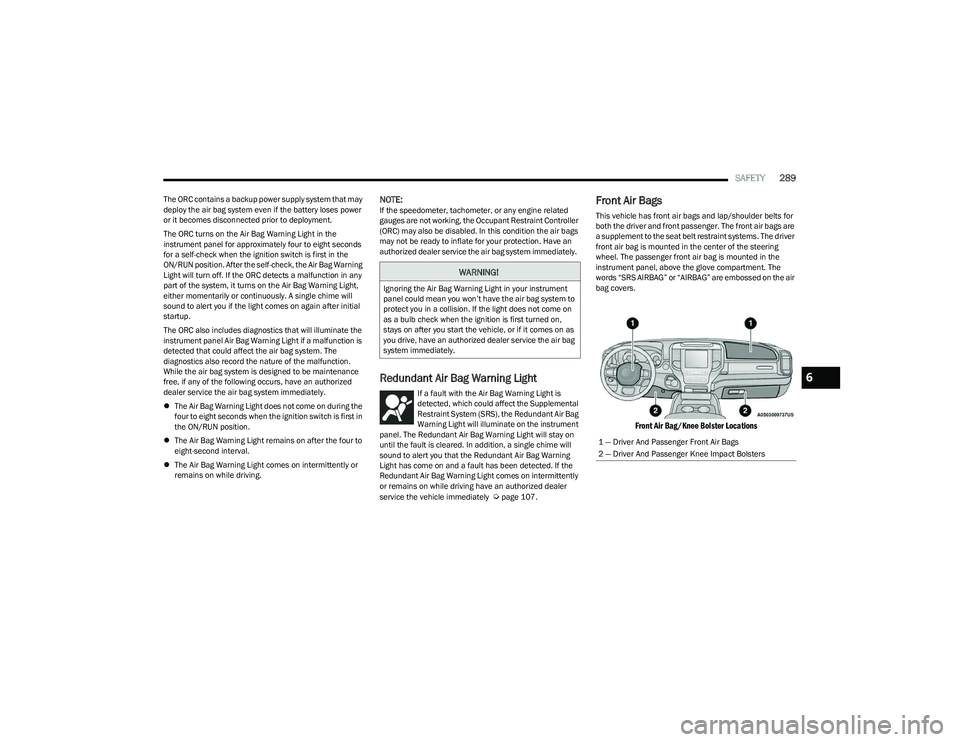
Front Air Bags
This vehicle has front air bags and lap/shoulder belts for
both the driver and front passenger. The front air bags are
a supplement to the seat belt restraint systems. The driver
front air bag is mounted in the center of the steering
wheel. The passenger front air bag is mounted in the
instrument panel, above the glove compartment. The
words “SRS AIRBAG” or “AIRBAG” are embossed on the air
bag covers.
Front Air Bag/Knee Bolster Locations
WARNING!
Ignoring the Air Bag Warning Light in your instrument
panel could mean you won’t have the air bag system to
protect you in a collision. If the light does not come on
as a bulb check when the ignition is first turned on,
stays on after you start the vehicle, or if it comes on as
you drive, have an authorized dealer service the air bag
system immediately.
1 — Driver And Passenger Front Air Bags
2 — Driver And Passenger Knee Impact Bolsters
6
23_DT_OM_EN_USC_t.book Page 289
Page 296 of 416
294SAFETY
The Air Bag Warning Light in the instrument panel will
turn on whenever the OCS is unable to classify the front
passenger seat status. A malfunction in the OCS may
affect the operation of the air bag system.
If the Air Bag Warning Light does not come on, or stays
on after you start the vehicle, or it comes on as you drive,
take the vehicle to an authorized dealer for service
immediately.
The passenger seat assembly contains critical OCS
components that may affect the Passenger Advanced
Front Air Bag inflation. In order for the OCS to properly
classify the seated weight of a front seat passenger, the
OCS components must function as designed. Do not make
any modifications to the front passenger seat
components, assembly, or to the seat cover. If the seat,
trim cover, or cushion needs service for any reason, take
the vehicle to an authorized dealer. Only FCA US LLC
approved seat accessories may be used.
The following requirements must be strictly followed:
Do not modify the front passenger seat assembly or
components in any way.
Do not use prior or future model year seat covers or
cushions not designated by FCA US LLC for the specific
model being repaired. Always use the correct seat
cover and cushion specified for the vehicle.
Do not replace the seat cover or cushion with an after -
market seat cover or cushion.
Do not add a secondary seat cover or mat.
At no time should any Supplemental Restraint System
(SRS) component or SRS related component or
fastener be modified or replaced with any part except
those which are approved by FCA US LLC.Knee Impact Bolsters
The Knee Impact Bolsters help protect the knees of the
driver and front passenger, and position the front
occupants for improved interaction with the front air bags.
Supplemental Side Air Bags
Supplemental Seat-Mounted Side Air Bags (SABs)
This vehicle is equipped with Supplemental Seat-Mounted
Side Air Bags (SABs).
Supplemental Seat-Mounted Side Air Bags (SABs) are
located in the outboard side of the front seats. The SABs
are marked with “SRS AIRBAG” or “AIRBAG” on a label or
on the seat trim on the outboard side of the seats.
The SABs may help to reduce the risk of occupant injury
during certain side impacts, in addition to the injury
reduction potential provided by the seat belts and body
structure.
WARNING!
Unapproved modifications or service procedures to
the passenger seat assembly, its related compo -
nents, seat cover or cushion may inadvertently
change the air bag deployment in case of a frontal
collision. This could result in death or serious injury
to the front passenger if the vehicle is involved in a
collision. A modified vehicle may not comply with
required Federal Motor Vehicle Safety Standards
(FMVSS) and/or Canadian Motor Vehicle Safety
Standards (CMVSS).
If it is necessary to modify the air bag system
for persons with disabilities, contact an authorized
dealer.
WARNING!
Do not drill, cut, or tamper with the knee impact
bolsters in any way.
Do not mount any accessories to the knee impact
bolsters such as alarm lights, stereos, citizen band
radios, etc.
23_DT_OM_EN_USC_t.book Page 294
Page 299 of 416
SAFETY297
If A Deployment Occurs
The front air bags are designed to deflate immediately
after deployment.
NOTE:Front and/or side air bags will not deploy in all collisions.
This does not mean something is wrong with the air bag
system.
If you do have a collision which deploys the air bags, any
or all of the following may occur:
The air bag material may sometimes cause abrasions
and/or skin reddening to the occupants as the air bags
deploy and unfold. The abrasions are similar to friction
rope burns or those you might get sliding along a carpet
or gymnasium floor. They are not caused by contact
with chemicals. They are not permanent and normally
heal quickly. However, if you haven’t healed signifi -
cantly within a few days, or if you have any blistering,
see your doctor immediately.
As the air bags deflate, you may see some smoke-like
particles. The particles are a normal by-product of the
process that generates the non-toxic gas used for air
bag inflation. These airborne particles may irritate the
skin, eyes, nose, or throat. If you have skin or eye irrita -
tion, rinse the area with cool water. For nose or throat
irritation, move to fresh air. If the irritation continues,
see your doctor. If these particles settle on your
clothing, follow the garment manufacturer’s instruc -
tions for cleaning. Do not drive your vehicle after the air bags have deployed.
If you are involved in another collision, the air bags will not
be in place to protect you.
NOTE:
Air bag covers may not be obvious in the interior trim,
but they will open during air bag deployment.
After any collision, the vehicle should be taken to an
authorized dealer immediately.
Enhanced Accident Response System
In the event of an impact, if the communication network
remains intact, and the power remains intact, depending
on the nature of the event, the Occupant Restraint
Controller (ORC) will determine whether to have the
Enhanced Accident Response System perform the
following functions:
Cut off fuel to the engine (if equipped)
Cut off battery power to the electric motor (if equipped)
Flash hazard lights as long as the battery has power
Turn on the interior lights, which remain on as long as
the battery has power or for 15 minutes from the inter -
vention of the Enhanced Accident Response System
Unlock the power door locks
Your vehicle may also be designed to perform any of these
other functions in response to the Enhanced Accident
Response System:
Turn off the Fuel Filter Heater, Turn off the HVAC Blower
Motor, Close the HVAC Circulation Door
Cut off battery power to the:
Engine
Electric Motor (if equipped)
Electric power steering
Brake booster
Electric park brake
Automatic transmission gear selector
Horn
Front wiper
Headlight washer pump (if equipped)
NOTE:After an accident, remember to cycle the ignition to the
STOP (OFF/LOCK) position and remove the key from the
ignition switch to avoid draining the battery. Carefully
check the vehicle for fuel leaks in the engine compartment
and on the ground near the engine compartment and fuel
tank before resetting the system and starting the engine.
If there are no fuel leaks or damage to the vehicle elec -
trical devices (e.g. headlights) after an accident, reset the
system by following the procedure described below. If you
have any doubt, contact an authorized dealer.
WARNING!
Deployed air bags and seat belt pretensioners cannot
protect you in another collision. Have the air bags, seat
belt pretensioners, and the seat belt retractor
assemblies replaced by an authorized dealer
immediately. Also, have the Occupant Restraint
Controller System serviced as well.
6
23_DT_OM_EN_USC_t.book Page 297