trailer Ram 3500 Chassis Cab 2019 Owner's Guide
[x] Cancel search | Manufacturer: RAM, Model Year: 2019, Model line: 3500 Chassis Cab, Model: Ram 3500 Chassis Cab 2019Pages: 607, PDF Size: 10.72 MB
Page 173 of 607

SAFETY 171
When TSC is functioning, the “ESC Activation/Malfunction
Indicator Light” will flash, the engine power may be reduced
and you may feel the brakes being applied to individual
wheels to attempt to stop the trailer from swaying. TSC is
disabled when the ESC system is in the “Partial Off” or “Full
Off” modes.
Hill Descent Control (HDC) — If Equipped
HDC is intended for low speed off road driving while in
4WD Low Range. HDC maintains vehicle speed while
descending hills during various driving situations. HDC
controls vehicle speed by actively controlling the brakes.
HDC Has Three States:
1. Off (feature is not enabled and will not activate).
2. Enabled (feature is enabled and ready but activationconditions are not met, or driver is actively overriding
with brake or throttle application).
3. Active (feature is enabled and actively controlling vehicle
speed).
Enabling HDC
HDC is enabled by pushing the HDC switch, but the
following conditions must also be met to enable HDC:
• Driveline is in 4WD Low Range.
• Vehicle speed is below 5 mph (8 km/h).
• Parking brake is released.
• Driver door is closed.
Activating HDC
Once HDC is enabled it will activate automatically if driven
down a grade of sufficient magnitude. The set speed for
HDC is selectable by the driver, and can be adjusted by using
the gear shift +/-. The following summarizes the HDC set
speeds:
HDC Target Set Speeds
• P = No set speed. HDC may be enabled but will not acti -
vate.
• R = 0.6 mph (1 km/h)
WARNING!
If TSC activates while driving, slow the vehicle down,
stop at the nearest safe location, and adjust the trailer
load to eliminate trailer sway.
4
Page 184 of 607

182 SAFETY
Vehicles With Non Matching Full Size Spare Or Compact
Spare
• The non matching full size spare or compact spare tiredoes not have a TPM sensor. Therefore, the TPMS will not
monitor the pressure in the non matching full size spare or
compact spare tire.
• If you install the non matching full size spare or compact spare tire in place of a road tire that has a pressure below the
low-pressure warning limit, upon the next ignition switch
cycle, the TPM Telltale Light and a “LOW TIRE” message
will remain ON and a chime will sound. In addition, the
graphic in the instrument cluster will still display a pressure
value in a different color and an “Inflate to XX” message.
• After driving the vehicle for up to 20 minutes above 15 mph (24 km/h), the TPM Telltale Light will flash on
and off for 75 seconds and then remain on solid. In addi -
tion, the instrument cluster will display a "SERVICE TPM
SYSTEM" message for a minimum of five seconds and then
display dashes (- -) in place of the pressure value.
• For each subsequent ignition switch cycle, a chime will sound, the TPM Telltale Light will flash on and off for 75
seconds and then remain on solid, and the instrument
cluster will display a "SERVICE TPM SYSTEM" message for
a minimum of five seconds and then display dashes (- -) in
place of the pressure value.
• Once you repair or replace the original road tire and rein
-
stall it on the vehicle in place of the non matching full size
spare or compact spare, the TPMS will update automati -
cally. In addition, the TPM Telltale Light will turn OFF and
the graphic in the instrument cluster will display a new
pressure value instead of dashes (- -), as long as no tire
pressure is below the low-pressure warning limit in any of
the four active road tires. The vehicle may need to be
driven for up to 20 minutes above 15 mph (24 km/h) in
order for the TPMS to receive this information.
Trailer Tire Pressure Monitoring System (TTPMS)
The Trailer Tire Pressure Monitoring System (TTPMS) is a
feature that will display the trailer tire pressure values and
warn the driver of a low trailer tire pressure, based on the
drivers set target tire pressure value, through the Instrument
Cluster (IC).
The TTPMS monitors the pressure of each tire and warns the
driver, through the IC, when either a low tire pressure condi -
tion or a TPM sensor or system malfunction condition exists.
The IC will display the actual tire pressure or dashes for each
of the trailer tires in the correct trailer position, based on
trailer configuration.
Page 185 of 607

SAFETY 183
The TTPMS consist of the following components:
• Trailer Receiver Module
• Trailer Interface Module
• Two to twelve tire pressure monitoring sensors dependingon trailer configuration
The TTPMS is configured though the trailer settings menu in the
Uconnect system by selecting the desired trailer number (up to
four trailers can be configured), the number of axles (1 - 3), the
number of trailer tires (2, 4, 6, 8, or 12), and the set trailer tire
pressure. Refer to “Uconnect Settings” in “Multimedia” for
further information.
Tire Pressure Monitoring Low Pressure Warnings
When a tire pressure low in one or more of the active road
tires is detected a chime will sound. In addition, the instru-
ment cluster will display a graphic showing the pressure
values of each tire with the low tire pressure values in a
different color. An “Inflate to XXX” message will also be
displayed.
NOTE:
"XXX" = TPM trailer tire target pressure value programmed
by the customer Should this occur, you should stop as soon as possible and
inflate the tires with a low pressure condition (those in a
different color in the instrument cluster graphic) to the
customer programmed target tire pressure value as shown in
the “Inflate to XXX” message. Once the system receives the
updated tire pressures, the system will automatically update
the graphic display in the instrument cluster will return to
it’s original color. The vehicle may need to be driven for up
to 10 minutes above 15 mph (24 km/h) in order for the
TTPMS to receive the updated information.
Service TTPMS Warning
If a system fault is detected, the system fault will sound a
chime and the instrument cluster will display a “Trailer Tire
Pressure System Service Required” message for a minimum
of five seconds and then display dashes (- -) in place of the
pressure value to indicate which sensor is not being received.
Once the system fault is corrected the "Trailer Tire Pressure
System Service Required" message will no longer be
displayed and the dashes will be replaced by pressure
values. The vehicle may need to be driven for up to
10 minutes above 15 mph (24 km/h) in order for the TTPMS
to receive the updated information.
4
Page 186 of 607

184 SAFETY
Trailer Tire Pressure System Not Configured
A “Trailer Tire Pressure System Not Configured” message
will be displayed in the Instrument Cluster when a trailer
number is selected that does not have configuration values
entered for the (Number of Tires, Number of Axles, SET
Target Tire Pressure, trailer TPM sensor ID's).
To correct this condition the (Number of Tires, Number of
Axles, and SET Target Tire Pressure) values must be entered
in the radio for the trailer number selected. The trailer
sensors must also be paired to the trailer. Refer to the “Ucon-
nect Settings” in “Multimedia” for further information.
Trailer Sensors Detected Do Not Match Active Trailer
The “Trailer Sensors Detected Do Not Match Active Trailer”
message will be displayed in the Instrument Cluster when
the trailer sensors being received by the TTPM module do
match the trailer sensors paired to the current trailer number
selected. This message will be displayed when the sensors
being received completely match the sensors paired to
another trailer number configured in the TTPM module.
To correct this condition, the correct trailer number must be
selected in the radio. Refer to the “Uconnect Settings” in
“Multimedia” for further information. Tire Fill Alert
This feature notifies the user when the placard tire pressure
is attained while inflating or deflating the tire.
The customer may choose to disable or enable the Tire Fill
Alert feature through use of the customer settings in the
radio.
NOTE:
• Only one tire can be filled at a time when using the Tire Fill
Alert system.
• The Tire Fill Alert feature cannot be entered if an existing TPM system fault is set to “active” or if the system is in
deactivation mode (if equipped).
The system will be activated when the TPM receiver module
detects a change in tire pressure. The ignition must be in the
RUN mode, with the transmission in PARK (P).
NOTE:
It is not required to have the engine running to enter Tire Fill
Alert mode.
The hazard lamps will come on to confirm the vehicle is in
Tire Fill Alert mode.
Page 262 of 607

260 STARTING AND OPERATING
NEUTRAL (N)
Use this range when the vehicle is standing for prolonged
periods with the engine running. The engine may be started
in this range. Apply the parking brake and shift the transmis-
sion into PARK if you must exit the vehicle.
DRIVE (D)
This range should be used for most city and highway
driving. It provides the smoothest upshifts and downshifts, and the best fuel economy. The transmission automatically
upshifts through underdrive first, second, and third gears,
direct fourth gear and overdrive fifth and sixth gears. The
DRIVE position provides optimum driving characteristics
under all normal operating conditions.
When frequent transmission shifting occurs (such as when
operating the vehicle under heavy loading conditions, in
hilly terrain, traveling into strong head winds, or while
towing a heavy trailer), use the Electronic Range Select (ERS)
shift control (refer to “Electronic Range Select (ERS) Opera
-
tion” in this section for further information) to select a lower
gear range. Under these conditions, using a lower gear range
will improve performance and extend transmission life by
reducing excessive shifting and heat buildup.
If the transmission temperature exceeds normal operating
limits, the powertrain controller will modify the transmis -
sion shift schedule and expand the range of torque converter
clutch engagement. This is done to prevent transmission
damage due to overheating.
If the transmission becomes extremely hot or is in danger of
overheating, the “Transmission Temperature Warning
Light” may illuminate and the transmission may operate
differently until the transmission cools down.
WARNING!
Do not coast in NEUTRAL and never turn off the
ignition to coast down a hill. These are unsafe practices
that limit your response to changing traffic or road
conditions. You might lose control of the vehicle and
have a collision.
CAUTION!
Towing the vehicle, coasting, or driving for any other
reason with the transmission in NEUTRAL can cause
severe transmission damage. Refer to “Recreational
Towing” in “Starting And Operating” and “Towing A
Disabled Vehicle” in “In Case Of Emergency” for further
information.
Page 263 of 607

STARTING AND OPERATING 261
NOTE:
Use caution when operating a heavily loaded vehicle at low
speeds (such as towing a trailer up a steep grade, or in
stop-and-go traffic) during hot weather. In these conditions,
torque converter slip can impose a significant additional heat
load on the cooling system. Downshifting the transmission
to the lowest possible gear (when climbing a grade), or
shifting to NEUTRAL (when stopped in heavy traffic) can
help to reduce this excess heat generation.
During cold temperatures, transmission operation may be
modified depending on engine and transmission tempera-
ture as well as vehicle speed. This feature improves warm up
time of the engine and transmission to achieve maximum
efficiency. Engagement of the torque converter clutch is
inhibited until the transmission fluid is warm (refer to the
“Note” under “Torque Converter Clutch” in this section).
On trucks with AS66RC transmission, fifth and sixth gears
may be inhibited briefly on cold starts below 41°F (5°C), and
during very cold temperatures (-4°F [-20°C] or below), oper -
ation may briefly be limited to third gear only. During this
condition, the ability of the vehicle to accelerate under
heavily loaded conditions may be reduced. In all cases,
normal operation will resume once the transmission
temperature has risen to a suitable level. Transmission Limp Home Mode
Transmission function is monitored electronically for
abnormal conditions. If a condition is detected that could
result in transmission damage, Transmission Limp Home
Mode is activated. In this mode, the transmission remains in
third gear regardless of which forward gear is selected. If an
AS66RC equipped truck enters Limp Home Mode at
highway speeds, it will initially engage fifth gear, until the
vehicle slows to a speed where third gear can be engaged.
PARK, REVERSE, and NEUTRAL will continue to operate.
The Malfunction Indicator Light (MIL) may be illuminated.
Limp Home Mode allows the vehicle to be driven to an
authorized dealer for service without damaging the trans
-
mission.
In the event of a momentary problem, the transmission can
be reset to regain all forward gears by performing the
following steps:
1. Stop the vehicle.
2. Shift the transmission into PARK.
3. Turn the ignition OFF.
4. Wait approximately 10 seconds.
5
Page 266 of 607
264 STARTING AND OPERATING
• If the vehicle has not been driven for several days, the firstfew seconds of operation after shifting the transmission
into gear may seem sluggish. This is due to the fluid
partially draining from the torque converter into the trans -
mission. This condition is normal and will not cause
damage to the transmission. The torque converter will
refill within five seconds after starting the engine.
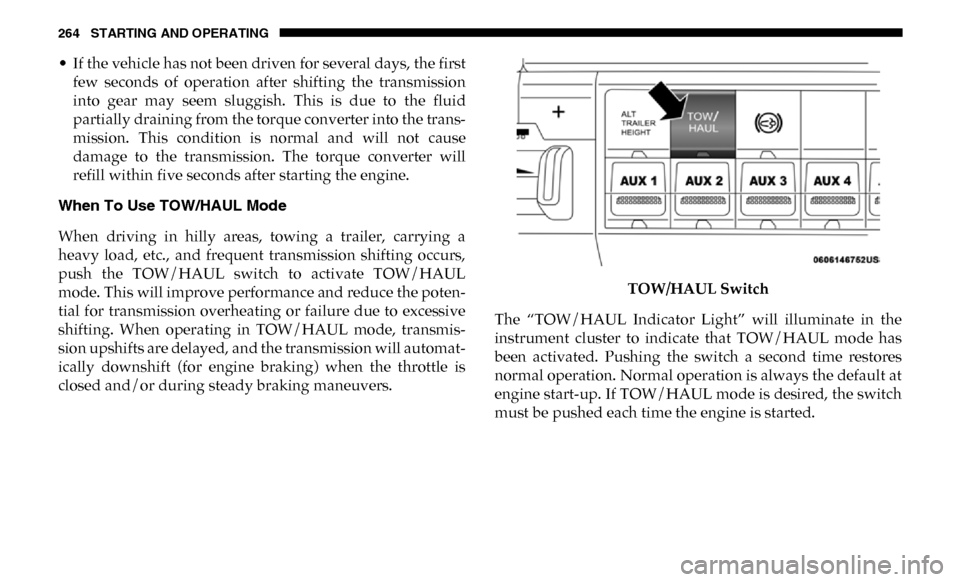
When To Use TOW/HAUL Mode
When driving in hilly areas, towing a trailer, carrying a
heavy load, etc., and frequent transmission shifting occurs,
push the TOW/HAUL switch to activate TOW/HAUL
mode. This will improve performance and reduce the poten -
tial for transmission overheating or failure due to excessive
shifting. When operating in TOW/HAUL mode, transmis -
sion upshifts are delayed, and the transmission will automat -
ically downshift (for engine braking) when the throttle is
closed and/or during steady braking maneuvers. TOW/HAUL Switch
The “TOW/HAUL Indicator Light” will illuminate in the
instrument cluster to indicate that TOW/HAUL mode has
been activated. Pushing the switch a second time restores
normal operation. Normal operation is always the default at
engine start-up. If TOW/HAUL mode is desired, the switch
must be pushed each time the engine is started.
Page 271 of 607

STARTING AND OPERATING 269
DRIVE (D)
This range should be used for most city and highway
driving. It provides the smoothest upshifts and downshifts,
and the best fuel economy. The transmission automatically
upshifts through all forward gears. The DRIVE position
provides optimum driving characteristics under all normal
operating conditions.
When frequent transmission shifting occurs (such as when
operating the vehicle under heavy loading conditions, in
hilly terrain, traveling into strong head winds, or while
towing a heavy trailer), select TOW/HAUL mode or use the
Electronic Range Select (ERS) shift control (refer to "Elec-
tronic Range Select (ERS) Operation" in this section for
further information) to select a lower gear range. Under
these conditions, using a lower gear range will improve
performance and extend transmission life by reducing exces -
sive shifting and heat buildup.
During extremely cold temperatures (-22°F [-30°C] or
below), transmission operation may be modified depending
on engine and transmission temperature as well as vehicle
speed. Normal operation will resume once the transmission
temperature has risen to a suitable level. Transmission Limp Home Mode
Transmission function is monitored electronically for
abnormal conditions. If a condition is detected that could
result in transmission damage, Transmission Limp Home
Mode is activated. In this mode, the transmission may
operate only in certain gears, or may not shift at all. Vehicle
performance may be severely degraded and the engine may
stall. In some situations, the transmission may not re-engage
if the engine is turned off and restarted. The Malfunction
Indicator Light (MIL) may be illuminated. A message in the
instrument cluster will inform the driver of the more serious
conditions, and indicate what actions may be necessary.
In the event of a momentary problem, the transmission can
be reset to regain all forward gears by performing the
following steps:
NOTE:
In cases where the instrument cluster message indicates the
transmission may not re-engage after engine shutdown,
perform this procedure only in a desired location (prefer
-
ably, at an authorized dealer).
1. Stop the vehicle.
2. Shift the transmission into PARK, if possible. If not, shift the transmission to NEUTRAL.
5
Page 273 of 607
STARTING AND OPERATING 271
To exit ERS mode, simply push and hold the GEAR+ switch
until the gear limit display disappears from the instrument
cluster.
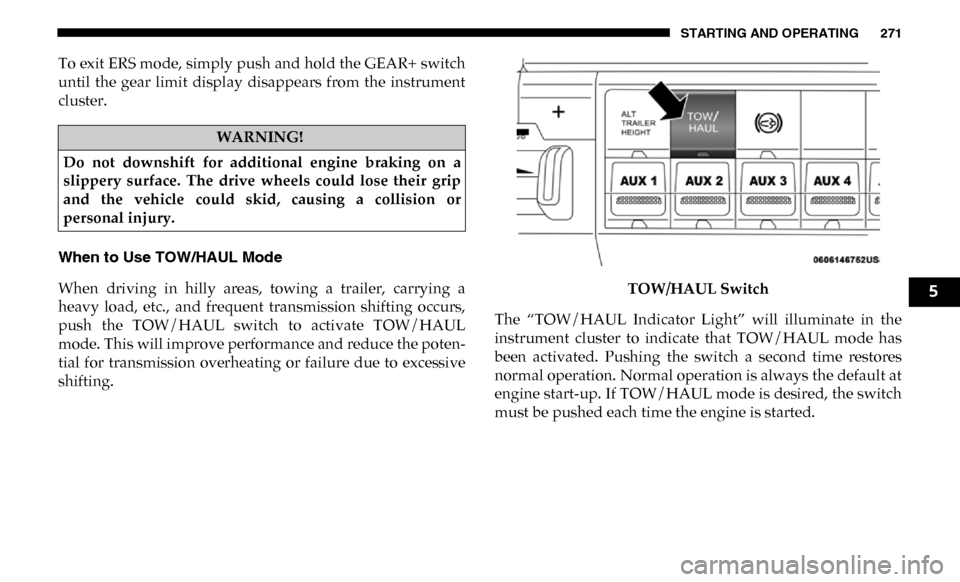
When to Use TOW/HAUL Mode
When driving in hilly areas, towing a trailer, carrying a
heavy load, etc., and frequent transmission shifting occurs,
push the TOW/HAUL switch to activate TOW/HAUL
mode. This will improve performance and reduce the poten-
tial for transmission overheating or failure due to excessive
shifting. TOW/HAUL Switch
The “TOW/HAUL Indicator Light” will illuminate in the
instrument cluster to indicate that TOW/HAUL mode has
been activated. Pushing the switch a second time restores
normal operation. Normal operation is always the default at
engine start-up. If TOW/HAUL mode is desired, the switch
must be pushed each time the engine is started.
WARNING!
Do not downshift for additional engine braking on a
slippery surface. The drive wheels could lose their grip
and the vehicle could skid, causing a collision or
personal injury.
5
Page 291 of 607

STARTING AND OPERATING 289
(Continued)
WARNING!
• Adaptive Cruise Control (ACC) is a convenience system. It is not a substitute for active driving involve -
ment. It is always the driver’s responsibility to be atten -
tive of road, traffic, and weather conditions, vehicle
speed, distance to the vehicle ahead; and, most impor -
tantly, brake operation to ensure safe operation of the
vehicle under all road conditions. Your complete atten -
tion is always required while driving to maintain safe
control of your vehicle. Failure to follow these warn -
ings can result in a collision and death or serious
personal injury.
• The ACC system: • Does not react to pedestrians, oncoming vehicles,and stationary objects (e.g., a stopped vehicle in a
traffic jam or a disabled vehicle).
• Cannot take street, traffic, and weather conditions into account, and may be limited upon adverse sight
distance conditions.
• Does not always fully recognize complex driving conditions, which can result in wrong or missing
distance warnings.
• Will bring the vehicle to a complete stop whilefollowing a target vehicle and hold the vehicle for
approximately two seconds in the stop position. At
this point, there will be an “ACC may cancel soon”
chime and warning to the driver. When ACC is
cancelled, the system will release the brakes and the
driver must take over braking. The system can be
resumed when the target vehicle drives off by
releasing the brake and pushing the resume button
on the steering wheel.
You should switch off the ACC system:
• When driving in fog, heavy rain, heavy snow, sleet, heavy traffic, and complex driving situations (i.e., in
highway construction zones).
• When entering a turn lane or highway off ramp; when driving on roads that are winding, icy, snow-covered,
slippery, or have steep uphill or downhill slopes.
• When towing a trailer up or down steep slopes.
• When circumstances do not allow safe driving at a constant speed.
WARNING! (Continued)
5