center console RAM CHASSIS CAB 2021 User Guide
[x] Cancel search | Manufacturer: RAM, Model Year: 2021, Model line: CHASSIS CAB, Model: RAM CHASSIS CAB 2021Pages: 463, PDF Size: 21.5 MB
Page 80 of 463
78GETTING TO KNOW YOUR VEHICLE
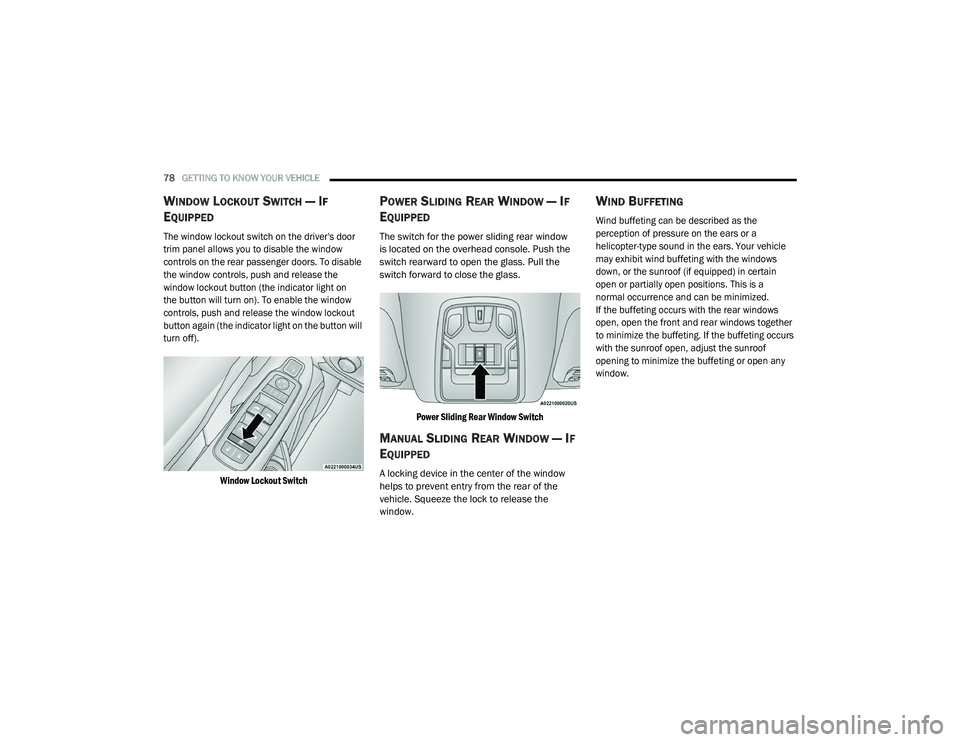
WINDOW LOCKOUT SWITCH — IF
E
QUIPPED
The window lockout switch on the driver's door
trim panel allows you to disable the window
controls on the rear passenger doors. To disable
the window controls, push and release the
window lockout button (the indicator light on
the button will turn on). To enable the window
controls, push and release the window lockout
button again (the indicator light on the button will
turn off).
Window Lockout Switch
POWER SLIDING REAR WINDOW — IF
E
QUIPPED
The switch for the power sliding rear window
is located on the overhead console. Push the
switch rearward to open the glass. Pull the
switch forward to close the glass.
Power Sliding Rear Window Switch
MANUAL SLIDING REAR WINDOW — IF
E
QUIPPED
A locking device in the center of the window
helps to prevent entry from the rear of the
vehicle. Squeeze the lock to release the
window.
WIND BUFFETING
Wind buffeting can be described as the
perception of pressure on the ears or a
helicopter-type sound in the ears. Your vehicle
may exhibit wind buffeting with the windows
down, or the sunroof (if equipped) in certain
open or partially open positions. This is a
normal occurrence and can be minimized.
If the buffeting occurs with the rear windows
open, open the front and rear windows together
to minimize the buffeting. If the buffeting occurs
with the sunroof open, adjust the sunroof
opening to minimize the buffeting or open any
window.
21_DPF_OM_EN_USC_t.book Page 78
Page 337 of 463

IN CASE OF EMERGENCY335
When you must leave the vehicle to seek
assistance, the Hazard Warning Flashers will
continue to operate even though the ignition is
placed in the OFF position.
NOTE:
With extended use the Hazard Warning
Flashers may wear down your battery.
ASSIST AND SOS SYSTEM — IF EQUIPPED
NOTE:
Depending on the vehicles trim level, the over -
head console may vary.
Assist And SOS Buttons Assist And SOS Buttons
If equipped, the overhead console contains an
ASSIST and a SOS button. NOTE:
Your vehicle may be transmitting data as
authorized by the subscriber Ú
page 449.
The SOS and ASSIST buttons will only func -
tion if you are connected to an operable LTE
(voice/data) or 4G (data) network, which
comes as a built in function. Other Uconnect
services will only be operable if your SiriusXM
Guardian™ service is active and you are
connected to an operable LTE (voice/data) or
4G (data) network.
ASSIST Call
The ASSIST Button is used to automatically
connect you to any one of the following support
centers:
Roadside Assistance – If you get a flat tire, or
need a tow, just push the ASSIST button and
you’ll be connected to someone who can help.
Roadside Assistance will know what vehicle
you’re driving and its location. Additional fees
may apply for roadside assistance.
1 — ASSIST Button
2 — SOS Button
1 — ASSIST Button
2 — SOS Button
WARNING!
ALWAYS obey traffic laws and pay attention to the
road. ALWAYS drive safely with your hands on the
steering wheel. You have full responsibility and
assume all risks related to the use of the features
and applications in this vehicle. Only use the
features and applications when it is safe to do so.
Failure to do so may result in an accident
involving serious injury or death.
7
21_DPF_OM_EN_USC_t.book Page 335