phone RAM CHASSIS CAB 2021 Owner's Guide
[x] Cancel search | Manufacturer: RAM, Model Year: 2021, Model line: CHASSIS CAB, Model: RAM CHASSIS CAB 2021Pages: 463, PDF Size: 21.5 MB
Page 267 of 463
MULTIMEDIA265
Answer Or Ignore An Incoming Call — No Call
Currently In Progress
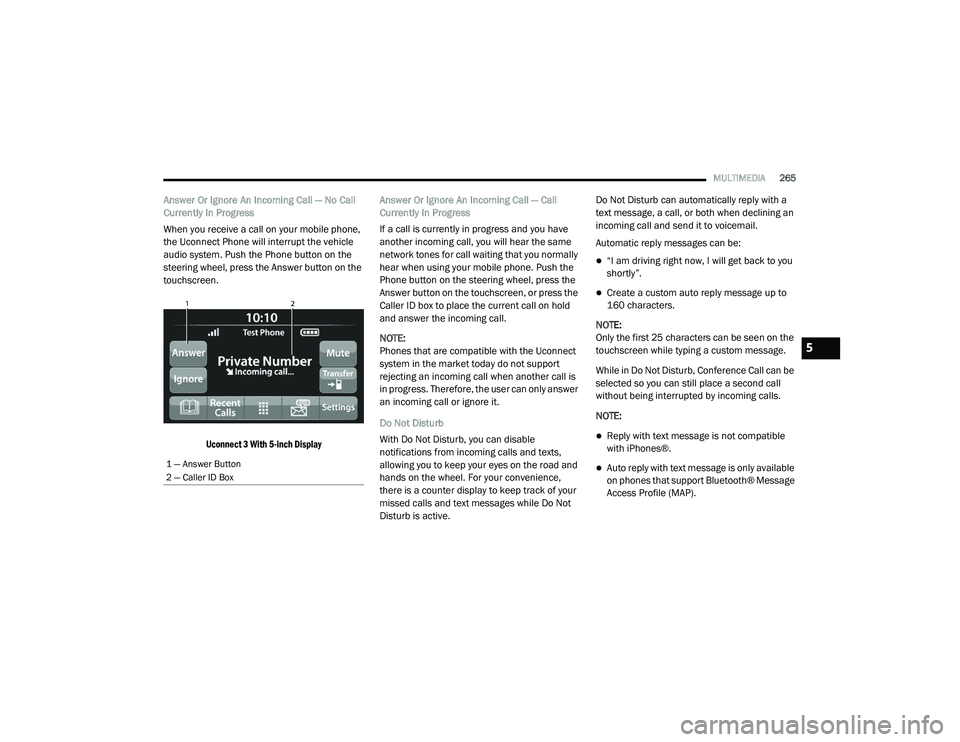
When you receive a call on your mobile phone,
the Uconnect Phone will interrupt the vehicle
audio system. Push the Phone button on the
steering wheel, press the Answer button on the
touchscreen.
Uconnect 3 With 5-inch Display
Answer Or Ignore An Incoming Call — Call
Currently In Progress
If a call is currently in progress and you have
another incoming call, you will hear the same
network tones for call waiting that you normally
hear when using your mobile phone. Push the
Phone button on the steering wheel, press the
Answer button on the touchscreen, or press the
Caller ID box to place the current call on hold
and answer the incoming call.
NOTE:
Phones that are compatible with the Uconnect
system in the market today do not support
rejecting an incoming call when another call is
in progress. Therefore, the user can only answer
an incoming call or ignore it.
Do Not Disturb
With Do Not Disturb, you can disable
notifications from incoming calls and texts,
allowing you to keep your eyes on the road and
hands on the wheel. For your convenience,
there is a counter display to keep track of your
missed calls and text messages while Do Not
Disturb is active. Do Not Disturb can automatically reply with a
text message, a call, or both when declining an
incoming call and send it to voicemail.
Automatic reply messages can be:
“I am driving right now, I will get back to you
shortly”.
Create a custom auto reply message up to
160 characters.
NOTE:
Only the first 25 characters can be seen on the
touchscreen while typing a custom message.
While in Do Not Disturb, Conference Call can be
selected so you can still place a second call
without being interrupted by incoming calls.
NOTE:
Reply with text message is not compatible
with iPhones®.
Auto reply with text message is only available
on phones that support Bluetooth® Message
Access Profile (MAP).1 — Answer Button
2 — Caller ID Box
5
21_DPF_OM_EN_USC_t.book Page 265
Page 268 of 463
266MULTIMEDIA
Place/Retrieve A Call From Hold
During an active call, press the Hold or Call On
Hold button on the Phone main screen.
Making A Second Call While Current Call Is In
Progress
You can place a call on hold by pressing the
Hold button on the Phone main screen, then
dial a number from the keypad (if supported by
your mobile phone), recent calls, SMS Inbox or
from the phonebooks.
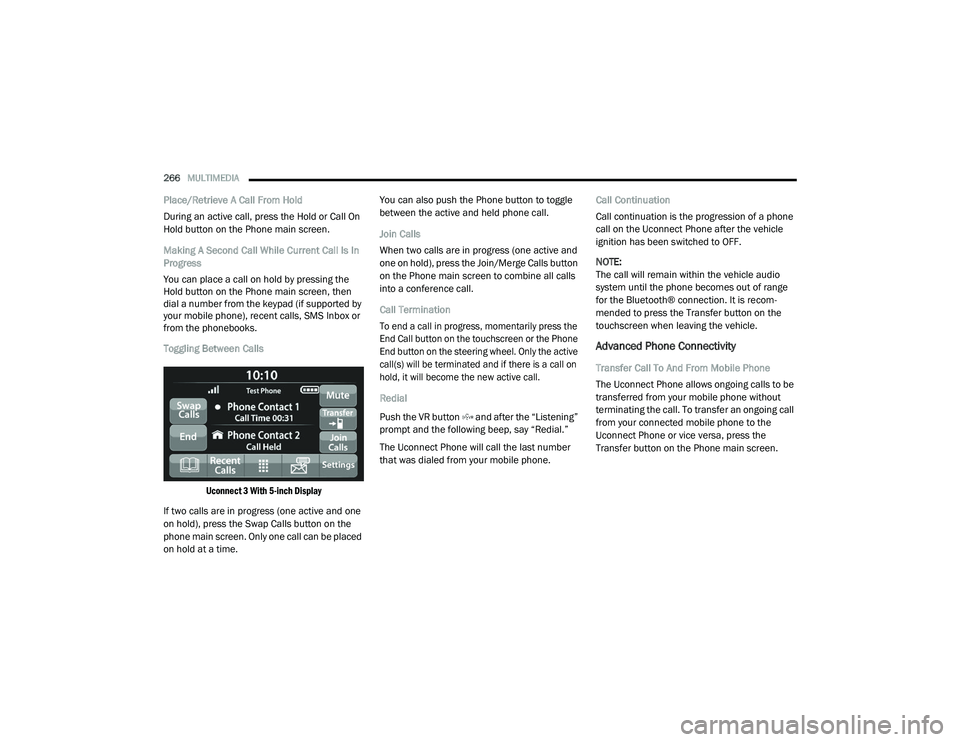
Toggling Between Calls
Uconnect 3 With 5-inch Display
If two calls are in progress (one active and one
on hold), press the Swap Calls button on the
phone main screen. Only one call can be placed
on hold at a time. You can also push the Phone button to toggle
between the active and held phone call.
Join Calls
When two calls are in progress (one active and
one on hold), press the Join/Merge Calls button
on the Phone main screen to combine all calls
into a conference call.
Call Termination
To end a call in progress, momentarily press the
End Call button on the touchscreen or the Phone
End button on the steering wheel. Only the active
call(s) will be terminated and if there is a call on
hold, it will become the new active call.
Redial
Push the VR button and after the “Listening”
prompt and the following beep, say “Redial.”
The Uconnect Phone will call the last number
that was dialed from your mobile phone.
Call Continuation
Call continuation is the progression of a phone
call on the Uconnect Phone after the vehicle
ignition has been switched to OFF.
NOTE:
The call will remain within the vehicle audio
system until the phone becomes out of range
for the Bluetooth® connection. It is recom
-
mended to press the Transfer button on the
touchscreen when leaving the vehicle.
Advanced Phone Connectivity
Transfer Call To And From Mobile Phone
The Uconnect Phone allows ongoing calls to be
transferred from your mobile phone without
terminating the call. To transfer an ongoing call
from your connected mobile phone to the
Uconnect Phone or vice versa, press the
Transfer button on the Phone main screen.
21_DPF_OM_EN_USC_t.book Page 266
Page 269 of 463
MULTIMEDIA267
Things You Should Know About Uconnect
Phone
Voice Command
For the best performance:
Always wait for the beep before speaking
Speak normally, without pausing, just as you
would speak to a person sitting a few feet/
meters away from you
Ensure that no one other than you is
speaking during a voice command period
Low-To-Medium Blower Setting
Low-To-Medium Vehicle Speed
Low Road Noise
Smooth Road Surface
Fully Closed Windows
Dry Weather Conditions Even though the system is designed for many
languages and accents, the system may not
always work for some.
NOTE:
It is recommended that you do not store names
in your Favorites phonebook while the vehicle is
in motion.
Number and name recognition rate is optimized
when the entries are not similar. You can say
“O” (letter “O”) for “0” (zero).
Even though international dialing for most
number combinations is supported, some
shortcut dialing number combinations may not
be supported. Audio Performance
Audio quality is maximized under:
Low-To-Medium Blower Setting
Low-To-Medium Vehicle Speed
Low Road Noise
Smooth Road Surface
Fully Closed Windows
Dry Weather Conditions
Operation From The Driver's Seat
Performance such as audio clarity, echo, and
loudness to a large degree rely on the phone
and network, and not the Uconnect Phone.
Echo at the far end can sometimes be reduced
by lowering the in-vehicle audio volume.
Phone Voice Commands
Making and answering hands-free phone calls
is easy with Uconnect. When the Phonebook
button is illuminated on your touchscreen, your
system is ready. Check UconnectPhone.com
for mobile phone compatibility and pairing
instructions.
WARNING!
ALWAYS drive safely with your hands on the
wheel. You have full responsibility and
assume all risks related to the use of the
Uconnect features and applications in this
vehicle. Only use Uconnect when it is safe
to do so. Failure to do so may result in an
accident involving serious injury or death.
5
21_DPF_OM_EN_USC_t.book Page 267
Page 270 of 463
268MULTIMEDIA
Push the Phone button and wait for the beep
to say a command. See some examples below:
“Call John Smith”
“Dial 123 456 7890”
“Redial ” (call previous outgoing phone number)
“Call back ” (call previously answered
incoming phone number)
Did You Know: When providing a Voice
Command, push the Phone button and say
“ Call ”, then pronounce the name exactly as it
appears in your phonebook. When a contact
has multiple phone numbers, you can say
“ Call John Smith work”.
Voice Text Reply — If Equipped
Uconnect can announce incoming text
messages. Push the VR button or Phone
button and say:
1. “
Listen
” to have the system read an
incoming text message. (Must have
compatible mobile phone paired to
Uconnect system.)
2. “
Reply ” after an incoming text message has
been read.
Listen to the Uconnect prompts. After the
beep, repeat one of the predefined messag -
es and follow the system prompts. NOTE:
Only use the numbering listed in the provided
table. Otherwise, the system will not transpose
the message.
Did You Know:
Your mobile phone must have the full
implementation of the Message Access Profile
(MAP) to take advantage of this feature. For details
about MAP, visit
UconnectPhone.com
.
Apple® iPhone® iOS 6 or later supports reading
incoming text messages only. For further
information on how to enable this feature on
your Apple® iPhone®, refer to your iPhone’s®
“User Manual”.
Did You Know: Voice Text Reply is not
compatible with iPhone®, but if your vehicle is
equipped with Siri® Eyes Free, you can use your
voice to send a text message.
Siri® Eyes Free — If Equipped
When used with your Apple® iPhone® connected
to your vehicle via Bluetooth®, Siri lets you use
your voice to send text messages, select media,
place phone calls and much more. Siri uses your
natural language to understand what you mean
and responds back to confirm your requests.
PRE-DEFINED VOICE TEXT REPLY RESPONSES
Yes. Stuck in
traffic. See you later.
No. Start without
me. I’ll be late.
Okay. Where are
you? I will be 5
25, 30, 45,
60> minutes late.
Call me.
Are you there
yet?
I’ll call you later. I need
directions. See you in 5
minutes.
I’m on my
way. Can’t talk
right now.
I’m lost. Thanks.
21_DPF_OM_EN_USC_t.book Page 268
Page 271 of 463
MULTIMEDIA269
The system is designed to keep your eyes on the
road and your hands on the wheel by letting Siri
help you perform useful tasks.
To enable Siri, push and hold, then release the
Uconnect Voice Recognition (VR) button on the
steering wheel. After you hear a double beep,
you can ask Siri to play podcasts and music, get
directions, read text messages, and many other
useful requests.
Bluetooth® Communication Link
Mobile phones may lose connection to the Uconnect
Phone. When this happens, the connection can
generally be re-established by restarting the mobile
phone. Your mobile phone is recommended to
remain in Bluetooth® ON mode.
Power-Up
After switching the ignition key from OFF to either
the ON/RUN or ACC position, or after a language
change, you must wait at least 15 seconds prior
to using the system
Ú
page 449.
RADIO OPERATION AND MOBILE PHONES
Under certain conditions, the mobile phone being
on in your vehicle can cause erratic or noisy
performance from your radio. This condition may be
lessened or eliminated by relocating the mobile
phone antenna. This condition is not harmful to
the radio. If your radio performance does not
satisfactorily “clear” by the repositioning of the
antenna, it is recommended that the radio volume
be turned down or off during mobile phone
operation when not using Uconnect (if equipped).
REGULATORY AND SAFETY
I
NFORMATION
USA/CANADA
Exposure to Radio Frequency Radiation
The radiated output power of the internal
wireless radio is far below the FCC and IC radio
frequency exposure limits. Nevertheless, the
wireless radio will be used in such a manner
that the radio is 8 in (20 cm) or further from the
human body. The internal wireless radio operates within
guidelines found in radio frequency safety
standards and recommendations, which reflect
the consensus of the scientific community.
The radio manufacturer believes the internal
wireless radio is safe for use by consumers.
The level of energy emitted is far less than the
electromagnetic energy emitted by wireless
devices such as mobile phones. However, the
use of wireless radios may be restricted in some
situations or environments, such as aboard
airplanes. If you are unsure of restrictions, you
are encouraged to ask for authorization before
turning on the wireless radio Ú
page 449.
5
21_DPF_OM_EN_USC_t.book Page 269
Page 338 of 463

336IN CASE OF EMERGENCY
SiriusXM Guardian™ Customer Care –
In-vehicle support for SiriusXM Guardian™.
Vehicle Customer Care – Total support for all
other vehicle issues.
Uconnect Customer Care - Total support for
Radio, Phone and NAV issues.
SOS Call
1. Push the SOS Call button on the overhead console.
NOTE:
In case the SOS Call button is pushed in error,
there will be a 10 second delay before the SOS
Call system initiates a call to a SOS operator.
To cancel the SOS Call connection, push the
SOS call button on the overhead console or
press the cancellation button on the Device
Screen. Termination of the SOS Call will turn off
the green LED light on the overhead console.
2. The LED light located within the ASSIST and SOS buttons on the overhead console will
turn green once a connection to a SOS
operator has been made.
3. Once a connection between the vehicle and a
SOS operator is made, the SOS Call system
may transmit the following important vehicle
information to a SOS operator:
Indication that the occupant placed a
SOS Call.
The vehicle brand.
The last known GPS coordinates of the
vehicle.
4. You should be able to speak with the SOS operator through the vehicle audio system
to determine if additional help is needed. NOTE:
Your vehicle may be transmitting data as
authorized by the subscriber.
Once a connection is made between the
vehicle’s SOS Call system and the SOS oper
-
ator, the SOS operator may be able to open a
voice connection with the vehicle to deter -
mine if additional help is needed. Once the
SOS operator opens a voice connection with
the vehicle’s SOS Call system, the operator
should be able to speak with you or other
vehicle occupants and hear sounds occurring
in the vehicle. The vehicle’s SOS Call system
will attempt to remain connected with the
SOS operator until the SOS operator termi -
nates the connection.
5. The SOS operator may attempt to contact appropriate emergency responders and
provide them with important vehicle
information and GPS coordinates.
WARNING!
ALWAYS obey traffic laws and pay attention
to the road. ALWAYS drive safely with your
hands on the steering wheel. You have full
responsibility and assume all risks related to
the use of the features and applications in this
vehicle. Only use the features and applications
when it is safe to do so. Failure to do so may
result in an accident involving serious injury or
death.
21_DPF_OM_EN_USC_t.book Page 336
Page 447 of 463
445
CUSTOMER ASSISTANCE
SUGGESTIONS FOR OBTAINING SERVICE
FOR YOUR VEHICLE
PREPARE FOR THE APPOINTMENT
All work to be performed may not be covered by
the warranty. Discuss additional charges with
the service manager. Keep a maintenance log
of your vehicle's service history. This can often
provide a clue to the current problem.
PREPARE A LIST
Make a written list of your vehicle's problems or
the specific work you want done. If you've had
an accident or work done that is not on your
maintenance log, let the service advisor know.
BE REASONABLE WITH REQUESTS
If you list a number of items and you must have your
vehicle by the end of the day, discuss the situation
with the service advisor and list the items in order of
priority. At many authorized dealers, you may obtain
a rental vehicle (additional charges may apply).
If you need a rental, it is advisable to make these
arrangements when you call for an appointment.
IF YOU NEED ASSISTANCE
FCA US LLC and its authorized dealers are vitally
interested in your satisfaction. We want you to
be happy with our products and services.
Warranty service must be done by an
authorized dealer. We strongly recommend that
you take the vehicle to an authorized dealer.
They know your vehicle the best, and are most
concerned that you get prompt and high quality
service. FCA US LLC’s authorized dealers have
the facilities, factory-trained technicians,
special tools, and the latest information to
ensure the vehicle is fixed correctly and in a
timely manner.This is why you should always talk to an
authorized dealer’s service manager first.
If for some reason you are still not satisfied,
talk to the general manager or owner of the
authorized dealer. They want to know if you
need assistance. If an authorized dealer is
unable to resolve the concern, you may contact
the FCA US LLC's Customer Assistance center.
Any communication to FCA US LLC’s customer
center should include the following information:Owner's name and address
Owner's telephone number (home, mobile,
and office)
Authorized dealer name
Vehicle Identification Number (VIN)
Vehicle delivery date and mileage
10
21_DPF_OM_EN_USC_t.book Page 445
Page 448 of 463

446CUSTOMER ASSISTANCE
FCA US LLC CUSTOMER CENTER
P.O. Box 21–8004
Auburn Hills, MI 48321–8004
Phone: (866) 726-4636
FCA CANADA INC. CUSTOMER CENTER
P.O. Box 1621
Windsor, Ontario N9A 4H6
Phone: (800) 465-2001 English /
(800) 387-9983 French
MEXICO
Av. Prolongacion Paseo de la Reforma, 1240
Sante Fe C.P. 05109
Mexico, D. F.
In Mexico City: 800-505-1300
Outside Mexico City: +(52)55 50817568
PUERTO RICO AND US VIRGIN ISLANDS
FCA Caribbean LLC
P.O. Box 191857
San Juan 00919-1857
Phone: (866) 726-4636
Fax: (787) 782-3345
CUSTOMER ASSISTANCE FOR THE
H
EARING OR SPEECH IMPAIRED
(TDD/TTY)
To assist customers who have hearing
difficulties, FCA US LLC has installed special
TDD (Telecommunication Devices for the Deaf)
equipment at its customer center. Any hearing
or speech impaired customer, who has access
to a TDD or a conventional teletypewriter (TTY)
in the United States, can communicate with the
FCA US LLC by dialing 1-800-380-2479.
Canadian residents with hearing difficulties that
require assistance can use the special needs
relay service offered by Bell Canada. For TTY
teletypewriter users, dial 711 and for Voice
callers, dial 1-800-855-0511 to connect with a
Bell Relay Service operator.
SERVICE CONTRACT
You may have purchased a service contract for
a vehicle to help protect you from the high cost
of unexpected repairs after FCA US LLC's New
Vehicle Limited Warranty expires. The Mopar
Vehicle Protection plans are the ONLY vehicle
extended protection plans authorized,
endorsed and backed by FCA US LLC to provide
additional protection beyond your vehicle’s
warranty. If you purchased a Mopar Vehicle
Protection Plan, you will receive Plan Provisions
and an Owner Identification Card in the mail
within three weeks of the vehicle delivery date.
If you have any questions about the service
contract, call the FCA US LLC’s Service Contract
National Customer Hotline at 1-800-521-9922
(Canadian residents, call (800) 465-2001
English / (800) 387-9983 French).
FCA US LLC is not responsible for any service
contract you may have purchased from another
manufacturer. If you require service after the
FCA US LLC New Vehicle Limited Warranty
expires, please refer to the contract documents,
and contact the person listed in those
documents.
21_DPF_OM_EN_USC_t.book Page 446
Page 450 of 463
448CUSTOMER ASSISTANCE
To contact NHTSA, you may call the
Vehicle Safety Hotline toll free at
1-888-327-4236 (TTY: 1-800-424-9153);
or go to
http://www.safercar.gov
; or write to:
Administrator, NHTSA, 1200 New Jersey
Avenue, SE., West Building, Washington,
D.C. 20590. You can also obtain other
information about motor vehicle safety
from
http://www.safercar.gov
.
IN CANADA
If you believe that your vehicle has a safety
defect, you should contact the Customer
Service Department immediately. Canadian
customers who wish to report a safety
defect to the Canadian government should
contact Transport Canada, Motor Vehicle
Defect Investigations and Recalls at
1-800-333-0510 or go to
wwwapps.tc.gc.ca/
Saf-Sec-Sur/7/PCDB-BDPP
.
PUBLICATION ORDER FORMS
To order the following manuals, you may use
either the website or the phone numbers listed
below.
Service Manuals
These comprehensive Service Manuals provide
a complete working knowledge of the vehicle,
system, and/or components and is written in
straightforward language with illustrations,
diagrams, and charts.
Diagnostic Procedure Manuals
Diagnostic Procedure Manuals are filled with
diagrams, charts and detailed illustrations.
These manuals make it easy to find and fix
problems on computer-controlled vehicle
systems and features. They show exactly how to
find and correct problems, using step-by-step
troubleshooting and drivability procedures,
proven diagnostic tests and a complete list of all
tools and equipment. Owner's Manuals
These Owner's Manuals have been prepared
with the assistance of service and engineering
specialists to acquaint you with specific FCA US
LLC vehicles.
To access your Owner's Information online, visit
www.mopar.com/om
To order a hard copy of your Owner’s
Information, visit:
www.techauthority.com (US)
Or
Call Tech Authority toll free at:
1-800-890-4038 (US)
1-800-387-1143 (Canada)
21_DPF_OM_EN_USC_t.book Page 448
Page 452 of 463
450
INDEX
Pair (Link) Uconnect Phone To A Mobile
Phone............................................................ 260 WARRANTY INFORMATION...................... 447
A
Adaptive Cruise Control (ACC)
(Cruise Control)
.................................... 164, 166Adding Engine Coolant (Antifreeze)............... 384Adding Fuel.................................................... 196Additives, Fuel............................................... 434Adjust Down........................................................... 35Forward....................................................... 35Rearward..................................................... 35Up................................................................ 35Adjustable Pedals............................................ 40Advance Phone Connectivity......................... 266Air BagAir Bag Operation...................................... 305Air Bag Warning Light................................ 303Enhanced Accident Response......... 310, 352Event Data Recorder (EDR)....................... 352If Deployment Occurs................................ 309Knee Impact Bolsters................................ 305Maintaining Your Air Bag System.............. 311Maintenance............................................. 311
Redundant Air Bag Warning Light............. 303Transporting Pets..................................... 330Air Bag Light................................ 107, 303, 331Air Cleaner, Engine (Engine Air Cleaner
Filter)................................................... 369, 391Air Conditioner Maintenance........................ 371Air Conditioner Refrigerant.................. 371, 372Air Conditioner System................................. 371Air Conditioning................................................ 62Air Conditioning Filter....................................... 65Air Conditioning System................................... 64Air Conditioning, Operating Tips....................... 65Air Filter........................................................ 369Air PressureTires......................................................... 415AlarmSecurity Alarm....................................23, 108Alterations/ModificationsVehicle......................................................... 10Antifreeze (Engine Coolant).......................... 384Capacities................................................. 439Disposal................................................... 385Anti-Lock Brake System (ABS)...................... 273Anti-Lock Warning Light................................ 113Assist, Hill Start............................................. 280Audio Settings............................................... 253Audio Systems (Radio).................................. 220
Auto Down Power Windows..............................77Automatic Door Locks......................................28Automatic Headlights.......................................52Automatic Temperature Control (ATC)..............64Automatic Transmission....................... 141, 389Adding Fluid.............................................. 389Fluid And Filter Change............................. 389Fluid Change............................................. 389Fluid Level Check............................. 387, 388Fluid Type........................................ 390, 444Shifting..................................................... 146Special Additives...................................... 387Automatic Transmission Limp Home Mode... 145AutoPark....................................................... 120AUX Camera......................................... 188, 194Auxiliary Driving Systems.............................. 281Axle Fluid.....................................390, 391, 444Axle Lubrication................................... 390, 391
B
Back-Up......................................................... 186Back-Up Camera........................................... 186Battery................................................. 108, 366Blanket..................................................... 130Charging System Light.............................. 108Keyless Key Fob Replacement....................16Battery Saver Feature......................................54
21_DPF_OM_EN_USC_t.book Page 450