radio RAM CHASSIS CAB 2021 Workshop Manual
[x] Cancel search | Manufacturer: RAM, Model Year: 2021, Model line: CHASSIS CAB, Model: RAM CHASSIS CAB 2021Pages: 463, PDF Size: 21.5 MB
Page 307 of 463

SAFETY305
Front Air Bag Operation
Front Air Bags are designed to provide additional
protection by supplementing the seat belts. Front
air bags are not expected to reduce the risk of
injury in rear, side, or rollover collisions. The front
air bags will not deploy in all frontal collisions,
including some that may produce substantial
vehicle damage — for example, some pole
collisions, truck underrides, and angle offset
collisions.
On the other hand, depending on the type and
location of impact, front air bags may deploy in
crashes with little vehicle front-end damage but
that produce a severe initial deceleration.
Because air bag sensors measure vehicle
deceleration over time, vehicle speed and
damage by themselves are not good indicators
of whether or not an air bag should have
deployed.
Seat belts are necessary for your protection in
all collisions, and also are needed to help keep
you in position, away from an inflating air bag.
When the Occupant Restraint Controller (ORC)
detects a collision requiring the front air bags, it
signals the inflator units. A large quantity of
non-toxic gas is generated to inflate the front air
bags.
The steering wheel hub trim cover and the
upper passenger side of the instrument panel
separate and fold out of the way as the air bags
inflate to their full size. The front air bags fully
inflate in less time than it takes to blink your
eyes. The front air bags then quickly deflate
while helping to restrain the driver and front
passenger.
Knee Impact Bolsters
The Knee Impact Bolsters help protect the
knees of the driver and front passenger, and
position the front occupants for improved
interaction with the front air bags.
WARNING!
No objects should be placed over or near
the air bag on the instrument panel or
steering wheel because any such objects
could cause harm if the vehicle is in a colli
-
sion severe enough to cause the air bag to
inflate.
Do not put anything on or around the air bag
covers or attempt to open them manually.
You may damage the air bags and you could
be injured because the air bags may no
longer be functional. The protective covers
for the air bag cushions are designed to open
only when the air bags are inflating.
Relying on the air bags alone could lead to
more severe injuries in a collision. The air
bags work with your seat belt to restrain you
properly. In some collisions, air bags won’t
deploy at all. Always wear your seat belts
even though you have air bags.
WARNING!
Do not drill, cut, or tamper with the knee
impact bolsters in any way.
Do not mount any accessories to the knee
impact bolsters such as alarm lights,
stereos, citizen band radios, etc.
6
21_DPF_OM_EN_USC_t.book Page 305
Page 336 of 463
334
IN CASE OF EMERGENCY
HAZARD WARNING FLASHERS
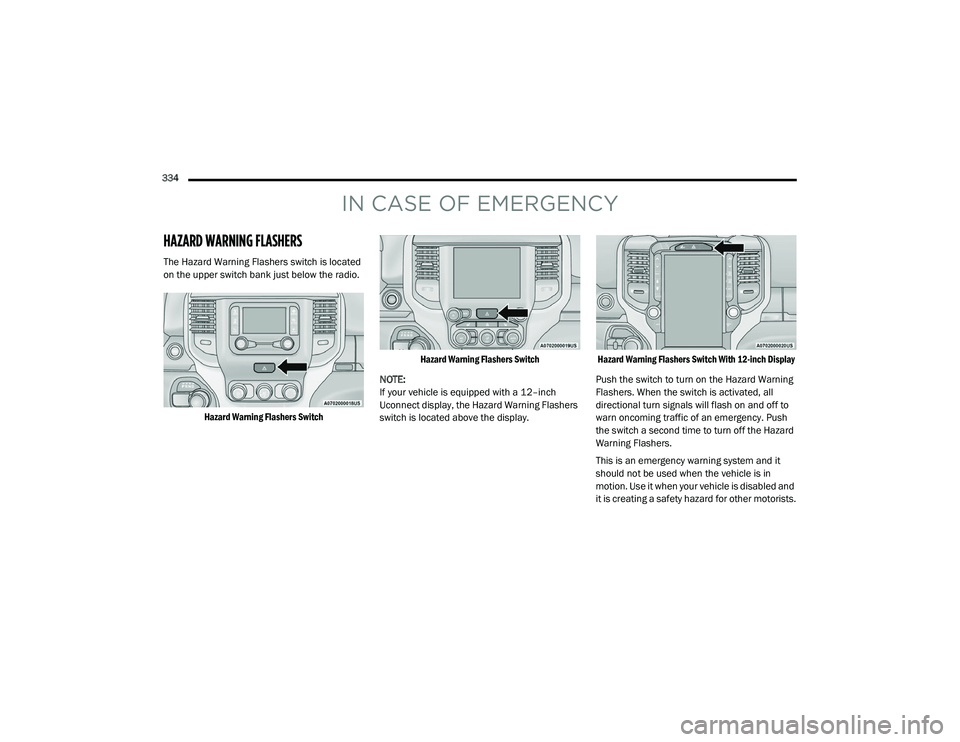
The Hazard Warning Flashers switch is located
on the upper switch bank just below the radio.
Hazard Warning Flashers Switch Hazard Warning Flashers Switch
NOTE:
If your vehicle is equipped with a 12–inch
Uconnect display, the Hazard Warning Flashers
switch is located above the display.
Hazard Warning Flashers Switch With 12-inch Display
Push the switch to turn on the Hazard Warning
Flashers. When the switch is activated, all
directional turn signals will flash on and off to
warn oncoming traffic of an emergency. Push
the switch a second time to turn off the Hazard
Warning Flashers.
This is an emergency warning system and it
should not be used when the vehicle is in
motion. Use it when your vehicle is disabled and
it is creating a safety hazard for other motorists.
21_DPF_OM_EN_USC_t.book Page 334
Page 338 of 463

336IN CASE OF EMERGENCY
SiriusXM Guardian™ Customer Care –
In-vehicle support for SiriusXM Guardian™.
Vehicle Customer Care – Total support for all
other vehicle issues.
Uconnect Customer Care - Total support for
Radio, Phone and NAV issues.
SOS Call
1. Push the SOS Call button on the overhead console.
NOTE:
In case the SOS Call button is pushed in error,
there will be a 10 second delay before the SOS
Call system initiates a call to a SOS operator.
To cancel the SOS Call connection, push the
SOS call button on the overhead console or
press the cancellation button on the Device
Screen. Termination of the SOS Call will turn off
the green LED light on the overhead console.
2. The LED light located within the ASSIST and SOS buttons on the overhead console will
turn green once a connection to a SOS
operator has been made.
3. Once a connection between the vehicle and a
SOS operator is made, the SOS Call system
may transmit the following important vehicle
information to a SOS operator:
Indication that the occupant placed a
SOS Call.
The vehicle brand.
The last known GPS coordinates of the
vehicle.
4. You should be able to speak with the SOS operator through the vehicle audio system
to determine if additional help is needed. NOTE:
Your vehicle may be transmitting data as
authorized by the subscriber.
Once a connection is made between the
vehicle’s SOS Call system and the SOS oper
-
ator, the SOS operator may be able to open a
voice connection with the vehicle to deter -
mine if additional help is needed. Once the
SOS operator opens a voice connection with
the vehicle’s SOS Call system, the operator
should be able to speak with you or other
vehicle occupants and hear sounds occurring
in the vehicle. The vehicle’s SOS Call system
will attempt to remain connected with the
SOS operator until the SOS operator termi -
nates the connection.
5. The SOS operator may attempt to contact appropriate emergency responders and
provide them with important vehicle
information and GPS coordinates.
WARNING!
ALWAYS obey traffic laws and pay attention
to the road. ALWAYS drive safely with your
hands on the steering wheel. You have full
responsibility and assume all risks related to
the use of the features and applications in this
vehicle. Only use the features and applications
when it is safe to do so. Failure to do so may
result in an accident involving serious injury or
death.
21_DPF_OM_EN_USC_t.book Page 336
Page 339 of 463

IN CASE OF EMERGENCY337
(Continued)
SOS Call System Limitations
Vehicles sold in Mexico DO NOT have SOS Call
system capabilities.
SOS or other emergency line operators in
Mexico may not answer or respond to SOS
system calls.
If the SOS Call system detects a malfunction,
any of the following may occur at the time the
malfunction is detected, and at the beginning of
each ignition cycle:
The overhead console light located within the
ASSIST and SOS buttons will continuously
illuminate red.
The Device Screen will display the following
message: “Vehicle device requires service.
Please contact an authorized dealer.”
An In-Vehicle Audio message will state
“Vehicle device requires service. Please
contact an authorized dealer.”
WARNING!
If anyone in the vehicle could be in danger
(e.g., fire or smoke is visible, dangerous
road conditions or location), do not wait for
voice contact from an Emergency Services
Agent. All occupants should exit the vehicle
immediately and move to a safe location.
Never place anything on or near the
vehicle’s operable network and GPS
antennas. You could prevent operable
network and GPS signal reception, which
can prevent your vehicle from placing an
emergency call. An operable network and
GPS signal reception is required for the SOS
Call system to function properly.
The SOS Call system is embedded into the
vehicle’s electrical system. Do not add
aftermarket electrical equipment to the
vehicle’s electrical system. This may
prevent your vehicle from sending a signal
to initiate an emergency call. To avoid inter -
ference that can cause the SOS Call system
to fail, never add aftermarket equipment
(e.g., two-way mobile radio, CB radio, data
recorder, etc.) to your vehicle’s electrical
system or modify the antennas on your
vehicle. IF YOUR VEHICLE LOSES BATTERY
POWER FOR ANY REASON (INCLUDING
DURING OR AFTER AN ACCIDENT), THE
UCONNECT FEATURES, APPS AND
SERVICES, AMONG OTHERS, WILL NOT
OPERATE.
Modifications to any part of the SOS Call
system could cause the air bag system to
fail when you need it. You could be injured
if the air bag system is not there to help
protect you.
WARNING! (Continued)
7
21_DPF_OM_EN_USC_t.book Page 337
Page 341 of 463

IN CASE OF EMERGENCY339
(Continued)
Automatic SOS — If Equipped
Automatic SOS is a hands-free safety service
that can immediately connect you with help in
the event that your vehicle’s airbags deploy.
Please refer to your provided radio supplement
for complete information.
JACKING AND TIRE CHANGING
4500/5500 MODELS
These vehicles do not come equipped with a
jack.
NOTE:
Jacking and tire changing on 4500/5500 models
should be performed by an authorized dealer, or
knowledgeable service personnel with the appro -
priate heavy duty equipment, like a tire service
company.
PREPARATIONS FOR JACKING
1. Park the vehicle on a firm, level surface. Avoid ice or slippery areas.
2. Place the gear selector into PARK. On four-wheel drive vehicles, shift the
transfer case to the 4WD Low position.
3. Turn on the Hazard Warning Flashers.
4. Apply the parking brake.
5. Turn the ignition OFF.
WARNING!
Do not attempt to change a tire on the side
of the vehicle close to moving traffic. Pull
far enough off the road to avoid the danger
of being hit when operating the jack or
changing the wheel.
Being under a jacked-up vehicle is
dangerous. The vehicle could slip off the
jack and fall on you. You could be crushed.
Never put any part of your body under a
vehicle that is on a jack. If you need to get
under a raised vehicle, take it to a service
center where it can be raised on a lift.
Never start or run the engine while the
vehicle is on a jack.
The jack is designed to be used as a tool for
changing tires only. The jack should not be
used to lift the vehicle for service purposes.
The vehicle should be jacked on a firm level
surface only. Avoid ice or slippery areas.
WARNING! (Continued)
WARNING!
Do not attempt to change a tire on the side of
the vehicle close to moving traffic. Pull far
enough off the road to avoid being hit when
operating the jack or changing the wheel.
7
21_DPF_OM_EN_USC_t.book Page 339
Page 346 of 463

344IN CASE OF EMERGENCY
Replace the wheel covers using a rubber mallet
to ease the installation. Align the wheel cover
vent holes to the wheel vent holes. Tap on the
wheel cover as needed to firmly seat it evenly
around the wheel.
JUMP STARTING
If your vehicle has a discharged battery, it can
be jump started using a set of jumper cables
and a battery in another vehicle, or by using a
portable battery booster pack. Jump starting
can be dangerous if done improperly, so please
follow the procedures in this section carefully. NOTE:
When using a portable battery booster pack,
follow the manufacturer's operating instruc
-
tions and precautions.
PREPARATIONS FOR JUMP START
The battery in your vehicle is located in the front
of the engine compartment, behind the left
headlight assembly.
Battery Location
If you have a diesel engine, you may have two
batteries, however jump start off the driver side
battery.
The positive battery post may be covered with a
protective cap if equipped. Lift up on the cap to
gain access to the positive battery post. Do not
jump off fuses. Only jump directly off positive
post which has a positive
(+) symbol on or
around the post.
Positive (+) Battery Post
NOTE:
1. Apply the parking brake, shift the automatic transmission into PARK and
turn the ignition OFF.
2. Turn off the heater, radio, and all electrical accessories.
The rear hub caps on the dual rear wheel
has two pull off notches. Make sure that the
hook of the jack handle driver is located
squarely in the cap notch before attempting
to pull off.
WARNING!
Do not attempt jump starting if the battery is
frozen. It could rupture or explode and cause
personal injury.
CAUTION! (Continued)CAUTION!
Do not use a portable battery booster pack or
any other booster source with a system
voltage greater than 12 Volts or damage to
the battery, starter motor, alternator or
electrical system may occur.
21_DPF_OM_EN_USC_t.book Page 344
Page 399 of 463
SERVICING AND MAINTENANCE397
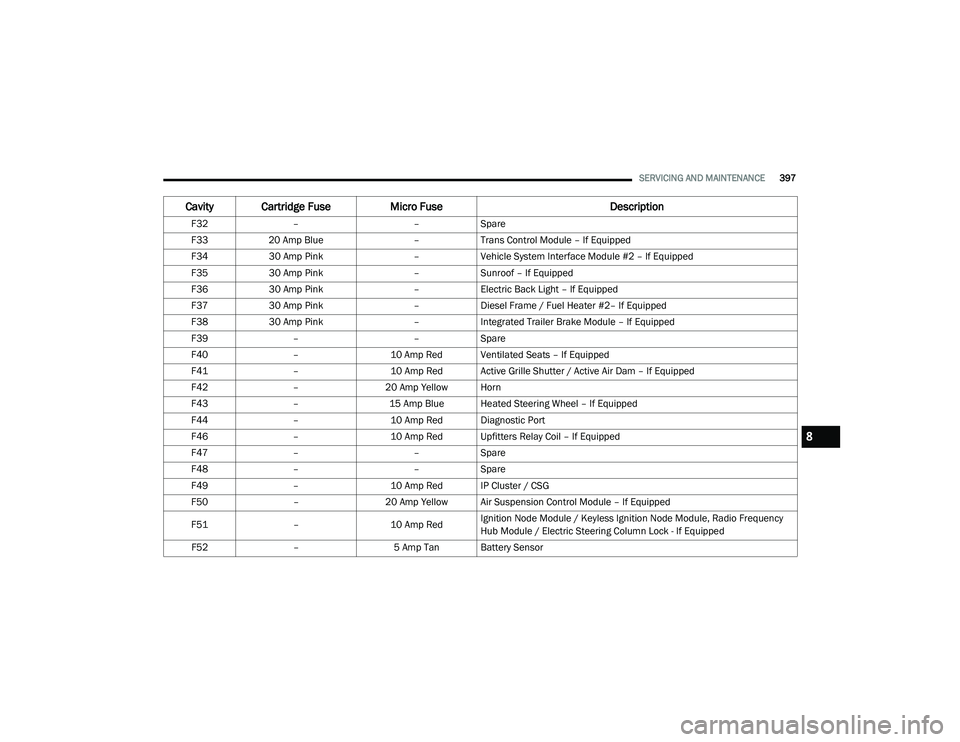
F32– –Spare
F33 20 Amp Blue –Trans Control Module – If Equipped
F34 30 Amp Pink –Vehicle System Interface Module #2 – If Equipped
F35 30 Amp Pink –Sunroof – If Equipped
F36 30 Amp Pink –Electric Back Light – If Equipped
F37 30 Amp Pink –Diesel Frame / Fuel Heater #2– If Equipped
F38 30 Amp Pink –Integrated Trailer Brake Module – If Equipped
F39 – –Spare
F40 –10 Amp Red Ventilated Seats – If Equipped
F41 –10 Amp Red Active Grille Shutter / Active Air Dam – If Equipped
F42 –20 Amp Yellow Horn
F43 –15 Amp Blue Heated Steering Wheel – If Equipped
F44 –10 Amp Red Diagnostic Port
F46 –10 Amp Red Upfitters Relay Coil – If Equipped
F47 – –Spare
F48 – –Spare
F49 –10 Amp Red IP Cluster / CSG
F50 –20 Amp Yellow Air Suspension Control Module – If Equipped
F51 –10 Amp RedIgnition Node Module / Keyless Ignition Node Module, Radio Frequency
Hub Module / Electric Steering Column Lock - If Equipped
F52 –5 Amp Tan Battery Sensor
Cavity Cartridge Fuse Micro Fuse Description
8
21_DPF_OM_EN_USC_t.book Page 397
Page 432 of 463

430SERVICING AND MAINTENANCE
LEATHER SURFACES
Mopar Total Clean is specifically recommended
for leather upholstery.
Your leather upholstery can be best preserved by
regular cleaning with a damp soft cloth. Small
particles of dirt can act as an abrasive and
damage the leather upholstery and should be
removed promptly with a damp cloth. Stubborn
soils can be removed easily with a soft cloth and
Mopar Total Clean. Care should be taken to avoid
soaking your leather upholstery with any liquid.
Please do not use polishes, oils, cleaning fluids,
solvents, detergents, or ammonia-based
cleaners to clean your leather upholstery.
NOTE:
If equipped with light colored leather, it tends to
show any foreign material, dirt, and fabric dye
transfer more so than darker colors. The leather
is designed for easy cleaning, and FCA recom
-
mends Mopar total care leather cleaner applied
on a cloth to clean the leather seats as needed.
GLASS SURFACES
All glass surfaces should be cleaned on a
regular basis with Mopar Glass Cleaner, or any
commercial household-type glass cleaner.
Never use an abrasive type cleaner. Use caution
when cleaning the inside rear window equipped
with electric defrosters or windows equipped
with radio antennas. Do not use scrapers or
other sharp instruments that may scratch the
elements.
When cleaning the rear view mirror, spray
cleaner on the towel or cloth that you are using.
Do not spray cleaner directly on the mirror.
CAUTION!
Do not use Alcohol and Alcohol-based and/or
Ketone based cleaning products to clean
leather upholstery, as damage to the
upholstery may result.
21_DPF_OM_EN_USC_t.book Page 430
Page 451 of 463
CUSTOMER ASSISTANCE449
GENERAL INFORMATION
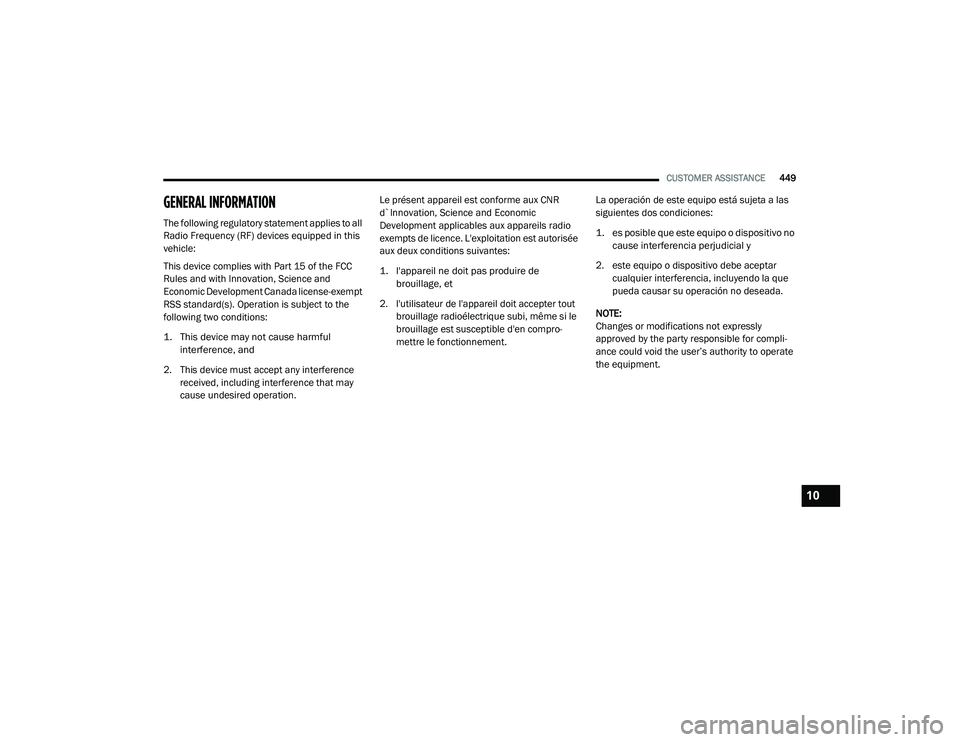
The following regulatory statement applies to all
Radio Frequency (RF) devices equipped in this
vehicle:
This device complies with Part 15 of the FCC
Rules and with Innovation, Science and
Economic Development Canada license-exempt
RSS standard(s). Operation is subject to the
following two conditions:
1. This device may not cause harmful
interference, and
2. This device must accept any interference received, including interference that may
cause undesired operation. Le présent appareil est conforme aux CNR
d`Innovation, Science and Economic
Development applicables aux appareils radio
exempts de licence. L'exploitation est autorisée
aux deux conditions suivantes:
1. l'appareil ne doit pas produire de
brouillage, et
2. l'utilisateur de l'appareil doit accepter tout brouillage radioélectrique subi, même si le
brouillage est susceptible d'en compro -
mettre le fonctionnement. La operación de este equipo está sujeta a las
siguientes dos condiciones:
1. es posible que este equipo o dispositivo no
cause interferencia perjudicial y
2. este equipo o dispositivo debe aceptar cualquier interferencia, incluyendo la que
pueda causar su operación no deseada.
NOTE:
Changes or modifications not expressly
approved by the party responsible for compli -
ance could void the user’s authority to operate
the equipment.
10
21_DPF_OM_EN_USC_t.book Page 449
Page 452 of 463
450
INDEX
Pair (Link) Uconnect Phone To A Mobile
Phone............................................................ 260 WARRANTY INFORMATION...................... 447
A
Adaptive Cruise Control (ACC)
(Cruise Control)
.................................... 164, 166Adding Engine Coolant (Antifreeze)............... 384Adding Fuel.................................................... 196Additives, Fuel............................................... 434Adjust Down........................................................... 35Forward....................................................... 35Rearward..................................................... 35Up................................................................ 35Adjustable Pedals............................................ 40Advance Phone Connectivity......................... 266Air BagAir Bag Operation...................................... 305Air Bag Warning Light................................ 303Enhanced Accident Response......... 310, 352Event Data Recorder (EDR)....................... 352If Deployment Occurs................................ 309Knee Impact Bolsters................................ 305Maintaining Your Air Bag System.............. 311Maintenance............................................. 311
Redundant Air Bag Warning Light............. 303Transporting Pets..................................... 330Air Bag Light................................ 107, 303, 331Air Cleaner, Engine (Engine Air Cleaner
Filter)................................................... 369, 391Air Conditioner Maintenance........................ 371Air Conditioner Refrigerant.................. 371, 372Air Conditioner System................................. 371Air Conditioning................................................ 62Air Conditioning Filter....................................... 65Air Conditioning System................................... 64Air Conditioning, Operating Tips....................... 65Air Filter........................................................ 369Air PressureTires......................................................... 415AlarmSecurity Alarm....................................23, 108Alterations/ModificationsVehicle......................................................... 10Antifreeze (Engine Coolant).......................... 384Capacities................................................. 439Disposal................................................... 385Anti-Lock Brake System (ABS)...................... 273Anti-Lock Warning Light................................ 113Assist, Hill Start............................................. 280Audio Settings............................................... 253Audio Systems (Radio).................................. 220
Auto Down Power Windows..............................77Automatic Door Locks......................................28Automatic Headlights.......................................52Automatic Temperature Control (ATC)..............64Automatic Transmission....................... 141, 389Adding Fluid.............................................. 389Fluid And Filter Change............................. 389Fluid Change............................................. 389Fluid Level Check............................. 387, 388Fluid Type........................................ 390, 444Shifting..................................................... 146Special Additives...................................... 387Automatic Transmission Limp Home Mode... 145AutoPark....................................................... 120AUX Camera......................................... 188, 194Auxiliary Driving Systems.............................. 281Axle Fluid.....................................390, 391, 444Axle Lubrication................................... 390, 391
B
Back-Up......................................................... 186Back-Up Camera........................................... 186Battery................................................. 108, 366Blanket..................................................... 130Charging System Light.............................. 108Keyless Key Fob Replacement....................16Battery Saver Feature......................................54
21_DPF_OM_EN_USC_t.book Page 450