radio RAM CHASSIS CAB 2021 Owner's Manual
[x] Cancel search | Manufacturer: RAM, Model Year: 2021, Model line: CHASSIS CAB, Model: RAM CHASSIS CAB 2021Pages: 463, PDF Size: 21.5 MB
Page 225 of 463
MULTIMEDIA223
Seek Functions
Seek Up
Push and release the Seek Up button to tune
the radio to the next listenable station or
channel.
During a Seek Up function, if the radio
reaches the starting station after passing
through the entire band two times, the radio
will stop at the station where it began.
Seek Down
Push and release the Seek Down button to
tune the radio to the next listenable station or
channel.
During a Seek Down function, if the radio
reaches the starting station after passing
through the entire band two times, the radio will
stop at the station where it began.
SiriusXM® Satellite Radio Mode — If
Equipped
SiriusXM® Satellite Radio uses direct
satellite-to-receiver broadcasting technology
to provide clear digital sound, coast to coast.
The subscription service provider is SiriusXM®
Satellite Radio. This service offers over 130 channels of music, sports, news,
entertainment, and programming for children,
directly from its satellites and broadcasting
studios. A one-year SiriusXM® Satellite Radio
subscription is included.
Visit siriusxm.com/getallaccess or review your
SiriusXM® Radio pamphlet in your Owner’s
Manual kit for more information.
SiriusXM® and all related marks and logos are
trademarks of SiriusXM® Radio Inc. and its
subsidiaries. SiriusXM® Satellite Radio requires
a subscription, sold separately after the trial
subscription included with vehicle purchase.
Prices and programming are provided by SiriusXM®
and are subject to change. Subscriptions
governed by Terms & Conditions available at
www.siriusxm.com/customeragreement
.
SiriusXM® Radio US service is only available to
those at least 18 years of age in the 48 contiguous
United States, D.C., and PR. Service is available in
Canada; see
www.siriusxm.ca
.
No Subscription
Radios equipped with a Satellite receiver
require a subscription to the SiriusXM® Service.
When the Radio does not have the necessary
subscription, the Radio is able to receive the
Preview channel only.
Acquiring SiriusXM® Subscription
To activate the SiriusXM® Satellite Radio
subscription, US visit siriusxm.com/
getallaccess or call: 1-800-643-2112
Canada visit https://www.siriusxm.ca/ or
call: 1-888-539-7474.
Setting Presets
The Presets are available for all Radio Modes,
and are activated by pushing any of the six
Preset buttons on the faceplate.
When you are receiving a station that you wish
to commit into memory, push and hold the
desired numbered button on the faceplate for
more than two seconds or until you hear a
confirmation beep.
The Radio stores up to 18 presets in each of the
Radio modes.
5
21_DPF_OM_EN_USC_t.book Page 223
Page 226 of 463
224MULTIMEDIA
Audio
Push Audio button. Turning the Tune/Scroll
knob highlights the desired selection.
The Audio Menu shows the following options for
you to customize the audio settings:
Treble, Mid, Bass, Fade And Balance — Select
the desired setting to adjust, then push the
Enter/Browse button. Turn the Tune/Scroll
knob to adjust the setting + or – 9. Push the
BACK button on the faceplate when done.
Speed Adjusted Volume (if equipped) —
Select Speed Adjusted Volume and push the
Enter/Browse button. Turn the Tune/Scroll
knob to adjust the setting to Off, 1, 2, or 3.
Push the Back button on the faceplate when
done.
Loudness (if equipped) — Select Loudness
and push the Enter/Browse button to mark
the check box on or off. Push the Back button
on the faceplate when done.
AUX Volume Offset (if equipped) — Select AUX
Volume Offset and push the Enter/Browse
button. Turn the Tune/Scroll knob to adjust
the setting + or – 3. Push the Back button on
the faceplate when done.
Clock Setting
1. Push the Menu button at the bottom of the
radio, and push the Enter/Browse button
for System Settings. Next, select the Time
and Format setting and then select Set
Time by pushing the Enter/Browse button.
2. Adjust the hours or minutes by turning the Tune/Scroll knob, then pushing the
Enter/Browse button to move to the next
entry. You can also select 12 hr or 24 hr
format by turning the Tune/Scroll knob,
then pushing the Enter/Browse button on
the desired selection.
3. Once the time is set, press the Back button to exit the time screen.
MEDIA MODE
Operating Media Mode
Media Mode is entered by pushing the Media
button on the faceplate located to the left of the
display. Once in Media Mode, press the Media
button in order to select the desired media
source. Audio Source Selection
Push the Media button on the faceplate to
select the desired audio source, AUX, USB or
Bluetooth® audio device.
Seek Up/Seek Down
Push and release the Seek Up button on the
faceplate for the next selection.
Push and release the Seek Down button on
the faceplate to return to the beginning of the
current selection, or return to the beginning of
the previous selection if the Media is within the
first three seconds of the current selection.
Fast Seek Up
Push and hold the Seek Up button on the
faceplate and the desired mode will begin to
fast forward through the current track until the
button on the faceplate is released.
Fast Seek Down
Push and hold the Seek Down button on the
faceplate and the desired mode will begin to
rewind through the current track until the
button on the faceplate is released.
21_DPF_OM_EN_USC_t.book Page 224
Page 227 of 463
MULTIMEDIA225
USB Mode
USB Mode is entered by either inserting a USB
device into the USB port, or by pushing the
Media button. Once in Media Mode, push the
Media button and select USB. The display will
show the track number, and track time in
minutes and seconds. Play will begin at the start
of track one.
Bluetooth® Mode
Bluetooth® Streaming Audio (BTSA) or
Bluetooth® Mode is entered by pairing a
Bluetooth® device containing music to the
Uconnect system.
Before proceeding, the Bluetooth® device
must be paired with the Uconnect Phone to
communicate with the Uconnect system.
Once the Bluetooth® device is paired to the
Uconnect system, push the Media button
located on the faceplate. Once in Media Mode,
push the Media button and then select
Bluetooth®.
For mobile phone compatibility and pairing
instructions, please visit UconnectPhone.com.
AUX Mode
AUX Mode is entered by inserting an AUX device
using a cable with a 3.5 mm stereo audio jack
into the AUX port, or by pushing Media button.
Once in Media Mode, push the Media button
and select AUX.
If you insert an auxiliary device with the ignition
ON/RUN and the radio On, the unit will switch to
AUX Mode and begin to play when you insert the
device cable.
Controlling The Auxiliary Device
The control of the auxiliary device (e.g.,
selecting playlists, play, fast forward, etc.)
cannot be provided by the radio. Use the device
controls instead. Adjust the volume with the
On/Off Volume rotary knob or with the volume
of the attached device.
NOTE:
The vehicle radio unit is acting as the amplifier
for audio output from the auxiliary device.
Therefore, if the volume control on the auxiliary
device is set too low, there will be insufficient
audio signal for the radio unit to play music from
the device.
PHONE MODE
Operating Phone Mode
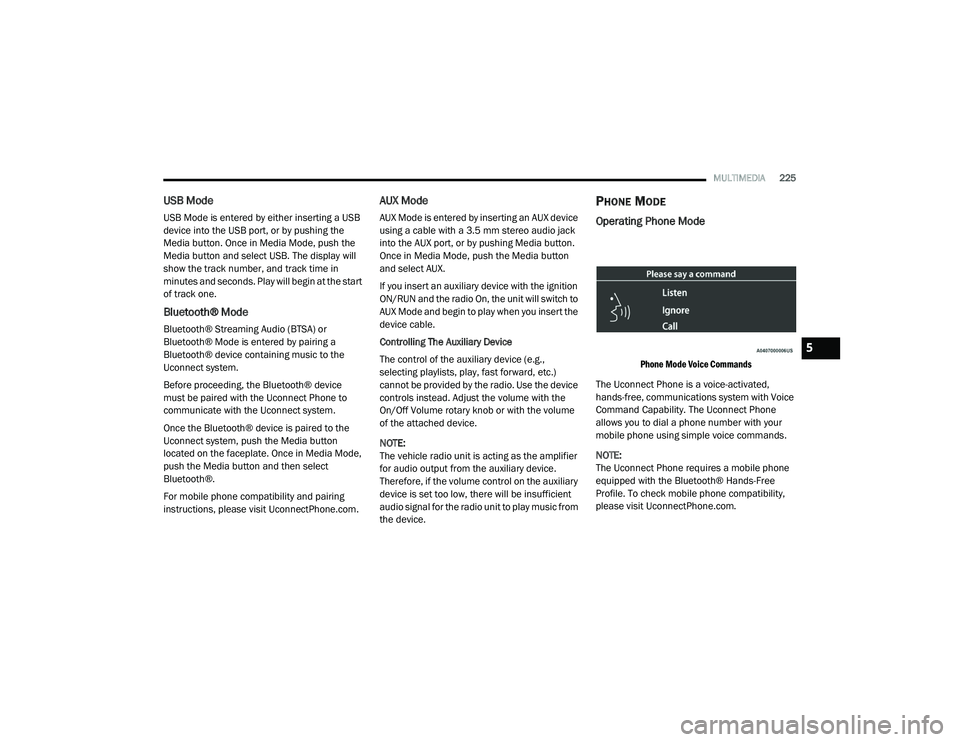
Phone Mode Voice Commands
The Uconnect Phone is a voice-activated,
hands-free, communications system with Voice
Command Capability. The Uconnect Phone
allows you to dial a phone number with your
mobile phone using simple voice commands.
NOTE:
The Uconnect Phone requires a mobile phone
equipped with the Bluetooth® Hands-Free
Profile. To check mobile phone compatibility,
please visit UconnectPhone.com.
5
21_DPF_OM_EN_USC_t.book Page 225
Page 228 of 463
226MULTIMEDIA
Uconnect System Support:
US residents visit
DriveUconnect.com
or call
1-877-855-8400 (24 hours a day, 7 days a week)
Canadian residents visit DriveUconnect.ca or
call 1-800-465-2001 (English) or
1-800-387-9983 (French)
Monday–Friday: 8:00 am – 8:00 pm, ET
Saturday: 9:00 am – 5:00 pm, ET
Sunday: Closed
Changing The Volume
1. Start a call by pushing the Phone button, then
adjust the volume during a normal call.
2. Use the radio On/Volume rotary knob to adjust the volume to a comfortable level. Please note the volume setting for
Uconnect phone is different than the
audio system volume setting.
Making A Phone Call
1. Push the Phone button on the steering wheel.
2. After the beep, say “dial” or “call” and then
the full name or phone number.
NOTE:
A phone call can also be made by pushing the Phone
button on the radio, and selecting a particular
contact in the phonebook or recent calls.
Mute (Or Unmute) Microphone During Call
Push the “Play/Pause/Mute” button on
the radio or during a call, push the Voice
Recognition button on the steering wheel.
After the beep, say “mute” (or “mute off”).
Pairing A Phone
To begin using your Uconnect Phone, you must
pair your compatible Bluetooth®-enabled mobile
phone. Mobile phone pairing is the process of
establishing a wireless connection between a
cellular phone and the Uconnect system. To complete the pairing process, you will need to
reference your mobile phone Owner's Manual.
Please visit
UconnectPhone.com
for complete
mobile phone compatibility information.
NOTE:
You must have Bluetooth® enabled on your
phone to complete this procedure.
The vehicle must be in PARK.
1. Place the ignition in the ACC or ON/RUN position.
2. Push the Phone button.
NOTE:
If there are no phones currently connected with
the system, a pop-up will appear asking if you
would like to pair a mobile phone.
3. Select “Yes” to begin the pairing process.
4. Search for available devices on your Bluetooth®-enabled mobile phone.
Press the Settings button on your mobile
phone.
Select “Bluetooth®” and ensure it is
enabled. Once enabled, the mobile
phone will begin to search for Bluetooth®
connections.
WARNING!
ALWAYS drive safely with your hands on the
wheel. You have full responsibility and
assume all risks related to the use of the
Uconnect features and applications in this
vehicle. Only use Uconnect when it is safe
to do so. Failure to do so may result in an
accident involving serious injury or death.
21_DPF_OM_EN_USC_t.book Page 226
Page 234 of 463
232MULTIMEDIA
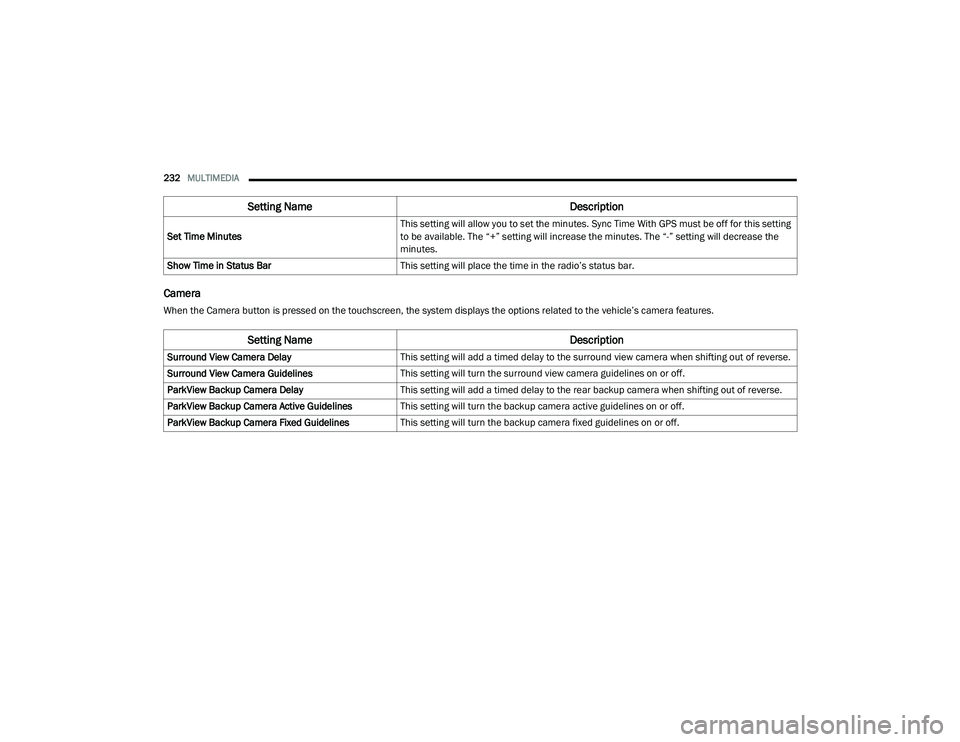
Camera
When the Camera button is pressed on the touchscreen, the system displays the options related to the vehicle’s camera features.Set Time Minutes
This setting will allow you to set the minutes. Sync Time With GPS must be off for this setting
to be available. The “+” setting will increase the minutes. The “-” setting will decrease the
minutes.
Show Time in Status Bar This setting will place the time in the radio’s status bar.
Setting Name Description
Setting NameDescription
Surround View Camera DelayThis setting will add a timed delay to the surround view camera when shifting out of reverse.
Surround View Camera Guidelines This setting will turn the surround view camera guidelines on or off.
ParkView Backup Camera Delay This setting will add a timed delay to the rear backup camera when shifting out of reverse.
ParkView Backup Camera Active Guidelines This setting will turn the backup camera active guidelines on or off.
ParkView Backup Camera Fixed Guidelines This setting will turn the backup camera fixed guidelines on or off.
21_DPF_OM_EN_USC_t.book Page 232
Page 239 of 463

MULTIMEDIA237
Doors & Locks
When the Doors & Locks button is pressed on the touchscreen, the system displays the options related to locking and unlocking the vehicle’s doors.
Setting Name Description
Auto Door LocksThis setting will allow you to change if the doors lock automatically when the vehicle reaches
12 mph (19 km/h).
Auto Unlock On Exit This setting will unlock the doors when any of the doors are opened from the inside.
Flash Lights With Lock This setting will allow you to turn the flashing of the lights when the Lock button is pushed on
the key fob on or off.
Sound Horn With Lock This setting will sound the horn when the Lock button is pushed on the key fob. The “Off”
setting will not sound the horn when the Lock button is pushed. The “1st Press” setting will
sound the horn when the Lock button is pushed once. The “2nd Press” setting will sound the
horn when the Lock button is pushed twice.
Sound Horn With Remote Start This setting will sound the horn when the remote start is activated from the key fob.
Remote Door Unlock, Door Lock/1st Press Of Key Fob
Unlocks This setting will change how many pushes of the Unlock button on the key fob are needed to
unlock all the doors. The “Driver Door” setting will only unlock the driver door on the first push
on the Unlock button. The “All Doors” setting will unlock all doors with only one push of the
Unlock button.
Passive Entry This setting will allow you to turn the Passive Entry feature (Keyless Enter-N-Go) on or off.
Personal Settings Linked To Key Fob This setting will recall preset radio stations and driver seat position that have been linked to
the key fob.
5
21_DPF_OM_EN_USC_t.book Page 237
Page 245 of 463
MULTIMEDIA243
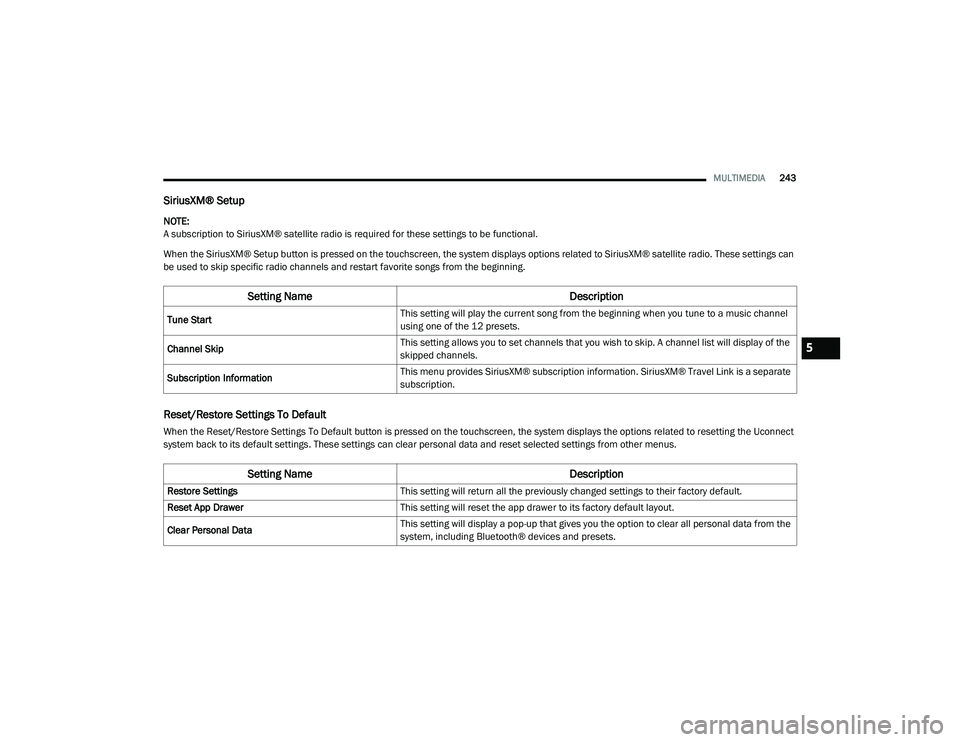
SiriusXM® Setup
NOTE:
A subscription to SiriusXM® satellite radio is required for these settings to be functional.
When the SiriusXM® Setup button is pressed on the touchscreen, the system displays options related to SiriusXM® satellite radio. These settings can
be used to skip specific radio channels and restart favorite songs from the beginning.
Reset/Restore Settings To Default
When the Reset/Restore Settings To Default button is pressed on the touchscreen, the system displays the options related to resetting the Uconnect
system back to its default settings. These settings can clear personal data and reset selected settings from other menus.
Setting Name Description
Tune StartThis setting will play the current song from the beginning when you tune to a music channel
using one of the 12 presets.
Channel Skip This setting allows you to set channels that you wish to skip. A channel list will display of the
skipped channels.
Subscription Information This menu provides SiriusXM® subscription information. SiriusXM® Travel Link is a separate
subscription.
Setting Name
Description
Restore SettingsThis setting will return all the previously changed settings to their factory default.
Reset App Drawer This setting will reset the app drawer to its factory default layout.
Clear Personal Data This setting will display a pop-up that gives you the option to clear all personal data from the
system, including Bluetooth® devices and presets.
5
21_DPF_OM_EN_USC_t.book Page 243
Page 246 of 463
244MULTIMEDIA
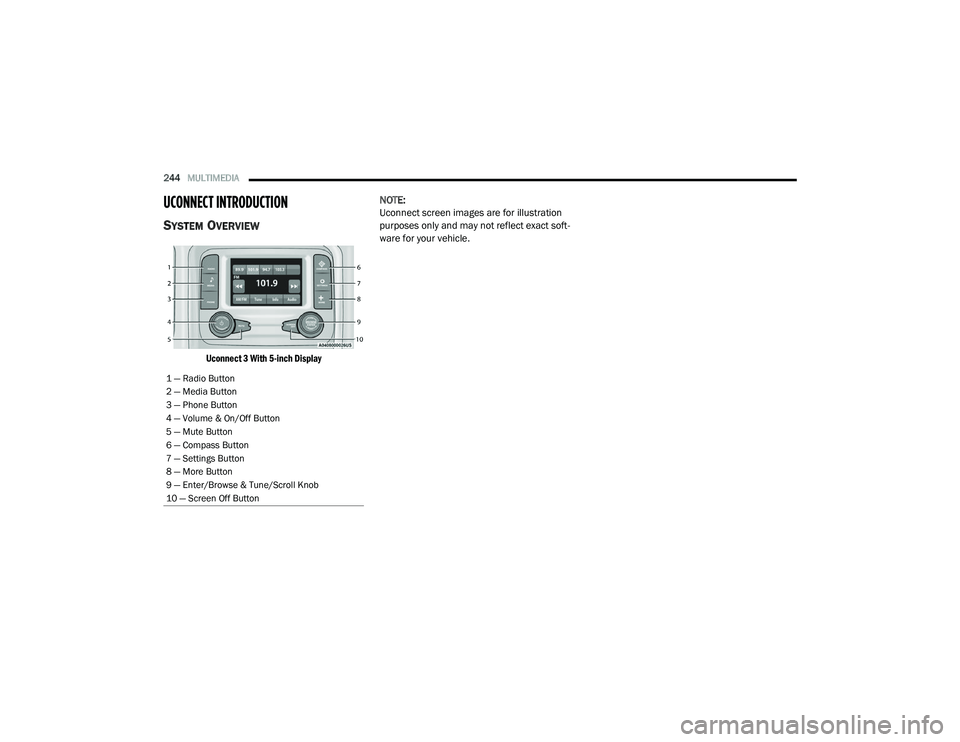
UCONNECT INTRODUCTION
SYSTEM OVERVIEW
Uconnect 3 With 5-inch Display
NOTE:
Uconnect screen images are for illustration
purposes only and may not reflect exact soft
-
ware for your vehicle.
1 — Radio Button
2 — Media Button
3 — Phone Button
4 — Volume & On/Off Button
5 — Mute Button
6 — Compass Button
7 — Settings Button
8 — More Button
9 — Enter/Browse & Tune/Scroll Knob
10 — Screen Off Button
21_DPF_OM_EN_USC_t.book Page 244
Page 247 of 463
MULTIMEDIA245
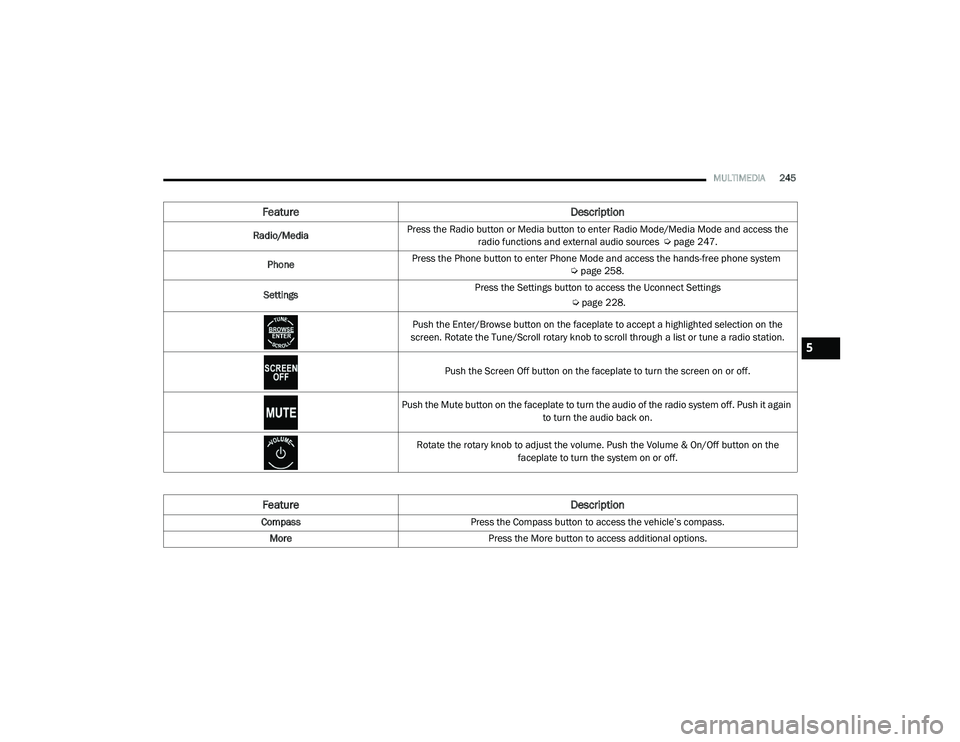
Feature Description
Radio/MediaPress the Radio button or Media button to enter Radio Mode/Media Mode and access the
radio functions and external audio sources Ú page 247.
Phone Press the Phone button to enter Phone Mode and access the hands-free phone system
Úpage 258.
Settings Press the Settings button to access the Uconnect Settings
Úpage 228.
Push the Enter/Browse button on the faceplate to accept a highlighted selection on the
screen. Rotate the Tune/Scroll rotary knob to scroll through a list or tune a radio station.
Push the Screen Off button on the faceplate to turn the screen on or off.
Push the Mute button on the faceplate to turn the audio of the radio system off. Push it again to turn the audio back on.
Rotate the rotary knob to adjust the volume. Push the Volume & On/Off button on the faceplate to turn the system on or off.
Feature Description
CompassPress the Compass button to access the vehicle’s compass.
More Press the More button to access additional options.
5
21_DPF_OM_EN_USC_t.book Page 245
Page 249 of 463
MULTIMEDIA247
UCONNECT MODES
STEERING WHEEL AUDIO CONTROLS
The remote sound system controls are located
on the rear surface of the steering wheel at the
three and nine o’clock positions.
Remote Sound System Controls
The right-hand control is a rocker-type switch with
a push button in the center and controls the
volume and mode of the sound system. Pushing
the top of the rocker switch will increase the
volume, and pushing the bottom of the rocker
switch will decrease the volume.
Pushing the center button will make the radio
switch between the various modes available
(AM/FM/SXM or Media, etc.). The left-hand control is a rocker-type switch with
a push button in the center. The function of the
left-hand control is different depending on
which mode you are in.
The following describes the left-hand control
operation in each mode:
Radio Operation
Pushing the top of the switch will Seek Up for
the next available station and pushing the
bottom of the switch will Seek Down for the next
available station.
The button located in the center of the left-hand
control will tune to the next preset station that
you have programmed in the radio presets.
Media Mode
Pushing the top of the switch skips to the
next track on the selected media (AUX/USB/
Bluetooth®). Pushing the switch up twice will go
forward two tracks. Pushing the bottom switch
goes to the beginning of the current track, or the
beginning of the previous track if it is within eight
seconds after the current track begins to play.
Double pressing the bottom button switch will
skip to the previous track if it is after eight
seconds into the current track.
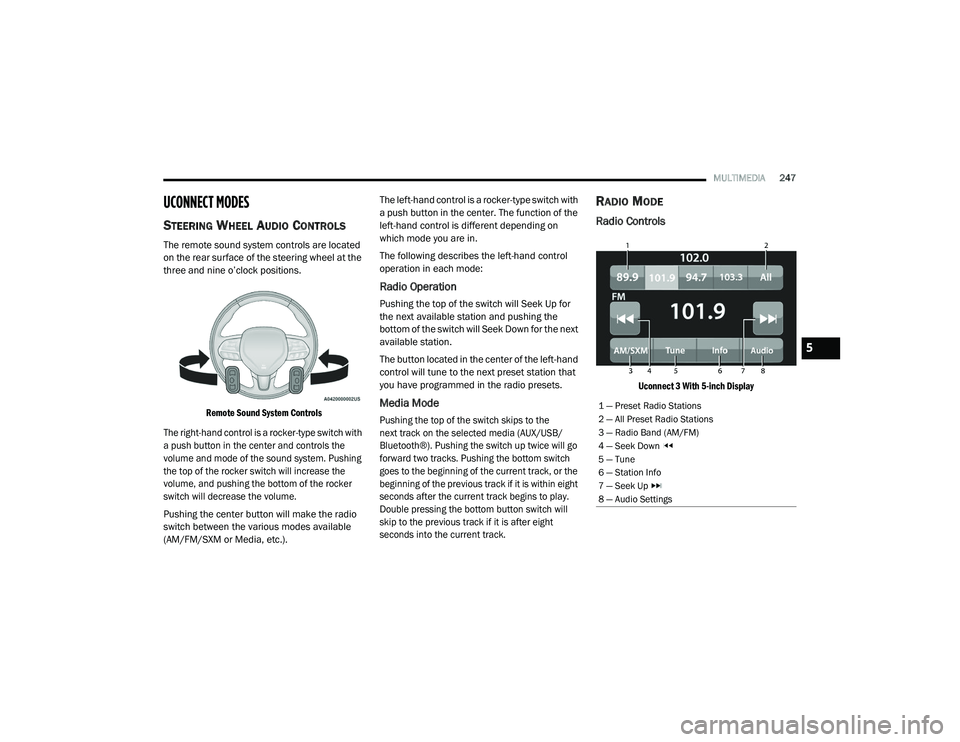
RADIO MODE
Radio Controls
Uconnect 3 With 5-inch Display
1 — Preset Radio Stations
2 — All Preset Radio Stations
3 — Radio Band (AM/FM)
4 — Seek Down
5 — Tune
6 — Station Info
7 — Seek Up
8 — Audio Settings
5
21_DPF_OM_EN_USC_t.book Page 247