ABS RAM PROMASTER 2023 Owners Manual
[x] Cancel search | Manufacturer: RAM, Model Year: 2023, Model line: PROMASTER, Model: RAM PROMASTER 2023Pages: 296, PDF Size: 12.31 MB
Page 6 of 296

4
Indications On The Display ........................... 102
Minimum Risk Maneuver.............................. 103 System Status................................................ 103
System Operation/Limitations ..................... 103
PARKSENSE FRONT/REAR PARK ASSIST —
IF EQUIPPED ........................................................ 104
ParkSense Sensors ....................................... 105
ParkSense Warning Display.......................... 105
ParkSense Display ........................................ 105
Enabling And Disabling ParkSense .............. 108
Service The ParkSense Park Assist
System ........................................................... 108ParkSense Park Assist Failure Indications .. 108
Cleaning The ParkSense System ................. 108ParkSense Park Assist System Usage
Precautions .................................................... 109
Side Distance Warning System ................... 110
PARKSENSE ACTIVE PARK ASSIST
SYSTEM — IF EQUIPPED ..................................... 112
Enabling And Disabling The ParkSense
Active Park Assist System ............................. 112
Parallel/Perpendicular Parking Space
Assistance Operation .................................... 113
Exiting The Parking Space ............................ 116
LANESENSE — IF EQUIPPED ............................. 116
LaneSense Operation ................................... 116Turning LaneSense On Or Off ....................... 117
LaneSense Warning Message ...................... 117Changing LaneSense Status ........................ 119
PARKVIEW REAR BACK UP CAMERA .............. 119 SURROUND VIEW CAMERA SYSTEM —
IF EQUIPPED ........................................................ 120
REFUELING THE VEHICLE ................................... 122
Loose Fuel Filler Cap Message .................... 123
VEHICLE LOADING .............................................. 123
Vehicle Certification Label ............................ 123
Gross Vehicle Weight Rating (GVWR) .......... 123
Gross Axle Weight Rating (GAWR) ............... 123
Tire Size ......................................................... 123
Rim Size ......................................................... 124
Inflation Pressure .......................................... 124
Curb Weight ................................................... 124
Overloading.................................................... 124
Loading ......................................................... 124
TRAILER TOWING ................................................ 124
Common Towing Definitions......................... 124
Trailer Hitch Classification ............................ 126
Trailer Towing Weights (Maximum Trailer
Weight Ratings) ............................................ 126
Trailer And Tongue Weight ........................... 127Towing Requirements .................................. 127
Towing Tips ................................................... 130
RECREATIONAL TOWING (BEHIND
MOTORHOME) .................................................... 130
Towing This Vehicle Behind Another
Vehicle ........................................................... 130
Recreational Towing...................................... 131
DRIVING TIPS ....................................................... 131
Driving On Slippery Surfaces ....................... 131
Driving Through Water ................................. 131
MULTIMEDIA
UCONNECT SYSTEMS ......................................... 133
CYBERSECURITY ................................................. 133
UCONNECT SETTINGS ........................................ 134 Customer Programmable Features ............. 134
RADIO OPERATION AND MOBILE PHONES...... 151
Regulatory And Safety Information .............. 151
SAFETY
SAFETY FEATURES .............................................. 152Anti-Lock Brake System (ABS)...................... 152
Electronic Brake Control (EBC) System ...... 153
DROWSY DRIVER DETECTION (DDD) —
IF EQUIPPED ......................................................... 157
To Activate/Deactivate ................................. 157
System Operation.......................................... 157
AUXILIARY DRIVING SYSTEMS .......................... 158
Blind Spot Monitoring (BSM) —
If Equipped ................................................... 158
Forward Collision Warning (FCW) With
Mitigation — If Equipped ............................... 164
Tire Pressure Monitoring
System (TPMS) .............................................. 168
OCCUPANT RESTRAINT SYSTEMS ................... 170
Occupant Restraint Systems Features ....... 170
Important Safety Precautions ...................... 170
Seat Belt Systems ........................................ 171
Supplemental Restraint Systems (SRS) ...... 178Child Restraints ............................................. 185
23_VF_OM_EN_USC_t.book Page 4
Page 12 of 296
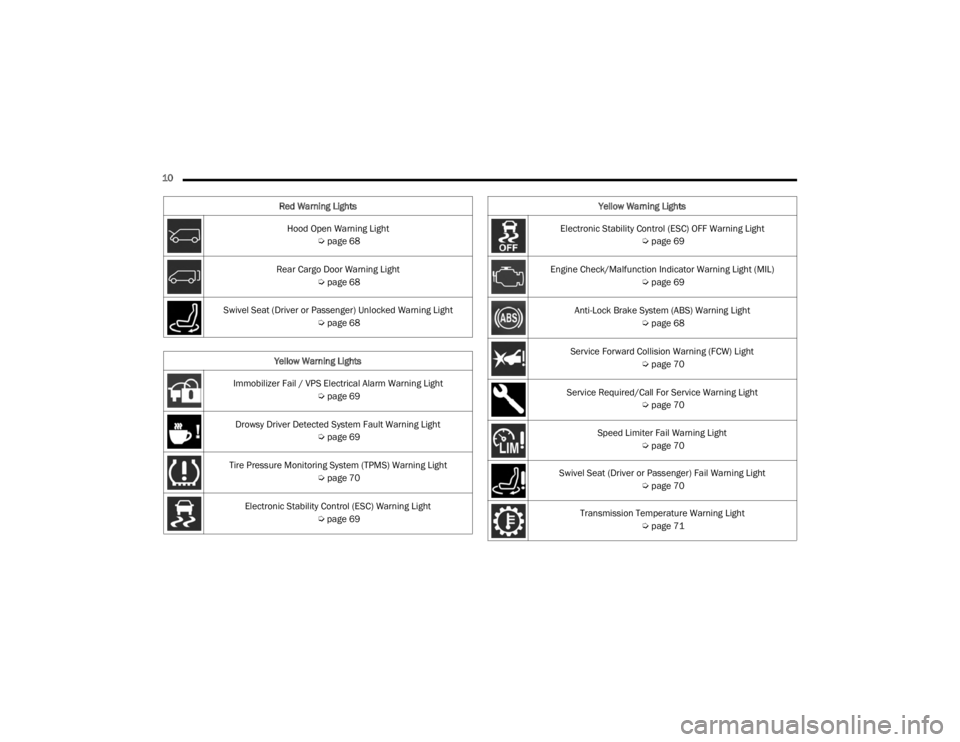
10 Hood Open Warning Light Úpage 68
Rear Cargo Door Warning Light Úpage 68
Swivel Seat (Driver or Passenger) Unlocked Warning Light Úpage 68
Yellow Warning Lights
Immobilizer Fail / VPS Electrical Alarm Warning Light Úpage 69
Drowsy Driver Detected System Fault Warning Light Úpage 69
Tire Pressure Monitoring System (TPMS) Warning Light Úpage 70
Electronic Stability Control (ESC) Warning Light Úpage 69
Red Warning Lights
Electronic Stability Control (ESC) OFF Warning Light
Úpage 69
Engine Check/Malfunction Indicator Warning Light (MIL) Úpage 69
Anti-Lock Brake System (ABS) Warning Light Úpage 68
Service Forward Collision Warning (FCW) Light Úpage 70
Service Required/Call For Service Warning Light Úpage 70
Speed Limiter Fail Warning Light Úpage 70
Swivel Seat (Driver or Passenger) Fail Warning Light Úpage 70
Transmission Temperature Warning Light Úpage 71
Yellow Warning Lights
23_VF_OM_EN_USC_t.book Page 10
Page 27 of 296
GETTING TO KNOW YOUR VEHICLE25
(Continued)
Recliner Adjustment
Without Swivel Seat
The recliner knob is on the rear outboard side of the
seat. To recline the seatback, lean back and rotate
the knob rearward to position the seatback as desired.
To return the seatback to its normal upright position,
lean forward and rotate the knob forward until the
seatback is in the upright position.
With Swivel Seat
The recliner lever is located at the lower front outboard
side of the seat. To recline the seatback, lean forward
slightly, pull the lever outward, lean back to the desired
position and release the lever. To return the seatback
to its normal upright position, lean forward and pull the
lever outward. Release the lever once the seatback is
in the upright position.
Lumbar Support — If Equipped
This feature allows you to increase or decrease the
amount of lumbar support. The lumbar control
knob is located on the rear upper outboard side of
the driver's seatback. Rotate the control forward to
increase and rearward to decrease the desired
amount of lumbar support.
Suspension Seat — If Equipped
The seat is equipped with a mechanical spring
system and hydraulic shock absorber to ensure
maximum comfort and safety. The system of
springs also effectively absorbs impact from
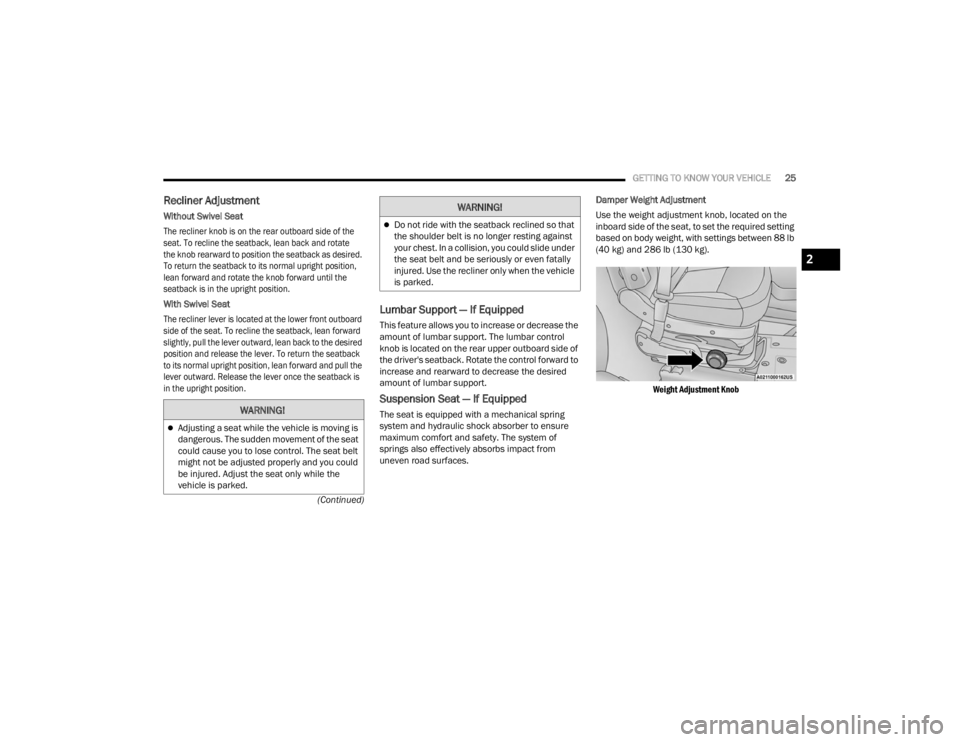
uneven road surfaces. Damper Weight Adjustment
Use the weight adjustment knob, located on the
inboard side of the seat, to set the required setting
based on body weight, with settings between 88 lb
(40 kg) and 286 lb (130 kg).
Weight Adjustment Knob
WARNING!
Adjusting a seat while the vehicle is moving is
dangerous. The sudden movement of the seat
could cause you to lose control. The seat belt
might not be adjusted properly and you could
be injured. Adjust the seat only while the
vehicle is parked.
Do not ride with the seatback reclined so that
the shoulder belt is no longer resting against
your chest. In a collision, you could slide under
the seat belt and be seriously or even fatally
injured. Use the recliner only when the vehicle
is parked.
WARNING!
2
23_VF_OM_EN_USC_t.book Page 25
Page 68 of 296
66GETTING TO KNOW YOUR INSTRUMENT PANEL
Brake Warning Light
This warning light monitors various brake
functions, including brake fluid level and
parking brake application. If the brake
light turns on it may indicate that the
parking brake is applied, that the brake fluid level
is low, or that there is a problem with the Anti-Lock
Brake System reservoir.
If the light remains on when the parking brake has been
disengaged, and the fluid level is at the full mark on the
master cylinder reservoir, it indicates a possible brake
hydraulic system malfunction or that a problem with the
Brake Booster has been detected by the Anti-Lock
Brake System (ABS) / Electronic Stability Control (ESC)
system. In this case, the light will remain on until the
condition has been corrected. If the problem is related
to the brake booster, the ABS pump will run when
applying the brake, and a brake pedal pulsation may be
felt during each stop.
The dual brake system provides a reserve braking
capacity in the event of a failure to a portion of the
hydraulic system. A leak in either half of the dual
brake system is indicated by the Brake Warning
Light, which will turn on when the brake fluid
level in the master cylinder has dropped below a
specified level.
The light will remain on until the cause is corrected.
NOTE:The light may flash momentarily during sharp
cornering maneuvers, which change fluid level
conditions. The vehicle should have service
performed, and the brake fluid level checked.
If brake failure is indicated, immediate repair is
necessary.
Vehicles equipped with the Anti-Lock Brake System
(ABS) are also equipped with Electronic Brake
Force Distribution (EBD). In the event of an EBD
failure, the Brake Warning Light will turn on along
with the ABS Light. Immediate repair to the ABS
system is required.
Operation of the Brake Warning Light can be
checked by turning the ignition switch from the OFF
position to the ON/RUN position. The light should
illuminate for approximately two seconds. The light
should then turn off unless the parking brake is
applied or a brake fault is detected. If the light does
not illuminate, have the light inspected by an
authorized dealer. The light also will turn on when the parking brake
is applied with the ignition switch in the ON/RUN
position.
NOTE:This light shows only that the parking brake is
applied. It does not show the degree of brake
application.
Battery Charge Warning Light
This warning light will illuminate when the
battery is not charging properly. If it stays on
while the engine is running, there may be
a malfunction with the charging system.
Contact an authorized dealer as soon as possible.
This indicates a possible problem with the
electrical system or a related component.
Door Open Warning Light
This indicator will illuminate when one or
more door(s) are not fully closed. A pop-up
appears on the instrument cluster display
showing which door is open.
NOTE:If the vehicle is moving and a door is opened, there
will also be a single chime.
WARNING!
Driving a vehicle with the red brake light on is
dangerous. Part of the brake system may have
failed. It will take longer to stop the vehicle.
You could have a collision. Have the vehicle
checked immediately.
23_VF_OM_EN_USC_t.book Page 66
Page 70 of 296

68GETTING TO KNOW YOUR INSTRUMENT PANEL
Hood Open Warning Light
The telltale turns on when the hood is not
properly closed. Along with the icon, an
image of the vehicle with an open hood
cap appears on the display.
Close the hood properly.
Rear Door Open Warning Light —
If Equipped
This warning light will illuminate when the
rear door is open.
NOTE:This light will flash at a fast rate for approximately
15 seconds when the vehicle security system is
arming, and then will flash slowly until the vehicle
is disarmed.
Oil Pressure Warning Light
This warning light will illuminate to
indicate low engine oil pressure. If the
light turns on while driving, stop the
vehicle, shut off the engine as soon
as possible, and contact an authorized dealer.
A chime will sound when this light turns on.
Do not operate the vehicle until the cause is
corrected. This light does not indicate how much
oil is in the engine. The engine oil level must be
checked under the hood.
Seat Belt Reminder Warning Light
When the ignition is first placed in the
ON/RUN or MAR/ON/RUN position, if the
driver’s seat belt is unbuckled, a chime
will sound and the light will turn on. When
driving, if the driver or front passenger seat belt
remains unbuckled, the Seat Belt Reminder Light
will flash or remain on continuously and a chime
will sound Ú page 170.
Transmission Fault Warning Light
This light will illuminate (together with
a message in the instrument cluster display
and a buzzer) to indicate a transmission
fault. Contact an authorized dealer if the
message remains after restarting the engine.
Vehicle Security Warning Light —
If Equipped
This light will flash at a fast rate for
approximately 15 seconds when the
vehicle security system is arming, and
then will flash slowly until the vehicle is
disarmed.
Swivel Seat (Driver or Passenger)
Unlocked Warning Light — If Equipped
This light will illuminate when the driver
or passenger seat is unlocked.
YELLOW WARNING LIGHTS
Adaptive Cruise Control (ACC) Fault
Warning Light — If Equipped
This warning light will illuminate to
indicate a fault in the ACC system.
Contact a local authorized dealer for
service Ú page 89.
Anti-Lock Brake System (ABS) Warning
Light
This light monitors the ABS. The light will
turn on when the ignition is placed in the
ON/RUN or MAR/ON/RUN position and
may stay on for as long as four seconds.
If the ABS light remains on or turns on while
driving, then the Anti-Lock portion of the brake
system is not functioning and service is required.
However, the conventional brake system will
continue to operate normally if the brake warning
light is not on.
If the ABS light is on, the brake system should
be serviced as soon as possible to restore the
benefits of Anti-Lock Brakes. If the ABS light
does not turn on when the ignition is placed in
the ON/RUN or MAR/ON/RUN position, have the
light inspected by an authorized dealer.
23_VF_OM_EN_USC_t.book Page 68
Page 95 of 296

STARTING AND OPERATING93
To Cancel
The following conditions cancel the ACC or Fixed
Speed Cruise Control systems:
The brake pedal is applied
The CANC (cancel) button is pushed
The Anti-Lock Brake System (ABS) activates
The gear selector is removed from the DRIVE
position
The Electronic Stability Control/Traction Control
System (ESC/TCS) activates
The vehicle parking brake is applied
The braking temperature exceeds normal range
(overheated)
To Turn Off
The system will turn off and clear the set speed in
memory if:
The Adaptive Cruise Control (ACC) on/off button
is pushed
The Fixed Speed Cruise Control on/off button is
pushed
The ignition is placed in the OFF position
To Resume
If there is a set speed in memory, push the RES
(resume) button and remove your foot from the
accelerator pedal. The instrument cluster display
will show the last set speed. Resume can be used at any speed above 20 mph
(32 km/h) when only Fixed Speed Cruise Control is
being used.
Resume can be used at any speed above 0 mph
(0 km/h) when ACC is active.
NOTE:
If your vehicle is at standstill longer than
two seconds, the driver will either have to push
the RES (resume) button, or apply the acceler
-
ator pedal to reengage the Adaptive Cruise
Control (ACC) to the existing set speed.
ACC cannot be resumed if there is a stationary
vehicle in front of your vehicle in close proximity.
To Vary The Speed Setting
To Increase Or Decrease The Set Speed
After setting a speed, you can increase the set
speed by pushing the SET (+) button, or decrease
speed by pushing the SET (-) button.
U.S. Speed (mph)
Pushing the SET (+) , or SET (-) button once
will result in a 1 mph speed adjustment. Each
subsequent tap of the button results in an
adjustment of 1 mph.
If the button is continually pushed, the set speed will
continue to adjust in 5 mph increments until the
button is released. The new set speed is reflected in
the instrument cluster display.
Metric Speed (km/h)
Pushing the SET (+) , or SET (-) button once will
result in a 1 km/h speed adjustment. Each
subsequent tap of the button results in an
adjustment of 1 km/h.
If the button is continually pushed, the set speed will
continue to adjust in 10 km/h increments until the
button is released. The new set speed is reflected in
the instrument cluster display.
NOTE:When you override and push the SET (+) button or
SET (-) button, the new set speed will be the current
speed of the vehicle.
WARNING!
The Resume function should only be used if
traffic and road conditions permit. Resuming
a set speed that is too high or too low for
prevailing traffic and road conditions could
cause the vehicle to accelerate or decelerate too
sharply for safe operation. Failure to follow these
warnings can result in a collision and death or
serious personal injury.
4
23_VF_OM_EN_USC_t.book Page 93
Page 105 of 296
STARTING AND OPERATING103
(Continued)
Active Driving Assist Indicators Are Yellow
Driver inattentiveness has been detected,
warning the driver to place hands on the
steering wheel.
Active Driving Assist Indicators Are Red
Driver inattentiveness is still being detected,
warning the driver to place hands on the
steering wheel. This warning is also issued when
the system has detected a tight curve and is
warning the driver to take control
NOTE:The driver MUST replace hands on the steering
wheel and take control of the vehicle when the
system is deactivated.
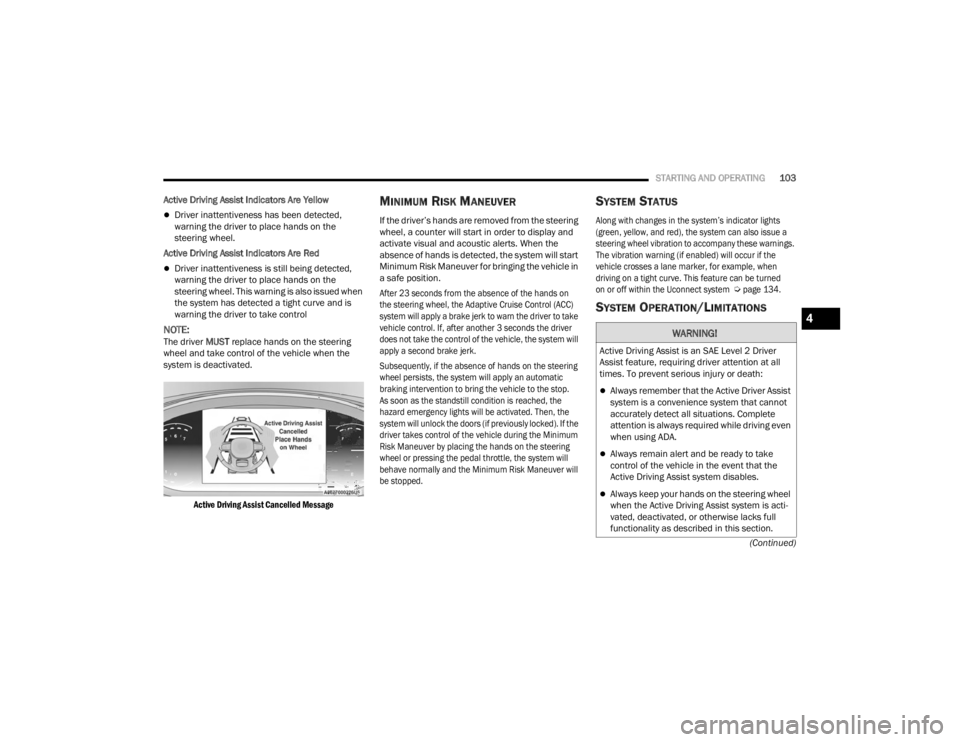
Active Driving Assist Cancelled Message
MINIMUM RISK MANEUVER
If the driver’s hands are removed from the steering
wheel, a counter will start in order to display and
activate visual and acoustic alerts. When the
absence of hands is detected, the system will start
Minimum Risk Maneuver for bringing the vehicle in
a safe position.
After 23 seconds from the absence of the hands on
the steering wheel, the Adaptive Cruise Control (ACC)
system will apply a brake jerk to warn the driver to take
vehicle control. If, after another 3 seconds the driver
does not take the control of the vehicle, the system will
apply a second brake jerk.
Subsequently, if the absence of hands on the steering
wheel persists, the system will apply an automatic
braking intervention to bring the vehicle to the stop.
As soon as the standstill condition is reached, the
hazard emergency lights will be activated. Then, the
system will unlock the doors (if previously locked). If the
driver takes control of the vehicle during the Minimum
Risk Maneuver by placing the hands on the steering
wheel or pressing the pedal throttle, the system will
behave normally and the Minimum Risk Maneuver will
be stopped.
SYSTEM STATUS
Along with changes in the system’s indicator lights
(green, yellow, and red), the system can also issue a
steering wheel vibration to accompany these warnings.
The vibration warning (if enabled) will occur if the
vehicle crosses a lane marker, for example, when
driving on a tight curve. This feature can be turned
on or off within the Uconnect system
Ú
page 134.
SYSTEM OPERATION/LIMITATIONS
WARNING!
Active Driving Assist is an SAE Level 2 Driver
Assist feature, requiring driver attention at all
times. To prevent serious injury or death:
Always remember that the Active Driver Assist
system is a convenience system that cannot
accurately detect all situations. Complete
attention is always required while driving even
when using ADA.
Always remain alert and be ready to take
control of the vehicle in the event that the
Active Driving Assist system disables.
Always keep your hands on the steering wheel
when the Active Driving Assist system is acti -
vated, deactivated, or otherwise lacks full
functionality as described in this section.
4
23_VF_OM_EN_USC_t.book Page 103
Page 114 of 296

112STARTING AND OPERATING
PARKSENSE ACTIVE PARK ASSIST
SYSTEM — IF EQUIPPED
The ParkSense Active Park Assist system is intended to
assist the driver during parallel and perpendicular
parking maneuvers by identifying a proper parking
space, providing audible/visual instructions through
the instrument cluster display, and controlling the
steering wheel. The ParkSense Active Park Assist
system is defined as “semi-automatic” since the driver
maintains control of the accelerator, gear selector and
brakes. Depending on the driver's parking maneuver
selection, the system is capable of maneuvering a
vehicle into a parallel or a perpendicular parking space
on either side (i.e., driver side or passenger side).
NOTE:
The driver is always responsible for controlling
the vehicle, responsible for any surrounding
objects, and must intervene as required.
The system is provided to assist the driver and
not to substitute the driver.
During a semi-automatic maneuver, if the
driver touches the steering wheel after being
instructed to remove their hands from the
steering wheel, the system will cancel, and the
driver will be required to manually complete the
parking maneuver.
The system may not work in all conditions
(e.g. environmental conditions such as heavy
rain, snow, etc., or if searching for a parking
space that has surfaces that will absorb the
ultrasonic sensor waves).
It is important to keep the sensors clean in order for
the system to operate correctly. During cleaning
make sure not to scratch or damage them; avoid
using dry or rough cloths. The sensors should be
washed using clean water with addition of car
shampoo if necessary. In washing stations, clean
the sensors quickly, keeping the steam jet/high
pressure washing nozzles at least 4 in (10 cm) away
from the sensors.
New vehicles from the dealership must have at
least 31 miles (50 km) accumulated before the
ParkSense Active Park Assist system is fully cali -
brated and performs accurately. This is due to
the system’s dynamic vehicle calibration to
improve the performance of the feature.
The driver must control the vehicle’s brakes.
The automatic emergency braking feature is
NOT intended to substitute for the driver during
REVERSE maneuvers.
ENABLING AND DISABLING THE
P
ARKSENSE ACTIVE PARK ASSIST
S
YSTEM
The ParkSense Active Park Assist system
can be enabled and disabled with the
ParkSense Active Park Assist switch,
located on the switch panel below the
Uconnect display.
To enable or disable the system, push the
ParkSense Active Park Assist switch once
(LED turns on). Pushing the switch a second time
will disable the system (LED turns off).
The ParkSense Active Park Assist system will turn off
automatically for any of the following conditions:
Parking maneuver is completed.
Vehicle speed is greater than 18 mph (30 km/h)
when searching for a parking space.
Vehicle speed is greater than 5 mph (7 km/h) during active steering guidance into the parking
space.
Steering wheel is touched during active steering
guidance into the parking space.
If parking maneuver has not been completed
after 3 minutes.
ParkSense Front/Rear Park Assist switch is
pushed.
23_VF_OM_EN_USC_t.book Page 112
Page 154 of 296
152 (Continued)
SAFETY
SAFETY FEATURES
ANTI-LOCK BRAKE SYSTEM (ABS)
The ABS is designed to aid the driver in maintaining
vehicle control under adverse braking conditions.
The system operates with a separate computer to
modulate hydraulic pressure, to prevent wheel lock-up
and to help avoid skidding on slippery surfaces.
The system's pump motor runs during an ABS stop
to provide regulated hydraulic pressure. The pump
motor makes a low humming noise during
operation, which is normal.
The ABS includes an yellow ABS Warning Light. When
the light is illuminated, the ABS is not functioning.
The system reverts to standard non-ABS. Placing the
ignition in the OFF mode and to the ON mode again may
reset the ABS if the fault detected was only momentary.
When you are in a severe braking condition
involving the use of the ABS, you will experience
some pedal drop as the vehicle comes to a stop.
This is the result of the system reverting to the
base brake system.
Engagement of the ABS may be accompanied by a
pulsing sensation. You may also hear a clicking
noise. These occurrences are normal and indicate
that the system is functioning properly.
WARNING!
The ABS contains sophisticated electronic equip
-
ment that may be susceptible to interference
caused by improperly installed or high output
radio transmitting equipment. This interference
can cause possible loss of anti-lock braking capa -
bility. Installation of such equipment should be
performed by qualified professionals.
Pumping of the Anti-Lock Brakes will diminish
their effectiveness and may lead to a collision.
Pumping makes the stopping distance longer.
Just press firmly on your brake pedal when you
need to slow down or stop.
The ABS cannot prevent the natural laws of
physics from acting on the vehicle, nor can it
increase braking or steering efficiency beyond
that afforded by the condition of the vehicle
brakes and tires or the traction afforded.
The ABS cannot prevent collisions, including
those resulting from excessive speed in turns,
following another vehicle too closely, or
hydroplaning.
The capabilities of an ABS equipped vehicle
must never be exploited in a reckless or
dangerous manner that could jeopardize the
user’s safety or the safety of others.
WARNING!
23_VF_OM_EN_USC_t.book Page 152
Page 155 of 296

SAFETY153
ELECTRONIC BRAKE CONTROL (EBC)
S
YSTEM
Your vehicle is equipped with an advanced
Electronic Brake Control (EBC) system that
includes the Brake Assist System (BAS), Crosswind
Assist (CWA), Electronic Stability Control (ESC), Hill
Start Assist (HSA), Traction Control System (TCS),
and Trailer Sway Control (TSC). These systems
complement the Anti-Lock Brake System (ABS) by
optimizing the vehicle braking capability during
emergency braking maneuvers.
Brake Assist System (BAS)
The BAS is designed to optimize the vehicle’s braking
capability during emergency braking maneuvers.
The system detects an emergency braking situation
by sensing the rate and amount of brake application
and then applies optimum pressure to the brakes.
This can help reduce braking distances. The BAS
complements the Anti-Lock Brake System (ABS).
Applying the brakes very quickly results in the best BAS
assistance. To receive the benefit of the system, you
must apply continuous braking pressure during the
stopping sequence (do not “pump” the brakes). Do not
reduce brake pedal pressure unless braking is no
longer desired. Once the brake pedal is released,
the BAS is deactivated.
Crosswind Assist (CWA)
CWA helps keep your vehicle from drifting out of its lane
due to unexpected crosswinds by means of targeted
braking of individual wheels. The system will provide
automatic stability assistance to counteract the effect
of strong side wind. If a strong lateral wind is detected,
front and rear brakes on the affected side are applied,
creating a steering effect that mitigates the crosswind
influence. During system intervention, the driver should
perceive the natural stable handling feel of the vehicle.
Crosswind Assist will activate automatically when
the vehicle reaches speeds above approximately
43 mph (70 km/h). When the system is activated,
the ESC Warning Light in the instrument cluster will
blink to warn the driver.
Electronic Roll Mitigation (ERM)
The ERM system anticipates the potential for
wheel lift by monitoring the driver’s steering wheel
input and the speed of the vehicle. When ERM
determines that the rate of change of the steering
wheel angle and vehicle’s speed are sufficient to
potentially cause wheel lift, it then applies the
appropriate brake and may also reduce engine
power to lessen the chance that wheel lift will
occur. ERM can only reduce the chance of wheel
lift occurring during severe or evasive driving
maneuvers; it cannot prevent wheel lift due to
other factors, such as road conditions, leaving the
roadway, striking objects or other vehicles.WARNING!
The Brake Assist System (BAS) cannot prevent the
natural laws of physics from acting on the vehicle,
nor can it increase the traction afforded by prevailing
road conditions. BAS cannot prevent collisions,
including those resulting from excessive speed in
turns, driving on very slippery surfaces, or
hydroplaning. The capabilities of a BAS-equipped
vehicle must never be exploited in a reckless or
dangerous manner, which could jeopardize the
user's safety or the safety of others.
WARNING!
Many factors, such as vehicle loading, road
conditions and driving conditions, influence
the chance that wheel lift or rollover may occur.
ERM cannot prevent all wheel lift or rollovers,
especially those that involve leaving the roadway
or striking objects or other vehicles. The
capabilities of an ERM-equipped vehicle must
never be exploited in a reckless or dangerous
manner which could jeopardize the user's safety
or the safety of others.
6
23_VF_OM_EN_USC_t.book Page 153