ESP RENAULT ALASKAN 2017 User Guide
[x] Cancel search | Manufacturer: RENAULT, Model Year: 2017, Model line: ALASKAN, Model: RENAULT ALASKAN 2017Pages: 340, PDF Size: 6.93 MB
Page 98 of 340
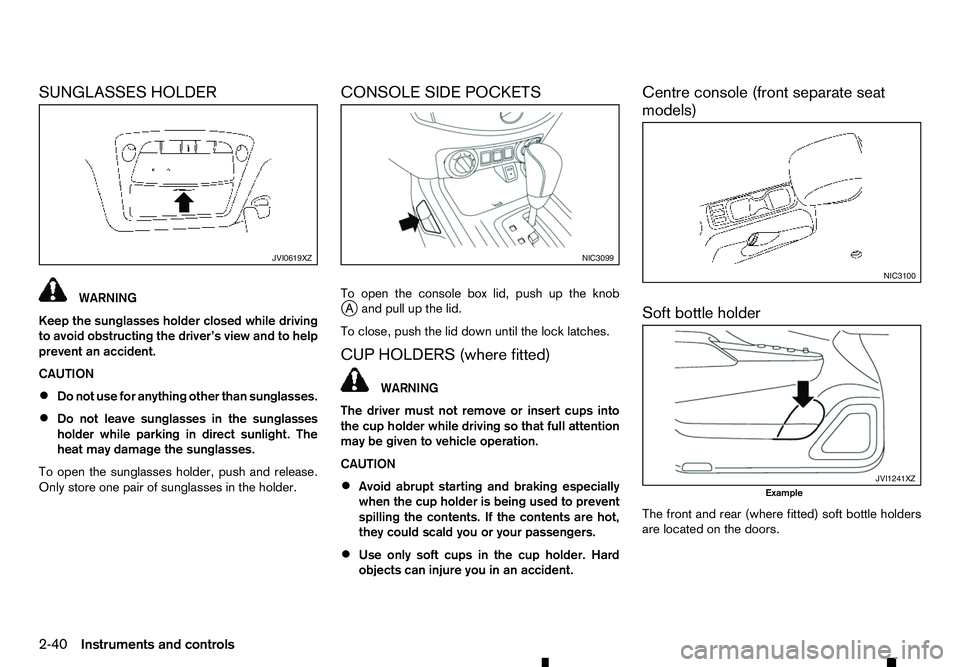
SUNGLASSES HOLDER
WARNING
Keep the sunglasses holder closed while driving
to avoid obstructing the driver’s view and to help
prevent an accident.
CAUTION
• Do not use for anything other than sunglasses.
• Do not leave sunglasses in the sunglasses
holder while parking in direct sunlight. The
heat may damage the sunglasses.
To open the sunglasses holder, push and release.
Only store one pair of sunglasses in the holder. CONSOLE SIDE POCKETS
To open the console box lid, push up the knob
j
Aa nd pull up the lid.
To close, push the lid down until the lock latches.
CUP HOLDERS (where fitted) WARNING
The driver must not remove or insert cups into
the cup holder while driving so that full attention
may be given to vehicle operation.
CAUTION
• Avoid abrupt starting and braking especially
when the cup holder is being used to prevent
spilling the contents. If the contents are hot,
they could scald you or your passengers.
• Use only soft cups in the cup holder. Hard
objects can injure you in an accident. Centre console (front separate seat
models)
Soft bottle holder
The front and rear (where fitted) soft bottle holders
are located on the doors.
JVI0619XZ NIC3099
NIC3100
JVI1241XZ
Example
2-40 Instruments and controls
Page 99 of 340
CAUTION
•
Do not use bottle holder for any other objects
that could be thrown about in the vehicle and
possibly injure people during sudden braking
or an accident.
• Do not use bottle holder for open liquid con-
tainers.
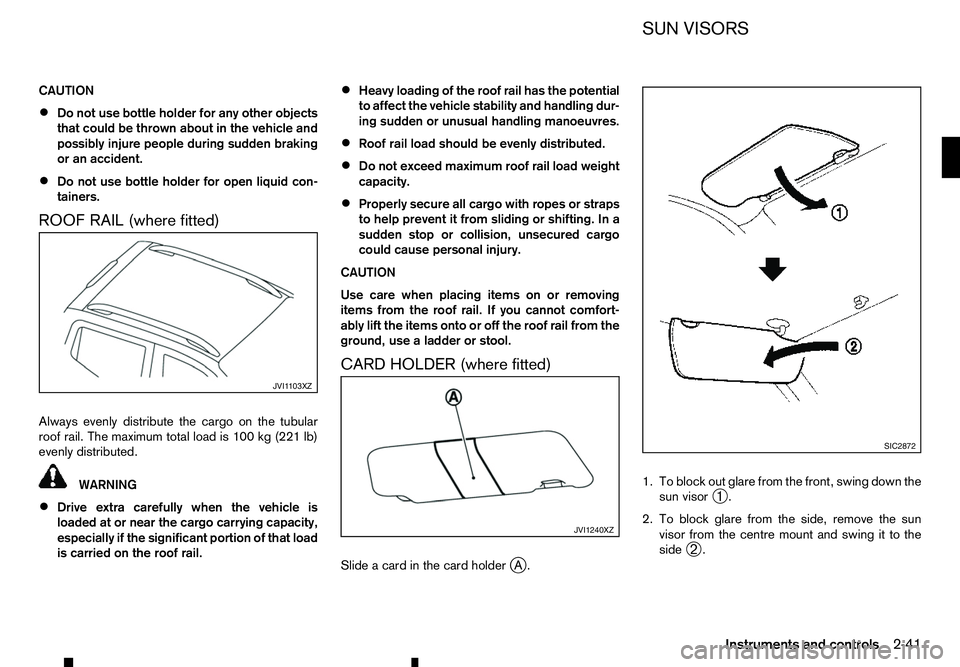
ROOF RAIL (where fitted)
Always evenly distribute the cargo on the tubular roof rail. The maximum total load is 100 kg (221 lb)
evenly distributed. WARNING
• Drive extra carefully when the vehicle is
loaded at or near the cargo carrying capacity,
especially if the significant portion of that load
is carried on the roof rail. •
Heavy loading of the roof rail has the potential
to affect the vehicle stability and handling dur-
ing sudden or unusual handling manoeuvres.
• Roof rail load should be evenly distributed.
• Do not exceed maximum roof rail load weight
capacity.
• Properly secure all cargo with ropes or straps
to help prevent it from sliding or shifting. In a
sudden stop or collision, unsecured cargo
could cause personal injury.
CAUTION
Use care when placing items on or removing
items from the roof rail. If you cannot comfort-
ably lift the items onto or off the roof rail from the
ground, use aladder or stool.
CARD HOLDER (where fitted)
Slide acard in the card holder jA. 1. To block out glare from the front, swing down the
sun visor ➀.
2. To block glare from the side, remove the sun visor from the centre mount and swing it to the
side ➁. JVI1 103XZ
JVI1240XZ SIC2872
SUN VISORS
Instruments and controls 2-41
Page 109 of 340
CAUTION
•
When locking the doors using the power door
lock switch, be sure not to leave the key in the
vehicle.
• When the Remote Control Key (where fitted)
is left in the vehicle, and you try to lock the
door using the power door lock switch after
getting out of the vehicle, all the doors will
unlock automatically after the door is closed.
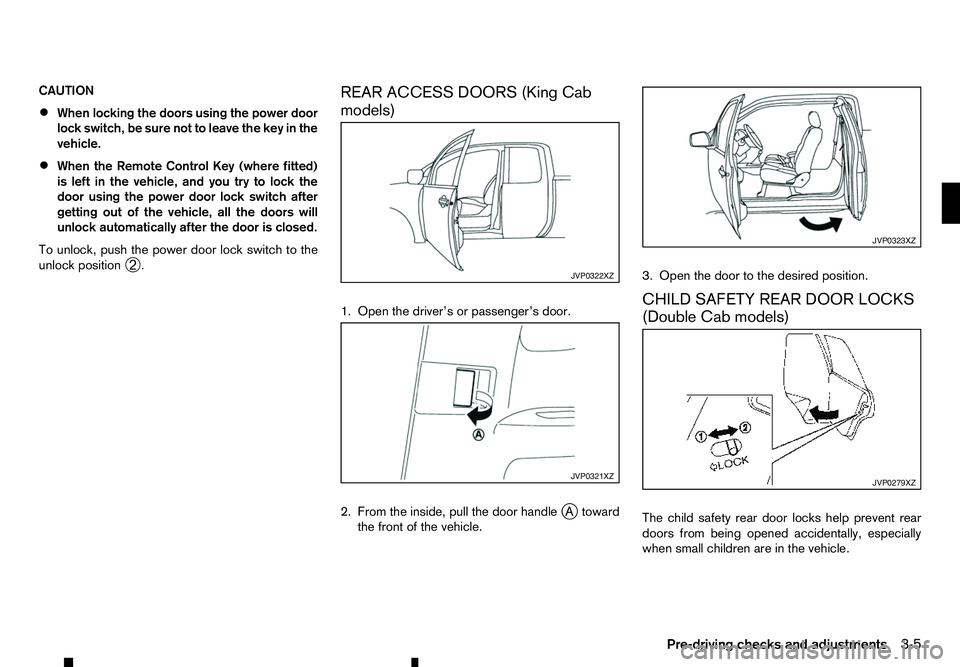
To unlock, push the power door lock switch to the
unlock position ➁. REAR ACCESS DOORS (King Cab
models)
1. Open the driver’s or passenger’s door.
2. From the inside, pull the door handle
j
At oward
the front of the vehicle. 3. Open the door to the desired position.
CHILD SAFETY REAR DOOR LOCKS
(Double Cab models)
The child safety rear door locks help prevent rear
doors from being opened accidentally, especially
when small children are in the vehicle. JVP0322XZ
JVP0321XZ JVP0323XZ
JVP0279XZ
Pre-driving checks and adjustments
3-5
Page 137 of 340
![RENAULT ALASKAN 2017 User Guide –[
Software Licenses]
• [Navigation]
• [Telephone
&Bluetooth]
• [Traffic Messages]
• [Radio]
[Audio] settings
Audio settings can be adjusted from the audio setup
screen.
This item is availab](/img/7/58394/w960_58394-136.png "RENAULT ALASKAN 2017 User Guide –[
Software Licenses]
• [Navigation]
• [Telephone
&Bluetooth]
• [Traffic Messages]
• [Radio]
[Audio] settings
Audio settings can be adjusted from the audio setup
screen.
This item is availab")
–[
Software Licenses]
• [Navigation]
• [Telephone
&Bluetooth]
• [Traffic Messages]
• [Radio]
[Audio] settings
Audio settings can be adjusted from the audio setup
screen.
This item is available only when the audio system is
turned on.
1. Push the
2. Touch the [Audio] key.
3. Select the item you wish to adjust.
[Bass]/[Treble]/[Balance]/[Fade]:
Touch the adjustment bar next to the corresponding
keys on the display to adjust the tone quality and
speaker balance.
The levels of these features can also be adjusted
with the
[Speed Sensitive Vol.]:
Speed sensitive volume function increases the vol-
ume of the audio system as the speed of the vehicle
increases. Choose the desired effect level from 0
(OFF) to 5. The higher the setting, the more the vol-
ume increases in relation to vehicle speed. [AUX Level]:
This feature controls the volume level of incoming
sound when an auxiliary device is connected to the
system. Select the level from [Quiet], [Medium], and
[Loud].
[System settings]
Various system settings can be adjusted from the
system settings.
1. Push the
2. Select the [System] key.
3. Select the item you wish to adjust.
[Display]:
Select the corresponding keys to adjust the set-
tings.
• [Brightness]:
Adjusts the brightness of the display.
• [Display Mode]:
Adjusts to fit the level of lighting in the vehicle.
Touch the [Display Mode] key to cycle through
options of the mode ([Day], [Night] and [Auto]).
• [Scroll Direction]:
Adjusts the direction of the menu scroll. Choose
either the up arrow or down arrow. [Clock]:
Select the corresponding keys to adjust the set-
tings.
• [Time Format]:
The time format setting can be selected from 12
hour and 24 hour formats.
• [Date Format]:
The day, month and year display can be selected
from five formats.
• [Clock Mode]:
Select the clock mode from [Manual], [Time
Zone] and [Auto].
When [Manual] is selected, you can set the clock
mode manually with the [Set Clock Manually]
key.
Select [Auto] to automatically maintain the time
using GPS.
• [Set Clock Manually]:
Mode (AM/PM) (where fitted), Hours, Minutes,
Day, Month and Year can be set manually if
“Manual” is selected in the Clock Mode setting.
• [Daylight Savings Time]:
Turns the daylight savings time ON or OFF.
• [Time Zone]:
Select the applicable time zone from the list.
Display screen, heater and air conditioner, and audio system 4-5
Page 144 of 340
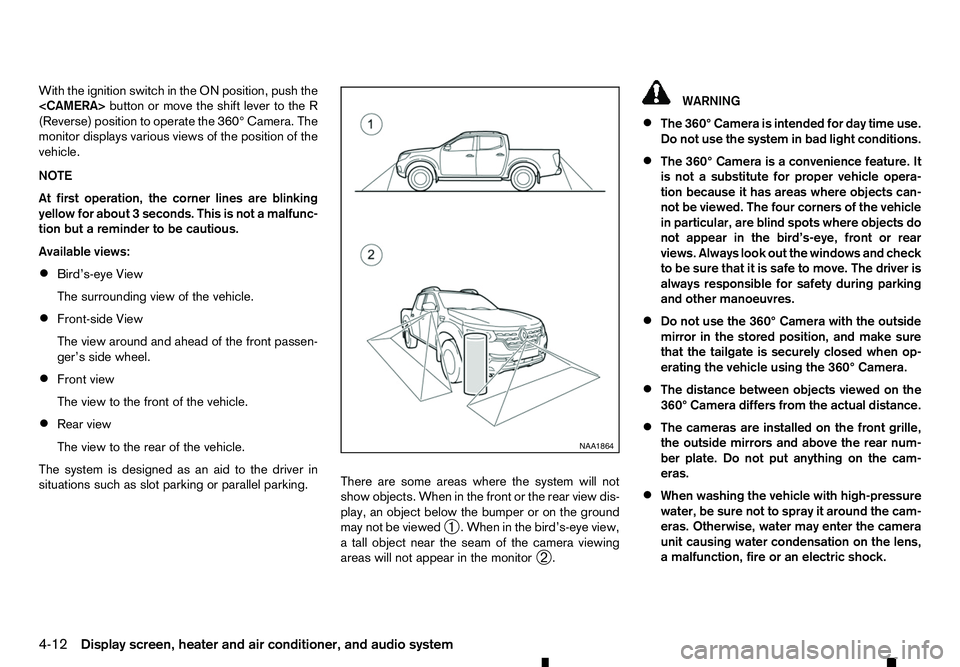
With the ignition switch in the ON position, push the
(Reverse) position to operate the 360° Camera. The
monitor displays various views of the position of the
vehicle.
NOTE
At first operation, the corner lines are blinking
yellow for about 3seconds. This is not amalfunc-
tion but areminder to be cautious.
Available views:
• Bird’s-eye View
The surrounding view of the vehicle.
• Front-side View
The view around and ahead of the front passen-
ger’s side wheel.
• Front view
The view to the front of the vehicle.
• Rear view
The view to the rear of the vehicle.
The system is designed as an aid to the driver in
situations such as slot parking or parallel parking. There are some areas where the system will not
show objects. When in the front or the rear view dis-
play, an object below the bumper or on the ground
may not be viewed
➀.W
hen in the bird’s-eye view,
at all object near the seam of the camera viewing
areas will not appear in the monitor ➁. WARNING
• The 360° Camera is intended for day time use.
Do not use the system in bad light conditions.
• The 360° Camera is
aconvenience feature. It
is not asubstitute for proper vehicle opera-
tion because it has areas where objects can-
not be viewed. The four corners of the vehicle
in particular, are blind spots where objects do
not appear in the bird’s-eye, front or rear
views. Always look out the windows and check
to be sure that it is safe to move. The driver is
always responsible for safety during parking
and other manoeuvres.
• Do not use the 360° Camera with the outside
mirror in the stored position, and make sure
that the tailgate is securely closed when op-
erating the vehicle using the 360° Camera.
• The distance between objects viewed on the
360° Camera differs from the actual distance.
• The cameras are installed on the front grille,
the outside mirrors and above the rear num-
ber plate. Do not put anything on the cam-
eras.
• When washing the vehicle with high-pressure
water, be sure not to spray it around the cam-
eras. Otherwise, water may enter the camera
unit causing water condensation on the lens,
am alfunction, fire or an electric shock. NAA1864
4-12 Display screen, heater and air conditioner, and audio system
Page 161 of 340
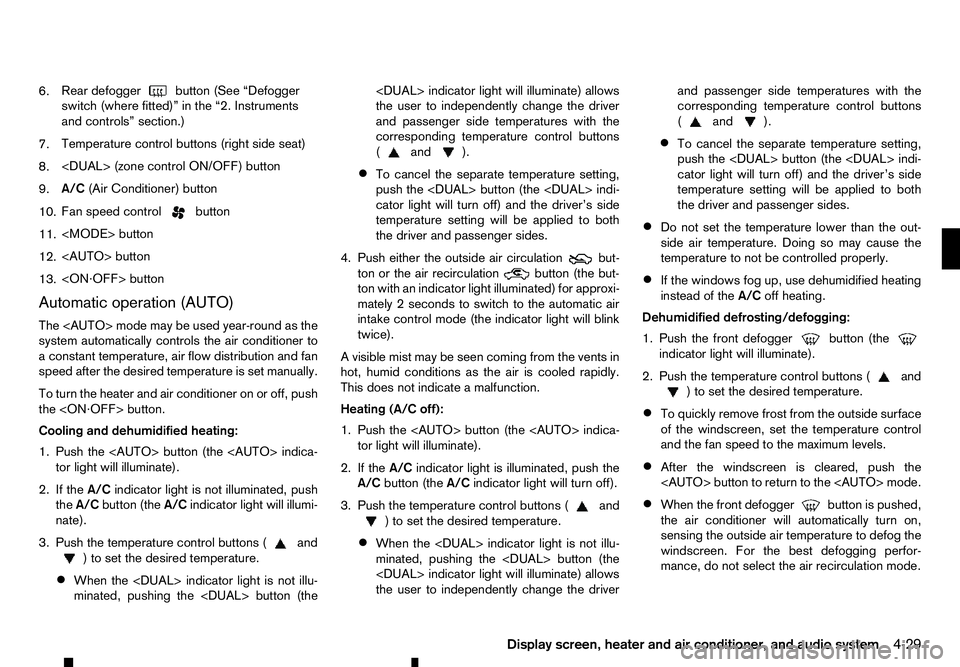
6.
Rear defogger
button (See “Defogger
switch (where fitted)” in the “2. Instruments
and controls” section.)
7. Temperature control buttons (right side seat)
8.
9. A/C
(Air Conditioner) button
10. Fan speed control button
11.
12.
13.
Automatic operation (AUTO)
The
system automatically controls the air conditioner to
ac onstant temperature, air flow distribution and fan
speed after the desired temperature is set manually.
To turn the heater and air conditioner on or off, push
the
Cooling and dehumidified heating:
1. Push the
2. If the A/Cindicator light is not illuminated, push
the A/C button (the A/Cindicator light will illumi-
nate).
3. Push the temperature control buttons ( and
)t os
et the desired temperature.
• When the
minated, pushing the
the user to independently change the driver
and passenger side temperatures with the
corresponding temperature control buttons
( and ).
• To cancel the separate temperature setting,
push the
cator light will turn off) and the driver’s side
temperature setting will be applied to both
the driver and passenger sides.
4. Push either the outside air circulation but-
ton or the air recirculation
button (the but-
ton with an indicator light illuminated) for approxi-
mately 2seconds to switch to the automatic air
intake control mode (the indicator light will blink
twice).
Av isible mist may be seen coming from the vents in
hot, humid conditions as the air is cooled rapidly.
This does not indicate amalfunction.
Heating (A/C off):
1. Push the
2. If the A/Cindicator light is illuminated, push the
A/C button (the A/Cindicator light will turn off).
3. Push the temperature control buttons ( and
)t os
et the desired temperature.
• When the
minated, pushing the
the user to independently change the driver and passenger side temperatures with the
corresponding temperature control buttons
( and ).
• To cancel the separate temperature setting,
push the
cator light will turn off) and the driver’s side
temperature setting will be applied to both
the driver and passenger sides.
• Do not set the temperature lower than the out-
side air temperature. Doing so may cause the
temperature to not be controlled properly.
• If the windows fog up, use dehumidified heating
instead of the
A/Coff heating.
Dehumidified defrosting/defogging:
1. Push the front defogger button (the
indicator light will illuminate).
2. Push the temperature control buttons ( and
)t os
et the desired temperature.
• To quickly remove frost from the outside surface
of the windscreen, set the temperature control
and the fan speed to the maximum levels.
• After the windscreen is cleared, push the
• When the front defogger button is pushed,
the air conditioner will automatically turn on,
sensing the outside air temperature to defog the windscreen. For the best defogging perfor-
mance, do not select the air recirculation mode.
Display screen, heater and air conditioner, and audio system 4-29
Page 162 of 340
•
Do not set the temperature too low when the
front defogger mode is on (the indicator
light is illuminated), because doing so may fog
up the windscreen.
Manual operation
The manual mode can be used to control the heater
and air conditioner to your desired settings.
Fan speed control:
Push the fan speed control button
(+side or
−s ide) to manually control the fan speed.
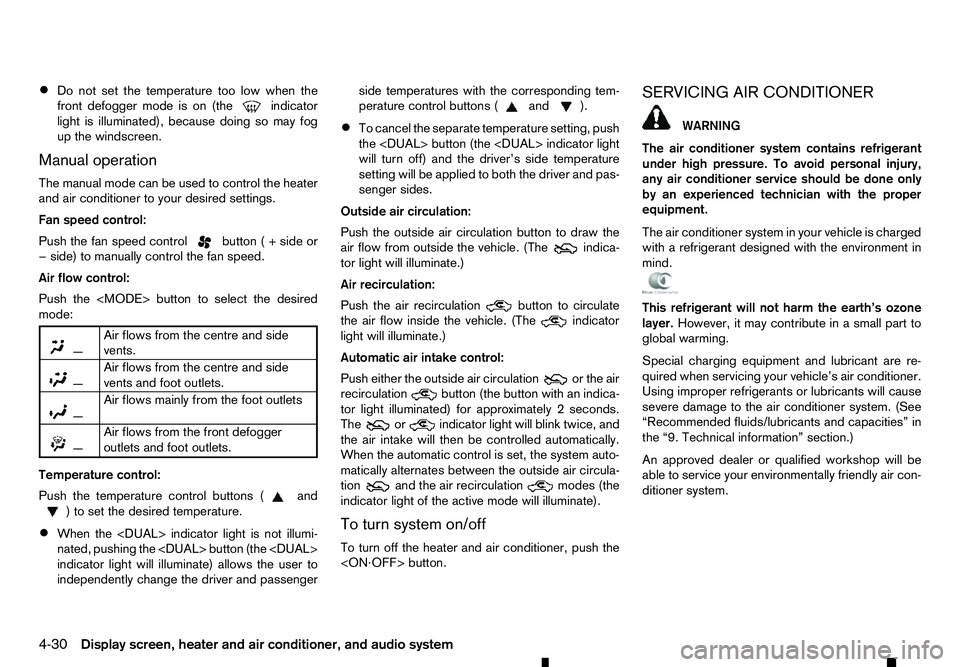
Air flow control:
Push the
mode:
m —
Air
flows from the centre and side
vents.
m —
Air
flows from the centre and side
vents and foot outlets.
m —
Air
flows mainly from the foot outlets
m
—
Air
flows from the front defogger
outlets and foot outlets.
Temperature control:
Push the temperature control buttons ( and
)t os
et the desired temperature.
• When the
nated, pushing the
indicator light will illuminate) allows the user to
independently change the driver and passenger side temperatures with the corresponding tem-
perature control buttons ( and ).
• To cancel the separate temperature setting, push
the
will turn off) and the driver’s side temperature
setting will be applied to both the driver and pas-
senger sides.
Outside air circulation:
Push the outside air circulation button to draw the
air flow from outside the vehicle. (The indica-
tor light will illuminate.)
Air recirculation:
Push the air recirculation button to circulate
the air flow inside the vehicle. (The indicator
light will illuminate.)
Automatic air intake control:
Push either the outside air circulation or the air
recirculation button (the button with an indica-
tor light illuminated) for approximately 2seconds.
The or indicator light will blink twice, and
the air intake will then be controlled automatically.
When the automatic control is set, the system auto-
matically alternates between the outside air circula-
tion and the air recirculation
modes (the
indicator light of the active mode will illuminate).
To turn system on/off
To turn off the heater and air conditioner, push the
The air conditioner system contains refrigerant
under high pressure. To avoid personal injury,
any air conditioner service should be done only
by an experienced technician with the proper
equipment.
The air conditioner system in your vehicle is charged
with arefrigerant designed with the environment in
mind. This refrigerant will not harm the earth’s ozone
layer. However, it may contribute in asmall part to
global warming.
Special charging equipment and lubricant are re-
quired when servicing your vehicle’s air conditioner.
Using improper refrigerants or lubricants will cause
severe damage to the air conditioner system. (See
“Recommended fluids/lubricants and capacities” in
the “9. Technical information” section.)
An approved dealer or qualified workshop will be
able to service your environmentally friendly air con-
ditioner system.
4-30 Display screen, heater and air conditioner, and audio system
Page 165 of 340

•
Audiobooks may not play in the same order as
they appear on an iPod.
• Large video files cause slow responses in an
iPod. The vehicle centre display may momen-
tarily black out, but will soon recover.
• If an iPod automatically selects large video files
while in the shuffle mode, the vehicle centre dis-
play may momentarily black out, but will soon
recover.
Bluetooth® audio player (where fitted)
• Some Bluetooth® audio devices may not be
used with this system. For detailed information
about Bluetooth® audio devices that are avail-
able for use with this system, contact an ap-
proved dealer or qualified workshop.
• Before using
aBluetooth® audio system, the ini-
tial registration process for the audio device is
necessary.
• Operation of the Bluetooth® audio system may
vary depending on the audio device that is con-
nected. Confirm the operation procedure before
use.
• The playback of Bluetooth® audio will be paused
under the following conditions. The playback will
be resumed after the following conditions are
completed.
–w
hile using ahands-free phone
–w hile checking aconnection with amobile
phone •
The in-vehicle antenna for Bluetooth® communi-
cation is built in the system. Do not place the
Bluetooth® audio device in an area surrounded
by metal, far away from the system or in
anarrow
space where the device closely contacts the
body or the seat. Otherwise, sound degradation
or connection interference may occur.
• While
aBluetooth® audio device is connected
through the Bluetooth® wireless connection, the
battery power of the device may discharge
quicker than usual.
• This system is compatible with the Bluetooth®
AV profile (A2DP and AVRCP).
m Bluetooth®
is
at rademark
owned by Bluetooth SIG, Inc.,
and licensed to Visteon Cor-
poration and Robert Bosch
GmbH.
Compact Disc (CD)/USB device with
MP3/WMA/AAC (where fitted)
Terms:
• MP3
—MP3 is short for Moving Pictures Ex-
perts Group Audio Layer 3. MP3 is the most well
known compressed digital audio file format. This
format allows for near “CD quality” sound, but at
af raction of the size of normal audio files. MP3
conversion of an audio track from CD can re-
duce the file size by approximately 10:1 ratio
(Sampling: 44.1 kHz, Bit rate: 128 kbps) with
virtually no perceptible loss in quality. MP3 com- pression removes the redundant and irrelevant
parts of
asound signal that the human ear
doesn’t hear.
• WMA
—Windows Media Audio (WMA) is a
compressed audio format created by Microsoft
as an alternative to MP3. The WMA codec offers
greater file compression than the MP3 codec,
enabling storage of more digital audio tracks in
the same amount of space when compared to
MP3s at the same level of quality.
• AAC (where fitted)
—Advanced Audio Coding
(AAC) is acompressed audio format. AAC of-
fers greater file compression than MP3 and en-
ables music file creation and storage at the same
quality as MP3.
• Bit rate
—Bit rate denotes the number of bits
per second used by adigital music files. The size
and quality of acompressed digital audio file is
determined by the bit rate used when encoding
the file.
• Sampling frequency
—Sampling frequency is
the rate at which the samples of asignal are con-
verted from analog to digital (A/D conversion)
per second.
• Multisession
—Multisession is one of the meth-
ods for writing data to media. Writing data once
to the media is called asingle session, and writ-
ing more than once is called amultisession.
Display screen, heater and air conditioner, and audio system 4-33
Page 168 of 340
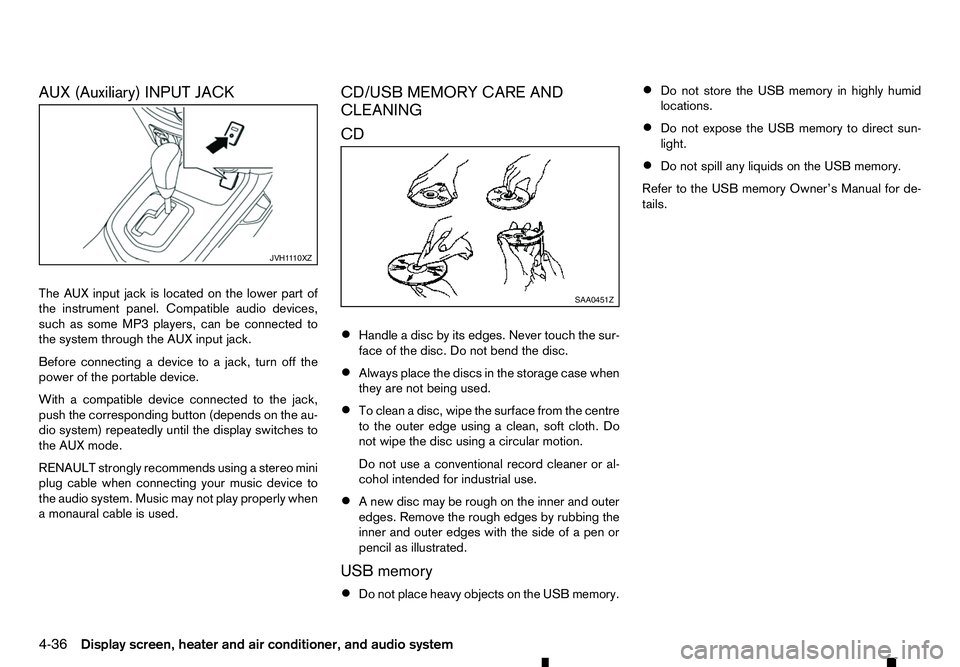
AUX (Auxiliary) INPUT JACK
The AUX input jack is located on the lower part of
the instrument panel. Compatible audio devices,
such as some MP3 players, can be connected to
the system through the AUX input jack. Before connecting adevice to ajack, turn off the
power of the portable device.
With acompatible device connected to the jack,
push the corresponding button (depends on the au-
dio system) repeatedly until the display switches to
the AUX mode.
RENAULT strongly recommends using astereo mini
plug cable when connecting your music device to
the audio system. Music may not play properly when
am onaural cable is used. CD/USB MEMORY CARE AND
CLEANING
CD
•
Handle
adisc by its edges. Never touch the sur-
face of the disc. Do not bend the disc.
• Always place the discs in the storage case when
they are not being used.
• To clean
adisc, wipe the surface from the centre
to the outer edge using aclean, soft cloth. Do
not wipe the disc using acircular motion.
Do not use aconventional record cleaner or al-
cohol intended for industrial use.
• An
ew disc may be rough on the inner and outer
edges. Remove the rough edges by rubbing the
inner and outer edges with the side of apen or
pencil as illustrated.
USB memory
• Do not place heavy objects on the USB memory. •
Do not store the USB memory in highly humid
locations.
• Do not expose the USB memory to direct sun-
light.
• Do not spill any liquids on the USB memory.
Refer to the USB memory Owner’s Manual for de-
tails. JVH1
110XZ SAA0451Z
4-36 Display screen, heater and air conditioner, and audio system
Page 172 of 340
![RENAULT ALASKAN 2017 User Guide 2. Turn the
<MENU> dial clockwise or anticlock-
wise, the display will appear in the following or-
der:
[Audio] ⇔[Clock] ⇔[Radio] ⇔[Language]
After the desired levels have been set, press either](/img/7/58394/w960_58394-171.png "RENAULT ALASKAN 2017 User Guide 2. Turn the
<MENU> dial clockwise or anticlock-
wise, the display will appear in the following or-
der:
[Audio] ⇔[Clock] ⇔[Radio] ⇔[Language]
After the desired levels have been set, press either")
2. Turn the