ECU RENAULT ALASKAN 2017 Owner's Manual
[x] Cancel search | Manufacturer: RENAULT, Model Year: 2017, Model line: ALASKAN, Model: RENAULT ALASKAN 2017Pages: 340, PDF Size: 6.93 MB
Page 71 of 340
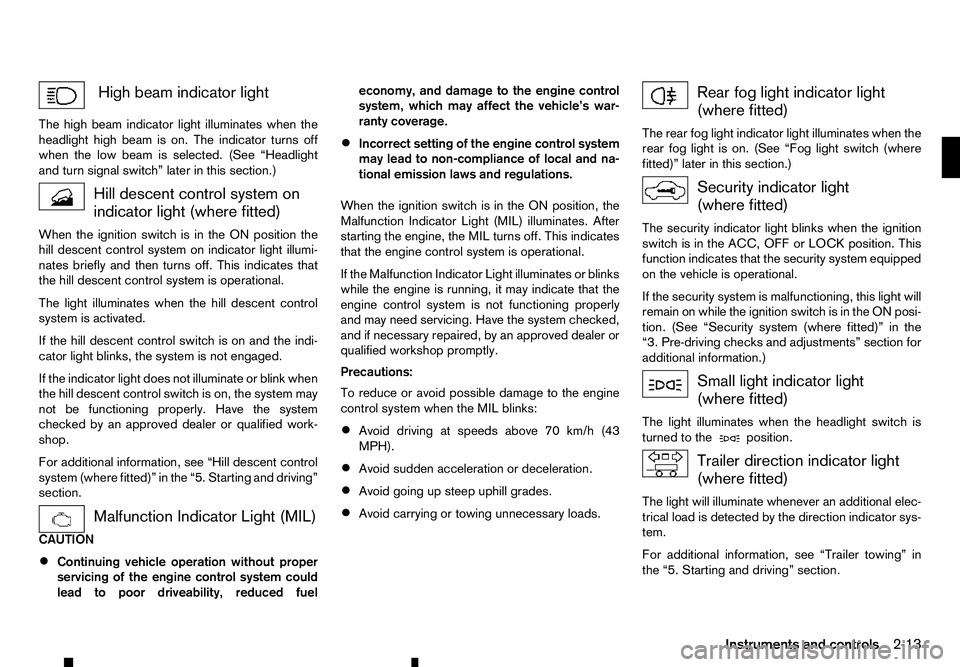
High beam indicator light
The high beam indicator light illuminates when the
headlight high beam is on. The indicator turns off
when the low beam is selected. (See “Headlight
and turn signal switch” later in this section.) Hill descent control system on
indicator light (where fitted)
When the ignition switch is in the ON position the hill descent control system on indicator light illumi-
nates briefly and then turns off. This indicates that
the hill descent control system is operational.
The light illuminates when the hill descent control
system is activated.
If the hill descent control switch is on and the indi-
cator light blinks, the system is not engaged.
If the indicator light does not illuminate or blink when
the hill descent control switch is on, the system may
not be functioning properly. Have the system
checked by an approved dealer or qualified work-
shop.
For additional information, see “Hill descent control
system (where fitted)” in the “5. Starting and driving”
section. Malfunction Indicator Light (MIL)
CAUTION
• Continuing vehicle operation without proper
servicing of the engine control system could
lead to poor driveability, reduced fuel economy, and damage to the engine control
system, which may affect the vehicle’s war-
ranty coverage.
• Incorrect setting of the engine control system
may lead to non-compliance of local and na-
tional emission laws and regulations.
When the ignition switch is in the ON position, the
Malfunction Indicator Light (MIL) illuminates. After
starting the engine, the MIL turns off. This indicates
that the engine control system is operational.
If the Malfunction Indicator Light illuminates or blinks
while the engine is running, it may indicate that the
engine control system is not functioning properly
and may need servicing. Have the system checked,
and if necessary repaired, by an approved dealer or
qualified workshop promptly.
Precautions:
To reduce or avoid possible damage to the engine
control system when the MIL blinks: • Avoid driving at speeds above 70 km/h (43
MPH).
• Avoid sudden acceleration or deceleration.
• Avoid going up steep uphill grades.
• Avoid carrying or towing unnecessary loads. Rear fog light indicator light
(where fitted)
The rear fog light indicator light illuminates when the
rear fog light is on. (See “Fog light switch (where
fitted)” later in this section.) Security indicator light
(where fitted)
The security indicator light blinks when the ignition
switch is in the ACC, OFF or LOCK position. This
function indicates that the security system equipped
on the vehicle is operational.
If the security system is malfunctioning, this light will
remain on while the ignition switch is in the ON posi- tion. (See “Security system (where fitted)” in the
“3. Pre-driving checks and adjustments” section for
additional information.) Small light indicator light
(where fitted)
The light illuminates when the headlight switch is
turned to the position.
Trailer direction indicator light
(where fitted)
The light will illuminate whenever an additional elec-
trical load is detected by the direction indicator sys-
tem.
For additional information, see “Trailer towing” in
the “5. Starting and driving” section.
Instruments and controls 2-13
Page 72 of 340
Turn signal/hazard warning
lights
The turn signal/hazard warning lights blink when the
turn signal switch lever or hazard warning flasher
switch is on. (See “Turn signal switch” later in this
section or “Hazard warning flasher switch” in the
“6. In case of emergency” section.)
AUDIBLE REMINDERS
Brake pad wear warning The disc brake pads have audible wear warnings.
When abrake pad requires replacement, it will make
ah igh pitched scraping sound when the vehicle is in
motion. This scraping sound will first occur only
when the brake pedal is depressed. After more wear
of the brake pad, the sound will always be heard
even if the brake pedal is not depressed. Have the
brakes checked as soon as possible if the wear
warning sound is heard.
Have the system checked, and if necessary re-
paired, by an approved dealer or qualified workshop
promptly. (See “Brakes” in the “8. Maintenance and
do-it-yourself” section.)
Key reminder chime
The chime will sound if any of the following opera-
tions are detected:
Models with Remote Control Key system:
The chime will sound if the driver side door is opened
while the ignition switch is placed in the ACC posi-
tion. Models without Remote Control Key system:
The chime sounds if the driver’s side door is opened
while the key is left in the ignition switch and the
ignition switch is in the ACC, OFF or LOCK posi-
tion. Remove the key and take it with you when leav-
ing the vehicle.
Light reminder chime
The light reminder chime will sound if the driver’s
side door is opened and the headlight switch is in
either the or position, and the ignition
switch is in the ACC, OFF or LOCK position.
Be sure to turn the headlight switch to the
or
the vehicle.
Parking brake reminder chime
The parking brake reminder chime will sound if the
vehicle is driven at more than 7km/h (4 MPH) with
the parking brake applied. Stop the vehicle and re-
lease the parking brake.
Seat belt warning chime (where fitted)
When the vehicle speed exceeds 15 km/h (10
MPH), the chime will sound unless the driver’s and/
or the front passenger’s seat belts are securely fas-
tened. The chime will continue to sound for about
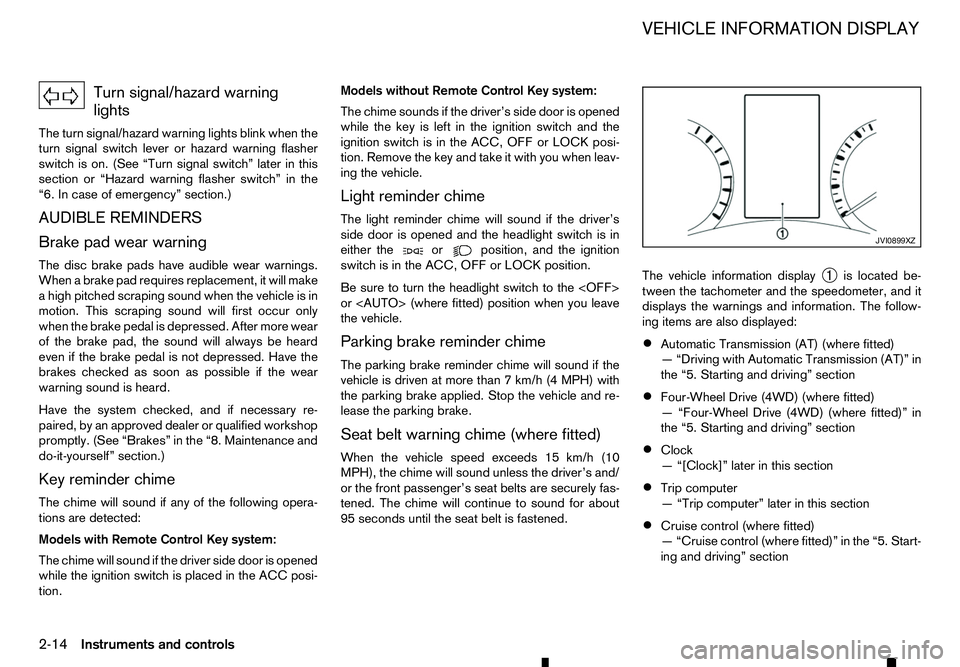
95 seconds until the seat belt is fastened. The vehicle information display
➀is located be-
tween the tachometer and the speedometer, and it
displays the warnings and information. The follow-
ing items are also displayed:
• Automatic Transmission (AT) (where fitted)
—“
Driving with Automatic Transmission (AT)” in
the “5. Starting and driving” section
• Four-Wheel Drive (4WD) (where fitted)
—“
Four-Wheel Drive (4WD) (where fitted)” in
the “5. Starting and driving” section
• Clock
—“
[Clock]” later in this section
• Trip computer
—“
Trip computer” later in this section
• Cruise control (where fitted)
—“
Cruise control (where fitted)” in the “5. Start-
ing and driving” section JVI0899XZ
VEHICLE INFORMATION DISPLAY
2-14 Instruments and controls
Page 85 of 340
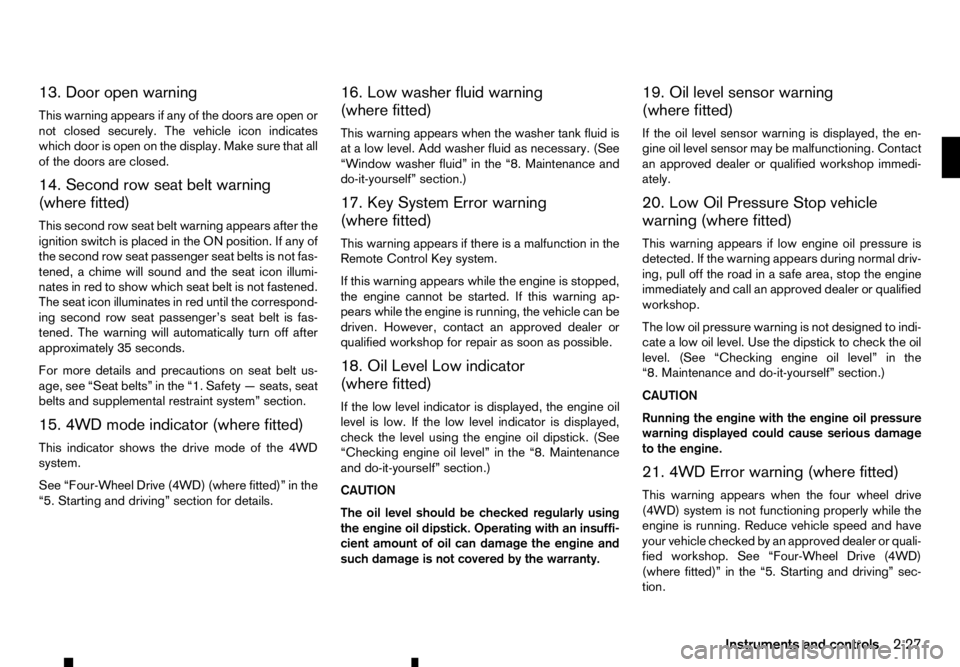
13. Door open warning
This warning appears if any of the doors are open or
not closed securely. The vehicle icon indicates
which door is open on the display. Make sure that all
of the doors are closed.
14. Second row seat belt warning
(where fitted)
This second row seat belt warning appears after the
ignition switch is placed in the ON position. If any of
the second row seat passenger seat belts is not fas-
tened, achime will sound and the seat icon illumi-
nates in red to show which seat belt is not fastened.
The seat icon illuminates in red until the correspond-
ing second row seat passenger’s seat belt is fas-
tened. The warning will automatically turn off after approximately 35 seconds.
For more details and precautions on seat belt us-
age, see “Seat belts” in the “1. Safety —seats, seat
belts and supplemental restraint system” section.
15. 4WD mode indicator (where fitted)
This indicator shows the drive mode of the 4WD
system.
See “Four-Wheel Drive (4WD) (where fitted)” in the
“5. Starting and driving” section for details. 16. Low washer fluid warning
(where fitted)
This warning appears when the washer tank fluid is
at
alow level. Add washer fluid as necessary. (See
“Window washer fluid” in the “8. Maintenance and
do-it-yourself” section.)
17. Key System Error warning
(where fitted)
This warning appears if there is amalfunction in the
Remote Control Key system.
If this warning appears while the engine is stopped,
the engine cannot be started. If this warning ap-
pears while the engine is running, the vehicle can be
driven. However, contact an approved dealer or
qualified workshop for repair as soon as possible.
18. Oil Level Low indicator
(where fitted)
If the low level indicator is displayed, the engine oil
level is low. If the low level indicator is displayed, check the level using the engine oil dipstick. (See
“Checking engine oil level” in the “8. Maintenance
and do-it-yourself” section.)
CAUTION
The oil level should be checked regularly using
the engine oil dipstick. Operating with an insuffi-
cient amount of oil can damage the engine and such damage is not covered by the warranty. 19. Oil level sensor warning
(where fitted)
If the oil level sensor warning is displayed, the en-
gine oil level sensor may be malfunctioning. Contact
an approved dealer or qualified workshop immedi-
ately.
20. Low Oil Pressure Stop vehicle
warning (where fitted)
This warning appears if low engine oil pressure is
detected. If the warning appears during normal driv-
ing, pull off the road in
asafe area, stop the engine
immediately and call an approved dealer or qualified
workshop.
The low oil pressure warning is not designed to indi-
cate alow oil level. Use the dipstick to check the oil
level. (See “Checking engine oil level” in the
“8. Maintenance and do-it-yourself” section.)
CAUTION
Running the engine with the engine oil pressure
warning displayed could cause serious damage
to the engine.
21. 4WD Error warning (where fitted)
This warning appears when the four wheel drive
(4WD) system is not functioning properly while the
engine is running. Reduce vehicle speed and have
your vehicle checked by an approved dealer or quali-
fied workshop. See “Four-Wheel Drive (4WD)
(where fitted)” in the “5. Starting and driving” sec-
tion.
Instruments and controls 2-27
Page 86 of 340
22. Shipping Mode On Push Storage
Fuse warning (where fitted)
This warning may appear if the extended storage
fuse switch is not pushed in (switched on). When
this warning appears, push in (switch on) the ex- tended storage fuse switch to turn off the warning.
For more information, see “Fuses” in the “8. Main-
tenance and do-it-yourself” section.
23. Headlight System Error warning
(where fitted)
This warning appears if the LED headlights are mal-
functioning. Have the system checked by an ap-
proved dealer or qualified workshop.
24. Reminder Turn OFF Headlights
warning
This warning appears when the driver side door is
opened with the headlight switch is left ONand the
ignition switch is placed in the OFF,ACCorLOCK
position. Place the headlight switch in the
formation, see “Headlight and turn signal switch” in
the “2. Instruments and controls” section.
25. Time for adriver break? indicator
This indicator appears when the set [Timer] alarm activates. You can set the time for up to 6hours.
(See “Settings” earlier in this section.) 26. Cruise control indicator
(where fitted)
This indicator shows the cruise control system sta-
tus. The status is shown by the colour.
See “Cruise control (where fitted)” in the “5. Start-
ing and driving” section for details.
27. Automatic Transmission (AT)
position indicator (AT models)
This indicator shows the automatic shift position.
In the manual shift mode, when the transmission
does not shift to the selected gear due to
atrans-
mission protection mode, the AT position indicator
will blink and achime will sound.
For further details, see “Driving with Automatic
Transmission (AT)” in the “5. Starting and driving”
section.
28. Automatic Transmission (AT) Error
warning (AT models)
If the Automatic Transmission (AT) Error warning
appears while the engine is running, or while driv-
ing, it may indicate that the AT is not functioning
properly and may need servicing. Have the system
checked, and if necessary repaired, by an approved
dealer or qualified workshop promptly. 29. Automatic Transmission (AT) park
warning (AT models)
This warning indicates that the Automatic Transmis-
sion (AT) parking function is not engaged. If the
transfer control is not secured in any driving position
while the AT shift lever is in the
P(Park) position, the
transmission will disengage and the wheels will not
lock.
For 4WD model: If the ATP warning appears with
the shift lever in the P(Park) position, shift the
Four-Wheel Drive (4WD) mode switch to the
<2WD>, <4H> or <4LO> position again with the
shift lever in the N(Neutral) position. (See “Four-
Wheel Drive (4WD) (where fitted)” in the “5. Start-
ing and driving” section.) WARNING
If the 4WD mode indicator (see “4WD mode
indicator” in the “5. Starting and driving” section)
is OFF or the ATP warning light is ON, this indi-
cates that the automatic transmission P(Park)
position will not function and could result in the
vehicle moving unexpectedly, causing serious
personal injury or property damage. Always set
the parking brake.
30. Parking Sensor Error warning
(where fitted)
This warning appears when the parking sensor (so-
nar) system is not functioning properly. If the warn-
ing appears, have the system checked by an ap-
proved dealer or qualified workshop.
2-28 Instruments and controls
Page 99 of 340
CAUTION
•
Do not use bottle holder for any other objects
that could be thrown about in the vehicle and
possibly injure people during sudden braking
or an accident.
• Do not use bottle holder for open liquid con-
tainers.
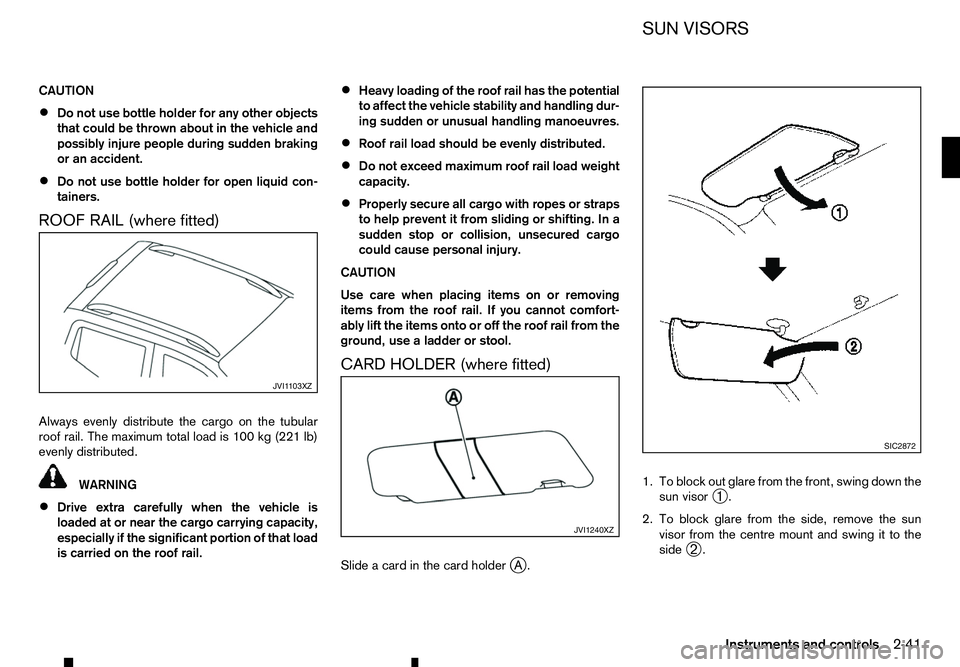
ROOF RAIL (where fitted)
Always evenly distribute the cargo on the tubular roof rail. The maximum total load is 100 kg (221 lb)
evenly distributed. WARNING
• Drive extra carefully when the vehicle is
loaded at or near the cargo carrying capacity,
especially if the significant portion of that load
is carried on the roof rail. •
Heavy loading of the roof rail has the potential
to affect the vehicle stability and handling dur-
ing sudden or unusual handling manoeuvres.
• Roof rail load should be evenly distributed.
• Do not exceed maximum roof rail load weight
capacity.
• Properly secure all cargo with ropes or straps
to help prevent it from sliding or shifting. In a
sudden stop or collision, unsecured cargo
could cause personal injury.
CAUTION
Use care when placing items on or removing
items from the roof rail. If you cannot comfort-
ably lift the items onto or off the roof rail from the
ground, use aladder or stool.
CARD HOLDER (where fitted)
Slide acard in the card holder jA. 1. To block out glare from the front, swing down the
sun visor ➀.
2. To block glare from the side, remove the sun visor from the centre mount and swing it to the
side ➁. JVI1 103XZ
JVI1240XZ SIC2872
SUN VISORS
Instruments and controls 2-41
Page 105 of 340
3
Pre-driving checks and adjustments
Pre-driving checks and adjustments
Keys ........................................................................V
3-2 Key (where fitted) ............................................... 3-2
Anti-Theft System (ATS*) key (where fitted) ........ 3-2
Remote Control Key (where fitted) ...................... 3-2
Doors ...................................................................... 3-4 Locking with key ................................................. 3-4
Opening with inside door handle ......................... 3-4
Locking with power door lock switch .................. 3-4
Rear access doors (King Cab models)................ 3-5
Child safety rear door locks (Double Cab
models) .............................................................. 3-5
Remote keyless entry system (where fitted) .............. 3-6
Using remote keyless entry system ..................... 3-6
Remote Control Key system (where fitted) ............... 3-7
Remote Control Key operating range .................. 3-9
Using Remote Control Key system ...................... 3-9
Battery saver system........................................... 3-10
Warning and audible reminders .......................... 3-11
Troubleshooting guide ........................................ 3-12
Using remote keyless entry system ..................... 3-14
Hazard indicator and horn operation.................... 3-15
Security system (where fitted) .................................. 3-15
Theft warning system (where fitted)..................... 3-15 Anti-Theft System (ATS) ..................................... 3-16
Bonnet..................................................................V
... 3-17 Opening bonnet.................................................. 3-17
Closing bonnet ................................................... 3-17
Fuel filler lid and cap ................................................ 3-18
Opening fuel filler lid ........................................... 3-18
Fuel filler cap ...................................................... 3-18
AdBlue® filler lid and cap ........................................ 3-19 Opening AdBlue® filler lid .................................. 3-20
Locking AdBlue® filler lid ................................... 3-20
AdBlue® filler cap .............................................. 3-20
Cargo bed (where fitted).......................................... 3-20 Tailgate .............................................................. 3-20
Tie down hooks (where fitted) ............................. 3-21
C-Channel system (where fitted) ......................... 3-21
Steering wheel......................................................... 3-23 Steering wheel adjustment .................................. 3-23
Mirrors..................................................................... 3-23 Inside rearview mirror ......................................... 3-23
Outside rearview mirrors..................................... 3-25
Vanity mirror (where fitted) .................................. 3-26
Parking brake .......................................................... 3-26
Page 111 of 340
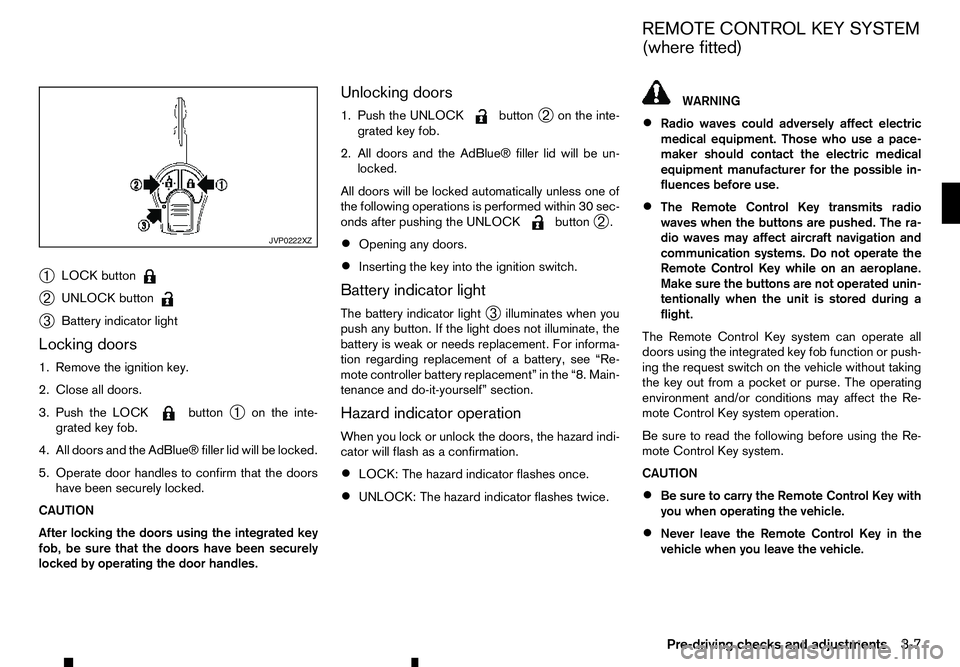
➀
LOCK button
➁
UNLOCK button
➂
Battery indicator light
Locking doors
1. Remove the ignition key.
2. Close all doors.
3. Push the LOCK button
➀on the inte-
grated key fob.
4. All doors and the AdBlue® filler lid will be locked.
5. Operate door handles to confirm that the doors have been securely locked.
CAUTION
After locking the doors using the integrated key
fob, be sure that the doors have been securely
locked by operating the door handles. Unlocking doors
1. Push the UNLOCK button
➁on the inte-
grated key fob.
2. All doors and the AdBlue® filler lid will be un- locked.
All doors will be locked automatically unless one of
the following operations is performed within 30 sec-
onds after pushing the UNLOCK button
➁.
• Opening any doors.
• Inserting the key into the ignition switch.
Battery indicator light
The battery indicator light ➂illuminates when you
push any button. If the light does not illuminate, the
battery is weak or needs replacement. For informa-
tion regarding replacement of abattery, see “Re-
mote controller battery replacement” in the “8. Main-
tenance and do-it-yourself” section.
Hazard indicator operation
When you lock or unlock the doors, the hazard indi-
cator will flash as aconfirmation.
• LOCK: The hazard indicator flashes once.
• UNLOCK: The hazard indicator flashes twice. WARNING
• Radio waves could adversely affect electric
medical equipment. Those who use apace-
maker should contact the electric medical
equipment manufacturer for the possible in-
fluences before use.
• The Remote Control Key transmits radio
waves when the buttons are pushed. The ra-
dio waves may affect aircraft navigation and
communication systems. Do not operate the
Remote Control Key while on an aeroplane.
Make sure the buttons are not operated unin-
tentionally when the unit is stored during a
flight.
The Remote Control Key system can operate all
doors using the integrated key fob function or push-
ing the request switch on the vehicle without taking
the key out from apocket or purse. The operating
environment and/or conditions may affect the Re-
mote Control Key system operation.
Be sure to read the following before using the Re-
mote Control Key system.
CAUTION
• Be sure to carry the Remote Control Key with
you when operating the vehicle.
• Never leave the Remote Control Key in the
vehicle when you leave the vehicle. JVP0222XZ
REMOTE CONTROL KEY SYSTEM
(where fitted)
Pre-driving checks and adjustments 3-7
Page 113 of 340
REMOTE CONTROL KEY
OPERATING RANGE
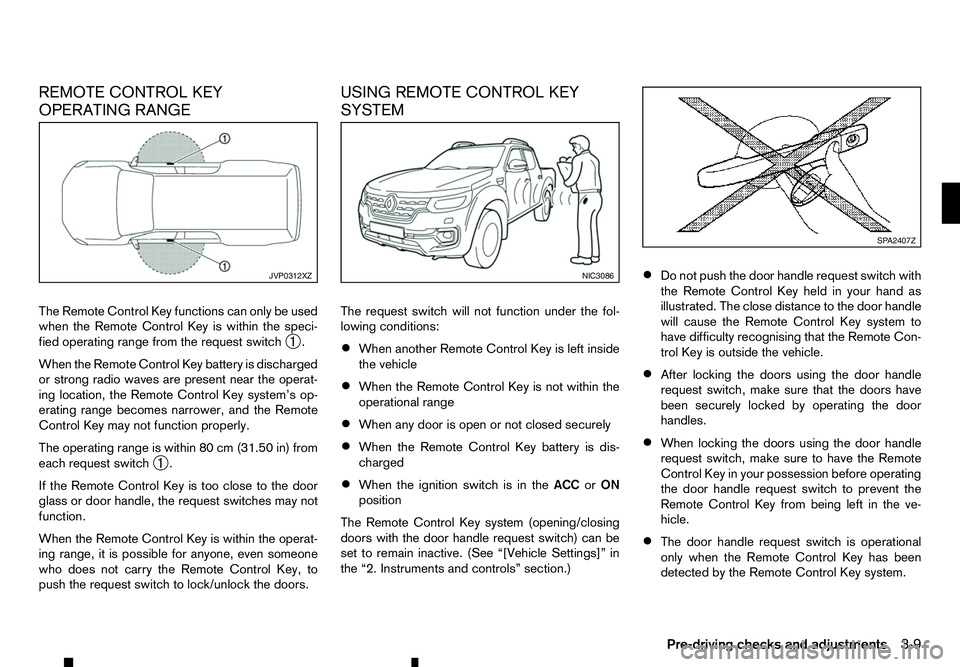
The Remote Control Key functions can only be used
when the Remote Control Key is within the speci-
fied operating range from the request switch ➀.
When the Remote Control Key battery is discharged
or strong radio waves are present near the operat-
ing location, the Remote Control Key system’s op-
erating range becomes narrower, and the Remote
Control Key may not function properly.
The operating range is within 80 cm (31.50 in) from
each request switch ➀.
If the Remote Control Key is too close to the door
glass or door handle, the request switches may not
function.
When the Remote Control Key is within the operat-
ing range, it is possible for anyone, even someone
who does not carry the Remote Control Key, to
push the request switch to lock/unlock the doors. USING REMOTE CONTROL KEY
SYSTEM
The request switch will not function under the fol-
lowing conditions:
•
When another Remote Control Key is left inside
the vehicle
• When the Remote Control Key is not within the
operational range
• When any door is open or not closed securely
• When the Remote Control Key battery is dis-
charged
• When the ignition switch is in the
ACCorON
position
The Remote Control Key system (opening/closing
doors with the door handle request switch) can be
set to remain inactive. (See “[Vehicle Settings]” in
the “2. Instruments and controls” section.) •
Do not push the door handle request switch with
the Remote Control Key held in your hand as
illustrated. The close distance to the door handle
will cause the Remote Control Key system to
have difficulty recognising that the Remote Con-
trol Key is outside the vehicle.
• After locking the doors using the door handle
request switch, make sure that the doors have
been securely locked by operating the door
handles.
• When locking the doors using the door handle
request switch, make sure to have the Remote
Control Key in your possession before operating
the door handle request switch to prevent the
Remote Control Key from being left in the ve-
hicle.
• The door handle request switch is operational
only when the Remote Control Key has been
detected by the Remote Control Key system. JVP0312XZ NIC3086 SP A2407Z
Pre-driving checks and adjustments 3-9
Page 114 of 340
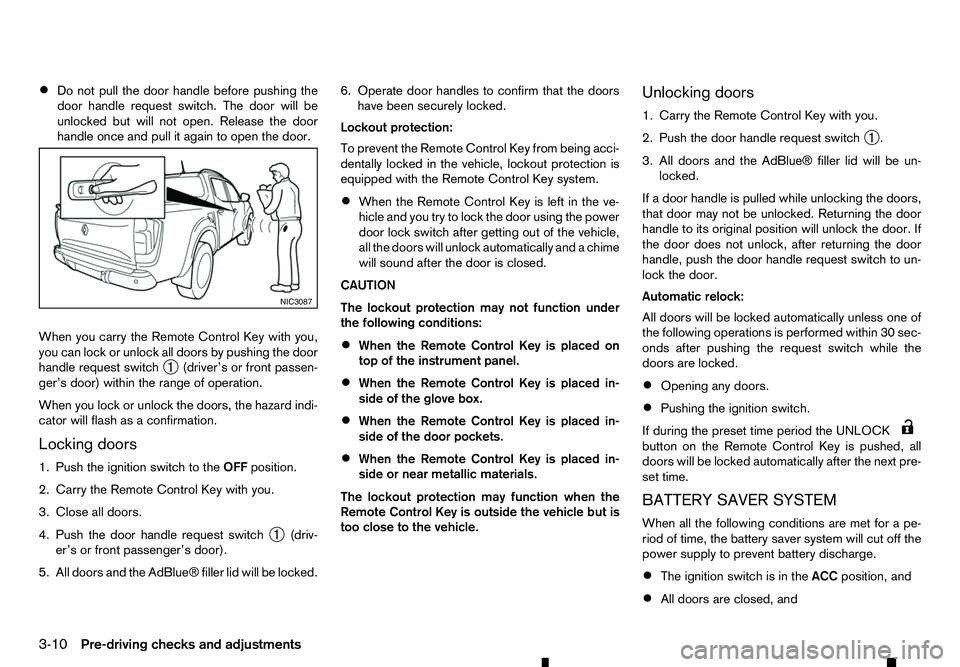
•
Do not pull the door handle before pushing the
door handle request switch. The door will be
unlocked but will not open. Release the door
handle once and pull it again to open the door.
When you carry the Remote Control Key with you,
you can lock or unlock all doors by pushing the door
handle request switch ➀(driver’s or front passen-
ger’s door) within the range of operation.
When you lock or unlock the doors, the hazard indi-
cator will flash as aconfirmation.
Locking doors
1. Push the ignition switch to the OFFposition.
2. Carry the Remote Control Key with you.
3. Close all doors.
4. Push the door handle request switch ➀(driv-
er’s or front passenger’s door).
5. All doors and the AdBlue® filler lid will be locked. 6. Operate door handles to confirm that the doors
have been securely locked.
Lockout protection:
To prevent the Remote Control Key from being acci-
dentally locked in the vehicle, lockout protection is
equipped with the Remote Control Key system.
• When the Remote Control Key is left in the ve-
hicle and you try to lock the door using the power
door lock switch after getting out of the vehicle,
all the doors will unlock automatically and
achime
will sound after the door is closed.
CAUTION
The lockout protection may not function under
the following conditions:
• When the Remote Control Key is placed on
top of the instrument panel.
• When the Remote Control Key is placed in-
side of the glove box.
• When the Remote Control Key is placed in-
side of the door pockets.
• When the Remote Control Key is placed in-
side or near metallic materials.
The lockout protection may function when the
Remote Control Key is outside the vehicle but is
too close to the vehicle. Unlocking doors
1. Carry the Remote Control Key with you.
2. Push the door handle request switch
➀.
3. All doors and the AdBlue® filler lid will be un- locked.
If ad oor handle is pulled while unlocking the doors,
that door may not be unlocked. Returning the door
handle to its original position will unlock the door. If
the door does not unlock, after returning the door
handle, push the door handle request switch to un-
lock the door.
Automatic relock:
All doors will be locked automatically unless one of
the following operations is performed within 30 sec-
onds after pushing the request switch while the
doors are locked.
• Opening any doors.
• Pushing the ignition switch.
If during the preset time period the UNLOCK button on the Remote Control Key is pushed, all
doors will be locked automatically after the next pre-
set time.
BATTERY SAVER SYSTEM
When all the following conditions are met for ape-
riod of time, the battery saver system will cut off the
power supply to prevent battery discharge.
• The ignition switch is in the
ACCposition, and
• All doors are closed, and NIC3087
3-10 Pre-driving checks and adjustments
Page 117 of 340
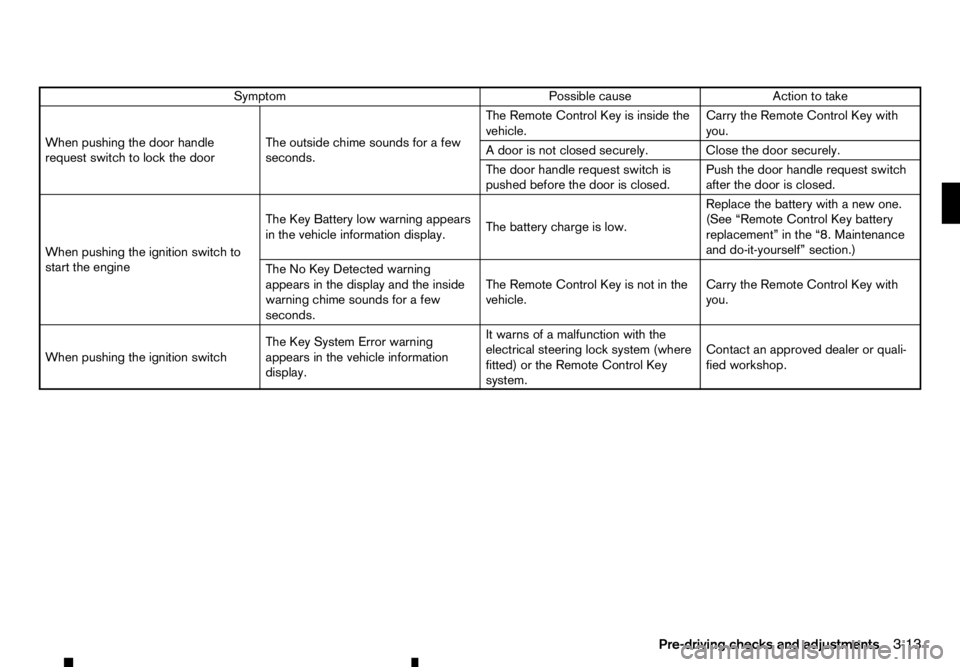
Symptom
Possible cause
Action to take
When pushing the door handle
request switch to lock the door The outside chime sounds for
afew
seconds. The Remote Control Key is inside the
vehicle.
Carry the Remote Control Key with
you.
Ad oor is not closed securely. Close the door securely.
The door handle request switch is
pushed before the door is closed. Push the door handle request switch
after the door is closed.
When pushing the ignition switch to
start the engine The Key Battery low warning appears
in the vehicle information display.
The battery charge is low.Replace the battery with
anew one.
(See “Remote Control Key battery
replacement” in the “8. Maintenance
and do-it-yourself” section.)
The No Key Detected warning
appears in the display and the inside
warning chime sounds for afew
seconds. The Remote Control Key is not in the
vehicle.
Carry the Remote Control Key with
you.
When pushing the ignition switch The Key System Error warning
appears in the vehicle information
display.It warns of
amalfunction with the
electrical steering lock system (where
fitted) or the Remote Control Key
system. Contact an approved dealer or quali-
fied workshop.
Pre-driving checks and adjustments 3-13