lights RENAULT ALASKAN 2017 Owner's Manual
[x] Cancel search | Manufacturer: RENAULT, Model Year: 2017, Model line: ALASKAN, Model: RENAULT ALASKAN 2017Pages: 340, PDF Size: 6.93 MB
Page 101 of 340
If the sunroof does not operate properly after per-
forming the procedure above, have your vehicle
checked by an approved dealer or qualified work-
shop. CAUTION
• Turn off the lights when you leave the vehicle.
• Do not use the lights for extended periods of
time with the engine stopped. This could re-
sult in
adischarged battery.
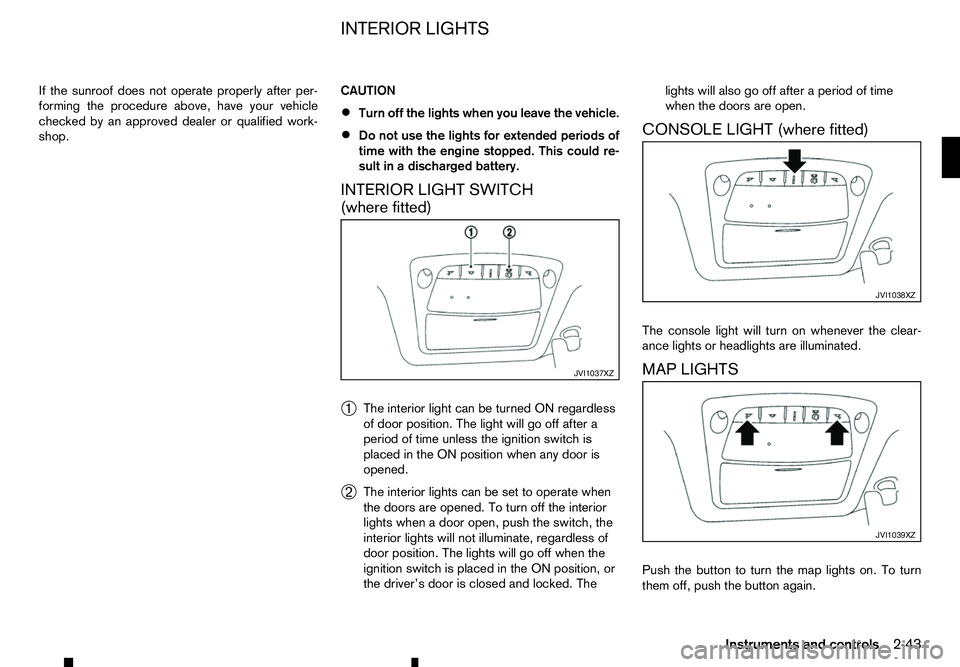
INTERIOR LIGHT SWITCH
(where fitted)
➀ The interior light can be turned ON regardless
of door position. The light will go off after a
period of time unless the ignition switch is
placed in the ON position when any door is
opened.
➁ The interior lights can be set to operate when
the doors are opened. To turn off the interior
lights when
adoor open, push the switch, the
interior lights will not illuminate, regardless of
door position. The lights will go off when the
ignition switch is placed in the ON position, or
the driver’s door is closed and locked. The lights will also go off after
aperiod of time
when the doors are open.
CONSOLE LIGHT (where fitted)
The console light will turn on whenever the clear-
ance lights or headlights are illuminated.
MAP LIGHTS
Push the button to turn the map lights on. To turn
them off, push the button again. JVI1037XZ JVI1038XZ
JVI1039XZ
INTERIOR LIGHTS
Instruments and controls2-43
Page 102 of 340
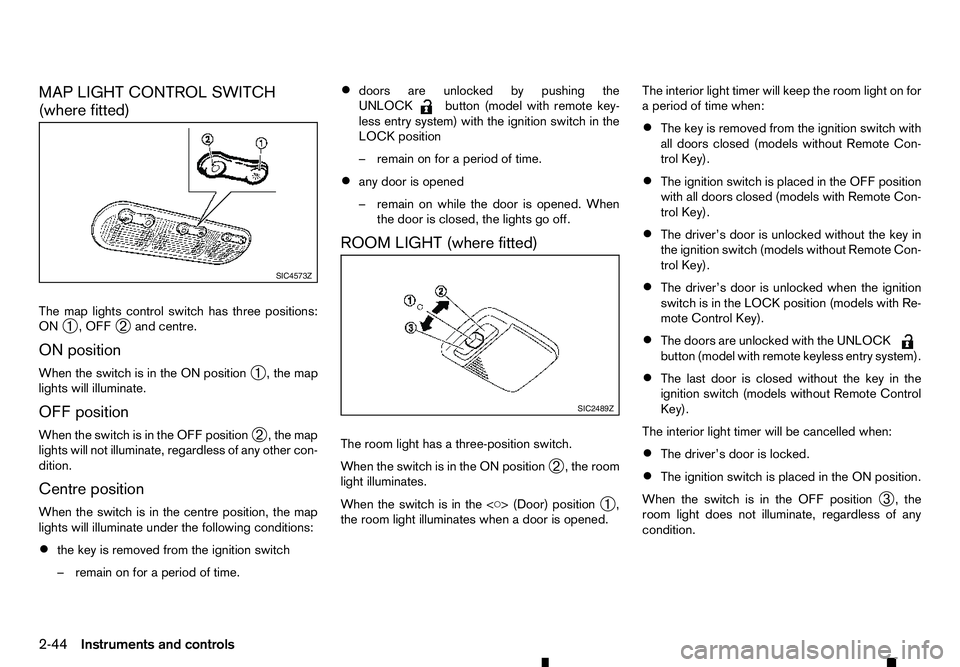
MAP LIGHT CONTROL SWITCH
(where fitted)
The map lights control switch has three positions:
ON ➀,O
FF
➁ and centre.
ON position
When the switch is in the ON position ➀,t
he map
lights will illuminate.
OFF position
When the switch is in the OFF position ➁,t
he map
lights will not illuminate, regardless of any other con-
dition.
Centre position
When the switch is in the centre position, the map
lights will illuminate under the following conditions:
• the key is removed from the ignition switch
–r emain on for aperiod of time. •
doors are unlocked by pushing the
UNLOCK button (model with remote key-
less entry system) with the ignition switch in the
LOCK position
–r emain on for aperiod of time.
• any door is opened
–r
emain on while the door is opened. When
the door is closed, the lights go off.
ROOM LIGHT (where fitted)
The room light has athree-position switch.
When the switch is in the ON position ➁,t
he room
light illuminates.
When the switch is in the
➀,
the room light illuminates when adoor is opened. The interior light timer will keep the room light on for
ap
eriod of time when:
• The key is removed from the ignition switch with
all doors closed (models without Remote Con-
trol Key).
• The ignition switch is placed in the OFF position
with all doors closed (models with Remote Con-
trol Key).
• The driver’s door is unlocked without the key in
the ignition switch (models without Remote Con-
trol Key).
• The driver’s door is unlocked when the ignition
switch is in the LOCK position (models with Re-
mote Control Key).
• The doors are unlocked with the UNLOCK button (model with remote keyless entry system).
• The last door is closed without the key in the
ignition switch (models without Remote Control
Key).
The interior light timer will be cancelled when:
• The driver’s door is locked.
• The ignition switch is placed in the ON position.
When the switch is in the OFF position ➂,t
he
room light does not illuminate, regardless of any
condition. SIC4573Z
SIC2489Z
2-44 Instruments and controls
Page 103 of 340
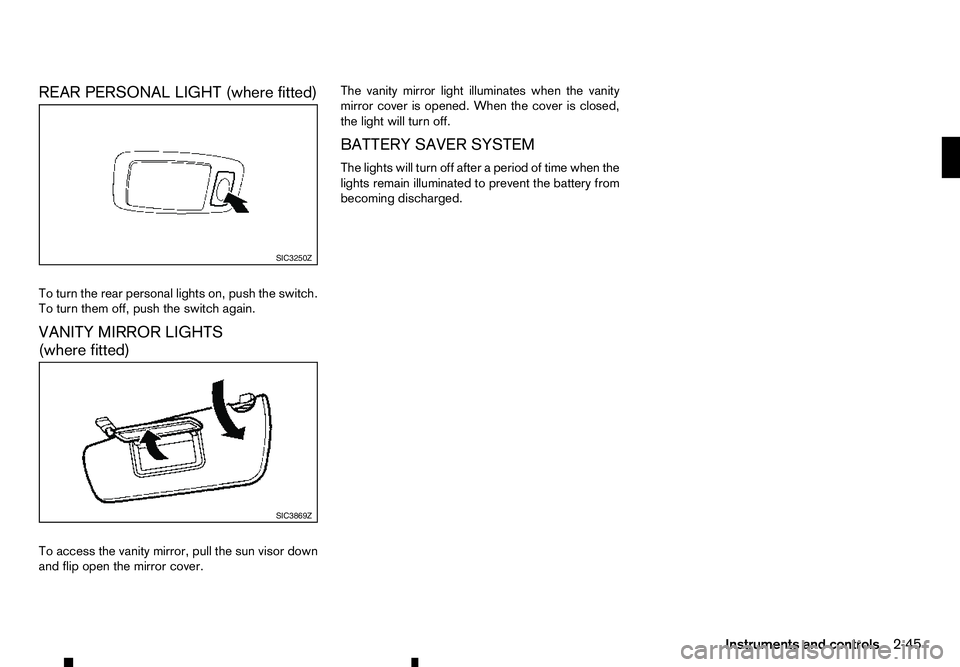
REAR PERSONAL LIGHT (where fitted)
To turn the rear personal lights on, push the switch.
To turn them off, push the switch again.
VANITY MIRROR LIGHTS
(where fitted)
To access the vanity mirror, pull the sun visor down
and flip open the mirror cover. The vanity mirror light illuminates when the vanity
mirror cover is opened. When the cover is closed,
the light will turn off.
BATTERY SAVER SYSTEM
The lights will turn off after aperiod of time when the
lights remain illuminated to prevent the battery from
becoming discharged. SIC3250Z
SIC3869Z
Instruments and controls
2-45
Page 128 of 340
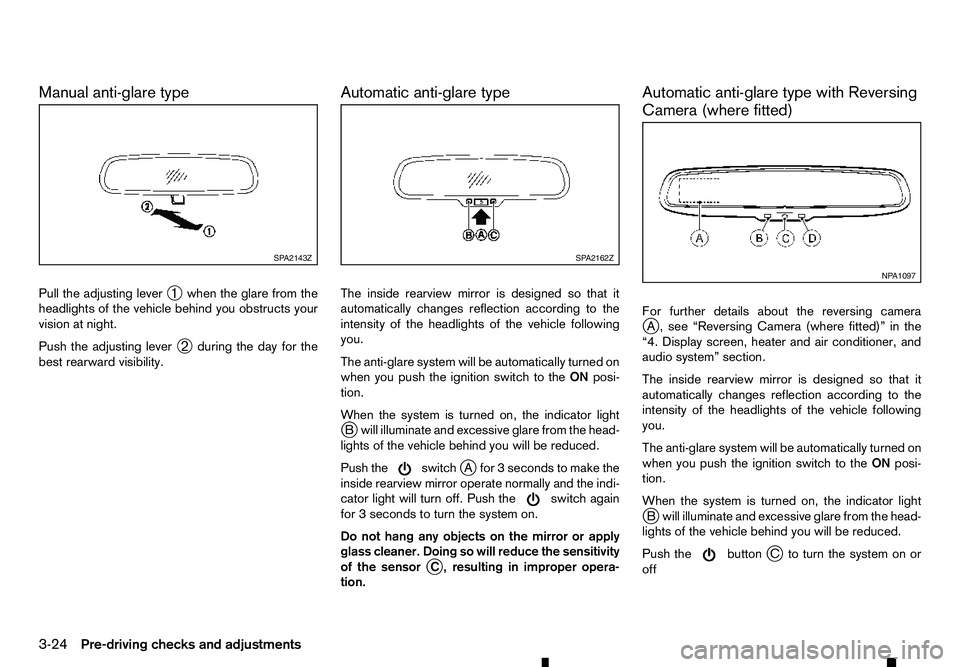
Manual anti-glare type
Pull the adjusting lever ➀when the glare from the
headlights of the vehicle behind you obstructs your
vision at night.
Push the adjusting lever ➁during the day for the
best rearward visibility. Automatic anti-glare type
The inside rearview mirror is designed so that it
automatically changes reflection according to the
intensity of the headlights of the vehicle following
you.
The anti-glare system will be automatically turned on
when you push the ignition switch to the
ONposi-
tion.
When the system is turned on, the indicator light
j Bw ill illuminate and excessive glare from the head-
lights of the vehicle behind you will be reduced.
Push the switch
jAf or3s econds to make the
inside rearview mirror operate normally and the indi-
cator light will turn off. Push the switch again
for 3s
econds to turn the system on.
Do not hang any objects on the mirror or apply
glass cleaner. Doing so will reduce the sensitivity
of the sensor j
C, resulting in improper opera-
tion. Automatic anti-glare type with Reversing
Camera (where fitted)
For further details about the reversing camera
j
A, see “Reversing Camera (where fitted)” in the
“4. Display screen, heater and air conditioner, and
audio system” section.
The inside rearview mirror is designed so that it
automatically changes reflection according to the
intensity of the headlights of the vehicle following
you.
The anti-glare system will be automatically turned on
when you push the ignition switch to the ONposi-
tion.
When the system is turned on, the indicator light j Bw ill illuminate and excessive glare from the head-
lights of the vehicle behind you will be reduced.
Push the button
jCt oturn the system on or
off SP A2143Z
SP A2162Z
NP A1097
3-24 Pre-driving checks and adjustments
Page 159 of 340
A/C (Air Conditioner) operation:
Push the A/Cbutton to turn on or off the air condi-
tioner. When the air conditioner is on, the A/Cindi-
cator light on the button illuminates.
Heater operation
Heating:
This mode is used to direct heated air from the foot
outlets.
1. Push the air recirculation button for normal
heating. (The indicator light will turn off.)
2. Push the button. (The indicator light will
turn on.)
3. Turn the fan speed control dial to the de-
sired position.
4. Turn the temperature control dial to the desired position between the middle and the hot (right)
position.
Defrosting or defogging:
This mode directs the air to the defogger outlets to
defrost/defog the windows.
1. Turn the fan speed control dial to the de-
sired position.
2. Push the front defogger button. (The indi-
cator lights on the front defogger button
and the
A/C button will turn on.) Then the air
recirculation indicator light will turn off. 3. Turn the temperature control dial to the desired
position between the middle and the hot (right)
position.
To remove frost from the windscreen quickly,
turn the temperature control dial to the maximum
hot (right) position and the fan speed control dial to the maximum position. For the best
bi-level heating performance, do not select the
air recirculation mode. For the best defogging
performance, do not select the air recirculation
mode.
Bi-level heating:
This mode directs cool air from the side/centre vents
and warm air from the foot outlets. (When the tem-
perature control dial is turned to the maximum hot
(right) or cool (left) position, the temperatures from
the side/centre vents and the foot outlets will be the
same.)
1. Push the air recirculation button. (The indi-
cator light will turn off.)
2. Push the button. (The indicator light will
turn on.)
3. Turn the fan speed control dial to the de-
sired position.
4. Turn the temperature control dial to the desired position. Heating and defogging:
This mode heats the interior and defogs the win-
dows.
1. Push the air recirculation button. (The indi-
cator light will turn off.)
2. Push the button. (The indicator light will
turn on.)
3. Turn the fan speed control dial to the de-
sired position.
4. Turn the temperature control dial to the maximum hot (right) position.
Air conditioner operation
The air conditioner system should be operated for
approximately 10 minutes at least once amonth.
This helps prevent damage to the air conditioner
system due to the lack of lubrication.
Cooling:
This mode is used to cool and dehumidify the air.
1. Push the air recirculation button. (The indi-
cator light will turn off.)
2. Push the button. (The indicator light will
turn on.)
3. Turn the fan speed control dial to the de-
sired position.
4. Push the A/Cbutton. (The indicator light will turn
on.)
Display screen, heater and air conditioner, and audio system 4-27
Page 160 of 340
5. Turn the temperature control dial to the desired
position between the middle and the cool (left)
position.
Av isible mist may be seen coming from the vents in
hot, humid conditions as the air is cooled rapidly.
This does not indicate amalfunction.
• For quick cooling when the outside temperature
is high, push the air recirculation button.
(The indicator light will turn on.) Be sure to return
the air recirculation button to turn off for
normal cooling.
Dehumidified heating:
This mode is used to heat and dehumidify the air.
1. Push the air recirculation button. (The indi-
cator light will turn off.)
2. Push the button. (The indicator light will
turn on.)
3. Turn the fan speed control dial to the de-
sired position.
4. Push the A/Cbutton. (The indicator light will turn
on.)
5. Turn the temperature control dial to the desired position between the middle and the hot (right)
position. Dehumidified defogging:
This mode is used to defog the windows and dehu-
midify the air.
1. Push the front defogger button. (The indi-
cator lights on the front defogger button
and the
A/C button will turn on.) Then the air
recirculation indicator light will turn off.
2. Turn the fan speed control dial to the de-
sired position.
3. Turn the temperature control dial to the desired position.
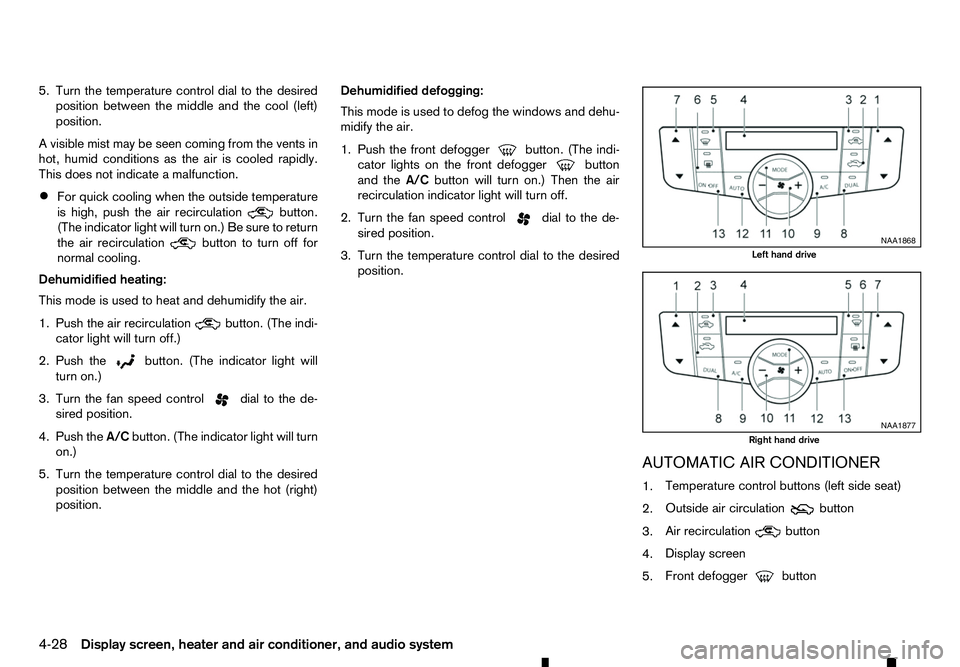
AUTOMATIC AIR CONDITIONER
1.Temperature control buttons (left side seat)
2. Outside air circulation button
3. Air recirculation
button
4. Display screen
5. Front defogger button NAA1868
Left hand drive
NAA1877
Right hand drive
4-28 Display screen, heater and air conditioner, and audio system
Page 169 of 340
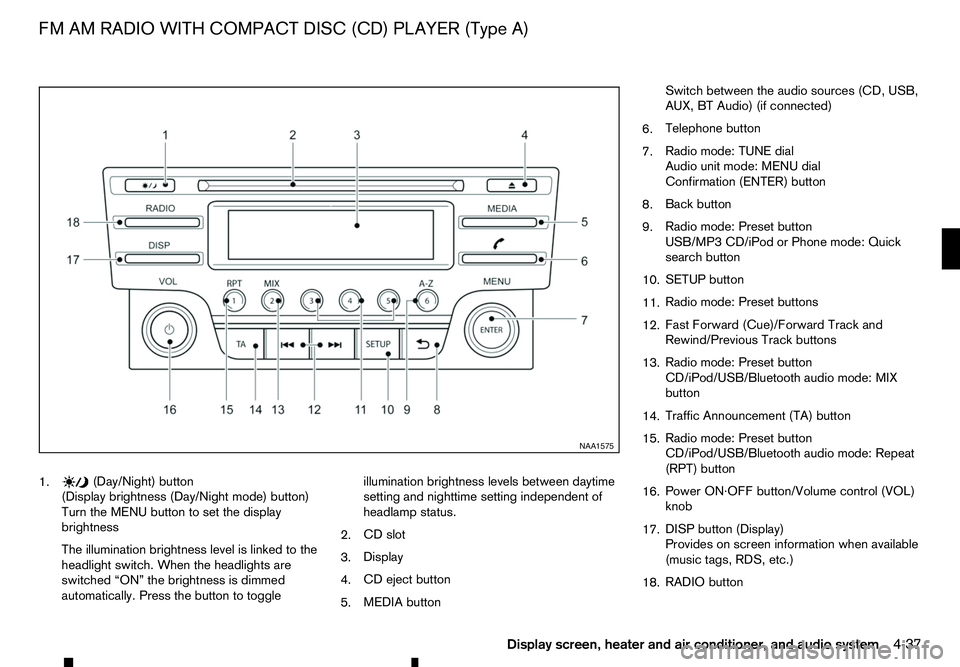
1. (Day/Night) button
(Display brightness (Day/Night mode) button)
Turn the MENU button to set the display
brightness
The illumination brightness level is linked to the
headlight switch. When the headlights are
switched “ON” the brightness is dimmed
automatically. Press the button to toggle illumination brightness levels between daytime
setting and nighttime setting independent of
headlamp status.
2. CD slot
3. Display
4. CD eject button
5. MEDIA button Switch between the audio sources (CD, USB,
AUX, BT Audio) (if connected)
6. Telephone button
7. Radio mode: TUNE dial
Audio unit mode: MENU dial
Confirmation (ENTER) button
8. Back button
9. Radio mode: Preset button
USB/MP3 CD/iPod or Phone mode: Quick
search button
10. SETUP button
11. Radio mode: Preset buttons
12. Fast Forward (Cue)/Forward Track and
Rewind/Previous Track buttons
13. Radio mode: Preset button
CD/iPod/USB/Bluetooth audio mode: MIX
button
14. Traffic Announcement (TA) button
15. Radio mode: Preset button
CD/iPod/USB/Bluetooth audio mode: Repeat
(RPT) button
16. Power ON·OFF button/Volume control (VOL)
knob
17. DISP button (Display)
Provides on screen information when available
(music tags, RDS, etc.)
18. RADIO button NAA1575
FM AM RADIO WITH COMPACT DISC (CD) PLAYER (Type A)
Display screen, heater and air conditioner, and audio system4-37
Page 198 of 340
EU RED Directive 2014/53/EU
Hereby, Robert Bosch Car Multimedia GmbH de-
clares that the radio equipment type LCN2K70A00/ LCN2K70A10 is in compliance with Directive 2014/
53/EU. The full text of the EU declaration of confor-
mity is available at the following internet address:
http://cert.bosch-carmultimedia.net
Any change of the radio equipment or usage with
other accessories, components or software as
specified will make are-assessment according com-
pliance to the legal approval necessary. Frequency Band
Radiated
Power
(EIRP) Hints/Restriction
2400 MHz –2480
MHz Bluetooth
<10 mW Internal not acces-
sible by user CONTROL BUTTONS AND
MICROPHONE
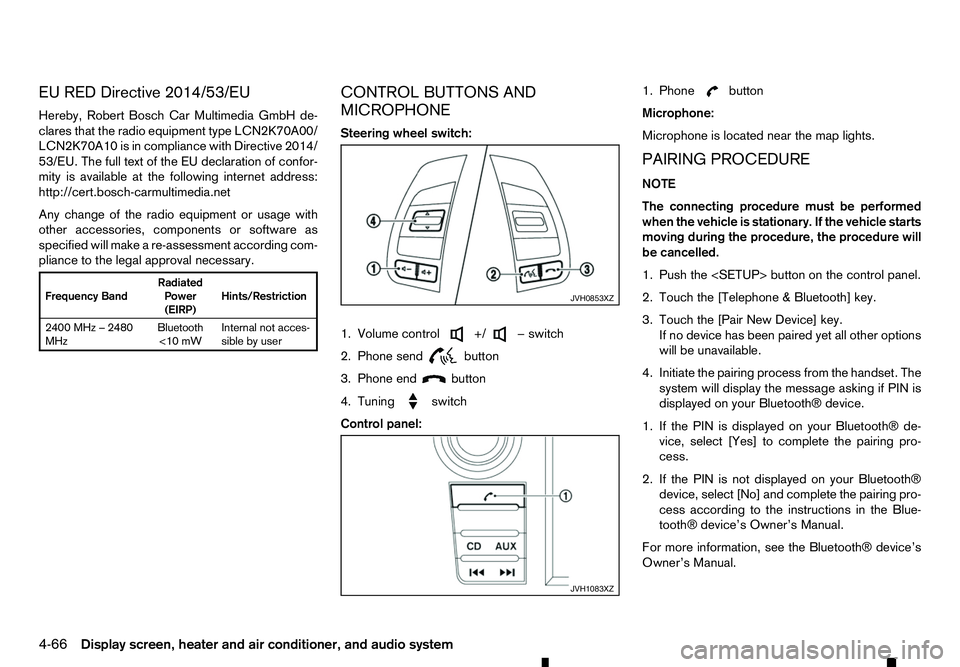
Steering wheel switch:
1. Volume control +/ −s
witch
2. Phone send
button
3. Phone end
button
4. Tuning
switch
Control panel:1. Phone button
Microphone:
Microphone is located near the map lights.
PAIRING PROCEDURE
NOTE
The connecting procedure must be performed
when the vehicle is stationary. If the vehicle starts
moving during the procedure, the procedure will
be cancelled.
1. Push the
2. Touch the [Telephone &Bluetooth] key.
3. Touch the [Pair New Device] key. If no device has been paired yet all other options
will be unavailable.
4. Initiate the pairing process from the handset. The system will display the message asking if PIN is
displayed on your Bluetooth® device.
1. If the PIN is displayed on your Bluetooth® de- vice, select [Yes] to complete the pairing pro-
cess.
2. If the PIN is not displayed on your Bluetooth® device, select [No] and complete the pairing pro-
cess according to the instructions in the Blue- tooth® device’s Owner’s Manual.
For more information, see the Bluetooth® device’s
Owner’s Manual. JVH0853XZ
JVH1083XZ
4-66 Display screen, heater and air conditioner, and audio system
Page 204 of 340
During the first 1,600 km (1,000 miles), follow these
recommendations to obtain maximum engine per-
formance and ensure the future reliability and
economy of your new vehicle. Failure to follow these
recommendations may result in shortened engine
life and reduced engine performance.
• Do not drive at
aconstant speed, either fast or
slow, for long periods of time.
• Do not run the engine over 4,000 rpm.
• Do not accelerate at full throttle in any gear.
• Do not start quickly.
• Do not brake hard as much as possible.
• Do not tow
atrailer for at least the first 800 km
(500 miles). WARNING
The driving characteristics of your vehicle will
change remarkably by any additional load and its
distribution, as well as by adding optional equip-
ment (trailer coupling, roof rail, etc.). Your driv-
ing style and speed must be adjusted according
to the circumstances. Especially when carrying
heavy loads, your speed must be reduced ad-
equately.
• Make sure the area around the vehicle is clear.
• Check fluid levels such as engine oil, coolant,
brake (and clutch) fluid, window washer fluid as
frequently as possible, at least whenever you
refuel.
• Visually inspect tyres for their appearance and
condition. Measure and check the tyre pressure
for proper inflation.
• Check that all windows and lights are clean.
• Adjust the seat and head restraint positions.
• Adjust the inside and outside rearview mirror po-
sitions.
• Fasten your seat belt and ask all passengers to
do the same.
• Check that all doors are closed.
• Check the operation of the warning lights when
the ignition switch is placed in the “ON” position. •
Maintenance items in the “8. Maintenance and
do-it-yourself” section should be checked peri-
odically.
RUNNING-IN SCHEDULE
BEFORE STARTING ENGINE
5-2 Starting and driving
Page 217 of 340
Unlocking the steering wheel
1) Insert the key into the ignition switch.
2) Gently turn the ignition switch while rotating the steering wheel left and right. PRECAUTIONS ON PUSH-BUTTON
IGNITION SWITCH OPERATION WARNING
Do not operate the push-button ignition switch
while driving the vehicle except in an emergency.
(The engine will stop when the ignition switch is
pushed 3consecutive times or the ignition switch
is pushed and held for more than 2seconds.)
The steering wheel may lock and could cause
the driver to lose control of the vehicle. This could
result in serious vehicle damage or personal in-
jury.
REMOTE CONTROL KEY SYSTEM
The Remote Control Key system can operate the
ignition switch without taking the key out from your
pocket or bag. The operating environment and/or
conditions may affect the Remote Control Key sys-
tem operation.
Some indicators and warnings for operation are dis-
played in the vehicle information display and/or in
the meter. (See “Warning lights, indicator lights and
audible reminders” in the “2. Instruments and
controls” section and “Vehicle information display”
in the “2. Instruments and controls” section.)
CAUTION
• Be sure to carry the Remote Control Key with
you when operating the vehicle.
• Never leave the Remote Control Key inside
the vehicle when you leave the vehicle. •
If the vehicle battery is discharged, the igni-
tion switch cannot be switched from the
“LOCK” position, and if the steering lock is
engaged, the steering wheel cannot be
moved. Charge the battery as soon as pos-
sible. (See “Remote Control Key battery
replacement” in the “8. Maintenance and
do-it-yourself” section.)
Operating range
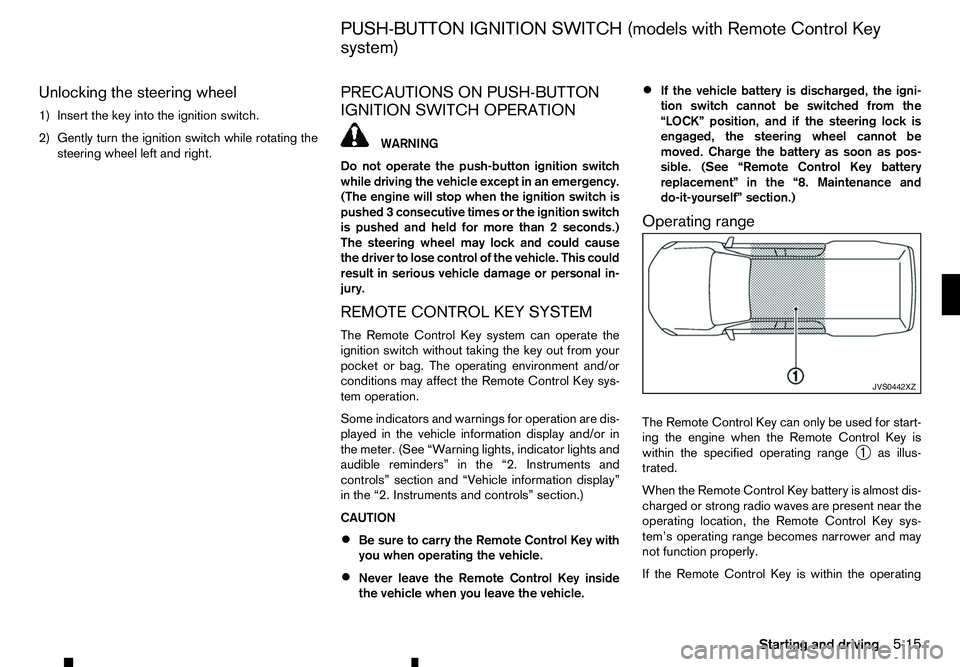
The Remote Control Key can only be used for start-
ing the engine when the Remote Control Key is
within the specified operating range ➀as illus-
trated.
When the Remote Control Key battery is almost dis-
charged or strong radio waves are present near the
operating location, the Remote Control Key sys-
tem’s operating range becomes narrower and may
not function properly.
If the Remote Control Key is within the operating JVS0442XZ
PUSH-BUTTON IGNITION SWITCH (models with Remote Control Key
system)
Starting and driving5-15