transmission RENAULT ALASKAN 2017 Owner's Manual
[x] Cancel search | Manufacturer: RENAULT, Model Year: 2017, Model line: ALASKAN, Model: RENAULT ALASKAN 2017Pages: 340, PDF Size: 6.93 MB
Page 220 of 340
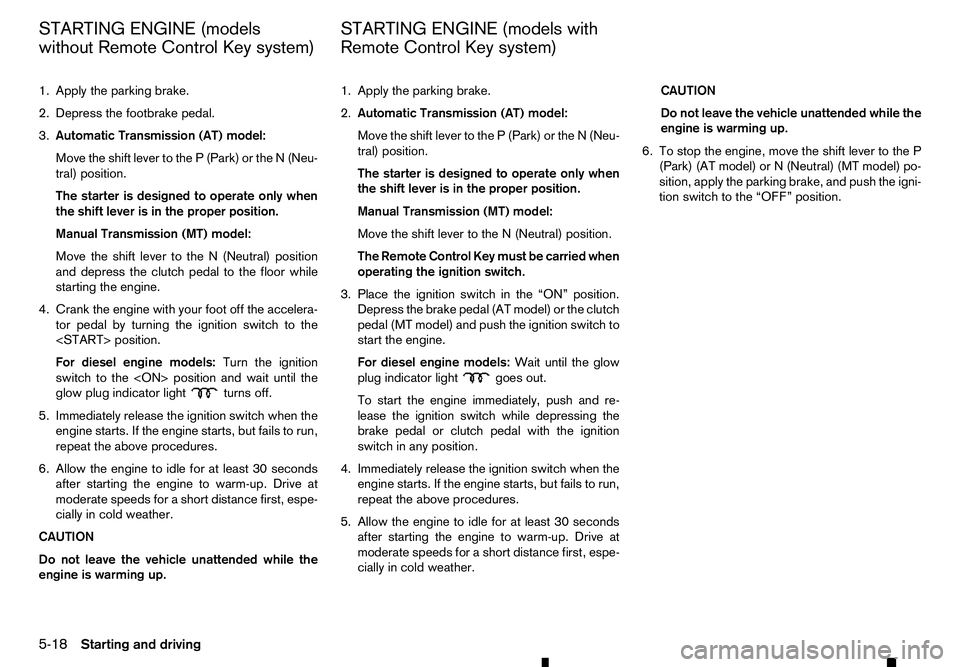
1. Apply the parking brake.
2. Depress the footbrake pedal.
3. Automatic Transmission (AT) model:
Move the shift lever to the P(Park) or the N(Neu-
tral) position.
The starter is designed to operate only when
the shift lever is in the proper position.
Manual Transmission (MT) model:
Move the shift lever to the N(Neutral) position
and depress the clutch pedal to the floor while
starting the engine.
4. Crank the engine with your foot off the accelera- tor pedal by turning the ignition switch to the
For diesel engine models: Turn the ignition
switch to the
glow plug indicator light turns off.
5. Immediately release the ignition switch when the engine starts. If the engine starts, but fails to run,
repeat the above procedures.
6. Allow the engine to idle for at least 30 seconds after starting the engine to warm-up. Drive at
moderate speeds for ashort distance first, espe-
cially in cold weather.
CAUTION
Do not leave the vehicle unattended while the
engine is warming up. 1. Apply the parking brake.
2.
Automatic Transmission (AT) model:
Move the shift lever to the P(Park) or the N(Neu-
tral) position.
The starter is designed to operate only when
the shift lever is in the proper position.
Manual Transmission (MT) model:
Move the shift lever to the N(Neutral) position.
The Remote Control Key must be carried when operating the ignition switch.
3. Place the ignition switch in the “ON” position. Depress the brake pedal (AT model) or the clutch
pedal (MT model) and push the ignition switch to
start the engine.
For diesel engine models: Wait until the glow
plug indicator light goes out.
To start the engine immediately, push and re-
lease the ignition switch while depressing the
brake pedal or clutch pedal with the ignition
switch in any position.
4. Immediately release the ignition switch when the engine starts. If the engine starts, but fails to run,
repeat the above procedures.
5. Allow the engine to idle for at least 30 seconds after starting the engine to warm-up. Drive at
moderate speeds for ashort distance first, espe-
cially in cold weather. CAUTION
Do not leave the vehicle unattended while the
engine is warming up.
6. To stop the engine, move the shift lever to the P (Park) (AT model) or N(Neutral) (MT model) po-
sition, apply the parking brake, and push the igni-
tion switch to the “OFF” position.
STARTING ENGINE (models
without Remote Control Key system)
STARTING ENGINE (models with
Remote Control Key system)
5-18 Starting and driving
Page 221 of 340
DRIVING WITH AUTOMATIC
TRANSMISSION (AT)
The Automatic Transmission (AT) in your vehicle is
electronically controlled to produce maximum power
and smooth operation.
The recommended operating procedures for this
transmission are shown on the following pages. Fol-
low these procedures for maximum vehicle perfor-
mance and driving enjoyment. WARNING
Do not downshift abruptly on slippery roads. This
may cause aloss of control.
CAUTION
• The cold engine idle speed is high, so use
caution when shifting into aforward or re-
verse gear before the engine has warmed up.
• Avoid revving up the engine while the vehicle
is stopped. This could cause unexpected ve-
hicle movement.
• Never shift to either the
P(Park) or R(Re-
verse) position while the vehicle is moving
forward and P(Park) or D(Drive) position
while the vehicle is reversing. This could cause an accident or damage the transmis-
sion. •
Except in an emergency, do not shift to the N
(Neutral) position while driving. Coasting with
the transmission in the
N(Neutral) position
may cause serious damage to the transmis-
sion.
• Start the engine in either the
P(Park) or N
(Neutral) position. The engine will not start in
any other gear position. If it does, have your
vehicle checked by an approved dealer or
qualified workshop.
• Shift into the
P(Park) position and apply the
parking brake when at astandstill for longer
than ashort waiting period.
• Keep the engine at idling speed while shifting
from the
N(Neutral) position to any driving
position.
• To avoid possible damage to your vehicle;
when stopping the vehicle on an uphill grade,
do not hold the vehicle by depressing the ac-
celerator pedal. The footbrake should be used
for this purpose.
Starting vehicle
1. After starting the engine, fully depress the foot- brake pedal before attempting to move the shift
lever out of the P(Park) position.
2. Keep the footbrake pedal depressed and move the shift lever into adriving position.
3. Release the parking brake, the footbrake pedal, and then gradually start the vehicle in motion. The AT is designed so the footbrake pedal MUST
be depressed before shifting from the
P(Park)
position to any driving position while the ignition
switch is in the “ON” position.
The shift lever cannot be moved out of the P
(Park) position and into any of the other gear
positions if the ignition switch is placed in the
“LOCK”, “OFF” or “ACC” position.
CAUTION
• DEPRESS THE FOOTBRAKE PEDAL
-Shifting
the shift lever to D(Drive), R(Reverse), or
manual shift mode without depressing the
footbrake pedal causes the vehicle to move
slowly when the engine is running. Make sure
the footbrake pedal is depressed fully and the
vehicle is stopped before shifting the shift le-
ver.
• MAKE SURE OF THE SHIFT LEVER POSITION
-M
ake sure the shift lever is in the desired
position. D(Drive) and manual shift mode are
used to move forward and R(Reverse) to re-
verse. Depress the accelerator pedal to start
the vehicle and merge with traffic (avoid
abrupt starting and spinning the wheels).
• WARM UP THE ENGINE
-Due to the higher
idle speeds when the engine is cold, extra
caution must be exercised when shifting the
shift lever into the driving position immedi-
ately after starting the engine.
DRIVING THE VEHICLE
Starting and driving5-19
Page 222 of 340
•
PARKING THE VEHICLE
-Depress the foot-
brake pedal and, once the vehicle stops, move
the shift lever into the P(Park) position, pull
the parking brake lever and release the foot-
brake pedal.
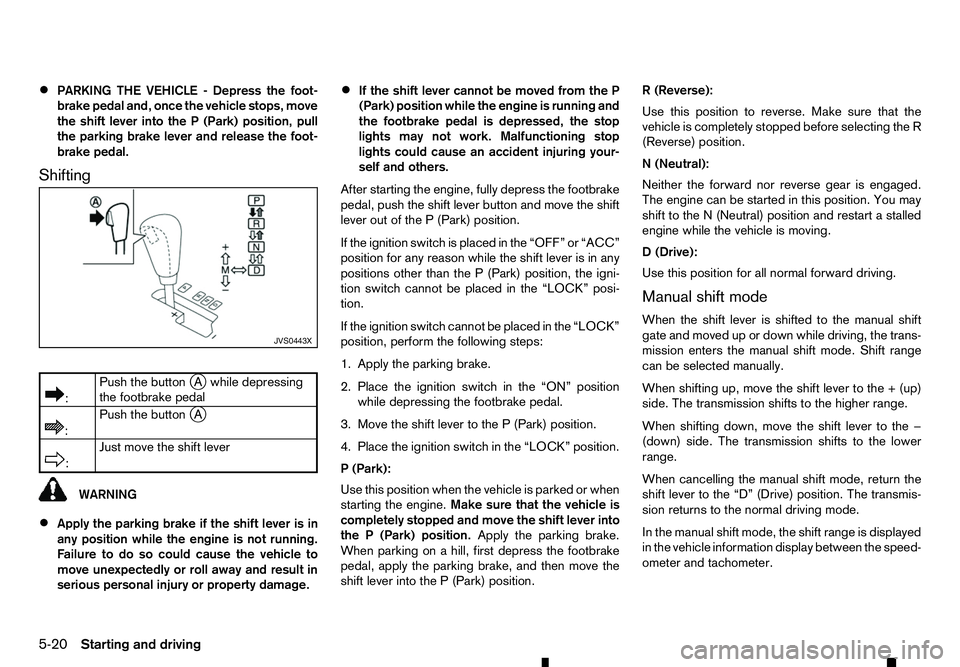
Shifting
m :
Push
the button
jAw hile depressing
the footbrake pedal
m :
Push
the button
jA
m :
Just
move the shift lever
WARNING
• Apply the parking brake if the shift lever is in
any position while the engine is not running.
Failure to do so could cause the vehicle to
move unexpectedly or roll away and result in
serious personal injury or property damage. •
If the shift lever cannot be moved from the P
(Park) position while the engine is running and
the footbrake pedal is depressed, the stop
lights may not work. Malfunctioning stop
lights could cause an accident injuring your-
self and others.
After starting the engine, fully depress the footbrake
pedal, push the shift lever button and move the shift
lever out of the P(Park) position.
If the ignition switch is placed in the “OFF” or “ACC”
position for any reason while the shift lever is in any
positions other than the P(Park) position, the igni-
tion switch cannot be placed in the “LOCK” posi-
tion.
If the ignition switch cannot be placed in the “LOCK”
position, perform the following steps:
1. Apply the parking brake.
2. Place the ignition switch in the “ON” position
while depressing the footbrake pedal.
3. Move the shift lever to the P(Park) position.
4. Place the ignition switch in the “LOCK” position.
P( Park):
Use this position when the vehicle is parked or when
starting the engine. Make sure that the vehicle is
completely stopped and move the shift lever into
the P(Park) position. Apply the parking brake.
When parking on ahill, first depress the footbrake
pedal, apply the parking brake, and then move the
shift lever into the P(Park) position. R(
Reverse):
Use this position to reverse. Make sure that the
vehicle is completely stopped before selecting the R
(Reverse) position.
N( Neutral):
Neither the forward nor reverse gear is engaged.
The engine can be started in this position. You may
shift to the N(Neutral) position and restart astalled
engine while the vehicle is moving.
D( Drive):
Use this position for all normal forward driving.
Manual shift mode
When the shift lever is shifted to the manual shift
gate and moved up or down while driving, the trans-
mission enters the manual shift mode. Shift range
can be selected manually.
When shifting up, move the shift lever to the +(up)
side. The transmission shifts to the higher range.
When shifting down, move the shift lever to the −
(down) side. The transmission shifts to the lower
range.
When cancelling the manual shift mode, return the
shift lever to the “D” (Drive) position. The transmis-
sion returns to the normal driving mode.
In the manual shift mode, the shift range is displayed
in the vehicle information display between the speed-
ometer and tachometer. JVS0443X
5-20 Starting and driving
Page 223 of 340
Shift ranges up or down one by one as follows:
M1
→
←M2→
←M3→
←M4→
←M5→
←M6→
←M7
M7(
7th):
Use this position for all normal forward driving at
highway speeds.
M6( 6th) andM5(5th):
Use these positions when driving up long slopes, or
for engine braking when driving down long slopes.
M4( 4th),M3(3rd) andM2(2nd):
Use these positions for hill climbing or engine brak-
ing on downhill grades.
M1( 1st):
Use this position when climbing steep hills slowly or
driving slowly through deep snow, or for maximum
engine braking on steep downhill grades.
• Remember not to drive at high speeds for ex-
tended periods of time in lower than 7th gear.
This reduces fuel economy.
• Moving the shift lever to the same side twice will
shift the ranges in succession. However, if this
motion is rapidly done, the second shifting may
not be completed properly.
• In the manual shift mode, the transmission
may not shift to the selected gear or may au-
tomatically shift to the other gear. This helps
maintain driving performance and reduces the
chance of vehicle damage or loss of control. •
When the transmission does not shift to the
selected gear, the Automatic Transmission
(AT) position indicator light (in the vehicle in-
formation display) will blink and the buzzer
will sound.
• In the manual shift mode, the transmission
automatically shifts down to 1st gear before
the vehicle comes to
astop. When accelerat-
ing again, it is necessary to shift up to the
desired range.
Accelerator downshift -inD(Drive)
position
For passing or climbing hills, depress the accelera-
tor pedal to the floor. This shifts the transmission
down into alower gear, depending on the vehicle
speed.
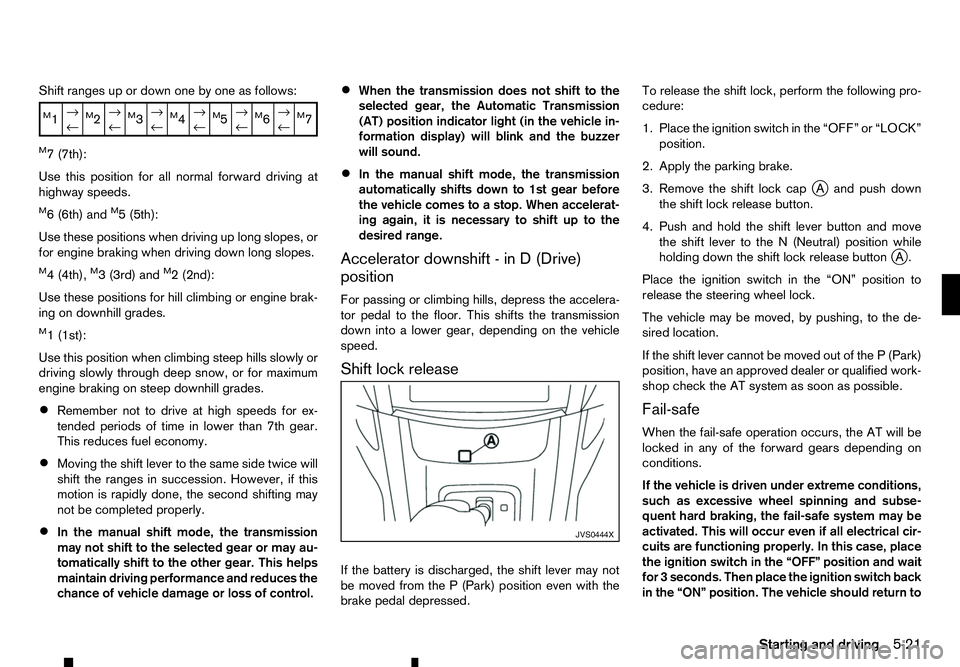
Shift lock release
If the battery is discharged, the shift lever may not
be moved from the P(Park) position even with the
brake pedal depressed. To release the shift lock, perform the following pro-
cedure:
1. Place the ignition switch in the “OFF” or “LOCK”
position.
2. Apply the parking brake.
3. Remove the shift lock cap jAa nd push down
the shift lock release button.
4. Push and hold the shift lever button and move the shift lever to the N(Neutral) position while
holding down the shift lock release button j
A.
Place the ignition switch in the “ON” position to
release the steering wheel lock.
The vehicle may be moved, by pushing, to the de-
sired location.
If the shift lever cannot be moved out of the P(Park)
position, have an approved dealer or qualified work-
shop check the AT system as soon as possible.
Fail-safe
When the fail-safe operation occurs, the AT will be
locked in any of the forward gears depending on
conditions.
If the vehicle is driven under extreme conditions,
such as excessive wheel spinning and subse-
quent hard braking, the fail-safe system may be
activated. This will occur even if all electrical cir-
cuits are functioning properly. In this case, place
the ignition switch in the “OFF” position and wait
for 3seconds. Then place the ignition switch back
in the “ON” position. The vehicle should return to JVS0444X
Starting
and driving
5-21
Page 224 of 340
its normal operating condition. If it does not re-
turn to its normal operating condition, have an
approved dealer or qualified workshop check the
transmission and repair it if necessary.
DRIVING WITH MANUAL
TRANSMISSION (MT) WARNING
• Do not downshift abruptly on slippery roads.
This may cause aloss of control.
• Do not over-rev the engine when shifting to a
lower gear. This may cause
aloss of vehicle
control or engine damage.
CAUTION
• Do not rest your foot on the clutch pedal while
driving. This may damage the clutch system.
• Fully depress the clutch pedal before shifting
to help prevent transmission damage.
• Stop the vehicle completely before shifting
into the
R(Reverse) position.
• When the vehicle is stopped for
aperiod of
time, for example, waiting at stoplights, shift
to the N(Neutral) position and release the
clutch pedal with the footbrake pedal
depressed. Starting vehicle
1. After starting the engine, depress the clutch
pedal to the floor and move the shift lever to the
1( 1st), 2(2nd) or R(Reverse) position.
RENAULT recommends to start the vehicle in
2nd gear on level, flat ground and in the unladen
condition.
2. Slowly depress the accelerator pedal, releasing the clutch pedal and parking brake at the same
time.
Shifting gear
To change gears, or when upshifting or downshift-
ing, fully depress the clutch pedal, shift into the ap-
propriate gear, then slowly and smoothly release the
clutch pedal.
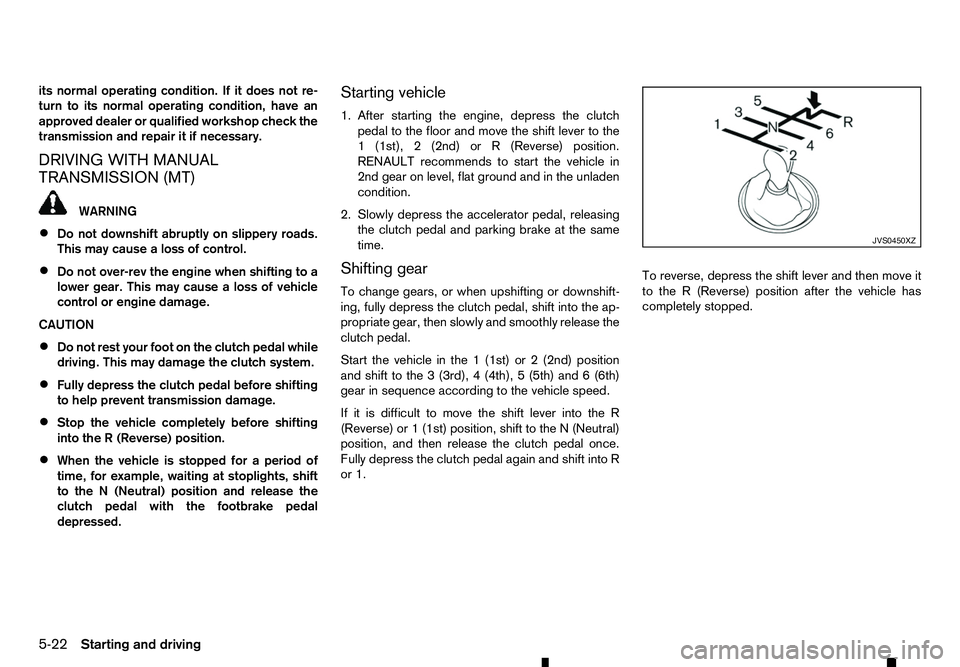
Start the vehicle in the 1(1st) or 2(2nd) position
and shift to the 3(3rd), 4(4th), 5(5th) and 6(6th)
gear in sequence according to the vehicle speed.
If it is difficult to move the shift lever into the R
(Reverse) or 1(1st) position, shift to the N(Neutral)
position, and then release the clutch pedal once.
Fully depress the clutch pedal again and shift into R
or 1. To reverse, depress the shift lever and then move it
to the
R(Reverse) position after the vehicle has
completely stopped. JVS0450XZ
5-22 Starting and driving
Page 225 of 340
The Stop/Start System is designed to prevent un-
necessary fuel consumption, exhaust emissions,
and noise during ajourney:
• When you stop the vehicle with the shift lever in
N(
Neutral) and clutch pedal released, the en-
gine is turned off automatically.
• When you push the clutch pedal, the engine is
automatically turned on.
CAUTION
At the end of the journey the engine must be
stopped and ignition turned off. Lock the vehicle
as normal. Turning the ignition switch OFF will
shut down all electrical systems. Failure to do
this may result in aflat battery.
NOTE
For model with Stop/Start System, use the spe-
cial battery that is enhanced in regard to the
charge-discharge capacity and life performance.
Avoid using anon-special battery for the Stop/
Start System, as this may cause early deteriora-
tion of the battery or amalfunction of the Stop/
Start System. For the battery, it is recommended
to use Genuine RENAULT parts. For more infor-
mation, contact an approved dealer or qualified
workshop.
NOTE
The Stop/Start System will not activate under
the following conditions:
• When the engine is kept idling without any
driving after the engine is turned on. •
When the engine coolant temperature is low.
• When the battery capacity is low.
• When the battery temperature is low.
• When the vehicle is moved.
• When the vacuum in the brake servo
decreases.
• When the engine bonnet is opened with the
engine running.
• When the engine is turned on with the engine
bonnet open.
• When the driver’s seat belt is not fastened.
• When the driver’s door is open.
• When the Stop/Start System indicator blinks
at
alow speed.
• When the fan speed control is in any position
other than OFF (0) while the air flow control is
in the front defogger position.
• When the front defogger switch is on.
• When the temperature inside the vehicle is
too high or low. (When the Auto air condition-
ing system is off, the Stop/Start System will
operate.)
• When the fan speed of the air conditioner is
set to the maximum speed.
• When the Stop/Start OFF switch is turned on.
• When the power consumption is large. •
When the vehicle is travelling at altitudes
higher than 2000
m(6562 ft) (MT model).
• For Manual Transmission (MT) models
• When the shift lever is in any position except
the
N(Neutral) position.
• When the clutch pedal is depressed.
• When the Remote Control Key is not in the
vehicle.
• When the steering wheel is turning or turned
more than 45 degrees.
NOTE
The engine will not restart even if the clutch pedal
is pressed while the Stop/Start System is acti-
vated under the following condition:
• When the engine bonnet is opened.
• When the driver seat belt is unfastened and
the driver’s door is opened.
• When the shift lever is not in the
N(Neutral)
position.
NOTE
It may take some time until the Stop/Start Sys-
tem activates under the following conditions:
• When the battery is discharged.
• When the outside temperature is low or high.
• When the battery is replaced or the battery
terminal is disconnected for extended peri-
ods and then reconnected.
STOP/START SYSTEM
(where fitted)
Starting and driving5-23
Page 228 of 340
•
Whenever the Stop/Start System is deactivated
the indicator light ➀on the Stop/Start OFF
switch illuminates. In this condition the Stop/
Start System cannot prevent unnecessary fuel
consumption, exhaust emissions, or noise dur-
ing your journey.
• If the Stop/Start System is malfunctioning, the
indicator light
➀on the Stop/Start OFF switch
illuminates.
NOTE
The Stop/Start System ON or OFF messages dis-
played for afew seconds in the vehicle informa-
tion display when the Stop/Start OFF switch is
pressed. See “Stop/Start System display” earlier
in this section. WARNING
• Do not attempt to raise two wheels off the
ground and shift the transmission to any drive
or reverse position with the engine running.
Doing so may result in drivetrain damage or
unexpected vehicle movement which could
result in serious vehicle damage or personal
injury.
• Do not attempt to test
a4WD equipped ve-
hicle on a2-wheel dynamometer or similar
equipment even if the other two wheels are
raised off the ground. Make sure you inform
test facility personnel that your vehicle is
equipped with 4WD before it is placed on a
dynamometer. Using the wrong test equip-
ment may result in drivetrain damage or unex-
pected vehicle movement which could result
in serious vehicle damage or personal injury.
CAUTION
• Do not drive the vehicle in the <4H> or <4LO>
position on dry hard surface roads. Driving on
dry, hard surfaces in <4H> or <4LO> may
cause unnecessary noise, tyre wear and in-
creased fuel consumption.
If the Four-Wheel Drive (4WD) warning light
turns on when driving on dry hard surface
roads:
–i
nthe <4H> position, shift the 4WD mode
switch to <2WD>. –i
nthe <4LO> position, stop the vehicle and
shift the transmission lever to the N(Neu-
tral) position with the brake pedal
depressed and shift the 4WD mode switch
to <2WD>.
If the 4WD warning light is still on after the
above operation, have your vehicle
checked by an approved dealer or quali-
fied workshop as soon as possible.
• The transfer case may be damaged if you con-
tinue driving with the 4WD warning light blink-
ing.
See “On-road and off-road driving precautions” ear-
lier in this section for other precautions.
PART TIME 4WD SYSTEM
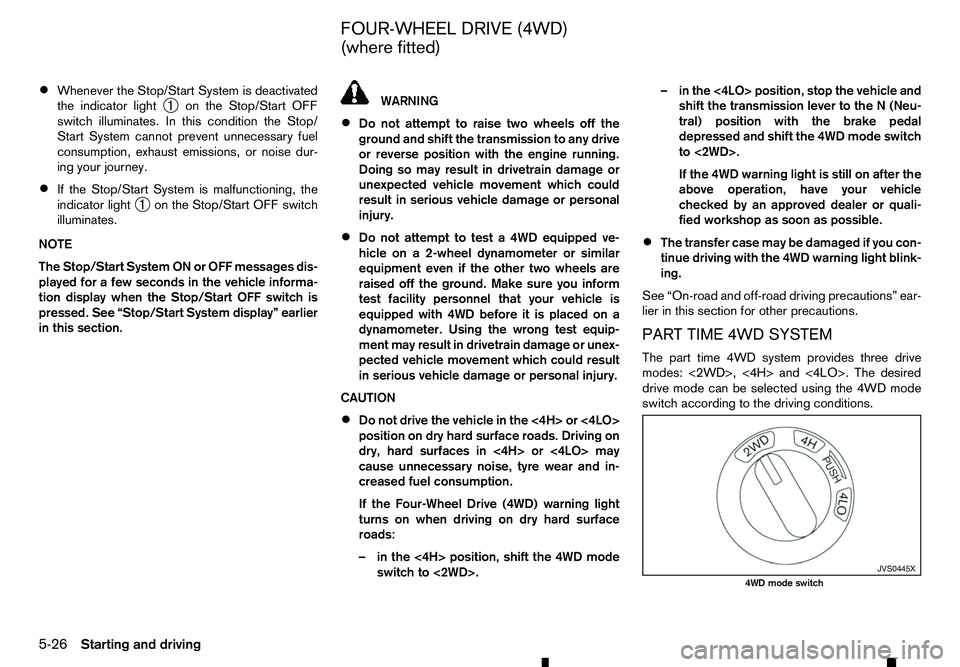
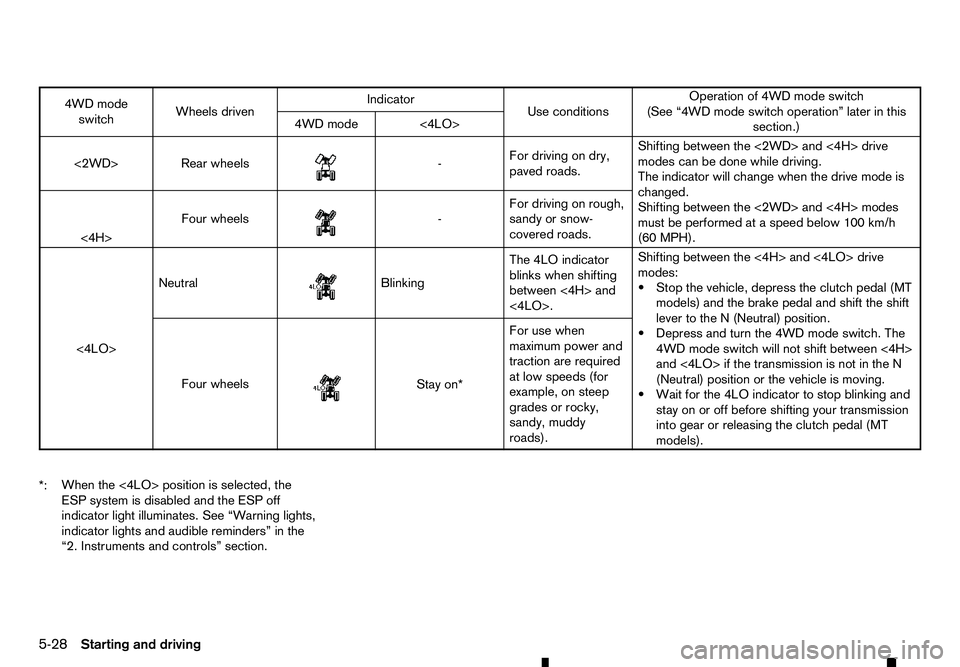
The part time 4WD system provides three drive
modes: <2WD>, <4H> and <4LO>. The desired
drive mode can be selected using the 4WD mode
switch according to the driving conditions. JVS0445X
4WD mode switch
FOUR-WHEEL DRIVE (4WD)
(where fitted)
5-26 Starting and driving
Page 230 of 340
4WD mode
switch Wheels driven Indicator
Use conditions Operation of 4WD mode switch
(See “4WD mode switch operation” later in this section.)
4WD mode <4LO>
<2WD> Rear wheels
m -
For
driving on dry,
paved roads. Shifting between the <2WD> and <4H> drive
modes can be done while driving.
The indicator will change when the drive mode is
changed.
Shifting between the <2WD> and <4H> modes
must be performed at
aspeed below 100 km/h
(60 MPH).
<4H> Four wheels
m -
For
driving on rough,
sandy or snow-
covered roads.
<4LO> Neutral
m Blinking
The
4LO indicator
blinks when shifting
between <4H> and
<4LO>. Shifting between the <4H> and <4LO> drive
modes:
•S
top the vehicle, depress the clutch pedal (MT
models) and the brake pedal and shift the shift
lever to the N(Neutral) position.
•D epress and turn the 4WD mode switch. The
4WD mode switch will not shift between <4H>
and <4LO> if the transmission is not in the N
(Neutral) position or the vehicle is moving.
•W ait for the 4LO indicator to stop blinking and
stay on or off before shifting your transmission into gear or releasing the clutch pedal (MT
models).
Four wheels
m Stay
on*
For use when
maximum power and
traction are required
at low speeds (for
example, on steep
grades or rocky,
sandy, muddy
roads).
*: When the <4LO> position is selected, the
ESP system is disabled and the ESP off
indicator light illuminates. See “Warning lights,
indicator lights and audible reminders” in the
“2. Instruments and controls” section.
5-28 Starting and driving
Page 231 of 340
WARNING
AT model: If the 4WD mode indicator is “OFF” or
the ATP warning light is “ON”, this indicates that
the automatic transmission P(Park) position will
not function and could result in the vehicle mov-
ing unexpectedly, causing serious personal in-
jury or property damage. Always set the parking
brake.
CAUTION
To avoid vehicle damage:
• Do not operate the 4WD mode switch when
cornering, reversing or if the rear wheels are
spinning freely. The vehicle must be moving
straight ahead.
• Do not move the shift lever (AT model) or
release the clutch pedal (MT model) when the
4LO indicator is blinking. Failure to do this
may cause the gears to grind and damaging
the powertrain.
• MT model: Do not accelerate rapidly from a
stopped position when the 4LO indicator is
blinking. Drive straight ahead at
alow speed
until the 4LO indicator is lit. The 4LO indicator
blinks when shifting between <4LO> and
<4H>.
• If the 4WD warning light comes on, perform
the following procedure:
1) Turn off the engine.
2) Start the engine. 3) Check if the 4WD warning light comes on.
If the 4WD warning light is still on after following
the above procedure, have the system checked
and serviced immediately by an approved dealer
or qualified workshop.
The transfer case 4WD mode switch is used to
select either Two-Wheel Drive (2WD) or
Four-Wheel Drive (4WD) depending on the driving
conditions. Turn the 4WD mode switch to select a drive mode (<2WD>, <4H> or <4LO>).
To change into or out of 4LO mode:
1. The vehicle MUST BE standing still.
2. Depress the clutch pedal (MT model) and the brake pedal and move the shift lever to N(Neu-
tral).
3. Depress and turn the 4WD mode switch to change into or out of <4LO>. WARNING
• When parking, apply the parking brake before
stopping the engine and make sure that the
4WD mode indicator is on and that the ATP
warning light or ATP warning message is off,
otherwise, the vehicle could unexpectedly
move even if the automatic transmission is in
the P(Park) position.
• The 4LO indicator must stop blinking and re-
main on or turn off before shifting the trans-
mission into gear. The vehicle may move un- expectedly if the shift lever is shifted from the
N(
Neutral) position to any other gear while
the 4LO indicator is blinking.
CAUTION
• Never turn the 4WD mode switch between
<4LO> and <4H> while driving.
• The <4H> drive mode provides greater power
and traction. Avoid excessive speed as it will
cause increased fuel consumption and higher
oil temperatures, and could damage power
train components. Speeds over 100 km/h (60
MPH) in <4H> are not recommended.
• The <4LO> drive mode provides maximum
power and traction. Avoid raising vehicle
speed excessively. The maximum speed is
approximately 50 km/h (30 MPH).
• The 4WD mode switch can be turned between
<2WD> and <4H> while driving straight ahead.
Do not turn the 4WD mode switch while mak-
ing
aturn or reversing.
• Do not turn the 4WD mode switch between
<2WD> and <4H> while driving on steep
downhill grades. Use the engine brake and
low transmission gears for engine braking.
• Do not turn the 4WD mode switch between
<2WD> and <4H> with the rear wheels spin-
ning.
Starting and driving 5-29
Page 232 of 340
•
Do not drive the vehicle in <4H> or <4LO>
mode on dry, hard surfaced roads. This may
cause unnecessary noise and tyre wear.
RENAULT recommends driving in 2WD under
these conditions.
• It is not possible to shift the 4WD transfer
case between <4H> and <4LO> at low ambi-
ent temperatures when the engine is cold. Do-
ing so may cause the 4LO indicator to blink.
Wait until the 4WD transfer case has reached
operational temperature (after driving for a
while) before using the 4WD mode switch to
change between <4H> and <4LO>.
When driving on rough roads
• Set the 4WD mode switch to <4H> or <4LO>.
• Drive carefully and according to the road surface
conditions.
If the vehicle gets stuck
• Place stones or wooden blocks under the tyres
to free the vehicle.
• Set the 4WD mode switch to <4H> or <4LO>.
• If it is difficult to free the vehicle, drive the vehicle
forwards and backwards to increase the mo-
mentum. If the vehicle is stuck deep in mud, tyre
chains may be effective.
CAUTION
• Do not spin the wheels excessively. The
wheels will sink deep into the mud and it will
be difficult to free the vehicle from the mud. •
Avoid shifting gears with the engine running
at high speeds as this may cause
amalfunc-
tion.
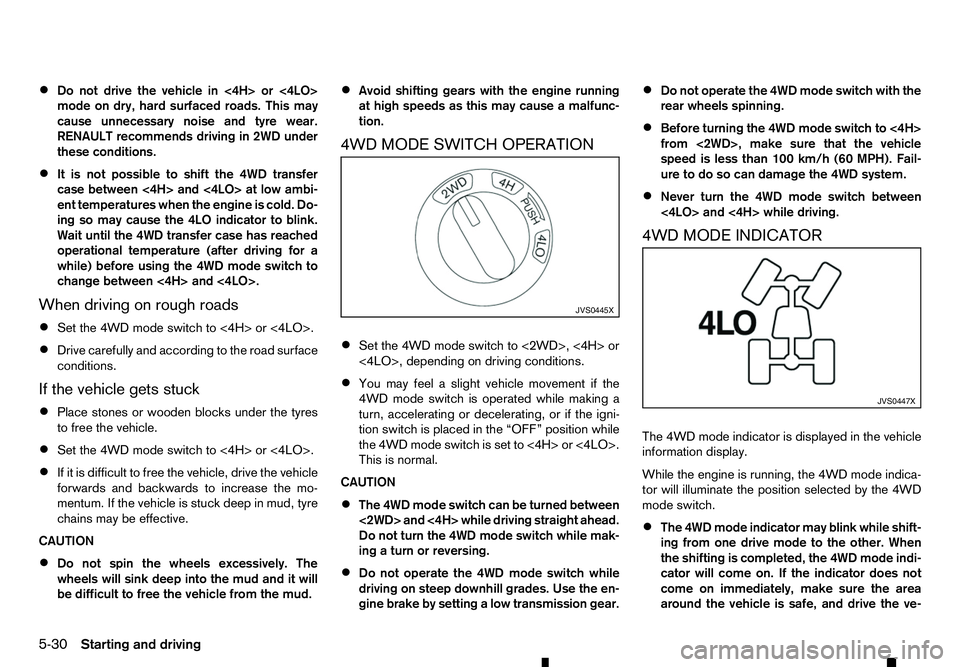
4WD MODE SWITCH OPERATION
• Set the 4WD mode switch to <2WD>, <4H> or
<4LO>, depending on driving conditions.
• You may feel
aslight vehicle movement if the
4WD mode switch is operated while making a
turn, accelerating or decelerating, or if the igni-
tion switch is placed in the “OFF” position while
the 4WD mode switch is set to <4H> or <4LO>.
This is normal.
CAUTION
• The 4WD mode switch can be turned between
<2WD> and <4H> while driving straight ahead.
Do not turn the 4WD mode switch while mak-
ing
aturn or reversing.
• Do not operate the 4WD mode switch while
driving on steep downhill grades. Use the en-
gine brake by setting
alow transmission gear. •
Do not operate the 4WD mode switch with the
rear wheels spinning.
• Before turning the 4WD mode switch to <4H>
from <2WD>, make sure that the vehicle
speed is less than 100 km/h (60 MPH). Fail-
ure to do so can damage the 4WD system.
• Never turn the 4WD mode switch between
<4LO> and <4H> while driving.
4WD MODE INDICATOR
The 4WD mode indicator is displayed in the vehicle
information display.
While the engine is running, the 4WD mode indica-
tor will illuminate the position selected by the 4WD
mode switch.
• The 4WD mode indicator may blink while shift-
ing from one drive mode to the other. When
the shifting is completed, the 4WD mode indi-
cator will come on. If the indicator does not
come on immediately, make sure the area
around the vehicle is safe, and drive the ve- JVS0445X
JVS0447X
5-30 Starting and driving