warning light RENAULT ALASKAN 2017 Owner's Guide
[x] Cancel search | Manufacturer: RENAULT, Model Year: 2017, Model line: ALASKAN, Model: RENAULT ALASKAN 2017Pages: 340, PDF Size: 6.93 MB
Page 148 of 340
•
Yellow line
➁:a
pprox. 1m(3f t)
• Green line
➂:a
pprox. 2m(7f t)
• Green line
➃:a
pprox. 3m(10 ft)
Vehicle width guide lines and static predictive
course lines ➄:
Indicate the vehicle width when reversing.
Dynamic predictive course lines ➅:
The dynamic predictive course lines will be dis-
played on the monitor when the steering wheel is
turned. The course lines will move depending on
how much the steering wheel is turned and will not
be displayed while the steering wheel is in the neu-
tral position.
The front view will not be displayed when the vehicle
speed is above 10 km/h (6 MPH). WARNING
• The distance between objects viewed in the
rear view differs from actual distance because
aw ide-angle lens is used. Objects in the rear
view will appear visually opposite than when
viewed in the rear view and outside mirrors.
• On
asnow-covered or slippery road, there
may be adifference between the predictive
course line and the actual course line.
• The displayed lines on the rear view will ap-
pear slightly off to the right because the rear
view camera is not installed in the rear centre
of the vehicle. NOTE
When the monitor displays the front view and the
steering wheel turns about 90 degrees or less
from the neutral position, both the right and left
predictive course lines
➅are displayed. When
the steering wheel turns about 90 degrees or
more, aline is displayed only on the opposite
side of the turn.
Bird’s-eye view WARNING
• Objects in the bird’s-eye view will appear fur-
ther than the actual distance because the
bird’s-eye view is apseudo view that is pro-
cessed by combining the views from the cam-
eras on the outside mirrors, the front and the
rear of the vehicle.
• Tall objects, such as
akerb or avehicle, may
be misaligned or not displayed at the seam of
the views.
• Objects that are above the camera cannot be
displayed.
• The view for the bird’s-eye view may be mis-
aligned when the camera position alters.
• Al
ine on the ground may be misaligned and is
not seen as being straight at the seam of the
views. The misalignment will increase as the
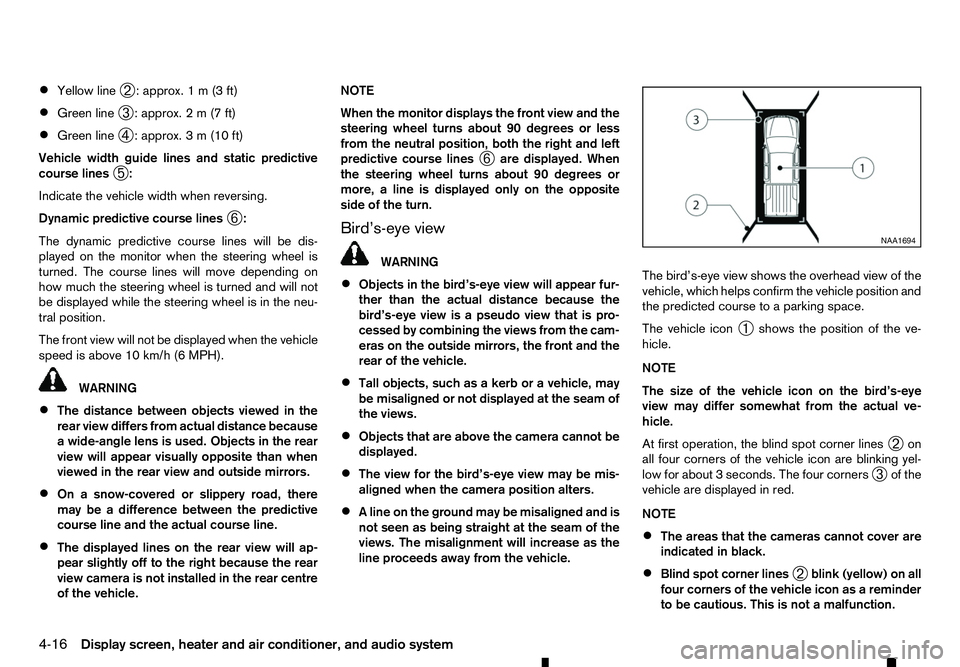
line proceeds away from the vehicle. The bird’s-eye view shows the overhead view of the
vehicle, which helps confirm the vehicle position and
the predicted course to
aparking space.
The vehicle icon ➀shows the position of the ve-
hicle.
NOTE
The size of the vehicle icon on the bird’s-eye
view may differ somewhat from the actual ve-
hicle.
At first operation, the blind spot corner lines ➁on
all four corners of the vehicle icon are blinking yel-
low for about 3seconds. The four corners
➂of the
vehicle are displayed in red.
NOTE
• The areas that the cameras cannot cover are
indicated in black.
• Blind spot corner lines
➁blink (yellow) on all
four corners of the vehicle icon as areminder
to be cautious. This is not amalfunction. NAA1694
4-16 Display screen, heater and air conditioner, and audio system
Page 162 of 340
•
Do not set the temperature too low when the
front defogger mode is on (the indicator
light is illuminated), because doing so may fog
up the windscreen.
Manual operation
The manual mode can be used to control the heater
and air conditioner to your desired settings.
Fan speed control:
Push the fan speed control button
(+side or
−s ide) to manually control the fan speed.
Air flow control:
Push the
mode:
m —
Air
flows from the centre and side
vents.
m —
Air
flows from the centre and side
vents and foot outlets.
m —
Air
flows mainly from the foot outlets
m
—
Air
flows from the front defogger
outlets and foot outlets.
Temperature control:
Push the temperature control buttons ( and
)t os
et the desired temperature.
• When the
nated, pushing the
indicator light will illuminate) allows the user to
independently change the driver and passenger side temperatures with the corresponding tem-
perature control buttons ( and ).
• To cancel the separate temperature setting, push
the
will turn off) and the driver’s side temperature
setting will be applied to both the driver and pas-
senger sides.
Outside air circulation:
Push the outside air circulation button to draw the
air flow from outside the vehicle. (The indica-
tor light will illuminate.)
Air recirculation:
Push the air recirculation button to circulate
the air flow inside the vehicle. (The indicator
light will illuminate.)
Automatic air intake control:
Push either the outside air circulation or the air
recirculation button (the button with an indica-
tor light illuminated) for approximately 2seconds.
The or indicator light will blink twice, and
the air intake will then be controlled automatically.
When the automatic control is set, the system auto-
matically alternates between the outside air circula-
tion and the air recirculation
modes (the
indicator light of the active mode will illuminate).
To turn system on/off
To turn off the heater and air conditioner, push the
The air conditioner system contains refrigerant
under high pressure. To avoid personal injury,
any air conditioner service should be done only
by an experienced technician with the proper
equipment.
The air conditioner system in your vehicle is charged
with arefrigerant designed with the environment in
mind. This refrigerant will not harm the earth’s ozone
layer. However, it may contribute in asmall part to
global warming.
Special charging equipment and lubricant are re-
quired when servicing your vehicle’s air conditioner.
Using improper refrigerants or lubricants will cause
severe damage to the air conditioner system. (See
“Recommended fluids/lubricants and capacities” in
the “9. Technical information” section.)
An approved dealer or qualified workshop will be
able to service your environmentally friendly air con-
ditioner system.
4-30 Display screen, heater and air conditioner, and audio system
Page 164 of 340
•
The CD player sometimes may not function when
the passenger compartment temperature is ex-
tremely high. Lower the temperature before use.
• Do not expose the CD to direct sunlight.
• CDs that are of poor quality, or are dirty,
scratched, covered with fingerprints, or that have
pin holes may not work properly.
• The following CDs may not work properly.
–C
opy control compact discs (CCCD)
–R ecordable compact discs (CD-R)
–R ewritable compact discs (CD-RW)
• Do not use the following CDs as they may cause
the CD player to malfunction.
–8
cm (3.1 in) discs
–C Ds that are not round
–C Ds with apaper label
–C Ds that are warped, scratched or have un-
usual edges.
• This audio system can only play prerecorded
CDs. It has no capabilities to record or burn
CDs. USB (Universal Serial Bus) Connection
Port WARNING
Do not connect, disconnect or operate the USB
device while driving. Doing so can be adistrac-
tion. If distracted you could lose control of your
vehicle and cause an accident or serious injury.
CAUTION
• Do not force the USB device into the USB
port. Inserting the USB device tilted or up-
side-down into the port may damage the port.
Make sure that the USB device is connected
correctly into the USB port.
• Do not grab the USB port cover (where fitted)
when pulling the USB device out of the port.
This could damage the port and the cover.
• Do not leave the USB cable in
aplace where
it can be pulled unintentionally. Pulling the
cable may damage the port.
The vehicle is not equipped with aUSB device.
USB devices should be purchased separately as
necessary.
This system cannot be used to format USB devices.
To format aUSB device, use apersonal computer.
In some areas, the USB device for the front seats
plays only sound without images for regulatory rea-
sons, even when the vehicle is parked. This system supports various USB memory devices,
USB hard drives and iPod players. Some USB de-
vices may not be supported by this system.
• Partitioned USB devices may not play correctly.
• Some characters used in other languages (Chi-
nese, Japanese, etc.) may not appear properly in
the display. Using English language characters
with
aUSB device is recommended.
General notes for USB use:
Refer to your device manufacturer’s owner informa-
tion regarding the proper use and care of the de-
vice.
Notes for iPod use:
iPod is atrademark of Apple Inc., registered in the
U.S. and other countries.
• Improperly plugging in the iPod may cause a
checkmark to be displayed on and off (flicker-
ing). Always make sure that the iPod is con-
nected properly.
• An iPod nano (1st Generation) may remain in
fast forward or rewind mode if it is connected
during
aseek operation. In this case, please
manually reset the iPod.
• An iPod nano (2nd Generation) will continue to
fast-forward or rewind if it is disconnected dur-
ing
aseek operation.
• An incorrect song title may appear when the Play
Mode is changed while using an iPod nano (2nd
Generation).
4-32 Display screen, heater and air conditioner, and audio system
Page 195 of 340
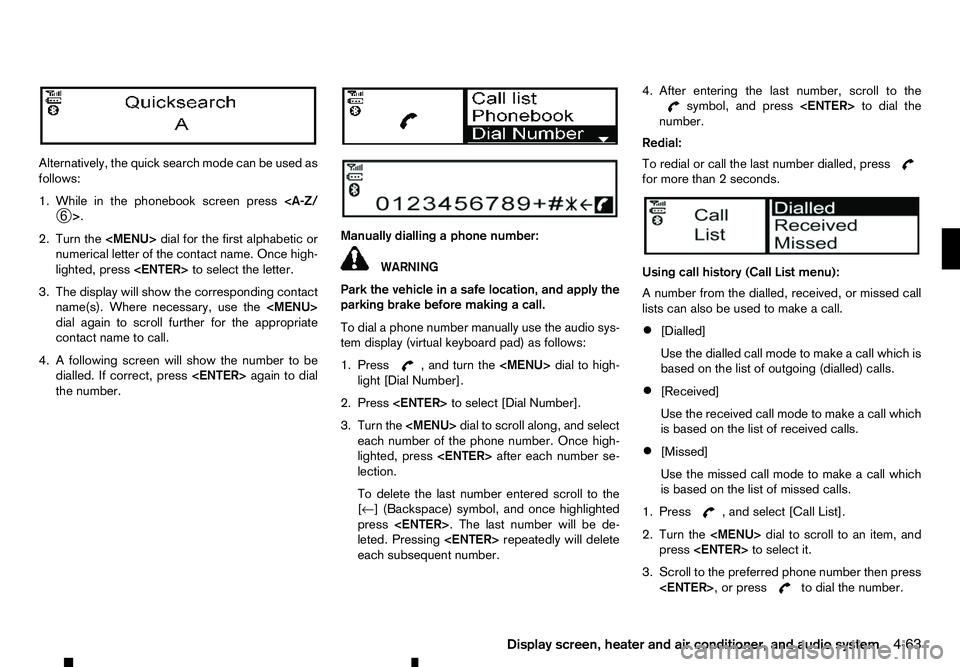
Alternatively, the quick search mode can be used as
follows:
1. While in the phonebook screen press
2. Turn the
Page 204 of 340
During the first 1,600 km (1,000 miles), follow these
recommendations to obtain maximum engine per-
formance and ensure the future reliability and
economy of your new vehicle. Failure to follow these
recommendations may result in shortened engine
life and reduced engine performance.
• Do not drive at
aconstant speed, either fast or
slow, for long periods of time.
• Do not run the engine over 4,000 rpm.
• Do not accelerate at full throttle in any gear.
• Do not start quickly.
• Do not brake hard as much as possible.
• Do not tow
atrailer for at least the first 800 km
(500 miles). WARNING
The driving characteristics of your vehicle will
change remarkably by any additional load and its
distribution, as well as by adding optional equip-
ment (trailer coupling, roof rail, etc.). Your driv-
ing style and speed must be adjusted according
to the circumstances. Especially when carrying
heavy loads, your speed must be reduced ad-
equately.
• Make sure the area around the vehicle is clear.
• Check fluid levels such as engine oil, coolant,
brake (and clutch) fluid, window washer fluid as
frequently as possible, at least whenever you
refuel.
• Visually inspect tyres for their appearance and
condition. Measure and check the tyre pressure
for proper inflation.
• Check that all windows and lights are clean.
• Adjust the seat and head restraint positions.
• Adjust the inside and outside rearview mirror po-
sitions.
• Fasten your seat belt and ask all passengers to
do the same.
• Check that all doors are closed.
• Check the operation of the warning lights when
the ignition switch is placed in the “ON” position. •
Maintenance items in the “8. Maintenance and
do-it-yourself” section should be checked peri-
odically.
RUNNING-IN SCHEDULE
BEFORE STARTING ENGINE
5-2 Starting and driving
Page 205 of 340
WARNING
• Never leave children or adults who would nor-
mally require the support of others alone in
your vehicle. Pets should not be left alone
either. They could unknowingly activate
switches or controls, or move the vehicle, and
inadvertently become involved in aserious ac-
cident and injure themselves. On hot, sunny
days, temperatures in aclosed vehicle could
quickly become high enough to cause severe
or possibly fatal illness to people or animals.
• Properly secure all cargo to help prevent it
from sliding or shifting. Do not place cargo
higher than the seatbacks. In
asudden stop
or collision, unsecured cargo could cause per-
sonal injury.
NOTE
During the first few months after purchasing a
new vehicle, if you smell strong odours of Vola-
tile Organic Compounds (VOCs) inside the ve-
hicle, ventilate the passenger compartment thor-
oughly. Open all the windows before entering or
while in the vehicle. In addition, when the tem-
perature in the passenger compartment rises, or
when the vehicle is parked in direct sunlight for a
period of time, turn off the air recirculation mode
of the air conditioner and/or open the windows
to allow sufficient fresh air into the passenger
compartment. EXHAUST GAS (carbon monoxide) WARNING
• Do not breathe exhaust gas; it contains co-
lourless and odourless carbon monoxide. Car-
bon monoxide is dangerous. It can cause un-
consciousness or death.
• If you suspect that exhaust fumes are enter-
ing the vehicle, drive with all windows fully
open, and have the vehicle inspected imme-
diately.
• Do not run the engine in closed spaces such
as
ag arage.
• Do not park the vehicle with the engine run-
ning for an extended period of time.
• If electrical wiring or other cable connections
must pass to
atrailer through the seal of the
body, follow the manufacturer’s recommen-
dations to prevent carbon monoxide entry into
the vehicle.
• If
as pecial body or other equipment is added
for recreational or other usage, follow the
manufacturer’s recommendation to prevent
carbon monoxide entry into the vehicle.
(Some recreational vehicle appliances such
as stoves, refrigerators, heaters, etc. may also
generate carbon monoxide.)
• The exhaust system and body should be in-
spected by
aqualified mechanic whenever:
–Y our vehicle is raised while being serviced. –Y
ou suspect that exhaust fumes are enter-
ing into the passenger compartment.
–Y ou notice achange in the sound of the
exhaust system.
–Y ou have had an accident involving dam-
age to the exhaust system, underbody, or
rear of the vehicle.
AdBlue® SELECTIVE CATALYTIC
REDUCTION (SCR) SYSTEM (where
fitted for diesel engine model)
AdBlue® or Diesel Exhaust Fluid (DEF), is anon-
toxic solution of 32.5% urea in de-ionized water.
This fluid is sprayed into the exhaust system of die-
sel vehicles to cause achemical reaction that breaks
down potentially dangerous NOx (nitrogen oxides)
emissions into harmless nitrogen and water. This
system is called Selective Catalytic Reduction
(SCR). AdBlue® fluid is not afuel additive and is
never mixed with diesel fuel. It is always stored in a
separate tank on the vehicle.
AdBlue® will begin to freeze below -11°C (12°F). If
you often drive in areas where the temperature is
below -11°C (12°F), the AdBlue® tank should al-
ways be filled with AdBlue® at the beginning of the
cold season to ensure enough defrosting capacity with heating.
PRECAUTIONS WHEN STARTING
AND DRIVING
Starting and driving5-3
Page 206 of 340
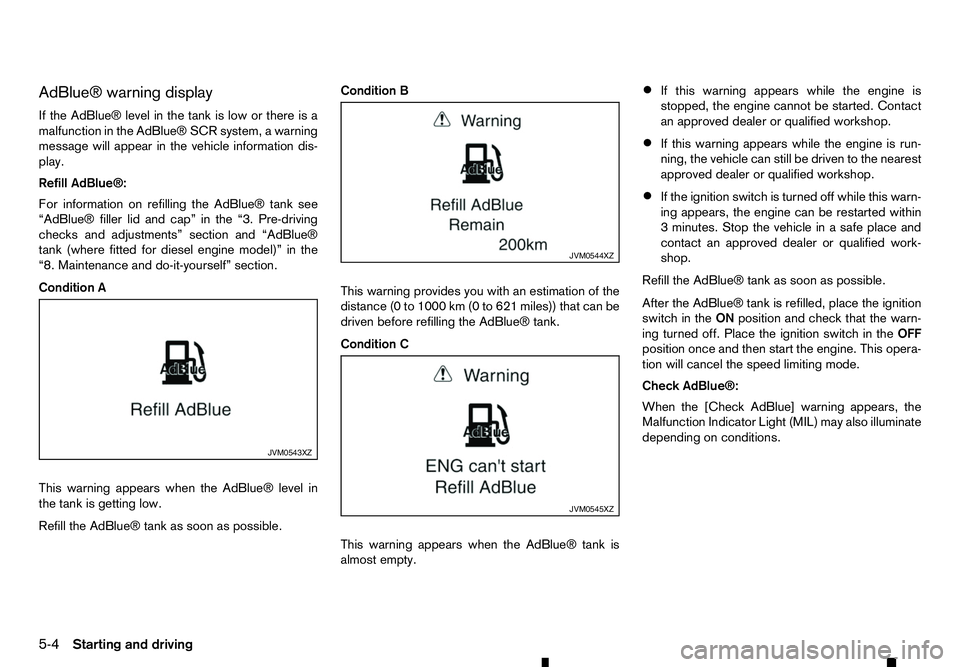
AdBlue® warning display
If the AdBlue® level in the tank is low or there is a malfunction in the AdBlue® SCR system, awarning
message will appear in the vehicle information dis- play.
Refill AdBlue®:
For information on refilling the AdBlue® tank see
“AdBlue® filler lid and cap” in the “3. Pre-driving
checks and adjustments” section and “AdBlue®
tank (where fitted for diesel engine model)” in the
“8. Maintenance and do-it-yourself” section.
Condition A
This warning appears when the AdBlue® level in
the tank is getting low.
Refill the AdBlue® tank as soon as possible. Condition B
This warning provides you with an estimation of the
distance (0 to 1000 km (0 to 621 miles)) that can be
driven before refilling the AdBlue® tank.
Condition C
This warning appears when the AdBlue® tank is
almost empty.•
If this warning appears while the engine is
stopped, the engine cannot be started. Contact
an approved dealer or qualified workshop.
• If this warning appears while the engine is run-
ning, the vehicle can still be driven to the nearest
approved dealer or qualified workshop.
• If the ignition switch is turned off while this warn-
ing appears, the engine can be restarted within
3m
inutes. Stop the vehicle in asafe place and
contact an approved dealer or qualified work-
shop.
Refill the AdBlue® tank as soon as possible.
After the AdBlue® tank is refilled, place the ignition
switch in the ONposition and check that the warn-
ing turned off. Place the ignition switch in the OFF
position once and then start the engine. This opera-
tion will cancel the speed limiting mode.
Check AdBlue®:
When the [Check AdBlue] warning appears, the
Malfunction Indicator Light (MIL) may also illuminate
depending on conditions. JVM0543XZ JVM0544XZ
JVM0545XZ
5-4 Starting and driving
Page 208 of 340
The Diesel Particulate Filter (DPF) reduces the
amount of materials that affect the environment by
collecting particulate matter included in exhaust
gases. Normally, particulate matter accumulated in
the DPF is automatically burned and converted to
harmless substances during driving. However, par-
ticulate matter collected in the DPF cannot be
burned under the following conditions:
• When vehicle speed remains below 15 km/h (10
MPH) for
along period of time.
• When the engine is frequently stopped and re-
started within 10 minutes.
• When the vehicle is frequently used for short
journeys of 10 minutes or less.
• When the engine is frequently stopped before it
has warmed up.
In these cases, it becomes difficult to burn particu-
late matter that has accumulated in the DPF auto-
matically. As aresult, the DPF warning light in the
meter will illuminate and the indicator light on the
DPF regeneration switch will blink. This is not amal-
function.
If the DPF warning light comes on, perform the DPF
regeneration process.
CAUTION
If the vehicle continues to be driven with the DPF
warning light illuminated and without doing the
regeneration process, the fail-safe will limit the
engine revolutions and/or torque. In this case, the engine oil must be replaced and the process
of service regeneration must be carried out by an
approved dealer or qualified workshop.
The service regeneration is not covered by the
warranty.
AUTOMATIC REGENERATION
If the DPF warning light comes on, it indicates that
particulate matter has accumulated in the DPF to
the specified limit. Particulate matter collected in the
DPF cannot be burned under low speed driving con-
ditions.
As soon as safely possible, drive the vehicle at a
high speed (more than approximately 80 km/h (50
MPH)) until the DPF warning light turns off. Always
conform to local regulations.
When the accumulated particulate matter has been
completely burned, the DPF warning light will turn
off. Pick-up vehicles have
asignificantly higher roll-
over rate than other types of vehicles.
They have higher ground clearance than passenger
cars to make them capable of performing in awide
variety of on-pavement and off-road applications.
This gives them ahigher centre of gravity than ordi-
nary cars. An advantage of higher ground clearance
is ab etter view of the road, allowing you to antici-
pate problems. However, they are not designed for
cornering at the same speeds as conventional pas-
senger cars any more than low-slung sports cars
are designed to perform satisfactorily under off-road
conditions. If at all possible, avoid sharp turns or
abrupt manoeuvres, particularly at high speeds. As
with other vehicles of this type, failure to operate
this vehicle correctly may result in loss of control or
vehicle rollover.
For information about driving using Four-Wheel
Drive (4WD) (where fitted), see “Four-Wheel Drive
(4WD) (where fitted)” later in this section.
DRIVING SAFETY PRECAUTIONS
Please observe the following precautions: WARNING
• Drive carefully when off the road and avoid
dangerous areas. Every person who drives or
rides in this vehicle should be seated with
their seat belt fastened. This will keep you
and your passengers in position when driving
over rough terrain.
ON-ROAD AND OFF-ROAD
DRIVING PRECAUTIONS
5-6 Starting and driving
Page 211 of 340
•
Avoid sudden steering.
• Avoid following too close to the vehicle in front.
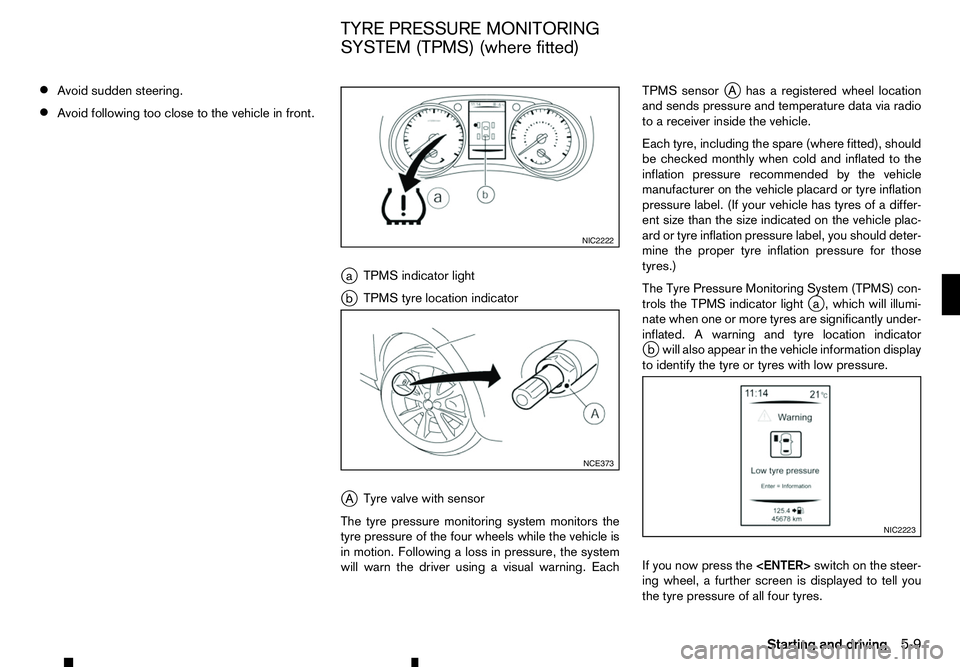
ja TPMS indicator light
j b TPMS tyre location indicator
j A Tyre valve with sensor
The tyre pressure monitoring system monitors the
tyre pressure of the four wheels while the vehicle is
in motion. Following aloss in pressure, the system
will warn the driver using avisual warning. Each TPMS sensor
jAh asaregistered wheel location
and sends pressure and temperature data via radio
to ar eceiver inside the vehicle.
Each tyre, including the spare (where fitted), should
be checked monthly when cold and inflated to the
inflation pressure recommended by the vehicle
manufacturer on the vehicle placard or tyre inflation
pressure label. (If your vehicle has tyres of adiffer-
ent size than the size indicated on the vehicle plac-
ard or tyre inflation pressure label, you should deter-
mine the proper tyre inflation pressure for those
tyres.)
The Tyre Pressure Monitoring System (TPMS) con-
trols the TPMS indicator light j
a, which will illumi-
nate when one or more tyres are significantly under-
inflated. Awarning and tyre location indicator
j bw ill also appear in the vehicle information display
to identify the tyre or tyres with low pressure.
If you now press the
ing wheel, afurther screen is displayed to tell you
the tyre pressure of all four tyres. NIC2222
NCE373
NIC2223
TYRE PRESSURE MONITORING
SYSTEM (TPMS) (where fitted)
Starting and driving5-9
Page 212 of 340
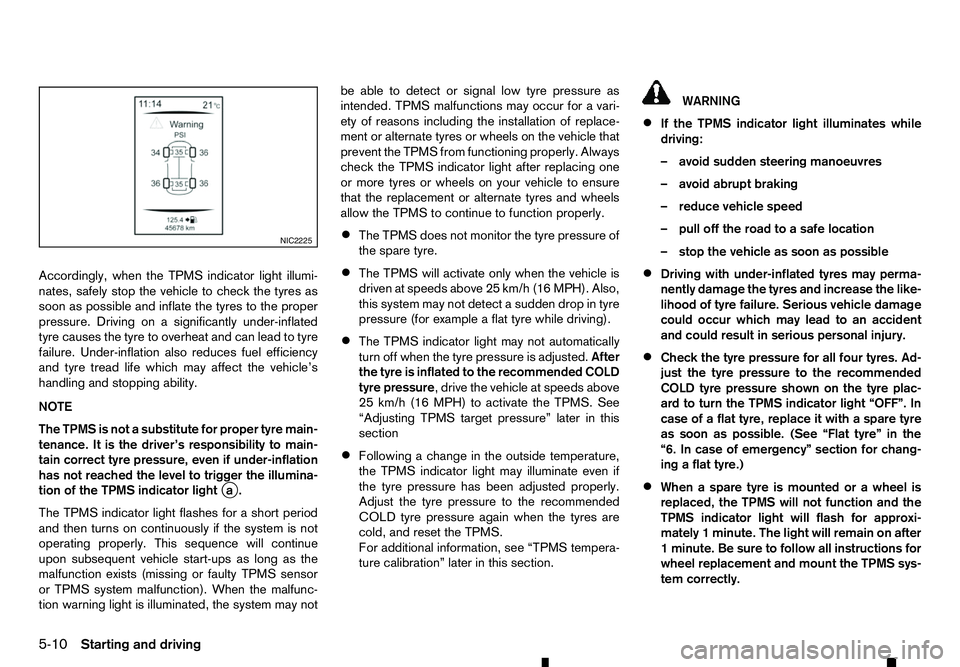
Accordingly, when the TPMS indicator light illumi-
nates, safely stop the vehicle to check the tyres as
soon as possible and inflate the tyres to the proper
pressure. Driving on asignificantly under-inflated
tyre causes the tyre to overheat and can lead to tyre
failure. Under-inflation also reduces fuel efficiency
and tyre tread life which may affect the vehicle’s
handling and stopping ability.
NOTE
The TPMS is not asubstitute for proper tyre main-
tenance. It is the driver’s responsibility to main-
tain correct tyre pressure, even if under-inflation
has not reached the level to trigger the illumina-
tion of the TPMS indicator light j
a.
The TPMS indicator light flashes for ashort period
and then turns on continuously if the system is not
operating properly. This sequence will continue
upon subsequent vehicle start-ups as long as the
malfunction exists (missing or faulty TPMS sensor
or TPMS system malfunction). When the malfunc-
tion warning light is illuminated, the system may not be able to detect or signal low tyre pressure as
intended. TPMS malfunctions may occur for avari-
ety of reasons including the installation of replace-
ment or alternate tyres or wheels on the vehicle that
prevent the TPMS from functioning properly. Always
check the TPMS indicator light after replacing one
or more tyres or wheels on your vehicle to ensure
that the replacement or alternate tyres and wheels
allow the TPMS to continue to function properly.
• The TPMS does not monitor the tyre pressure of
the spare tyre.
• The TPMS will activate only when the vehicle is
driven at speeds above 25 km/h (16 MPH). Also,
this system may not detect
asudden drop in tyre
pressure (for example aflat tyre while driving).
• The TPMS indicator light may not automatically
turn off when the tyre pressure is adjusted.
After
the tyre is inflated to the recommended COLD
tyre pressure,d rive the vehicle at speeds above
25 km/h (16 MPH) to activate the TPMS. See
“Adjusting TPMS target pressure” later in this
section
• Following
achange in the outside temperature,
the TPMS indicator light may illuminate even if
the tyre pressure has been adjusted properly.
Adjust the tyre pressure to the recommended
COLD tyre pressure again when the tyres are
cold, and reset the TPMS.
For additional information, see “TPMS tempera-
ture calibration” later in this section. WARNING
• If the TPMS indicator light illuminates while
driving:
–a void sudden steering manoeuvres
–a void abrupt braking
–r educe vehicle speed
–p ull off the road to asafe location
–s top the vehicle as soon as possible
• Driving with under-inflated tyres may perma-
nently damage the tyres and increase the like-
lihood of tyre failure. Serious vehicle damage
could occur which may lead to an accident
and could result in serious personal injury.
• Check the tyre pressure for all four tyres. Ad-
just the tyre pressure to the recommended
COLD tyre pressure shown on the tyre plac-
ard to turn the TPMS indicator light “OFF”. In
case of
aflat tyre, replace it with aspare tyre
as soon as possible. (See “Flat tyre” in the
“6. In case of emergency” section for chang-
ing aflat tyre.)
• When
aspare tyre is mounted or awheel is
replaced, the TPMS will not function and the
TPMS indicator light will flash for approxi-
mately 1minute. The light will remain on after
1m inute. Be sure to follow all instructions for
wheel replacement and mount the TPMS sys-
tem correctly. NIC2225
5-10 Starting and driving