light RENAULT ALASKAN 2017 Repair Manual
[x] Cancel search | Manufacturer: RENAULT, Model Year: 2017, Model line: ALASKAN, Model: RENAULT ALASKAN 2017Pages: 340, PDF Size: 6.93 MB
Page 161 of 340
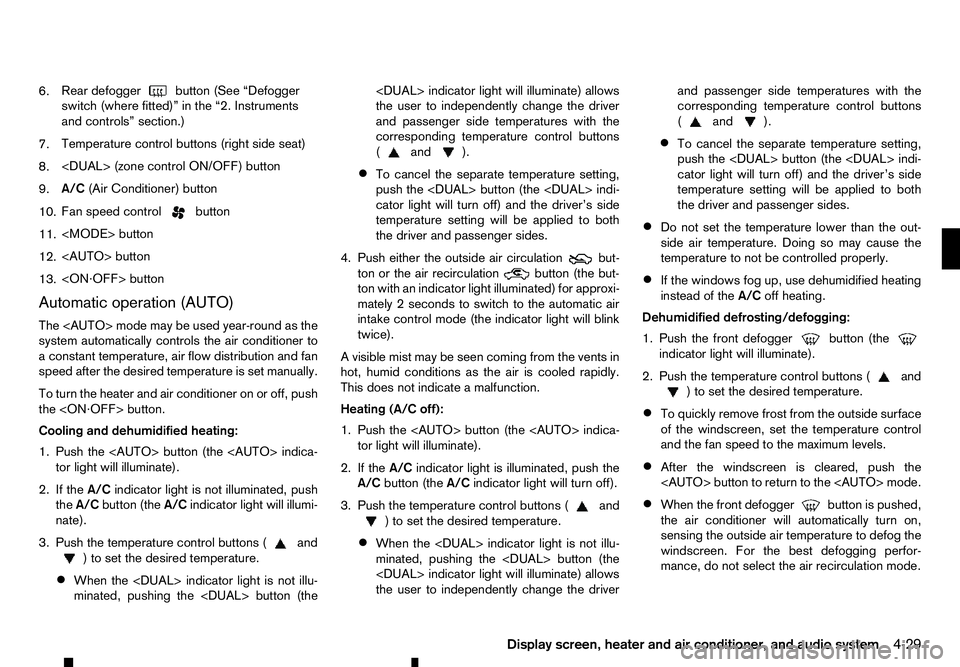
6.
Rear defogger
button (See “Defogger
switch (where fitted)” in the “2. Instruments
and controls” section.)
7. Temperature control buttons (right side seat)
8.
9. A/C
(Air Conditioner) button
10. Fan speed control button
11.
12.
13.
Automatic operation (AUTO)
The
system automatically controls the air conditioner to
ac onstant temperature, air flow distribution and fan
speed after the desired temperature is set manually.
To turn the heater and air conditioner on or off, push
the
Cooling and dehumidified heating:
1. Push the
2. If the A/Cindicator light is not illuminated, push
the A/C button (the A/Cindicator light will illumi-
nate).
3. Push the temperature control buttons ( and
)t os
et the desired temperature.
• When the
minated, pushing the
the user to independently change the driver
and passenger side temperatures with the
corresponding temperature control buttons
( and ).
• To cancel the separate temperature setting,
push the
cator light will turn off) and the driver’s side
temperature setting will be applied to both
the driver and passenger sides.
4. Push either the outside air circulation but-
ton or the air recirculation
button (the but-
ton with an indicator light illuminated) for approxi-
mately 2seconds to switch to the automatic air
intake control mode (the indicator light will blink
twice).
Av isible mist may be seen coming from the vents in
hot, humid conditions as the air is cooled rapidly.
This does not indicate amalfunction.
Heating (A/C off):
1. Push the
2. If the A/Cindicator light is illuminated, push the
A/C button (the A/Cindicator light will turn off).
3. Push the temperature control buttons ( and
)t os
et the desired temperature.
• When the
minated, pushing the
the user to independently change the driver and passenger side temperatures with the
corresponding temperature control buttons
( and ).
• To cancel the separate temperature setting,
push the
cator light will turn off) and the driver’s side
temperature setting will be applied to both
the driver and passenger sides.
• Do not set the temperature lower than the out-
side air temperature. Doing so may cause the
temperature to not be controlled properly.
• If the windows fog up, use dehumidified heating
instead of the
A/Coff heating.
Dehumidified defrosting/defogging:
1. Push the front defogger button (the
indicator light will illuminate).
2. Push the temperature control buttons ( and
)t os
et the desired temperature.
• To quickly remove frost from the outside surface
of the windscreen, set the temperature control
and the fan speed to the maximum levels.
• After the windscreen is cleared, push the
• When the front defogger button is pushed,
the air conditioner will automatically turn on,
sensing the outside air temperature to defog the windscreen. For the best defogging perfor-
mance, do not select the air recirculation mode.
Display screen, heater and air conditioner, and audio system 4-29
Page 162 of 340
•
Do not set the temperature too low when the
front defogger mode is on (the indicator
light is illuminated), because doing so may fog
up the windscreen.
Manual operation
The manual mode can be used to control the heater
and air conditioner to your desired settings.
Fan speed control:
Push the fan speed control button
(+side or
−s ide) to manually control the fan speed.
Air flow control:
Push the
mode:
m —
Air
flows from the centre and side
vents.
m —
Air
flows from the centre and side
vents and foot outlets.
m —
Air
flows mainly from the foot outlets
m
—
Air
flows from the front defogger
outlets and foot outlets.
Temperature control:
Push the temperature control buttons ( and
)t os
et the desired temperature.
• When the
nated, pushing the
indicator light will illuminate) allows the user to
independently change the driver and passenger side temperatures with the corresponding tem-
perature control buttons ( and ).
• To cancel the separate temperature setting, push
the
will turn off) and the driver’s side temperature
setting will be applied to both the driver and pas-
senger sides.
Outside air circulation:
Push the outside air circulation button to draw the
air flow from outside the vehicle. (The indica-
tor light will illuminate.)
Air recirculation:
Push the air recirculation button to circulate
the air flow inside the vehicle. (The indicator
light will illuminate.)
Automatic air intake control:
Push either the outside air circulation or the air
recirculation button (the button with an indica-
tor light illuminated) for approximately 2seconds.
The or indicator light will blink twice, and
the air intake will then be controlled automatically.
When the automatic control is set, the system auto-
matically alternates between the outside air circula-
tion and the air recirculation
modes (the
indicator light of the active mode will illuminate).
To turn system on/off
To turn off the heater and air conditioner, push the
The air conditioner system contains refrigerant
under high pressure. To avoid personal injury,
any air conditioner service should be done only
by an experienced technician with the proper
equipment.
The air conditioner system in your vehicle is charged
with arefrigerant designed with the environment in
mind. This refrigerant will not harm the earth’s ozone
layer. However, it may contribute in asmall part to
global warming.
Special charging equipment and lubricant are re-
quired when servicing your vehicle’s air conditioner.
Using improper refrigerants or lubricants will cause
severe damage to the air conditioner system. (See
“Recommended fluids/lubricants and capacities” in
the “9. Technical information” section.)
An approved dealer or qualified workshop will be
able to service your environmentally friendly air con-
ditioner system.
4-30 Display screen, heater and air conditioner, and audio system
Page 164 of 340
•
The CD player sometimes may not function when
the passenger compartment temperature is ex-
tremely high. Lower the temperature before use.
• Do not expose the CD to direct sunlight.
• CDs that are of poor quality, or are dirty,
scratched, covered with fingerprints, or that have
pin holes may not work properly.
• The following CDs may not work properly.
–C
opy control compact discs (CCCD)
–R ecordable compact discs (CD-R)
–R ewritable compact discs (CD-RW)
• Do not use the following CDs as they may cause
the CD player to malfunction.
–8
cm (3.1 in) discs
–C Ds that are not round
–C Ds with apaper label
–C Ds that are warped, scratched or have un-
usual edges.
• This audio system can only play prerecorded
CDs. It has no capabilities to record or burn
CDs. USB (Universal Serial Bus) Connection
Port WARNING
Do not connect, disconnect or operate the USB
device while driving. Doing so can be adistrac-
tion. If distracted you could lose control of your
vehicle and cause an accident or serious injury.
CAUTION
• Do not force the USB device into the USB
port. Inserting the USB device tilted or up-
side-down into the port may damage the port.
Make sure that the USB device is connected
correctly into the USB port.
• Do not grab the USB port cover (where fitted)
when pulling the USB device out of the port.
This could damage the port and the cover.
• Do not leave the USB cable in
aplace where
it can be pulled unintentionally. Pulling the
cable may damage the port.
The vehicle is not equipped with aUSB device.
USB devices should be purchased separately as
necessary.
This system cannot be used to format USB devices.
To format aUSB device, use apersonal computer.
In some areas, the USB device for the front seats
plays only sound without images for regulatory rea-
sons, even when the vehicle is parked. This system supports various USB memory devices,
USB hard drives and iPod players. Some USB de-
vices may not be supported by this system.
• Partitioned USB devices may not play correctly.
• Some characters used in other languages (Chi-
nese, Japanese, etc.) may not appear properly in
the display. Using English language characters
with
aUSB device is recommended.
General notes for USB use:
Refer to your device manufacturer’s owner informa-
tion regarding the proper use and care of the de-
vice.
Notes for iPod use:
iPod is atrademark of Apple Inc., registered in the
U.S. and other countries.
• Improperly plugging in the iPod may cause a
checkmark to be displayed on and off (flicker-
ing). Always make sure that the iPod is con-
nected properly.
• An iPod nano (1st Generation) may remain in
fast forward or rewind mode if it is connected
during
aseek operation. In this case, please
manually reset the iPod.
• An iPod nano (2nd Generation) will continue to
fast-forward or rewind if it is disconnected dur-
ing
aseek operation.
• An incorrect song title may appear when the Play
Mode is changed while using an iPod nano (2nd
Generation).
4-32 Display screen, heater and air conditioner, and audio system
Page 168 of 340
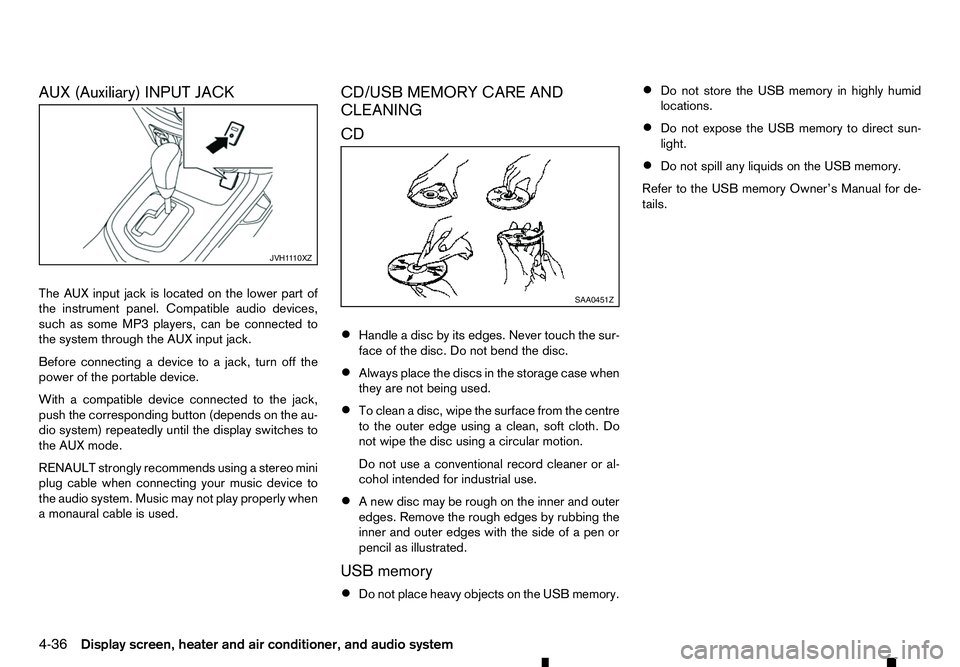
AUX (Auxiliary) INPUT JACK
The AUX input jack is located on the lower part of
the instrument panel. Compatible audio devices,
such as some MP3 players, can be connected to
the system through the AUX input jack. Before connecting adevice to ajack, turn off the
power of the portable device.
With acompatible device connected to the jack,
push the corresponding button (depends on the au-
dio system) repeatedly until the display switches to
the AUX mode.
RENAULT strongly recommends using astereo mini
plug cable when connecting your music device to
the audio system. Music may not play properly when
am onaural cable is used. CD/USB MEMORY CARE AND
CLEANING
CD
•
Handle
adisc by its edges. Never touch the sur-
face of the disc. Do not bend the disc.
• Always place the discs in the storage case when
they are not being used.
• To clean
adisc, wipe the surface from the centre
to the outer edge using aclean, soft cloth. Do
not wipe the disc using acircular motion.
Do not use aconventional record cleaner or al-
cohol intended for industrial use.
• An
ew disc may be rough on the inner and outer
edges. Remove the rough edges by rubbing the
inner and outer edges with the side of apen or
pencil as illustrated.
USB memory
• Do not place heavy objects on the USB memory. •
Do not store the USB memory in highly humid
locations.
• Do not expose the USB memory to direct sun-
light.
• Do not spill any liquids on the USB memory.
Refer to the USB memory Owner’s Manual for de-
tails. JVH1
110XZ SAA0451Z
4-36 Display screen, heater and air conditioner, and audio system
Page 169 of 340
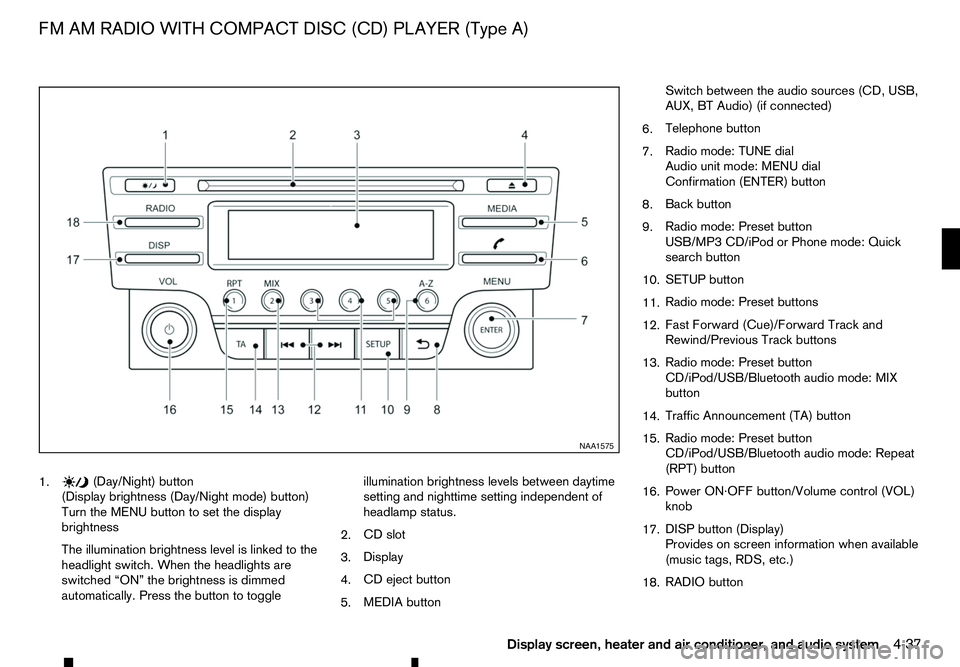
1. (Day/Night) button
(Display brightness (Day/Night mode) button)
Turn the MENU button to set the display
brightness
The illumination brightness level is linked to the
headlight switch. When the headlights are
switched “ON” the brightness is dimmed
automatically. Press the button to toggle illumination brightness levels between daytime
setting and nighttime setting independent of
headlamp status.
2. CD slot
3. Display
4. CD eject button
5. MEDIA button Switch between the audio sources (CD, USB,
AUX, BT Audio) (if connected)
6. Telephone button
7. Radio mode: TUNE dial
Audio unit mode: MENU dial
Confirmation (ENTER) button
8. Back button
9. Radio mode: Preset button
USB/MP3 CD/iPod or Phone mode: Quick
search button
10. SETUP button
11. Radio mode: Preset buttons
12. Fast Forward (Cue)/Forward Track and
Rewind/Previous Track buttons
13. Radio mode: Preset button
CD/iPod/USB/Bluetooth audio mode: MIX
button
14. Traffic Announcement (TA) button
15. Radio mode: Preset button
CD/iPod/USB/Bluetooth audio mode: Repeat
(RPT) button
16. Power ON·OFF button/Volume control (VOL)
knob
17. DISP button (Display)
Provides on screen information when available
(music tags, RDS, etc.)
18. RADIO button NAA1575
FM AM RADIO WITH COMPACT DISC (CD) PLAYER (Type A)
Display screen, heater and air conditioner, and audio system4-37
Page 171 of 340
![RENAULT ALASKAN 2017 Repair Manual Preset station buttons
➀➁➂➃➄➅
Pressing apreset button for less than 2seconds will
select the stored radio station.
Pressing apreset button for more than 2seconds
while in the [FM list] or](/img/7/58394/w960_58394-170.png "RENAULT ALASKAN 2017 Repair Manual Preset station buttons
➀➁➂➃➄➅
Pressing apreset button for less than 2seconds will
select the stored radio station.
Pressing apreset button for more than 2seconds
while in the [FM list] or")
Preset station buttons
➀➁➂➃➄➅
Pressing apreset button for less than 2seconds will
select the stored radio station.
Pressing apreset button for more than 2seconds
while in the [FM list] or radio main screen will cause
the station currently being received to be stored
against that preset button.
• Twelve stations (if available) can be stored in the
FM bands. (Six each for FM1 and FM2)
• Twelve stations (if available) can be stored in the
DR bands. (Six each for DR1 and DR2) (where
fitted)
• Six stations (if available) can be set for the AM
band.
If the battery is disconnected, or if the fuse blows,
the radio memory will be erased. In that case, reset
the desired stations after battery connection or fuse
replacement.
DAB and Radio Data System (RDS)
operation (where fitted)
The RDS is asystem through which encoded digital
information is transmitted by FM radio stations in
addition to the normal FM radio broadcasting. The
RDS provides information services such as station
name, traffic information, or news.
DAB (Digital Audio Broadcast) NOTE
• When in DR mode operation is similar to FM
mode but may slightly differ.
• In some countries or regions, some of these
services may not be available.
Alternative Frequency (AF) mode:
The AF mode operates in the FM (radio) mode.
• The AF mode operates in the FM (radio), AUX or
CD mode (if FM was previously selected in the
radio mode).
• The AF function compares signal strengths and
selects the station with the optimum reception
conditions for the currently tuned-in station.
DAB and RDS functions
Programme Service (PS) function (station name
display function):
–F M:
When an RDS station is tuned in with seek or
manual tuning, the RDS data is received and the
PS name is displayed.
–D R:
When astation is tuned in with seek or manual
tuning, the data is received and the PS name is
displayed.
TA Traffic announcement
This function operates in FM/DR (Radio) mode. This
function will still operate in the background if any
media source is selected (CD, USB or MEDIA
mode). •
Pressing the
The TA indicator is displayed while TA mode is
on.
• When
switched off and the TA indicator will disappear
from the display.
Traffic announcement interrupt function:
When atraffic announcement is received, the an-
nouncement is tuned in and the display shows a
notification message with the radio station name e.g.
[TA: Radio 1].
Once the traffic announcement has finished, the unit
returns to the source that was active before the traf-
fic announcement started.
If
the traffic announcement interrupt mode is can-
celled. The TA mode returns to the standby mode
and the audio unit returns to the previous source.
SETUP BUTTON
To configure [Audio], [Clock], [Radio], and [Lan-
guage] settings, perform the following procedure:
1. Press the
4-39
Page 194 of 340
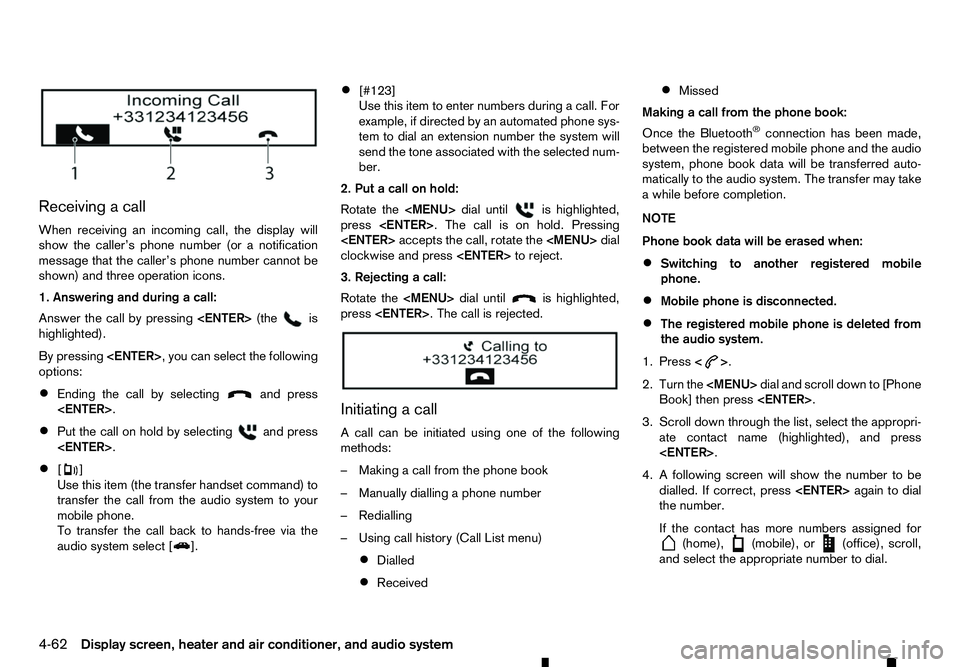
Receiving
acall
When receiving an incoming call, the display will
show the caller’s phone number (or anotification
message that the caller’s phone number cannot be
shown) and three operation icons.
1. Answering and during acall:
Answer the call by pressing
highlighted).
By pressing
options:
• Ending the call by selecting and press
• Put the call on hold by selecting and press
• [ ]
Use this item (the transfer handset command) to
transfer the call from the audio system to your
mobile phone.
To transfer the call back to hands-free via the
audio system select [ ].•
[#123]
Use this item to enter numbers during
acall. For
example, if directed by an automated phone sys-
tem to dial an extension number the system will
send the tone associated with the selected num-
ber.
2. Put acall on hold:
Rotate the
Page 195 of 340
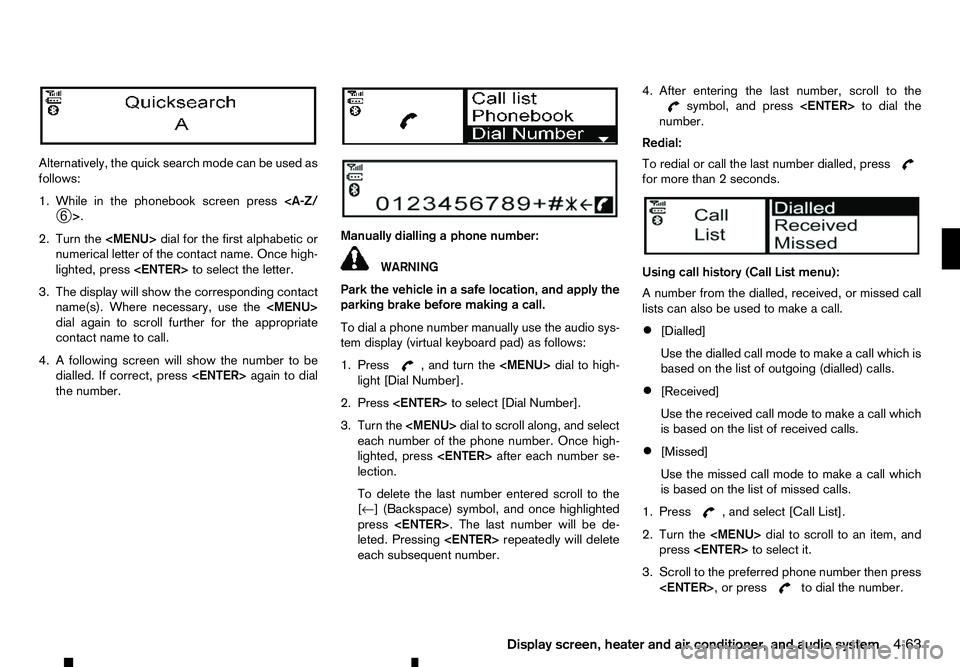
Alternatively, the quick search mode can be used as
follows:
1. While in the phonebook screen press
2. Turn the
Page 198 of 340
EU RED Directive 2014/53/EU
Hereby, Robert Bosch Car Multimedia GmbH de-
clares that the radio equipment type LCN2K70A00/ LCN2K70A10 is in compliance with Directive 2014/
53/EU. The full text of the EU declaration of confor-
mity is available at the following internet address:
http://cert.bosch-carmultimedia.net
Any change of the radio equipment or usage with
other accessories, components or software as
specified will make are-assessment according com-
pliance to the legal approval necessary. Frequency Band
Radiated
Power
(EIRP) Hints/Restriction
2400 MHz –2480
MHz Bluetooth
<10 mW Internal not acces-
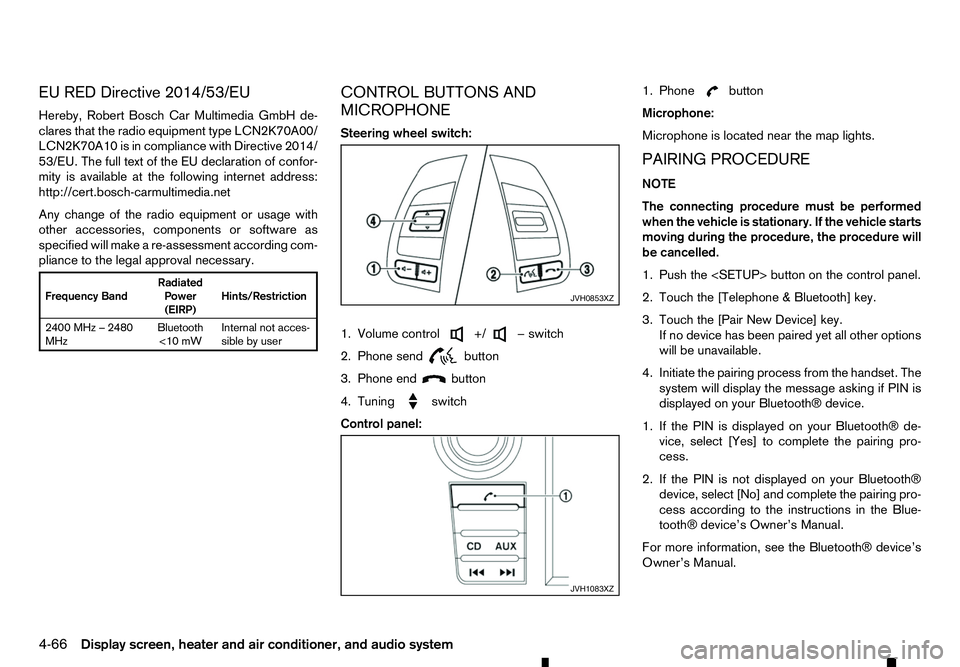
sible by user CONTROL BUTTONS AND
MICROPHONE
Steering wheel switch:
1. Volume control +/ −s
witch
2. Phone send
button
3. Phone end
button
4. Tuning
switch
Control panel:1. Phone button
Microphone:
Microphone is located near the map lights.
PAIRING PROCEDURE
NOTE
The connecting procedure must be performed
when the vehicle is stationary. If the vehicle starts
moving during the procedure, the procedure will
be cancelled.
1. Push the
2. Touch the [Telephone &Bluetooth] key.
3. Touch the [Pair New Device] key. If no device has been paired yet all other options
will be unavailable.
4. Initiate the pairing process from the handset. The system will display the message asking if PIN is
displayed on your Bluetooth® device.
1. If the PIN is displayed on your Bluetooth® de- vice, select [Yes] to complete the pairing pro-
cess.
2. If the PIN is not displayed on your Bluetooth® device, select [No] and complete the pairing pro-
cess according to the instructions in the Blue- tooth® device’s Owner’s Manual.
For more information, see the Bluetooth® device’s
Owner’s Manual. JVH0853XZ
JVH1083XZ
4-66 Display screen, heater and air conditioner, and audio system
Page 204 of 340
During the first 1,600 km (1,000 miles), follow these
recommendations to obtain maximum engine per-
formance and ensure the future reliability and
economy of your new vehicle. Failure to follow these
recommendations may result in shortened engine
life and reduced engine performance.
• Do not drive at
aconstant speed, either fast or
slow, for long periods of time.
• Do not run the engine over 4,000 rpm.
• Do not accelerate at full throttle in any gear.
• Do not start quickly.
• Do not brake hard as much as possible.
• Do not tow
atrailer for at least the first 800 km
(500 miles). WARNING
The driving characteristics of your vehicle will
change remarkably by any additional load and its
distribution, as well as by adding optional equip-
ment (trailer coupling, roof rail, etc.). Your driv-
ing style and speed must be adjusted according
to the circumstances. Especially when carrying
heavy loads, your speed must be reduced ad-
equately.
• Make sure the area around the vehicle is clear.
• Check fluid levels such as engine oil, coolant,
brake (and clutch) fluid, window washer fluid as
frequently as possible, at least whenever you
refuel.
• Visually inspect tyres for their appearance and
condition. Measure and check the tyre pressure
for proper inflation.
• Check that all windows and lights are clean.
• Adjust the seat and head restraint positions.
• Adjust the inside and outside rearview mirror po-
sitions.
• Fasten your seat belt and ask all passengers to
do the same.
• Check that all doors are closed.
• Check the operation of the warning lights when
the ignition switch is placed in the “ON” position. •
Maintenance items in the “8. Maintenance and
do-it-yourself” section should be checked peri-
odically.
RUNNING-IN SCHEDULE
BEFORE STARTING ENGINE
5-2 Starting and driving