Whil RENAULT FLUENCE 2012 1.G Owners Manual
[x] Cancel search | Manufacturer: RENAULT, Model Year: 2012, Model line: FLUENCE, Model: RENAULT FLUENCE 2012 1.GPages: 241, PDF Size: 6.5 MB
Page 7 of 241
keys ...................................................... (up to the end of the DU)
locking the doors .................................. (up to the end of the DU)
1.3
ENG_UD13739_1
Télécommande à radiofréquence : utilisation (L38 - X38 - X3\
2 - B32 - Renault)
ENG_NU_891_892-7_L38-B32_Renault_1
Unlocking the doors
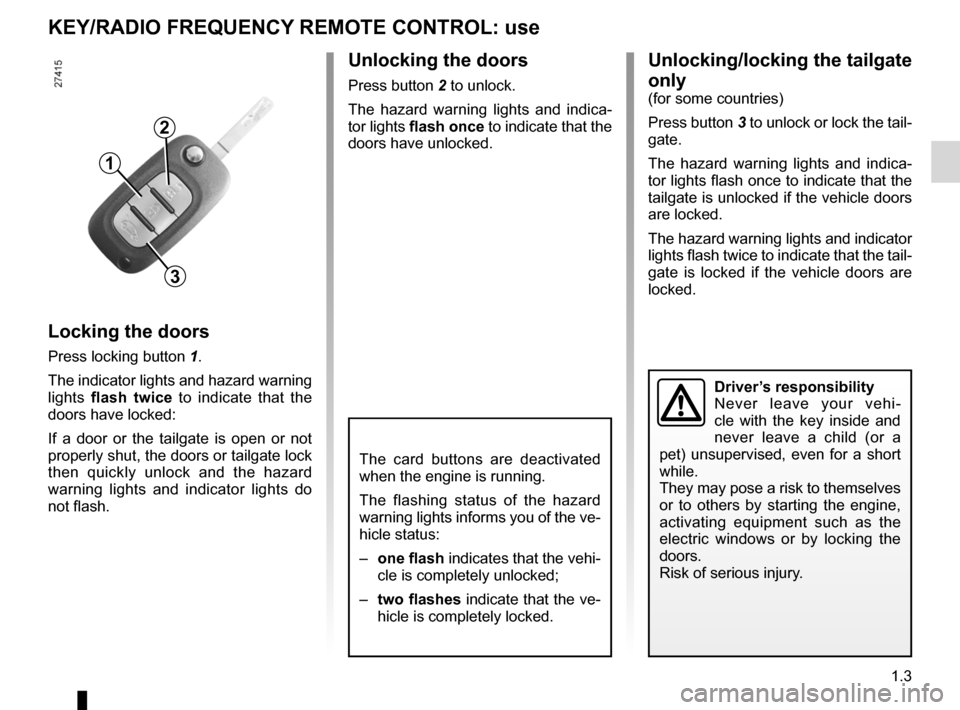
Press button 2 to unlock.
The hazard warning lights and indica -
tor lights flash once to indicate that the
doors have unlocked.
KEY/RADIO FREQUENCY REMOTE CONTROL: use
Locking the doors
Press locking button 1.
The indicator lights and hazard warning
lights flash twice to indicate that the
doors have locked:
If a door or the tailgate is open or not
properly shut, the doors or tailgate lock
then quickly unlock and the hazard
warning lights and indicator lights do
not flash.
3
1
2
Unlocking/locking the tailgate
only
(for some countries)
Press button 3 to unlock or lock the tail-
gate.
The hazard warning lights and indica -
tor lights flash once to indicate that the
tailgate is unlocked if the vehicle doors
are locked.
The hazard warning lights and indicator
lights flash twice to indicate that the tail-
gate is locked if the vehicle doors are
locked.
Driver’s responsibility
Never leave your vehi -
cle with the key inside and
never leave a child (or a
pet) unsupervised, even for a short
while.
They may pose a risk to themselves
or to others by starting the engine,
activating equipment such as the
electric windows or by locking the
doors.
Risk of serious injury.
The card buttons are deactivated
when the engine is running.
The flashing status of the hazard
warning lights informs you of the ve-
hicle status:
– one flash indicates that the vehi-
cle is completely unlocked;
– two flashes indicate that the ve-
hicle is completely locked.
Page 8 of 241

locking the doors .................................. (up to the end of the DU)
emergency key ..................................... (up to the end of the DU)
child safety ............................................................. (current page)
children (safety) ..................................................... (current page)
RENAULT card use .................................................. (up to the end of the DU)
1.4
ENG_UD21347_2
Cartes RENAULT : généralités (L38 - X38 - Renault)
ENG_NU_891_892-7_L38-B32_Renault_1
Jaune NoirNoir texte
Battery lifeMake sure that the correct battery type
is being used, and that the battery is in
good condition and inserted correctly.
Its service life is approximately two
years: replace it when the message
“Keycard battery low ” appears on the
instrument panel (refer to the informa -
tion on the “RENAULT card: battery" in
section 5).
RENAULT card operating
range
This varies according to the surround -
ings. It is important to make sure when
handling the RENAULT card that you
do not lock or unlock the doors by inad -
vertently pressing the buttons.
RENAULT cards: General information, use, deadlocking
RENAULT CARDs: general information (1/2)
1 Unlocking the doors and tailgate.
2 Locking all doors and tailgate.
3 Switching on the lighting remotely.
4 Unlocking/locking the tailgate
5 Integrated key.
The RENAULT card is used
for:
– locking/unlocking the doors and tail-
gate (doors, tailgate) and the fuel
filler flap (see the following pages);
– switching on the vehicle lighting re -
motely (refer to the following pages);
– starting the engine; refer to the in -
formation on “Starting the engine” in
Section 2.
Driver’s responsibility
Never leave your vehicle
with the RENAULT card
inside and never leave a
child (or a pet) unsupervised, even
for a short while.
They may pose a risk to themselves
or to others by starting the engine,
activating equipment such as the
electric windows or by locking the
doors.
Risk of serious injury.
45123
When the battery is flat, you can
still lock/unlock and start your ve -
hicle. Refer to the information on
“Locking/unlocking the doors” in
Section 1 and “Starting the engine”
in Section 2.
Page 19 of 241
RENAULT ANTI-INTRUDER DEVICE (RAID) (up to the end of the DU)
central door locking .............................. (up to the end of the DU)
doors ..................................................... (up to the end of the DU)
locking the doors .................................. (up to the end of the DU)
doors/tailgate ........................................ (up to the end of the DU)
1.15
ENG_UD21750_3
Condamnation automatique des ouvrants en roulage (L38 - X38 - Renault)\
ENG_NU_891_892-7_L38-B32_Renault_1
Automatic locking when driving
AUTOMATIC LOCKINg WhEN DRIVINg
Activating/deactivating the
function
Depending on the vehicle:
– Refer to “Vehicle settings customi -
sation menu” in Section 1, regarding
the “Auto door locking while driving”
function:
= function activated
< function deactivated.
– With the engine running, press
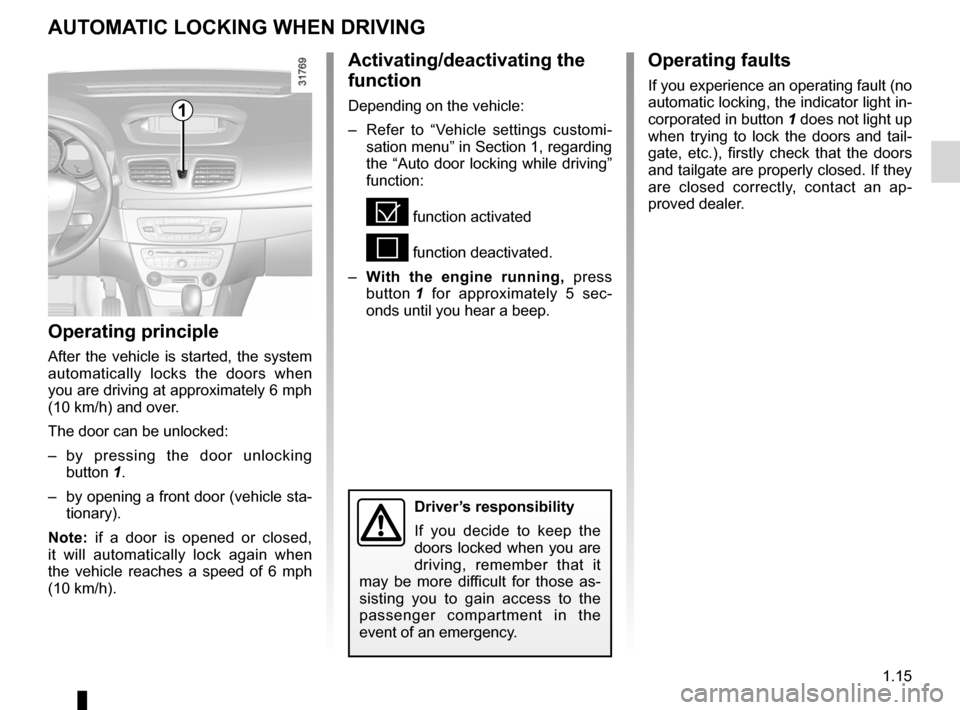
button 1 for approximately 5 sec -
onds until you hear a beep.
Operating principle
After the vehicle is started, the system
automatically locks the doors when
you are driving at approximately 6 mph
(10 km/h) and over.
The door can be unlocked:
– by pressing the door unlocking
button 1.
– by opening a front door (vehicle sta-
tionary).
Note: if a door is opened or closed,
it will automatically lock again when
the vehicle reaches a speed of 6 mph
(10 km/h).
Operating faults
If you experience an operating fault (no
automatic locking, the indicator light in-
corporated in button 1 does not light up
when trying to lock the doors and tail -
gate, etc.), firstly check that the doors
and tailgate are properly closed. If they
are closed correctly, contact an ap -
proved dealer.
1
Driver’s responsibility
If you decide to keep the
doors locked when you are
driving, remember that it
may be more difficult for those as -
sisting you to gain access to the
passenger compartment in the
event of an emergency.
Page 21 of 241
headrest................................................ (up to the end of the DU)
adjusting your driving position .............. (up to the end of the DU)
1.17
ENG_UD21350_2
Appuis-tête arrière (L38 - X38 - Renault)
ENG_NU_891_892-7_L38-B32_Renault_1
REAR hEADREsTs
position for use
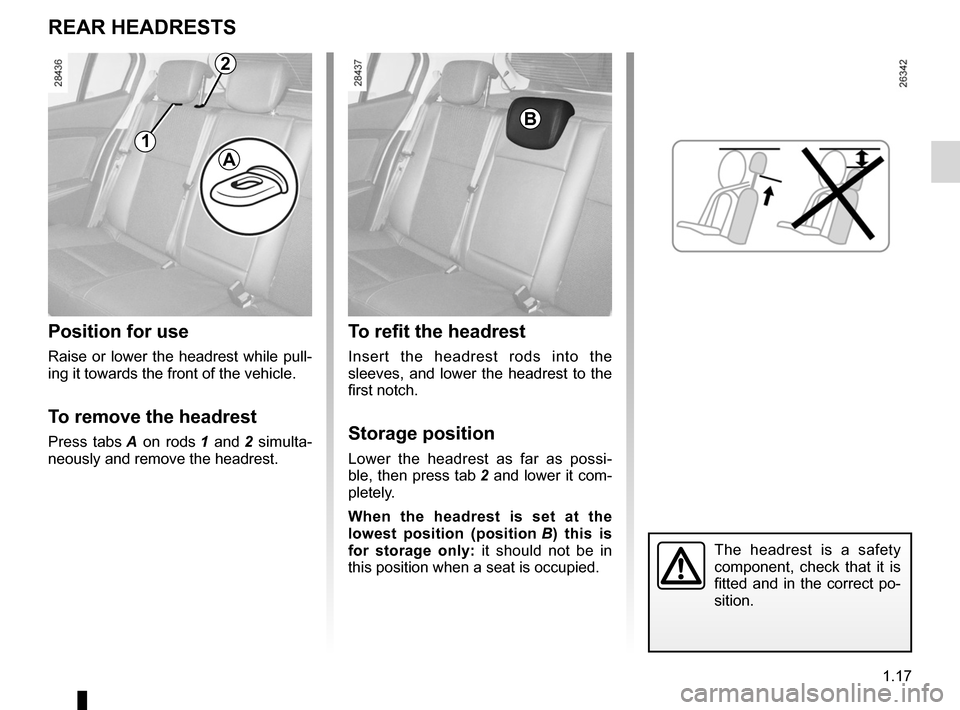
Raise or lower the headrest while pull -
ing it towards the front of the vehicle.
To remove the headrest
Press tabs A on rods 1 and 2 simulta -
neously and remove the headrest.
To refit the headrest
Insert the headrest rods into the
sleeves, and lower the headrest to the
first notch.
storage position
Lower the headrest as far as possi -
ble, then press tab 2 and lower it com-
pletely.
When the headrest is set at the
lowest position (position B ) this is
for storage only: it should not be in
this position when a seat is occupied.
The headrest is a safety
component, check that it is
fitted and in the correct po-
sition.
B
1
2
A
Page 23 of 241
seat belts .............................................. (up to the end of the DU)
driving position settings ........................................... (up to the end of the DU)
adjusting your driving position ............................... (current page)
front seats adjustment ...................................... (up to the end of the DU)
1.19
ENG_UD25555_3
Ceintures de sécurité (L38 - X38 - Renault)
ENG_NU_891_892-7_L38-B32_Renault_1
Always wear your seat belt when trav-
elling in your vehicle. You must also
comply with the legislation of the par -
ticular country you are in.
Seat belts
I n c o r r e c t l y a d j u s t e d o r
twisted seat belts may
cause injuries in the event
of an accident.
Use one seat belt per person,
whether child or adult.
Even pregnant women should wear
a seat belt. In this case, ensure that
the lap belt is not exerting too much
pressure on the abdomen, but do
not allow any slack.
Before starting, first adjust your driv-
ing position, then ask all occupants
to adjust their seat belts to ensure
optimum protection.
Adjusting your driving
position
– s it well back in your seat (having
first removed your coat or jacket).
This is essential to ensure your back
is positioned correctly;
– adjust the distance between the
seat and the pedals. Your seat
should be as far back as possible
while still allowing you to depress
the clutch pedal fully. The seatback
should be adjusted so that your arms
are slightly bent when you hold the
steering wheel;
– adjust the position of your head -
rest. For the maximum safety, your
head must be as close as possible to
the headrest;
– adjust the height of the seat. This
adjustment allows you to select the
seat position which offers you the
best possible view;
– adjust the position of the steering
wheel.
Adjusting the seat belts
Sit with your back firmly against the
seatback.
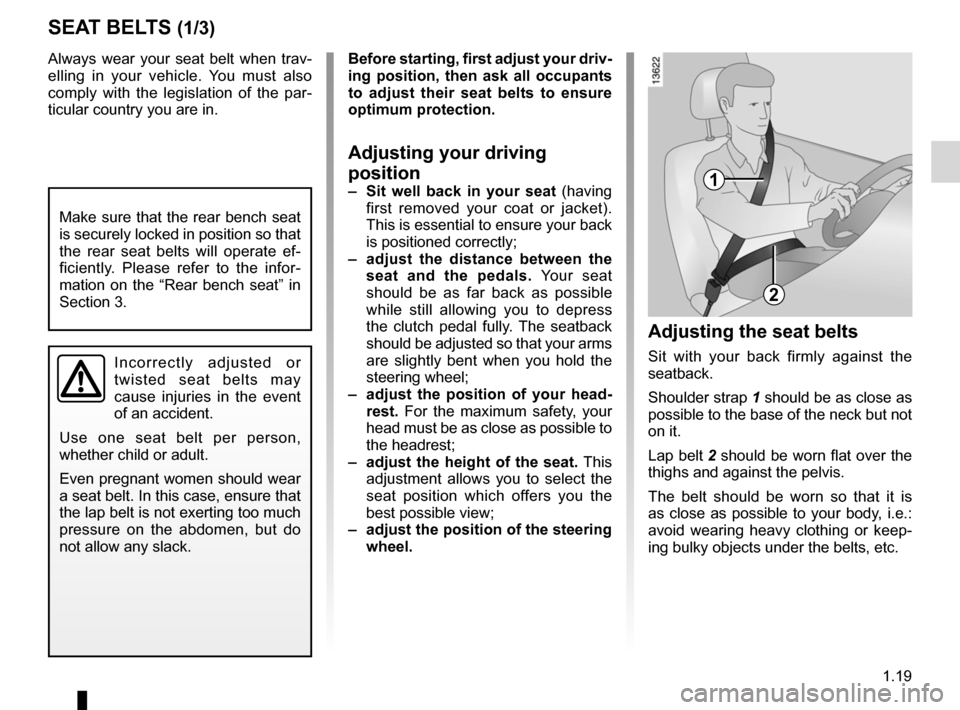
Shoulder strap 1 should be as close as
possible to the base of the neck but not
on it.
Lap belt 2 should be worn flat over the
thighs and against the pelvis.
The belt should be worn so that it is
as close as possible to your body, i.e.:
avoid wearing heavy clothing or keep -
ing bulky objects under the belts, etc.
sEAT BELTs (1/3)
1
2
Make sure that the rear bench seat
is securely locked in position so that
the rear seat belts will operate ef -
ficiently. Please refer to the infor -
mation on the “Rear bench seat” in
Section 3.
Page 35 of 241
child restraint/seat ................................ (up to the end of the DU)
child restraint/seat ................................ (up to the end of the DU)
child restraint/seat ................................ (up to the end of the DU)
child safety ............................................ (up to the end of the DU)
child seats ............................................. (up to the end of the DU)
transporting children ............................. (up to the end of the DU)
towing rings .......................................... (up to the end of the DU)
1.31
ENG_UD22117_2
Sécurité enfants : choix de la fixation du siège enfant (L38 -\
X38 - Renault)
ENG_NU_891_892-7_L38-B32_Renault_1
choosing a child seat mounting
ChILD sAFETY : choosing a child/baby seat mounting (1/2)
There are two ways of attaching child
seats: via the seat belt or using the
ISOFIX system.
Attachment via the seat belt
The seat belt must be adjusted to
ensure that it is effective in the event of
harsh braking or an impact.
Ensure that the strap paths indicated
by the child seat manufacturer are re-
spected.
Always check that the seat belt is cor-
rectly fastened by pulling it up, then
pulling it out fully whilst pressing on the
child seat.
Check that the seat is correctly held by
moving it from side to side and back
to front: the seat should remain firmly
fixed.
Check that the child seat has not been
installed at an angle and that it is not
resting against a window. Attachment using the IsOFIX
system
Authorised ISOFIX child seats are ap
-
proved in accordance with regulation
ECE-R44 in one of the three following
scenarios:
– ISOFIX universal 3-point forwardfac-
ing seat
– ISOFIX semi-universal 2-point seat
– specific
For the latter two, check that your child
seat can be installed by consulting the
list of compatible vehicles.
Attach the child seat with the ISOFIX
locks, if these are provided. The ISOFIX
system allows quick, easy, safe fitting.
The ISOFIX system consists of 2 rings
and, in some cases, a third ring.
Before using an ISOFIX
child seat that you pur -
chased for another vehicle,
check that its installation is
authorised. Consult the list of ve -
hicles which can be fitted with the
seat from the equipment manufac -
turer.
No modifications may be
made to the component
parts of the restraint system
(ISOFIX seat belts, seats
and their mountings) originally fitted.
The seat belt must never
be twisted or the tension
relieved. Never pass the
shoulder strap under the
arm or behind the back.
Check that the seat belt has not
been damaged by sharp edges.
If the seat belt does not operate nor-
mally, it will not protect the child.
Consult an approved dealer. Do not
use this seat until the seat belt has
been repaired.
Do not use the child seat
if it may unfasten the seat
belt restraining it: the base
of the seat must not rest on
the buckle and/or catch of the seat
belt.
Page 49 of 241

steering wheeladjustment ...................................... (up to the end of the DU)
power-assisted steering ........................(up to the end of the DU)
power-assisted steering ........................(up to the end of the DU)
1.45
ENG_UD18854_2
Volant de direction (L38 - X38 - Renault)
ENG_NU_891_892-7_L38-B32_Renault_1
power-assisted steering
The variable power-assisted steering
system is equipped with an electronic
control system which alters the level of
assistance to suit the vehicle speed.
Steering is made easier during parking
manoeuvres (for added comfort) whilst
the force needed to steer increases
progressively as the speed rises (for
enhanced safety at high speeds).
Steering wheel
Power-assisted steering
sTEERINg WhEEL/pOWER-AssIsTED sTEERINg
steering wheel
Height and, depending on the vehicle,
depth adjustment.
Pull lever 1 and move the steering
wheel to the required position.
Then, push the lever back fully, beyond
the point of resistance to lock the steer-
ing wheel.
Make sure that the steering wheel is
correctly locked.
For safety reasons, only
adjust the steering wheel
when the vehicle is station-
ary.
1
Never switch off the igni -
tion when travelling down -
hill, and avoid doing so in
normal driving (assistance
is not provided).
Never leave the steering wheel on
full lock when the vehicle is station-
ary.
Do not drive with a low battery
charge. The steering wheel may not
operate correctly.
With the engine switched off, or if
there is a system fault, it is still pos-
sible to turn the steering wheel. The
force required will be greater.
A noise may be heard when the
steering wheel is moved quickly.
This is normal.
Page 70 of 241

ENG_NU_891_892-7_L38-B32_Renault_1
TRIp COMpUTER AND WARNINg sYsTEM: information messages
Examples")
1.66
ENG_UD23767_1
Ordinateur de bord : messages d’information (L38 - X38 - X32 - B32 -\
Renault)
ENG_NU_891_892-7_L38-B32_Renault_1
TRIp COMpUTER AND WARNINg sYsTEM: information messages
Examples of messages Interpreting the display selected
“Battery low start engine” Indicates that the vehicle must be started to recharge the battery (eg. after the engine has been
switched off for some time whilst listening to the radio).
“please remove keycard ”Request to remove the RENAULT card from the reader when you leave the vehicle.
“Checking control functions ” Displayed with the ignition on when the vehicle is running self-diagnost\
ics.
“Traction control off ”Indicates that you have deactivated the ASR function.
“Turn steering
wheel + sTART” Turn the steering wheel slightly whilst pressing the vehicle start button to unlock the steering
column.
“No message available” No warning is stored.
“steering wheel not locked ”Indicates that the steering column has not been locked.
“stop vehicle” Indicates an electronic parking brake fault. Apply the electronic parking brake manually and
ensure that the vehicle is immobilised using a chock.
These can help in the vehicle starting phase, or give information about \
a selection or a driving status.
Examples of information messages are given in the following pages.
Page 73 of 241

menu for customising the vehicle settings
(up to the end of the DU)
customising the vehicle settings ........... (up to the end of the DU)
customised vehicle settings .................. (up to the end of the DU)
1.69
ENG_UD24231_2
Menu de personnalisation des réglages du véhicule (L38 - X38 - Re\
nault)
ENG_NU_891_892-7_L38-B32_Renault_1
vehicle settings customisation menu
VEhICLE sETTINgs CUsTOMIsATION MENU
Adjusting the settingsPress one of buttons 2 or 3 to select a
function to change:
a) Auto door locking while driving ;
b) Auto rear wipe with reverse gear ;
c) Auto dipped-beam headlights ;
d) Rear parking sensor ;
e) Parking sensor volume ;
f) LANGUAGE.
= function activated
< function deactivated
On equipped vehicles, this function,
which is integrated in the trip compu
-
ter and warning system 1 , allows you
to activate/deactivate some of the vehi-
cle’s functions.
Accessing the settings
customisation menu
With the vehicle stationary, press
either button 2 or 3 until the mes -
sage “ Settings menu: press and hold ”
appears on display 1 . Press either
button 2 or 3 for longer than 2 seconds
to enter the menu.
Once a line has been selected, keep
pressing either button 2 or 3 to change
the function: If you select either “Parking
sensor volume ” or “LANGUAGE ”, you
will be given a new choice of options
(parking distance control volume or in-
strument panel language). In this case,
make your selection and confirm it by
holding either button 2 or 3 , the value
selected is shown by a
~ in front
of the line.
To exit the menu, select “ EXIT” or
“ BACK ” then confirm by holding either
button 2 or 3 . It may be necessary to
carry out this operation several times.
2
3
1
The vehicle settings customisation
menu cannot be used when driv -
ing. At speeds of above 12 mph (20
km/h) for vehicles with a manual
gearbox (0 mph for vehicles with an
automatic gearbox), the on-board
display returns automatically to the
trip computer and warning system
mode.
Page 74 of 241

clock ..................................................... (up to the end of the DU)
clock ..................................................... (up to the end of the DU)
external temperature ............................ (up to the end of the DU)
indicators: exterior temperature indicator .......................... (current page)
1.70
ENG_UD21621_3
Heure et température extérieure (L38 - X38 - Renault)
ENG_NU_891_892-7_L38-B32_Renault_1
Jaune NoirNoir texte
Vehicles equipped with a
navigation system, radio, etc.
For vehicles which are not fitted with
buttons 2 and 3 , refer to the specific
equipment instructions to discover the
special features.
Clock and exterior temperature
With the ignition on , the time and,
depending on the vehicle, the exterior
temperature are displayed.
Resetting the clock 1
On equipped vehicles, buttons 2 and 3
are used to set the clock.
Press button 2 to adjust the hours and
button 3 to adjust the minutes.
External temperature
indicator
As ice formation is related
to climatic exposure, local
air humidity and temperature, the
external temperature alone is not
sufficient to detect ice.
CLOCK AND EXTERIOR TEMpERATURE (1/2)
If the power supply is cut (battery
disconnected, supply wire cut, etc.),
the clock must be reset.
We recommend that you do not
adjust these settings while driving.
External temperature
indicator
special note:
When the external temperature is be -
tween –3°C and +3°C, the °C charac -
ters flash (indicates risk of ice forma -
tion).
12
3