Eco RENAULT KOLEOS 2018 Owner's Manual
[x] Cancel search | Manufacturer: RENAULT, Model Year: 2018, Model line: KOLEOS, Model: RENAULT KOLEOS 2018Pages: 332, PDF Size: 8.91 MB
Page 63 of 332
1.57
WARNING LIGHTS (4/6)
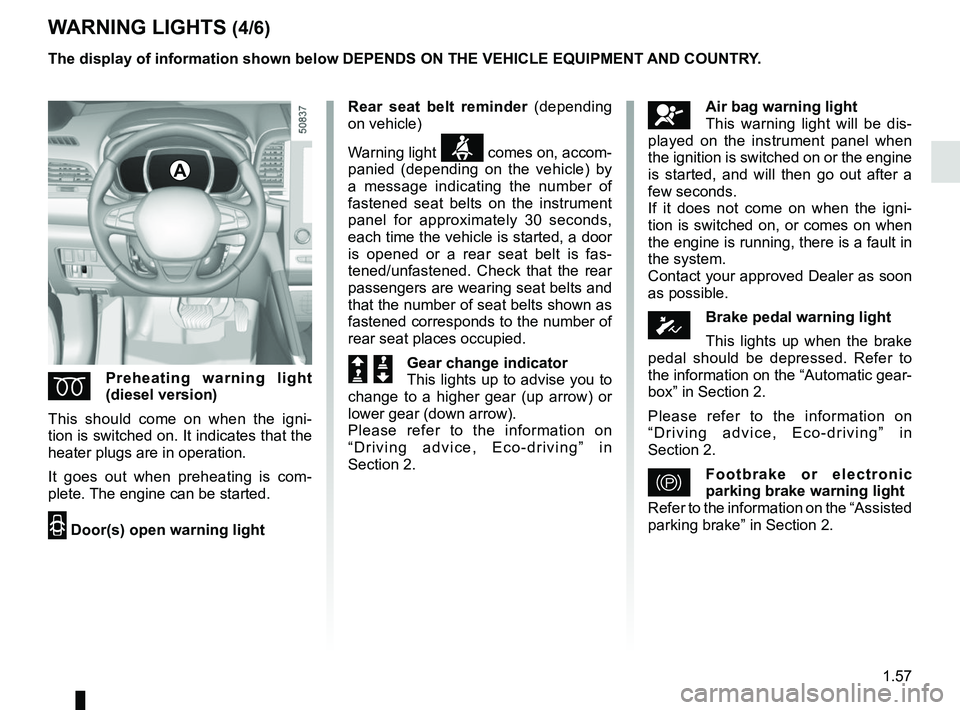
ÉPreheating warning light
(diesel version)
This should come on when the igni-
tion is switched on. It indicates that the
heater plugs are in operation.
It goes out when preheating is com-
plete. The engine can be started.
2 Door(s) open warning light
A
The display of information shown below DEPENDS ON THE VEHICLE EQUIPMENT \
AND COUNTRY.
åAir bag warning light
This warning light will be dis-
played on the instrument panel when
the ignition is switched on or the engine
is started, and will then go out after a
few seconds.
If it does not come on when the igni-
tion is switched on, or comes on when
the engine is running, there is a fault in
the system.
Contact your approved Dealer as soon
as possible.
ÓBrake pedal warning light
This lights up when the brake
pedal should be depressed. Refer to
the information on the “Automatic gear-
box” in Section 2.
Please refer to the information on
“Driving advice, Eco-driving” in
Section 2.
}Footbrake or electronic
parking brake warning light
Refer to the information on the “Assisted
parking brake” in Section 2.
Rear seat belt reminder
(depending
on vehicle)
Warning light
ß comes on, accom-
panied (depending on the vehicle) by
a message indicating the number of
fastened seat belts on the instrument
panel for approximately 30 seconds,
each time the vehicle is started, a door
is opened or a rear seat belt is fas-
tened/unfastened. Check that the rear
passengers are wearing seat belts and
that the number of seat belts shown as
fastened corresponds to the number of
rear seat places occupied.
Š ‰Gear change indicator
This lights up to advise you to
change to a higher gear (up arrow) or
lower gear (down arrow).
Please refer to the information on
“Driving advice, Eco-driving” in
Section 2.
Page 64 of 332

The display of information shown below DEPENDS ON THE VEHICLE EQUIPMENT \
AND COUNTRY.
Assisted parking brake fault
light
Please refer to the information on the
“Assis")
1.58
WARNING LIGHTS (5/6)
The display of information shown below DEPENDS ON THE VEHICLE EQUIPMENT \
AND COUNTRY.
Assisted parking brake fault
light
Please refer to the information on the
“Assisted parking brake” in Section 2.
Emergency active brake
assist
Refer to the information on “Driving cor-
rection devices and aids” in Section 2.
\bElectronic Stability Program
(ESC) and traction control
system warning light
It lights up when the ignition or the
engine is switched on and goes off after
a few seconds.
There are several reasons for the warn-
ing light to come on: please refer to the
information on “Driver correction de-
vices and aids” in Section 2.
A
ÐÏSpeed limiter and cruise
control indicator lights
See the information on the “Speed lim-
iter” and “Cruise control” in Section 2.
Tyre pressure monitoring
system
Refer to the information on the “Tyre
pressure monitoring system” in Section
2.
ECO mode warning light
This comes on when ECO
mode is activated.
Please refer to the information on “Eco-
driving” in Section 2.
Engine standby warning
light
Please see information in the para-
graph on “Stop and Start Function” in
Section 2.
\fUnavailability of engine
standby warning light
Please see information in the para-
graph on “Stop and Start Function” in
Section 2.
Page 66 of 332
1.60
DISPLAYS AND INDICATORS (1/2)
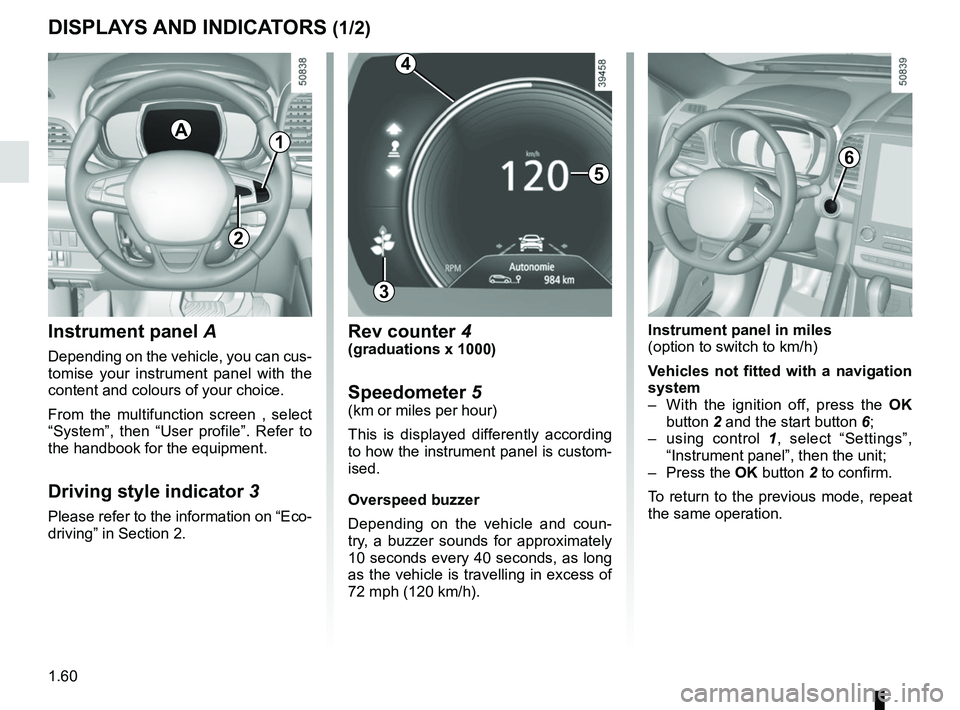
Instrument panel A
Depending on the vehicle, you can cus-
tomise your instrument panel with the
content and colours of your choice.
From the multifunction screen , select
“System”, then “User profile”. Refer to
the handbook for the equipment.
Driving style indicator 3
Please refer to the information on “Eco-
driving” in Section 2.
A
5
3
Rev counter 4(graduations x 1000)
Speedometer 5(km or miles per hour)
This is displayed differently according
to how the instrument panel is custom-
ised.
Overspeed buzzer
Depending on the vehicle and coun-
try, a buzzer sounds for approximately
10 seconds every 40 seconds, as long
as the vehicle is travelling in excess of
72 mph (120 km/h).
6
Instrument panel in miles
(option to switch to km/h)
Vehicles not fitted with a navigation
system
– With the ignition off, press the OK
button 2 and the start button 6;
– using control 1, select “Settings”,
“Instrument panel”, then the unit;
– Press the OK button 2 to confirm.
To return to the previous mode, repeat
the same operation.
4
1
2
Page 67 of 332
1.61
DISPLAYS AND INDICATORS (2/2)
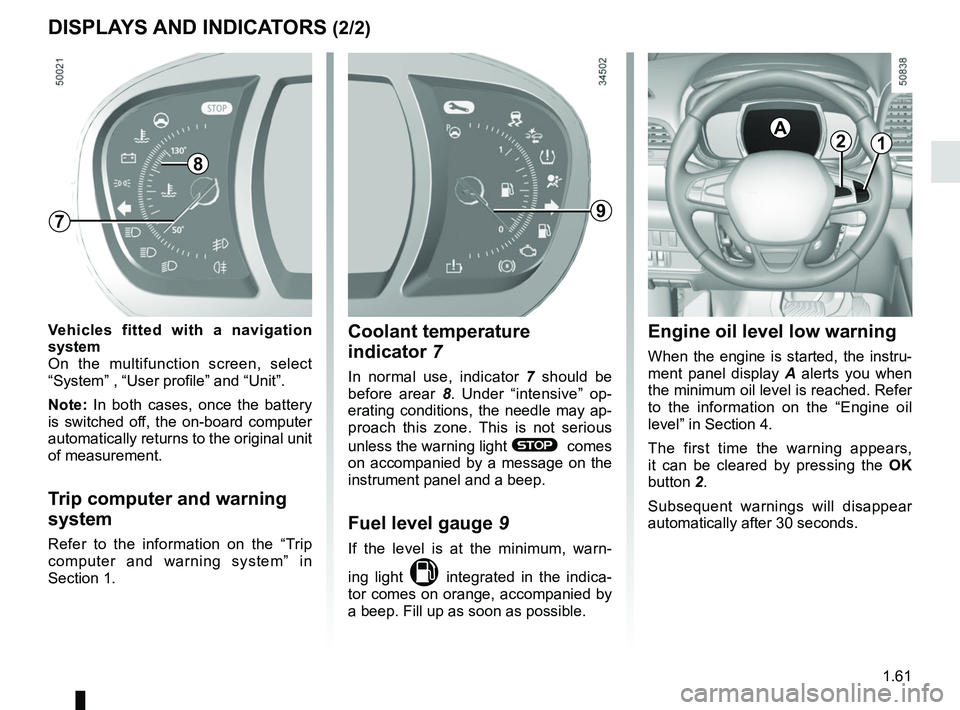
Engine oil level low warning
When the engine is started, the instru-
ment panel display A alerts you when
the minimum oil level is reached. Refer
to the information on the “Engine oil
level” in Section 4.
The first time the warning appears,
it can be cleared by pressing the OK
button 2.
Subsequent warnings will disappear
automatically after 30 seconds.
2A
Coolant temperature
indicator 7
In normal use, indicator 7 should be
before arear 8. Under “intensive” op-
erating conditions, the needle may ap-
proach this zone. This is not serious
unless the warning light
® comes
on accompanied by a message on the
instrument panel and a beep.
Fuel level gauge 9
If the level is at the minimum, warn-
ing light
M integrated in the indica-
tor comes on orange, accompanied by
a beep. Fill up as soon as possible.
9
Vehicles fitted with a navigation
system
On the multifunction screen, select
“System” , “User profile” and “Unit”.
Note: In both cases, once the battery
is switched off, the on-board computer
automatically returns to the original unit
of measurement.
Trip computer and warning
system
Refer to the information on the “Trip
computer and warning system” in
Section 1.
7
1
8
Page 69 of 332
1.63
3
ON-BOARD COMPUTER: general information
Interpreting some of the
values displayed after
resetting
The values showing average fuel con-
sumption and average speed will
become more stable and reliable the
further you have travelled since the last
time the Reset button was pressed.
The average fuel consumption may de-
crease when:
– the vehicle stops accelerating;
– the engine reaches its operating
temperature (if the engine was cold
when the reset key was pressed);
– when driving from an urban area
onto the open road.
Automatic resetting of the
journey parameters
Resetting occurs automatically when
the maximum value of any of the pa-
rameters is exceeded.
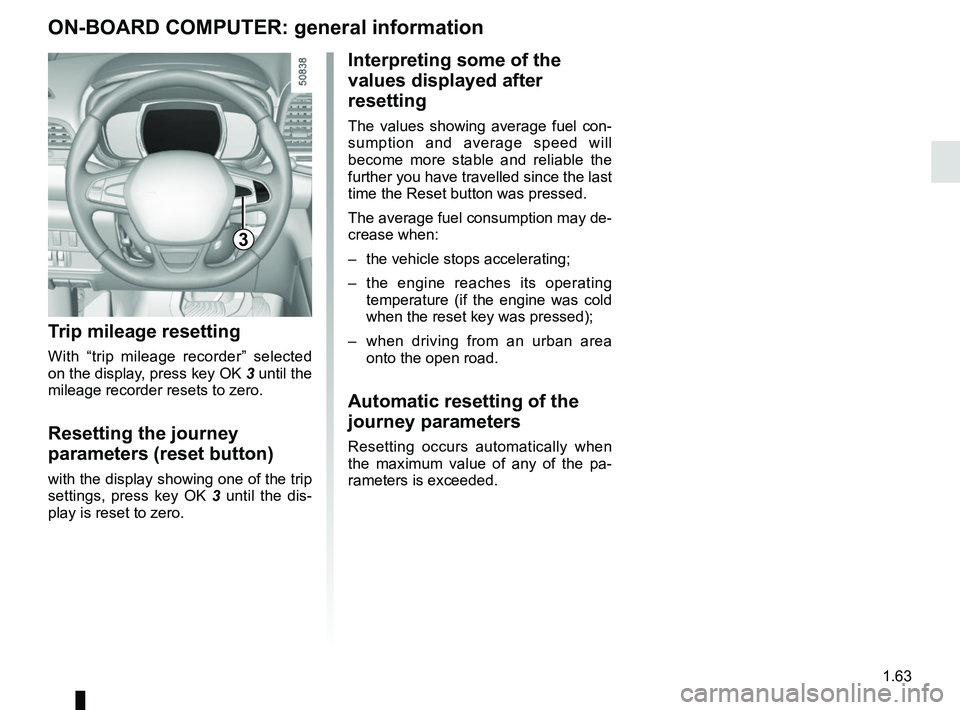
Trip mileage resetting
With “trip mileage recorder” selected
on the display, press key OK 3 until the
mileage recorder resets to zero.
Resetting the journey
parameters (reset button)
with the display showing one of the trip
settings, press key OK 3 until the dis-
play is reset to zero.
Page 70 of 332

The display of information shown below DEPENDS ON THE VEHICLE EQUIPMENT \
AND COUNTRY.
Examples of selectionsInterpreting the display selected
101778 km
a)")
1.64
ON-BOARD COMPUTER: trip settings (1/5)
The display of information shown below DEPENDS ON THE VEHICLE EQUIPMENT \
AND COUNTRY.
Examples of selectionsInterpreting the display selected
101778 km
a) Total mileage and trip mileage recorder.
112.4 km
Average
b) Journey parameters:
Average fuel consumption since the last reset.
The value is displayed after having travelled at least 400 metres since \
the last
reset.
5.8 L/100
Current
Current fuel consumption. This value is displayed after a speed of approximately 6 mph (10 km/h)\
is reached.
7.4 L/100
Page 72 of 332

The display of information shown below DEPENDS ON THE VEHICLE EQUIPMENT \
AND COUNTRY.
Examples of selectionsInterpreting the display selected
On-board comp")
1.66
ON-BOARD COMPUTER: trip settings (3/5)
The display of information shown below DEPENDS ON THE VEHICLE EQUIPMENT \
AND COUNTRY.
Examples of selectionsInterpreting the display selected
On-board computer with mileage-
before-service message
c) Mileage before service or oil change.Mileage before service
With the ignition switched on, the engine not running and
the display set to “Service Intervals”, press button OK for ap-
proximately 5 seconds to display the mileage before service (dis-
tance or time to the next service). When the range approaches
its limit, there are several possible scenarios:
– distance/time remaining less than 900 miles (1,500 km) or
one month : the message “Service due in” is displayed along
with the nearest limit (distance or time);
– range equal to 0 km/miles or service date reached: the
message “Service required” is displayed accompanied by
warning light
©.
The vehicle requires a service as soon as possible.
Service Intervals
Service in
30 000 Kms / 12 mo
Service due in
300 Kms / 24 days
Service required
Resetting: to reset the distance before service, press and hold button 2 for approximately 10 seconds until the display shows
the mileage permanently.
NB: if a service is performed without changing the engine oil, only the mi\
leage before the next service should be reset. In the
event of an oil change, both the distance before the next service and th\
e next oil change should be reset.
Page 73 of 332

Examples of selectionsInterpreting the display selected
On-board comp")
1.67
The display of information shown below DEPENDS ON THE VEHICLE EQUIPMENT \
AND COUNTRY.
ON-BOARD COMPUTER: trip settings (4/5)
Examples of selectionsInterpreting the display selected
On-board computer with distance before
next service message (cntd.)
c) Mileage before service or oil change.Mileage before service
With the ignition switched on and the engine not running ,
and the selected display is “Mileage before service”, press
button OK for about 5 seconds to display the mileage before
the next service, then press button 2 to view the mileage before
the next oil change (distance or time remaining before the next
service). When the range approaches its limit, there are several
possible scenarios:
– distance/time remaining less than 900 miles (1,500 km) or
one month : the message “Service due in” is displayed, ac-
companied by the nearest term (distance or time);
– range equal to 0 km/miles or service date reached: the
message “Service required” is displayed accompanied by
warning light
©.
The vehicle requires an oil change as soon as possible.
Service Intervals
Oil change in
30 000 Kms / 24 mo
Service due in
300 Kms / 24 days
Service required
Depending on the vehicle, the mileage before an oil change varies accord\
ing to the driving style (frequent driving at low speed ,
door-to-door journeys, extensive use at idling speed, towing a trailer, etc.). The distance remaining until the next oil change can
therefore decrease more quickly in some cases than the actual distance t\
ravelled.
Resetting: to reset the mileage before a service, press and hold button 2 for approximately 10 seconds until the display shows
the range permanently.
NB: if a service is performed without changing the engine oil, only the mi\
leage before the next service should be reset. In the
event of an oil change, both the distance before the next service and th\
e next oil change should be reset.
Page 76 of 332

1.70
TRIP COMPUTER AND WARNING SYSTEM: operating fault messages
These appear with the © warning light and mean that you should drive very carefully to an author\
ised dealer as
soon as possible. If you fail to follow this recommendation, you risk da\
maging your vehicle.
They disappear when the display selection key is pressed or after severa\
l seconds and are stored in the computer log. The
© warning light stays on. Examples of operating fault messages are given \
in the following pages.
Examples of messages Interpreting the display selected« Clean diesel filter » Indicates the presence of water in the diesel filter; contact an approve\
d Dealer
as soon as possible.
« Check lighting » Indicates a fault in the headlights.
« Check vehicle » Indicates a fault in one of the pedal sensors, battery management system\
or oil
level sensor.
« Check airbag » Indicates a fault in the restraint system in addition to the seat belts.\
In the event
of an accident, it is possible that they may not be triggered.
« Check anti-pollution system » Indicates a fault in the vehicle’s particle filter system.
Page 88 of 332
1.82
“See-me-home lighting”
function
This function allows you to briefly switch
on the dipped beam headlights (to pro-
vide light when opening a gate, etc.).
With the engine and lights switched
off and the ring 3 in position 0 or
AUTO, pull the stalk 1 towards you: the
dipped beam headlights come on for
approximately 30 seconds. To increase
this duration, you may pull the stalk up
to four times (total time limited to ap-
proximately 2 minutes). The message
“Follow me home for _ _ _” along with
the time the lights will be on for is dis-
played on the instrument panel to con-
firm this action. You can then lock your
vehicle.
To switch off the lights before they go
out automatically, turn ring 3 to any po-
sition, then return it to the AUTO posi-
tion .
EXTERIOR LIGHTING AND SIGNALS (4/5)
Welcome and goodbye
function
(depending on the vehicle)
Once the function is activated, the day-
time running lights and the rear side
light light up automatically upon detect-
ing the RENAULT card or when the ve-
hicle is unlocked.
They switch off automatically:
– approximately one minute after li- ghting up;
– when starting the engine based on the position of the lighting stalk;
or
– upon locking the vehicle. Activating/deactivating the function
From the multifunction screen, select
menu “Vehicle”, “User settings” then
“External welcome”. Choose “
ON”
or “OFF” to activate or deactivate the
function.