Eco RENAULT KOLEOS 2018 Repair Manual
[x] Cancel search | Manufacturer: RENAULT, Model Year: 2018, Model line: KOLEOS, Model: RENAULT KOLEOS 2018Pages: 332, PDF Size: 8.91 MB
Page 171 of 332
2.67
CRUISE CONTROL FUNCTION (3/4)
Exceeding the cruising speed
The cruising speed may be exceeded
at any time by depressing the accelera-
tor pedal. While overtaking, the cruis-
ing speed flashes red on the instrument
panel.
Then, release the accelerator: after a
few seconds, the vehicle will automati-
cally return to its set cruising speed.
Cruising speed cannot be
maintained
If driving up or down a steep gradi-
ent, the system is unable to maintain
the cruising speed: the stored speed is
flashes red on the instrument panel to
inform you of this situation.
Adjusting the cruising speed
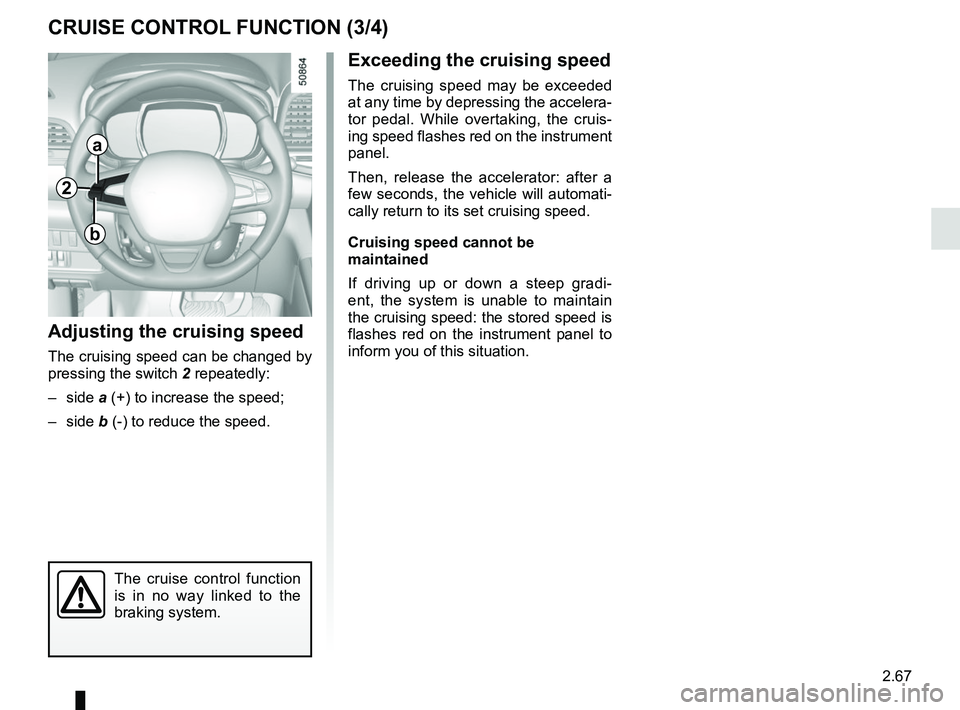
The cruising speed can be changed by
pressing the switch 2 repeatedly:
– side a (+) to increase the speed;
– side b (-) to reduce the speed.
The cruise control function
is in no way linked to the
braking system.
2
a
b
Page 175 of 332
2.71
Driving
Once a cruising speed is memorised
and the cruise control function is active,
you may lift your foot off the accelera-
tor pedal.
If a following distance is stored and a
vehicle travelling slower than yours is
detected by the system in your lane,
your vehicle will brake (with the brake
lights on) and adapt its speed to that of
the vehicle in front, respecting the fol-
lowing distance selected previously.
Overtaking
If your speed is lower than the cruise
control and you wish to perform an
overtaking manoeuvre, activating the
direction indicator will provide acceler-
ation enabling the overtaking manoeu-
vre.
Please note that you must
keep your feet close to the
pedals in order to react in
an emergency.
ADAPTIVE CRUISE CONTROL (3/8)
Adjusting the cruising speed
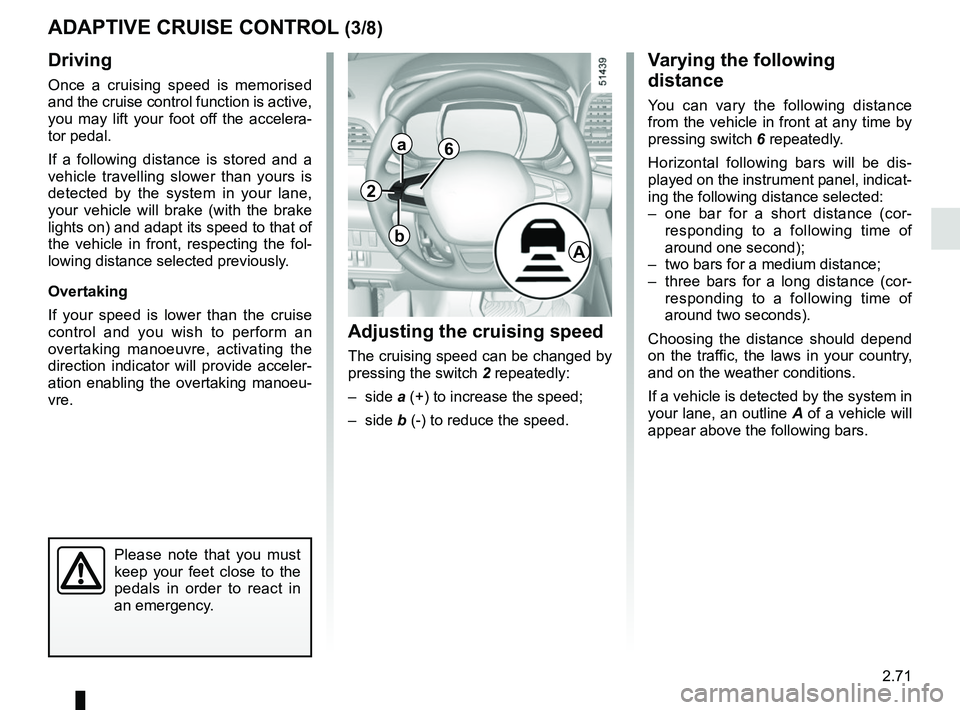
The cruising speed can be changed by
pressing the switch 2 repeatedly:
– side a (+) to increase the speed;
– side b (-) to reduce the speed.
Varying the following
distance
You can vary the following distance
from the vehicle in front at any time by
pressing switch 6 repeatedly.
Horizontal following bars will be dis-
played on the instrument panel, indicat-
ing the following distance selected:
– one bar for a short distance (cor- responding to a following time of
around one second);
– two bars for a medium distance;
– three bars for a long distance (cor- responding to a following time of
around two seconds).
Choosing the distance should depend
on the traffic, the laws in your country,
and on the weather conditions.
If a vehicle is detected by the system in
your lane, an outline A of a vehicle will
appear above the following bars.
6
A
2
a
b
Page 181 of 332
2.77
PARKING DISTANCE CONTROL (1/5)
Operating principle
Ultrasonic sensors in the rear bumper
measure the distance between the ve-
hicle and an obstacle.
This measurement is indicated by
beeps which become more frequent the
closer you come to the obstacle, until
they become a continuous beep when
the vehicle is approximately 20 to
30 centimetres from the obstacle.
The system detects obstacles to the
front, the rear and the sides of the ve-
hicle.
The parking distance control system
is only activated when the vehicle is
driven at a speed below approximately
6 mph (10 km/h).
This function is an addi-
tional aid that indicates the
distance between the vehi-
cle and an obstacle whilst
reversing, using sound signals.
Under no circumstances should it
replace the driver’s care or respon-
sibility whilst reversing.
The driver should always look out
for sudden hazards during driv-
ing: always ensure that there are
no moving obstacles (such as a
child, animal, pram or bicycle, etc.)
or small, narrow objects such as
stones or posts in your path when
manoeuvring.
Special features
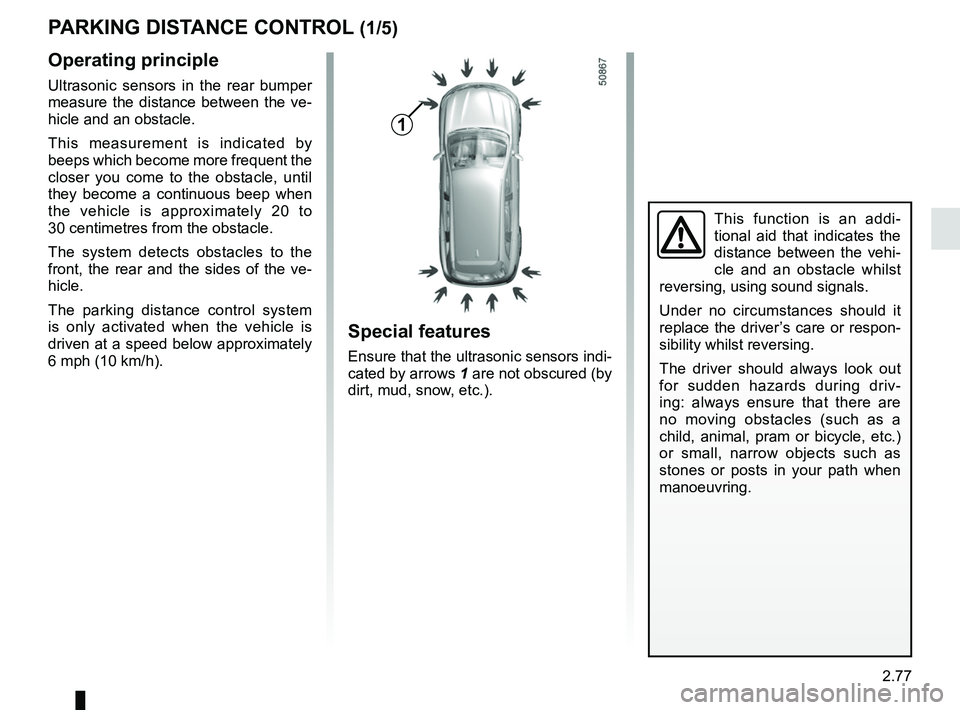
Ensure that the ultrasonic sensors indi-
cated by arrows 1 are not obscured (by
dirt, mud, snow, etc.).
1
Page 182 of 332
2.78
Operation
Most objects located less near the
front, rear and sides of the vehicle are
detected.
Depending on the distance of the ob-
stacle, the frequency of the beep will
be higher while approaching it, and will
become a solid beep around 20 cm for
obstacles to the sides, and 30 cm for
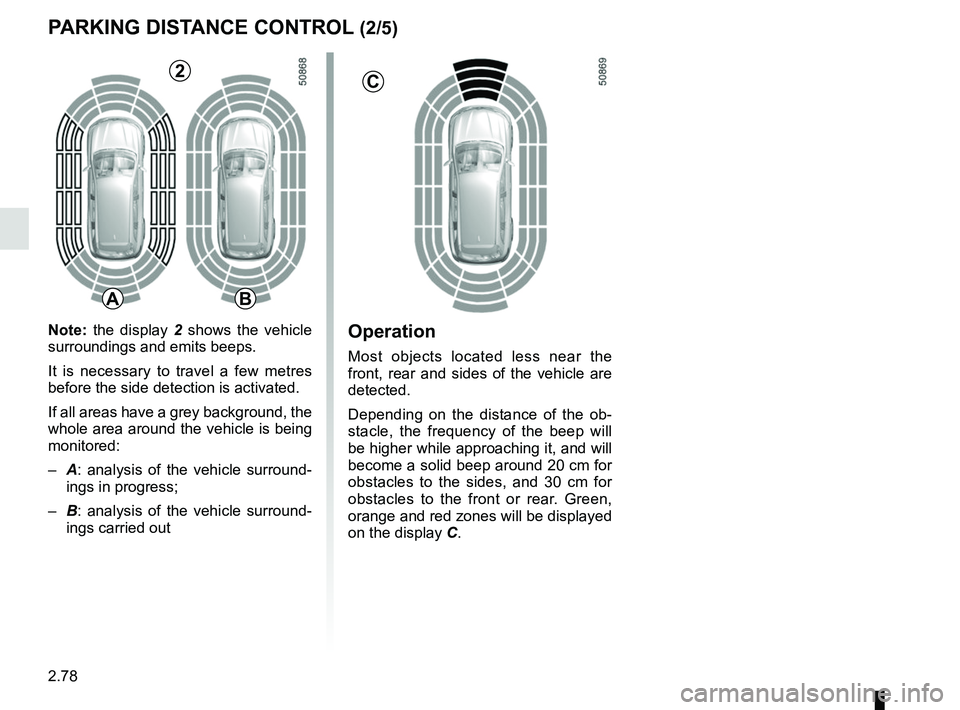
obstacles to the front or rear. Green,
orange and red zones will be displayed
on the display C.
PARKING DISTANCE CONTROL (2/5)
C
AB
2
Note: the display 2 shows the vehicle
surroundings and emits beeps.
It is necessary to travel a few metres
before the side detection is activated.
If all areas have a grey background, the
whole area around the vehicle is being
monitored:
– A: analysis of the vehicle surround-
ings in progress;
– B: analysis of the vehicle surround-
ings carried out
Page 183 of 332
2.79
An impact to the under-
side of the vehicle while
manoeuvring (e.g.: strik-
ing a post, raised kerb or
other street furniture) may result in
damage to the vehicle (e.g.: defor-
mation of an axle).
To avoid any risk of accident, have
your vehicle checked by an ap-
proved dealer.
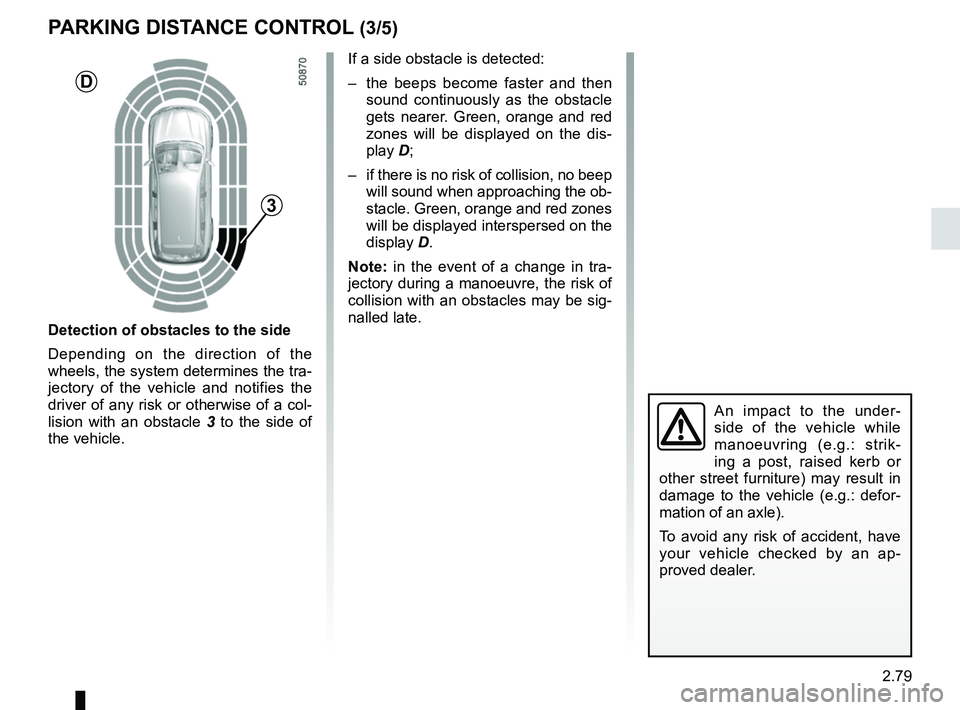
Detection of obstacles to the side
Depending on the direction of the
wheels, the system determines the tra-
jectory of the vehicle and notifies the
driver of any risk or otherwise of a col-
lision with an obstacle 3 to the side of
the vehicle.
PARKING DISTANCE CONTROL (3/5)
If a side obstacle is detected:
– the beeps become faster and then sound continuously as the obstacle
gets nearer. Green, orange and red
zones will be displayed on the dis-
play D;
– if there is no risk of collision, no beep will sound when approaching the ob-
stacle. Green, orange and red zones
will be displayed interspersed on the
display D.
Note: in the event of a change in tra-
jectory during a manoeuvre, the risk of
collision with an obstacles may be sig-
nalled late.
3
D
Page 185 of 332
2.81
Automatic deactivation of the
parking distance control
The system deactivates:
– when the vehicle speed is above ap-proximately 6 mph (10 km/h);
– depending on the model, when the vehicle is stationary for more than
approximately 5 seconds and an ob-
stacle is detected (such as when in a
traffic jam, etc.);
– when the vehicle is in neutral for manual gearboxes, or in position N
or P for automatic gearboxes.
PARKING DISTANCE CONTROL (5/5)
Operating faults
When the system detects an operating
fault, a beep sounds for approximately
3 seconds each time reverse gear is se-
lected and is accompanied by the mes-
sage “Check parking sensor” shown on
the instrument panel. Please consult an
authorised dealer.
The function can be disrupted under
certain conditions, including:
– if the sensor is obscured by dirt, mud, snow, etc, wipe it clean with
a soft damp cloth or cotton wool;
– if the sensor is frozen;
– when driving on uneven or grav- elled surfaces or slope or in bush;
– very poor weather conditions
(heavy rain, snow, etc.);
The system can not detect includ-
ing:
– small or narrow objects such as rope, etc;
– objects that can absorb ultrasonic like a sponge, snow, etc.
The system can be beeped or dis-
rupted by motorbikes, bicycles,
transmitters, etc.
Page 190 of 332
2.86
Special note
– Drive slowly and always be ready to use the brake;
– The system can not detect parking spaces between objects except for
vehicles such as a post, motorbike or
obstacle;
– The system can not detect park- ing spaces made after detecting or
before detecting;
– Maintain the distance about 50~150 cm from the parked vehicles
when looking for parking spaces.
The system may not detect spaces
when the distance is less than 50 cm
or over 150 cm;
– You can move the gear lever position R to D or D to R while parking. The system is still available.
– The driver should look out for the de- tected space if it is possible to park
(obstacles in the space);
– If you fit a different tire or wheel, the system performance may be
changed. For the best performance,
fit the same size with original one;
– The system may not work if the wheels are misaligned. Contact an
approved dealer.
ASSISTED PARKING (3/6)
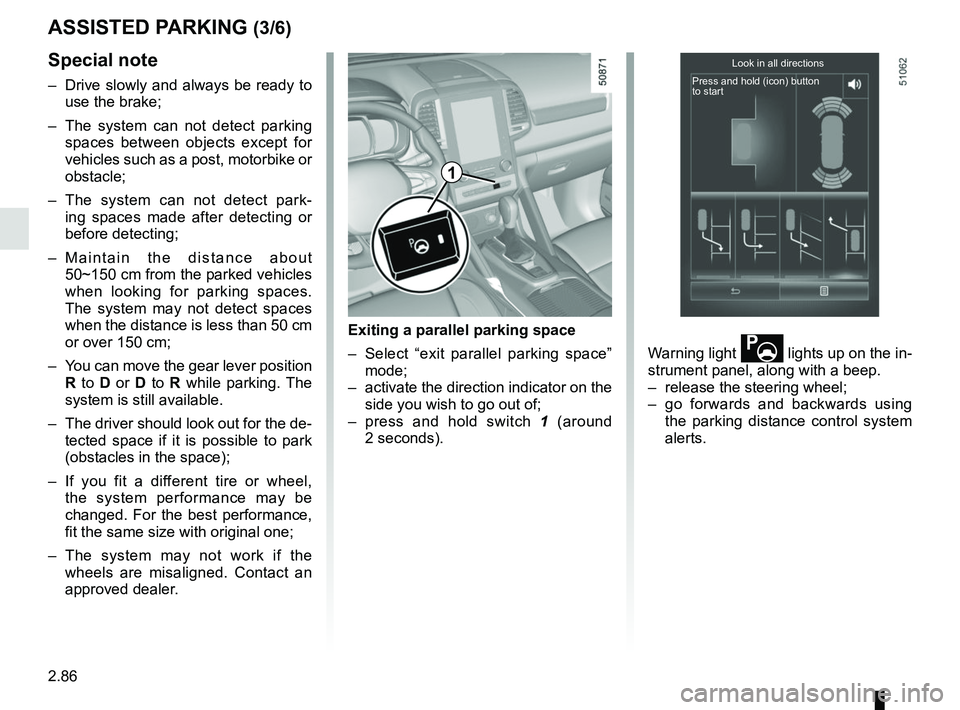
Exiting a parallel parking space
– Select “exit parallel parking space” mode;
– activate the direction indicator on the side you wish to go out of;
– press and hold switch 1 (around
2 seconds). Warning light
lights up on the in-
strument panel, along with a beep.
– release the steering wheel;
– go forwards and backwards using the parking distance control system
alerts.
Look in all directions
Press and hold (icon) button
to start
1
Page 194 of 332
2.90
AUTOMATIC TRANSMISSION (1/3)
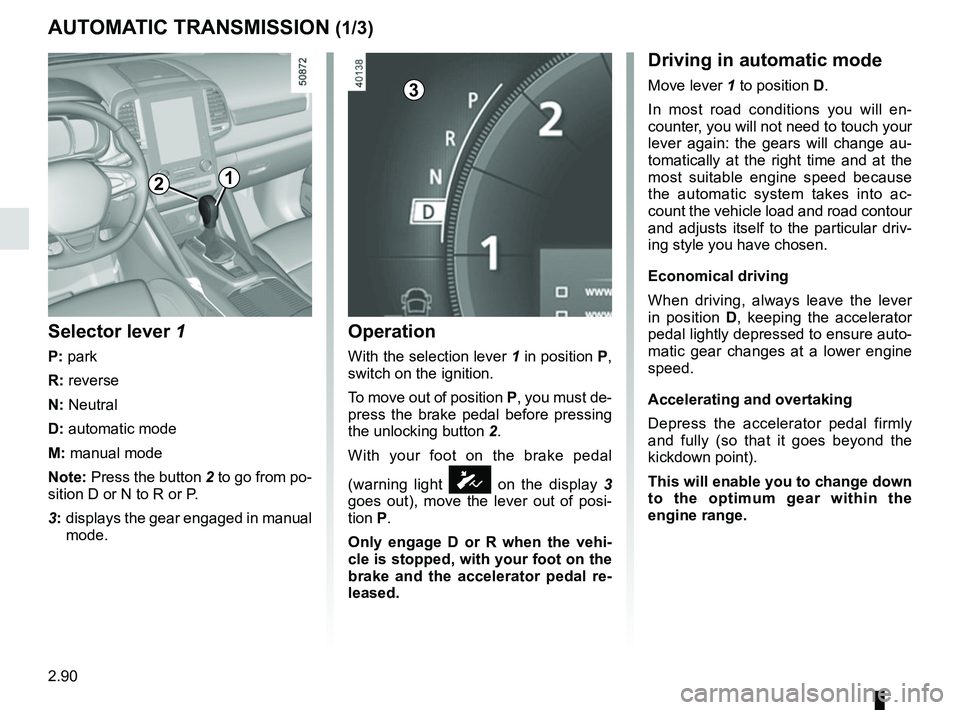
Operation
With the selection lever 1 in position P,
switch on the ignition.
To move out of position P, you must de-
press the brake pedal before pressing
the unlocking button 2.
With your foot on the brake pedal
(warning light
Ó on the display 3
goes out), move the lever out of posi-
tion P.
Only engage D or R when the vehi-
cle is stopped, with your foot on the
brake and the accelerator pedal re-
leased.
Selector lever 1
P: park
R: reverse
N: Neutral
D: automatic mode
M: manual mode
Note: Press the button 2 to go from po-
sition D or N to R or P.
3: displays the gear engaged in manual
mode.
12
Driving in automatic mode
Move lever 1 to position D.
In most road conditions you will en-
counter, you will not need to touch your
lever again: the gears will change au-
tomatically at the right time and at the
most suitable engine speed because
the automatic system takes into ac-
count the vehicle load and road contour
and adjusts itself to the particular driv-
ing style you have chosen.
Economical driving
When driving, always leave the lever
in position D, keeping the accelerator
pedal lightly depressed to ensure auto-
matic gear changes at a lower engine
speed.
Accelerating and overtaking
Depress the accelerator pedal firmly
and fully (so that it goes beyond the
kickdown point).
This will enable you to change down
to the optimum gear within the
engine range.3
Page 195 of 332
2.91
AUTOMATIC TRANSMISSION (2/3)
Special cases
In certain driving conditions (for exam-
ple, engine protection, operation of the
Electronic Stability Programme: the au-
tomatic system may change gear auto-
matically.
Likewise, to prevent incorrect manoeu-
vres, a gear change may be refused by
the automatic system: in this case the
gear display flashes for a few seconds
as a warning.
Special circumstances
– If the bends and road surface do
not allow you to stay in automatic
mode (e.g. in the mountains), we
recommend that you change to
manual mode. This will prevent the
automatic gearbox from changing
gear repeatedly when climbing, and
permit engine braking on long de-
scents.
– In cold weather , start the engine
and wait a few seconds before
moving the selector lever from posi-
tion P or N and engaging it in D or R
to prevent the engine stalling.
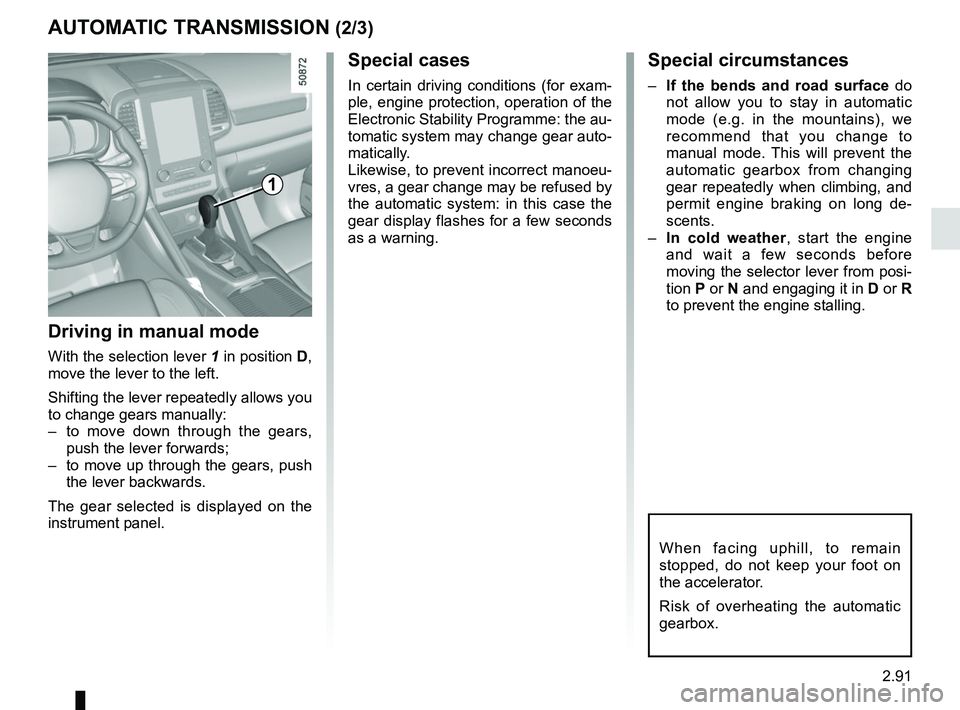
Driving in manual mode
With the selection lever 1 in position D,
move the lever to the left.
Shifting the lever repeatedly allows you
to change gears manually:
– to move down through the gears, push the lever forwards;
– to move up through the gears, push the lever backwards.
The gear selected is displayed on the
instrument panel.
1
When facing uphill, to remain
stopped, do not keep your foot on
the accelerator.
Risk of overheating the automatic
gearbox.
Page 200 of 332
3.4
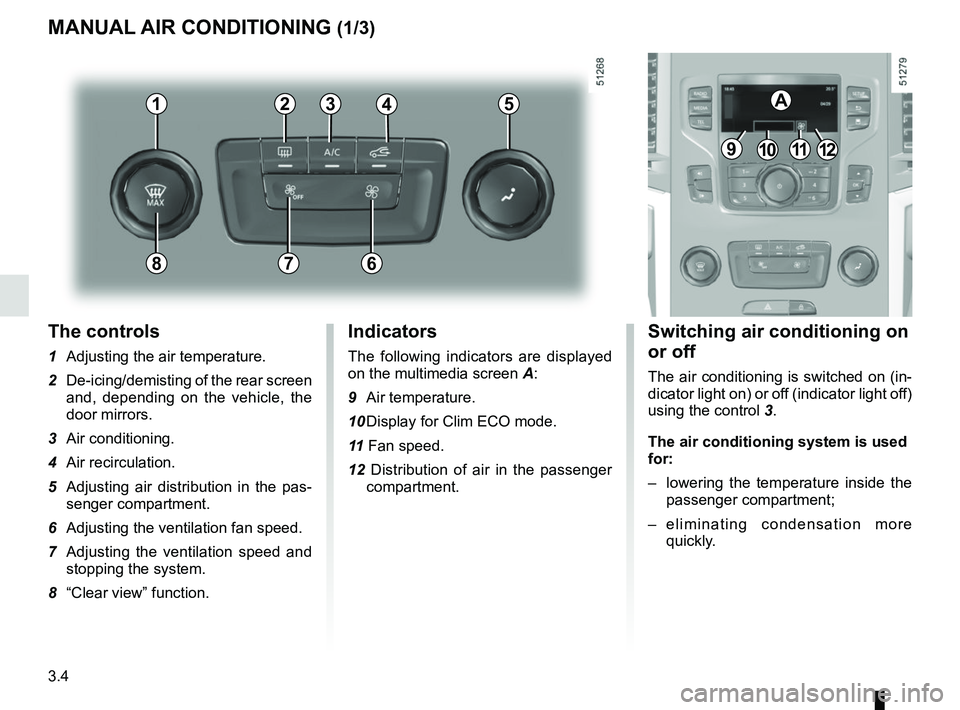
The controls
1 Adjusting the air temperature.
2 De-icing/demisting of the rear screen and, depending on the vehicle, the
door mirrors.
3 Air conditioning.
4 Air recirculation.
5 Adjusting air distribution in the pas- senger compartment.
6 Adjusting the ventilation fan speed.
7 Adjusting the ventilation speed and stopping the system.
8 “Clear view” function.
MANUAL AIR CONDITIONING (1/3)
Switching air conditioning on
or off
The air conditioning is switched on (in-
dicator light on) or off (indicator light off)
using the control 3.
The air conditioning system is used
for:
– lowering the temperature inside the
passenger compartment;
– eliminating condensation more quickly.
Indicators
The following indicators are displayed
on the multimedia screen A:
9 Air temperature.
10 Display for Clim ECO mode.
11 Fan speed.
12 Distribution of air in the passenger compartment.
21
7
34
9101112
A5
68