display Seat Alhambra 2011 Owner's Guide
[x] Cancel search | Manufacturer: SEAT, Model Year: 2011, Model line: Alhambra, Model: Seat Alhambra 2011Pages: 385, PDF Size: 7.92 MB
Page 87 of 385
85
Unlocking and locking
Warning indicator lights up Possible cause Solution
The tailgate is open or not
corr
ectly
shut.
Stop driving immediately!
Open the t ai
lgate and close it
again. Several warning and control lamps should light up for a few seconds when
the ignition is
sw
itched. This signals that the lamp is working properly. They
will switch off after a few seconds.
A warning appears on the instrument panel if the tailgate is open or not
properly closed.
Depending on the vehicle equipment, a symbol may be displayed on the in-
strument panel screen instead of the warning lamp. The indication is also
visible when the ignition is switched off. The indication disappears around
15 seconds after the vehicle has been locked. WARNING
If the tailgate is not correctly closed, it could open unexpectedly when
drivin g and c
ause serious injuries.
● Always stop immediately and close the tailgate.
● Ensure that the tailgate has been locked into place by the element on
the lock c
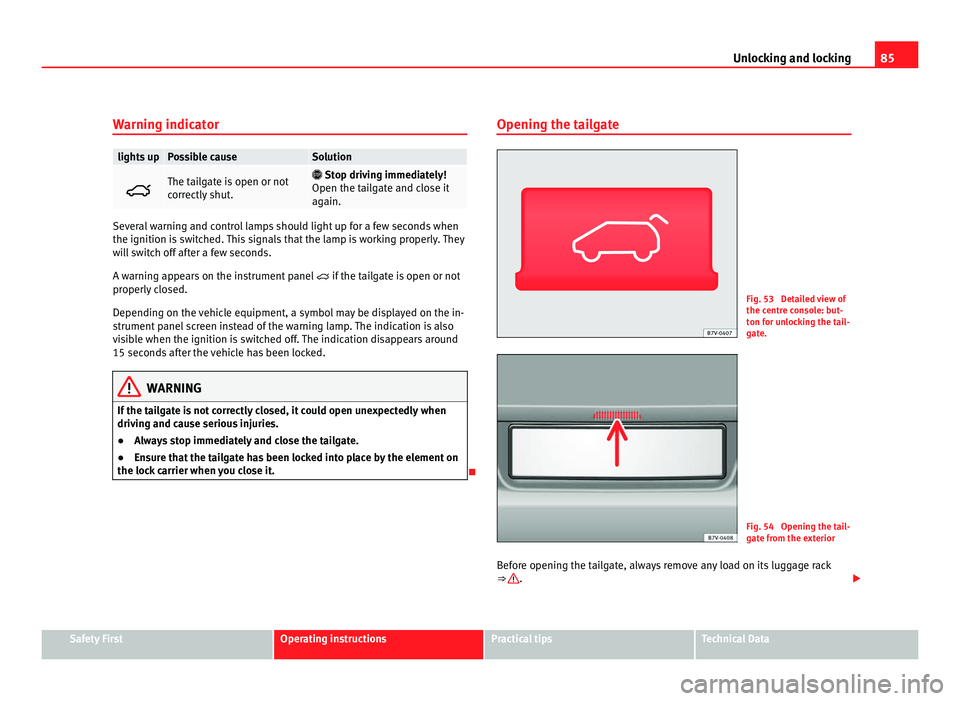
arrier when you close it. Opening the tailgate Fig. 53 Detailed view of
the centr
e c
onsole: but-
ton for unlocking the tail-
gate. Fig. 54 Opening the tail-
gat
e fr
om the exterior
Before opening the tailgate, always remove any load on its luggage rack
⇒ .
Safety First Operating instructions Practical tips Technical Data
Page 99 of 385
97
Lights and visibility
The control turn signals are switched on and off from the menu Lights & Visi-
bility on the instrument panel display ⇒ page 62. This function can be dis-
connected at a specialised workshop for those vehicles which do not have
the menu Lights & Visibility .WARNING
Incorrect use of the headlamps may cause accidents and serious injury,
as the m
ain beam may distract or dazzle other drivers. Note
● The turn signal only works when the ignition is switched on. The hazard
w arnin
g lights also work when the ignition is switched off ⇒ page 312.
● If a turn signal on the vehicle or trailer is faulty, the warning lamp flash-
es tw
ice as fast as usual.
● The main beam headligh
ts can only be switched on if the dipped beam
headlights are already on.
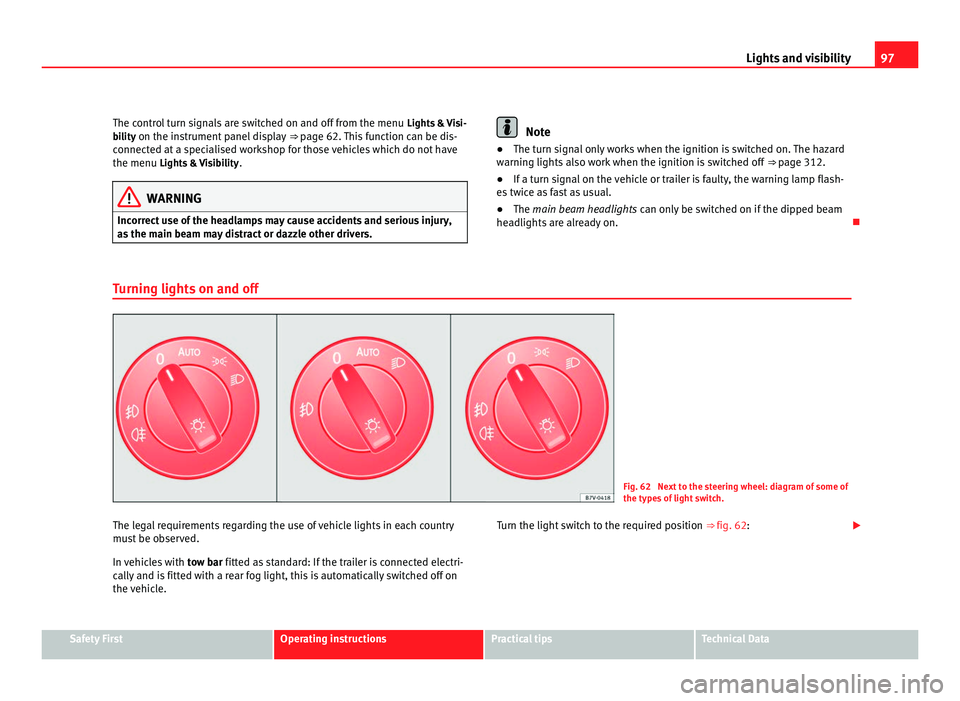
Turning lights on and off Fig. 62 Next to the steering wheel: diagram of some of
the type
s
of light switch.
The legal requirements regarding the use of vehicle lights in each country
mus t
be observed.
In vehicles with tow bar fitted as standard: If the trailer is connected electri-
cally and is fitted with a rear fog light, this is automatically switched off on
the vehicle. Turn the light switch to the required position
⇒ fig. 62:Safety First Operating instructions Practical tips Technical Data
Page 102 of 385
100
Lights and visibility
The automatic headlight adjustment automatically switches on the main
beam dependin g on the
vehicles travelling in front and in the opposite di-
rection, and of other environmental and traffic conditions from an approxi-
mate speed of 60 km/h (37 mph) and turns them off again at speeds below
approximately 30 km/h (18 mph).
When the dynamic adaptive light system is deactivated ⇒ page 99 or the
headlight adjustment is activated, only the main beam is turned on and off
automatically. This happens depending on the vehicles travelling in front
and in the opposite direction, and on the road lighting.
Switching on and off How it works
Switching
on: – With the ignition on, turn the lights control to the position
and p
ut the turn signal and main beam lever in the
main beam position ⇒ page 96. When the headlight adjust-
ment (automatic also) is activated, the warning lamp lights
up in the instrument panel display .Switching
off: – Switch the ignition off.
– ALTERNA
TIVEL
Y: Turn the light switch to a position other
than ⇒ page 97.
– ALTERNATIVELY: place the turn signal and main beam lev-
er in the headlight flasher or main beam position
⇒ page 96. The following conditions can cause the headlight adjustment to fail to turn
off the m
ain be
am or fail to do so in time:
● On roads with insufficient lighting with very reflective signs
● If road users are insufficiently lit up, e.g. pedestrians or cyclists
● On closed curves, when the traffic in the opposite direction is partially
hidden, on pronou
nced slopes
● On roads with traffic in the opposite direction and with a central reserva-
tion barrier when the driver c
an see through gaps or over it e.g. lorry drivers
● If the camera is damaged or if the power supply has been cut off
● In the event of fog, snow or heavy rain ●
In the event of
dust or sand storms
● If the windscreen is damaged by the impact from a stone in the camera's
field of
vision
● If the camera's field of vision is misted up, dirty or covered by a sticker,
snow or ic
e. WARNING
The greater comfort that the headlight adjustment provides (automatic
al so) mu
st not cause you to take risks. The system is not a replacement
for driver awareness.
● Always monitor the lights yourself and adjust them depending on the
light, vi
sibility and traffic conditions.
● The headlight adjustment (automatic also) may not correctly detect
all
situations and in certain situations may only provide limited function.
● If the windscreen is damaged or modifications are made to the vehi-
cle lightin
g, this may harm the functioning of the headlight adjustment
(automatic also), for example, if additional headlight are fitted. Note
Main beam and flashed headlights can be turned on and off manually at
any time w
ith the turn signal and main beam lever ⇒ page 96.
Adhesive strips for headlights or adjusting headlights In those countries where vehicles drive on the other side of the road to the
home cou
ntr
y, the asymmetric dipped beam may dazzle drivers of oncom-
ing vehicles. Therefore, when driving abroad, adhesive strips should be at-
tached to the headlights or the headlights should be adjusted accordingly.
The direction of the headlights can be adjusted from the instrument panel,
in the Tourist light submenu of the Settings menu
⇒ page 67.
Page 157 of 385
155
Heating, Ventilation and Air conditioning
Heating, Ventilation and Air conditioning Climate Control
Introduction Viewing Climatronic information
The fact
or
y-fitted radio or navigation system screen briefly displays informa-
tion relating to Climatronic.
The units of temperature measurement is displayed on the factory-installed
radio or navigation system and, depending on the vehicle equipment, can
be set using the Configuration menu on the instrument panel.
Additional information and warnings:
● SEAT information system ⇒ page 62
● W
indscreen wash system ⇒ page 105
● Aux
iliary heating ⇒ page 163
● C
aring for and cleaning the vehicle exterior ⇒ page 242WARNING
Reduced visibility through the windows increases the risk of serious acci-
dents.
● Ens
ure that all windows are free of ice and snow and that they are not
fogg
ed up preventing a clear view of everything outside.
● The maximum heat output required to defrost windows quickly is only
avail
able when the engine has reached its normal running temperature.
Only drive when you have good visibility. WARNING (Continued)
● Always ensure that you use the climate control and heated rear win-
do w t
o maintain good visibility.
● Never leave the air recirculation on for a long period of time. If the
coolin
g mode is switched off and air recirculation mode switched on, the
windows can mist over very quickly, considerably limiting visibility.
● Switch air recirculation mode off when it is not required. WARNING
Stuffy or used air will increase fatigue and reduce driver concentration
pos s
ibly resulting in a serious accident.
● Never leave the fresh air fan turned off or use the air recirculation for
long periods
of time; the air inside the passenger compartment will not
be refreshed. CAUTION
● Switch the climate control system off if you think it may be broken. This
w i
ll avoid additional damage. Have the climate control system checked by a
Technical Service.
● Repairs to the climate control system require specialist knowledge and
speci
al tools. SEAT recommends visiting a Technical Service.
● Do not smoke when air recirculation is switched on in vehicles with a cli-
mate c
ontrol system. The smoke taken in could lie on the cooling system va-
poriser and on the activated charcoal cartridge of the dust and pollen filter,
leading to a permanently unpleasant smell. Safety First Operating instructions Practical tips Technical Data
Page 160 of 385
158
Heating, Ventilation and Air conditioning
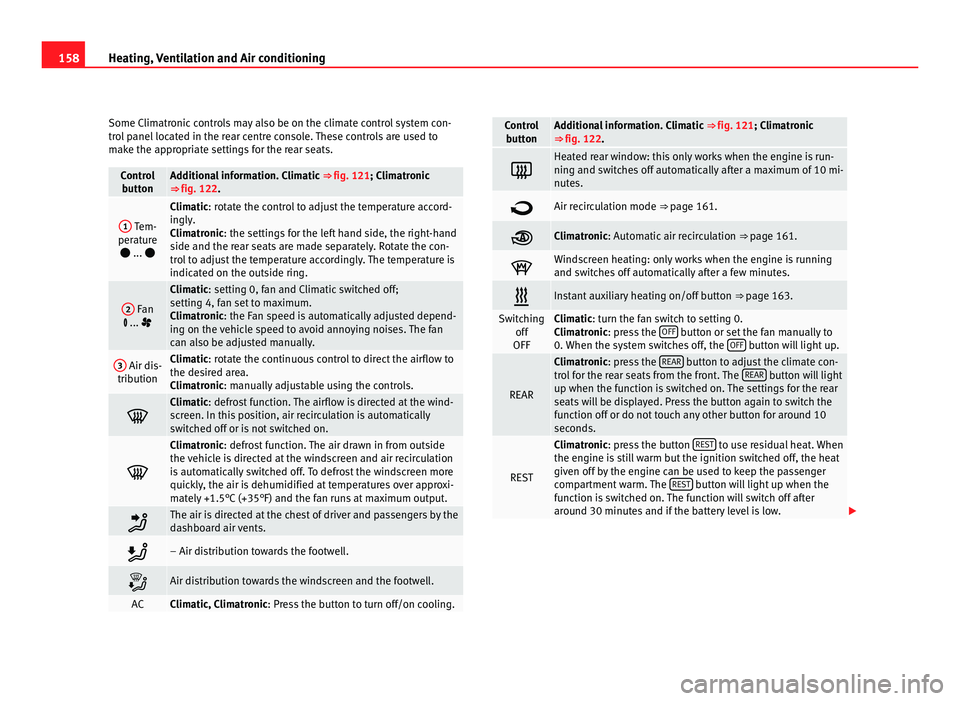
Some Climatronic controls may also be on the climate control system con-
tro l
panel located in the rear centre console. These controls are used to
make the appropriate settings for the rear seats. Control
butt on Additional information. Climatic
⇒ fig. 121; Climatr
onic
⇒ fig. 122. 1
Tem-
perat ur
e
... Climatic: rotate the control to adjust the temperature accord-
in
gly
.
Climatronic: the settings for the left hand side, the right-hand
side and the rear seats are made separately. Rotate the con-
trol to adjust the temperature accordingly. The temperature is
indicated on the outside ring. 2
Fan
... Climatic: setting 0, f
an and C
limatic switched off;
setting 4, fan set to maximum.
Climatronic: the Fan speed is automatically adjusted depend-
ing on the vehicle speed to avoid annoying noises. The fan
can also be adjusted manually. 3
Air dis-
tribution Climatic: rotate the continuous control to direct the airflow to
the de
s
ired area.
Climatronic: manually adjustable using the controls. Climatic: defro
s
t function. The airflow is directed at the wind-
screen. In this position, air recirculation is automatically
switched off or is not switched on. Climatronic: defro
s
t function. The air drawn in from outside
the vehicle is directed at the windscreen and air recirculation
is automatically switched off. To defrost the windscreen more
quickly, the air is dehumidified at temperatures over approxi-
mately +1.5°C (+35°F) and the fan runs at maximum output. The air is directed at the chest of driver and passengers by the
da
shbo
ard air vents. – Air distribution towards the footwell.
Air distribution towards the windscreen and the footwell.
AC Climatic, Climatronic: Pre
s
s the button to turn off/on cooling. Control
butt on Additional information. Climatic
⇒ fig. 121; Climatr
onic
⇒ fig. 122. Heated rear window: this only works when the engine is run-
ning and sw
it
ches off automatically after a maximum of 10 mi-
nutes. Air recirculation mode ⇒ pag
e 161. Climatronic: Autom
atic
air recirculation ⇒ page 161. Windscreen heating: only works when the engine is running
and swit
c
hes off automatically after a few minutes. Instant auxiliary heating on/off button
⇒ page 163. Switching
off
OFF Climatic: turn the fan switch to setting 0.
C
lim
atronic: press the OFF button or set the fan manually to
0. When the sy s
tem switches off, the OFF button will light up.
REAR Climatronic: pre
s
s the REAR button to adjust the climate con-
tro l
for the rear seats from the front. The REAR button will light
up when the fu nction i
s switched on. The settings for the rear
seats will be displayed. Press the button again to switch the
function off or do not touch any other button for around 10
seconds. REST Climatronic: pre
s
s the button REST to use residual heat. When
the engine i s
still warm but the ignition switched off, the heat
given off by the engine can be used to keep the passenger
compartment warm. The REST button will light up when the
fu nction i
s switched on. The function will switch off after
around 30 minutes and if the battery level is low.
Page 162 of 385
160
Heating, Ventilation and Air conditioning
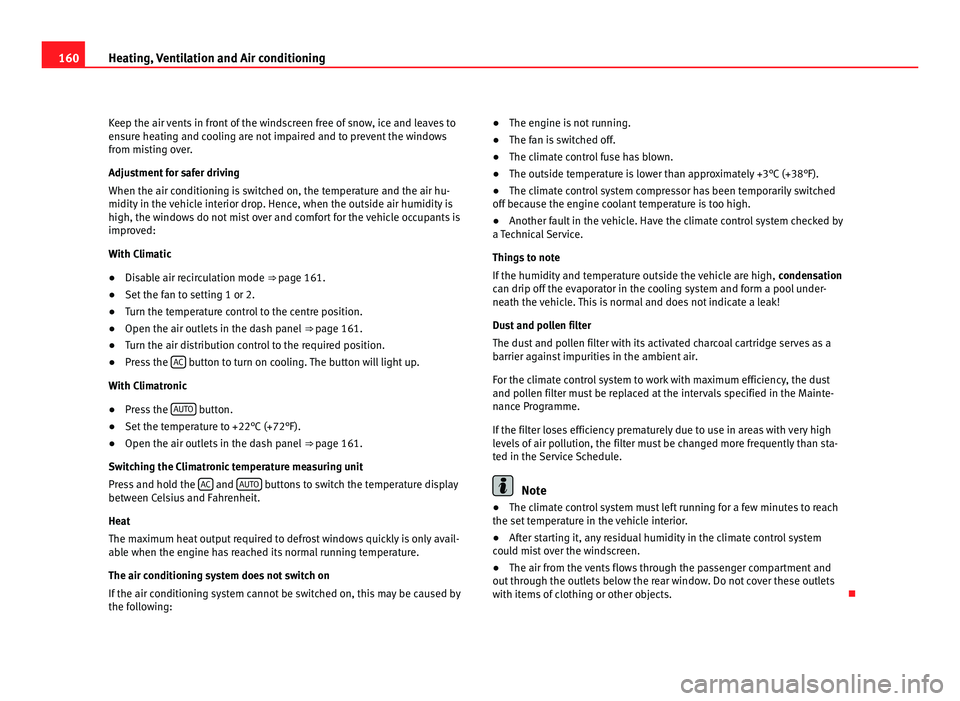
Keep the air vents in front of the windscreen free of snow, ice and leaves to
ens ur
e heating and cooling are not impaired and to prevent the windows
from misting over.
Adjustment for safer driving
When the air conditioning is switched on, the temperature and the air hu-
midity in the vehicle interior drop. Hence, when the outside air humidity is
high, the windows do not mist over and comfort for the vehicle occupants is
improved:
With Climatic
● Disable air recirculation mode ⇒ pag
e 161.
● Set the fan to setting 1 or 2.
● Turn the temperature control to the centre position.
● Open the air outlets in the dash panel ⇒ pag
e 161.
● Turn the air distribution control to the required position.
● Press the AC button to turn on cooling. The button will light up.
With C lim
atronic
● Press the AUTO button.
● Set the temperature to +22°C (+72°F).
● Open the air outlets in the dash panel ⇒ pag
e 161.
Switching the Climatronic temperature measuring unit
Press and hold the AC and
AUT
O buttons to switch the temperature display
between C el
sius and Fahrenheit.
Heat
The maximum heat output required to defrost windows quickly is only avail-
able when the engine has reached its normal running temperature.
The air conditioning system does not switch on
If the air conditioning system cannot be switched on, this may be caused by
the following: ●
The engine is not running.
● The fan i
s switched off.
● The climate control fuse has blown.
● The outside temperature is lower than approximately +3°C (+38°F).
● The climate control system compressor has been temporarily switched
off becau
se the engine coolant temperature is too high.
● Another fault in the vehicle. Have the climate control system checked by
a Tec
hnical Service.
Things to note
If the humidity and temperature outside the vehicle are high, condensation
can drip off the evaporator in the cooling system and form a pool under-
neath the vehicle. This is normal and does not indicate a leak!
Dust and pollen filter
The dust and pollen filter with its activated charcoal cartridge serves as a
barrier against impurities in the ambient air.
For the climate control system to work with maximum efficiency, the dust
and pollen filter must be replaced at the intervals specified in the Mainte-
nance Programme.
If the filter loses efficiency prematurely due to use in areas with very high
levels of air pollution, the filter must be changed more frequently than sta-
ted in the Service Schedule. Note
● The climate control system must left running for a few minutes to reach
the set t
emperature in the vehicle interior.
● After starting it, any residual humidity in the climate control system
coul
d mist over the windscreen.
● The air from the vents flows through the passenger compartment and
out through the outl
ets below the rear window. Do not cover these outlets
with items of clothing or other objects.
Page 167 of 385
165
Heating, Ventilation and Air conditioning
Range
The rec eiv
er is in the interior of the vehicle. The remote control, when fitted
with new batteries, has a range of several hundred metres. Obstacles be-
tween the remote control and the vehicle, bad weather conditions and dis-
charged batteries can considerably reduce the range of the remote control.
An optimum range is obtained by keeping the remote control vertical, with
the aerial A pointing upwards. When doing so, do not cover the aerial with
your fin g
ers or with the palm of your hand.
There must be a minimum distance of two metres between the remote con-
trol and the vehicle. CAUTION
● The radiofrequency remote control contains electronic components.
Ther ef
ore, avoid getting the remote control wet and from being knocked
and protect it from direct sunlight.
● Use of inappropriate batteries may damage the remote control. For this
rea
son, always replace the dead battery with another of the same voltage,
size and specifications. For the sake of the environment
● Please dispose of old batteries so that they do not harm the environ-
ment .
● The r
emote control battery may contain perchlorate. Observe the legal
requirements
for their disposal.
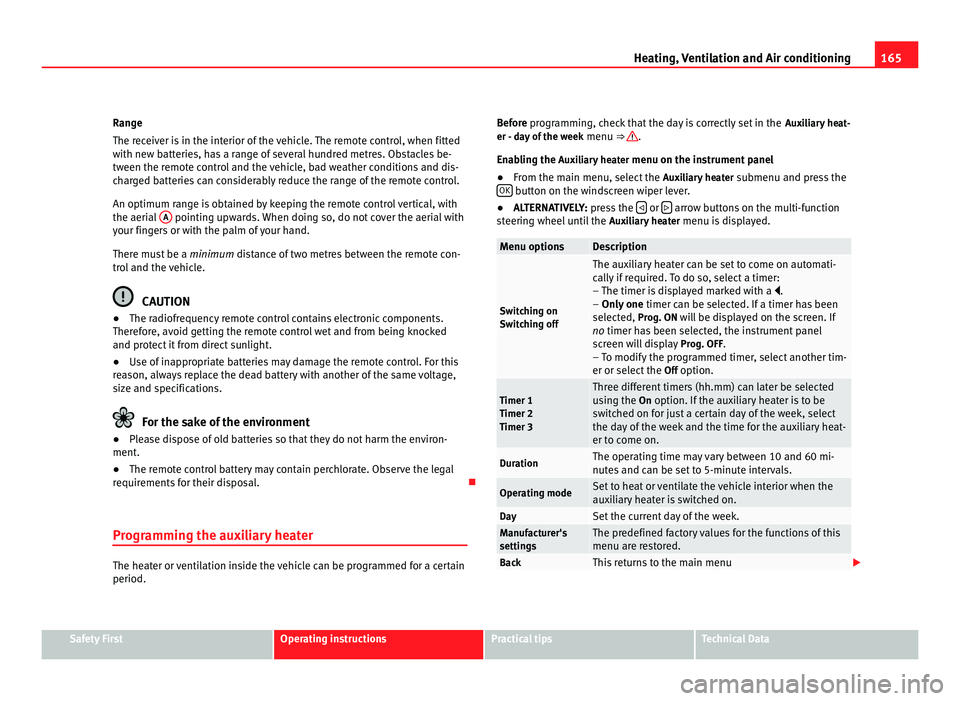
Programming the auxiliary heater The heater or ventilation inside the vehicle can be programmed for a certain
period. Before programming, check that the day is correctly set in the
Auxi
liary heat-
er - day of the week menu ⇒ .
Enab lin
g the Auxiliary heater menu on the instrument panel
● From the main menu, select the Auxili
ary heater submenu and press the
OK button on the windscreen wiper lever.
● ALTERNATIVELY: pre s
s the or
arrow buttons on the multi-function
st eerin
g wheel until the Auxiliary heater menu is displayed. Menu options Description
Switching on
Swit
c
hing off The auxiliary heater can be set to come on automati-
cal
ly
if required. To do so, select a timer:
– The timer is displayed marked with a .
– Only one timer can be selected. If a timer has been
selected, Prog. ON will be displayed on the screen. If
no timer has been selected, the instrument panel
screen will display Prog. OFF.
– To modify the programmed timer, select another tim-
er or select the Off option. Timer 1
Timer 2
Timer 3 Three different timers (hh.mm) can later be selected
us
in
g the On option. If the auxiliary heater is to be
switched on for just a certain day of the week, select
the day of the week and the time for the auxiliary heat-
er to come on. Duration The operating time may vary between 10 and 60 mi-
nute
s
and can be set to 5-minute intervals. Operating mode Set to heat or ventilate the vehicle interior when the
auxi
li
ary heater is switched on. Day Set the current day of the week.
Manufacturer's
setting
s The predefined factory values for the functions of this
menu are r
e
stored. Back This returns to the main menu
Safety First Operating instructions Practical tips Technical Data
Page 170 of 385
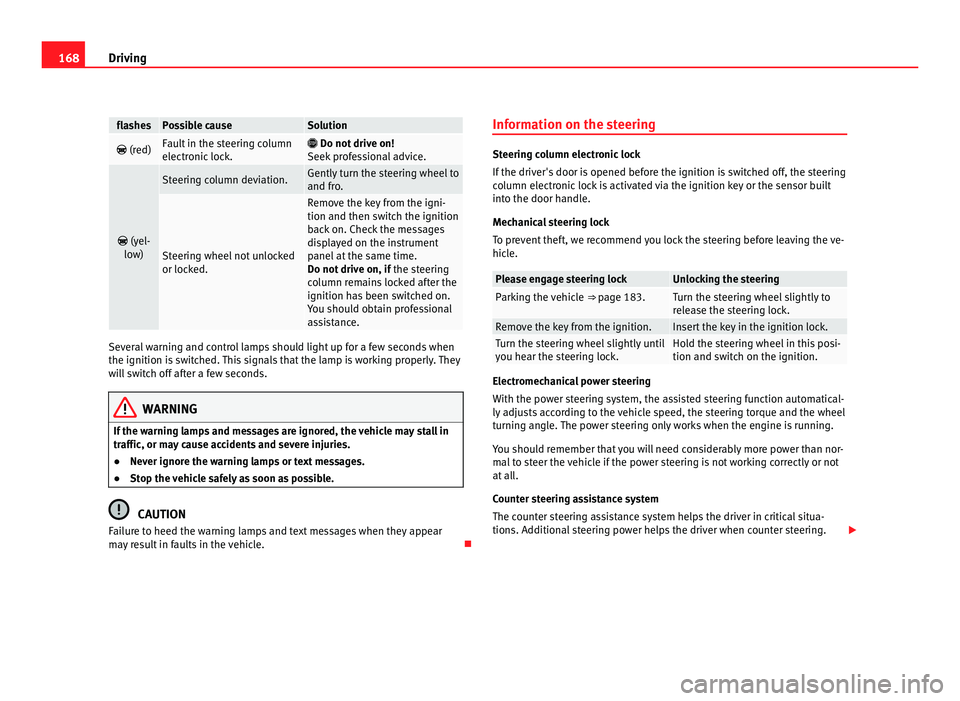
168
Driving flashes Possible cause Solution
(red) Fault in the steering column
electr
onic
lock.
Do not drive on!
Seek pr
ofessional advice.
(yel-
lo w) Steering column deviation. Gently turn the steering wheel to
and fro
. Steering wheel not unlocked
or lock
ed. Remove the key from the igni-
tion and then swit
c
h the ignition
back on. Check the messages
displayed on the instrument
panel at the same time.
Do not drive on, if the steering
column remains locked after the
ignition has been switched on.
You should obtain professional
assistance. Several warning and control lamps should light up for a few seconds when
the ignition is
sw
itched. This signals that the lamp is working properly. They
will switch off after a few seconds. WARNING
If the warning lamps and messages are ignored, the vehicle may stall in
traffic, or m a
y cause accidents and severe injuries.
● Never ignore the warning lamps or text messages.
● Stop the vehicle safely as soon as possible. CAUTION
Failure to heed the warning lamps and text messages when they appear
ma y
result in faults in the vehicle. Information on the steering Steering column electronic lock
If the driv
er's
door is opened before the ignition is switched off, the steering
column electronic lock is activated via the ignition key or the sensor built
into the door handle.
Mechanical steering lock
To prevent theft, we recommend you lock the steering before leaving the ve-
hicle. Please engage steering lock Unlocking the steering
Parking the vehicle
⇒ page 183. Turn the steering wheel slightly to
rel
e
ase the steering lock. Remove the key from the ignition. Insert the key in the ignition lock.
Turn the steering wheel slightly until
you he
ar the s
teering lock. Hold the steering wheel in this posi-
tion and swit
c
h on the ignition. Electromechanical power steering
With the po
w
er steering system, the assisted steering function automatical-
ly adjusts according to the vehicle speed, the steering torque and the wheel
turning angle. The power steering only works when the engine is running.
You should remember that you will need considerably more power than nor-
mal to steer the vehicle if the power steering is not working correctly or not
at all.
Counter steering assistance system
The counter steering assistance system helps the driver in critical situa-
tions. Additional steering power helps the driver when counter steering.
Page 172 of 385
170
Driving
Stopping and starting the engine
Introduction Immobiliser display
When an inv
alid k
ey is used or in the event of a system fault, or Immo-
biliser on is displayed on the instrument panel. The engine cannot be star- ted.
Pushing or towing
For technical reasons, the vehicle must not be push- or tow-started. Jump
starting is preferable.
Additional information and warnings:
● Vehicle key set ⇒ pag
e 71
● Changing gear ⇒ pag
e 174
● Braking, stopping and parking ⇒ page 183
● St
eering ⇒ pag
e 167
● Start assist systems ⇒ pag
e 194
● Refuelling ⇒ pag
e 264
● Fuel ⇒ page 267
● Emer
gency locking and unlocking ⇒ page 314
● Jump s
tarting ⇒ pag
e 337
● Tow-starting and towing away ⇒ pag
e 340 WARNING
Turning off the engine while driving will make stopping the vehicle diffi-
cu lt; thi
s could even result in the loss of control causing an accident with
serious consequences.
● The assisted braking and steering systems, the airbag system, safety
belts and c
ertain safety equipment are only active while the engine is
running.
● The engine should only be switched off when the vehicle is at a
stand
still. WARNING
While the engine is running or starting it could help reduce the risk of se-
rious injur
y.
● Never start or leave the engine running in poorly ventilated or closed
spac
es. Exhaust gas contains carbon monoxide, a toxic, colourless and
odourless gas. Carbon monoxide can cause people to lose conscious-
ness. It can also cause death.
● Never leave the vehicle unattended if the engine is running. The vehi-
cle c
ould move off suddenly or something unexpected could happen re-
sulting in damage and serious injury.
● Never use start boosters. Cold start sprays could explode or increase
the engine speed u
nexpectedly.
Page 176 of 385
174
Driving Note
● In vehicles with automatic gearbox, the key can only be removed when
the sel ect
or lever is in position P.
● After stopping the engine, the engine compartment fan may continue
running f
or a few minutes, even when the ignition has been switched off or
the key removed. The radiator fan is automatically switched off.
Electronic immobiliser The gear lock prevents the engine from being started with an unauthorised
key
and the
vehicle being moved.
The vehicle key has a built-in chip. It automatically deactivates the immobil-
izer when the key is inserted into the ignition lock.
For this reason, the vehicle can only be used with a genuine SEAT key with
the correct code. Coded keys can be obtained from your Authorised Service
Centre ⇒ page 71. If an unauthorised key is used, the message SAFE or Immobiliser active is
displayed on the instrument panel. The vehicle cannot be started in this
case Note
The correct operation of the vehicle is only guaranteed when original SEAT
key s
are used. Changing gear
Introduction When reverse gear is engaged and the ignition is switched on the following
tak
e
s place:
● Reverse lights light up.
● When reversing, the air conditioner automatically changes to air recircu-
lation mode.
● The re
ar window heater switches on when the windscreen wiper is acti-
vated.
● A
lso, the parking sensor system, the optical parking sensor and the
camera f
or the reverse assist system are connected.
Additional information and warnings:
● Instruments ⇒ page 57
● Br
aking, stopping and parking ⇒ page 183
● P
arking sensor system ⇒ page 198
● P
ark Assist system ⇒ page 202
● R
everse assist system (Rear Assist) ⇒ page 207
● Air c
onditioning ⇒ page 155
● El
ectronic power control and exhaust gases purification system
⇒ page 228
● Emer
gency locking and unlocking ⇒ page 314 WARNING
Rapid acceleration can cause loss of traction and skidding, especially on
slip per
y ground. This could cause loss of control of the vehicle resulting
in an accident and considerable damage.
● Only use the kickdown or rapid acceleration if visibility, weather, road
and traffic c
onditions so permit.