display Seat Alhambra 2011 Workshop Manual
[x] Cancel search | Manufacturer: SEAT, Model Year: 2011, Model line: Alhambra, Model: Seat Alhambra 2011Pages: 385, PDF Size: 7.92 MB
Page 220 of 385
218
Driving
Sign Assist*
Introduction Sign Assist can help the driver with information on speed limits or if over-
tak
in
g is prohibited at that moment. The traffic signs and additional infor-
mation detected by the system is represented in the instrument panel dis-
play and in the visual presentation of the navigation system map.
Applicable countries:
Sign Assist is supported in the following countries:
Andorra, Belgium, Denmark, Germany, Finland, France, Ireland, Italy, Liech-
tenstein, Luxembourg, Monaco, Netherlands, Norway, Austria, Poland, Por-
tugal, San Marino, Sweden, Switzerland, Spain, Czech Republic, United
Kingdom, Vatican City.
Additional information and warnings:
● SEAT information system ⇒ pag
e 62
● Navigation system ⇒ Bookl
et Navigation systemWARNING
The traffic signs and instructions shown by Sign Assist may differ from
the curr ent
traffic situation.
● The signs and Highway Code rules always take precedence over the
instruction
s and display of Sign Assist.
● Adjust your speed and driving style to visibility, road, traffic and
weather c
onditions.
● The system cannot always detect or correctly show all the traffic
signs. WARNING
The traffic sign detection is not a replacement for driver awareness.
● Adverse conditions of visibility, darkness, snow, rain and fog can
cau se the sy
stem not to show the traffic signs or to show them errone-
ously. CAUTION
● If old mapping data is used in the navigation system, this may cause the
tr affic
signs to be shown incorrectly.
● In the route points mode (navigation by route points) of the navigation
syst
em, Sign Assist is only partly available.
Page 221 of 385
219
Driving
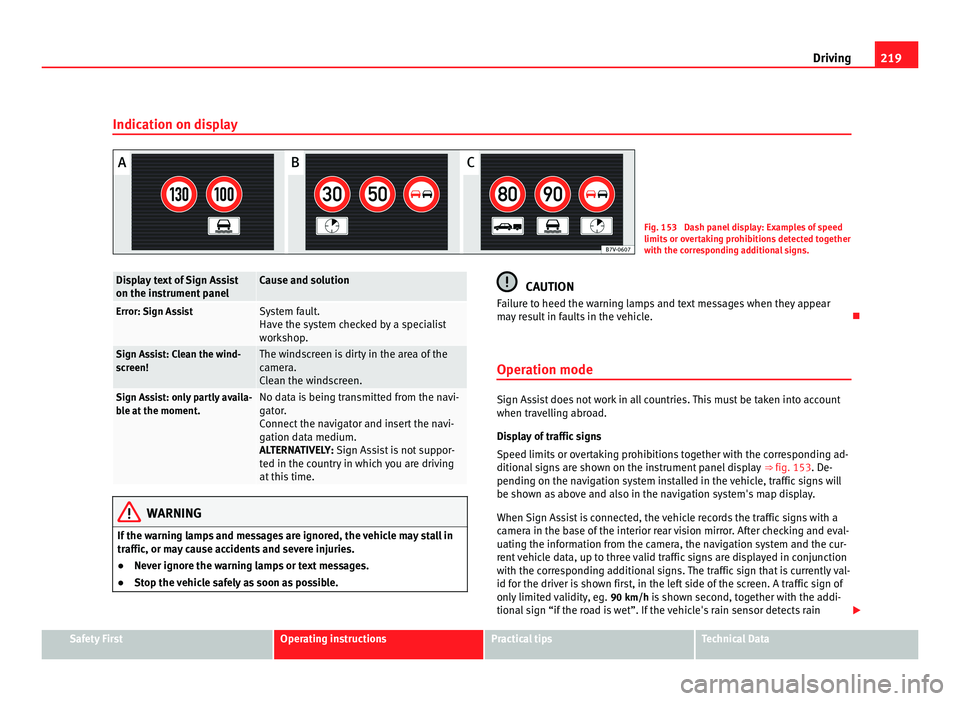
Indication on display Fig. 153 Dash panel display: Examples of speed
limits
or o
vertaking prohibitions detected together
with the corresponding additional signs. Display text of Sign Assist
on the ins
trument
panel Cause and solution
Error: Sign Assist System fault.
Have the sy
s
tem checked by a specialist
workshop. Sign Assist: Clean the wind-
sc
r
een! The windscreen is dirty in the area of the
camer
a.
C
lean the windscreen. Sign Assist: only partly availa-
bl
e at
the moment. No data is being transmitted from the navi-
gat
or
.
Connect the navigator and insert the navi-
gation data medium.
ALTERNATIVELY: Sign Assist is not suppor-
ted in the country in which you are driving
at this time. WARNING
If the warning lamps and messages are ignored, the vehicle may stall in
traffic, or m a
y cause accidents and severe injuries.
● Never ignore the warning lamps or text messages.
● Stop the vehicle safely as soon as possible. CAUTION
Failure to heed the warning lamps and text messages when they appear
ma y
result in faults in the vehicle.
Operation mode Sign Assist does not work in all countries. This must be taken into account
when trav
el
ling abroad.
Display of traffic signs
Speed limits or overtaking prohibitions together with the corresponding ad-
ditional signs are shown on the instrument panel display ⇒ fig. 153. De-
pending on the navigation system installed in the vehicle, traffic signs will
be shown as above and also in the navigation system's map display.
When Sign Assist is connected, the vehicle records the traffic signs with a
camera in the base of the interior rear vision mirror. After checking and eval-
uating the information from the camera, the navigation system and the cur-
rent vehicle data, up to three valid traffic signs are displayed in conjunction
with the corresponding additional signs. The traffic sign that is currently val-
id for the driver is shown first, in the left side of the screen. A traffic sign of
only limited validity, eg. 90 km/h is shown second, together with the addi-
tional sign “if the road is wet”. If the vehicle's rain sensor detects rain Safety First Operating instructions Practical tips Technical Data
Page 222 of 385
220
Driving
during travel, the traffic sign valid at this moment will move to the first posi-
tion along the a d
ditional sign “if the road is wet”.
The permanent display on the instrument panel screen is shown as you
pass the real traffic signs. The signs for entering and leaving towns activate
the display of the usual speed limits for that country on roads in populated
areas and national highways, even if the speed is not limited by an actual
traffic sign.
The end of a prohibition or limitation is not displayed. If you exceed the
speed limits shown, a warning will not appear. The system does not detect
areas with little traffic. The current legal provisions apply.
Connection and disconnection
● Connect or disconnect the assist system in the Settings
menu within the
Seat information system ⇒ page 62.
● ALTERNATIVELY: Pres
s the button for the driver assist systems on the
main beam lever.
Trailer
Connect or disconnect the additional display of speed limits and overtaking
prohibitions valid for trailers (trailer mode) in the Settings menu inside with-
in the Seat information system ⇒ page 62.
Page 228 of 385
226
Driving and the environment
Economic driving style Changing gear early
General
in
structions: The highest gear is always the most economical gear.
As a guideline, for the majority of vehicles: At a speed of 30 km/h, drive in
third gear, at 40 km/h in fourth gear and at 50 km/h in fifth gear.
In addition, skipping gears when shifting up helps to save fuel, weather and
traffic conditions permitting.
Do not wait until the last moment before changing gear. Only use first gear
when you move off and change to second gear quickly. Avoid the kick-down
function in vehicles with automatic gearbox.
Vehicles with a gear display help to achieve an economical driving style as
the display indicates the best moment to change gear.
Let the vehicle roll
If you take your foot off the accelerator, the fuel supply is stopped and con-
sumption is reduced.
Allow the vehicle to roll without accelerating, for example when approach-
ing a red traffic light. However, if the vehicle is rolling too slowly or the dis-
tance is too long, the clutch pedal should be pressed to declutch. The en-
gine will then operate at idle speed.
If the vehicle is going to be at a standstill for a period of time, switch off the
engine; for example, while waiting at a level crossing. In vehicles which
have the Start-Stop function on, the engine switches off automatically when
the vehicle is not moving.
Think ahead and “flow” with the traffic
Frequent acceleration and braking considerably increase fuel consumption.
If you think ahead as you drive and keep a safe distance from the vehicle in
front, it is possible to slow down by simply lifting your foot off the accelera-
tor. This eliminates the need for constant braking and acceleration. Calm and steady driving
Cons
tancy is more important than speed: The more you drive at a constant
speed, the lower the fuel consumption.
When driving on the motorway, it is more efficient to drive at a constant and
more moderate speed than to be continuously accelerating and braking. As
a general rule, you will reach your destination just as quickly when you drive
at a constant speed.
The cruise control function helps you to achieve a constant style of driving.
Moderate use of additional electrical appliances
It is important to travel in comfort, but convenience systems should be used
in an ecological manner.
Some equipment, when connected, increase fuel consumption considera-
bly, for example:
● Air conditioning cooling system: If the air conditioning system is re-
quired to c
ool to significantly lower temperatures than the true outside tem-
perature, it will require a large quantity of energy from the engine. There-
fore, we recommend that the selected temperature for the vehicle is not too
different to the outside temperature. It is a good idea to open all the win-
dows of the car before starting your journey, and to drive a short distance
with all the windows open to allow the vehicle to cool down slightly. Only
then should you close all the windows and switch on the air conditioning.
Keep windows closed when travelling at high speeds. Driving with the win-
dows open increases fuel consumption.
● Switch off the seat heating when the seats have warmed up.
● Switch off the heated rear window and the windscreen heating when the
window
s have demisted and are free of ice.
● Do not leave the auxiliary heater switched on when the vehicle is mov-
ing ⇒ p
age 163.
Page 263 of 385
261
Accessories, parts replacement and modifications
In vehicles equipped with an emergency call function via the mobile phone
or other app li
ances connected in the vehicle, it is possible to send the vehi-
cle position. If the control unit records an accident with airbag activation,
the system may automatically send a signal. This will depend on the net-
work operator. Normally, transmission is only possible in areas with good
coverage.
Event Data Recorder
The vehicle is not fitted with an event data recorder.
An event data recorder temporarily stores the vehicle information. There-
fore, in the event of accident, it is possible to obtain detailed information
about how the accident occurred. For example, in vehicles with airbag sys-
tems, data relating to speed of impact, seat belt status, seat positions and
airbag activation times may be stored. The volume of data depends on the
manufacturer.
Event data recorders can only be mounted with authorisation from the vehi-
cle owner and, in some countries, they are governed by local legislation.
Reprogramming control units
On the whole, all the data required for the component management is stor-
ed in the control units. The programming of certain convenience functions,
such as the convenience indicators, individual door opening and instruc-
tions on the display can be modified using special equipment at the work-
shop. If this is the case, the information and descriptions given in the in-
structions manual will not match the original functions. Therefore, SEAT rec-
ommends that any modifications are recorded in the section “Other work-
shop notes” in the Maintenance Programme.
The Technical Service must have a record of any modification to the pro-
gramming.
Reading the vehicle fault memory
There is a diagnostics connector in the vehicle interior for reading the vehi-
cle fault memory. The fault memory documents errors and deviations from
the theoretical values of the electronic control units. The diagnostics connector is in the driver's side footwell area, next to the
lever f
or opening the bonnet, below a cover.
The fault memory should only be read and reset by a Technical Service.
Using a mobile telephone in a vehicle without connection
to an ext
erior aerial Mobile telephones transmit and receive radio waves, both when in use and
when on st
and-b
y. Scientific studies state that radio waves exceeding cer-
tain values may be harmful to the human body. International committees
and authorities have established limits and directives in order to ensure
electromagnetic radiation from mobile phones remains within certain limits
that do not endanger human health. However, there is no available conclu-
sive scientific evidence that cordless phones are completely safe.
Therefore, some experts recommend that use of mobile phone be kept to a
minimum until the results of current research are published.
When a mobile phone not connected to an exterior aerial is used inside the
vehicle, the electromagnetic radiation may be greater than if the mobile
phone were connected to a built-in aerial or to another exterior aerial.
If the vehicle is fitted with a suitable hands-free device, it will comply with
the legislation in many countries which only permits the use of mobile
phones inside vehicles using a hands-free device.
The hands-free system mounted at the factory has been designed for use
with conventional mobile phones and phones with Bluetooth technology.
Mobile phones should be placed on a suitable phone cradle. In addition,
the cradle should always be correctly fitted into the base plate. This ensures
that the mobile phone is securely fastened to the instrument panel and con-
nected to the exterior aerial of the vehicle.
If the mobile phone is connected to an aerial incorporated into the vehicle
or an exterior aerial connected to the vehicle, this will help to reduce the Safety First Operating instructions Practical tips Technical Data
Page 274 of 385
272
Checking and refilling levels WARNING
If the warning lamps and messages are ignored, the vehicle may stall in
traffic, or m a
y cause accidents and severe injuries.
● Never ignore the warning lamps or text messages.
● Stop the vehicle safely as soon as possible. CAUTION
Failure to heed the warning lamps and text messages when they appear
ma y
result in faults in the vehicle.
Information on AdBlue In vehicles with Selective Catalytic Reduction, a special urea solution (AdBl-
ue) is
inj
ected into the exhaust gas system in front of the catalytic converter
to reduce nitrogen oxide emissions.
The consumption of AdBlue depends on individual driving style, the tem-
perature at which the system operates and the outside temperature where
the vehicle is driven. AdBlue is kept in an independent tank in the vehicle and should be refilled
at an offici
al supplier. The AdBlue tank holds about 17 litres.
A message will be displayed on the instrument panel around 2400 km be-
fore the next service to indicate that AdBlue must be refilled ⇒ page 273. If
you ignore this message and do not refill, you will be unable to start the en-
gine afterwards ⇒ page 271.
SEAT recommends contacting a specialist workshop. If you are unable to
visit a qualified specialist workshop, you should temporarily refill with a
minimum of 10.0 litres of AdBlue. Only refill using AdBlue expressly ap-
proved by SEAT.
When the indicators and light simultaneously, there is a fault. SEAT
recommends visiting the closest qualified workshop.
AdBlue ®
is a registered trademark in the US, Germany, the European Union
and other countries belonging to the German automobile industry ("Ver-
band der Automobilindustrie e. V.", VDA).
Page 293 of 385
291
Checking and refilling levels WARNING (Continued)
● Battery acid is very corrosive and caustic. It can burn skin and cause
b lindne
ss. When handling the battery, protect yourself from splashes of
acids, above all your hands, arms and face.
● Never tilt the vehicle battery. Battery acid could spill out of the open-
ings
to release gases and cause corrosion damage.
● Never open the vehicle battery.
● If battery acid splashes on you, immediately rinse your eyes and skin
abund
antly with water for several minutes. Then seek medical care imme-
diately.
● If acid is swallowed by mistake, consult a doctor immediately.
Charging, replacing and connecting or disconnecting the
batt er
y Charging the battery
The v
ehic
le battery should be charged by a specialist workshop only, as bat-
teries using special technology have been installed and they must be charg-
ed in a controlled environment ⇒ . SEAT recommends visiting a Technical
Serv ic
e.
Replacing a vehicle battery
The battery has been developed to suit the conditions of its location and
has special safety features. If the battery must be replaced, consult a quali-
fied SEAT workshop for information on electromagnetic compatibility, the
size and maintenance, performance and safety requirements of the new bat-
tery in your vehicle before you purchase one. SEAT recommends you have
the battery replaced by a qualified SEAT workshop.
Use only maintenance-free genuine batteries conforming to TL 825 06 and
VW 7 50 73 Standards. These standards must be dated April 2008 or later. Start-Stop systems (
⇒ page 196) ar
e equipped with a special battery. There-
fore, it must only be replaced with a battery of the same specifications.
Disconnecting the vehicle's battery
If you must disconnect the battery from the electrical system, please note
the following:
● Switch off the ignition and all electrical equipment.
● The vehicle must be unlocked before disconnecting the battery, other-
wise the al
arm will be triggered.
● First disconnect the negative cable and then the positive ⇒ .
Connectin g the
vehicle's battery
● Before reconnecting the battery, switch off the engine, the ignition and
electric dev
ices.
● First reconnect the positive cable and then the negative ⇒ .
Differ ent
control lamps may light up after connecting the battery and switch-
ing the ignition on. They will be turned off after a short trip at a speed of
between 15 - 20 km/h (10 - 12 mph). If the warning indicators remain lit,
please visit a specialised workshop to have the vehicle checked.
If the battery has been disconnected for a long time, it is possible that the
next service date is not displayed or calculated correctly ⇒ page 57. Respect
the maximum service intervals permitted ⇒ Booklet Maintenance Pro-
gramme.
Automatic consumer disconnection
The intelligent vehicle electrical system automatically implements a range
of measures to prevent the battery from discharging when high demands
are made on it: Safety First Operating instructions Practical tips Technical Data
Page 328 of 385
326
If and when
Changing bulbs
Introduction Changing bulbs requires a certain amount of manual skill. If you are unsure,
SEA
T r
ecommends that you consult an qualified workshop or request assis-
tance from a specialist. In general, a specialist is required if other vehicle
components must be removed or if the discharge lamps must be replaced.
You should store spare light bulbs in the vehicle for safety-relevant lights.
Spare bulbs may be obtained from the Official dealers and workshops. In
some countries, it is a legal requirement to carry spare bulbs in the vehicle.
Driving with faults and blown bulbs on the vehicle exterior lighting is
against the law.
Additional bulb specifications
The specifications of some headlamp bulbs and bulbs for the tail lamps fit-
ted at the factory may be different to those of conventional bulbs. Bulb in-
formation is displayed on the bulb socket or on the bulb itself.
Additional information and warnings:
● Lights and visibility ⇒ page 95
● W
orking in the engine compartment ⇒ page 275
● V
ehicle tools ⇒ page 320
● F
uses ⇒ page 322 WARNING
If the road is not well-lit and the vehicle is not clearly visible to other
driver s, ther
e is a risk of accident. WARNING
Failure to replace bulbs correctly may cause serious accidents.
● Before carrying out any work in the engine compartment please read
and ob ser
ve the warnings ⇒ page 275. In any vehicle, the engine com-
partment is a hazardous area and could cause severe injury.
● Discharge lamps work with high-voltage and can cause serious or fa-
tal
injury if handled incorrectly.
● H7 and discharge lamps are highly pressurised and could explode
when being ch
anged.
● Only replace the bulbs concerned when they have cooled.
● Never replace bulbs alone if you are not familiar with the operations
neces
sary. If you are not sure about procedures then visit a Technical
Service to carry out the necessary work.
● Never touch the bulb glass directly. Fingerprints will be evaporated by
the heat of
the operating bulb thus “fogging” up the reflector.
● The headlamp frameworks in the engine compartment and the tail
lamps
contain sharp elements. Always protect your hands when chang-
ing bulbs. CAUTION
After changing a bulb, if the rubber covers and plastic caps are not replaced
corr ectly
on the headlamp framework, the electrical installation may be
damaged, especially if water is allowed to enter.
Indicator lights up Possible cause Solution
A vehicle exterior lighting
bu
l
b is not working. Replace the faulty bulb.
Page 329 of 385
327
If and when
Several warning and control lamps should light up for a few seconds when
the ignition is sw
itched. This signals that the lamp is working properly. They
will switch off after a few seconds.
Checking the bulbs of a trailer
For vehicles with the factory fitted trailer system, certain trailer lights are al-
so controlled if the socket is correctly connected.
A fault on a trailer turn indicator is indicated on the instrument panel by the
indicator blinking twice as fast ( or ) ⇒ page 95.
● General fault of all indicators on one side.
● Fault in one tail light (on some models, also the registration light).
● Fault in two brake lights. WARNING
If the warning lamps and messages are ignored, the vehicle may stall in
traffic, or m a
y cause accidents and severe injuries.
● Never ignore the warning lamps or text messages.
● Stop the vehicle safely as soon as possible. CAUTION
Failure to heed the warning lamps and text messages when they appear
ma y
result in faults in the vehicle. Note
A fault in the LED on the tail lights will not be indicated. However, if the fault
affects al
l the LEDs then this will be indicated by the indicator . Information for replacing bulbs Checklist
To r
ep
lace a bulb, carry out the following operations always in the order giv-
en ⇒ :
Park the
vehicle a safe distance from traffic and on suitable ground.
Connect the electronic parking brake ⇒ page 183.
Turn the light switch to position 0 ⇒ page 95.
Move the gear lever into the neutral position ⇒ page 95.
Automatic gearbox: Move selector lever to position P ⇒ page 174.
Stop the engine and remove the key from the ignition ⇒ page 170.
Manual gearbox: Select a gear ⇒ page 174.
Wait until all of the passenger compartment lights are turned off
⇒ page 95.
Allow the corresponding bulb to cool. Visually inspect fuses to see if any are blown ⇒ page 322.
Replace the bulb according to the instructions ⇒ . Bulbs should only
be rep l
aced by new identical models. Bulb information is displayed on
the bulb socket or on the bulb itself.
In general, never touch the bulb glass directly. The heat of the bulb
would cause the fingerprint to evaporate and condense on the reflector.
This will impair the brightness of the headlight.
Check if the new bulb is working. If the bulb is not working, it may not
have been correctly fitted, it could be damaged or the connector may
not be correctly connected.
Every time a bulb for the headlights is replaced, visit a specialised
workshop to check the headlights.
1.
2.
3.
4.
5.
6.
7.
8.
9.
10.
11.
12.
13.
14.
Safety First Operating instructions Practical tips Technical Data
Page 371 of 385
Control of function
Rain sen sor
. . . . . . . . . . . . . . . . . . . . . . . . . 108
Control units . . . . . . . . . . . . . . . . . . . . . . . . . . . 260 Reprogramming . . . . . . . . . . . . . . . . . . . . . 261
Convenience closing Electric windows . . . . . . . . . . . . . . . . . . . . . . 90
Panorama sliding sunroof . . . . . . . . . . . . . . 94
Convenience functions Reprogramming . . . . . . . . . . . . . . . . . . . . . 261
Convenience opening Electric windows . . . . . . . . . . . . . . . . . . . . . . 90
Panorama sliding sunroof . . . . . . . . . . . . . . 94
Convenient entry function for the third row of seats . . . . . . . . . . . . . . . . . . . . . . . . . . . . . . . 120
Coolant Control lamp . . . . . . . . . . . . . . . . . . . . . . . . 284
See engine coolant . . . . . . . . . . . . . . . . . . 283
Temperature gauge . . . . . . . . . . . . . . . . . . 284
Warning lamp . . . . . . . . . . . . . . . . . . . . . . . 284
Counter steering assistance system . . . . . . . . 168
Crossing a river Salt water . . . . . . . . . . . . . . . . . . . . . . . . . . . . 9
Cruise control . . . . . . . . . . . . . . . . . . . . . . . . . . 212 Control lamp . . . . . . . . . . . . . . . . . . . . . . . . 212
Operations . . . . . . . . . . . . . . . . . . . . . . . . . 213
Warning lamp . . . . . . . . . . . . . . . . . . . . . . . 212
Cruise control system . . . . . . . . . . . . . . . . . . . . 212
Cup holder . . . . . . . . . . . . . . . . . . . . . . . . . . . . 149
Cup holders . . . . . . . . . . . . . . . . . . . . . . . 148, 150
Curb weight . . . . . . . . . . . . . . . . . . . . . . . . . . . . 15
Curtain airbags See "Airbag system" . . . . . . . . . . . . . . . . . . 37 D
Damaged ty res . . . . . . . . . . . . . . . . . . . . . . . . . 299
Dangers of not using the seat belt . . . . . . . . . . 20
Dash panel . . . . . . . . . . . . . . . . . . . . . . . . . . . . . 53 Airbag system . . . . . . . . . . . . . . . . . . . . . . . . 31
Data link connector (DLC) . . . . . . . . . . . . . . . . 261
Data plate . . . . . . . . . . . . . . . . . . . . . . . . . . . . . 345 Model identification . . . . . . . . . . . . . . . . . . 345
Technical data . . . . . . . . . . . . . . . . . . . . . . 345
Vehicle identification number . . . . . . . . . . 345
Data registry . . . . . . . . . . . . . . . . . . . . . . . . . . . 260
Data storage during the journey . . . . . . . . . . . 260
Data stored by the control units . . . . . . . . . . . 260
Daytime driving light . . . . . . . . . . . . . . . . . . . . . 98
De-icing the door lock cylinder . . . . . . . . . . . . 248
De-icing the locks . . . . . . . . . . . . . . . . . . . . . . . 248
Details Driving with a trailer . . . . . . . . . . . . . . . . . . 237
Diagnostics connection . . . . . . . . . . . . . . . . . . 261
Diesel . . . . . . . . . . . . . . . . . . . . . . . . . . . . . . . . 269 Auxiliary heater . . . . . . . . . . . . . . . . . . . . . 269
Biodiesel . . . . . . . . . . . . . . . . . . . . . . . . . . . 270
Filling the tank . . . . . . . . . . . . . . . . . . . . . . 266
Filter pre-heater . . . . . . . . . . . . . . . . . . . . . 269
Fuel gauge . . . . . . . . . . . . . . . . . . . . . . . . . 265
Winter-grade diesel . . . . . . . . . . . . . . . . . . 269
Diesel particulate filter . . . . . . . . . . . . . . . . . . 229 Malfunction . . . . . . . . . . . . . . . . . . . . . . . . 229
Recommended gear . . . . . . . . . . . . . . . . . . 182
Things to note . . . . . . . . . . . . . . . . . . . . . . . 270
Warning lamp . . . . . . . . . . . . . . . . . . . . . . . 228 Differential lock
See "Brakin g assist systems" . . . . . . . . . . 190
Digital clock . . . . . . . . . . . . . . . . . . . . . . . . . . . . 57
Dipped beam headlight . . . . . . . . . . . . . . . . . . . 97
Dipstick . . . . . . . . . . . . . . . . . . . . . . . . . . . . . . . 281
Display . . . . . . . . . . . . . . . . . . . . . . . . . . . . . 57, 58
Disposal Airbag system . . . . . . . . . . . . . . . . . . . . . . . 256
Belt tension device . . . . . . . . . . . . . . . . . . . . 27
End-of-life vehicle . . . . . . . . . . . . . . . . . . . 256
Door release lever . . . . . . . . . . . . . . . . . . . . . . . 53
Doors . . . . . . . . . . . . . . . . . . . . . . . . . . . . . . . . . . 80 Child safety lock . . . . . . . . . . . . . . . . . . . . . . 83
Emergency locking and unlocking . . . . . . 315
Warning indicator . . . . . . . . . . . . . . . . . . . . . 80
Drawbar load . . . . . . . . . . . . . . . . . . . . . . . . . . 231 Loading the trailer . . . . . . . . . . . . . . . . . . . 236
Drawers . . . . . . . . . . . . . . . . . . . . . . . . . . . . . . . 146
Driving Automatic gearbox . . . . . . . . . . . . . . . . . . . 180
Check list . . . . . . . . . . . . . . . . . . . . . . . . . . . . 8
Cross country . . . . . . . . . . . . . . . . . . . . . . . . . 7
Data storage . . . . . . . . . . . . . . . . . . . . . . . . 260
Driving abroad . . . . . . . . . . . . . . . . . . . . . . . . 8
Driving through water . . . . . . . . . . . . . . . . . . 9
Ecological . . . . . . . . . . . . . . . . . . . . . . . . . . 225
Economic . . . . . . . . . . . . . . . . . . . . . . . . . . 225
Fuel gauge . . . . . . . . . . . . . . . . . . . . . . . . . 265
Fuel level to low . . . . . . . . . . . . . . . . . . . . . 266
Parking downhill . . . . . . . . . . . . . . . . . . . . 186
Parking uphill . . . . . . . . . . . . . . . . . . . . . . . 186
Tips . . . . . . . . . . . . . . . . . . . . . . . . . . . . . . . . . 7
Towing . . . . . . . . . . . . . . . . . . . . . . . . . . . . . 343 369
Index