light Seat Alhambra 2015 Workshop Manual
[x] Cancel search | Manufacturer: SEAT, Model Year: 2015, Model line: Alhambra, Model: Seat Alhambra 2015Pages: 305, PDF Size: 5.46 MB
Page 125 of 305
Air conditioning
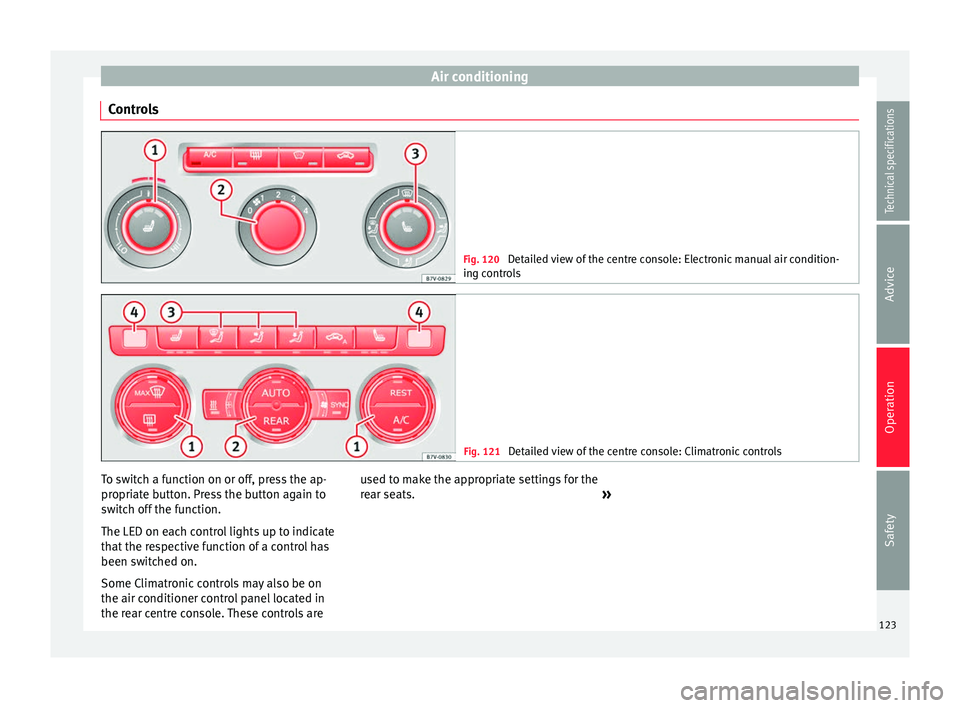
Controls Fig. 120
Detailed view of the centre console: Electronic manual air condition-
ing controls Fig. 121
Detailed view of the centre console: Climatronic controls To switch a function on or off, press the ap-
propriate button. Press the button again to
switch off the function.
The LED on each control lights up to indicate
that the respective function of a control has
been switched on.
Some Climatronic controls may also be on
the air conditioner control panel located in
the rear centre console. These controls are
used to make the appropriate settings for the
rear seats.
»
123Technical specifications
Advice
Operation
Safety
Page 126 of 305
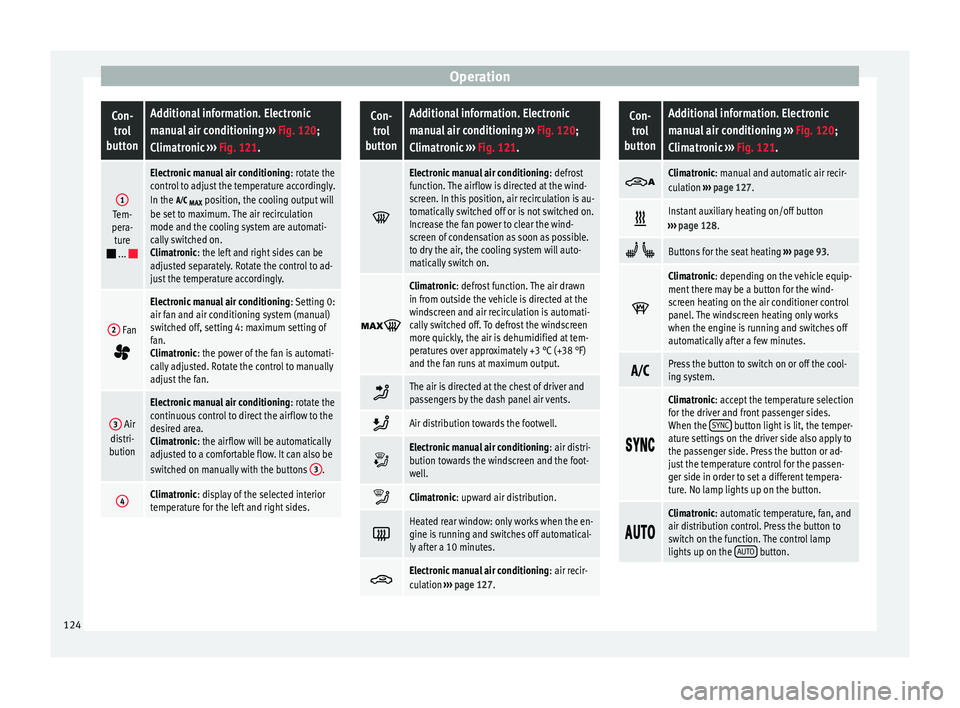
OperationCon-
trol
buttonAdditional information. Electronic
manual air conditioning ››› Fig. 120;
Climatronic ››› Fig. 121.
1Tem-
pera- ture
...
Electronic manual air conditioning : rotate the
control to adjust the temperature accordingly.
In the
MAX position, the cooling output will
be set to maximum. The air recirculation
mode and the cooling system are automati-
cally switched on.
Climatronic: the left and right sides can be
adjusted separately. Rotate the control to ad-
just the temperature accordingly.
2 Fan
Electronic manual air conditioning : Setting 0:
air fan and air conditioning system (manual)
switched off, setting 4: maximum setting of
fan.
Climatronic: the power of the fan is automati-
cally adjusted. Rotate the control to manually
adjust the fan.
3 Air
distri-
bution
Electronic manual air conditioning : rotate the
continuous control to direct the airflow to the
desired area.
Climatronic: the airflow will be automatically
adjusted to a comfortable flow. It can also be
switched on manually with the buttons 3
.
4Climatronic: display of the selected interior
temperature for the left and right sides.
Con-
trol
buttonAdditional information. Electronic
manual air conditioning ››› Fig. 120;
Climatronic ››› Fig. 121.
Electronic manual air conditioning
: defrost
function. The airflow is directed at the wind-
screen. In this position, air recirculation is au-
tomatically switched off or is not switched on.
Increase the fan power to clear the wind-
screen of condensation as soon as possible.
to dry the air, the cooling system will auto-
matically switch on.
Climatronic: defrost function. The air drawn
in from outside the vehicle is directed at the
windscreen and air recirculation is automati-
cally switched off. To defrost the windscreen
more quickly, the air is dehumidified at tem-
peratures over approximately +3 °C (+38 °F)
and the fan runs at maximum output.
The air is directed at the chest of driver and
passengers by the dash panel air vents.
Air distribution towards the footwell.
Electronic manual air conditioning
: air distri-
bution towards the windscreen and the foot-
well.
Climatronic: upward air distribution.
Heated rear window: only works when the en-
gine is running and switches off automatical-
ly after a 10 minutes.
Electronic manual air conditioning
: air recir-
culation ››› page 127.
Con-
trol
buttonAdditional information. Electronic
manual air conditioning ››› Fig. 120;
Climatronic ››› Fig. 121.
Climatronic: manual and automatic air recir-
culation
››› page 127.
Instant auxiliary heating on/off button
››› page 128.
Buttons for the seat heating ››› page 93.
Climatronic: depending on the vehicle equip-
ment there may be a button for the wind-
screen heating on the air conditioner control
panel. The windscreen heating only works
when the engine is running and switches off
automatically after a few minutes.
Press the button to switch on or off the cool-
ing system.
Climatronic: accept the temperature selection
for the driver and front passenger sides.
When the
SYNC
button light is lit, the temper-
ature settings on the driver side also apply to
the passenger side. Press the button or ad-
just the temperature control for the passen-
ger side in order to set a different tempera-
ture. No lamp lights up on the button.
Climatronic: automatic temperature, fan, and
air distribution control. Press the button to
switch on the function. The control lamp
lights up on the
AUTO
button.124
Page 127 of 305
Air conditioningCon-
trol
buttonAdditional information. Electronic
manual air conditioning ››› Fig. 120;
Climatronic ››› Fig. 121.
Climatronic: press the
REAR button to adjust
the air conditioner for the rear seats from the
front seats. A lamp is lit on the REAR
button if
the feature is activated. The settings for the
rear seats will be displayed. Press the button
again to switch the function off or do not
touch any other button for around 10 sec-
onds.
Climatronic: Press the
REST button to use the
heat that the engine produces. When the en-
gine is still warm but the ignition switched
off, the heat given off by the engine can be
used to keep the vehicle interior warm. The REST
button will light up when the function is
switched on. The function will switch off after
around 30 minutes and if the battery level is
low.
a)
Switch off.
Electronic manual air conditioning
: turn the
fan switch to setting 0.
Climatronic: press the OFF
button or manual-
ly set the fan to 0. When the device is switch-
ed off the OFF
button will light up.
a)
Depending on the version of the model. Note
● Not all Climatronic buttons are operational
in REAR mode.
● The REAR button is locked in defrost mode. Rear operation
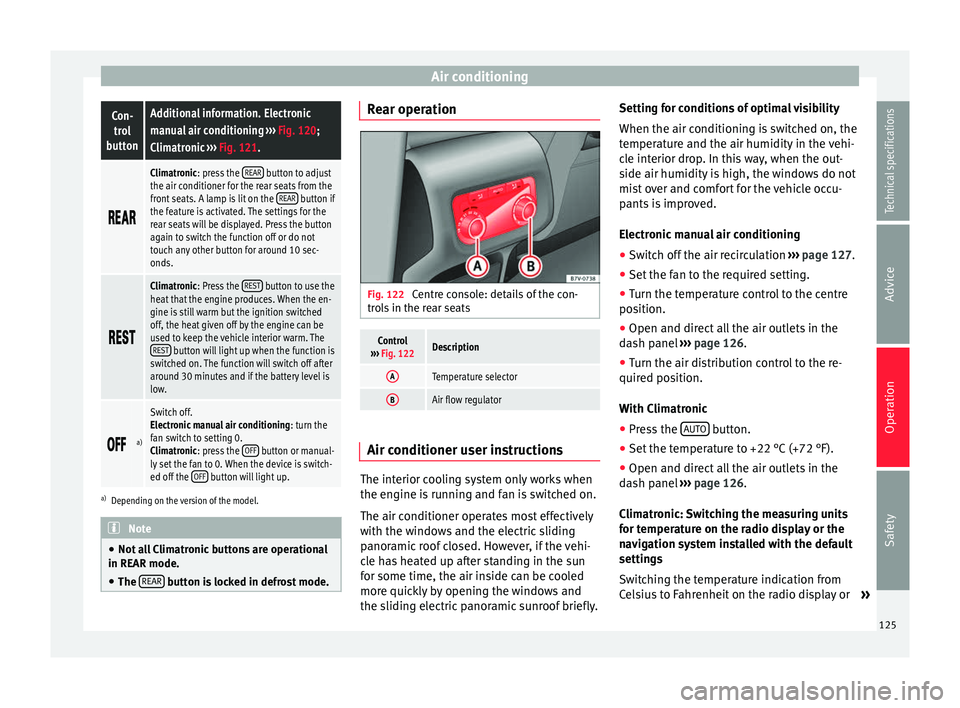
Fig. 122
Centre console: details of the con-
trols in the rear seats
Control
››› Fig. 122Description
ATemperature selector
BAir flow regulator Air conditioner user instructions
The interior cooling system only works when
the engine is running and fan is switched on.
The air conditioner operates most effectively
with the windows and the electric sliding
panoramic roof closed. However, if the vehi-
cle has heated up after standing in the sun
for some time, the air inside can be cooled
more quickly by opening the windows and
the sliding electric panoramic sunroof briefly.Setting for conditions of optimal visibility
When the air conditioning is switched on, the
temperature and the air humidity in the vehi-
cle interior drop. In this way, when the out-
side air humidity is high, the windows do not
mist over and comfort for the vehicle occu-
pants is improved.
Electronic manual air conditioning
● Switch off the air recirculation ››› page 127.
● Set the fan to the required setting.
● Turn the temperature control to the centre
position.
● Open and direct all the air outlets in the
dash panel ››› page 126 .
● Turn the air di
stribution control to the re-
quired position.
With Climatronic
● Press the AUTO button.
● Set the temperature to +22 °C (+72 °F).
● Open and direct all the air outlets in the
dash panel ››› page 126 .
C lim
atronic: Switching the measuring units
for temperature on the radio display or the
navigation system installed with the default
settings
Switching the temperature indication from
Celsius to Fahrenheit on the radio display or »
125
Technical specifications
Advice
Operation
Safety
Page 129 of 305
Air conditioning
CAUTION
Never place food, medicines or other heat-
sensitive objects close to the air vents. Being
heat-sensitive, they may be damaged or
made unsuitable for use by the air coming
from the air vents. Note
The air from the vents flows through the vehi-
cle interior and out through the outlets below
the rear window. The slots must not be cov-
ered with items of clothing or other objects. Air recirculation mode
Air recirculation mode prevents the ambient
air from entering the interior.
When the outside temperature is very high,
selecting manual air recirculation mode for a
short period refreshes the vehicle interior
more quickly.
For safety reasons, air recirculation mode is
switched off when the
button is press-
ed or the air distributor turned to ››› .
Switching the recirculation mode on and off
manually on the air conditioning (Electronic
manual air conditioning)
Switching on : press the button
u
nti l the
lamp on the button lights up. Switching off: press the button
until the
lamp on the button switches off.
Switching the recirculation mode on and off
manually on the Climatronic
Switching on: press the button until the
l
amp on the button lights up.
Switching off
: press the button until the
lamp on the button switches off.
Automatic air recirculation mode
Fresh air enters the vehicle interior in posi-
tion . If the system detects a high con-
centration of hazardous substances in the
ambient air, air recirculation mode is switch-
ed on automatically. When the level of impur-
ities drops to within a normal range, recircu-
lation mode is switched off.
The system is unable to detect unpleasant
smells.
With the following outside temperatures and
conditions the air recirculation does not
switch on automatically:
● The cooling system is switched on (the A/C button is lit up) and the outside temperature
is below +3 °C (+38 °F).
● The cooling system and the windscreen
wipers are switched off and the outside tem-
perature is below +10 °C (+50 °F).
● The cooling system is switched off and the
outside temperature is below +15 °C (+59 °F). The windscreen wiper is switched
on.
Switching the automatic air recirculation
mode on and off
Switching on
: press the button
until the
right
lamp on the button lights up.
Switching off
: press the button until all
the lamps on the button are switched off.
Switching the automatic air recirculation
mode off temporarily
● Press the button once to temporarily
switch to manual air recirculation mode in
the event of unpleasant smells from outside.
The left indicator lamp turns on.
● After more than two seconds, press the
button again to restart automatic air recircu-
lation. The right indicator lamp turns on. WARNING
Observe the safety warnings ››› in Intro-
duction on page 122.
● If the c
ooling system is switched off and air
recirculation mode switched on, the windows
can mist over very quickly, considerably limit-
ing visibility.
● Switch air recirculation mode off when it is
not required. » 127
Technical specifications
Advice
Operation
Safety
Page 130 of 305
Operation
CAUTION
Do not smoke when air recirculation is
switched on in vehicles with an air condition-
er. The smoke taken in could lie on the cool-
ing system vaporiser and on the activated
charcoal cartridge of the dust and pollen fil-
ter, leading to a permanently unpleasant
smell. Note
Climatronic: air recirculation mode switches
on to prevent exhaust gas from entering the
vehicle interior when it is in reverse and
while the automatic windscreen wipers are
working. Auxiliary heater* (additional
heater)
Introduction The auxiliary heater is powered by fuel from
the vehicle's fuel tank and can be used while
the vehicle is in motion and at a standstill.
Select the mode required (
heat
or fan
)
››› page 130 on the dash panel.
In w int
er, the auxiliary heater can be used in
heat mode before switching on the ignition to
remove any ice, mist or snow from the wind-
screen (thin layers only). WARNING
The auxiliary heater fumes contain carbon di-
oxide, an odourless and colourless toxic gas.
Carbon monoxide can cause people to lose
consciousness. It can also cause death.
● Never switch on the auxiliary heater or
leave it running in places that are enclosed or
unventilated.
● Never program the independent heating
system to be activated and operated in
closed, unventilated areas. WARNING
The components of the auxiliary heater ex-
haust system heat up a great deal. This could
cause a fire.
● Always park your vehicle so that no part of
the exhaust system can come in contact with
flammable materials (such as dried grass). CAUTION
Never place food, medicines or other heat-
sensitive objects close to the air vents. Food,
medicines and other heat-sensitive objects
may be damaged or made unsuitable for use
by the air coming from the air vents. Switching the auxiliary heater on and
off
Switching the auxiliary heater on:
Manually using the instant on/off
button.›››
page
123
ONManually using the remote control.››› page
129
Automatically at the programmed
and enabled on time.››› page
130
Switching the auxiliary heater off:
Manually using the instant on/off
button for the air conditioner.›››
page
123
OFFManually using the remote control.››› page
129
Automatically after the programmed
time.››› page
130
Automatically when the light comes
on (fuel reserve).››› page
206
Automatically when the battery pow-
er drops to a very low level.››› page
227 Things to note
After switching the auxiliary heater off, it con-
tinues to run for a short period to completely
128
Page 131 of 305
Air conditioning
burn any fuel remaining in the auxiliary heat-
er. The exhaust gases are also extracted from
the system.
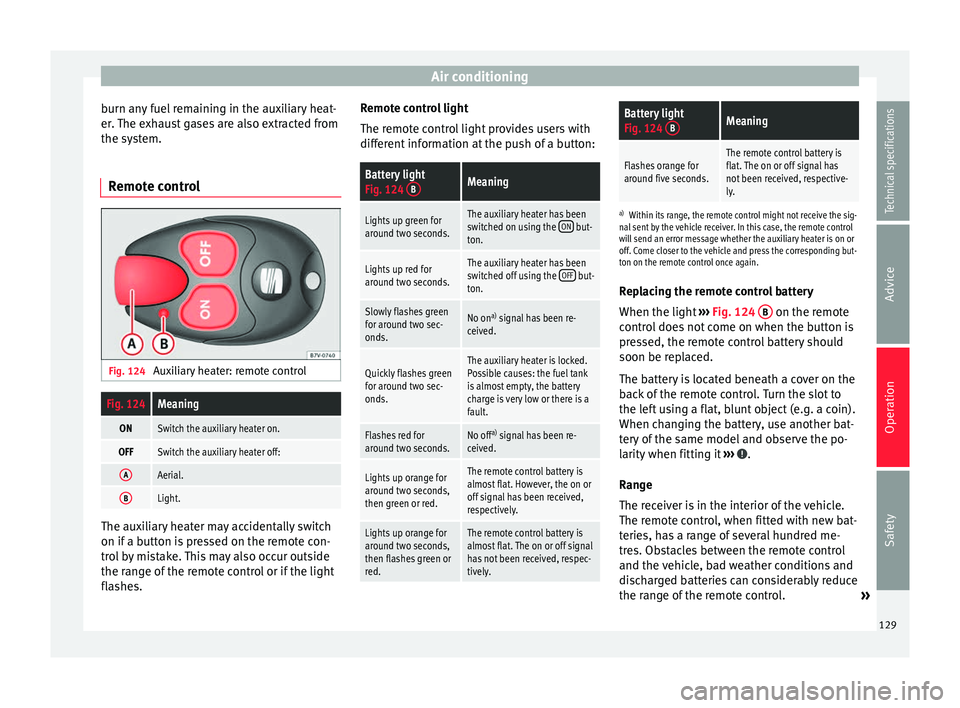
Remote control Fig. 124
Auxiliary heater: remote controlFig. 124Meaning
ONSwitch the auxiliary heater on.
OFFSwitch the auxiliary heater off:
AAerial.
BLight. The auxiliary heater may accidentally switch
on if a button is pressed on the remote con-
trol by mistake. This may also occur outside
the range of the remote control or if the light
flashes. Remote control light
The remote control light provides users with
different information at the push of a button:
Battery light
Fig. 124
BMeaning
Lights up green for
around two seconds.The auxiliary heater has been
switched on using the ON but-
ton.
Lights up red for
around two seconds.The auxiliary heater has been
switched off using the OFF but-
ton.
Slowly flashes green
for around two sec-
onds.No on a)
signal has been re-
ceived.
Quickly flashes green
for around two sec-
onds.The auxiliary heater is locked.
Possible causes: the fuel tank
is almost empty, the battery
charge is very low or there is a
fault.
Flashes red for
around two seconds.No off a)
signal has been re-
ceived.
Lights up orange for
around two seconds,
then green or red.The remote control battery is
almost flat. However, the on or
off signal has been received,
respectively.
Lights up orange for
around two seconds,
then flashes green or
red.The remote control battery is
almost flat. The on or off signal
has not been received, respec-
tively.
Battery light
Fig. 124 BMeaning
Flashes orange for
around five seconds.The remote control battery is
flat. The on or off signal has
not been received, respective-
ly.
a)
Within its range, the remote control might not receive the sig-
nal sent by the vehicle receiver. In this case, the remote control
will send an error message whether the auxiliary heater is on or
off. Come closer to the vehicle and press the corresponding but-
ton on the remote control once again.
Replacing the remote control battery
When the light ›››
Fig. 124 B on the remote
control does not come on when the button is
pressed, the remote control battery should
soon be replaced.
The battery is located beneath a cover on the
back of the remote control. Turn the slot to
the left using a flat, blunt object (e.g. a coin).
When changing the battery, use another bat-
tery of the same model and observe the po-
larity when fitting it ››› .
Range
The receiver is in the interior of the vehicle.
The remote control, when fitted with new bat-
teries, has a range of several hundred me-
tres. Obstacles between the remote control
and the vehicle, bad weather conditions and
discharged batteries can considerably reduce
the range of the remote control. »
129
Technical specifications
Advice
Operation
Safety
Page 132 of 305
Operation
An optimum range is obtained by keeping
the remote control vertical, with the aerial
››› Fig. 124 A pointing upwards. When doing
so, do not cover the aerial with your fingers
or with the palm of your hand.
There must be a minimum distance of 2 me-
tr e
s between the remote control and the vehi-
cle. CAUTION
● The radio frequency remote control con-
tains electronic components. Therefore, avoid
getting it wet and being knocked and protect
it from direct sunlight.
● Use of inappropriate batteries may damage
the remote control. For this reason, always re-
place the used battery with another of the
same voltage, size and specifications. For the sake of the environment
● Please dispose of old batteries so that they
do not harm the environment.
● The remote control battery may contain
perchlorate. Observe the legal requirements
for their disposal. Programming the auxiliary heater
The heater or ventilation inside the vehicle
can be programmed for a certain period. Before programming, check that the day is
correctly set in the
Auxiliary heater - day of the
week menu ››› .
Enabling the Auxiliary heater
menu on the
in s
trument panel
● From the main menu, select the Auxiliary
heater submenu and press the OK button on
the windscreen wiper lever.
● OR: press the or
arrow buttons on the
multi-function steering wheel until the Auxili-
ary heater menu is displayed.
Menu op-
tionsDescription
Switching on
Switching off
The auxiliary heater can be set to come
on automatically if required. To do so,
select a timer:
– The timer is displayed marked with a
.
– Only one timer can be selected. If a
timer has been selected, Prog. ON will be
displayed on the screen. If no timer has
been selected, the dash panel display
will show Prog. OFF.
– To modify the programmed timer, se-
lect another timer or select the Off op-
tion.
Timer 1
Timer 2
Timer 3
Three different timers (hh.mm) can later
be selected using the On option. If the
auxiliary heater is to be switched on for
just a certain day of the week, select the
day of the week and the time for the aux-
iliary heater to come on.
Menu op-
tionsDescription
DurationThe operating time may vary between 10
and 60 minutes and can be set to 5-mi-
nute intervals.
Operating
modeSet to heat or ventilate the vehicle interi-
or when the auxiliary heater is switched
on.
DaySet the current day of the week.
Factory set-
tingsThe predefined factory values for the
functions of this menu are restored.
BackThis returns to the main menu. Checking programming
If the
timer has been switched on after
switching the ignition off, the light on button will remain lit for around 10 seconds.
WARNING
Never program the independent heating sys-
tem to be activated and operated in closed,
unventilated areas. The auxiliary heater
fumes contain carbon dioxide, an odourless
and colourless toxic gas. Carbon monoxide
can cause people to lose consciousness. It
can also cause death. 130
Page 133 of 305
Driving
Operating instructions The auxiliary heater exhaust system located
below the vehicle must be kept clear of snow,
mud and other objects. The exhaust gases
must not be obstructed in any way. The ex-
haust gases generated by the auxiliary heater
are removed via an exhaust pipe fitted under-
neath the vehicle.
On heating the vehicle interior, depending on
the outside temperature the warm air is first
directed at the windscreen and then to the
rest of the vehicle interior through the air
vents. If the air vents are turned towards the
windows, for example, the form of air distri-
bution may be affected.
Depending on the outside temperature, the
temperature at which the auxiliary heater
warms the vehicle interior may be somewhat
higher if the heating or air conditioner tem-
perature control is set to maximum before
switching the heating on.
Depending on the engine, vehicles with aux-
iliary heater may be fitted with a second bat-
tery in the luggage compartment that is re-
sponsible for powering the auxiliary heater.
Cases in which the auxiliary heater will not
switch on
● The auxiliary heater requires about as
much power as the dipped beam headlights.
If the battery charge is low, the auxiliary heat- er will switch off automatically or will not
even switch on. This avoids problems when
starting the engine.
●
The heater will switch on just once each
time. The timer will also have to be switched
back on every time it is required. Note
● Noise will be heard while the auxiliary
heater is running.
● When the air humidity is high and the out-
side temperature low, the heating system
may evaporate condensation from the auxili-
ary heater. In this case, steam may be re-
leased from underneath the vehicle. This is
completely normal and there is no need to
suspect a fault!
● If the auxiliary heater runs several times
over a prolonged period, the vehicle battery
may run flat. To re-charge the battery, drive
the vehicle for a long distance. As a general
rule, drive for as much time as the auxiliary
heating was working. Driving
Address Introduction The power steering is not hydraulic but elec-
tromechanical. The advantage of this steer-
ing system is that it disposes of hydraulic
tubes, hydraulic oil, the pump, filter and oth-
er components. The electromechanical sys-
tem saves fuel. While a hydraulic system re-
quires oil pressure to be maintained, electro-
mechanical steering only requires energy
when the steering wheel is turned.
With the power steering system, the assisted
steering function automatically adjusts ac-
cording to the vehicle speed, the steering tor-
que and the wheel turning angle. The power
steering only works when the engine is run-
ning.
WARNING
If the power steering is not working then the
steering wheel is much more difficult to turn
and the vehicle more difficult to control.
● The power steering only works when the
engine is running.
● Never allow the vehicle to move when the
engine is switched off.
● Never remove the key from the ignition if
the vehicle is in motion. The steering may » 131Technical specifications
Advice
Operation
Safety
Page 134 of 305
Operation
lock and it will not be possible to turn the
steering wheel.
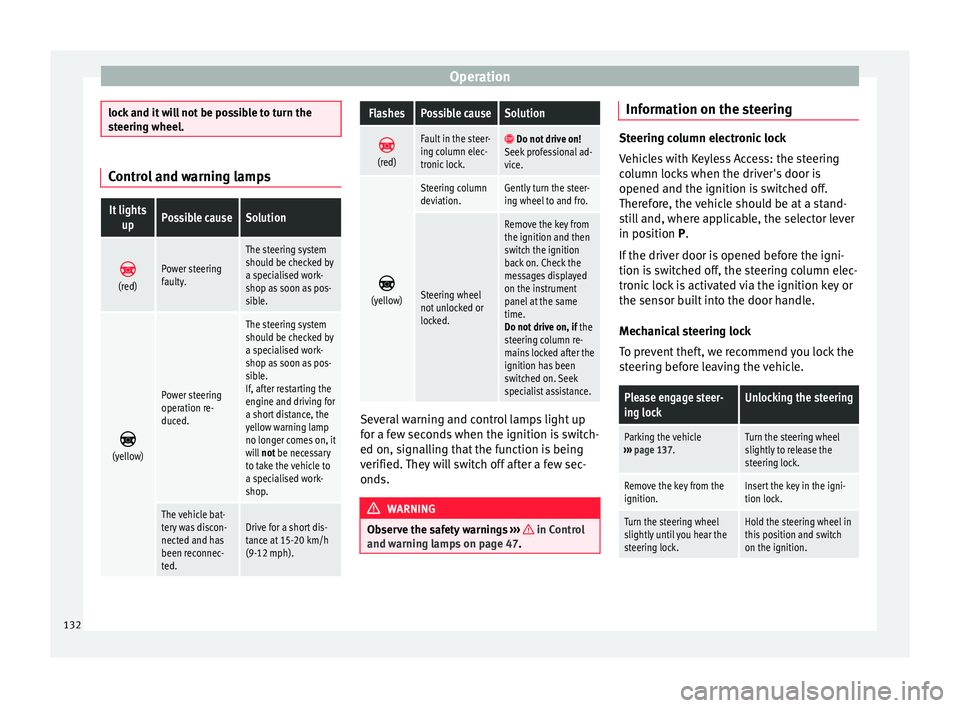
Control and warning lampsIt lights
upPossible causeSolution
(red)Power steering
faulty.
The steering system
should be checked by
a specialised work-
shop as soon as pos-
sible.
(yellow)
Power steering
operation re-
duced.
The steering system
should be checked by
a specialised work-
shop as soon as pos-
sible.
If, after restarting the
engine and driving for
a short distance, the
yellow warning lamp
no longer comes on, it
will
not be necessary
to take the vehicle to
a specialised work-
shop.
The vehicle bat-
tery was discon-
nected and has
been reconnec-
ted.Drive for a short dis-
tance at 15-20 km/h
(9-12 mph).
FlashesPossible causeSolution
(red)
Fault in the steer-
ing column elec-
tronic lock. Do not drive on!
Seek professional ad-
vice.
(yellow)
Steering column
deviation.Gently turn the steer-
ing wheel to and fro.
Steering wheel
not unlocked or
locked.
Remove the key from
the ignition and then
switch the ignition
back on. Check the
messages displayed
on the instrument
panel at the same
time.
Do not drive on, if
the
steering column re-
mains locked after the
ignition has been
switched on. Seek
specialist assistance. Several warning and control lamps light up
for a few seconds when the ignition is switch-
ed on, signalling that the function is being
verified. They will switch off after a few sec-
onds.
WARNING
Observe the safety warnings ››› in Control
and warning lamps on page 47. Information on the steering
Steering column electronic lock
Vehicles with Keyless Access: the steering
column locks when the driver's door is
opened and the ignition is switched off.
Therefore, the vehicle should be at a stand-
still and, where applicable, the selector lever
in position P
.
If
the driver door is opened before the igni-
tion is switched off, the steering column elec-
tronic lock is activated via the ignition key or
the sensor built into the door handle.
Mechanical steering lock
To prevent theft, we recommend you lock the
steering before leaving the vehicle.
Please engage steer-
ing lockUnlocking the steering
Parking the vehicle
››› page 137.Turn the steering wheel
slightly to release the
steering lock.
Remove the key from the
ignition.Insert the key in the igni-
tion lock.
Turn the steering wheel
slightly until you hear the
steering lock.Hold the steering wheel in
this position and switch
on the ignition. 132
Page 138 of 305
Operation
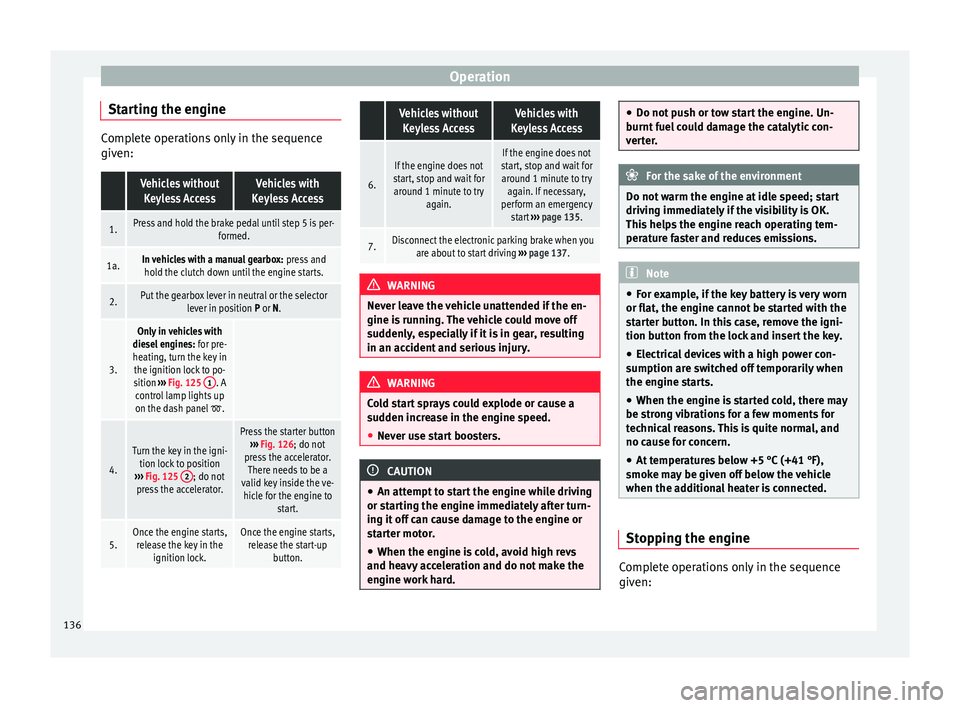
Starting the engine Complete operations only in the sequence
given: Vehicles without
Keyless AccessVehicles with
Keyless Access
1.Press and hold the brake pedal until step 5 is per- formed.
1a.In vehicles with a manual gearbox: press and
hold the clutch down until the engine starts.
2.Put the gearbox lever in neutral or the selector lever in position P or N.
3.
Only in vehicles with
diesel engines: for pre-
heating, turn the key in the ignition lock to po-
sition ››› Fig. 125 1
. A
control lamp lights up
on the dash panel
.
4.
Turn the key in the igni- tion lock to position
››› Fig. 125 2
; do not
press the accelerator.
Press the starter button ››› Fig. 126; do not
press the accelerator. There needs to be a
valid key inside the ve- hicle for the engine to start.
5.Once the engine starts,release the key in the ignition lock.Once the engine starts,release the start-up button.
Vehicles without
Keyless AccessVehicles with
Keyless Access
6.
If the engine does not
start, stop and wait for around 1 minute to try again.If the engine does not
start, stop and wait for around 1 minute to try again. If necessary,
perform an emergency start ››› page 135.
7.Disconnect the electronic parking brake when you
are about to start driving ››› page 137. WARNING
Never leave the vehicle unattended if the en-
gine is running. The vehicle could move off
suddenly, especially if it is in gear, resulting
in an accident and serious injury. WARNING
Cold start sprays could explode or cause a
sudden increase in the engine speed.
● Never use start boosters. CAUTION
● An attempt to start the engine while driving
or starting the engine immediately after turn-
ing it off can cause damage to the engine or
starter motor.
● When the engine is cold, avoid high revs
and heavy acceleration and do not make the
engine work hard. ●
Do not push or tow start the engine. Un-
burnt fuel could damage the catalytic con-
verter. For the sake of the environment
Do not warm the engine at idle speed; start
driving immediately if the visibility is OK.
This helps the engine reach operating tem-
perature faster and reduces emissions. Note
● For example, if the key battery is very worn
or flat, the engine cannot be started with the
starter button. In this case, remove the igni-
tion button from the lock and insert the key.
● Electrical devices with a high power con-
sumption are switched off temporarily when
the engine starts.
● When the engine is started cold, there may
be strong vibrations for a few moments for
technical reasons. This is quite normal, and
no cause for concern.
● At temperatures below +5 °C (+41 °F),
smoke may be given off below the vehicle
when the additional heater is connected. Stopping the engine
Complete operations only in the sequence
given:
136