light Seat Alhambra 2015 Repair Manual
[x] Cancel search | Manufacturer: SEAT, Model Year: 2015, Model line: Alhambra, Model: Seat Alhambra 2015Pages: 305, PDF Size: 5.46 MB
Page 140 of 305
Operation
WARNING
Driving with worn brake pads or a faulty
brake system may lead to serious accident.
● If lights, alone or accompanied by a
warning message on the instrument panel
display, please go immediately to a special-
ised workshop to check the brake pads and to
replace them if they are worn. WARNING
Careless parking can cause serious injury.
● Never remove the key from the ignition if
the vehicle is in motion. The steering lock
may engage and lock the steering wheel mak-
ing the vehicle impossible to control.
● Always park your vehicle so that no part of
the exhaust system can come in contact with
flammable materials (such as wood, leaves,
dried grass, spilled fuel, etc.).
● Always apply the electronic parking brake
when you leave your vehicle and when you
park.
● Never leave children or disabled people
alone in the vehicle. They could release the
electronic parking brake, activate the selec-
tor lever or gear stick and start the vehicle
moving. This could result in a serious acci-
dent.
● Always take all the keys with you whenever
you leave the vehicle. The engine could acci-
dentally be started and electrical equipment
such as the windows could accidentally be
operated resulting in serious injury. ●
Never leave children or disabled people
alone in the car. They could be trapped in the
car in an emergency and will not be able to
get themselves to safety. For example, de-
pending on the time of the year, tempera-
tures inside a locked and closed vehicle can
be extremely high or extremely low resulting
in serious injuries and illness or even death,
particularly for young children. CAUTION
● Special care should be taken when parking
in areas with high kerbs or fixed barriers. Ob-
jects protruding from the ground may dam-
age the bumper or other parts of the vehicle
during manoeuvres. To avoid damage, stop
before the wheels touch the barrier or kerb.
● Special attention is required when driving
through entrances, over ramps, kerbs or oth-
er objects. The vehicle underbody, bumpers,
mudguards and running gear, and the engine
and exhaust system could be damaged as
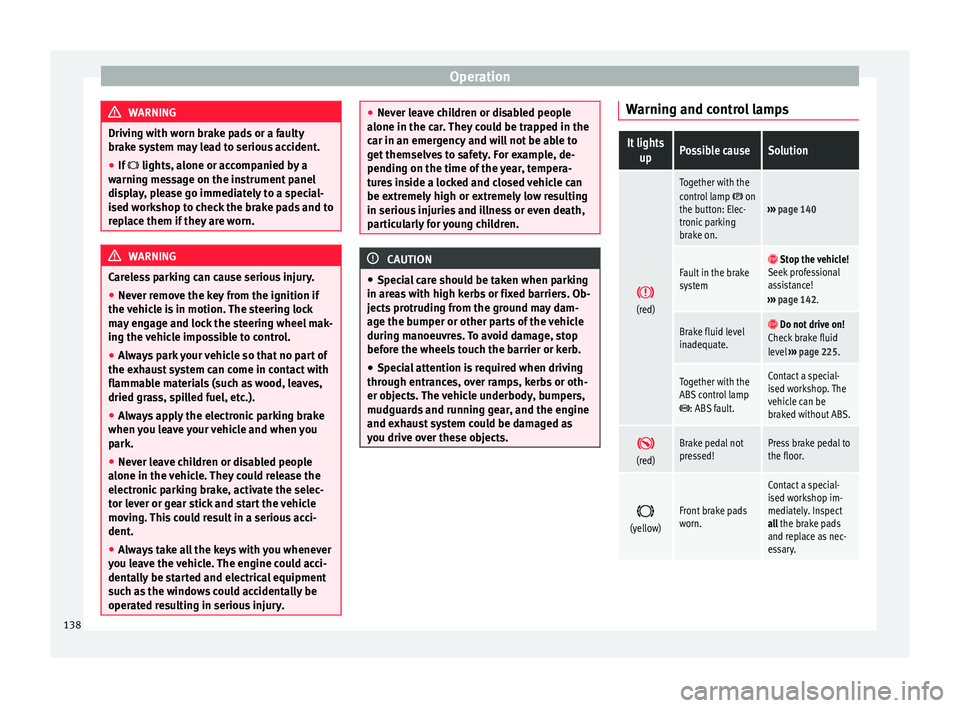
you drive over these objects. Warning and control lampsIt lights
upPossible causeSolution
(red)
Together with the
control lamp on
the button: Elec-
tronic parking
brake on.››› page 140
Fault in the brake
system Stop the vehicle!
Seek professional
assistance!
››› page 142.
Brake fluid level
inadequate. Do not drive on!
Check brake fluid
level ››› page 225.
Together with the
ABS control lamp
: ABS fault.
Contact a special-
ised workshop. The
vehicle can be
braked without ABS.
(red)Brake pedal not
pressed!Press brake pedal to
the floor.
(yellow)Front brake pads
worn.
Contact a special-
ised workshop im-
mediately. Inspect
all the brake pads
and replace as nec-
essary.
138
Page 141 of 305
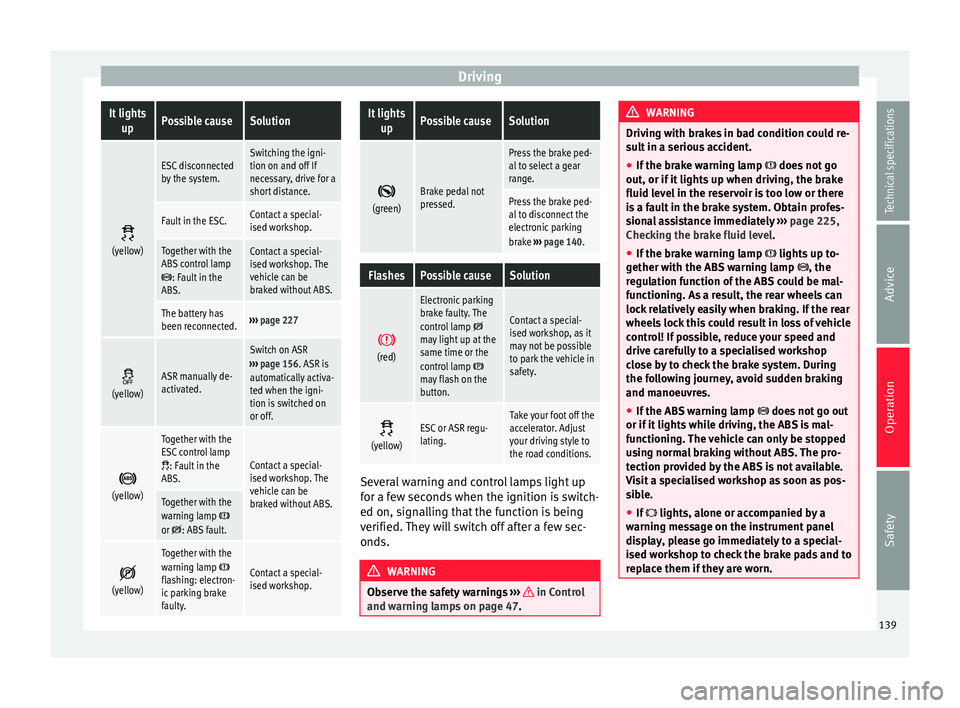
DrivingIt lights
upPossible causeSolution
(yellow)
ESC disconnected
by the system.Switching the igni-
tion on and off If
necessary, drive for a
short distance.
Fault in the ESC.Contact a special-
ised workshop.
Together with the
ABS control lamp
: Fault in the
ABS.
Contact a special-
ised workshop. The
vehicle can be
braked without ABS.
The battery has
been reconnected.››› page 227
(yellow)ASR manually de-
activated.
Switch on ASR
››› page 156. ASR is
automatically activa-
ted when the igni-
tion is switched on
or off.
(yellow)
Together with the
ESC control lamp
: Fault in the
ABS.Contact a special-
ised workshop. The
vehicle can be
braked without ABS.
Together with the
warning lamp or : ABS fault.
(yellow)
Together with the
warning lamp flashing: electron-
ic parking brake
faulty.Contact a special-
ised workshop.
It lights
upPossible causeSolution
(green)Brake pedal not
pressed.
Press the brake ped-
al to select a gear
range.
Press the brake ped-
al to disconnect the
electronic parking
brake
››› page 140.
FlashesPossible causeSolution
(red)
Electronic parking
brake faulty. The
control lamp
may light up at the
same time or the
control lamp
may flash on the
button.
Contact a special-
ised workshop, as it
may not be possible
to park the vehicle in
safety.
(yellow)ESC or ASR regu-
lating.Take your foot off the
accelerator. Adjust
your driving style to
the road conditions.
Several warning and control lamps light up
for a few seconds when the ignition is switch-
ed on, signalling that the function is being
verified. They will switch off after a few sec-
onds.
WARNING
Observe the safety warnings ››› in Control
and warning lamps on page 47. WARNING
Driving with brakes in bad condition could re-
sult in a serious accident.
● If the brake warning lamp does not go
out, or if it lights up when driving, the brake
fluid level in the reservoir is too low or there
is a fault in the brake system. Obtain profes-
sional assistance immediately ››› page 225,
Checking the brake fluid level.
● If the brake warning lamp lights up to-
gether with the ABS warning lamp , the
regulation function of the ABS could be mal-
functioning. As a result, the rear wheels can
lock relatively easily when braking. If the rear
wheels lock this could result in loss of vehicle
control! If possible, reduce your speed and
drive carefully to a specialised workshop
close by to check the brake system. During
the following journey, avoid sudden braking
and manoeuvres.
● If the ABS warning lamp does not go out
or if it lights while driving, the ABS is mal-
functioning. The vehicle can only be stopped
using normal braking without ABS. The pro-
tection provided by the ABS is not available.
Visit a specialised workshop as soon as pos-
sible.
● If lights, alone or accompanied by a
warning message on the instrument panel
display, please go immediately to a special-
ised workshop to check the brake pads and to
replace them if they are worn. 139
Technical specifications
Advice
Operation
Safety
Page 142 of 305
Operation
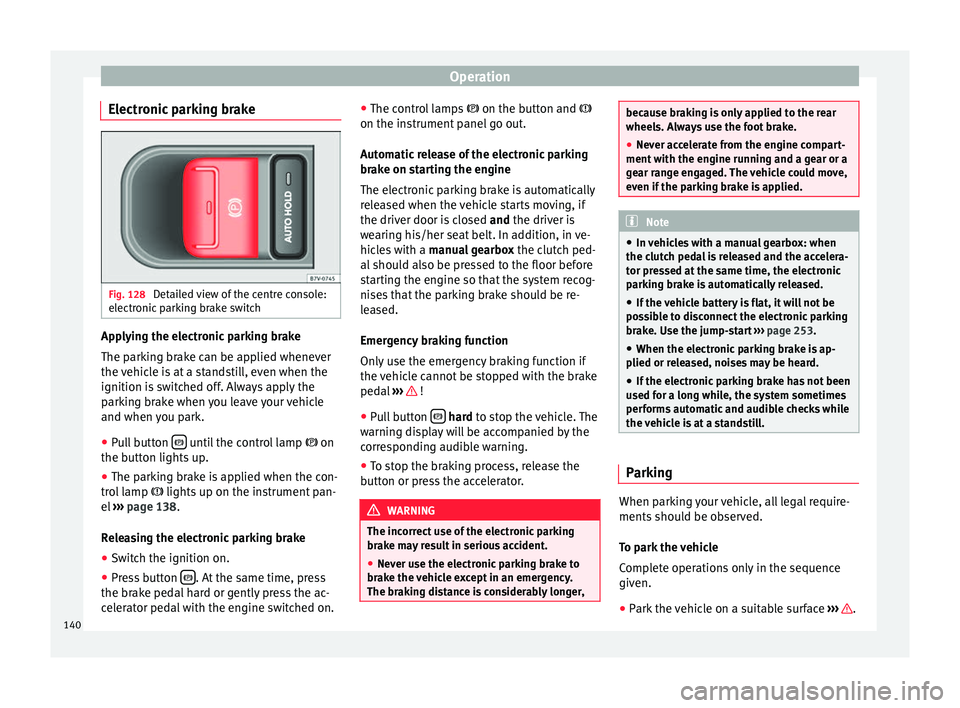
Electronic parking brake Fig. 128
Detailed view of the centre console:
electronic parking brake switch Applying the electronic parking brake
The parking brake can be applied whenever
the vehicle is at a standstill, even when the
ignition is switched off. Always apply the
parking brake when you leave your vehicle
and when you park.
●
Pull button until the control lamp
on
the button lights up.
● The parking brake is applied when the con-
trol lamp lights up on the instrument pan-
el ››› page 138 .
R el
easing the electronic parking brake
● Switch the ignition on.
● Press button . At the same time, press
the brake pedal hard or gently press the ac-
celerator pedal with the engine switched on. ●
The control lamps on the button and
on the in s
trument panel go out.
Automatic release of the electronic parking
brake on starting the engine
The electronic parking brake is automatically
released when the vehicle starts moving, if
the driver door is closed and
the driver is
wearing his/her seat belt. In addition, in ve-
hicles with a manual gearbox the clutch ped-
al should also be pressed to the floor before
starting the engine so that the system recog-
nises that the parking brake should be re-
leased.
Emergency braking function
Only use the emergency braking function if
the vehicle cannot be stopped with the brake
pedal ››› !
● Pull button
hard
to stop the vehicle. The
w
arning display will be accompanied by the
corresponding audible warning.
● To stop the braking process, release the
button or press the accelerator. WARNING
The incorrect use of the electronic parking
brake may result in serious accident.
● Never use the electronic parking brake to
brake the vehicle except in an emergency.
The braking distance is considerably longer, because braking is only applied to the rear
wheels. Always use the foot brake.
●
Never accelerate from the engine compart-
ment with the engine running and a gear or a
gear range engaged. The vehicle could move,
even if the parking brake is applied. Note
● In vehicles with a manual gearbox: when
the clutch pedal is released and the accelera-
tor pressed at the same time, the electronic
parking brake is automatically released.
● If the vehicle battery is flat, it will not be
possible to disconnect the electronic parking
brake. Use the jump-start ››› page 253.
● When the electronic parking brake is ap-
plied or released, noises may be heard.
● If the electronic parking brake has not been
used for a long while, the system sometimes
performs automatic and audible checks while
the vehicle is at a standstill. Parking
When parking your vehicle, all legal require-
ments should be observed.
To park the vehicle
Complete operations only in the sequence
given.
● Park the vehicle on a suitable surface ››› .
140
Page 143 of 305
Driving
● Press and hold the brake pedal until the ve-
hicle comes to a standstill.
● Connect the electronic parking brake
››› page 140 .
● For an aut
omatic gearbox, move the selec-
tor lever to position P.
● Sw
itch off the engine and release the brake
pedal.
● Remove the key from the ignition.
● If necessary, turn the steering wheel slight-
ly to lock the steering.
● With a manual gearbox, engage 1st gear on
flat ground and slopes, or even reverse gear
on hills, and release the clutch pedal.
● Ensure that all passengers leave the vehi-
cle, especially children.
● When leaving the vehicle, take all keys with
you.
● Lock the vehicle.
Additional information for steep slopes and
hills
Before switching off the engine, rotate the
steering wheel so that if the vehicle should
move, it will be held by the kerb.
● On slopes, turn the front wheels so that
they are against the edge of the kerb.
● Uphill, turn the wheels towards the centre
of the road. WARNING
The components of the exhaust system reach
very high temperatures. This could cause a
fire and considerable damage.
● Always park your vehicle so that no part of
the exhaust system can come in contact with
flammable materials (such as wood,
leaves,dried grass, or spilled fuel). CAUTION
● Special care should be taken when parking
in areas with high kerbs or fixed barriers. Ob-
jects protruding from the ground may dam-
age the bumper or other parts of the vehicle
during manoeuvres. To avoid damage, stop
before the wheels touch the barrier or kerb.
● Special attention is required when driving
through entrances, over ramps, kerbs or oth-
er objects. The vehicle underbody, bumpers,
mudguards and running gear, and the engine
and exhaust system could be damaged as
you drive over these objects. Information about the brakes
For the first 200 to 300 km, new brake pads
have not yet reached their maximum braking
capacity, and need to be “run in” first
››› .
The slightly reduced braking effect can be
compensated for by increasing pressure on
the brake pedal. While running in, the full
br ak
ing distance or emergency braking dis- tance is larger
then when the brake pads
have been run in. While running in, avoid full
power braking or situations requiring braking
performance. For example, in heavy traffic.
The
rate of wear of the brake pads depends
to a great extent on the conditions in which
the vehicle is used and the way the vehicle is
driven. If the vehicle is used frequently in city
traffic or for short trips or driven sport style,
visit a specialised workshop regularly, more
frequently than advised in the Maintenance
Programme, to have the brake pads checked.
If you drive with wet brakes, for example, af-
ter crossing areas of water, in heavy rainfall
or even after washing the car, the effect of
the brakes is lessened as the brake discs are
wet or even frozen (in winter). At higher
speed, “dry” the brakes as quickly as possi-
ble by braking gently several times. Only do
this without endangering vehicles behind
you or any other road users ››› .
A layer of salt on the discs and brake pads
w i
ll reduce the effectiveness of the brakes
and increase braking distance. If you drive for
a prolonged period on salted roads without
braking then brake carefully several times to
eliminate the layer of salt on the brakes ››› .
If the vehicle remains parked for considera-
ble lengths of time, is used little, or if the
brakes are not used, there may be corrosion
on the brake discs and a build up of dirt on
the brake pads. If the brakes are not used »
141
Technical specifications
Advice
Operation
Safety
Page 144 of 305
Operation
frequently, or if rust has formed on the discs,
SEAT recommends cleaning the pads and
discs by braking firmly a few times at a mod-
erately high speed. Only do this without en-
dangering vehicles behind you or any other
road users ››› .
Faults in the brake system
During braking, if you notice that the vehicle
does not react as usual (that the braking dis-
tance has increased suddenly) it may be pos-
sible that there is a fault in the braking sys-
tem. The warning lamp lights up and a
text message displayed. Take the vehicle to a
specialised workshop immediately and have
the fault repaired. Drive at a moderate speed
and be prepared to use more pressure on the
brake pedal, and allow for longer stopping
distances.
Brake servo
The brake servo only operates when the en-
gine is running and the pressure applied by
the driver on the brake pedal increases.
If the brake servo does not operate or the ve-
hicle must be towed, then the brake pedal
will have to be pressed with more force given
that the braking distance will be increased
when the brake servo does not operate ››› . WARNING
New brake pads do not brake to full efficien-
cy.
● For the first 320 km, new brake pads have
not yet reached their maximum braking ca-
pacity, and need to be “run in” first. For this,
to compensate for reduced braking efficiency
the brake pedal will have to be pressed with
more force.
● To avoid losing control of the vehicle and
causing serious accidents, always take great
care when driving with new brake pads.
● When running in new brake pads, always
respect the safety distances between you and
other vehicles and do not cause situations re-
quiring extreme braking performance. WARNING
When brakes overheat, braking is less effi-
cient and braking distances increase.
● When driving on slopes, brakes can be
overloaded and overheat quickly.
● Reduce speed or change down a gear when
faced with steep and long slopes. This allows
you to use the engine braking effect and to
reduce the strain on the brake system.
● Non-standard or damaged front spoilers
could restrict the airflow to the brakes and
cause them to overheat. WARNING
Wet, frozen or salt-covered brakes take lon-
ger to engage and this increases braking dis-
tances.
● Test the brakes carefully.
● Dry the brakes, free them of ice and salt by
braking gently several times, when weather,
road and traffic conditions permit. WARNING
Driving without the brake servo may signifi-
cantly increase the braking distance and re-
sult in a severe accident.
● Never allow the vehicle to move forwards
when the engine is switched off.
● If the brake servo does not operate or the
vehicle must be towed, then the brake pedal
will have to be pressed with more force given
that the braking distance will be increased
when the brake servo does not operate. CAUTION
● Never make the brakes “slip” by pressing
the pedal gently, if it is not really necessary
to brake. Continuously pressing on the brake
pedal will heat the brakes. This could signifi-
cantly reduce braking power, increase brak-
ing distance or even result in the total failure
of the brake system.
● Reduce speed or change down a gear when
faced with steep and long slopes. This allows
you to use the engine braking effect and to 142
Page 145 of 305
Driving
reduce the strain on the brake system. Other-
wise, the brakes may overheat and fail. Only
use the brakes to reduce speed or to stop.
Note
When checking the front brake pads, take the
time to also check the rear brake pads. The
thickness of the brake pads should be
checked visually and regularly, by looking
through the openings in the wheel rims or
from underneath the vehicle. If necessary, re-
move the wheels to check them thoroughly.
SEAT recommends taking your car in for tech-
nical service. Changing gear
Introduction When reverse gear is engaged and the
ignition is switched on the following takes
place:
● Reverse lights light up.
● When reversing, the air conditioner auto-
matically changes to air recirculation mode.
● The rear window heater switches on when
the windscreen wiper is activated.
● Also, the parking sensor system, the opti-
cal parking sensor and the camera for the re-
verse assist system are connected. WARNING
Rapid acceleration can cause loss of traction
and skidding, especially on slippery ground.
This could cause loss of control of the vehicle
resulting in an accident and considerable
damage.
● Only use the kick-down function or rapid
acceleration if visibility, weather, road and
traffic conditions so permit. WARNING
Do not allow the brakes to “rub” for a pro-
longed period of time, or brake frequently or
for long periods of time. Continuous braking
heats up the brakes. This could significantly
reduce braking power, increase braking dis-
tance or even result in the total failure of the
brake system. Warning and control lampsIt lights
upPossible causeSolution
(red)Brake pedal not
pressed!Press brake pedal to
the floor.
(green)Brake pedal not
pressed.
To select a range of
gears, press the
brake pedal.
Please also see "Elec-
tronic parking brake"
››› page 137.
FlashesPossible causeSolution
(green)
The selector lever
locking button
has not engaged.
The vehicle does
not start to move.Engage the selector
lever lock
››› page 145. Several warning and control lamps light up
for a few seconds when the ignition is switch-
ed on, signalling that the function is being
verified. They will switch off after a few sec-
onds.
WARNING
Observe the safety warnings ››› in Control
and warning lamps on page 47. Manual gearbox: Engaging gears
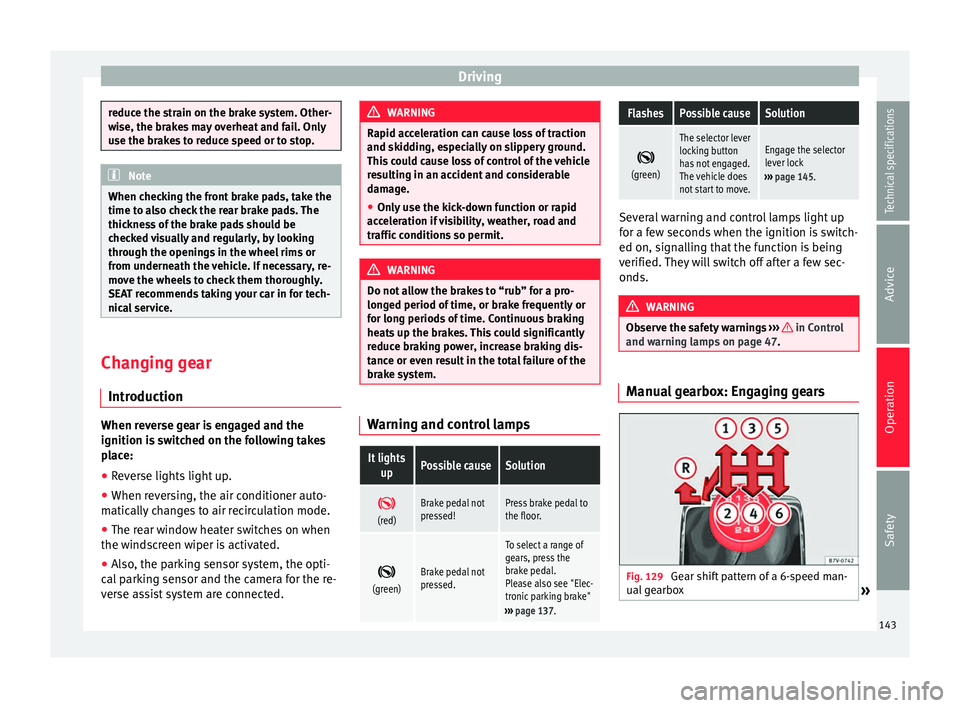
Fig. 129
Gear shift pattern of a 6-speed man-
ual gearbox » 143
Technical specifications
Advice
Operation
Safety
Page 147 of 305
DrivingSelector
lever po- sitionsDenomi- nationMeaning ›››
Standard
forwards driving
position (sports pro-
gramme)
The shift up to a higher gear
is automatically delayed and
the shift down is faster with
respect to the D range of
gears, to take full advantage
of the engine power. The
gear shifts are determined by
the engine load, your individ-
ual driving style and the
speed of the vehicle. Selector lever locking
The gear selector lever lock prevents, in
P or
N , a gear selection from being inadvertently
en
gaged and the vehicle moving off acciden-
tally.
To release the gear selector lever lock, press
and hold the brake pedal with the ignition
on. Press simultaneously on the selector lev-
er lock.
The selector lever lock is not engaged if it is
moved quickly through position N (e.g. when
shiftin
g from R to D). This makes it possible,
for instance, to “rock the vehicle backwards
and forwards” if it is stuck in snow or mud.
The selector lever lock engages automatically
if the brake pedal is not pressed and the lev-
er is in position N
for more than about one
second at a speed of less than 5 km/h
(3 mph). In vehicles with a DSG
®
automatic gearbox,
on rare occasions the selector lever lock may
not engage. In this case, the transmission is
locked to prevent the vehicle from moving ac-
cidentally. The green control light flashes
and an inform
ation text is displayed. Proceed
as follows to engage the selector lever lock:
● Press the brake pedal and then release. WARNING
Placing the selector lever in an incorrect posi-
tion may cause loss of control of the vehicle
and a serious accident.
● Do not press the accelerator when engag-
ing a range of gears.
● With the engine running and a range of
gears selected, the vehicle will move off
when the brake pedal is released.
● Never select reverse gear or the parking
lock while driving. WARNING
Unintentional movements of the vehicle
could cause serious injury.
● As a driver, you should never leave your ve-
hicle if the engine is running and a gear range
is engaged. If you have to leave your vehicle
while the engine is running, you must apply
the electronic parking brake and engage
parking lock P with the selector lever.
● While the engine is running and with the D,
S or R range of gears selected, keep the brake pressed to keep the vehicle at a standstill.
Transmission is not totally interrupted either
when the vehicle is idling or when the vehicle
“continues moving forwards”.
●
Never engage the R or P gear ranges when
the vehicle is moving.
● Never leave the vehicle with the gear selec-
tor in N. The vehicle may move downhill re-
gardless of whether the engine is switched
on or not. CAUTION
If, when the vehicle is at a standstill, the
electronic parking brake is not applied and
the brake pedal is released while in position
P, the vehicle may move a few centimetres
forwards or backwards. Note
If, while driving, the selector lever is acciden-
tally placed in position N, lift your foot off the
accelerator. Wait until the engine is running
at idle speed before selecting a new gear
range. 145
Technical specifications
Advice
Operation
Safety
Page 148 of 305
Operation
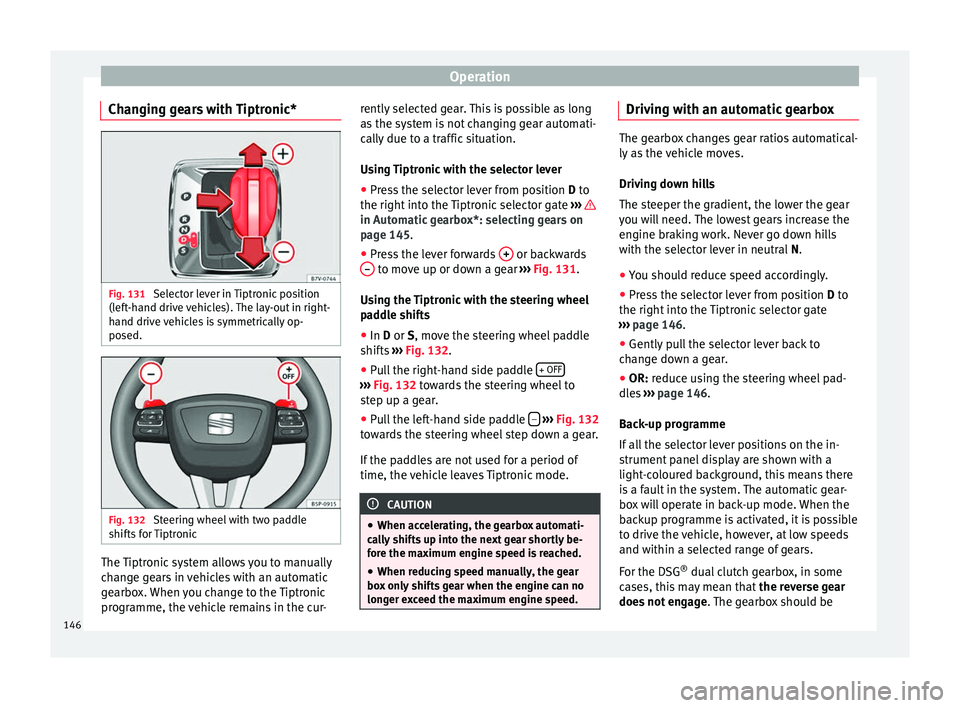
Changing gears with Tiptronic* Fig. 131
Selector lever in Tiptronic position
(left-hand drive vehicles). The lay-out in right-
hand drive vehicles is symmetrically op-
posed. Fig. 132
Steering wheel with two paddle
shifts for Tiptronic The Tiptronic system allows you to manually
change gears in vehicles with an automatic
gearbox. When you change to the Tiptronic
programme, the vehicle remains in the cur- rently selected gear. This is possible as long
as the system is not changing gear automati-
cally due to a traffic situation.
Using Tiptronic with the selector lever
● Press the selector lever from position D to
the right int
o the Tiptronic selector gate ››› in Automatic gearbox*: selecting gears on
page 145
.
● Pr e
ss the lever forwards + or backwards
– to move up or down a gear
››› Fig. 131 .
U s
ing the Tiptronic with the steering wheel
paddle shifts
● In
D or S, move the steering wheel paddle
shifts ››› Fig. 132.
● Pu
ll the right-hand side paddle + OFF ›››
Fig. 132 towards the steering wheel to
s t
ep up a gear.
● Pull the left-hand side paddle –
››› Fig. 132
towards the steering wheel step down a gear.
If the paddles are not used for a period of
time, the vehicle leaves Tiptronic mode. CAUTION
● When accelerating, the gearbox automati-
cally shifts up into the next gear shortly be-
fore the maximum engine speed is reached.
● When reducing speed manually, the gear
box only shifts gear when the engine can no
longer exceed the maximum engine speed. Driving with an automatic gearbox
The gearbox changes gear ratios automatical-
ly as the vehicle moves.
Driving down hills
The steeper the gradient, the lower the gear
you will need. The lowest gears increase the
engine braking work. Never go down hills
with the selector lever in neutral
N.
● You shou
ld reduce speed accordingly.
● Press the selector lever from position D to
the right int
o the Tiptronic selector gate
››› page 146
.
● Gently pull the selector lever back to
change down a gear.
● OR:
reduce using the steering wheel pad-
dles ›››
page 146.
Bac
k-up programme
If all the selector lever positions on the in-
strument panel display are shown with a
light-coloured background, this means there
is a fault in the system. The automatic gear-
box will operate in back-up mode. When the
backup programme is activated, it is possible
to drive the vehicle, however, at low speeds
and within a selected range of gears.
For the DSG ®
dual clutch gearbox, in some
cases, this may mean that the reverse gear
does not engage . The gearbox should be
146
Page 151 of 305
Driving
● Use of CFC-free coolants.
Ban on heavy metals, with the exceptions
dictated by law (Annex II of ELV Directive
2000/53/EC): cadmium, lead, mercury, hexa-
v al
ent chromium.
Manufacturing methods ● Reduction of the quantity of thinner in the
protective wax for cavities.
● Use of plastic film as protection during ve-
hicle transport.
● Use of solvent-free adhesives.
● Use of CFC-free coolants in cooling sys-
tems.
● Recycling and energy recovery from resi-
dues (RDF).
● Improvement in the quality of waste water.
● Use of systems for the recovery of residual
heat (thermal recovery, enthalpy wheels,
etc.).
● The use of water-soluble paints. Correct economical and ecological
driving
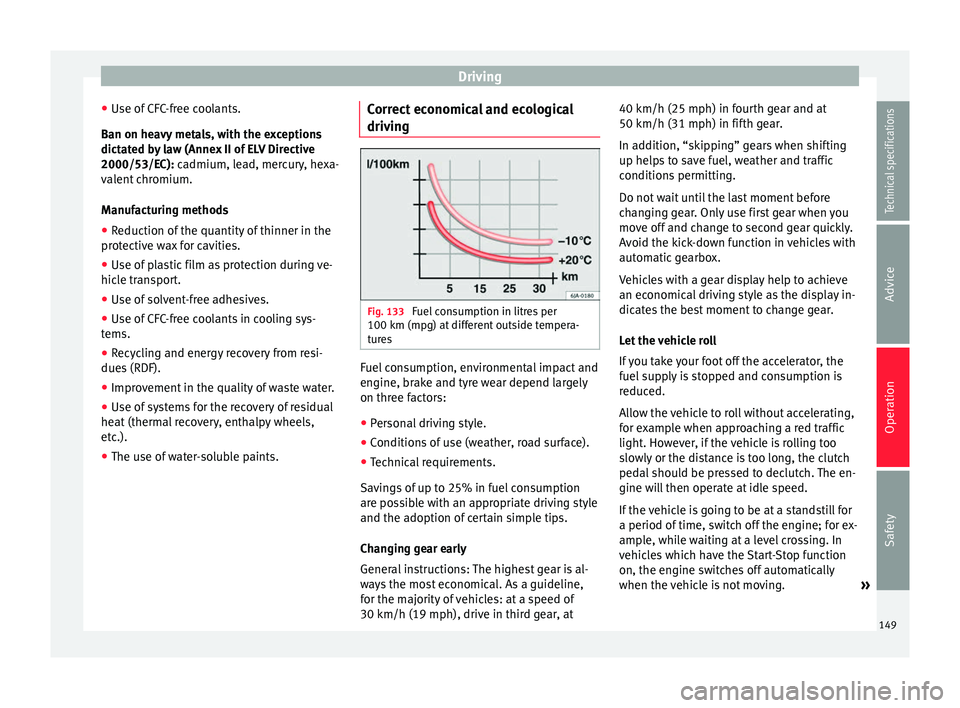
Fig. 133
Fuel consumption in litres per
100 km (mpg) at different outside tempera-
tures Fuel consumption, environmental impact and
engine, brake and tyre wear depend largely
on three factors:
● Personal driving style.
● Conditions of use (weather, road surface).
● Technical requirements.
Savings of up to 25% in fuel consumption
are possible with an appropriate driving style
and the adoption of certain simple tips.
Changing gear early
General instructions: The highest gear is al-
ways the most economical. As a guideline,
for the majority of vehicles: at a speed of
30 km/h (19 mph), drive in third gear, at 40 km/h (25 mph) in fourth gear and at
50 km/h (31 mph) in fifth gear.
In addition, “skipping” gears when shifting
up helps to save fuel, weather and traffic
conditions permitting.
Do not wait until the last moment before
changing gear. Only use first gear when you
move off and change to second gear quickly.
Avoid the kick-down function in vehicles with
automatic gearbox.
Vehicles with a gear display help to achieve
an economical driving style as the display in-
dicates the best moment to change gear.
Let the vehicle roll
If you take your foot off the accelerator, the
fuel supply is stopped and consumption is
reduced.
Allow the vehicle to roll without accelerating,
for example when approaching a red traffic
light. However, if the vehicle is rolling too
slowly or the distance is too long, the clutch
pedal should be pressed to declutch. The en-
gine will then operate at idle speed.
If the vehicle is going to be at a standstill for
a period of time, switch off the engine; for ex-
ample, while waiting at a level crossing. In
vehicles which have the Start-Stop function
on, the engine switches off automatically
when the vehicle is not moving.
»
149
Technical specifications
Advice
Operation
Safety
Page 152 of 305
Operation
Think ahead and “flow” with the traffic
Frequent acceleration and braking considera-
bly increase fuel consumption. If you think
ahead as you drive and keep a safe distance
from the vehicle in front, it is possible to slow
down by simply lifting your foot off the accel-
erator. This eliminates the need for constant
braking and acceleration.
Calm and steady driving
Constancy is more important than speed: The
more you drive at a constant speed, the lower
the fuel consumption.
When driving on the motorway, it is more effi-
cient to drive at a constant and more moder-
ate speed than to be continuously accelerat-
ing and braking. As a general rule, you will
reach your destination just as quickly when
you drive at a constant speed.
The cruise control function helps you to ach-
ieve a constant style of driving.
Moderate use of additional devices
It is important to travel in comfort, but con-
venience systems should be used ecological-
ly.
Some equipment, when connected, increase
fuel consumption considerably, for example:
● Air conditioning cooling system: If the air
conditioning system is required to cool to
significantly lower temperatures than the true outside temperature, it will require a large
amount of energy from the engine. Therefore,
we recommend that the selected temperature
for the vehicle is not too different to the out-
side temperature. It is a good idea to air the
vehicle before starting your journey and to
drive a short distance with all the windows
open. Only then should you close all the win-
dows and switch on the air conditioning.
Keep windows closed when travelling at high
speeds. Driving with the windows open in-
creases fuel consumption.
●
Switch off the seat heating when the seats
have warmed up.
● Switch off the heated rear window and the
windscreen heating when the windows have
demisted and are free of ice.
● Do not leave the auxiliary heater switched
on when the vehicle is moving ››› page 128.
Avoid short journeys
Fuel consumption is much higher when the
engine is cold, immediately after it has been
started. It takes a few kilometres of driving
for the engine to warm up and to normalise
consumption.
The engine and catalytic converter need to
reach their proper working temperature in or-
der t o minimi
se fuel consumption and emis-
sions. The ambient temperature has a deci-
sive influence. Fig. 133 shows the difference in consump-
tion for the same journey at +20 °C (+68 °F)
and at -10 °C (+14 °F).
Therefore, unnecessary short journeys
should be avoided. Try to combine trips.
The vehicle uses more fuel in winter than in
summer, even when other conditions are the
same.
“Warming” the engine is not only forbidden
in some countries, but in practice it is techni-
cally superfluous as it is a waste of fuel.
Adjusting type pressures.
Having the correct pressure in your tyres
helps to reduce rolling resistance and, as a
result reduces fuel consumption. Increasing
the tyre pressure slightly (+0.2 bar
[2.9 psi/20 kPa]) can help to save fuel.
If you are prepared to accept a slight reduc-
tion in comfort, the tyres may be filled to the
pressures recommended for a fully-loaded
vehicle. This is also valid when driving alone
without luggage.
When you buy new tyres, make sure they are
optimised for minimum rolling resistance.
Use low friction engine oil
The use of low viscosity totally synthetic oils,
known as low friction engine oil, helps to re-
duce fuel consumption. These oils reduce the
resistance caused by friction in the engine,
150